#Introduction
The repeater component allows you to output a JSON array of repeated form components.
use Filament\Forms\Components\Repeater;
use Filament\Forms\Components\Select;
use Filament\Forms\Components\TextInput;

Repeater::make('members')
    ->schema([
        TextInput::make('name')->required(),
        Select::make('role')
            ->options([
                'member' => 'Member',
                'administrator' => 'Administrator',
                'owner' => 'Owner',
            ])
            ->required(),
    ])
    ->columns(2)
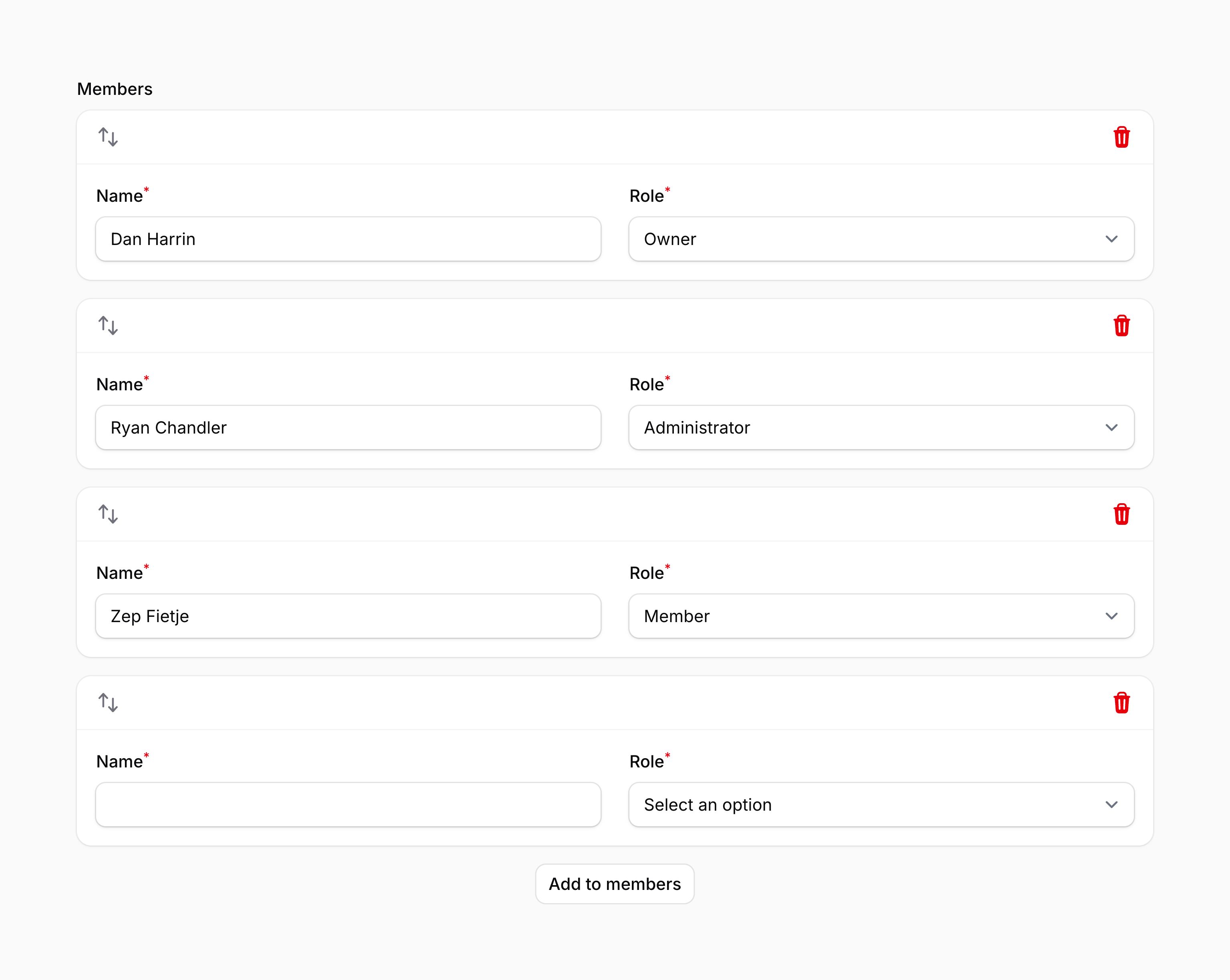
We recommend that you store repeater data with a JSON column in your database. Additionally, if you're using Eloquent, make sure that column has an array cast.
As evident in the above example, the component schema can be defined within the schema() method of the component:
use Filament\Forms\Components\Repeater;
use Filament\Forms\Components\TextInput;

Repeater::make('members')
    ->schema([
        TextInput::make('name')->required(),
        // ...
    ])
If you wish to define a repeater with multiple schema blocks that can be repeated in any order, please use the builder.
#Setting empty default items
Repeaters may have a certain number of empty items created by default. The default is only used when a schema is loaded with no data. In a standard panel resource, defaults are used on the Create page, not the Edit page. To use default items, pass the number of items to the defaultItems() method:
use Filament\Forms\Components\Repeater;

Repeater::make('members')
    ->schema([
        // ...
    ])
    ->defaultItems(3)
As well as allowing a static value, the defaultItems() method also accepts a function to dynamically calculate it. You can inject various utilities into the function as parameters.
defaultItems() method also accepts a function to dynamically calculate it. You can inject various utilities into the function as parameters.-
Field
$componentFilament\Forms\ Components\ Field The current field component instance.
-
Get function
$getFilament\Schemas\ Components\ Utilities\ Get A function for retrieving values from the current form data. Validation is not run.
-
Livewire
$livewireLivewire\Component The Livewire component instance.
-
Eloquent model FQN
$model?string<Illuminate\Database\ Eloquent\ Model> The Eloquent model FQN for the current schema.
-
Operation
$operationstring The current operation being performed by the schema. Usually
create,edit, orview.-
Parent repeater item index
$parentRepeaterItemIndexint The zero-based index of the nearest containing repeater item or builder block, or
0when neither exists.-
Raw state
$rawStatemixed The current value of the field, before state casts were applied. Validation is not run.
-
Eloquent record
$record?Illuminate\Database\ Eloquent\ Model The Eloquent record for the current schema.
-
State
$statemixed The current value of the field. Validation is not run.
#Adding items
An action button is displayed below the repeater to allow the user to add a new item.
#Setting the add action button's label
You may set a label to customize the text that should be displayed in the button for adding a repeater item, using the addActionLabel() method:
use Filament\Forms\Components\Repeater;

Repeater::make('members')
    ->schema([
        // ...
    ])
    ->addActionLabel('Add member')
As well as allowing a static value, the addActionLabel() method also accepts a function to dynamically calculate it. You can inject various utilities into the function as parameters.
addActionLabel() method also accepts a function to dynamically calculate it. You can inject various utilities into the function as parameters.-
Field
$componentFilament\Forms\ Components\ Field The current field component instance.
-
Get function
$getFilament\Schemas\ Components\ Utilities\ Get A function for retrieving values from the current form data. Validation is not run.
-
Livewire
$livewireLivewire\Component The Livewire component instance.
-
Eloquent model FQN
$model?string<Illuminate\Database\ Eloquent\ Model> The Eloquent model FQN for the current schema.
-
Operation
$operationstring The current operation being performed by the schema. Usually
create,edit, orview.-
Parent repeater item index
$parentRepeaterItemIndexint The zero-based index of the nearest containing repeater item or builder block, or
0when neither exists.-
Raw state
$rawStatemixed The current value of the field, before state casts were applied. Validation is not run.
-
Eloquent record
$record?Illuminate\Database\ Eloquent\ Model The Eloquent record for the current schema.
-
State
$statemixed The current value of the field. Validation is not run.
#Aligning the add action button
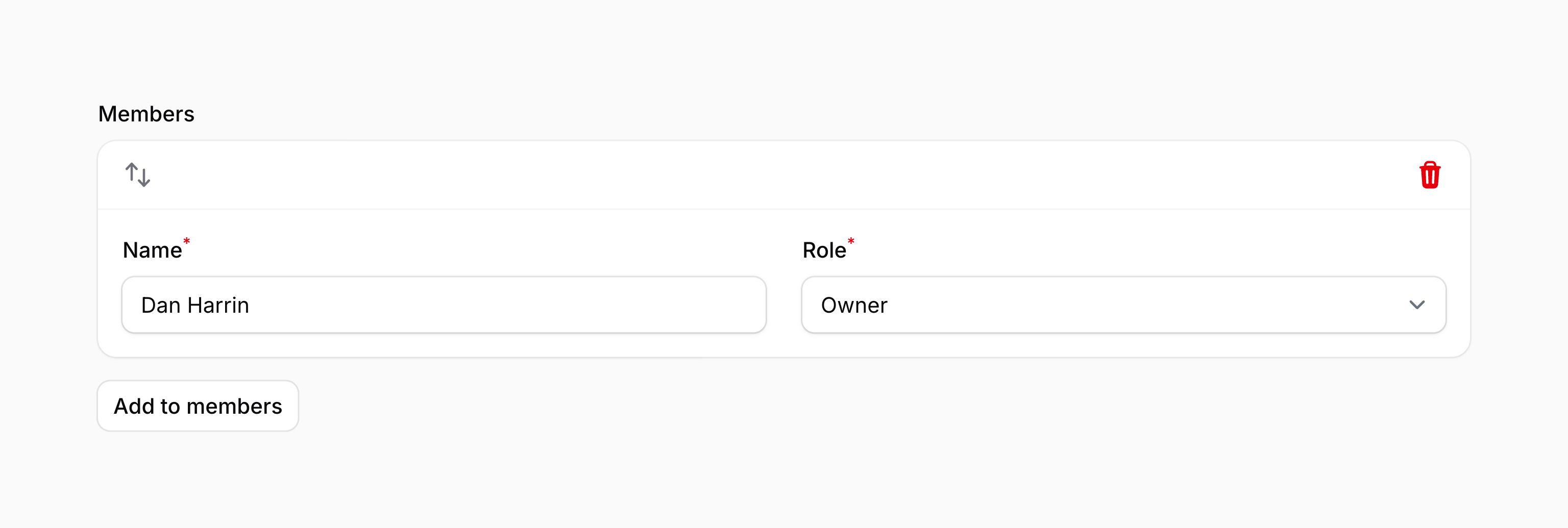
By default, the add action is aligned in the center. You may adjust this using the addActionAlignment() method, passing an Alignment option of Alignment::Start or Alignment::End:
use Filament\Forms\Components\Repeater;
use Filament\Support\Enums\Alignment;

Repeater::make('members')
    ->schema([
        // ...
    ])
    ->addActionAlignment(Alignment::Start)
As well as allowing a static value, the addActionAlignment() method also accepts a function to dynamically calculate it. You can inject various utilities into the function as parameters.
addActionAlignment() method also accepts a function to dynamically calculate it. You can inject various utilities into the function as parameters.-
Field
$componentFilament\Forms\ Components\ Field The current field component instance.
-
Get function
$getFilament\Schemas\ Components\ Utilities\ Get A function for retrieving values from the current form data. Validation is not run.
-
Livewire
$livewireLivewire\Component The Livewire component instance.
-
Eloquent model FQN
$model?string<Illuminate\Database\ Eloquent\ Model> The Eloquent model FQN for the current schema.
-
Operation
$operationstring The current operation being performed by the schema. Usually
create,edit, orview.-
Parent repeater item index
$parentRepeaterItemIndexint The zero-based index of the nearest containing repeater item or builder block, or
0when neither exists.-
Raw state
$rawStatemixed The current value of the field, before state casts were applied. Validation is not run.
-
Eloquent record
$record?Illuminate\Database\ Eloquent\ Model The Eloquent record for the current schema.
-
State
$statemixed The current value of the field. Validation is not run.
#Preventing the user from adding items
You may prevent the user from adding items to the repeater using the addable(false) method:
use Filament\Forms\Components\Repeater;

Repeater::make('members')
    ->schema([
        // ...
    ])
    ->addable(false)
As well as allowing a static value, the addable() method also accepts a function to dynamically calculate it. You can inject various utilities into the function as parameters.
addable() method also accepts a function to dynamically calculate it. You can inject various utilities into the function as parameters.-
Field
$componentFilament\Forms\ Components\ Field The current field component instance.
-
Get function
$getFilament\Schemas\ Components\ Utilities\ Get A function for retrieving values from the current form data. Validation is not run.
-
Livewire
$livewireLivewire\Component The Livewire component instance.
-
Eloquent model FQN
$model?string<Illuminate\Database\ Eloquent\ Model> The Eloquent model FQN for the current schema.
-
Operation
$operationstring The current operation being performed by the schema. Usually
create,edit, orview.-
Parent repeater item index
$parentRepeaterItemIndexint The zero-based index of the nearest containing repeater item or builder block, or
0when neither exists.-
Raw state
$rawStatemixed The current value of the field, before state casts were applied. Validation is not run.
-
Eloquent record
$record?Illuminate\Database\ Eloquent\ Model The Eloquent record for the current schema.
-
State
$statemixed The current value of the field. Validation is not run.
#Deleting items
An action button is displayed on each item to allow the user to delete it.
#Preventing the user from deleting items
You may prevent the user from deleting items from the repeater using the deletable(false) method:
use Filament\Forms\Components\Repeater;

Repeater::make('members')
    ->schema([
        // ...
    ])
    ->deletable(false)
As well as allowing a static value, the deletable() method also accepts a function to dynamically calculate it. You can inject various utilities into the function as parameters.
deletable() method also accepts a function to dynamically calculate it. You can inject various utilities into the function as parameters.-
Field
$componentFilament\Forms\ Components\ Field The current field component instance.
-
Get function
$getFilament\Schemas\ Components\ Utilities\ Get A function for retrieving values from the current form data. Validation is not run.
-
Livewire
$livewireLivewire\Component The Livewire component instance.
-
Eloquent model FQN
$model?string<Illuminate\Database\ Eloquent\ Model> The Eloquent model FQN for the current schema.
-
Operation
$operationstring The current operation being performed by the schema. Usually
create,edit, orview.-
Parent repeater item index
$parentRepeaterItemIndexint The zero-based index of the nearest containing repeater item or builder block, or
0when neither exists.-
Raw state
$rawStatemixed The current value of the field, before state casts were applied. Validation is not run.
-
Eloquent record
$record?Illuminate\Database\ Eloquent\ Model The Eloquent record for the current schema.
-
State
$statemixed The current value of the field. Validation is not run.
#Reordering items
Items can be reordered by dragging. To provide visible controls for keyboard users, enable reordering with buttons.
#Preventing the user from reordering items
You may prevent the user from reordering items from the repeater using the reorderable(false) method:
use Filament\Forms\Components\Repeater;

Repeater::make('members')
    ->schema([
        // ...
    ])
    ->reorderable(false)
As well as allowing a static value, the reorderable() method also accepts a function to dynamically calculate it. You can inject various utilities into the function as parameters.
reorderable() method also accepts a function to dynamically calculate it. You can inject various utilities into the function as parameters.-
Field
$componentFilament\Forms\ Components\ Field The current field component instance.
-
Get function
$getFilament\Schemas\ Components\ Utilities\ Get A function for retrieving values from the current form data. Validation is not run.
-
Livewire
$livewireLivewire\Component The Livewire component instance.
-
Eloquent model FQN
$model?string<Illuminate\Database\ Eloquent\ Model> The Eloquent model FQN for the current schema.
-
Operation
$operationstring The current operation being performed by the schema. Usually
create,edit, orview.-
Parent repeater item index
$parentRepeaterItemIndexint The zero-based index of the nearest containing repeater item or builder block, or
0when neither exists.-
Raw state
$rawStatemixed The current value of the field, before state casts were applied. Validation is not run.
-
Eloquent record
$record?Illuminate\Database\ Eloquent\ Model The Eloquent record for the current schema.
-
State
$statemixed The current value of the field. Validation is not run.
#Reordering items with buttons
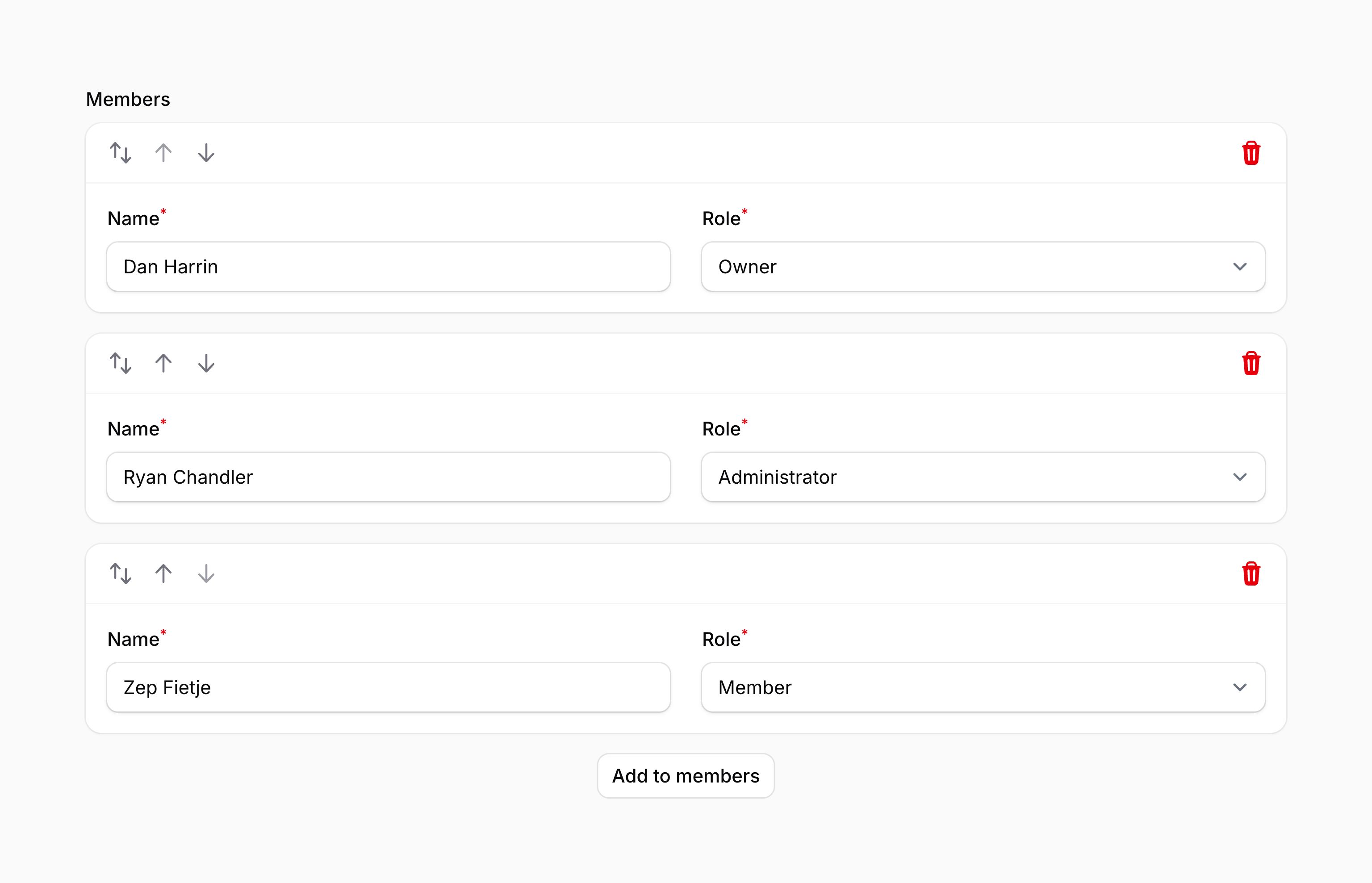
You may use reorderableWithButtons() to display move up and move down buttons:
use Filament\Forms\Components\Repeater;

Repeater::make('members')
    ->schema([
        // ...
    ])
    ->reorderableWithButtons()
Optionally, you may pass a boolean value to control if the repeater should be ordered with buttons or not:
use Filament\Forms\Components\Repeater;

Repeater::make('members')
    ->schema([
        // ...
    ])
    ->reorderableWithButtons(FeatureFlag::active())
As well as allowing a static value, the reorderableWithButtons() method also accepts a function to dynamically calculate it. You can inject various utilities into the function as parameters.
reorderableWithButtons() method also accepts a function to dynamically calculate it. You can inject various utilities into the function as parameters.-
Field
$componentFilament\Forms\ Components\ Field The current field component instance.
-
Get function
$getFilament\Schemas\ Components\ Utilities\ Get A function for retrieving values from the current form data. Validation is not run.
-
Livewire
$livewireLivewire\Component The Livewire component instance.
-
Eloquent model FQN
$model?string<Illuminate\Database\ Eloquent\ Model> The Eloquent model FQN for the current schema.
-
Operation
$operationstring The current operation being performed by the schema. Usually
create,edit, orview.-
Parent repeater item index
$parentRepeaterItemIndexint The zero-based index of the nearest containing repeater item or builder block, or
0when neither exists.-
Raw state
$rawStatemixed The current value of the field, before state casts were applied. Validation is not run.
-
Eloquent record
$record?Illuminate\Database\ Eloquent\ Model The Eloquent record for the current schema.
-
State
$statemixed The current value of the field. Validation is not run.
#Preventing reordering with drag and drop
You may use the reorderableWithDragAndDrop(false) method to prevent items from being ordered with drag and drop:
use Filament\Forms\Components\Repeater;

Repeater::make('members')
    ->schema([
        // ...
    ])
    ->reorderableWithDragAndDrop(false)
This also removes the visually hidden fallback buttons. Explicitly enabled visible move buttons remain available. Use reorderable(false) to prevent all reordering.
As well as allowing a static value, the reorderableWithDragAndDrop() method also accepts a function to dynamically calculate it. You can inject various utilities into the function as parameters.
reorderableWithDragAndDrop() method also accepts a function to dynamically calculate it. You can inject various utilities into the function as parameters.-
Field
$componentFilament\Forms\ Components\ Field The current field component instance.
-
Get function
$getFilament\Schemas\ Components\ Utilities\ Get A function for retrieving values from the current form data. Validation is not run.
-
Livewire
$livewireLivewire\Component The Livewire component instance.
-
Eloquent model FQN
$model?string<Illuminate\Database\ Eloquent\ Model> The Eloquent model FQN for the current schema.
-
Operation
$operationstring The current operation being performed by the schema. Usually
create,edit, orview.-
Parent repeater item index
$parentRepeaterItemIndexint The zero-based index of the nearest containing repeater item or builder block, or
0when neither exists.-
Raw state
$rawStatemixed The current value of the field, before state casts were applied. Validation is not run.
-
Eloquent record
$record?Illuminate\Database\ Eloquent\ Model The Eloquent record for the current schema.
-
State
$statemixed The current value of the field. Validation is not run.
#Collapsing items
The repeater may be collapsible() to optionally hide content in long forms:
use Filament\Forms\Components\Repeater;

Repeater::make('qualifications')
    ->schema([
        // ...
    ])
    ->collapsible()
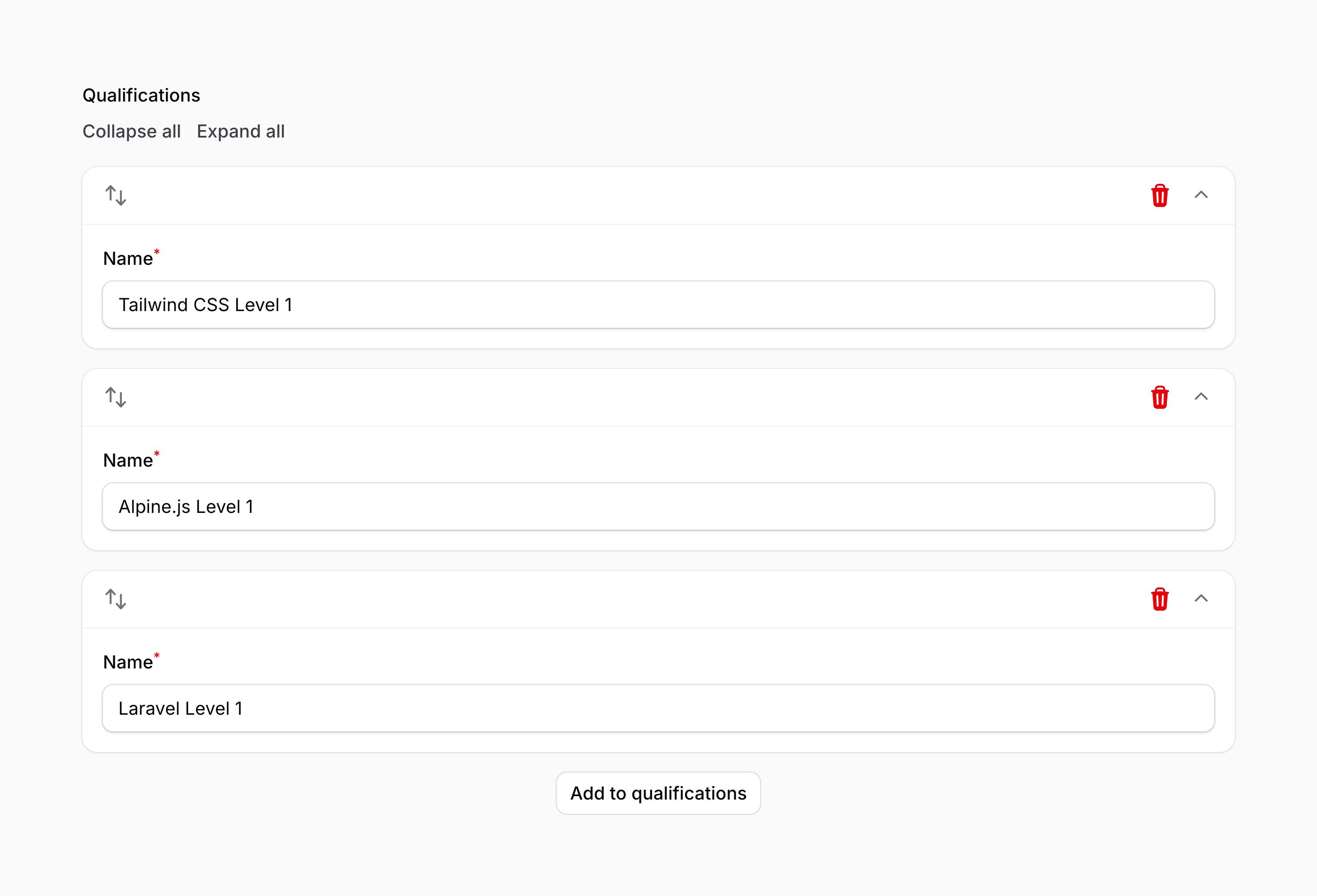
You may also collapse all items by default:
use Filament\Forms\Components\Repeater;

Repeater::make('qualifications')
    ->schema([
        // ...
    ])
    ->collapsed()
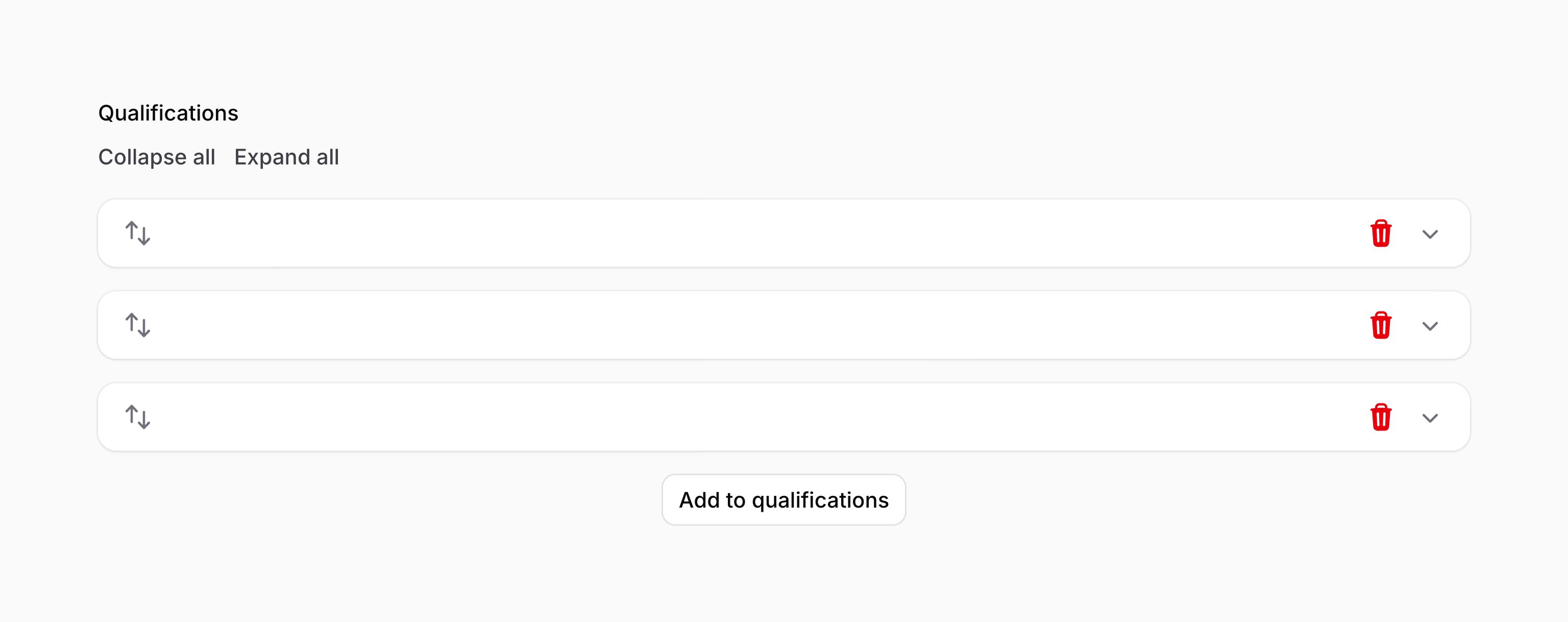
Optionally, the collapsible() and collapsed() methods accept a boolean value to control if the repeater should be collapsible and collapsed or not:
use Filament\Forms\Components\Repeater;

Repeater::make('qualifications')
    ->schema([
        // ...
    ])
    ->collapsible(FeatureFlag::active())
    ->collapsed(FeatureFlag::active())
As well as allowing static values, the collapsible() and collapsed() methods also accept functions to dynamically calculate it. You can inject various utilities into the function as parameters.
collapsible() and collapsed() methods also accept functions to dynamically calculate it. You can inject various utilities into the function as parameters.-
Field
$componentFilament\Forms\ Components\ Field The current field component instance.
-
Get function
$getFilament\Schemas\ Components\ Utilities\ Get A function for retrieving values from the current form data. Validation is not run.
-
Livewire
$livewireLivewire\Component The Livewire component instance.
-
Eloquent model FQN
$model?string<Illuminate\Database\ Eloquent\ Model> The Eloquent model FQN for the current schema.
-
Operation
$operationstring The current operation being performed by the schema. Usually
create,edit, orview.-
Parent repeater item index
$parentRepeaterItemIndexint The zero-based index of the nearest containing repeater item or builder block, or
0when neither exists.-
Raw state
$rawStatemixed The current value of the field, before state casts were applied. Validation is not run.
-
Eloquent record
$record?Illuminate\Database\ Eloquent\ Model The Eloquent record for the current schema.
-
State
$statemixed The current value of the field. Validation is not run.
If collapsed items contain components that are expensive to render, you can defer the loading of their schemas until they are expanded.
#Cloning items
You may allow repeater items to be duplicated using the cloneable() method:
use Filament\Forms\Components\Repeater;

Repeater::make('qualifications')
    ->schema([
        // ...
    ])
    ->cloneable()
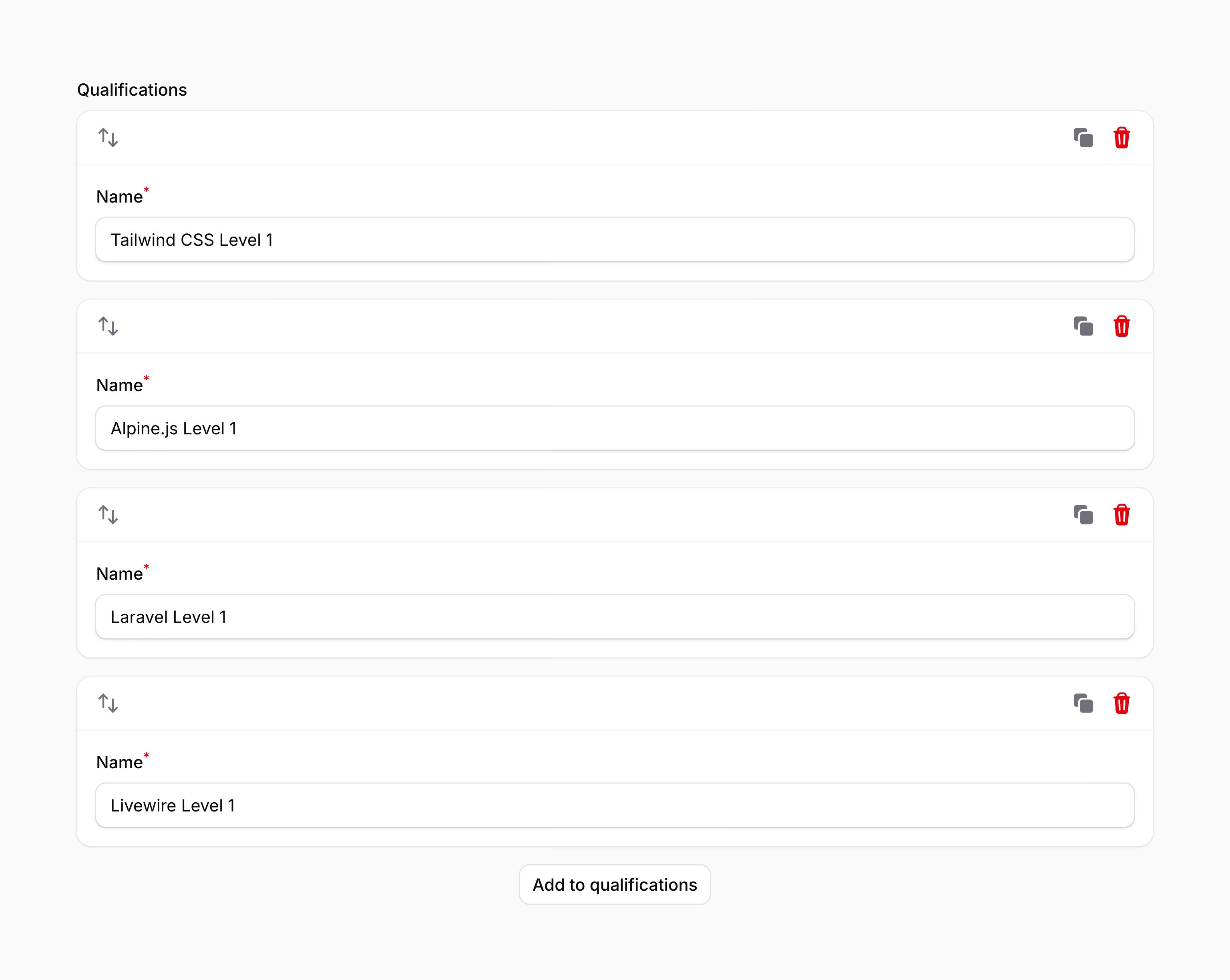
Optionally, the cloneable() method accepts a boolean value to control if the repeater should be cloneable or not:
use Filament\Forms\Components\Repeater;

Repeater::make('qualifications')
    ->schema([
        // ...
    ])
    ->cloneable(FeatureFlag::active())
As well as allowing a static value, the cloneable() method also accepts a function to dynamically calculate it. You can inject various utilities into the function as parameters.
cloneable() method also accepts a function to dynamically calculate it. You can inject various utilities into the function as parameters.-
Field
$componentFilament\Forms\ Components\ Field The current field component instance.
-
Get function
$getFilament\Schemas\ Components\ Utilities\ Get A function for retrieving values from the current form data. Validation is not run.
-
Livewire
$livewireLivewire\Component The Livewire component instance.
-
Eloquent model FQN
$model?string<Illuminate\Database\ Eloquent\ Model> The Eloquent model FQN for the current schema.
-
Operation
$operationstring The current operation being performed by the schema. Usually
create,edit, orview.-
Parent repeater item index
$parentRepeaterItemIndexint The zero-based index of the nearest containing repeater item or builder block, or
0when neither exists.-
Raw state
$rawStatemixed The current value of the field, before state casts were applied. Validation is not run.
-
Eloquent record
$record?Illuminate\Database\ Eloquent\ Model The Eloquent record for the current schema.
-
State
$statemixed The current value of the field. Validation is not run.
#Integrating with an Eloquent relationship
You may employ the relationship() method of the Repeater to configure a HasMany relationship. Filament will load the item data from the relationship, and save it back to the relationship when the form is submitted. If a custom relationship name is not passed to relationship(), Filament will use the field name as the relationship name:
use Filament\Forms\Components\Repeater;

Repeater::make('qualifications')
    ->relationship()
    ->schema([
        // ...
    ])
#Reordering items in a relationship
By default, reordering relationship repeater items is disabled. This is because your related model needs a sort column to store the order of related records. To enable reordering, you may use the orderColumn() method, passing in a name of the column on your related model to store the order in:
use Filament\Forms\Components\Repeater;

Repeater::make('qualifications')
    ->relationship()
    ->schema([
        // ...
    ])
    ->orderColumn('sort')
If you use something like spatie/eloquent-sortable with an order column such as order_column, you may pass this in to orderColumn():
use Filament\Forms\Components\Repeater;

Repeater::make('qualifications')
    ->relationship()
    ->schema([
        // ...
    ])
    ->orderColumn('order_column')
As well as allowing a static value, the orderColumn() method also accepts a function to dynamically calculate it. You can inject various utilities into the function as parameters.
orderColumn() method also accepts a function to dynamically calculate it. You can inject various utilities into the function as parameters.-
Field
$componentFilament\Forms\ Components\ Field The current field component instance.
-
Get function
$getFilament\Schemas\ Components\ Utilities\ Get A function for retrieving values from the current form data. Validation is not run.
-
Livewire
$livewireLivewire\Component The Livewire component instance.
-
Eloquent model FQN
$model?string<Illuminate\Database\ Eloquent\ Model> The Eloquent model FQN for the current schema.
-
Operation
$operationstring The current operation being performed by the schema. Usually
create,edit, orview.-
Parent repeater item index
$parentRepeaterItemIndexint The zero-based index of the nearest containing repeater item or builder block, or
0when neither exists.-
Raw state
$rawStatemixed The current value of the field, before state casts were applied. Validation is not run.
-
Eloquent record
$record?Illuminate\Database\ Eloquent\ Model The Eloquent record for the current schema.
-
State
$statemixed The current value of the field. Validation is not run.
#Integrating with a BelongsToMany Eloquent relationship
There is a common misconception that using a BelongsToMany relationship with a repeater is as simple as using a HasMany relationship. This is not the case, as a BelongsToMany relationship requires a pivot table to store the relationship data. The repeater saves its data to the related model, not the pivot table. Therefore, if you want to map each repeater item to a row in the pivot table, you must use a HasMany relationship with a pivot model to use a repeater with a BelongsToMany relationship.
Imagine you have a form to create a new Order model. Each order belongs to many Product models, and each product belongs to many orders. You have a order_product pivot table to store the relationship data. Instead of using the products relationship with the repeater, you should create a new relationship called orderProducts on the Order model, and use that with the repeater:
use Illuminate\Database\Eloquent\Relations\HasMany;

public function orderProducts(): HasMany
{
    return $this->hasMany(OrderProduct::class);
}
If you don't already have an OrderProduct pivot model, you should create that, with inverse relationships to Order and Product:
use Illuminate\Database\Eloquent\Relations\BelongsTo;
use Illuminate\Database\Eloquent\Relations\Pivot;

class OrderProduct extends Pivot
{
    public $incrementing = true;

    public function order(): BelongsTo
    {
        return $this->belongsTo(Order::class);
    }

    public function product(): BelongsTo
    {
        return $this->belongsTo(Product::class);
    }
}
Now you can use the orderProducts relationship with the repeater, and it will save the data to the order_product pivot table:
use Filament\Forms\Components\Repeater;
use Filament\Forms\Components\Select;

Repeater::make('orderProducts')
    ->relationship()
    ->schema([
        Select::make('product_id')
            ->relationship('product', 'name')
            ->required(),
        // ...
    ])
#Mutating related item data before filling the field
You may mutate the data for a related item before it is filled into the field using the mutateRelationshipDataBeforeFillUsing() method. This method accepts a closure that receives the current item's data in a $data variable. You must return the modified array of data:
use Filament\Forms\Components\Repeater;

Repeater::make('qualifications')
    ->relationship()
    ->schema([
        // ...
    ])
    ->mutateRelationshipDataBeforeFillUsing(function (array $data): array {
        $data['user_id'] = auth()->id();

        return $data;
    })
You can inject various utilities into the function passed to mutateRelationshipDataBeforeFillUsing() as parameters.
mutateRelationshipDataBeforeFillUsing() as parameters.-
Field
$componentFilament\Forms\ Components\ Field The current field component instance.
-
Data
$dataarray<array<string, mixed>> The data that is being filled into the repeater.
-
Get function
$getFilament\Schemas\ Components\ Utilities\ Get A function for retrieving values from the current form data. Validation is not run.
-
Livewire
$livewireLivewire\Component The Livewire component instance.
-
Eloquent model FQN
$model?string<Illuminate\Database\ Eloquent\ Model> The Eloquent model FQN for the current schema.
-
Operation
$operationstring The current operation being performed by the schema. Usually
create,edit, orview.-
Parent repeater item index
$parentRepeaterItemIndexint The zero-based index of the nearest containing repeater item or builder block, or
0when neither exists.-
Raw state
$rawStatemixed The current value of the field, before state casts were applied. Validation is not run.
-
Eloquent record
$record?Illuminate\Database\ Eloquent\ Model The Eloquent record for the current schema.
-
State
$statemixed The current value of the field. Validation is not run.
#Mutating related item data before creating
You may mutate the data for a new related item before it is created in the database using the mutateRelationshipDataBeforeCreateUsing() method. This method accepts a closure that receives the current item's data in a $data variable. You can choose to return either the modified array of data, or null to prevent the item from being created:
use Filament\Forms\Components\Repeater;

Repeater::make('qualifications')
    ->relationship()
    ->schema([
        // ...
    ])
    ->mutateRelationshipDataBeforeCreateUsing(function (array $data): array {
        $data['user_id'] = auth()->id();

        return $data;
    })
You can inject various utilities into the function passed to mutateRelationshipDataBeforeCreateUsing() as parameters.
mutateRelationshipDataBeforeCreateUsing() as parameters.-
Field
$componentFilament\Forms\ Components\ Field The current field component instance.
-
Data
$dataarray<string, mixed> The data that is being saved by the repeater.
-
Get function
$getFilament\Schemas\ Components\ Utilities\ Get A function for retrieving values from the current form data. Validation is not run.
-
Livewire
$livewireLivewire\Component The Livewire component instance.
-
Eloquent model FQN
$model?string<Illuminate\Database\ Eloquent\ Model> The Eloquent model FQN for the current schema.
-
Operation
$operationstring The current operation being performed by the schema. Usually
create,edit, orview.-
Parent repeater item index
$parentRepeaterItemIndexint The zero-based index of the nearest containing repeater item or builder block, or
0when neither exists.-
Raw state
$rawStatemixed The current value of the field, before state casts were applied. Validation is not run.
-
Eloquent record
$record?Illuminate\Database\ Eloquent\ Model The Eloquent record for the current schema.
-
State
$statemixed The current value of the field. Validation is not run.
#Mutating related item data before saving
You may mutate the data for an existing related item before it is saved in the database using the mutateRelationshipDataBeforeSaveUsing() method. This method accepts a closure that receives the current item's data in a $data variable. You can choose to return either the modified array of data, or null to prevent the item from being saved:
use Filament\Forms\Components\Repeater;

Repeater::make('qualifications')
    ->relationship()
    ->schema([
        // ...
    ])
    ->mutateRelationshipDataBeforeSaveUsing(function (array $data): array {
        $data['user_id'] = auth()->id();

        return $data;
    })
You can inject various utilities into the function passed to mutateRelationshipDataBeforeSaveUsing() as parameters.
mutateRelationshipDataBeforeSaveUsing() as parameters.-
Field
$componentFilament\Forms\ Components\ Field The current field component instance.
-
Data
$dataarray<string, mixed> The data that is being saved by the repeater.
-
Get function
$getFilament\Schemas\ Components\ Utilities\ Get A function for retrieving values from the current form data. Validation is not run.
-
Livewire
$livewireLivewire\Component The Livewire component instance.
-
Eloquent model FQN
$model?string<Illuminate\Database\ Eloquent\ Model> The Eloquent model FQN for the current schema.
-
Operation
$operationstring The current operation being performed by the schema. Usually
create,edit, orview.-
Parent repeater item index
$parentRepeaterItemIndexint The zero-based index of the nearest containing repeater item or builder block, or
0when neither exists.-
Raw state
$rawStatemixed The current value of the field, before state casts were applied. Validation is not run.
-
Eloquent record
$record?Illuminate\Database\ Eloquent\ Model The Eloquent record for the current schema.
-
State
$statemixed The current value of the field. Validation is not run.
#Running code after creating a related item
You may run code after a new related item is created in the database using the afterCreate() method. This method accepts a closure that receives the current item's data in a $data variable and the newly created record in a $record variable. This is useful when you need the record's ID to perform additional operations, such as attaching pivot data:
use Filament\Forms\Components\Repeater;
use Illuminate\Database\Eloquent\Model;

Repeater::make('variants')
    ->relationship()
    ->schema([
        // ...
    ])
    ->afterCreate(function (array $data, Model $record): void {
        if (isset($data['attributes'])) {
            $record->attributes()->attach($data['attributes']);
        }
    })
You can inject various utilities into the function passed to afterCreate() as parameters.
afterCreate() as parameters.-
Field
$componentFilament\Forms\ Components\ Field The current field component instance.
-
Data
$dataarray<string, mixed> The data that was used to create the record.
-
Get function
$getFilament\Schemas\ Components\ Utilities\ Get A function for retrieving values from the current form data. Validation is not run.
-
Livewire
$livewireLivewire\Component The Livewire component instance.
-
Eloquent model FQN
$model?string<Illuminate\Database\ Eloquent\ Model> The Eloquent model FQN for the current schema.
-
Operation
$operationstring The current operation being performed by the schema. Usually
create,edit, orview.-
Parent repeater item index
$parentRepeaterItemIndexint The zero-based index of the nearest containing repeater item or builder block, or
0when neither exists.-
Raw state
$rawStatemixed The current value of the field, before state casts were applied. Validation is not run.
-
Record
$recordIlluminate\Database\ Eloquent\ Model The newly created record.
-
State
$statemixed The current value of the field. Validation is not run.
#Running code after updating a related item
You may run code after an existing related item is updated in the database using the afterUpdate() method. This method accepts a closure that receives the current item's data in a $data variable and the updated record in a $record variable:
use Filament\Forms\Components\Repeater;
use Illuminate\Database\Eloquent\Model;

Repeater::make('variants')
    ->relationship()
    ->schema([
        // ...
    ])
    ->afterUpdate(function (array $data, Model $record): void {
        if (isset($data['attributes'])) {
            $record->attributes()->sync($data['attributes']);
        }
    })
You can inject various utilities into the function passed to afterUpdate() as parameters.
afterUpdate() as parameters.-
Field
$componentFilament\Forms\ Components\ Field The current field component instance.
-
Data
$dataarray<string, mixed> The data that was used to update the record.
-
Get function
$getFilament\Schemas\ Components\ Utilities\ Get A function for retrieving values from the current form data. Validation is not run.
-
Livewire
$livewireLivewire\Component The Livewire component instance.
-
Eloquent model FQN
$model?string<Illuminate\Database\ Eloquent\ Model> The Eloquent model FQN for the current schema.
-
Operation
$operationstring The current operation being performed by the schema. Usually
create,edit, orview.-
Parent repeater item index
$parentRepeaterItemIndexint The zero-based index of the nearest containing repeater item or builder block, or
0when neither exists.-
Raw state
$rawStatemixed The current value of the field, before state casts were applied. Validation is not run.
-
Record
$recordIlluminate\Database\ Eloquent\ Model The updated record.
-
State
$statemixed The current value of the field. Validation is not run.
#Running code after deleting a related item
You may run code after a related item is deleted from the database using the afterDelete() method. This method accepts a closure that receives the record that was just deleted in a $record variable. The record will no longer exist in the database at this point, but you can still access its attributes, such as its ID:
use Filament\Forms\Components\Repeater;
use Illuminate\Database\Eloquent\Model;
use Illuminate\Support\Facades\Storage;

Repeater::make('attachments')
    ->relationship()
    ->schema([
        // ...
    ])
    ->afterDelete(function (Model $record): void {
        Storage::delete($record->file_path);
    })
You can inject various utilities into the function passed to afterDelete() as parameters.
afterDelete() as parameters.-
Field
$componentFilament\Forms\ Components\ Field The current field component instance.
-
Get function
$getFilament\Schemas\ Components\ Utilities\ Get A function for retrieving values from the current form data. Validation is not run.
-
Livewire
$livewireLivewire\Component The Livewire component instance.
-
Eloquent model FQN
$model?string<Illuminate\Database\ Eloquent\ Model> The Eloquent model FQN for the current schema.
-
Operation
$operationstring The current operation being performed by the schema. Usually
create,edit, orview.-
Parent repeater item index
$parentRepeaterItemIndexint The zero-based index of the nearest containing repeater item or builder block, or
0when neither exists.-
Raw state
$rawStatemixed The current value of the field, before state casts were applied. Validation is not run.
-
Record
$recordIlluminate\Database\ Eloquent\ Model The record that was just deleted.
-
State
$statemixed The current value of the field. Validation is not run.
#Modifying related records after retrieval
You may filter or modify the related records of a repeater after they are retrieved from the database using the modifyRecordsUsing argument. This method accepts a function that receives a Collection of related records. You should return the modified collection.
This can be particularly useful to restrict records to a specific group or category without doing this in the database query itself, which would trigger an extra query if the records are already eager loaded:
use Filament\Forms\Components\Repeater;
use Illuminate\Database\Eloquent\Collection;

Repeater::make('startItems')
    ->relationship(name: 'items', modifyRecordsUsing: fn (Collection $records): Collection => $records->where('group', 'start')),
Repeater::make('endItems')
    ->relationship(name: 'items', modifyRecordsUsing: fn (Collection $records): Collection => $records->where('group', 'end')),
You can inject various utilities into the function passed to modifyRecordsUsing as parameters.
modifyRecordsUsing as parameters.-
Field
$componentFilament\Forms\ Components\ Field The current field component instance.
-
Get function
$getFilament\Schemas\ Components\ Utilities\ Get A function for retrieving values from the current form data. Validation is not run.
-
Livewire
$livewireLivewire\Component The Livewire component instance.
-
Eloquent model FQN
$model?string<Illuminate\Database\ Eloquent\ Model> The Eloquent model FQN for the current schema.
-
Operation
$operationstring The current operation being performed by the schema. Usually
create,edit, orview.-
Parent repeater item index
$parentRepeaterItemIndexint The zero-based index of the nearest containing repeater item or builder block, or
0when neither exists.-
Raw state
$rawStatemixed The current value of the field, before state casts were applied. Validation is not run.
-
Eloquent record
$record?Illuminate\Database\ Eloquent\ Model The Eloquent record for the current schema.
-
Records
$recordsIlluminate\Database\ Eloquent\ Collection The collection of related records.
-
State
$statemixed The current value of the field. Validation is not run.
#Grid layout
You may organize repeater items into columns by using the grid() method:
use Filament\Forms\Components\Repeater;

Repeater::make('qualifications')
    ->schema([
        // ...
    ])
    ->grid(2)
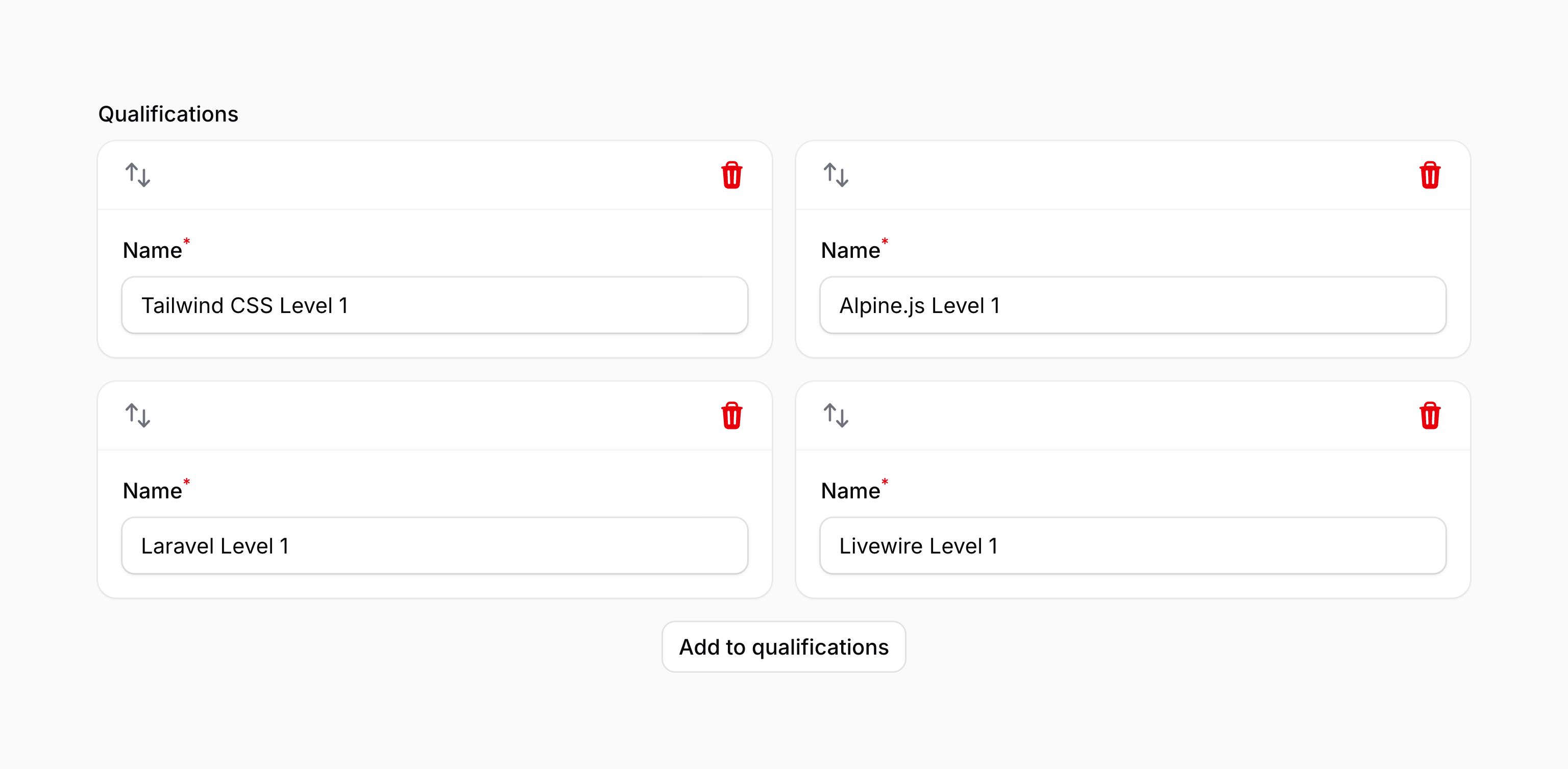
This method accepts the same options as the columns() method of the grid. This allows you to responsively customize the number of grid columns at various breakpoints.
As well as allowing a static value, the grid() method also accepts a function to dynamically calculate it. You can inject various utilities into the function as parameters.
grid() method also accepts a function to dynamically calculate it. You can inject various utilities into the function as parameters.-
Field
$componentFilament\Forms\ Components\ Field The current field component instance.
-
Get function
$getFilament\Schemas\ Components\ Utilities\ Get A function for retrieving values from the current form data. Validation is not run.
-
Livewire
$livewireLivewire\Component The Livewire component instance.
-
Eloquent model FQN
$model?string<Illuminate\Database\ Eloquent\ Model> The Eloquent model FQN for the current schema.
-
Operation
$operationstring The current operation being performed by the schema. Usually
create,edit, orview.-
Parent repeater item index
$parentRepeaterItemIndexint The zero-based index of the nearest containing repeater item or builder block, or
0when neither exists.-
Raw state
$rawStatemixed The current value of the field, before state casts were applied. Validation is not run.
-
Eloquent record
$record?Illuminate\Database\ Eloquent\ Model The Eloquent record for the current schema.
-
State
$statemixed The current value of the field. Validation is not run.
#Adding a label to repeater items based on their content
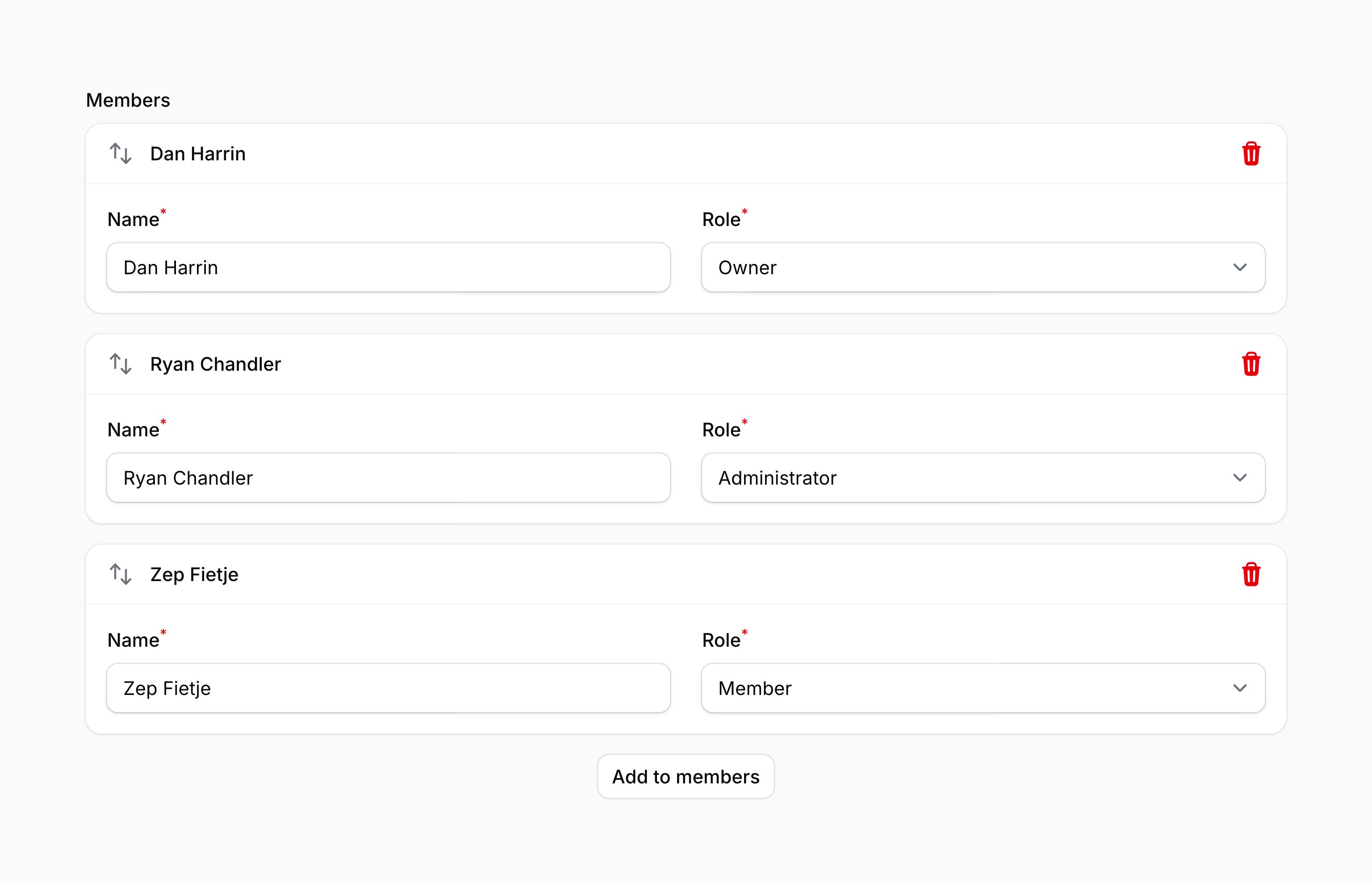
You may add a label for repeater items using the itemLabel() method. This method accepts a closure that receives the current item's data in a $state variable. You must return a string to be used as the item label:
use Filament\Forms\Components\Repeater;
use Filament\Forms\Components\TextInput;
use Filament\Forms\Components\Select;

Repeater::make('members')
    ->schema([
        TextInput::make('name')
            ->required()
            ->live(onBlur: true),
        Select::make('role')
            ->options([
                'member' => 'Member',
                'administrator' => 'Administrator',
                'owner' => 'Owner',
            ])
            ->required(),
    ])
    ->columns(2)
    ->itemLabel(fn (array $state): ?string => $state['name'] ?? null),
You can inject various utilities into the function passed to itemLabel() as parameters.
itemLabel() as parameters.-
Field
$componentFilament\Forms\ Components\ Field The current field component instance.
-
Get function
$getFilament\Schemas\ Components\ Utilities\ Get A function for retrieving values from the current form data. Validation is not run.
-
Index
$indexint The zero-based index of the current repeater item.
-
Item
$itemFilament\Schemas\ Schema The schema object for the current repeater item.
-
Key
$keystring The key for the current repeater item.
-
Livewire
$livewireLivewire\Component The Livewire component instance.
-
Eloquent model FQN
$model?string<Illuminate\Database\ Eloquent\ Model> The Eloquent model FQN for the current schema.
-
Operation
$operationstring The current operation being performed by the schema. Usually
create,edit, orview.-
Parent repeater item index
$parentRepeaterItemIndexint The zero-based index of the nearest containing repeater item or builder block, or
0when neither exists.-
Raw state
$rawStatemixed The current value of the field, before state casts were applied. Validation is not run.
-
Eloquent record
$record?Illuminate\Database\ Eloquent\ Model The Eloquent record for the current schema.
-
State
$statearray<string, mixed> The raw unvalidated data for the current repeater item.
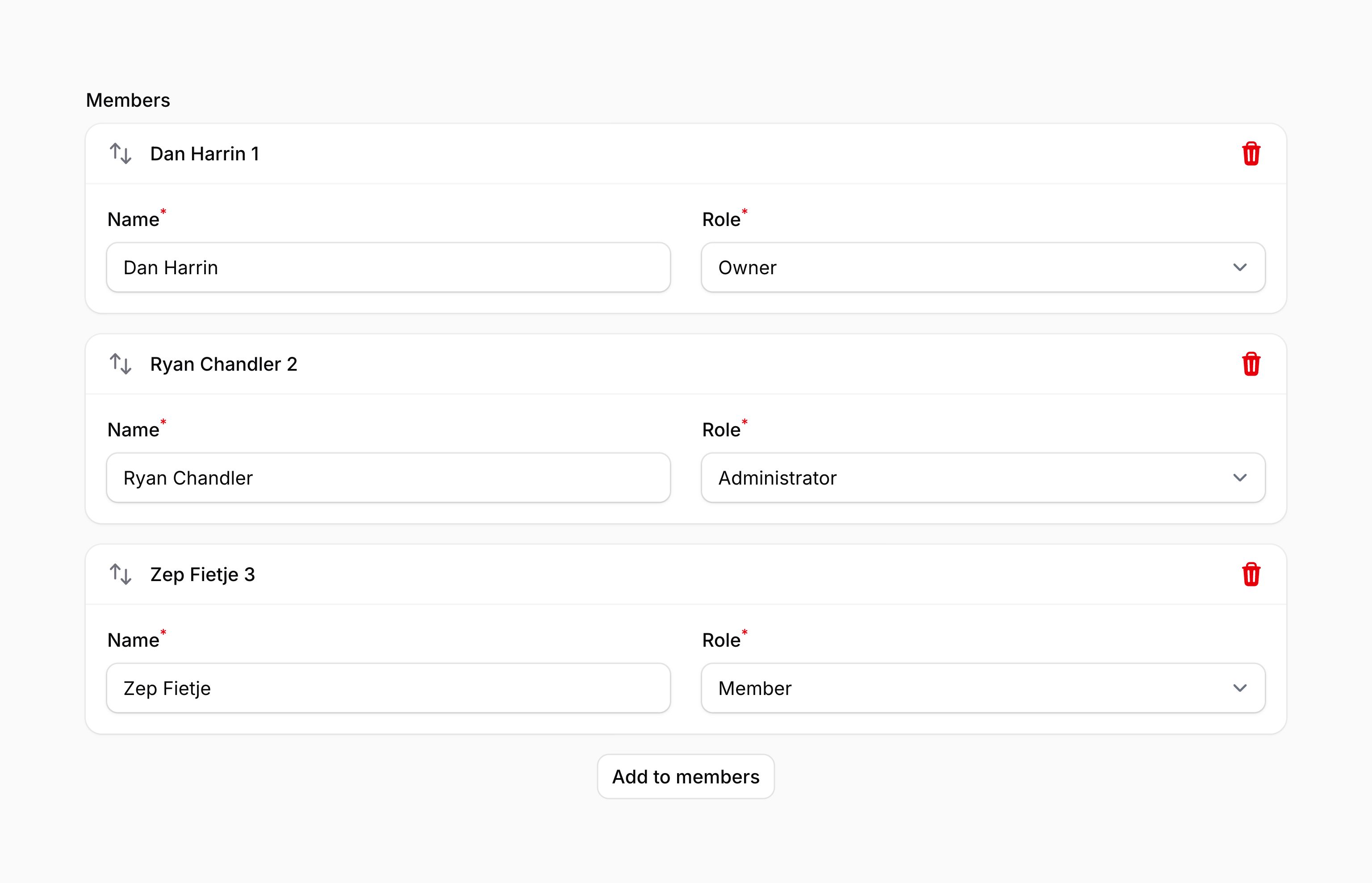
#Numbering repeater items
You can add the repeater item's number next to its label using the itemNumbers() method:
use Filament\Forms\Components\Repeater;

Repeater::make('members')
    ->schema([
        // ...
    ])
    ->itemNumbers()
#Simple repeaters with one field
You can use the simple() method to create a repeater with a single field, using a minimal design
use Filament\Forms\Components\Repeater;
use Filament\Forms\Components\TextInput;

Repeater::make('invitations')
    ->simple(
        TextInput::make('email')
            ->email()
            ->required(),
    )
As well as allowing a static value, the simple() method also accepts a function to dynamically calculate it. You can inject various utilities into the function as parameters.
simple() method also accepts a function to dynamically calculate it. You can inject various utilities into the function as parameters.-
Field
$componentFilament\Forms\ Components\ Field The current field component instance.
-
Get function
$getFilament\Schemas\ Components\ Utilities\ Get A function for retrieving values from the current form data. Validation is not run.
-
Livewire
$livewireLivewire\Component The Livewire component instance.
-
Eloquent model FQN
$model?string<Illuminate\Database\ Eloquent\ Model> The Eloquent model FQN for the current schema.
-
Operation
$operationstring The current operation being performed by the schema. Usually
create,edit, orview.-
Parent repeater item index
$parentRepeaterItemIndexint The zero-based index of the nearest containing repeater item or builder block, or
0when neither exists.-
Raw state
$rawStatemixed The current value of the field, before state casts were applied. Validation is not run.
-
Eloquent record
$record?Illuminate\Database\ Eloquent\ Model The Eloquent record for the current schema.
-
State
$statemixed The current value of the field. Validation is not run.
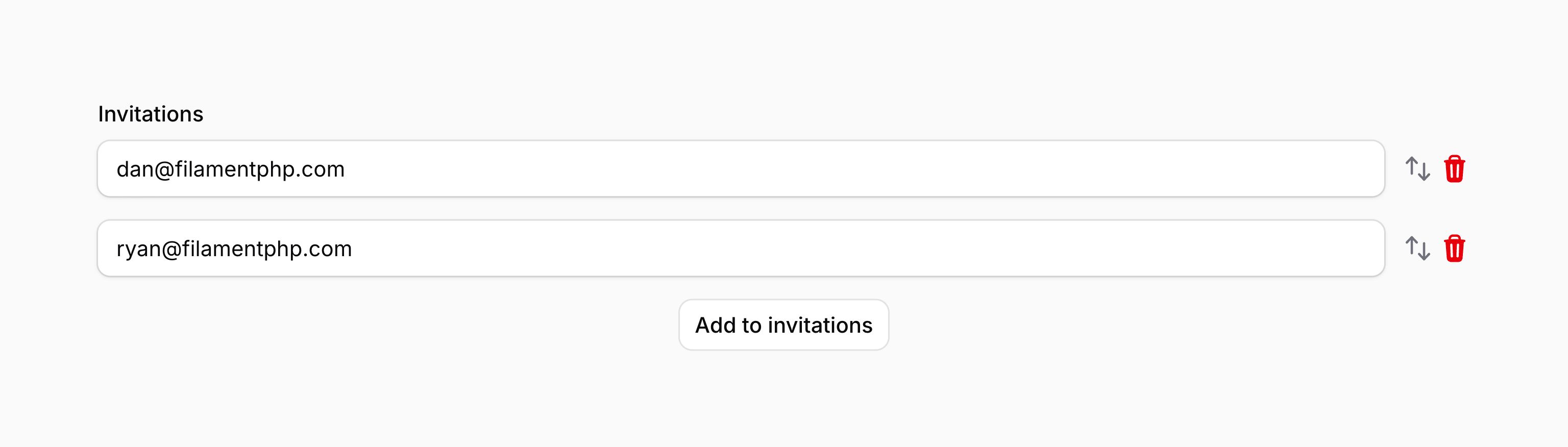
Instead of using a nested array to store data, simple repeaters use a flat array of values. This means that the data structure for the above example could look like this:
[
    'invitations' => [
        '[email protected]',
        '[email protected]',
    ],
],
#Using $get() to access parent field values
All form components are able to use $get() and $set() to access another field's value. However, you might experience unexpected behavior when using this inside the repeater's schema.
This is because $get() and $set(), by default, are scoped to the current repeater item. This means that you are able to interact with another field inside that repeater item easily without knowing which repeater item the current form component belongs to.
The consequence of this is that you may be confused when you are unable to interact with a field outside the repeater. We use ../ syntax to solve this problem - $get('../parent_field_name').
Consider your form has this data structure:
[
    'client_id' => 1,

    'repeater' => [
        'item1' => [
            'service_id' => 2,
        ],
    ],
]
You are trying to retrieve the value of client_id from inside the repeater item.
$get() is relative to the current repeater item, so $get('client_id') is looking for $get('repeater.item1.client_id').
You can use ../ to go up a level in the data structure, so $get('../client_id') is $get('repeater.client_id') and $get('../../client_id') is $get('client_id').
The special case of $get() with no arguments, or $get('') or $get('./'), will always return the full data array for the current repeater item.
#Table repeaters
You can present repeater items in a table format using the table() method, which accepts an array of TableColumn objects. These objects represent the columns of the table, which correspond to any components in the schema of the repeater:
use Filament\Forms\Components\Repeater;
use Filament\Forms\Components\Repeater\TableColumn;
use Filament\Forms\Components\Select;
use Filament\Forms\Components\TextInput;

Repeater::make('members')
    ->table([
        TableColumn::make('Name'),
        TableColumn::make('Role'),
    ])
    ->schema([
        TextInput::make('name')
            ->required(),
        Select::make('role')
            ->options([
                'member' => 'Member',
                'administrator' => 'Administrator',
                'owner' => 'Owner',
            ])
            ->required(),
    ])
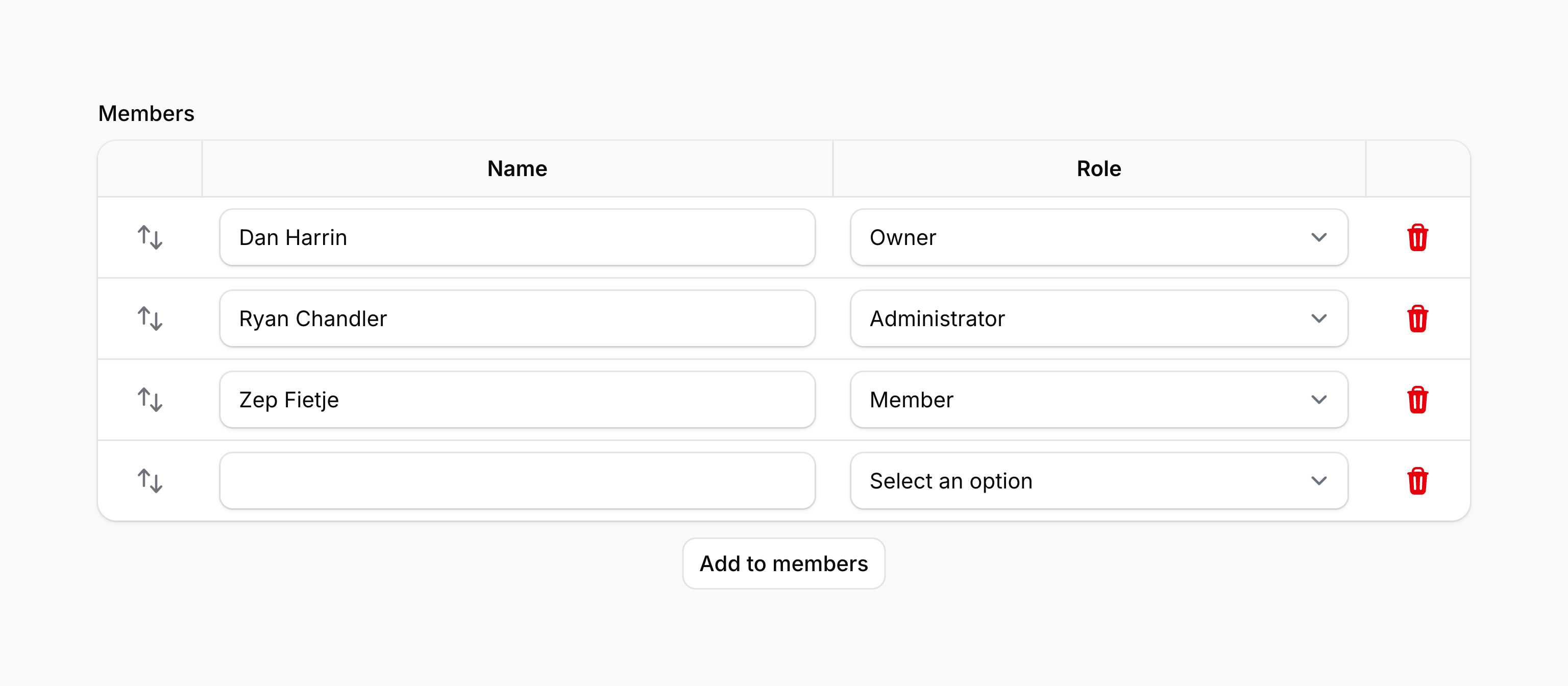
The labels displayed in the header of the table are passed to the TableColumn::make() method. If you want to provide an accessible label for a column but do not wish to display it, you can use the hiddenHeaderLabel() method:
use Filament\Forms\Components\Repeater\TableColumn;

TableColumn::make('Name')
    ->hiddenHeaderLabel()
If you would like to mark a column as "required" with a red asterisk, you can use the markAsRequired() method:
use Filament\Forms\Components\Repeater\TableColumn;

TableColumn::make('Name')
    ->markAsRequired()
You can enable wrapping of the column header using the wrapHeader() method:
use Filament\Forms\Components\Repeater\TableColumn;

TableColumn::make('Name')
    ->wrapHeader()
You can also adjust the alignment of the column header using the alignment() method, passing an Alignment option of Alignment::Start, Alignment::Center, or Alignment::End:
use Filament\Forms\Components\Repeater\TableColumn;
use Filament\Support\Enums\Alignment;

TableColumn::make('Name')
    ->alignment(Alignment::Start)
You can set a fixed column width using the width() method, passing a string value that represents the width of the column. This value is passed directly to the style attribute of the column header:
use Filament\Forms\Components\Repeater\TableColumn;

TableColumn::make('Name')
    ->width('200px')
#Compact table repeaters
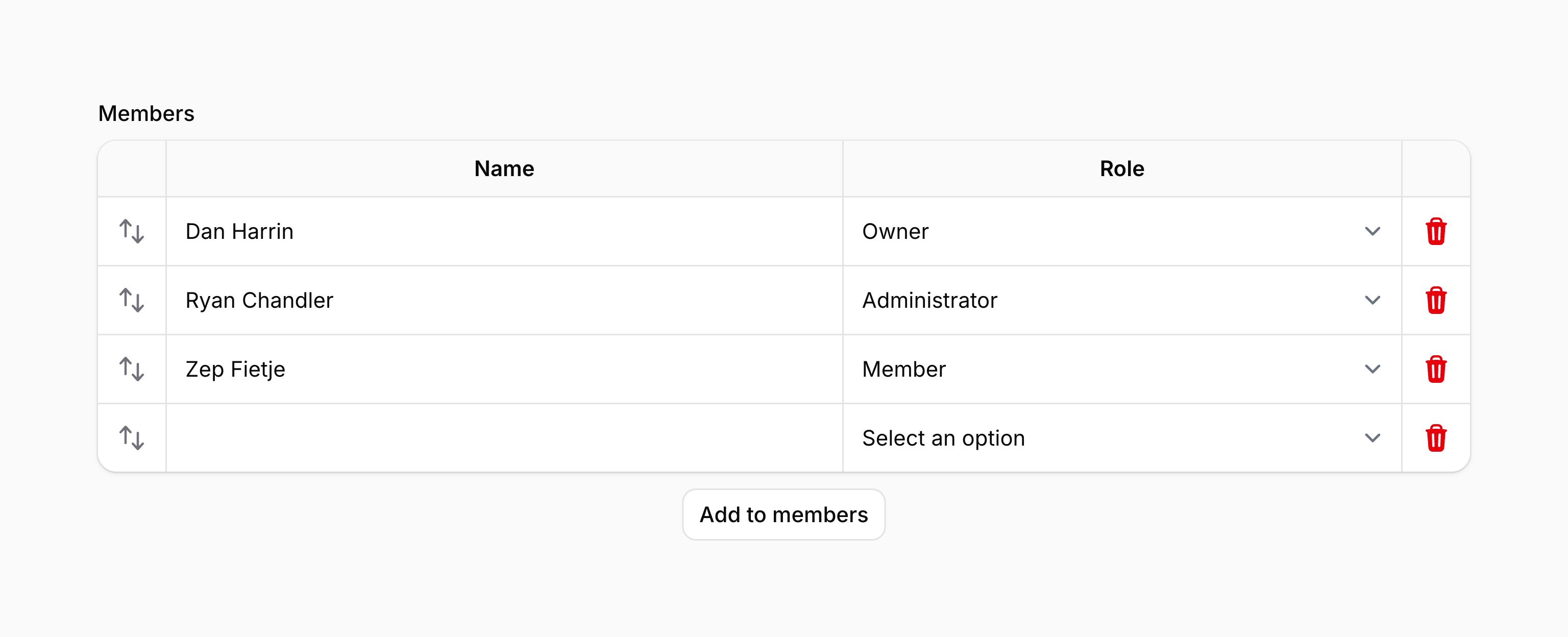
You can make table repeaters more compact by using the compact() method, to fit more data in a smaller space:
use Filament\Forms\Components\Repeater;

Repeater::make('members')
    ->table([
        // ...
    ])
    ->compact()
    ->schema([
        // ...
    ])
Optionally, you may pass a boolean value to control if the table repeater should be compact or not:
use Filament\Forms\Components\Repeater;

Repeater::make('members')
    ->table([
        // ...
    ])
    ->compact(FeatureFlag::active())
    ->schema([
        // ...
    ])
As well as allowing a static value, the compact() method also accepts a function to dynamically calculate it. You can inject various utilities into the function as parameters.
compact() method also accepts a function to dynamically calculate it. You can inject various utilities into the function as parameters.-
Field
$componentFilament\Forms\ Components\ Field The current field component instance.
-
Get function
$getFilament\Schemas\ Components\ Utilities\ Get A function for retrieving values from the current form data. Validation is not run.
-
Livewire
$livewireLivewire\Component The Livewire component instance.
-
Eloquent model FQN
$model?string<Illuminate\Database\ Eloquent\ Model> The Eloquent model FQN for the current schema.
-
Operation
$operationstring The current operation being performed by the schema. Usually
create,edit, orview.-
Parent repeater item index
$parentRepeaterItemIndexint The zero-based index of the nearest containing repeater item or builder block, or
0when neither exists.-
Raw state
$rawStatemixed The current value of the field, before state casts were applied. Validation is not run.
-
Eloquent record
$record?Illuminate\Database\ Eloquent\ Model The Eloquent record for the current schema.
-
State
$statemixed The current value of the field. Validation is not run.
#Repeater validation
As well as all rules listed on the validation page, there are additional rules that are specific to repeaters.
#Number of items validation
You can validate the minimum and maximum number of items that you can have in a repeater by setting the minItems() and maxItems() methods:
use Filament\Forms\Components\Repeater;

Repeater::make('members')
    ->schema([
        // ...
    ])
    ->minItems(2)
    ->maxItems(5)
As well as allowing static values, the minItems() and maxItems() methods also accept a function to dynamically calculate them. You can inject various utilities into the function as parameters.
minItems() and maxItems() methods also accept a function to dynamically calculate them. You can inject various utilities into the function as parameters.-
Field
$componentFilament\Forms\ Components\ Field The current field component instance.
-
Get function
$getFilament\Schemas\ Components\ Utilities\ Get A function for retrieving values from the current form data. Validation is not run.
-
Livewire
$livewireLivewire\Component The Livewire component instance.
-
Eloquent model FQN
$model?string<Illuminate\Database\ Eloquent\ Model> The Eloquent model FQN for the current schema.
-
Operation
$operationstring The current operation being performed by the schema. Usually
create,edit, orview.-
Parent repeater item index
$parentRepeaterItemIndexint The zero-based index of the nearest containing repeater item or builder block, or
0when neither exists.-
Raw state
$rawStatemixed The current value of the field, before state casts were applied. Validation is not run.
-
Eloquent record
$record?Illuminate\Database\ Eloquent\ Model The Eloquent record for the current schema.
-
State
$statemixed The current value of the field. Validation is not run.
#Distinct state validation
In many cases, you will want to ensure some sort of uniqueness between repeater items. A couple of common examples could be:
- Ensuring that only one checkbox or toggle is activated at once across items in the repeater.
- Ensuring that an option may only be selected once across select, radio, checkbox list, or toggle buttons fields in a repeater.
You can use the distinct() method to validate that the state of a field is unique across all items in the repeater:
use Filament\Forms\Components\Checkbox;
use Filament\Forms\Components\Repeater;

Repeater::make('answers')
    ->schema([
        // ...
        Checkbox::make('is_correct')
            ->distinct(),
    ])
The behavior of the distinct() validation depends on the data type that the field handles
- If the field returns a boolean, like a checkbox or toggle, the validation will ensure that only one item has a value of
true. There may be many fields in the repeater that have a value offalse. - Otherwise, for fields like a select, radio, checkbox list, or toggle buttons, the validation will ensure that each option may only be selected once across all items in the repeater.
Optionally, you may pass a boolean value to the distinct() method to control if the field should be distinct or not:
use Filament\Forms\Components\Checkbox;

Checkbox::make('is_correct')
    ->distinct(FeatureFlag::active())
As well as allowing a static value, the distinct() method also accepts a function to dynamically calculate it. You can inject various utilities into the function as parameters.
distinct() method also accepts a function to dynamically calculate it. You can inject various utilities into the function as parameters.-
Field
$componentFilament\Forms\ Components\ Field The current field component instance.
-
Get function
$getFilament\Schemas\ Components\ Utilities\ Get A function for retrieving values from the current form data. Validation is not run.
-
Livewire
$livewireLivewire\Component The Livewire component instance.
-
Eloquent model FQN
$model?string<Illuminate\Database\ Eloquent\ Model> The Eloquent model FQN for the current schema.
-
Operation
$operationstring The current operation being performed by the schema. Usually
create,edit, orview.-
Parent repeater item index
$parentRepeaterItemIndexint The zero-based index of the nearest containing repeater item or builder block, or
0when neither exists.-
Raw state
$rawStatemixed The current value of the field, before state casts were applied. Validation is not run.
-
Eloquent record
$record?Illuminate\Database\ Eloquent\ Model The Eloquent record for the current schema.
-
State
$statemixed The current value of the field. Validation is not run.
#Automatically fixing indistinct state
If you'd like to automatically fix indistinct state, you can use the fixIndistinctState() method:
use Filament\Forms\Components\Checkbox;
use Filament\Forms\Components\Repeater;

Repeater::make('answers')
    ->schema([
        // ...
        Checkbox::make('is_correct')
            ->fixIndistinctState(),
    ])
This method will automatically enable the distinct() and live() methods on the field.
Depending on the data type that the field handles, the behavior of the fixIndistinctState() adapts:
- If the field returns a boolean, like a checkbox or toggle, and one of the fields is enabled, Filament will automatically disable all other enabled fields on behalf of the user.
- Otherwise, for fields like a select, radio, checkbox list, or toggle buttons, when a user selects an option, Filament will automatically deselect all other usages of that option on behalf of the user.
Optionally, you may pass a boolean value to the fixIndistinctState() method to control if the field should fix indistinct state or not:
use Filament\Forms\Components\Checkbox;

Checkbox::make('is_correct')
    ->fixIndistinctState(FeatureFlag::active())
As well as allowing a static value, the fixIndistinctState() method also accepts a function to dynamically calculate it. You can inject various utilities into the function as parameters.
fixIndistinctState() method also accepts a function to dynamically calculate it. You can inject various utilities into the function as parameters.-
Field
$componentFilament\Forms\ Components\ Field The current field component instance.
-
Get function
$getFilament\Schemas\ Components\ Utilities\ Get A function for retrieving values from the current form data. Validation is not run.
-
Livewire
$livewireLivewire\Component The Livewire component instance.
-
Eloquent model FQN
$model?string<Illuminate\Database\ Eloquent\ Model> The Eloquent model FQN for the current schema.
-
Operation
$operationstring The current operation being performed by the schema. Usually
create,edit, orview.-
Parent repeater item index
$parentRepeaterItemIndexint The zero-based index of the nearest containing repeater item or builder block, or
0when neither exists.-
Raw state
$rawStatemixed The current value of the field, before state casts were applied. Validation is not run.
-
Eloquent record
$record?Illuminate\Database\ Eloquent\ Model The Eloquent record for the current schema.
-
State
$statemixed The current value of the field. Validation is not run.
#Disabling options when they are already selected in another item
If you'd like to disable options in a select, radio, checkbox list, or toggle buttons when they are already selected in another item, you can use the disableOptionsWhenSelectedInSiblingRepeaterItems() method:
use Filament\Forms\Components\Repeater;
use Filament\Forms\Components\Select;

Repeater::make('members')
    ->schema([
        Select::make('role')
            ->options([
                // ...
            ])
            ->disableOptionsWhenSelectedInSiblingRepeaterItems(),
    ])
This method will automatically enable the distinct() and live() methods on the field.
#Deferring the loading of repeater item schemas
If a repeater's item schema is expensive to render, you can pass a Schema object to schema() and use deferLoading(). This is particularly useful when items are collapsed by default. Each item schema will be loaded independently when its item is expanded and enters the viewport:
use Filament\Forms\Components\Repeater;
use Filament\Forms\Components\TextInput;
use Filament\Schemas\Schema;

Repeater::make('members')
    ->schema(
        Schema::make()
            ->components([
                TextInput::make('name'),
                TextInput::make('email')
                    ->email(),
            ])
            ->deferLoading(),
    )
    ->collapsed()
Repeater item schemas automatically receive unique keys from their item state paths. You can learn more about deferred schemas in the schema overview.
#Customizing the repeater item actions
This field uses action objects for easy customization of buttons within it. You can customize these buttons by passing a function to an action registration method. The function has access to the $action object, which you can use to customize it. The following methods are available to customize the actions:
addAction()cloneAction()collapseAction()collapseAllAction()deleteAction()expandAction()expandAllAction()moveDownAction()moveUpAction()reorderAction()
Here is an example of how you might customize an action:
use Filament\Actions\Action;
use Filament\Forms\Components\Repeater;

Repeater::make('members')
    ->schema([
        // ...
    ])
    ->collapseAllAction(
        fn (Action $action) => $action->label('Collapse all members'),
    )
The action registration methods can inject various utilities into the function as parameters.
-
Action
$actionFilament\Actions\ Action The action object to customize.
-
Field
$componentFilament\Forms\ Components\ Field The current field component instance.
-
Get function
$getFilament\Schemas\ Components\ Utilities\ Get A function for retrieving values from the current form data. Validation is not run.
-
Livewire
$livewireLivewire\Component The Livewire component instance.
-
Eloquent model FQN
$model?string<Illuminate\Database\ Eloquent\ Model> The Eloquent model FQN for the current schema.
-
Operation
$operationstring The current operation being performed by the schema. Usually
create,edit, orview.-
Parent repeater item index
$parentRepeaterItemIndexint The zero-based index of the nearest containing repeater item or builder block, or
0when neither exists.-
Raw state
$rawStatemixed The current value of the field, before state casts were applied. Validation is not run.
-
Eloquent record
$record?Illuminate\Database\ Eloquent\ Model The Eloquent record for the current schema.
-
State
$statemixed The current value of the field. Validation is not run.
#Confirming repeater actions with a modal
You can confirm actions with a modal by using the requiresConfirmation() method on the action object. You may use any modal customization method to change its content and behavior:
use Filament\Actions\Action;
use Filament\Forms\Components\Repeater;

Repeater::make('members')
    ->schema([
        // ...
    ])
    ->deleteAction(
        fn (Action $action) => $action->requiresConfirmation(),
    )
Completing a drag that changes the item order invokes reorderAction(), which supports requiresConfirmation(). Clicking the drag handle alone does not invoke the action.
#Adding extra item actions to a repeater
You may add new action buttons to the header of each repeater item by passing Action objects into extraItemActions():
use Filament\Actions\Action;
use Filament\Forms\Components\Repeater;
use Filament\Forms\Components\TextInput;
use Filament\Support\Icons\Heroicon;
use Illuminate\Support\Facades\Mail;

Repeater::make('members')
    ->schema([
        TextInput::make('email')
            ->label('Email address')
            ->email(),
        // ...
    ])
    ->extraItemActions([
        Action::make('sendEmail')
            ->icon(Heroicon::Envelope)
            ->action(function (array $arguments, Repeater $component): void {
                $itemData = $component->getItemState($arguments['item']);

                Mail::to($itemData['email'])
                    ->send(
                        // ...
                    );
            }),
    ])
In this example, $arguments['item'] gives you the ID of the current repeater item. You can validate the data in that repeater item using the getItemState() method on the repeater component. This method returns the validated data for the item. If the item is not valid, it will cancel the action and show an error message for that item in the form.
If you want to get the raw data from the current item without validating it, you can use $component->getRawItemState($arguments['item']) instead.
If you want to manipulate the raw data for the entire repeater, for example, to add, remove or modify items, you can use $component->getState() to get the data, and $component->state($state) to set it again:
use Illuminate\Support\Str;

// Get the raw data for the entire repeater
$state = $component->getState();

// Add an item, with a random UUID as the key
$state[Str::uuid()] = [
    'email' => auth()->user()->email,
];

// Set the new data for the repeater
$component->state($state);