#Introduction
The repeatable entry allows you to repeat a set of entries and layout components for items in an array or relationship.
use Filament\Infolists\Components\RepeatableEntry;
use Filament\Infolists\Components\TextEntry;

RepeatableEntry::make('comments')
    ->schema([
        TextEntry::make('author.name'),
        TextEntry::make('title'),
        TextEntry::make('content')
            ->columnSpan(2),
    ])
    ->columns(2)
As you can see, the repeatable entry has an embedded schema() which gets repeated for each item.
For example, the state of this entry might be represented as:
[
    [
        'author' => ['name' => 'Jane Doe'],
        'title' => 'Wow!',
        'content' => 'Lorem ipsum dolor sit amet, consectetur adipiscing elit. Nullam euismod, nisl eget aliquam ultricies, nunc nisl aliquet nunc, quis aliquam nisl.',
    ],
    [
        'author' => ['name' => 'John Doe'],
        'title' => 'This isn\'t working. Help!',
        'content' => 'Lorem ipsum dolor sit amet, consectetur adipiscing elit. Nullam euismod, nisl eget aliquam ultricies, nunc nisl aliquet nunc, quis aliquam nisl.',
    ],
]
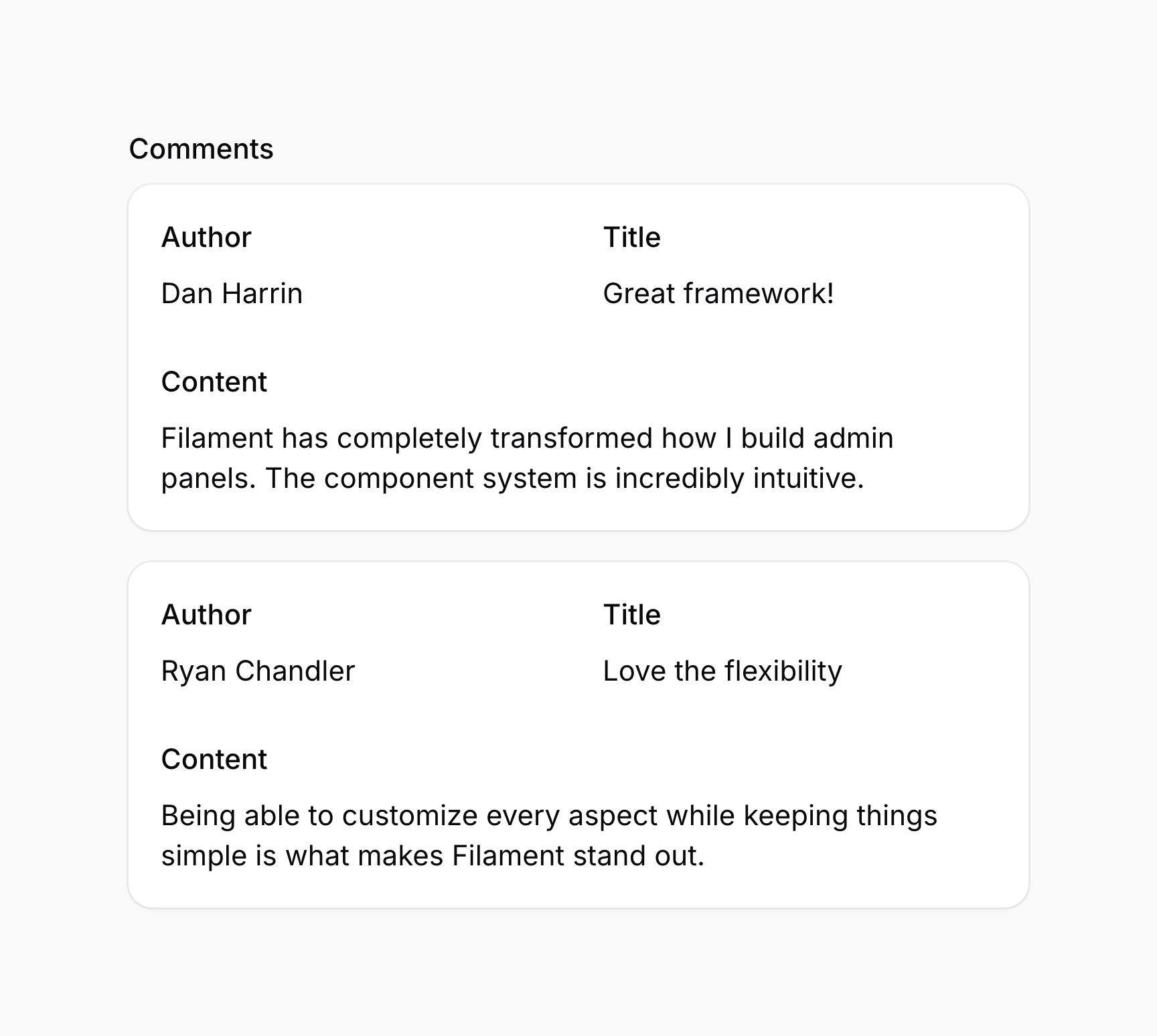
Alternatively, comments and author could be Eloquent relationships, title and content could be attributes on the comment model, and name could be an attribute on the author model. Filament will automatically handle the relationship loading and display the data in the same way.
#Grid layout
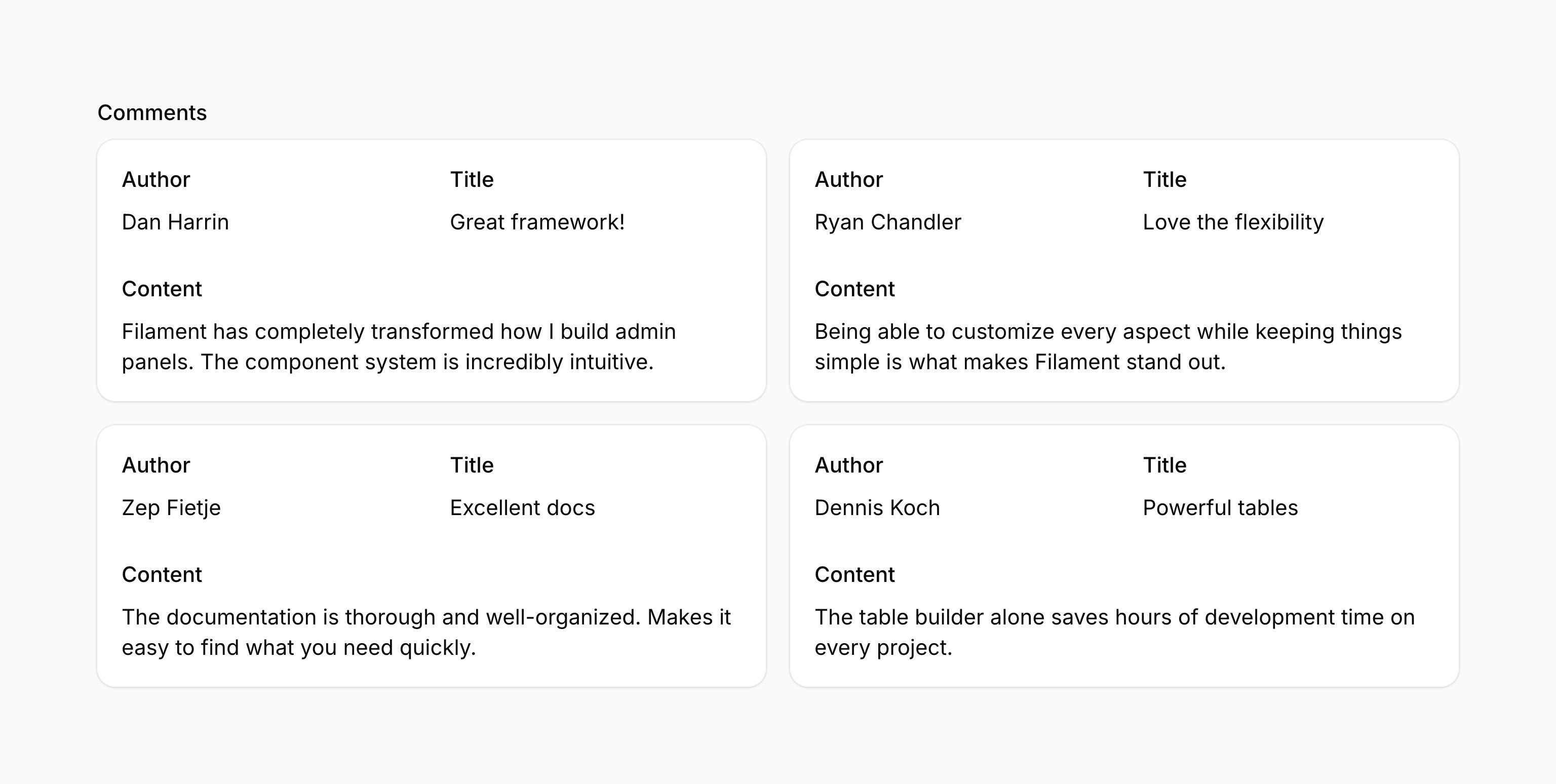
You may organize repeatable items into columns by using the grid() method:
use Filament\Infolists\Components\RepeatableEntry;

RepeatableEntry::make('comments')
    ->schema([
        // ...
    ])
    ->grid(2)
This method accepts the same options as the columns() method of the grid. This allows you to responsively customize the number of grid columns at various breakpoints.
As well as allowing a static value, the grid() method also accepts a function to dynamically calculate it. You can inject various utilities into the function as parameters.
grid() method also accepts a function to dynamically calculate it. You can inject various utilities into the function as parameters.-
Entry
$componentFilament\Infolists\ Components\ Entry The current entry component instance.
-
Get function
$getFilament\Schemas\ Components\ Utilities\ Get A function for retrieving values from the current schema data. Validation is not run on form fields.
-
Livewire
$livewireLivewire\Component The Livewire component instance.
-
Eloquent model FQN
$model?string<Illuminate\Database\ Eloquent\ Model> The Eloquent model FQN for the current schema.
-
Operation
$operationstring The current operation being performed by the schema. Usually
create,edit, orview.-
Parent repeater item index
$parentRepeaterItemIndexint The zero-based index of the nearest containing repeater item or builder block, or
0when neither exists.-
Record
$recordIlluminate\Database\ Eloquent\ Model|array<string, mixed>|null The Eloquent record or custom data array for the current schema.
-
State
$statemixed The current value of the entry.
#Removing the styled container
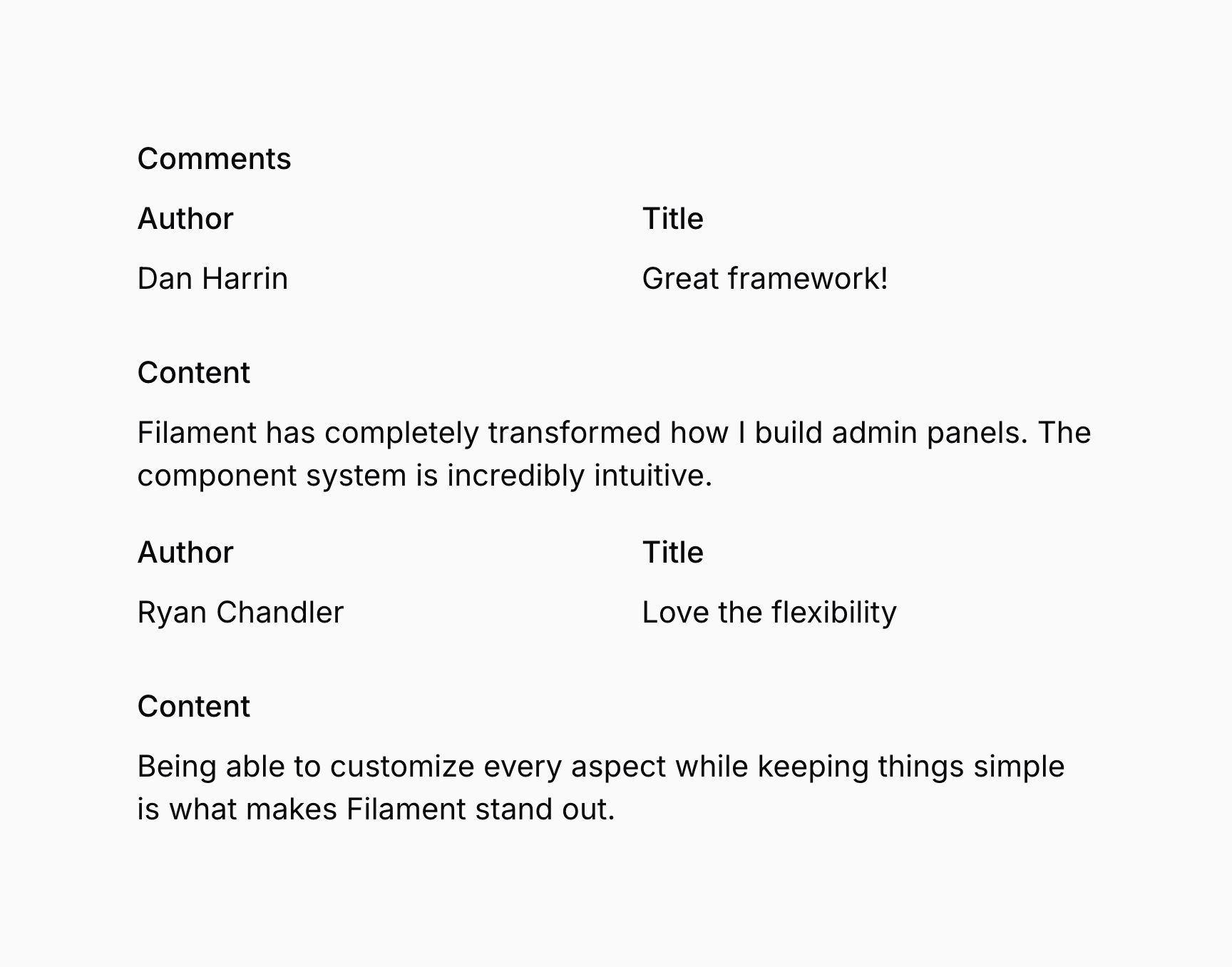
By default, each item in a repeatable entry is wrapped in a container styled as a card. You may remove the styled container using contained():
use Filament\Infolists\Components\RepeatableEntry;

RepeatableEntry::make('comments')
    ->schema([
        // ...
    ])
    ->contained(false)
As well as allowing a static value, the contained() method also accepts a function to dynamically calculate it. You can inject various utilities into the function as parameters.
contained() method also accepts a function to dynamically calculate it. You can inject various utilities into the function as parameters.-
Entry
$componentFilament\Infolists\ Components\ Entry The current entry component instance.
-
Get function
$getFilament\Schemas\ Components\ Utilities\ Get A function for retrieving values from the current schema data. Validation is not run on form fields.
-
Livewire
$livewireLivewire\Component The Livewire component instance.
-
Eloquent model FQN
$model?string<Illuminate\Database\ Eloquent\ Model> The Eloquent model FQN for the current schema.
-
Operation
$operationstring The current operation being performed by the schema. Usually
create,edit, orview.-
Parent repeater item index
$parentRepeaterItemIndexint The zero-based index of the nearest containing repeater item or builder block, or
0when neither exists.-
Record
$recordIlluminate\Database\ Eloquent\ Model|array<string, mixed>|null The Eloquent record or custom data array for the current schema.
-
State
$statemixed The current value of the entry.
#Table repeatable layout
You can present repeatable items in a table format using the table() method, which accepts an array of TableColumn objects. These objects represent the columns of the table, which correspond to any components in the schema of the entry:
use Filament\Infolists\Components\IconEntry;
use Filament\Infolists\Components\RepeatableEntry;
use Filament\Infolists\Components\RepeatableEntry\TableColumn;
use Filament\Infolists\Components\TextEntry;

RepeatableEntry::make('comments')
    ->table([
        TableColumn::make('Author'),
        TableColumn::make('Title'),
        TableColumn::make('Published'),
    ])
    ->schema([
        TextEntry::make('author.name'),
        TextEntry::make('title'),
        IconEntry::make('is_published')
            ->boolean(),
    ])
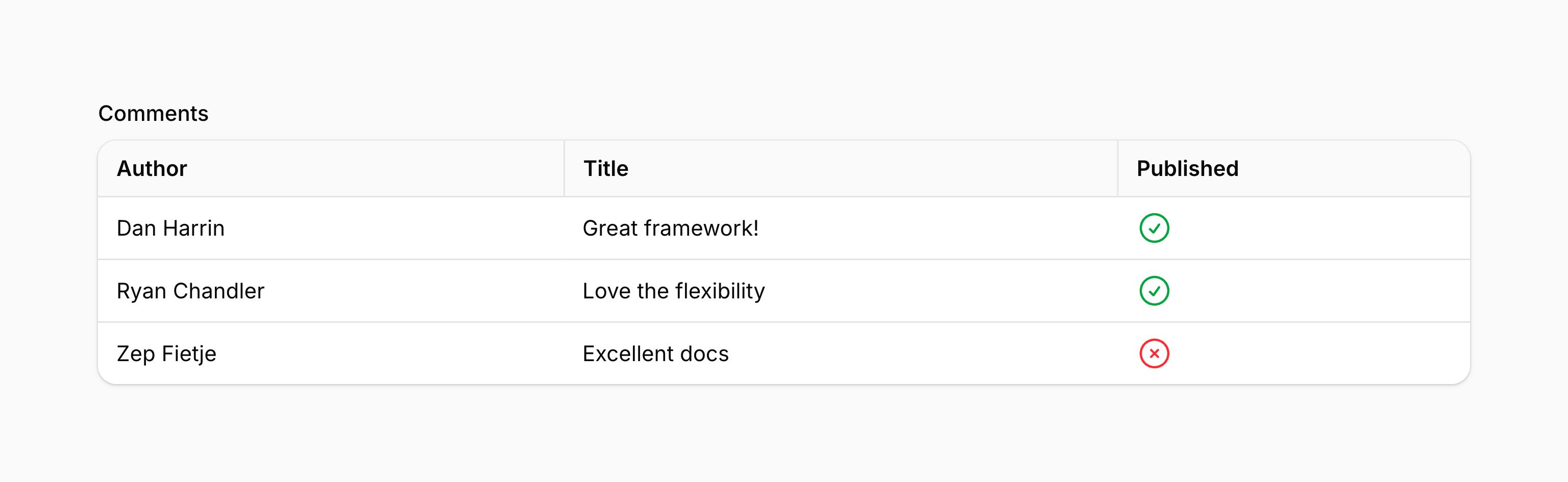
The labels displayed in the header of the table are passed to the TableColumn::make() method. If you want to provide an accessible label for a column but do not wish to display it, you can use the hiddenHeaderLabel() method:
use Filament\Infolists\Components\RepeatableEntry\TableColumn;

TableColumn::make('Name')
    ->hiddenHeaderLabel()
You can enable wrapping of the column header using the wrapHeader() method:
use Filament\Infolists\Components\RepeatableEntry\TableColumn;

TableColumn::make('Name')
    ->wrapHeader()
You can also adjust the alignment of the column header using the alignment() method, passing an Alignment option of Alignment::Start, Alignment::Center, or Alignment::End:
use Filament\Infolists\Components\RepeatableEntry\TableColumn;
use Filament\Support\Enums\Alignment;

TableColumn::make('Name')
    ->alignment(Alignment::Center)
You can set a fixed column width using the width() method, passing a string value that represents the width of the column. This value is passed directly to the style attribute of the column header:
use Filament\Infolists\Components\RepeatableEntry\TableColumn;

TableColumn::make('Name')
    ->width('200px')
#Limiting item processing
An unexpectedly large item collection can take a long time to build and render. You can opt in to a processing limit using maxItemsForProcessing():
use Filament\Infolists\Components\RepeatableEntry;
use Filament\Infolists\Components\TextEntry;

RepeatableEntry::make('comments')
    ->schema([
        TextEntry::make('content'),
    ])
    ->maxItemsForProcessing(100)
If the entry has more than 100 items, Filament aborts with an HTTP 413 response before building its item schemas, without truncating the data. This also applies to the table layout. The limit is disabled by default and accepts an integer, or null to disable it.
Caution
The processing limit also applies to existing data loaded from your database. A record above the limit cannot be displayed through that infolist until you raise the limit or correct its data elsewhere. Choose a limit that accommodates existing records you need to display.
#Applying processing limits globally
Use configureUsing() in a service provider's boot() method to set a global default:
use Filament\Infolists\Components\RepeatableEntry;

RepeatableEntry::configureUsing(static function (RepeatableEntry $entry): void {
    $entry->maxItemsForProcessing(100);
});
You can override this default on individual entries using maxItemsForProcessing(200) to increase it, maxItemsForProcessing(50) to decrease it, or maxItemsForProcessing(null) to disable it. Repeaters and builders have independent defaults; see the shared configuration guidance to configure all three component types.
This is an opt-in performance safeguard, not a security boundary or a guarantee of request duration. The limit applies to each repeatable entry separately, not to the total number of nested items or fields in a request. A parent's processing limit does not limit the number of items in its nested components.
Filament counts the normalized items before building their schemas. Database loading, state callbacks, and materializing generators or other iterables can still take place before this check. The limit does not bound that earlier work or the cost of rendering individual items.