Warp Shift by Yuichi Okada
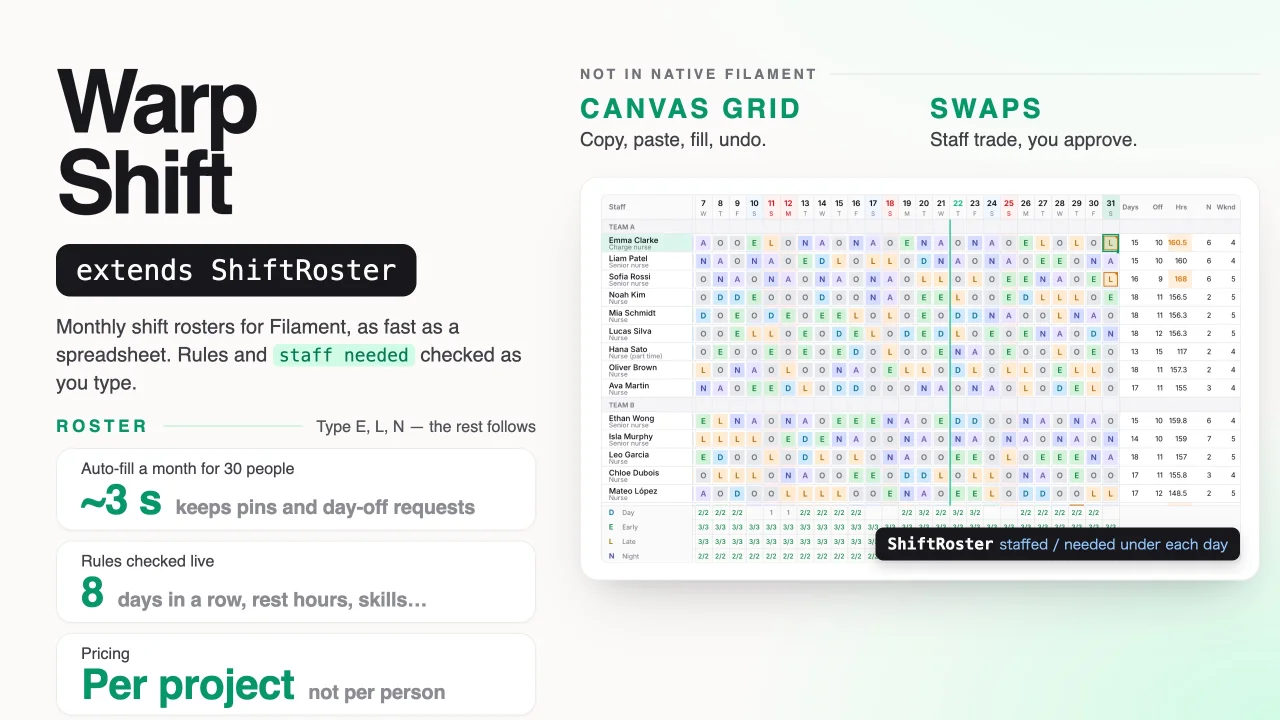
CommunityMonthly shift rosters you type like a spreadsheet, with staff shortages and rule breaks shown as you type, day-off requests, auto-fill, publishing, and shift swaps and cover requests that staff send from their phone.
filament/
namespace. Review the source and install at your own risk. Found
malware or an unresolved security issue the author won't
address?
Report it
.
 Author:
Yuichi Okada
Documentation
- Contents
- Why
- Features
- Requirements
- Installation
- The roster page
- Staff
- Shift codes
- Rosters per ward or shop
- Periods
- Holidays
- Typing in the roster
- Times in a cell
- Two times in a day
- The day by hour
- Notes
- Places
- Staff needed
- Rules
- Rotations
- Auto-fill
- Why this person?
- Fairness over the year
- Help from another roster
- Labour cost and budget
- Importing from Excel
- Publishing
- Closing a roster
- My shifts
- Requests
- Leave balance
- Availability
- Reminders
- Swaps and cover
- Open shifts
- Approving swaps and requests
- Calendar feed
- Notifications
- Clock-ins (actuals)
- Excel, CSV and printing
- Payroll summary
- Using rosters from your code
- Saving and working together
- Permissions
- Tenancy
- Keyboard
- Limitations
- Troubleshooting
- Changelog
- Support
- License
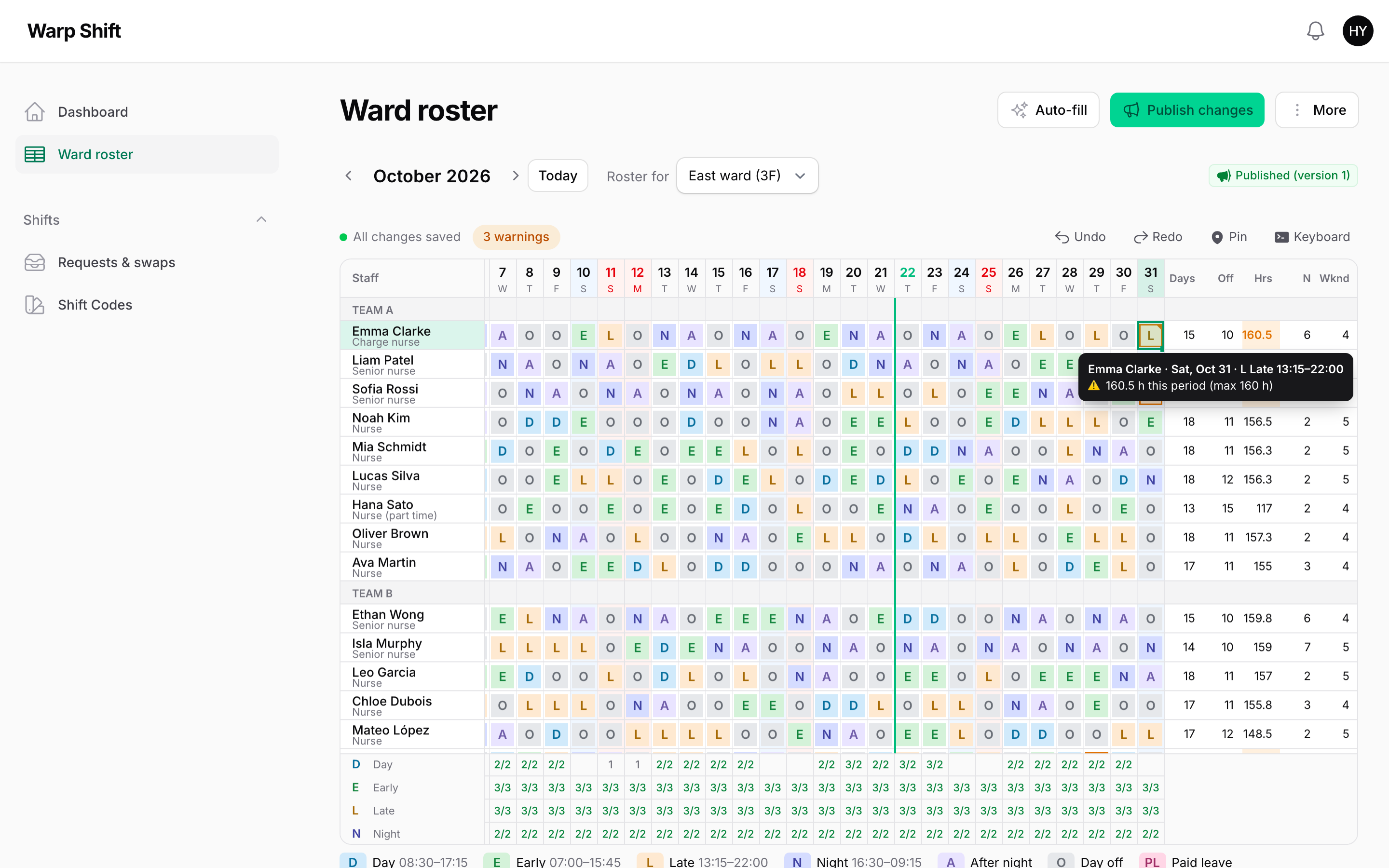
Monthly shift rosters for Filament. Type shift codes like a spreadsheet, see staff shortages and rule breaks as you type, collect day-off requests, auto-fill a draft, publish it, and let staff swap shifts and ask for cover. The roster is drawn on a <canvas>, so a whole ward or shop stays fast to type in.

Type a month of shifts with the keyboard, auto-fill the rest, publish, then sign in as a nurse to ask for cover and see it approved at demo.warpui.com/shift. No sign-up needed; the data is reset every hour.
Most people who plan shifts end up in a spreadsheet: it is the fastest way to type a month. What a spreadsheet cannot tell you is that Tuesday is one nurse short, that someone works six days in a row, or that a night shift has nobody senior on it. Warp Shift keeps the spreadsheet speed and adds those answers, live, plus the parts around the roster: requests from staff, publishing, swaps and the calendar on their phone.
use App\Models\Nurse;
use Illuminate\Database\Eloquent\Builder;
use Qalainau\FilamentWarpShift\Pages\ShiftRoster;
use Qalainau\FilamentWarpShift\Roster;
use Qalainau\FilamentWarpShift\Rules\AfterShift;
use Qalainau\FilamentWarpShift\Rules\MaxConsecutiveDays;
use Qalainau\FilamentWarpShift\Rules\MinDaysOff;
use Qalainau\FilamentWarpShift\Rules\RequiredSkill;

class WardRoster extends ShiftRoster
{
    public static function roster(Roster $roster): Roster
    {
        return $roster
            ->staff(Nurse::class)
            ->staffQuery(fn (Builder $query, string $ward) => $query->where('ward_id', $ward))
            ->scopes(fn () => Ward::query()->pluck('name', 'id')->all())
            ->groupStaffBy('team')
            ->skills(fn (Nurse $nurse) => $nurse->is_senior ? ['leader'] : [])
            ->rules([
                MaxConsecutiveDays::make(5),
                AfterShift::make('N')->then(['A', 'O']),
                MinDaysOff::make(9),
                RequiredSkill::make('leader')->on(['N'])->atLeast(1),
            ]);
    }
}
#Contents
- Why · Features · Requirements · Installation
- Setting up: The roster page · Staff · Shift codes · Rosters per ward or shop · Periods · Holidays
- Planning: Typing in the roster · Times in a cell · Two times in a day · The day by hour · Notes · Places · Staff needed (from your app) · Rules (who works together) · Rotations · Auto-fill · Why this person? · Fairness over the year · Help from another ward · Labour cost and budget · Importing from Excel · Publishing · Closing a roster
- Staff: My shifts · Requests · Leave balance · Availability · Reminders · Swaps and cover · Open shifts · Approving swaps and requests · Calendar feed · Notifications
- Clock-ins (actuals) · Excel, CSV and printing · Payroll summary · Using rosters from your code (rules and projections) · Saving and working together · Permissions · Tenancy · Keyboard · Limitations · Troubleshooting
#Why
- As fast as a spreadsheet. Select a cell and press
E. Type a night shift and the "after night" and the day off are filled in for you. Copy and paste with Excel, drag the corner to repeat a pattern, undo anything. - You see the problems while you type. Each day shows how many people each shift has and needs. Cells that break a rule get a red or amber corner, and the tooltip says why ("6 days in a row (max 5)").
- Auto-fill gives you a draft you can use. It keeps what you pinned and every day-off request, never breaks a rule you marked as an error, spreads nights and weekends evenly over the whole year, tops people up to their contract hours, stays within the budget, and tells you what it could not fill. Make three drafts and pick one, and ask "why this person?" about any cell.
- Shops and wards alike. Type
10-15for an hourly shift (or10-14,17-21for a split shift), set staff needed per time of day, and drag shifts on a timeline of the day. Borrow someone from another ward or shop for a short day. - Sites without a code per site. Security, cleaning and staffing firms put a site on each shift ("Day at Tower A") and set the staff needed per site, instead of making one code for every site and time.
- Plan and clock-ins side by side. See "plan 9-18, clocked 9:12-19:30" in one cell, with late, early, overtime, no-shows and work on a day off in colour, and who is not in yet today. Your attendance table stays the only place for clock-ins (or import a time clock's CSV).
- Part-timers' availability, once. "Tuesdays and Thursdays only", "weekdays until 3 pm": staff register it once in My shifts (or your app passes it), the roster shades the days they cannot work, and auto-fill plans around it every month.
- The whole loop is inside your app. Staff send requests, see the published roster on their phone, subscribe to it in their calendar, swap shifts, ask for cover and pick up open shifts that nobody could fill. Managers approve with one click and see beforehand whether a change breaks a rule.
- No per-person pricing. A license covers a project, not a head count.
#Features
- Monthly roster on a
<canvas>: frozen names, days and totals; weekends and holidays shaded; groups (teams) as header rows; phone layout - Typing by code or label (works with IME, so
早or夜work too), a code list with Enter or double-click, Delete, copy and paste (TSV, to and from Excel), fill handle with repeating patterns, undo and redo, pinned cells - Notes on a shift ("Training in room 3"), shown to the person in My shifts and their calendar
- Saved by itself a moment after you type; per-cell conflict detection when two people edit the same roster
- Staff needed per shift for every day, weekdays, holidays or a single date (minimum and maximum), per time of day ("3 people from 11:00 to 14:00") and per place, or from your app (a closure turns bookings or orders into each day's numbers)
- Times typed into a cell (
10-15,9:30-14) for hourly shifts and split shifts (10-14,17-21), with breaks by your own rule; a timeline of the day with drag to move and resize shifts, and a chart of how many people work at each time - Places (sites, posts, counters) on a shift, read from your own model; auto-fill puts people at the places that need them
- Rules: consecutive days, shift sequences, rest hours between shifts, hours per period, counts per shift, days off, people with a skill on a shift, overtime limits of a Japanese 36 agreement, and requests; each as an error or a warning, each for everyone or some staff, with values per person
- Whole-team rules: the average night hours of the ward (Japan's 72-hour rule for nurses) and total hours
- Who works together: keep newcomers (or two people who clash) off the same shift, and put a preceptor on every newcomer's shift
- Rotations ("4 on, 2 off", "Day → Night → After night → Off") poured into the rows you pick, per person from your data, carried on into the next period, and put in first by auto-fill
- Leave balance from your app: leave past the balance is marked, refused in requests and kept by auto-fill; a warning for people who take too little leave over the year
- Japanese public holidays built in
- PHP API to read published shifts (for clock-in or payroll), a payroll summary per person, rule breaks and projected hours and overtime per person (
RosterEvaluation), and to make and publish rosters (for seeders and imports) - Clock-ins next to the plan: passed from your attendance table (or imported from a time clock's CSV), with late, early, overtime, no clock-in, missing clock-out and work without a shift marked in the roster, today's late and missing people above it, clock-in bars in the day view, and payroll from the hours worked
- Auto-fill (only empty cells, or everything except pinned cells), fairness for nights and weekends counted over the whole year, top-up shift, a report of what is short, and three drafts to compare (balanced, requests first, fairness first, lowest cost)
- "Why this person?" for any shift: the reasons, and why each colleague is not on it
- Help from another ward or shop on short days, with the people who are spare or free there first
- Labour cost per day and per period from hourly wages, allowances and night premiums, with a budget
- Import a roster from Excel or CSV (names in a column, days in a row), checked before it goes in and undone with Ctrl/⌘ + Z
- Requests from staff (day off, a shift, not a shift) with a deadline, an "I'm done" button, and reminders before the deadline
- Availability: the days and hours each person can work every week ("Tuesdays and Thursdays only", "weekdays until 15:00"), registered by staff in My shifts or passed from your own data; marked in the roster before you type, kept by auto-fill and help from another roster
- Publishing with versions; only the people whose shifts changed are notified
- Swaps between two people and cover requests open to everyone free that day; a night moves together with its rest day
- Open shifts: post what auto-fill could not fill; only staff who are free and break no rule see them and raise a hand; you pick one (or the first one gets it) and the roster and the published version are updated
- My shifts for staff (month calendar, phone friendly), an iCalendar feed (days off and leave too, if you like), database and mail notifications
- Excel and CSV download, a printable A3 view
- 10 languages, dark mode, Filament tenancy
#Requirements
- PHP 8.3+
- Laravel 12 or 13
- Filament 5.x (Livewire 4)
- MySQL 8 / MariaDB 10.6+, PostgreSQL 14+ or SQLite
#Installation
Warp Shift is a commercial plugin. A license is required. After purchase you receive credentials for the private Composer repository.
Add the repository and authenticate:
composer config repositories.qalainau composer https://qalainau.privato.pub/composer
composer config --auth http-basic.qalainau.privato.pub "your-email" "your-license-key"
Install the package, run the migrations and publish Filament's assets:
composer require qalainau/filament-warp-shift
php artisan migrate
php artisan filament:assets
The migration creates warp_shift_codes, warp_shift_plans, warp_shift_assignments, warp_shift_requirements, warp_shift_requests, warp_shift_swaps, warp_shift_open_shifts, warp_shift_open_shift_claims, warp_shift_availabilities, warp_shift_actuals, warp_shift_submissions and warp_shift_publications. Your tables are not changed. To edit the migration, publish it with php artisan vendor:publish --tag=filament-warp-shift-migrations. Publish it before you run php artisan migrate for the first time: Warp Shift then runs your copy instead of its own. If the tables already exist, change them with a migration of your own instead.
Register the plugin in your panel and add your roster page:
use App\Filament\Pages\WardRoster;
use Qalainau\FilamentWarpShift\FilamentWarpShiftPlugin;

return $panel
    ->databaseNotifications()
    ->pages([WardRoster::class])
    ->plugin(FilamentWarpShiftPlugin::make());
Run
php artisan filament:assetsagain after every update of the package.
#The roster page
A roster page is a class that extends ShiftRoster and returns its settings from the static roster() method. Put it in app/Filament/Pages (or add it with ->pages()), like any Filament page. You can have several roster pages, for example one for nurses and one for doctors; each keeps its own rosters.
roster() is static on purpose: Warp Shift also calls it outside the page (to approve a swap, to build the calendar feed), so it must not read the page's properties. What changes between rosters of the same page (the ward, the shop) is the scope, which the closures receive.
The page title is "Roster". Set protected static ?string $title on your page to change it, and $navigationIcon, $navigationGroup and $navigationSort as on any page.
#Staff
The rows of the roster are your own models: User, Employee, Nurse… Add the HasShifts trait to the model:
use Qalainau\FilamentWarpShift\Concerns\HasShifts;

class Nurse extends Model
{
    use HasShifts;
    use Notifiable; // to receive "your shifts are out" and swap notifications
}
| Method | What it does |
|---|---|
staff(Nurse::class) |
The model of the rows. Required. |
staffQuery(fn (Builder $query, string $scope) => …) |
Which staff are on the roster, and in which order. Without an orderBy, rows are ordered by key. |
groupStaffBy('team') |
Header rows that group the staff. An attribute, a dotted relation ('team.name') or a closure returning a string. Rows are grouped where the value changes, so order the query by it too. |
staffLabel(fn (Nurse $nurse) => …) |
The name in the row. Defaults to getShiftStaffName() from HasShifts, which returns name. |
staffDescription(fn (Nurse $nurse) => …) |
A small second line under the name (the role, "part time"…). |
skills(fn (Nurse $nurse) => ['leader']) |
Skills used by RequiredSkill. Any strings. |
staffTenantRelationship('hospitals') |
With tenancy: the relationship from the staff model to the tenant. Found by itself when it is named like the tenant (team() or teams()). false if you limit the staff to the tenant in staffQuery() yourself. |
When someone leaves the staff query (moves to another ward, leaves the company), their row disappears from the roster but their shifts stay in the database and come back if they return.
#Shift codes
Shift codes are managed under Shifts → Shift codes (the resource is added by the plugin; hide it with ->codes(false)).
| Field | Meaning |
|---|---|
| Code | What you type and see in a cell, 1–4 characters: E, N, 早, PL. |
| Name | Shown in the code list, the legend and tooltips: "Early", "Night". |
| Key | Used in your PHP code: in rules (AfterShift::make('N')), requirements and exports. Unique per tenant. Keep it stable. |
| Counts as | Work counts as a working day and its hours; Day off and Leave count as days off; Rest (for "after night") counts as neither. |
| Starts / Ends / Break | Working time. An end earlier than the start means the next day (night shifts). Hours are end − start − break. Codes without times count as 0 hours. |
| Order | The order in the code list, the legend and the staff needed rows. You can also drag the rows. |
| In use | Turned off codes can no longer be typed, but stay in old rosters. |
A code can also carry your own data in its meta column (a JSON object, not shown in the form), for example the site or the contract a shift is for. Warp Shift does not use it; reading published shifts returns it with every shift:
ShiftCode::query()->create(['key' => 'site_a_day', 'label' => 'A日', 'name' => 'Site A, day', 'kind' => CodeKind::Work, 'starts_at' => '08:00', 'ends_at' => '17:00', 'break_minutes' => 60, 'meta' => ['site_id' => 12]]);
A code that a roster uses cannot be deleted (that would break old rosters); turn it off instead.
All rosters of a tenant share the codes. When rosters need different codes (a hospital and a café in the same app), give each roster the keys it uses; the others are not offered, not typed and not used by auto-fill:
->codes(['OP', 'MD', 'CL', 'O'])
Typing matches the code first, then the key, without regard to case. When one code matches exactly and no other code starts with what you typed, it is filled in at once; otherwise the code list opens filtered to what you typed.
#Rosters per ward or shop
->scopes(fn () => Ward::query()->orderBy('name')->pluck('name', 'id')->all())
->staffQuery(fn (Builder $query, string $ward) => $query->where('ward_id', $ward))
scopes() returns [key => label]. The page shows a "Roster for" select, and each scope has its own rosters, staff needed, requests and publications. The current scope is in the URL (?scope=3). Without scopes() there is one roster per period and the scope is an empty string.
#Periods
By default a roster covers a calendar month. For 4-week rosters:
->cycle(days: 28, anchor: '2026-01-05')
Periods then start on the anchor and every 28 days before and after it. The page shows the period's dates instead of the month name. The current period is in the URL (?from=2026-11-01).
Rules that look back (consecutive days, sequences, rest hours) continue from the end of the previous period: the last 7 days of the previous roster are read along (->lookback(7) to change). Auto-fill also places the "after night" and the day off that follow a night at the end of the previous roster.
#Holidays
->holidays(fn (CarbonImmutable $from, CarbonImmutable $to) => Holiday::query()->whereBetween('date', [$from, $to])->pluck('date')->all())
Return dates as Y-m-d strings or date objects. Holidays are shaded like Sundays, can have their own staff needed, and count as weekend days for fairness and the "Wknd" total.
#Japanese public holidays
Japanese holidays are built in, with substitute holidays (振替休日) and the days between two holidays (国民の休日):
use Qalainau\FilamentWarpShift\Support\JapaneseHolidays;

->holidays(fn (CarbonImmutable $from, CarbonImmutable $to) => JapaneseHolidays::between($from, $to))

// Add your own closing days
->holidays(fn (CarbonImmutable $from, CarbonImmutable $to) => [
    ...JapaneseHolidays::between($from, $to),
    ...$company->closedDays()->whereBetween('date', [$from, $to])->pluck('date')->all(),
])
The list is the Cabinet Office's official one (国民の祝日, from 1955), shipped with the plugin. Years the Cabinet Office has not published yet are worked out from the current holiday law (Happy Monday days, the equinox formula, substitute holidays), which gives the same days as the official list for every year since 2022. One-off holidays (such as an enthronement) appear once a plugin update includes the new list.
| Method | Returns |
|---|---|
JapaneseHolidays::between($from, $to) |
The dates (Y-m-d, both ends included, in order). |
JapaneseHolidays::named($from, $to) |
['2026-11-03' => '文化の日', ...]. Substitute holidays and days between holidays are named 休日. |
JapaneseHolidays::name($date) / isHoliday($date) |
The name of one day (or null) / whether it is a holiday. |
#Typing in the roster
Click a cell and type a code. With one cell selected the cursor then moves to the next day, so you can type a person's week as E E L L N without touching the mouse. Select a range (drag, or Shift + click, or click a name or a date) and type a code to fill all of it.
- Enter, F2 or a double-click opens the code list. Arrow keys and Enter pick; "Clear" empties the cells.
- Delete or Backspace clears the selected cells.
- Copy and paste use tab-separated text, so they work with Excel and Google Sheets in both directions. A single value pasted into a range fills the range. Unknown codes are skipped and listed.
- Fill handle: drag the square at the bottom-right of the selection. The selected pattern repeats: select
E E L L N A Oand drag to the right to repeat a rotation. - Pin (Ctrl/⌘ + K, the Pin button or the right-click menu): auto-fill never changes a pinned cell, and typing skips it. A pin shows as a small dot in the corner.
- Undo / Redo: Ctrl/⌘ + Z and Ctrl/⌘ + Y (or Shift + Z), also after auto-fill and paste.
When you type a code that starts a sequence rule (AfterShift::make('N')->then(['A', 'O'])), the following empty, unpinned days are filled with the sequence too, and the cursor jumps past them.
#Times in a cell
For shops, cafés and anywhere people work different hours every day, type the times instead of a code: 10-15, 9:30-14, 1000-1500, 22-6. Full-width digits and 〜 work too. The code list shows Use these times; Enter puts them in. The cell then shows 10-15 in the code's color.
-
On a cell that already has a work shift, the shift stays and only its times change. On an empty cell (or a day off), the cell gets the roster's time code:
->timeCode('MD') // default: the first work code of the roster -
The break comes from your own rule, given the minutes from start to end. Without it, the code's break is used:
// Japan's Labour Standards Act: 45 minutes over 6 hours, 1 hour over 8 hours ->breaks(fn (int $minutes) => $minutes > 480 ? 60 : ($minutes > 360 ? 45 : 0)) -
An end earlier than the start is the next day, as with codes. Typed times count everywhere times count: hours, rest between shifts, overtime, time-of-day staff needed, labour cost, My shifts, the calendar feed, the API and the exports.
-
Typing another code over the cell, or a day off, removes the times. Undo brings them back.
-
Copy gives
10-15, and pasting10-15from Excel works the same way as typing it.
#Two times in a day
For split shifts (a café that needs people for lunch and dinner, a cleaner who comes in the morning and the evening), type both times with a comma: 10-14,17-21. 、 and / work as the comma too. The code list shows Use these two times; the cell shows 10-14 above 17-21.
The shift is still one shift code for the day, with two times. That is on purpose: every rule, swap, request and auto-fill works with one shift per person per day, and two separate shifts on one day would change all of them for little gain. If two parts of the day are different jobs, give them different places on different days, or use one code for the combination.
How the two times count:
| What | Counts |
|---|---|
Hours, overtime (MaxOvertime), MaxHours, payroll |
Both times added up; the gap between them is not work. |
| Break | From breaks(), given the length of both times together (10-14,17-21 is 480 minutes, not 660). The gap is not a break. |
Rest between shifts (MinRestHours) |
From the end of the second time to the next day's start, and from the day before to the start of the first. |
| Staff needed by time of day, the chart of the day by hour | Each time on its own: the person is not counted at 15:00. |
| Night premium, night hours, labour cost | The parts of both times that fall in the band. |
| My shifts, the calendar feed | Both times; the feed has two events that day. |
| The API | startsAt is the start of the first time and endsAt the end of the second; parts() gives both, minutes() leaves the gap out. |
The second time starts after the first one ends and both fit in 24 hours from the first start; 10-14,13-18 and 10-14,14-18 are refused. The second time may end after midnight (18-22,23-2). In the day by hour, a split shift has two bars; drag either one, but not over the other. Excel and CSV show 10-14,17-21, and importing reads it back.
#The day by hour
Right-click a cell and choose See the day by hour, or click a time-of-day staff needed row, to open a timeline of that day above the roster:
- one row per person, with their shift as a bar; drag a bar's ends to change the start or the end, and its middle to move it (15 minutes at a time). The new times go into the cell as typed times, saved and undone like typing;
- drag across an empty row to add a shift with those times;
- the chart at the top shows how many people work at each time, with a dashed line for the staff needed and red where it is short;
- nights that started the day before, and days the person spends in another ward, are shown but cannot be dragged. Pinned cells cannot be dragged either.
Use ‹ and › to go to the day before or after, and × to close it.
Marks in a cell:
| Mark | Meaning |
|---|---|
| Red or amber corner and border | Breaks a rule (red: error, amber: warning). Hover for the reason. |
| Small circle, top left | A request: filled when approved, a ring while waiting, crossed for "not this shift". |
| Small dot, bottom right | Pinned. |
| Gray line at the bottom | Not saved yet. |
| Small colored dot, bottom left | Different from the published version. |
| Small triangle, top left | Has a note. Hover to read it. |
| Thin colored stripe on the left, small letters under the code | Has a place (the place's color and short label). |
The bar above the roster shows whether everything is saved and how many rule breaks there are. Click the count for a list; click a line to go to the cell.
#Notes
Right-click a cell and choose Note… (or press Shift + F2) to leave a note on that shift: "Training in room 3 at 14:00", "Hand over the keys", "Help on the West ward after lunch". Enter saves, Shift + Enter starts a new line, Escape closes without saving; Remove note deletes it. Notes are up to 255 characters.
- The person sees the note with that day in My shifts (a "Note" tag in the calendar, a dot on phones, and the text when they open the day), and in their calendar feed as the event's description. Like shifts, they see it once you publish; a changed note counts as a change, so publishing tells that person.
- A note belongs to the shift in the cell: changing the shift code keeps it, clearing the cell removes it. Undo brings both back.
- Copy, paste, the fill handle and auto-fill copy shift codes only; a note stays on its cell as long as the cell has a shift.
- An approved swap or cover moves the notes with the shifts.
- Excel, CSV and the print view list the notes after the table (in print, cells with a note get a
*). - An empty cell cannot have a note; type a shift first.
#Places
Security guards, cleaners, temps and field staff work the same shifts at different sites. Instead of a code per site and time ("Tower A, day", "Tower A, night", "Mall, day" … 20 sites × 3 times = 60 codes), keep a few shift codes and put a place on each shift: the cell is "Day" + "Tower A".
The places come from your own model; Warp Shift has no table of its own for them. The cell stores the key you give (your model's id):
public static function roster(Roster $roster): Roster
{
    return $roster
        ->staff(Guard::class)
        ->codes(['D', 'N', 'O'])
        ->places(fn (string $scope) => WorkSite::query()
            ->where('branch_id', $scope)      // the ward or shop of the roster ('' without scopes())
            ->orderBy('name')
            ->get()
            ->mapWithKeys(fn (WorkSite $site) => [$site->id => [
                'name' => $site->name,        // in the tooltip, My shifts, the calendar feed, the API
                'label' => $site->short_name, // 2–3 letters, under the code in the cell (default: the first 2 letters of the name)
                'color' => $site->color,      // the stripe in the cell (default: a color from a fixed set)
            ]])
            ->all());
}
[$id => $name] works too (WorkSite::query()->pluck('name', 'id')->all()). The callback runs once per request and scope.
Putting a place on a shift. Select one or more cells, right-click and choose Place… (or press Shift + F3), and pick a place; type a few letters to narrow the list. No place takes it off. Only working shifts have a place; days off are skipped. The place is part of the cell like a note: saved with the cell, undone with Ctrl/⌘ + Z, kept when you change the shift to another working shift (Day → Night at the same site), removed by a day off or clearing the cell. Copy, paste and the fill handle copy the place too: copying gives D@TA (code, @, the place's label), and pasting D@TA or D@Tower A from Excel works the same way.
Staff needed per place. In More → Staff needed, pick a place in a row: "Day at Tower A: 2", "Night at Tower A: 1", "Day at Harbor Mall: 2 on weekends". Each gets its own row under the roster, right under the code's row, with the place's color (D · Tower A 1/2), and clicking a number sets that day only, as for any shift. A shift at Tower A counts for "Day at Tower A" and for "Day" (without a place); a requirement without a place counts everyone on the shift. With For a time of day, a place counts only the people at that place in the window.
Auto-fill fills the place rows first and puts the place on the shifts it makes; when it swaps two people to even things out, their places go with their shifts. Help from another roster borrows into the place that is short.
Everywhere else:
- Publishing keeps the places; a changed place counts as a change, so publishing tells that person. My shifts shows the place under the shift (
TA) and its name when the person opens the day. The calendar feed puts it in the event's location. - Approved swaps and cover move the place with the shift.
- Excel and CSV show
D@TAin the cell and list the places (label and name) after the table; the print view shows the label under the code. PublishedShifthas$place(your key) and$placeName, so payroll or billing can price a shift by site and shift code.RosterPlantakes'place' => $site->id.- A place that is no longer in
places()stays on old shifts and shows its key. - Rosters that do not call
places()work exactly as before: no menu item, no rows, nothing in the cells.
#Staff needed
Open More → Staff needed to set, per shift, how many people are needed: at least, optionally at most, and on which weekdays and holidays. For example "Early: at least 3 every day", "Day: at least 2, at most 5, Monday to Friday".
Each shift with a requirement gets a row under the roster showing staffed/needed per day, red when short and amber when over the maximum. Click a number to set that day only (a ward that needs an extra nurse on the day of an inspection); "Use the usual number" goes back to the weekday setting.
When several settings fit a day, the most specific wins: a single date, then holidays, then weekdays, then every day.
#Staff needed by time of day
Turn on For a time of day in a row to say how many people are needed from one time to another: "3 people from 11:00 to 14:00 on weekdays". Leave the shift empty to count everyone who works then, whatever their shift, or pick a shift to count only it.
The window is cut into 30-minute slots, and the number shown is the fewest people working at any moment of the window: one person 10:00–15:00 and one 12:00–18:00 make 1 for 11:00–14:00, because at 11:00 only one is there. Breaks are not taken out (people take them in turn). A night that started the day before counts for the morning.
->slotMinutes(15) // count every 15 minutes (default 30)
Each window gets a row under the roster (10-14 Anyone working); click it to open the day by hour. Auto-fill fills a window with the shift codes that cover most of its missing time; it does not invent times of its own.
From code, a time-of-day requirement is a Requirement with starts_at, ends_at and an optional code_id:
Requirement::query()->create(['roster' => CafeRoster::class, 'scope' => 'harbor', 'code_id' => null, 'starts_at' => '11:00', 'ends_at' => '14:00', 'weekdays' => [1, 2, 3, 4, 5], 'min' => 3]);
#Staff needed from your app
When the number comes from your own data (bookings, orders, beds, deliveries), return it per day instead of typing it:
->requirements(fn (CarbonImmutable $date, string $scope) => [
    'D' => (int) ceil(Booking::forDay($date, $scope)->count() / 30),   // 1 per 30 bookings
    'L' => [2, 4],                                                       // at least 2, at most 4
    'D#tower-a' => 3,                                                    // per place: "code#place key"
    '@11:00-14:00' => Booking::lunch($date, $scope)->count() > 60 ? 4 : 3, // a time of day, any shift
    'L@17:00-21:00' => ['min' => 2, 'max' => 3],                           // a time of day for one shift
])
The closure is called for each day of the period with the scope of the roster ('' without scopes), so load the period once in your app if it is heavy. Keys are a shift code, code#place for a place, or code@HH:MM-HH:MM / @HH:MM-HH:MM for a time of day; values are the minimum or [min, max] (['min' => .., 'max' => ..] works too). Return [] or leave a key out to use what is set in Staff needed for that day.
An app number is stronger than anything set on the roster for the same day and row (even a single-date number). Its cells get a small dot in the row under the roster, the tooltip says it comes from your app, and clicking it does not open the editor. Codes or places that are not on the roster, and times not written as HH:MM, are ignored. Auto-fill, the export, printing and RosterEvaluation use these numbers like any other.
#Rules
->rules([
    MaxConsecutiveDays::make(5),
    AfterShift::make('N')->then(['A', 'O']),
    MinRestHours::make(11)->warn(),
    MaxHours::make(fn (Nurse $nurse) => $nurse->contract_hours)->warn(),
    MaxCount::make('N', 8),
    MinCount::make(['E', 'L'], 4)->warn(),
    MinDaysOff::make(9),
    RequiredSkill::make('leader')->on(['N'])->atLeast(1),
])
| Rule | Breaks when |
|---|---|
MaxConsecutiveDays::make(5) |
Someone works more than 5 days in a row, counting from the end of the previous period. ->codes(['N']) counts only those shifts (consecutive nights). Marks every day past the limit. |
AfterShift::make('N')->then(['A', 'O']) |
The days after N are not A and then O. Empty days are not marked (they get filled as you type). |
MinRestHours::make(11) |
Less than 11 hours between the end of one day's shift and the start of the next day's, using the codes' times. |
MaxHours::make(160) / MinHours::make(120) |
More / fewer hours in the period. The maximum marks the day it is crossed; the minimum marks the person's row once the row is complete. |
MaxCount::make('N', 8) / MinCount::make('N', 2) |
More / fewer of those shifts in the period. Pass an array of keys to count several. |
MinDaysOff::make(9) |
Fewer days off (Day off and Leave codes) in the period, once the row is complete. Auto-fill plans this many days off. |
RequiredSkill::make('leader')->on(['N'])->atLeast(1) |
On a day where someone works N, fewer than 1 of them has the skill. Marks the date. |
Availability::make() |
Someone works on a day or at a time they cannot work. Added for you as an error when you use availability(); list it yourself to make it ->warn() or ->only(...). |
MaxOvertime::make(45) |
Overtime (over 8 hours a day and 40 hours a week) goes over the limits of a Japanese 36 agreement. See Overtime. |
NotTogether::skill('new')->on(['N']) |
More than one person of the group works the same shift on the same day. See Who works together. |
Together::skill('new')->withSkill('preceptor')->on(['N']) |
Someone of the group works a shift with no partner on the same shift that day. See Who works together. |
LeaveBalance::make() |
Someone has more leave days than their leave balance. Added for you as an error when you use leaveBalance(). |
MinLeaveDays::make(5)->year(4) |
Someone has taken less leave since the start of the year than they should have by now. A warning by default. See Leave balance. |
Every rule:
- is an error by default: red, and auto-fill never breaks it.
->warn()makes it a warning: amber, and auto-fill avoids it when it can. - takes a number or a closure per person (
fn (Nurse $nurse) => $nurse->contract_hours); people for whom the closure returnsnullare not checked. - can be limited to some people with
->only(fn (Nurse $nurse) => ! $nurse->is_part_time).
Requests are checked too: a cell that breaks a day-off or "not this shift" request gets a warning.
#Who works together
Two rules look at the people on the same shift on the same day (the same code; with ->samePlace(), the same place too).
use Qalainau\FilamentWarpShift\Rules\NotTogether;
use Qalainau\FilamentWarpShift\Rules\Together;

->rules([
    // Newcomers: at most one on each night
    NotTogether::skill('new')->on(['N']),
    // Two people who should not share any shift
    NotTogether::make([$ann->id, $bob->id])->warn(),
    // A newcomer's night needs a preceptor on it too
    Together::skill('new')->withSkill('preceptor')->on(['N']),
    // Mia works only with Kim or Lee, at the same site
    Together::make([$mia])->withStaff([$kim, $lee])->samePlace(),
])
| Method | |
|---|---|
NotTogether::make($staff = null) / Together::make($staff = null) |
The group, by key or model. Without it, everyone (narrowed by skill() and only()). |
NotTogether::skill('new') / Together::skill('new') |
The group is the people with this skill. Combine with ->only(fn (Nurse $nurse) => ...). |
->on(['N']) |
The shifts to look at. Default: every work shift. Each shift code is counted on its own. |
NotTogether::...->atMost(2) |
How many of the group may share a shift (default 1). |
Together::...->withSkill('preceptor') / ->withStaff([...]) |
Who counts as a partner: people with the skill, the people listed (keys, models or fn (Nurse $nurse) => bool), or both. The person themselves never counts. Without either, anyone else on the shift counts. |
Together::...->atLeast(2) |
How many partners are needed (default 1). |
->samePlace() |
Count only people at the same place. |
A break of NotTogether marks the cell of every person of the group on that shift; a break of Together marks the person without a partner. Auto-fill never breaks them when they are errors and avoids them when they are warnings, and Why this person? says "Working Night with Mia" and "Partner for Ann on Night". Only the cells of this roster count; a preceptor helping another ward is not a partner here.
#Whole-team rules
Some limits are about the whole ward, not one person. They mark the Staff heading of the roster (hover it for the reason) and appear in the list of rule breaks as "Whole team". Auto-fill keeps to them like to any other rule.
| Rule | Breaks when |
|---|---|
AverageNightHours::make(72) |
The average night hours of the people who work nights are over 72 in the period. Japan's rule for hospital wards (月平均夜勤時間 72 時間以下). |
TeamMaxHours::make(2400) |
Everyone's hours together are over 2,400 in the period. ->codes(['OT']) adds up only those shifts. |
use Qalainau\FilamentWarpShift\Rules\AverageNightHours;

AverageNightHours::make(72)
    ->between('16:00', '08:00')         // the night band your hospital set (16 hours including 22:00–5:00)
    ->countingFrom(16)                  // people with fewer night hours than this are left out, from the hours and from the count
    ->codeHours(['N' => 13.5])          // optional: night hours of one shift, if your counting differs from the times
    ->only(fn (Nurse $nurse) => $nurse->role !== 'assistant')
    ->warn();
Night hours are the part of a shift (its code's times, or the typed times) inside the night band. The break is taken out in proportion: a 16:30–9:00 night with a 2-hour break and a 16:00–8:00 band has 930 of its 990 minutes in the band, so 930 − 120 × 930 / 990 = 817 minutes count. If your hospital counts breaks differently, give the hours per shift with codeHours(). With the rule, each person gets a Night total. Only the cells of this roster count; a nurse who helps another ward counts there for that day.
Rules are checked in the browser as you type and on the server for auto-fill and swap approvals, with the same results. Rules only mark problems; they never stop you from saving or publishing, because sometimes a roster has to break one.
#Overtime (Japan's 36 agreement)
MaxOvertime counts overtime as you type and marks the day a limit of the 36 agreement (36協定) is crossed. With the rule, the roster also gets an OT total per person (and a Hol. total for holiday work when you set legalHoliday()).
use Qalainau\FilamentWarpShift\Rules\MaxOvertime;

MaxOvertime::make(45)                         // 45 hours a month (the default)
    ->yearly(360, startsIn: 4)                // 360 hours a year, the agreement year starting in April (the default)
    ->weekStartsOn(0)                         // the week starts on Sunday (0) … Saturday (6); the default is Sunday
    ->legalHoliday(0)                         // optional: work on Sundays is holiday work (休日労働), counted apart from overtime
    ->specialClause()                         // optional: the special clause (特別条項)
    ->priorOvertime(fn (Employee $employee, CarbonImmutable $from, CarbonImmutable $to) => $employee->overtimeHoursByMonth($from, $to))
    ->only(fn (Employee $employee) => ! $employee->is_manager) // leave out managers (管理監督者)
    ->warn();
How overtime is counted. A shift's working time is its end minus its start minus its break. Overtime is the time over 8 hours on a day, plus, adding up each day's first 8 hours from the start of the week, the time over 40 hours in the week. A shift that crosses midnight counts on the day it starts. Without legalHoliday(), work on a statutory day off is not told apart (it counts as overtime, so the warning comes earlier rather than later). The week before the period is read along (->lookback(), 7 days by default; keep it at 6 or more), so a week that starts in the previous month is counted whole. ->legalHours(daily: 8, weekly: 40) changes the legal hours.
Holiday work (休日労働). legalHoliday() tells work on the statutory day off (法定休日) apart from overtime, as the law counts it:
->legalHoliday(0): the statutory day off is a weekday, Sunday (0) … Saturday (6), or a closure that returns one. Every shift on that weekday is holiday work.->legalHoliday()(or a closure that returnsnull): no fixed weekday. When a week (cut byweekStartsOn()) has no day off, its last day is holiday work. A day without a work code counts as a day off (off, leave, an empty cell, or the rest day after a night, since the night counts on the day it starts).
A whole shift on that day is holiday work. It is left out of the 8 hours a day and the 40 hours a week, and out of the monthly and yearly limits and the count of months over 45 hours; it is added to overtime for under 100 hours a month and the 2–6 month average. Variable days off (4 days off in 4 weeks, 変形休日制) are not supported.
What it checks. The month is the roster's period.
| Setting | Breaks when |
|---|---|
make(45) (null to skip) |
The period's overtime is over 45 hours. |
yearly(360, startsIn: 4) (null to skip) |
The earlier months of the agreement year plus this period are over 360 hours. |
| Always (the law's own limits) | Overtime plus holiday work reaches 100 hours in the period (it must stay under 100), or its average over this period and the 1–5 months before it is over 80 hours. |
specialClause(monthly: 100, average: 80, yearly: 720, times: 6) |
Instead of make() and yearly(): the year is over 720 hours, or this is the 7th month over 45 hours in the agreement year. monthly and average change the two limits above. |
Each problem marks the day it is crossed, and the tooltip says which limit and what it counts ("時間外 46 時間(上限 45 時間)", "時間外と休日労働 101 時間(100 時間未満まで)"). The person's OT total turns red or amber too. As an error, auto-fill does not give anyone a shift that would cross a limit.
Earlier months. The year, the average and the count of months over 45 hours need the overtime of earlier months. Pass priorOvertime() a closure that returns ['Y-m' => hours] for one person, or ['Y-m' => ['overtime' => hours, 'holiday' => hours]] to give holiday work too (it then counts only toward the average). It gets the person and the range it needs: from the start of the agreement year or five months back, whichever is earlier, to the day before the period. Return what actually happened (from your attendance records), not the old rosters. Months that are missing count as 0 hours. Without priorOvertime() only this period is counted.
The limits and the week can differ per company: roster() is built for each request, so pass the current company's settings (->weekStartsOn($company->week_starts_on)), or a closure for the week.
#Rotations
Factory shifts and security posts often follow a fixed pattern: "4 on, 2 off", "Day → Night → After night → Off", "Early, Early, Late, Late, Off, Off". Give the patterns names, and optionally say who follows which:
public static function roster(Roster $roster): Roster
{
    return $roster
        ->rotations([
            'four-two' => ['label' => '4 on, 2 off', 'codes' => ['D', 'D', 'D', 'D', 'O', 'O']],
            'rotating' => ['D', 'N', 'A', 'O'],               // the label is then "D N A O"
        ])
        ->staffRotation(fn (Guard $guard) => $guard->rotation === null ? null : [
            'rotation' => $guard->rotation,                   // a key of rotations(), or a list of codes
            'from' => $guard->rotation_starts_on,             // the day the pattern's first code falls on (optional)
        ]);
}
Apply a rotation (More, or right-click the rows) fills the rows you pick:
| Field | |
|---|---|
| People | Preselected from the rows you right-clicked. |
| Rotation | One of rotations(), Each person's own rotation (staffRotation()), or Type the codes (D D N N O O, or labels such as 日日夜夜休休). |
| First day starts with | Carry on from the days before (default), or a step of the pattern. |
| From / Until | Any days of the period (default: all of it). |
| Only empty cells | Keep what is already typed. |
| Pin the cells it fills | So auto-fill leaves them alone. |
Where the pattern starts:
- a step you pick wins;
- otherwise, with
'from'instaffRotation(), the step is counted from that day, so every period carries on by itself; - otherwise the plugin looks at the cells just before the first day (the end of the previous period, up to
lookback()days) and carries on from the step they match best ("D D D D O" before the 1st → the 1st is the second O); - if nothing matches, the pattern starts at its first code.
Pinned cells, day-off requests, days a person cannot work (for work codes) and days they help another roster are left as they are, and the dialog says how many. The cells go in like typed ones: they are saved by themselves and one Ctrl/⌘ + Z takes them all out.
With staffRotation(), the auto-fill dialog has Put in rotations first (on by default): those people get their rotation before the rest is filled (cells that would break an error rule, such as a day they cannot work, are left for the usual filling; with places, a work shift goes to a place that is still short), and the others cover what is still needed.
#Auto-fill
Auto-fill opens a dialog with two choices:
- Only empty cells keeps everything already typed.
- Everything except pinned cells starts over.
It then:
- keeps pinned cells and places a day off on every day-off request (approved or waiting; a request for a leave code gets that code while the leave balance allows), and the rest days after the previous period's last nights; with Put in rotations first, it then places each person's rotation;
- goes day by day and fills each shift up to the staff needed, choosing people for whom it breaks no error rule (including their availability: nobody on a day they cannot work, and "from 17:00" gets a late shift), preferring people who asked for that shift, people with a missing skill, people with fewer of that shift and fewer working days so far, and avoiding people it would push over a warning (contract hours);
- gives everyone the days off of
MinDaysOff, spread over the period, and fills the remaining days with->fillWith('D')(up to their hours) or a day off; - improves the result for a few seconds by trading cells between two people on the same day (or the few days of a night sequence), to remove rule breaks and even out the fairness counts;
- saves, and reports how many cells changed, which days are still short and how many rule breaks are left.
->offCode('O')              // the day off code it uses (default: the first Day off code that is not right after a sequence)
->fillWith('D')             // the shift for remaining days (default: none, they become days off)
->fairness(['N', 'weekend']) // what to spread evenly: shift keys and 'weekend' (Saturdays, Sundays and holidays)
->autoSchedule(false)       // hide the button
Auto-fill is a heuristic, not a solver: with tight rules it can leave a day short, and it says so. It is undone with one Ctrl/⌘ + Z. It does not use a queue; a month for 30 people takes a few seconds.
When some short days could be filled by borrowing from another ward, the report says how many.
#Comparing drafts
Turn on Make 3 drafts and compare in the dialog. Auto-fill then makes the roster three ways and shows them side by side:
| Draft | Leans towards |
|---|---|
| Balanced | The usual auto-fill. |
| Requests first | Keeping requests (days off, wanted and unwanted shifts), even if the nights are less even. |
| Fairness first | Evening out the shifts and weekends of fairness(), even if fewer requests are kept. |
| Lowest labour cost | Cheaper people first and as little cost as the staff needed allows. Only when wages are set. |
Each draft lists its rule breaks, warnings, people short, the share of requests kept, how far apart the most and the fewest of each fairness count are, and the labour cost. Pick one and it goes into the roster like a normal auto-fill (pinned cells stay, Ctrl/⌘ + Z undoes it). The drafts are kept for 30 minutes in your cache. Making them takes a few seconds longer than one auto-fill.
#Why this person?
Right-click a working shift and choose Why this person?. A panel lists:
- why this person is on it: pinned, asked for it, has the skill the shift needs, how many of that shift they have this period against the team average (and this year against their fair share, with fairness over the year), weekends, hours against their limit;
- for everyone else that day: why they are not on it (asked for a day off, already on another shift, resting after a night, on leave, helping another ward), which rule it would break for them, or that they could take it and how many of that shift they have so far.
It is worked out in the browser from the roster as it is now, unsaved changes included, so it explains shifts you typed yourself as well as auto-filled ones.
#Fairness over the year
fairness() evens out shifts within the period. To even them out over the year, so that a person who had many nights last month gets fewer this month:
->fairness(['N', 'weekend'])
->fairnessYear(4)           // the year starts in April (default 1, January)
For each person and each fairness key, Warp Shift counts the earlier periods of the year, on every roster of the same page (all wards), and compares it with a fair share: the team's average per period × the number of periods the person was on a roster. Someone who joined in October is not asked to catch up on April to September.
- Fairness in the bar above the roster opens a table: per person and per key, this period's count, the year's count (
yr), and the difference from the fair share (+2= two more than their share). - Auto-fill adds each person's difference to their counts, so the people behind get more.
#Help from another roster
On a short day, borrow someone from another ward or shop for the day. The roster must have scopes:
->scopes(fn () => ['east' => 'East ward', 'west' => 'West ward'])
->borrowing()
More → Help from another roster asks for a short day, the shift (filled in from the shortage) and who. It offers people from the other scopes in this order:
- people whose ward has more of a shift than it needs that day (they move, and their own ward still has enough);
- people with nothing planned that day in their own ward;
- people with a day off there (not a requested one, and not pinned).
People who would break an error rule are not offered: their own rules count the days in both wards. Borrowing moves the day: their cell in their own ward is cleared, and they get the shift in yours.
- In your roster they appear under Help from other rosters, with their own ward under their name, only for the days they help. Clear the cell to send them back.
- In their own ward the day shows striped with the shift they work elsewhere, and cannot be typed over. Nobody can be on two rosters of the same page on the same day; a save that tries is refused like a conflict.
- Auto-fill leaves borrowed people as they are and gives them nothing else.
- Publishing the roster that borrows shows the day in their My shifts ("Helping East ward") and their calendar feed. Swaps and cover are not offered for borrowed days.
#Labour cost and budget
->hourlyWage(fn (Nurse $nurse) => $nurse->hourly_wage)   // or a number for everyone
->allowances(['N' => 5000])                              // a fixed amount per shift
->nightPremium(0.25, '22:00', '05:00')                   // wage × 0.25 for the time in this band (Japan's 深夜割増)
->currency('JPY')                                        // ISO 4217; without it, plain numbers
->budget(fn (Plan $plan) => $plan->scope === 'east' ? 4_000_000 : 3_000_000)
With hourlyWage(), the roster shows the cost of each day in a row under the roster, and the period's total in the bar above (Labour cost ¥3,820,000 / budget ¥4,000,000, red when over). A shift costs wage × hours (without the break) + its allowance + the night premium for the part inside the band (the break taken out in proportion, as for night hours).
The budget is per period. budget() gives the default; More → Budget sets one for the period, and an empty value goes back to the default. Over the budget is a warning for the whole team (->budget(…, strict: true) makes it an error). Auto-fill never adds fillWith() shifts past the budget; staff needed are still filled. Only the cells of this roster count (a borrowed nurse costs in the ward they help).
#Importing from Excel
More → Import from Excel reads an .xlsx or CSV file of a roster made elsewhere:
- one row has the days: day numbers (
1,2,3(Mon),5日), dates (2026-11-05,11/5, Excel dates); - one column, left of the days, has the names, matched to the roster's names without regard to case, spaces or full-width letters;
- cells have codes, labels or names of shift codes, or times (
10-15,10-14,17-21). With places,D@TAorD@Tower Aputs the place too (a cell without@gets no place). Empty cells are skipped.
Before anything changes, a dialog shows what was found: how many people and days, how many cells will be filled, names that are not on the roster and codes that were not found. Choose Only empty cells or Replace what's there; pinned cells and days in another ward are never changed. Import puts the cells in like typing, so they are saved by themselves and one Ctrl/⌘ + Z takes the whole import back.
The file is read in the browser and never uploaded. .xls (Excel 97–2003) files cannot be read; save them as .xlsx or CSV.
#Publishing
Staff see the published version, never the draft you are typing in. Publish makes the first version; afterwards the button reads Publish changes, and the dialog tells you how many people's shifts changed. Only they are notified, with the days that changed. Publishing when nothing changed does nothing.
Cells that differ from the published version get a small colored dot, so you can see what you have changed since.
#Closing a roster
More → Close this roster makes it read-only for everyone: no typing, auto-fill, requests or swaps. Use it at the end of the month, before payroll. Reopen this roster undoes it.
#My shifts
The plugin adds My shifts for staff: a month calendar of their published shifts with times, their requests and pending swaps. Tap a day to send a request, ask for a swap or ask for cover. It works on phones.
Staff are matched to the signed-in user with staffForUser():
FilamentWarpShiftPlugin::make()
    ->staffForUser(fn (User $user) => $user->nurse)   // default: the user is the staff (staff model is User)
Users without a staff record do not see the page. Hide it with ->myShifts(false), or decide per tenant and per person:
FilamentWarpShiftPlugin::make()
    ->myShifts(fn (Employee $staff, ?Company $company) => $company?->uses_shifts ?? false)
// A panel without Filament tenancy, where tenantKey() names the company
FilamentWarpShiftPlugin::make()
    ->tenantKey(fn () => CurrentCompany::get())
    ->myShifts(fn (Employee $staff, ?Company $company) => $company?->uses_shifts ?? false)
The closure gets the staff record of the signed-in user and the current company: the Filament tenant, or, in a panel without tenancy, what tenantKey() returns (a model, or your key if it returns a key; null when neither is set). When it returns false, My shifts is left out of the navigation and opening its URL gives 403, like Filament's canAccess(). In a panel shared by companies that plan shifts and companies that do not, staff of the second kind then see no empty "My shifts".
#Requests
Open More → Collect requests, turn it on and optionally set the last day. Staff can then ask, per day, for a day off, to work a shift (or any shift) or not to work a shift, with a note. They can change or remove a request until the last day (the whole day counts).
Requests appear in the roster as small circles with the note in the tooltip, and auto-fill keeps every day-off request. Managers can approve or decline them in Requests & swaps; a declined request disappears from the roster and the person is notified.
In My shifts, staff with nothing to ask for tap I'm done with my requests, so you know they have looked. The Collect requests dialog shows how many people have sent requests or said they are done.
Turn requests off entirely with ->requests(false).
#Leave balance
Pass how many leave days each person has left, and the roster keeps leave codes within it:
->leaveBalance(fn (Employee $staff, CarbonImmutable $periodStart) => $staff->leaveDaysLeft($periodStart))
// or count only some leave codes:
->leaveBalance(fn (Employee $staff, CarbonImmutable $periodStart) => $staff->paid_leave_left, codes: ['PL'])
Return the days left at the start of the period, before this period's leave cells (half days such as 7.5 are fine; null means "do not check this person"). Leave codes are the codes of kind Leave (or the codes you pass); each cell counts as one day.
- Roster. The leave day past the balance gets a red corner ("Leave day number 3, but only 2 left"). This is the
LeaveBalancerule, added for you as an error; listLeaveBalance::make()->warn()inrules()for a warning. - Requests. In My shifts, a day-off request can name a leave code ("Kind of leave"). The dialog shows how many leave days the person can still ask for this period (the balance minus leave cells and leave requests), and a request past it is refused.
- Auto-fill puts a leave request in as that leave code while the balance allows, and as a plain day off after that. It never adds leave past the balance.
#Leave over the year
Some countries require a minimum amount of leave to be taken each year. MinLeaveDays warns about people who are behind:
use Qalainau\FilamentWarpShift\Rules\MinLeaveDays;

->rules([
    MinLeaveDays::make(5)->year(4)                                   // 5 days a year, the year starts in April
        ->codes(['PL'])                                              // optional: which leave codes count
        ->only(fn (Employee $staff) => $staff->annual_leave_days >= 10)
        ->takenBefore(fn (Employee $staff, CarbonImmutable $from, CarbonImmutable $to) => $staff->leaveTaken($from, $to)),
])
By the end of each period, a person should have taken days × (days of the year so far ÷ days of the year), rounded down: 5 days a year from April means 3 by the end of November and all 5 by the end of March. Leave in this period counts as soon as the row is complete. Days before the period come from takenBefore(), or, without it, from the leave cells of this roster page (every ward or shop) since the start of the year. The warning marks the person's row ("2 days of leave so far this year (should be 3 by now, 5 a year)"). Make it an error with ->warn(false).
Japan's Labour Standards Act is an example: people granted 10 or more days of annual paid leave must take at least 5 of them within the year (年 5 日の年次有給休暇の確実な取得). That is MinLeaveDays::make(5)->year($grantMonth)->only(fn ($staff) => $staff->granted_days >= 10).
#Availability
Part-timers in shops and restaurants work on fixed terms every week: "Tuesdays and Thursdays only", "until 15:00 on weekdays", "never on weekends", "Mondays from 17:00". Instead of a request every month, record it once:
public static function roster(Roster $roster): Roster
{
    return $roster
        ->staff(Employee::class)
        ->availability();   // staff register it in My shifts, managers change it in the roster
}
In the roster, a day someone cannot work is shaded with a short dash before anything is typed, and a day with hours shows them faintly (17-, -15). The tooltip says it in words ("On Mondays, available from 17:00"), and so does the name's tooltip for the whole week (Mon 17:00– · Tue ×). A working shift on such a day, or outside the hours, gets the rule's mark with the same text. Hours are checked against the shift's times: the typed times of the cell (both times of a split shift) or the shift code's times. A shift code without times is only checked on days off. A window may cross midnight (22:00-06:00).
The rule. With availability(), the roster checks it as an error: auto-fill never puts anyone on a day or at an hour they cannot work, help from another roster does not offer them, a colleague cannot take a swap or cover on a day they cannot work, and Requests & swaps shows it before approving. To let managers override it, list the rule yourself as a warning; auto-fill then avoids it unless nobody else can work:
->availability()
->rules([
    Availability::make()->warn(),                                   // amber instead of red
    // Availability::make()->only(fn (Employee $e) => $e->is_part_time),
])
"Why this person?" says it too: "On Mondays, available from 17:00" for the person on the shift, and "Not available on Mondays" for a colleague who cannot take it.
#Registered by staff
With ->availability() (no argument), staff open My shifts → Availability → Change and choose, for each weekday and for holidays, Any time, Can't work or Only these hours (from, until, or both). It works at phone width.
- Starting on makes it change from a date ("three days a week from April"). Rosters before that date keep the old times. The first registration counts from the start; a later change counts from today unless a later date is chosen.
- A change that has not started yet is listed apart ("From Tue, Apr 1") with Edit, and Cancel this change removes it. A change from today does not replace one that starts later.
- Managers right-click any cell of a person and choose Availability… (or More → Availability). The form starts from the roster's first day, so changing it while planning April leaves March as it was. The roster updates without reloading.
It is stored in warp_shift_availabilities (one row per change: staff_type, staff_id, starts_on, days), per tenant.
#From your own data
If your app already knows when people can work, pass a closure. Warp Shift then keeps nothing of its own, shows no form in My shifts and no Availability… in the roster; change it in your app.
->availability(fn (Employee $employee) => [
    'tue' => true,
    'thu' => true,
    '*' => false,           // every other weekday: cannot work ("Tuesdays and Thursdays only")
])

->availability(fn (Employee $employee) => [
    'mon' => '17:00-',      // from 17:00
    'wed' => '-15:00',      // until 15:00
    'fri' => '10:00-15:00', // only then
    'sat' => false,         // cannot work
    'holiday' => false,     // public holidays (from holidays()), whatever the weekday
])
| Value | Means |
|---|---|
true or null, or a day left out |
any time |
false |
cannot work that day |
'17:00-', '-15:00', '10:00-15:00' (also '17-', '10-15', ['start' => '10:00', 'end' => null]) |
only those hours |
Days are mon … sun (or monday …, or 0 for Sunday to 6 for Saturday, as in staff needed) and holiday (or 7); '*' is every weekday you did not list. On a holiday, holiday wins when it is given, otherwise the weekday's value. Return null or [] for someone with no limits.
For terms that change on a date, return a list of periods with from and/or until (dates, inclusive); on a day that several periods cover, the one with the latest from wins:
->availability(fn (Employee $employee) => $employee->availabilities->map(fn ($row) => [
    'from' => $row->starts_on,          // null: from the beginning
    'until' => $row->ends_on,           // null: no end
    'days' => $row->days,               // ['mon' => '17:00-', …]
])->all())
The closure runs once per person each time a roster is read; eager-load what it needs in staffQuery(). An unknown day or a time that is not a time throws an InvalidArgumentException, so a typo does not silently allow everything.
Not covered: one-off days ("not on May 3rd") are requests; the plugin does not make one from the other. Availability is per person, not per roster: with self-registration, the same row is used by every roster page of the person that calls availability().
#Reminders
Remind the people who have neither sent a request nor tapped "I'm done":
-
More → Remind about requests lists them and sends them a notification now.
-
Automatically, a few days before the last day of requests:
->remindBefore([3, 1]) // 3 days before and the day beforeand run the command every day:
// routes/console.php
Schedule::command('warp-shift:remind')->dailyAt('09:00');
Each reminder day is sent once per roster, for every tenant. Rosters that are closed, not open for requests or without a last day are skipped.
The notification links to My shifts for that month.
#Swaps and cover
On a published day with a shift, staff can:
- Swap with someone: pick a colleague and one of their shifts. The colleague accepts or declines. They trade the whole day: if the days differ, both days are traded.
- Ask for cover: everyone on the same roster who is free that day sees it and can take it. The first one wins.
A night shift moves together with the rest days that follow it (AfterShift), so nobody is left with an "after night" without the night, and the person covering must be free on those days too.
Turn them off with ->swaps(false).
#Open shifts
Some days stay short: auto-fill could not find anyone, or someone called in sick after the roster went out. Instead of phoning around, post the shift. Everyone who could take it sees it in My shifts and taps I can work it; you pick one of them, and the shift goes into the roster and the published version.
Open shifts are on by default. Turn them off, or let the first person who can take it get it without your approval:
->openShifts(false)              // no open shifts
->openShifts(firstCome: true)    // the first person who taps "I can work it" gets it
Posting. The roster has to be published (staff only see published rosters). Then:
- More → Post open shifts lists every short shift from today on (from the Staff needed rows, also per place and per time of day), all ticked. Untick what you want to handle yourself, add a note if you like, and post. Shortages that already have an open shift say how many people are posted, so posting twice does not double them.
- After Auto-fill, the notification has a Post as open shifts button when days are still short.
- Click a number in a Staff needed row and choose Post as an open shift to post that shift for that day, also when the day is not short (an extra person for an event, say). Pick the shift, the place and how many people.
An open shift is one shift code on one day, for one or more people, with a place and a note if you like. A shortage from a time-of-day row without its own shift code uses the shift that covers that time best, with the row's times typed into the cell. Notify the people who can work it (on by default) sends them a notification.
Who sees it. A person sees an open shift in My shifts (with a mark on that day of the calendar) only when they could take it:
- they are on that roster, and their published cell for that day is empty or a day off (not a shift, an "after night" or leave);
- they are not helping on another roster that day (help from another roster);
- taking it breaks none of their error rules: consecutive days, rest between shifts, hours, availability, who works together, and the others.
A night with AfterShift brings its rest days along: taking an open N also puts A and O on the next days, and the person must be free on those days too. A person who has said they can work it can take it back until it is decided.
Choosing. Requests & swaps lists the open shifts with the people who raised a hand, how many are still needed, and Choose next to each name. A person who can no longer take it (you changed their row since) shows the reason instead of the button. Choosing puts the shift into the roster and publishes a new version with only that change, as approving cover does: the other unpublished changes in your draft stay unpublished. If you changed that person's cells in the draft after publishing, it refuses: publish the roster, then choose again. The person is notified. When all the people needed are chosen, the open shift closes and everybody else who raised a hand is told it went to someone else. Withdraw closes an open shift and tells the people who raised a hand. When the roster already has enough people for a posted shortage (you filled it yourself), the open shift says so; withdraw it.
With openShifts(firstCome: true), the first person who taps I can work it gets it right away, with the same checks, and managers have nothing to approve.
Open shifts are stored in warp_shift_open_shifts, the raised hands in warp_shift_open_shift_claims; both have the tenant columns, copied from the roster.
#Approving swaps and requests
Requests & swaps (for managers; hide with ->inbox(false)) lists accepted swaps and cover with an Approve button, open ones still waiting for a colleague, open shifts with the people who can work them, and waiting requests. A badge in the menu counts the swaps and raised hands waiting for you.
Before you approve, it shows the rule breaks that approving would add. Approving changes the roster and publishes a new version with only that change (other unpublished changes in your draft stay unpublished). If the roster changed in those cells since the request, it refuses: decline it and let them ask again.
FilamentWarpShiftPlugin::make()
    ->managers(fn () => User::query()->where('is_manager', true)->get())  // who is told that a swap or a raised hand waits for them
#Calendar feed
My shifts shows a private address that staff can subscribe to in Google Calendar, Apple Calendar or Outlook. It lists their published working shifts from two months back, with their notes as the description and the place as the location (a split shift is two events), with times in the app's timezone (config('app.timezone')); a night ends on the next day at the clock time, also on the day clocks change. The address is signed; anyone with it can read that person's shifts, so treat it like a password.
If someone else may have the address (a shared calendar, an old phone), the person clicks Get a new address under it. The old address stops working at once and calendars subscribed to it stop updating, so they subscribe again with the new one. The address of a person you delete stops working too.
Days off and leave can be in the feed too, as all-day events marked as free time (so they do not block the day in a shared calendar):
->calendarDaysOff() // days off and leave in everyone's feed on this roster
Each person can also choose for themselves with Show days off and leave too under the address in My shifts; their address then carries off=1 or off=0, which wins over the roster's setting. "After night" days are never in the feed. Days off are left out by default because many people share their calendar with family or colleagues, and a month of "Day off" events mostly hides the shifts; existing subscriptions keep looking the same.
#Notifications
Staff get a notification when a roster is published (the first time: everyone on it; afterwards: only people whose shifts changed), when a colleague asks them to swap, when their swap is accepted, approved or declined, when a request is declined, when an open shift they could work is posted, and when an open shift they raised a hand for is theirs, goes to someone else or is withdrawn. Managers get one when a swap waits for approval and when someone raises a hand for an open shift.
Notifications are sent to the staff model (add Laravel's Notifiable) as Filament database notifications (enable ->databaseNotifications() on the panel) and by mail when the model has an email address.
#Clock-ins (actuals)
Plans and what really happened drift apart: someone is 12 minutes late, stays an hour longer, works on a day off or never shows up. With actuals() the roster puts the clock-ins next to the plan, colours the differences, and the payroll summary and the evaluation from your code can count the hours actually worked.
The plugin does not keep its own time clock. If your app already stores clock-ins (an attendance table), pass them in a closure. If it does not (you only get a CSV from a time clock), call actuals() without a closure and import the CSV in the roster; the plugin then stores them in warp_shift_actuals.
use App\Models\AttendanceRecord;
use Illuminate\Support\Collection;

public static function roster(Roster $roster): Roster
{
    return $roster
        ->staff(Employee::class)
        // all staff in one query (batch: true); without batch the closure gets one Employee at a time
        ->actuals(fn (Collection $employees, CarbonImmutable $from, CarbonImmutable $to): array => AttendanceRecord::query()
            ->whereIn('employee_id', $employees->keys())
            ->whereBetween('work_date', [$from->toDateString(), $to->toDateString()])
            ->get()
            ->groupBy('employee_id')
            ->map(fn (Collection $records) => $records->mapWithKeys(fn (AttendanceRecord $record) => [
                $record->work_date->toDateString() => [
                    'start' => $record->clock_in_at,
                    'end' => $record->clock_out_at,      // null while still at work (or a forgotten clock-out)
                    'break' => $record->break_minutes,
                    'worked' => $record->worked_minutes, // optional: minutes you counted yourself
                    'overtime' => $record->overtime_minutes,
                    'holiday' => $record->holiday_minutes,
                    'night' => $record->night_minutes,
                ],
            ]))
            ->all(), batch: true)
        ->actualsTolerance(late: 5, early: 5, overtime: 15);
}
The closure returns the work date (Y-m-d, the day the shift started) → the clock-ins of that day. Each day can be:
| Shape | Meaning |
|---|---|
[$start, $end, $breakMinutes] |
One clock-in and clock-out. Times are DateTimes or '09:12'. A time earlier than the clock-in is the next morning ('22:00', '07:00' is a night shift). |
[['10:00', '14:00'], ['17:00', '21:00']] |
Several clock-ins on one day (a split shift). Time between them is not work; the break is 0 unless you pass one in the array form below. |
['start' => …, 'end' => …, 'break' => 60, 'worked' => 480, 'overtime' => 30, 'holiday' => 0, 'night' => 120] |
With the minutes your app already counted. When given, they are used instead of the plugin's own count for that day (punches instead of start/end for several clock-ins). |
end is null while the person is still at work. A night shift belongs to the day it started, like the shift on the roster. Without break, the break is your breaks() rule for the length (or 0). Days outside $from–$to are ignored.
#On the roster
Actuals in the bar above the roster switches the view (it is remembered on that device): each cell up to today shows the plan on top and the clock-in below, and the totals get an Actual column (hours on settled days; the tooltip compares them with the plan). In a narrow column the lower line shows only the time that matters — the late clock-in, the early or late clock-out — or ✓ when everything is on time; wider columns show the full 9:12-19:30.
| Colour | What happened |
|---|---|
| Red | No clock-in on a scheduled day, or no clock-out (missing) |
| Yellow | Late, or left early, by more than the tolerance |
| Blue | Stayed after the end by more than the tolerance, or worked without a shift |
The tooltip says by how many minutes. actualsTolerance() sets how many minutes do not count (5 minutes late, 5 minutes early and 15 minutes over by default). Days after today are never judged. Today, someone who has not clocked in is marked once the start of their shift (plus the tolerance) has passed, and Today: 1 not clocked in · 2 late appears above the roster — click it to go to the first one. The marks on today's column show even when the view is off. The clock-ins are fetched again every minute while the roster is open.
The day by hour shows a clock-in bar under each shift (dashed while still at work).
A day only counts as settled (for the Actual column and projections) once it is over, or once today's clock-out is in. A clock-in that is still open the next morning is shown as missing, unless the shift itself has not ended yet (a night shift).
#Importing clock-ins from a CSV
With actuals() and no closure, More → Import clock-in times (CSV) reads a CSV or Excel file from a time clock in the browser (Excel's Shift_JIS and UTF-16 CSV too). One row per clock-in:
Staff no.,Name,Date,Clock-in,Clock-out,Break
G-001,Ray Cooper,2026/11/02,07:56,17:04,60
G-004,Ken Ito,2026/11/02,22:00,07:05,
- The heading row is found in the first ten rows; Japanese, English and the other eight languages work (社員番号・氏名・日付・出勤・退勤・休憩, Name, Date, Clock in, Clock out, Break…). Date, clock-in and a name or staff number are needed.
- People are matched by staff number first (
staffNumber(fn (Employee $e) => $e->code), the staff key without it), then by name (case, width and spaces are ignored). - Dates:
2026-11-02,2026/11/02,11/2or an Excel date. Times:9:05,09:05:00,0905or an Excel time. Break: minutes (60,60分) or1:00. - Several rows for one person and day are several clock-ins on that day.
A dialog shows how many clock-ins and people it read, the days that will be saved (and how many replace clock-ins already saved), rows outside the period, names not on the roster and rows it could not read. Saving replaces the stored clock-ins of those days; Undo import puts the previous ones back. The stored rows have tenant_type, tenant_id first in their index like every other table.
#Payroll from clock-ins
With actuals(), More also has Payroll summary from clock-ins (Excel / CSV), and from code PayrollSummary::for(...)->actuals() (see Payroll summary).
#Excel, CSV and printing
More → Download Excel / Download CSV exports the roster as you see it: one row per person, one column per day (10-14,17-21 for a split shift, D@TA with a place), the totals, and the staffed/needed rows, then the places (label and name) and the notes (person, date, shift, note). Excel keeps the shift colors. More → Print opens a print view in a new tab, laid out for A3 landscape, with the notes under the table.
#Payroll summary
More → Payroll summary (Excel / CSV) downloads one row per person for the period: days worked, hours, night hours (the night premium band, 22:00–5:00 by default), weekend days, holiday days, overtime and holiday work (with MaxOvertime), how many of each shift, allowances and labour cost. It covers every ward of the page, and a person who helped another ward gets one row with both. It counts the published version (with approved swaps); before the first publish it counts the draft.
From code:
use Qalainau\FilamentWarpShift\PayrollSummary;

$rows = PayrollSummary::for(WardRoster::class, '2026-11-01')   // the period that contains this day
    ->tenant($hospital)                                       // outside a panel
    ->scope('east')                                           // optional: one ward
    ->draft()                                                 // optional: the draft instead of the published version
    ->actuals()                                               // optional: hours from clock-ins instead of the roster
    ->rows();

return PayrollSummary::for(WardRoster::class, now())->download('xlsx');   // or 'csv'
With actuals() (and clock-ins on the roster) it counts what was clocked instead of the plan: only days with a clock-out, at the clocked times (work on a day off too, a scheduled day without a clock-in not at all). The minutes your app counted (worked, overtime, holiday, night) are used for those days; allowances and the count per shift only include scheduled shifts that were worked.
Each row is ['staff' => key, 'name', 'scope' => their own ward, 'days', 'hours', 'night_hours', 'weekend_days', 'holiday_days', 'overtime_hours', 'holiday_work_hours', 'codes' => ['N' => 4, …], 'allowances', 'cost']. Hours are decimal hours rounded to 2 places; overtime_hours and holiday_work_hours are null without the rule, cost without wages.
#Using rosters from your code
Other parts of your app (clock-in, attendance, payroll, seeders, a data import) can read published shifts and make rosters without the page.
Outside a panel (a command, a job, a seeder, or a panel without tenancy), always say which tenant: ->tenant($team), or WarpShift::get()->asTenant($team, fn () => ...). Without it, code outside a panel sees every tenant's rows. Pass the tenant model of your panel (Team), the key your tenantKey() returns, or null for rows without a tenant. Inside a panel with tenancy you can leave it out; the current tenant is used.
If your staffQuery() scopes the staff by the tenant itself (for example because the staff also appear in a panel without tenancy), use WarpShift::get()->currentTenant(). It returns the model passed to tenant() / asTenant(), or Filament's tenant inside a panel, so the same roster works on the page and from your code:
->staffTenantRelationship(false)
->staffQuery(fn (Builder $query) => $query->where('company_id', WarpShift::get()->currentTenant()?->getKey()))
#Reading published shifts
use Qalainau\FilamentWarpShift\PublishedShifts;

// Everyone: staff key => (Y-m-d => PublishedShift), in date order
$shifts = PublishedShifts::query()
    ->tenant($company)
    ->roster(ShiftSchedule::class)   // optional: only these roster pages
    ->scope('3')                     // optional: only this ward or shop
    ->get('2026-11-01', '2026-11-30');

// One person: Y-m-d => PublishedShift
PublishedShifts::query()->tenant($company)->forStaff($employee, $from, $to);

// One day, or null
$shift = PublishedShifts::query()->tenant($company)->on($employee, today());
It reads the latest published version, which is what staff see in My shifts: approved swaps and cover are in it, the draft is not. Only working shifts (codes that count as Work) are returned; add ->withOff() for days off, leave and rest days too. The range can cross months. If a person is on two published rosters on the same day, the one with the later period wins.
A PublishedShift has:
| Property / method | Value |
|---|---|
$staffKey, $date |
The person's key and the day (Y-m-d). |
$startsAt, $endsAt |
The times on that day (typed into the cell, or the code's) as dates in the app's timezone. The end is on the next day for a night shift. null for codes without times. For a split shift, the start of the first time and the end of the second. |
isSplit(), parts(), $secondStartsAt, secondEndsAt() |
Whether the day has two times; parts() is [[start, end]], or two pairs for a split shift ([] without times). |
$place, $placeName |
The place: your key (as a string) and its name from places() (null without a place, or a name when the place is gone). |
key(), label(), name(), kind(), isWork() |
The code. $code is the ShiftCode model itself. |
breakMinutes(), minutes() |
The break and the working minutes (end − start − break; both times without the gap for a split shift). |
hasCustomTimes() |
Whether the times were typed into the cell. |
$note |
The cell's note, or null. |
$meta |
The code's meta ([] without). |
$planId, $version |
The roster and the published version it came from. |
#Rules and projections from your code
RosterEvaluation runs the roster's rules outside the roster page — for a dashboard ("who will go over the 36 agreement this month?"), an attendance summary or a nightly check — and returns, per person, the rule breaks and the hours. With clock-ins, settled days use what was clocked and the rest of the period uses the published roster, so this month's figures are a projection.
use Qalainau\FilamentWarpShift\RosterEvaluation;

$evaluations = RosterEvaluation::for(ShiftSchedule::class, now())   // the period (month) that contains this day
    ->tenant($company)                 // outside a panel
    ->get();                           // Collection: staff key => StaffEvaluation, in roster order

foreach ($evaluations as $evaluation) {
    $evaluation->name;                 // the row label
    $evaluation->minutes;              // projected minutes worked (clocked days + planned days)
    $evaluation->overtimeMinutes;      // projected overtime (MaxOvertime), null when the rule does not apply to them
    $evaluation->holidayWorkMinutes;   // projected holiday work (with legalHoliday()), else null
    $evaluation->actual;               // ['days', 'minutes', 'night', 'overtime', 'holiday'] from clock-ins only
    $evaluation->violations;           // [['type' => 'overtime_month', 'severity' => 'warning', 'date' => '2026-11-24', 'message' => '48 h overtime this period (max 45 h)', 'params' => [...]], ...]
    $evaluation->level();              // 'error', 'warning' or null
    $evaluation->overtime();           // the period's 36 agreement figures: overtime, holiday, year, average, average_months, months_over, limits
    $evaluation->nearLimits(80);       // limits at 80 % or more but not yet over: [['limit' => 'yearly', 'minutes' => …, 'max' => 360], ...]
    $evaluation->attendance;           // 'Y-m-d' => ['flags' => ['late'], 'late' => 12, 'worked' => …, 'planned' => …] up to today
}

RosterEvaluation::for(ShiftSchedule::class, '2026-11-01', '2026-12-31')->tenant($company)->forStaff($employee);
| Method | |
|---|---|
for($page, $from, $to = null) |
The days to count. Without $to, the whole period that contains $from. The range may cross periods (months). |
tenant($tenant) |
The tenant (a model, or your tenantKey() key). Always pass it outside a panel. |
scope('east') |
Only the people of one ward or shop. |
draft() |
Use the draft instead of the published version (what the roster page shows). |
actuals(false) |
Use the plan only, even when the roster has clock-ins. |
at($dateTime) |
"Now" — where clock-ins stop and the plan starts, and what counts as late today. Default now(). Pass a moment with its time, not today(): at midnight no shift has started yet, so nobody is marked as not clocked in today. |
How it counts:
- Projection. A settled day (before today, or today after the clock-out) uses its clock-ins: a shift that was worked keeps its code and place with the clocked times, work on a day off counts as work, and a scheduled day without a clock-in counts as 0 hours. A day with a missing clock-out keeps the planned hours. Today before the clock-out and later days use the roster. Minutes your app counted (
worked,overtime,holiday,night) replace the plugin's count on settled days. - Rules per period. Each period is evaluated like the roster page (monthly limits apply to the period, the weekly 40 hours carry over from the days before it, earlier months come from
priorOvertime()). Rule breaks on the days asked for are returned, plus breaks without a date (such as "too few days off") when the period overlaps. Sums only add the days asked for;periodshas the 36 agreement figures for each period. - Wards and help. Each person is evaluated on the roster of their own ward or shop, with days helping elsewhere counted as theirs (as on the roster page). A person is listed once, under the first scope that has them.
- Staff whose roster was never opened are still listed (with their clock-ins, if any).
#Making and publishing rosters
use Qalainau\FilamentWarpShift\RosterPlan;

RosterPlan::for(ShiftSchedule::class, '2026-11-01')   // the period that contains this day
    ->tenant($company)
    ->scope('3')                                       // optional
    ->replace([
        $employee->id => ['2026-11-02' => 'site_a_day', '2026-11-03' => 'off'],
    ])
    ->publish(notify: false, at: now()->subDays(5));
Cells have the same shape as a published version: [staff key => [Y-m-d => code key]]. To add a note, a place or times, give an array instead of the code key:
$employee->id => [
    '2026-11-02' => ['code' => 'day', 'place' => $tower->id, 'note' => 'Bring the keys'],
    '2026-11-03' => ['code' => 'MD', 'times' => '10-14,17-21'],   // or ['start' => '10:00', 'end' => '14:00', 'start2' => '17:00', 'end2' => '21:00', 'break' => 0]
],
The break of times comes from breaks() or the code, unless you give break.
| Method | Does |
|---|---|
replace($cells) |
Makes the draft exactly $cells: other cells are cleared, pinned ones too, and notes you do not give are removed. Running it again gives the same roster. |
merge($cells) |
Changes only the given cells; null clears one. A cell keeps its note and place unless you give them, and its times unless you give them or change the code. For importing in parts. |
publish(notify: true, at: null, by: null) |
Publishes like the Publish button: version 1, then 2, 3… for changes, and nothing when nothing changed (returns null). notify: false sends no notifications; at sets the published time. |
cells() |
The draft's cells. |
plan() |
The Plan model (created when missing). |
The cells are checked before anything is written: a person who is not on the roster (the roster's staffQuery() and tenant decide), a day outside the period, a code that does not exist or is turned off, a place that is not in places(), or times that cannot be read throws an InvalidArgumentException and nothing is saved. The rules are not enforced, as on the page.
#Shift codes and staff needed
The models work as usual inside asTenant(), and the rows get that tenant:
use Qalainau\FilamentWarpShift\Enums\CodeKind;
use Qalainau\FilamentWarpShift\Models\Requirement;
use Qalainau\FilamentWarpShift\Models\ShiftCode;
use Qalainau\FilamentWarpShift\WarpShift;

WarpShift::get()->asTenant($company, function () {
    $day = ShiftCode::query()->updateOrCreate(['key' => 'site_a_day'], ['label' => 'A日', 'name' => 'Site A, day', 'kind' => CodeKind::Work, 'starts_at' => '08:00', 'ends_at' => '17:00', 'break_minutes' => 60]);

    // At least 2 on weekdays (0 = Sunday … 6 = Saturday, 7 = holidays); weekdays null means every day
    Requirement::query()->create(['roster' => ShiftSchedule::class, 'scope' => '', 'code_id' => $day->id, 'weekdays' => [1, 2, 3, 4, 5], 'min' => 2]);

    // At one place only (a key from places()); with starts_at and ends_at, for a time of day at that place
    Requirement::query()->create(['roster' => ShiftSchedule::class, 'scope' => '', 'code_id' => $day->id, 'place' => (string) $tower->id, 'min' => 2, 'max' => 2]);
});
#Saving and working together
There is no save button. Changes are sent a moment after you stop typing, together; changes typed while a save is on its way are sent right after. The bar says "All changes saved", "Saving…", or that it could not reach the server, in which case your changes stay in the page and are sent again.
Each change says what the cell held before. When someone else changed the same cell first, their shift is kept, your roster shows it, and a message says how many cells that affected. Changes by others in other cells appear when you save, when you come back to the tab, and every 20 seconds while you are not typing. Leaving the page with unsaved changes sends them and asks you to wait.
#Permissions
FilamentWarpShiftPlugin::make()
    ->canManage(fn (User $user) => $user->hasRole('scheduler'))
canManage decides who can open roster pages, the shift codes and Requests & swaps. Default: anyone who can use the panel. Staff only need My shifts, so if staff sign in to the same panel, set canManage; otherwise every member of staff can open and edit the rosters.
#Tenancy
Warp Shift works with Filament's multi-tenancy, so one app can run the rosters of many hospitals, shops or teams (a SaaS) and nobody sees another team's rosters or people.
#Setting it up
Add ->tenant() to your panel as usual. Warp Shift needs nothing more than that and a relationship from your staff model to the tenant:
use App\Filament\Pages\WardRoster;
use App\Models\Team;
use App\Models\User;
use Filament\Facades\Filament;
use Qalainau\FilamentWarpShift\FilamentWarpShiftPlugin;

return $panel
    ->id('app')
    ->path('app')
    ->tenant(Team::class) // or ->tenant(Team::class, slugAttribute: 'slug')
    ->databaseNotifications()
    ->pages([WardRoster::class])
    ->plugin(
        FilamentWarpShiftPlugin::make()
            ->canManage(fn (User $user) => $user->isManagerOf(Filament::getTenant()))
            ->managers(fn () => Filament::getTenant()->managers()->get())
    );
use Filament\Models\Contracts\FilamentUser;
use Filament\Models\Contracts\HasTenants;
use Qalainau\FilamentWarpShift\Concerns\HasShifts;

class User extends Authenticatable implements FilamentUser, HasTenants
{
    use HasShifts;

    // A person can be in several teams
    public function teams(): BelongsToMany
    {
        return $this->belongsToMany(Team::class);
    }

    public function getTenants(Panel $panel): Collection
    {
        return $this->teams;
    }

    public function canAccessTenant(Model $tenant): bool
    {
        return $this->teams()->whereKey($tenant)->exists();
    }
}
The roster page stays the same: staff(User::class) now lists only the people in the current team.
#What is kept per tenant
| What | How |
|---|---|
| Shift codes, rosters, staff needed | Stored with the tenant in tenant_type (the model's morph class, such as App\Models\Team) and tenant_id ($team->getKey(), also when the URL uses a slug). A code key only has to be unique within a tenant, so every team can have its own N. Two panels with different tenant models (Team and Hospital) never mix their rows, even when the IDs are the same. |
| Cells, requests, swaps, published versions | They belong to a roster, so they follow its tenant. An ID from another tenant (sent from the browser, or typed in a URL) is treated as not found. |
| Open shifts and raised hands | warp_shift_open_shifts and warp_shift_open_shift_claims have the tenant columns, copied from the roster; another tenant's open shifts are not shown, cannot be taken and cannot be chosen. |
| Rule texts | Use the current tenant's code labels. |
| Staff | The roster, auto-fill, the colleagues in My shifts, Excel, CSV and printing only use the people of the current tenant. Cells for anyone else are refused when saving. |
| Requests & swaps, My shifts | Only the current tenant's rosters. |
| Clock-ins (imported) | warp_shift_actuals has the tenant columns; each tenant sees and replaces only its own. Clock-ins passed from your app are your app's to scope (the closure runs inside the tenant, so use WarpShift::get()->currentTenant()). |
| Calendar feed | One feed per person, with their published shifts from every team they are in, each with its own team's codes. |
#Staff and tenants
Warp Shift limits the staff to the current tenant through a relationship on the staff model. It uses the relationship named like the tenant: team() (a team_id column), teams() (many-to-many) or a MorphTo. For another name, set it in roster():
->staff(Nurse::class)
->staffTenantRelationship('hospital')
If the staff model has no such relationship, the roster stops with an error instead of showing everyone. If you limit the staff yourself, say so with ->staffTenantRelationship(false) and filter in staffQuery().
A person who is in two teams is on both teams' rosters; in each team they see only that team's shifts, requests and swaps.
When staff are separate records per team (a Nurse row per hospital), return the current one from staffForUser():
FilamentWarpShiftPlugin::make()
    ->staffForUser(fn (User $user) => $user->nurses()->whereBelongsTo(Filament::getTenant())->first())
#Columns
warp_shift_codes, warp_shift_plans, warp_shift_requirements, warp_shift_availabilities, warp_shift_actuals, warp_shift_open_shifts and warp_shift_open_shift_claims have nullable tenant_type and tenant_id string columns from the start (first in their indexes, so one tenant's rows are easy to copy or delete), so there is no migration to add. Without tenancy both stay empty. The database keeps a code key unique per tenant (tenant_type, tenant_id, key); for rows without a tenant, where both are empty, the code form checks it (databases do not treat two empty values as the same). The columns that hold a tenant or a person (tenant_type, tenant_id, staff_id, requester_id, partner_id, decided_by, published_by, created_by) are strings, so UUID and ULID keys work as well as numbers. If your staff have UUID keys and get notifications, Laravel's notifications table needs uuidMorphs('notifiable'). Your app only needs the tenant model (teams), the link between staff and tenant (team_user or team_id) and the Filament tenancy setup.
#Another tenant key: tenantKey()
By default the tenant is Filament::getTenant(). Set your own key when the tenant is not a Filament tenant, for example a hospital_id on the user or a subdomain:
FilamentWarpShiftPlugin::make()
    ->tenantKey(fn () => auth()->user()?->hospital_id)
Rows are then saved with your key in tenant_id. tenant_type is the panel's tenant model when the panel has Filament tenancy, otherwise custom; the closure may also return a model, whose morph class is used. If one app has two kinds of such tenants, make the keys different yourself (for example 'hospital-'.$id). A closure that returns null shows every tenant's rows. Without a Filament tenant, Warp Shift cannot tell who belongs to the tenant, so limit the staff in staffQuery().
#Good to know
- A panel without tenancy has its own rows. An
adminpanel next to the tenant panel uses only the codes and rosters saved without a tenant, so the same roster page can be in both panels without mixing them. Its rosters list everyone instaffQuery(). In a tenant panel before the tenant is known, nothing is shown. Outside a panel (queued jobs, commands) nothing is filtered; usePlan::query()->where('tenant_type', $team->getMorphClass())->where('tenant_id', $team->getKey())there. - Plugin settings are per panel.
canManage(),staffForUser(),managers()andtenantKey()apply to the panel whose plugin you set them on. Outside a panel (queued jobs, commands), the settings of the panel registered last are used. - Your closures should know the tenant too.
managers()should return the current tenant's managers, or other teams' managers get swap notifications.scopes()should return only the current tenant's wards, for exampleWard::query()->whereBelongsTo(Filament::getTenant()). - Changing the key later. Rows keep the
tenant_typeandtenant_idthey were saved with. If you addtenantKey()to a running app, update the existing rows to the new keys.
#Keyboard
| Keys | Action |
|---|---|
A code or label (E, n, 早) |
Fill the selected cells; with one cell, move to the next day |
Times (10-15, 9:30-14, 10-14,17-21) then Enter |
Put those times in the selected cells |
| Arrow keys / Tab / Shift + Tab | Move |
| Shift + arrow keys | Select a range |
| Ctrl/⌘ + arrow keys | Jump to the first or last day or person |
| Home / End, Page Up / Page Down | First or last day, a page of people up or down |
| Enter or F2 | Open the code list (arrow keys and Enter to pick) |
| Shift + F2 | Add or edit the note of the selected cell |
| Shift + F3 | Choose the place of the selected cells (rosters with places()) |
| Delete / Backspace | Clear |
| Ctrl/⌘ + C, X, V | Copy, cut, paste (tab-separated, works with Excel) |
| Ctrl/⌘ + Z, Ctrl/⌘ + Y | Undo, redo |
| Ctrl/⌘ + K | Pin or unpin |
| Ctrl/⌘ + A | Select the whole roster |
| Escape | Close the list, collapse the selection |
On phones, swipe to scroll and tap to select. The names column is narrower and the totals are hidden.
#Limitations
- One shift code per person per day. Rules, swaps, requests, open shifts and auto-fill all work with one shift a day. A split shift is one code with two times (
10-14,17-21); two different codes on one day (an early and a late as separate shifts) are not possible, so make a code for the combination when you need it. - A cell holds a shift code, times, a place and a note, not other structured data of your own. For data that belongs to a shift code (a contract, a pay type), use the code's
meta. - Auto-fill uses the shift codes' own times. It fills time-of-day staff needed and keeps availability hours by choosing a code whose times fit; it does not type shorter times of its own. Type or drag times for anything else.
- Availability is weekly (per weekday and holidays), with changes from a date; one-off days are requests.
- Who works together compares shift codes (and places), not times: two people on different codes that overlap in time are not "on the same shift".
- A rotation is a list of shift codes, one per day. It carries no typed times or places (auto-fill puts its shifts at places that are short; Apply a rotation leaves the place empty), and it continues from at most
lookback()days before the first day unless you give'from'. - Leave counts one day per leave cell; half-day leave is not a cell of its own. Make a half-day code of another kind if you need one, and keep its days in your app's balance.
- Numbers from
requirements()cannot be changed on the roster; change your data, or leave the key out for that day. Their shortages are posted as open shifts through More → Post open shifts (clicking their row only says they come from your app). - The budget, the labour cost and whole-team rules count one roster (one ward); a total across wards is in the payroll summary and
RosterEvaluation. - Open shifts need a published roster and are checked against the published version and the person's rules in the draft. They are not closed by themselves when you fill the day yourself (the open shift says the roster has enough; withdraw it), and there is no ranking of the people who raise a hand: you choose, or the first one gets it.
- The calendar feed shows the published version only, never the draft. Days off and leave are in it only when turned on, and "after night" days never are.
- Clock-ins are compared with one shift a day (the first clock-in with the start, the last clock-out with the end). A scheduled day before your app started recording clock-ins shows as "no clock-in"; look at months after that. More than two clock-ins a day count as two times for night hours (the gaps become the break). Imported clock-ins can be replaced or undone right after an import, not edited one by one in the roster.
- Rosters are monthly or a fixed number of days; weekly rosters are a
cycle(7, …).
#Troubleshooting
Nothing is drawn. Run php artisan filament:assets after installing or updating, and check that the page shows no JavaScript errors.
"Add shift codes first." Create your codes under Shifts → Shift codes. The roster needs at least one.
A staff member does not see My shifts. staffForUser() must return their staff record, and they must be on a roster that has been published.
A rule does nothing. Rule codes are the code keys, not the labels. A closure that returns null for a person skips them.
Two people saved the same cell and one lost their change. That is the conflict handling: the first one wins and the second sees a message. On SQLite, give the connection a busy_timeout (for example 5000) in config/database.php so that simultaneous saves wait instead of failing.
#Changelog
See CHANGELOG.md.
#Support
Ask a question or report a bug at https://warpui.com/support?plugin=shift. Do not post your license key in your question.
#License
Warp Shift is commercial software. See LICENSE.md for the license terms.
The author
From the same author
Univer Sheet
Integrate Univer Sheet into Filament — full spreadsheet editor for forms, read-only display for infolists, and compact preview for table columns.
Author:
Yuichi Okada
Team Chat
Add Slack-like team chat to any Filament panel — channels, DMs, threads, reactions, @mentions, file sharing, and unread tracking, all self-hosted with zero external dependencies.
Author:
Yuichi Okada
Bonsai Theme
High-density, compact UI theme for Filament v5. Inspired by Japanese business applications (sales, inventory, order management) that prioritize information density, Bonsai Theme reduces padding, gaps, and font sizes across all Filament components to fit more data on screen. No Tailwind build required. The theme ships as pre-compiled CSS and is loaded automatically.
Author:
Yuichi Okada
Inbox
A Gmail-style internal messaging system for your Filament panel. Provides inbox, sent, starred, and trash pages with full message threading, reply/reply all, forwarding, read receipts, rich text editing, file attachments, bulk actions, search & filters, database notifications, stats widget, dark mode, multi-tenancy support, and i18n (8 languages). Built natively for Filament v5 with Laravel events, configurable user model, and test factories included.
Author:
Yuichi Okada
Featured Plugins
A selection of plugins curated by the Filament team
Soft Theme
A theme that gives panels a warm, approachable look with rounded shapes, gentle colors, and serif headings.
 Filament
Advanced Tables (formerly Filter Sets)
Supercharge your tables with powerful features like user-customizable views, quick filters, multi-column sorting, advanced table searching, convenient view management, and more. Compatible with Resource Panel Tables, Relation Managers, Table Widgets, and Table Builder!
 Kenneth Sese
Noir Theme
A theme that gives panels a focused, refined look with near-black surfaces, crisp actions, and restrained color.
Filament