
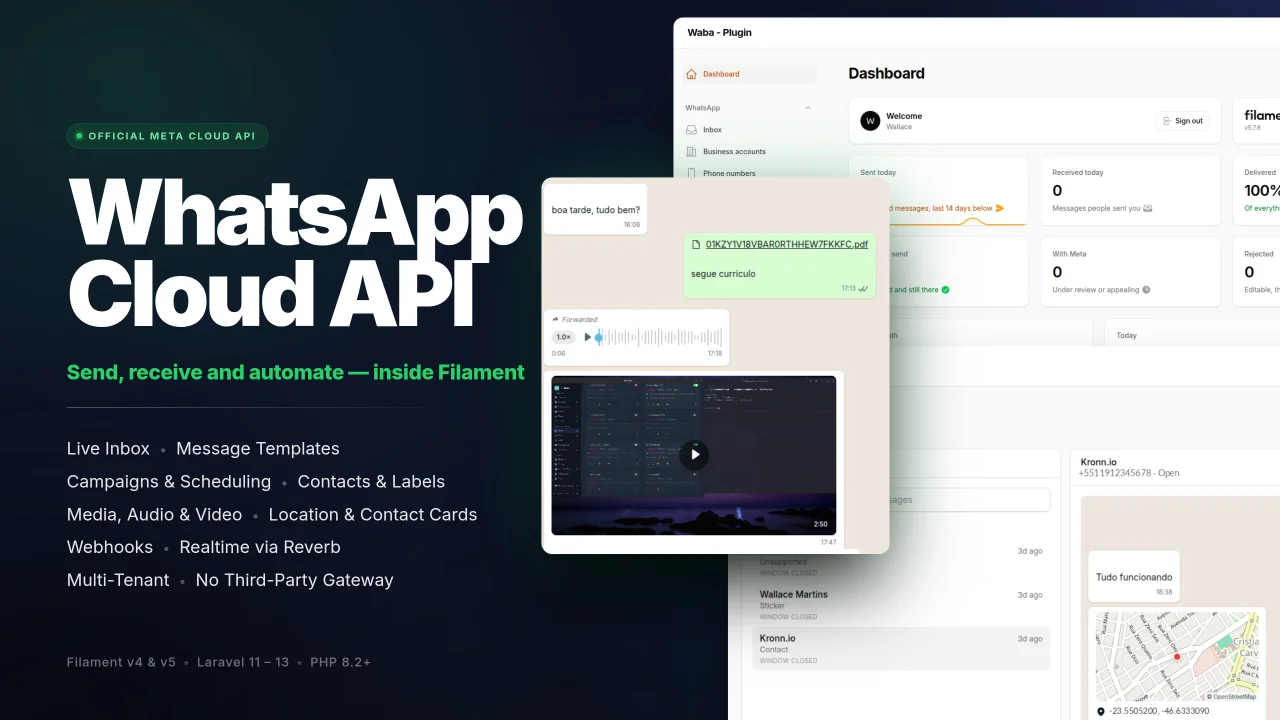
WhatsApp MetaCloud Connector by Wallace Martins
CommunityManage WhatsApp business accounts, phone numbers, message templates, conversations and campaigns from your panel through Meta's official Cloud API, without a third-party gateway.
filament/
namespace. Review the source and install at your own risk. Found
malware or an unresolved security issue the author won't
address?
Report it
.
 Author:
Wallace Martins
Author:
Wallace Martins
Documentation
- Contents
- Why this plugin
- Requirements
- Installation
- Connecting an account
- Multi-tenancy
- Sending
- The 24-hour service window
- Message templates
- Inbox
- Contacts and labels
- Campaigns
- Payments in Brazil
- Polls, and why they are not here
- Groups, and why they are not here
- Media
- Webhooks
- Commands
- Customising the views
- Configuration
- From your own code
- Using the API client
- Database support
- Troubleshooting
- Translations
- Dashboard widgets
- Testing
- Support
- Working on your copy
- Credits
- License
A Filament plugin for the official WhatsApp Business Platform — Meta's Cloud API. Manage business accounts, phone numbers, message templates, conversations and campaigns from your panel, without a third-party gateway.
#Contents
Getting it running · Requirements · Installation · Connecting an account · Multi-tenancy
Messaging · Sending · The 24-hour service window · Message templates · Media
The panel · Inbox · Contacts and labels · Campaigns · Payments in Brazil · Dashboard widgets
Under it · Webhooks · Commands · Configuration · From your own code · Using the API client
Changing it · Customising the views · Translations · Working on your copy
When something is wrong · Troubleshooting · Support
What the API will not do · Polls · Groups
#Why this plugin
| Official API | Meta's Cloud API. No unofficial bridges, no session that drops at 3am. |
| Templates, done properly | Build templates visually with a live preview, submit them to Meta, and watch approval status update itself from the webhook. |
| The 24-hour window, handled | The package knows when a contact's service window is open and refuses to send a free-form message when it is not, instead of letting Meta reject it. |
| Credentials in the database | Every account carries its own encrypted token, app secret and verify token, so one installation can serve many tenants with many Meta apps. |
| Labels and imports | Label contacts and conversations, import a spreadsheet of people, and aim a campaign at exactly those labels. Meta has no labels; these are yours. |
| Portable | MySQL and PostgreSQL, both covered by the test suite. |
| Two Filament versions | Filament v4 on the 1.x branch, Filament v5 on 2.x. |
| Speaks your language | Fourteen languages, including Meta's error codes translated into sentences a person can act on. |
#Requirements
- PHP 8.2+
- Laravel 11, 12 or 13
- MySQL 8+, MariaDB 11+ or PostgreSQL 14+
- A queue worker
- A publicly reachable HTTPS endpoint for webhooks
- A Meta app with the WhatsApp product enabled
#Version compatibility
| Package | Filament | Livewire | PHP | Laravel |
|---|---|---|---|---|
1.x |
v4 | v3 | 8.2+ | 11 / 12 / 13 |
2.x |
v5 | v4 | 8.2+ | 11 / 12 / 13 |
#Installation
This is a commercial package, distributed from a private Composer registry rather than from Packagist. Point Composer at it once:
{
    "repositories": [
        {
            "type": "composer",
            "url": "https://filament-whatsapp-cloud.composer.sh"
        }
    ]
}
Then install it like anything else:
composer require wallacemartinss/filament-whatsapp-cloud
php artisan vendor:publish --tag="filament-whatsapp-cloud-config"
php artisan vendor:publish --tag="filament-whatsapp-cloud-migrations"
php artisan migrate
The views are publishable too, and are the one thing worth thinking about before you do it:
php artisan vendor:publish --tag="filament-whatsapp-cloud-views"
Optional, and not part of a normal install. A published view is a frozen copy that stops receiving fixes, so publish the single file you are changing and delete the rest — Customising the views explains why, and covers translations, which behave differently.
Composer will ask for credentials the first time:
Authentication required (filament-whatsapp-cloud.composer.sh):
Username: you@example.com          # the email the licence was issued to
Password: 8c21df8f-6273-…          # the licence key
Two things about that password, both of which bite once and never again:
A fingerprint is appended with a colon, when the licence policy uses one:
8c21df8f-6273-…:yourdomain.com. The fingerprint ties an activation to one
place, so a key that leaks does not become an unlimited licence. Without a
fingerprint policy, the key alone is the password.
An unassigned licence uses unlock as the username rather than an email.
#Deploys
Type the credentials once and Composer will not ask again on that machine — which is exactly the problem on a server or in CI, where nobody is there to type them. Store them instead:
composer config --global --auth http-basic.filament-whatsapp-cloud.composer.sh \
    you@example.com 8c21df8f-6273-…
Or, without writing them to disk at all, as an environment variable your deploy pipeline already knows how to keep secret:
COMPOSER_AUTH='{"http-basic":{"filament-whatsapp-cloud.composer.sh":{"username":"you@example.com","password":"8c21df8f-6273-…"}}}'
Do not commit auth.json. A licence key in a repository is a licence key in
everybody's repository.
#Which branch you get
1.x for Filament v4, 2.x for Filament v5. Composer picks by your own
Filament constraint, so composer require normally does the right thing
without being told.
The major names the Filament version rather than a rewrite: 2.0.0 is the same
release as 1.0.0, built against a newer Filament, with the same features and
the same API. One licence covers both — upgrading Filament is not a reason to
buy the package again. See UPGRADING.md.
Register the plugin in your panel provider:
use WallaceMartinss\FilamentWhatsAppCloud\FilamentWhatsAppCloudPlugin;

public function panel(Panel $panel): Panel
{
    return $panel->plugins([
        FilamentWhatsAppCloudPlugin::make(),
    ]);
}
#Tailwind
Filament builds its CSS from the classes it can actually see, and it cannot see
inside this package unless told. Add its views to your panel's theme, which
lives at resources/css/filament/{panel}/theme.css:
@source '../../../../vendor/wallacemartinss/filament-whatsapp-cloud/resources/views/**/*.blade.php';
Four levels up, because that is where the theme file sits — the same depth as
the @source lines Filament puts there itself. Count them against the neighbours
if you have moved the file.
Skip it and everything still works — it just looks broken. The inbox loses its two-pane layout and the template preview loses its bubble, because the utility classes holding them up were purged as unused.
Then rebuild: npm run build.
#The rest of the checklist
php artisan storage:link   # inbound media is served from the public disk
php artisan queue:work     # sends, media downloads and webhooks all run here
Without a queue worker nothing breaks loudly — messages simply sit in queued
and webhooks stay unprocessed, which reads like the package is broken when it is
waiting.
Sends, webhooks and media downloads all share the default queue, so one plain
worker is enough. Media downloads are the one thing worth separating later:
Meta's download URL expires after five minutes, and a long backlog of ordinary
work can outlive it. When you have a second worker for them, name the queue and
list it first:
'queue' => ['media_queue' => 'whatsapp-media'],
php artisan queue:work --queue=whatsapp-media,default
Set it without a worker consuming it and inbound images silently never arrive while everything else keeps working — which is why it is not the default.
Each resource can be switched off, and the navigation placement overridden:
FilamentWhatsAppCloudPlugin::make()
    ->businessAccountResource()      // default: true
    ->phoneNumberResource(false)     // default: true
    ->navigationGroup('Communication')
    ->navigationSort(30);
Dashboard widgets are off unless asked for — see Dashboard widgets.
#Connecting an account
- In the panel, open WhatsApp → Business accounts → Connect account.
- Paste the WABA id and a permanent System User token, plus the app id, app secret and a verify token of your choosing.
- The token is checked against Meta before anything is saved. Nothing is written if Meta refuses it.
- Open the account and copy its callback URL into your Meta app's webhook configuration, using the same verify token.
- Press Subscribe webhook so Meta starts delivering events.
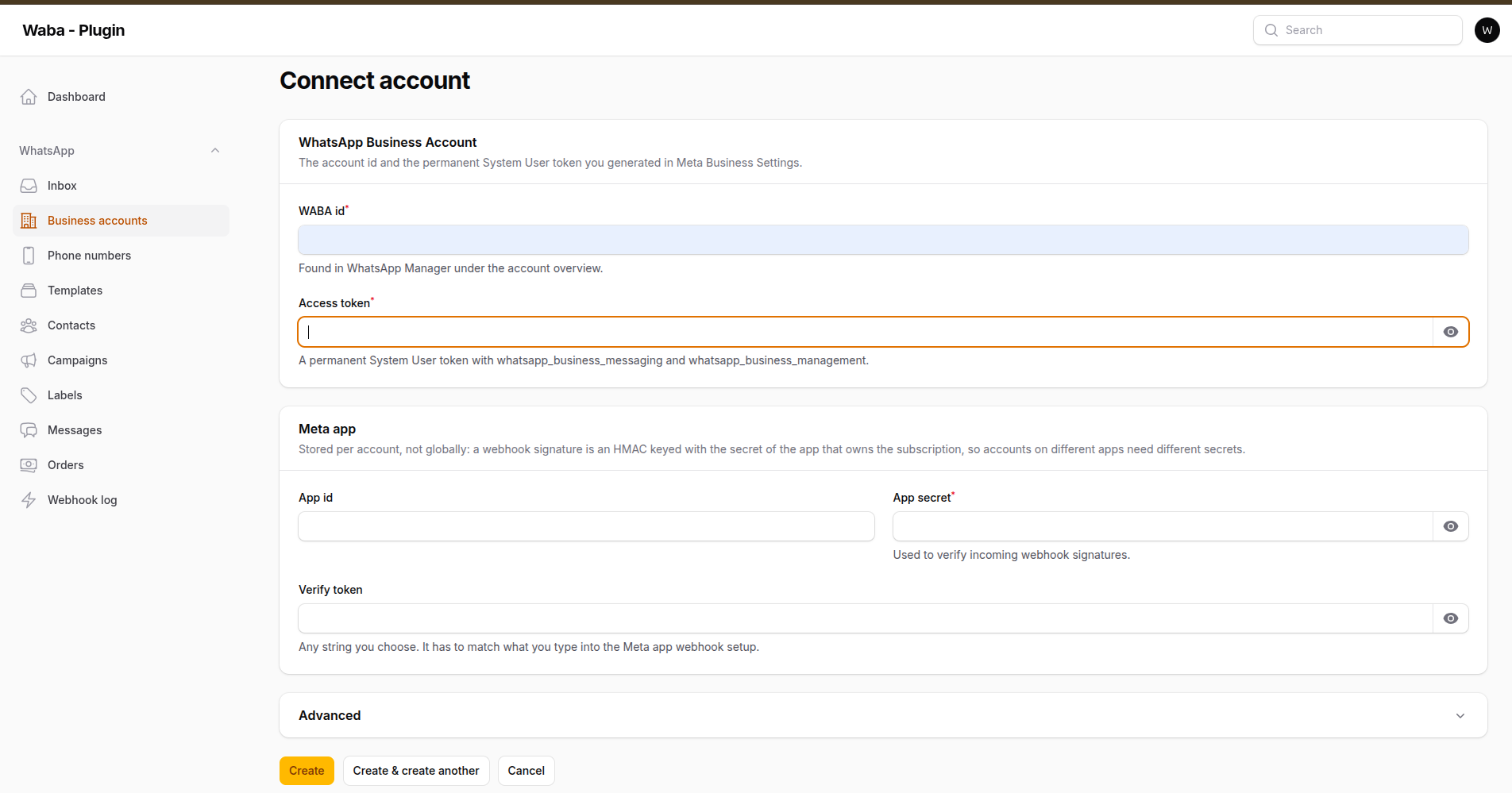
Step 2: the WABA id and a System User token, plus the Meta app whose secret verifies the webhook signature
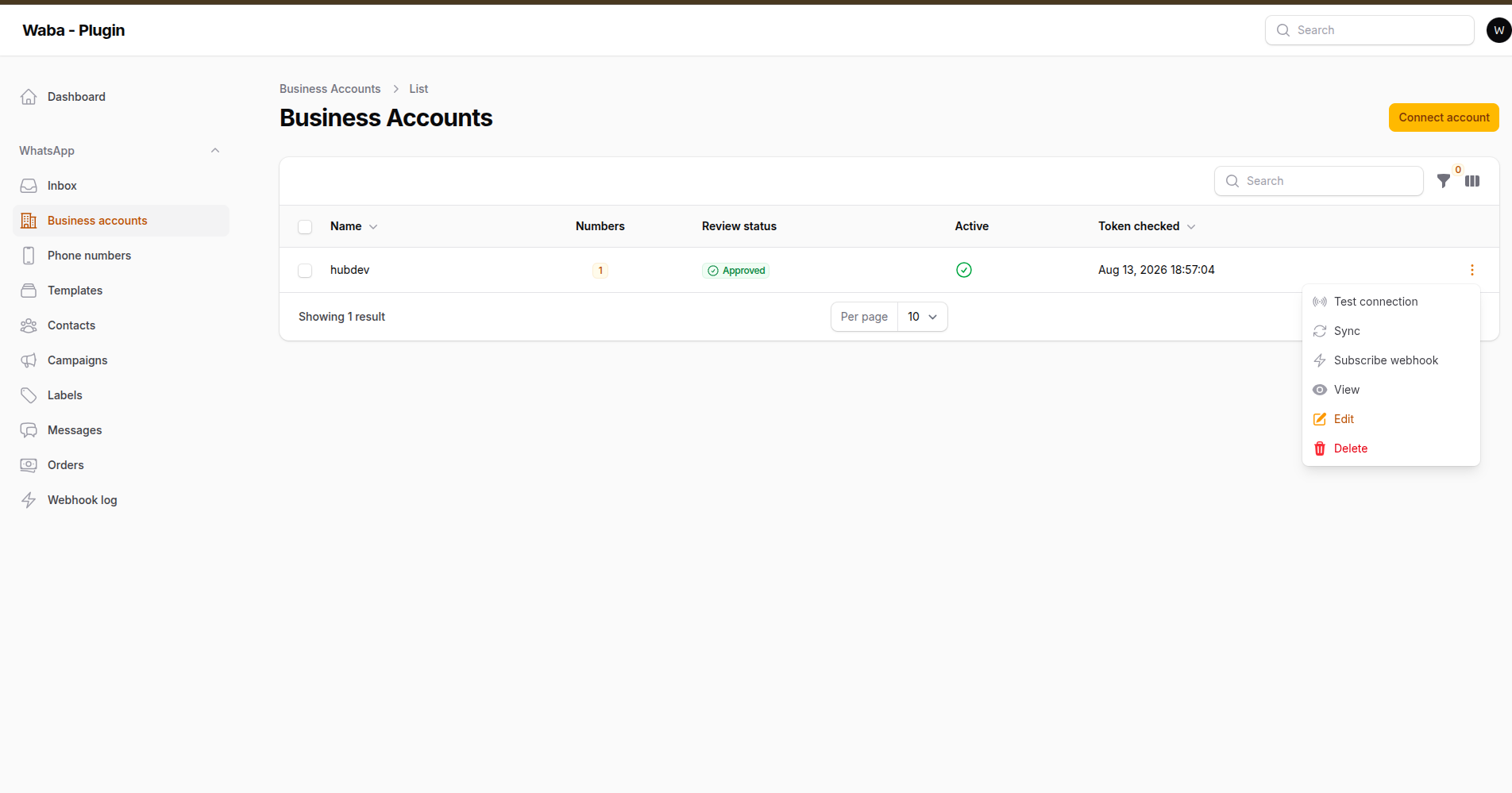
Afterwards: test connection, sync and webhook subscription all live on the row
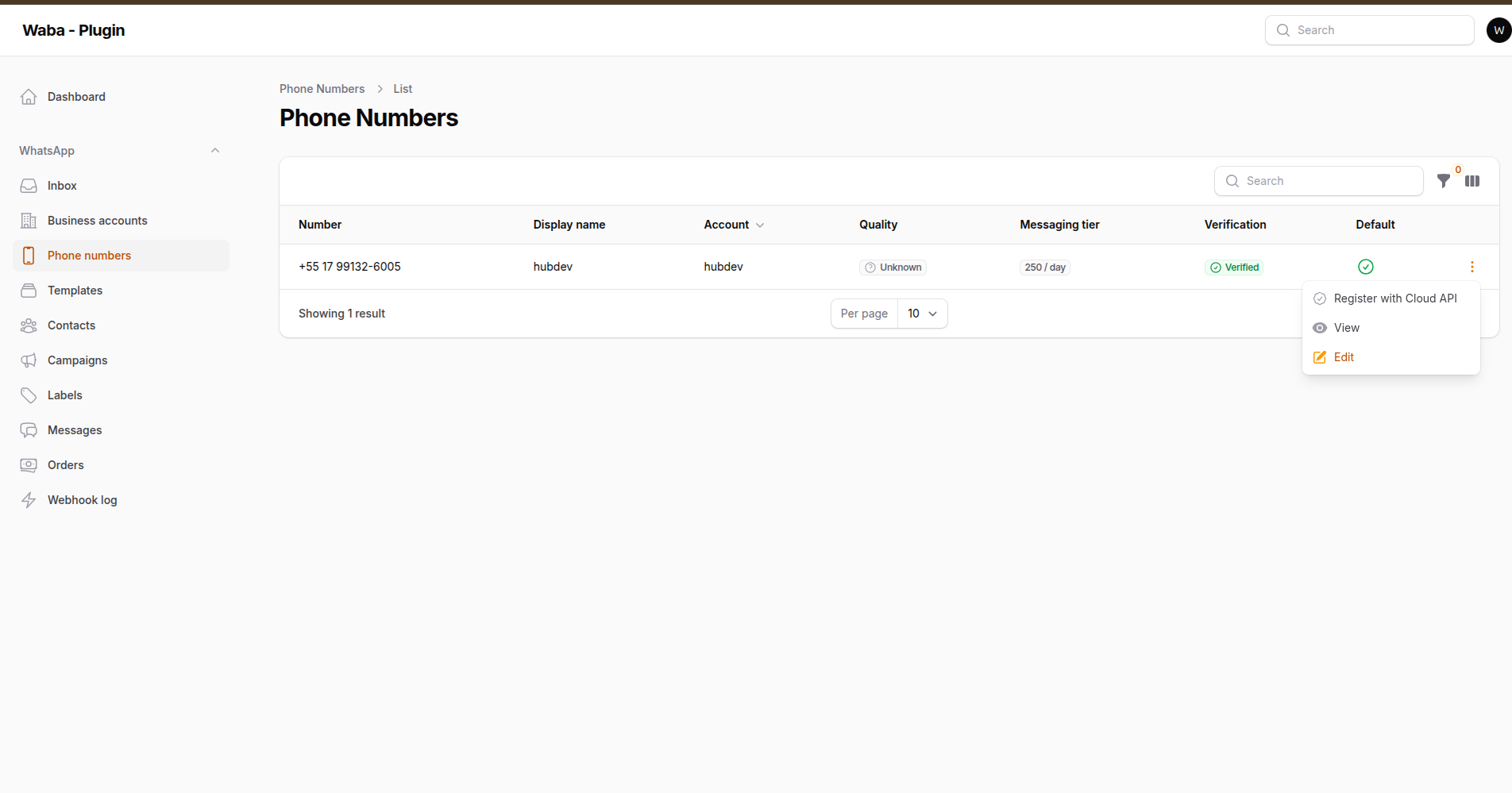
The numbers arrive with the first sync, carrying quality, messaging tier and verification as Meta reports them
Every account gets its own callback URL, ending in a random identifier. That is what lets one installation serve several tenants with several Meta apps: the signing secret is chosen from the route, so a payload never has to be parsed before its signature has been checked.
#Multi-tenancy
Enable it in the config file:
'tenancy' => [
    'enabled' => true,
    'column' => 'team_id',
    'table' => 'teams',
    'model' => App\Models\Team::class,
    'column_type' => 'uuid',
],
Records are then scoped to the current tenant, and stamped with it on creation.
Outside a panel request — a webhook, a queued job, a scheduled command — there is no current tenant, and the package refuses to guess: a tenant-scoped query throws rather than quietly returning every tenant's rows. Code that legitimately spans tenants says so:
use WallaceMartinss\FilamentWhatsAppCloud\Support\TenantResolver;

// Deliberately cross-tenant, for example while identifying a webhook's account.
WhatsAppBusinessAccount::query()->withoutTenantScope()->where('waba_id', $id)->first();

// Or bind the tenant for the duration of a piece of work.
app(TenantResolver::class)->run($tenantKey, fn () => /* ... */);
#Sending
use WallaceMartinss\FilamentWhatsAppCloud\Facades\WhatsApp;

WhatsApp::to('5511999998888')->text('Your order has shipped')->send();
WhatsApp::to($phone)->image('promos/june.jpg', 'This month only')->send();
WhatsApp::to($phone)->document($path, 'invoice.pdf', 'Your invoice')->send();
WhatsApp::to($phone)->location(-23.55, -46.63, 'Head office')->send();

WhatsApp::to($phone)
    ->buttons('Confirm your appointment?', footer: 'Reply within 24h')
    ->button('yes', 'Confirm')
    ->button('no', 'Reschedule')
    ->send();

WhatsApp::to($phone)->template('order_shipped', 'pt_BR')->send();
From your own services:
use WallaceMartinss\FilamentWhatsAppCloud\Concerns\CanSendWhatsApp;

class InvoiceService
{
    use CanSendWhatsApp;

    public function sendReceipt(Invoice $invoice): void
    {
        $this->sendWhatsAppDocument($invoice->customer->phone, $invoice->pdf_path);
    }
}
From anywhere in the panel:
SendWhatsAppMessageAction::make()->recipientFrom('customer.phone')
#The 24-hour service window
WhatsApp lets a business reply freely for 24 hours after someone writes to it — 72 when the conversation started from a Click-to-WhatsApp ad. Outside that window only an approved template gets through, and Meta charges for it.
Every send is checked against that window first, so the refusal arrives before the request rather than as an opaque error 131047 afterwards:
WhatsApp::windowIsOpen($phone);      // bool
WhatsApp::windowExpiresAt($phone);   // ?CarbonInterface
Choose what happens when it has closed:
'messaging' => [
    'outside_window' => 'throw',   // refuse (default)
    // 'outside_window' => 'queue',    // hold it until they write again
    // 'outside_window' => 'template', // send the fallback template instead
    'fallback_template' => ['name' => 're_engagement', 'language' => 'pt_BR'],
],
The window is tracked from both sources Meta offers: the inbound message, and the exact expiry it reports on every delivery receipt. The later of the two wins, so a delayed webhook can never close a window that is still open.
#Message templates
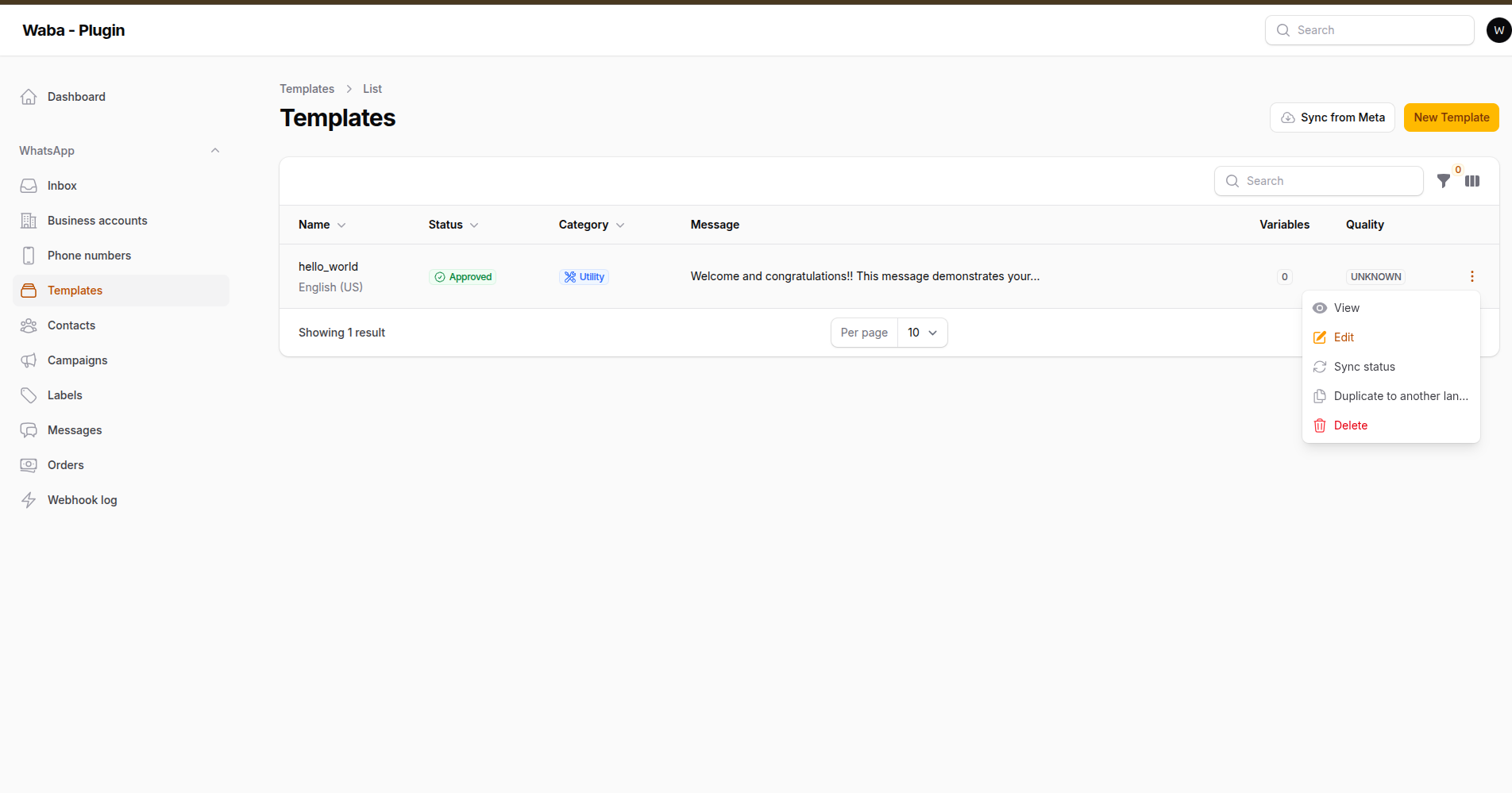
Templates, with the status Meta last reported and the actions that change it
Templates are the only way to open a conversation, and the only thing WhatsApp
delivers once the 24-hour window has closed. They are also the part of the Cloud
API that punishes mistakes hardest: a rejected submission is not a failed
request you retry a second later, it is a wait of up to 24 hours followed by a
reason as informative as INVALID_FORMAT, and it spends one of the 100
submissions an hour the account is allowed.
So everything Meta checks at submission that can be checked locally, is.
#The builder
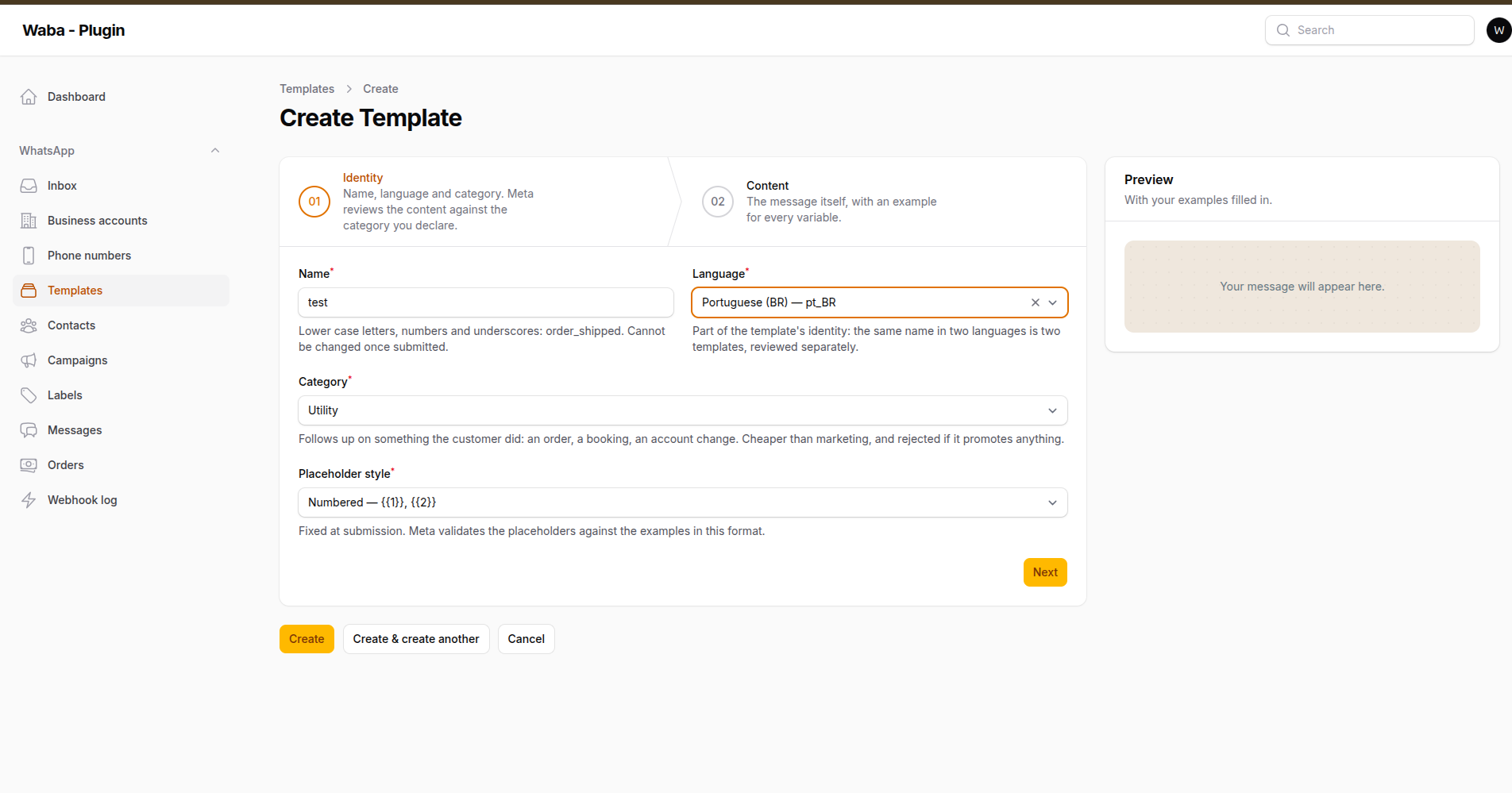
Step one: name, language and category — the three things Meta reviews the content against
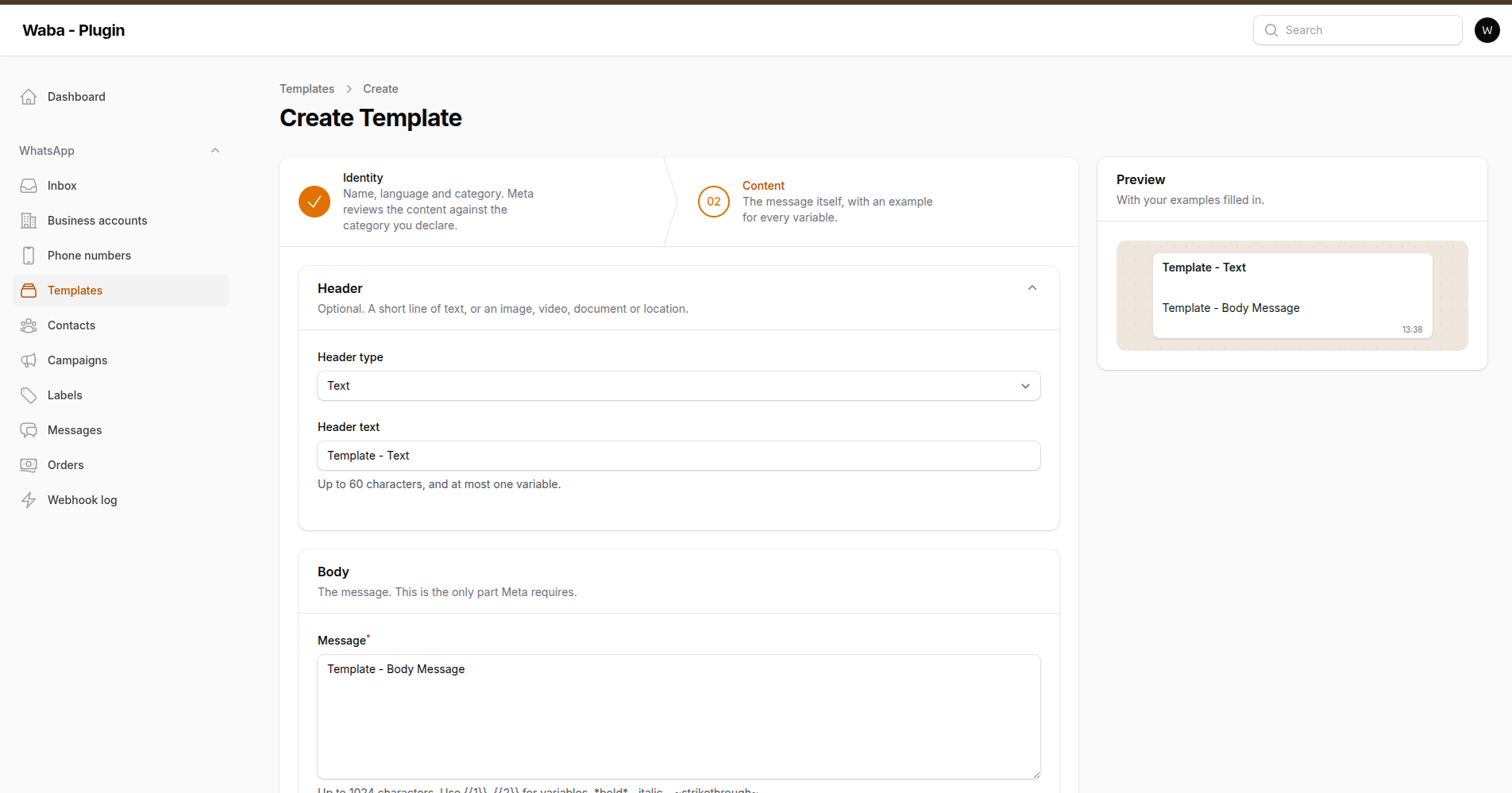
Step two: the message, with the preview filled in from your own examples
Templates in the panel is a wizard — Identity → Content → Review — with a
live preview beside it, rendered as WhatsApp renders it: *bold* in bold,
placeholders replaced by your examples, buttons and footer where the recipient
will see them.
The example fields are generated from the text as you type it. Write
Hi {{1}}, your order {{2}} is on its way and two example fields appear. A
missing example is the single most common reason Meta rejects a template, and
keeping a separate list in step with your own prose by hand is a mistake waiting
to happen.
Refused before you can save, each with a message that names the component and the rule:
| Rule | |
|---|---|
| Header | 60 characters, at most one variable |
| Body | 1024 characters, every variable needs an example |
| Footer | 60 characters, no variables |
| Buttons | 10 total, at most 2 URL, 1 phone number, 1 copy code |
| Quick replies | must sit together — Meta refuses them interleaved |
| URL variables | one, and only at the end: Meta appends the value rather than substituting it |
| Numbering | {{1}}, {{2}} with no gaps, and never mixed with named ones |
| Name | lower case, digits and underscores |
| Language | Meta's own codes — pt_BR, not pt-BR |
#Drafts, and then submission
A template is saved here first and sent to Meta only when you say so. Saving is free; submitting is not.
use WallaceMartinss\FilamentWhatsAppCloud\Builders\TemplateBuilder;
use WallaceMartinss\FilamentWhatsAppCloud\Services\TemplateManager;

$template = app(TemplateManager::class)->draft($account,
    TemplateBuilder::make('order_shipped')
        ->language('pt_BR')
        ->category(TemplateCategory::UTILITY)
        ->headerText('Order {{1}}', ['A-1234'])
        ->body('Hi {{1}}, your order left today.', ['Wallace'])
        ->footer('Reply STOP to unsubscribe')
        ->urlButton('Track', 'https://acme.test/track/{{1}}', 'A-1234'),
);

app(TemplateManager::class)->submit($template);
Meta answers with the status and the category it decided on, which is not always the one you asked for — and the category is what each send costs. Both are written back.
#Sending one
WhatsApp::to($phone)->useTemplate($template, ['Wallace', 'A-1234'])->send();

// Named placeholders are keyed by name:
WhatsApp::to($phone)->useTemplate($template, [
    'customer' => 'Wallace',
    'order_id' => 'A-1234',
])->send();

// A media header is chosen per send; a URL button's tail is addressed by
// the button's position.
WhatsApp::to($phone)
    ->useTemplate($template, ['Wallace', 'A-1234'])
    ->templateHeader('https://cdn.acme.test/receipt.pdf', 'receipt.pdf')
    ->templateButton(1, 'A-1234')
    ->send();
useTemplate() builds the parameters from the template's own stored definition
and refuses a mismatch locally, naming the placeholder. template('name') still
works and sends whatever you give it — Meta answers a mismatch with 132000,
which names neither the component nor the parameter.
A template that is not approved, or that Meta no longer reports, is refused before the request.
#Staying in step with Meta
message_template_status_update |
approval, rejection and the reason; FLAGGED is read as paused |
message_template_quality_update |
the score, which falls before a template is paused |
template_category_update |
a recategorisation — a billing change |
message_template_components_update |
the template is pulled back rather than reconstructed from Meta's flattened payload |
Templates can also be created and edited in WhatsApp Manager, and a delivery can be missed, so a pull exists too:
php artisan whatsapp:sync-templates --queue
It runs on its own schedule when templates.auto_sync is on. A template Meta no
longer reports is marked, never deleted — the messages sent with it still
point at the row — and it stops being sendable.
#What Meta will not let you do
- Change a name, a language or the placeholder style after submission.
- Edit a template while it is under review. Only approved and rejected ones, and approved ones only 10 times a month.
- Reuse a deleted name for 30 days.
- Delete one language without naming its id — the endpoint takes a name, and without an id it removes every language of it. The panel asks which you mean.
#Media headers
The sample file a media header is reviewed with is not the file that goes out
with each message. It is uploaded through Meta's resumable upload API — which is
addressed by App ID, not by WABA id, and authenticates with
Authorization: OAuth, not Bearer — and what comes back is a handle, not a
media id. The panel does all of that when you save; the account needs its
app_id stored.
#Inbox
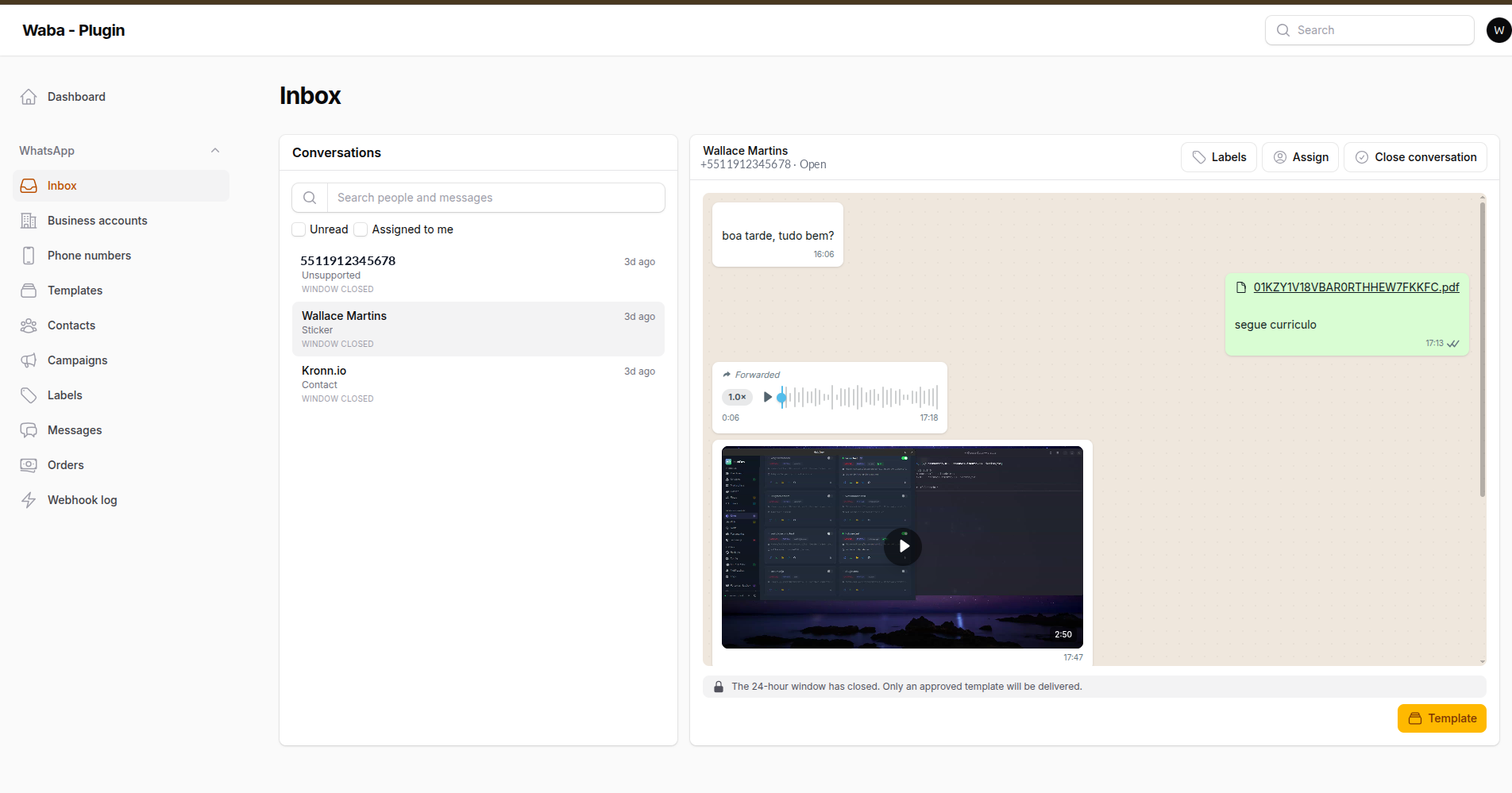
A voice note with its own player, a video with a play button rather than a control bar, a document, and the forwarded label
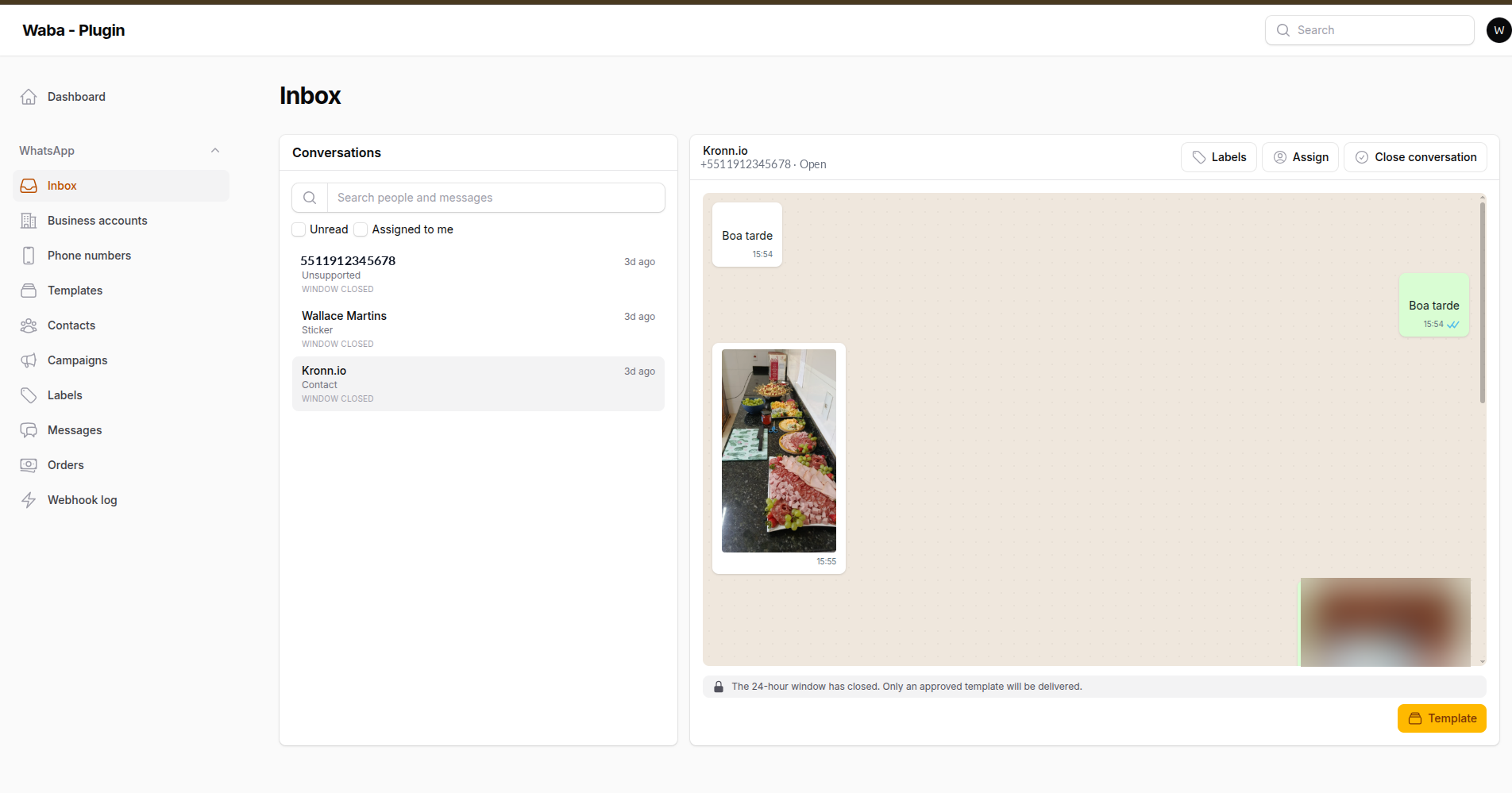
Photos arrive inline, downloaded from Meta before the five-minute link expires
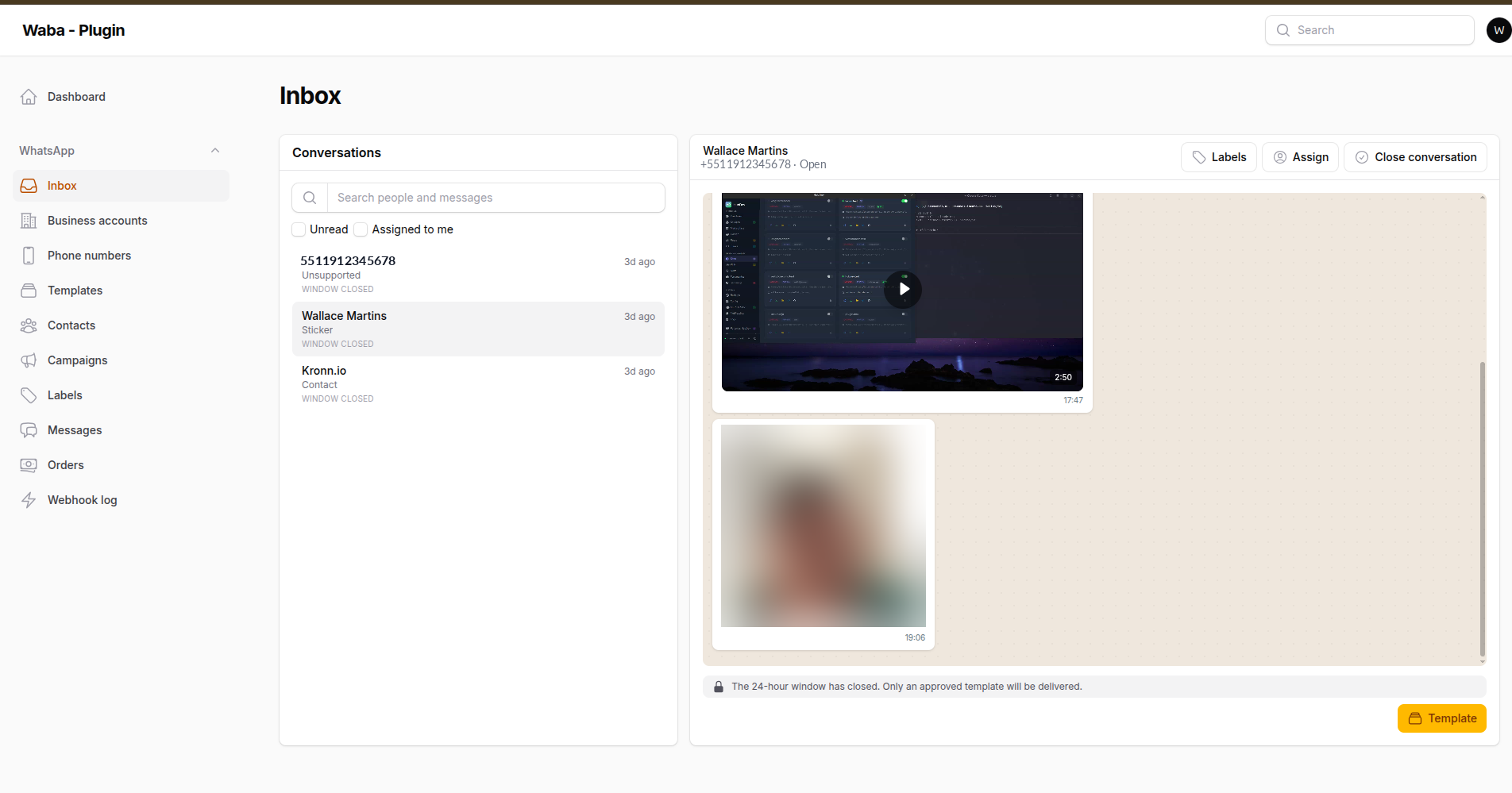
A video keeps its poster frame and a duration badge until somebody decides to watch
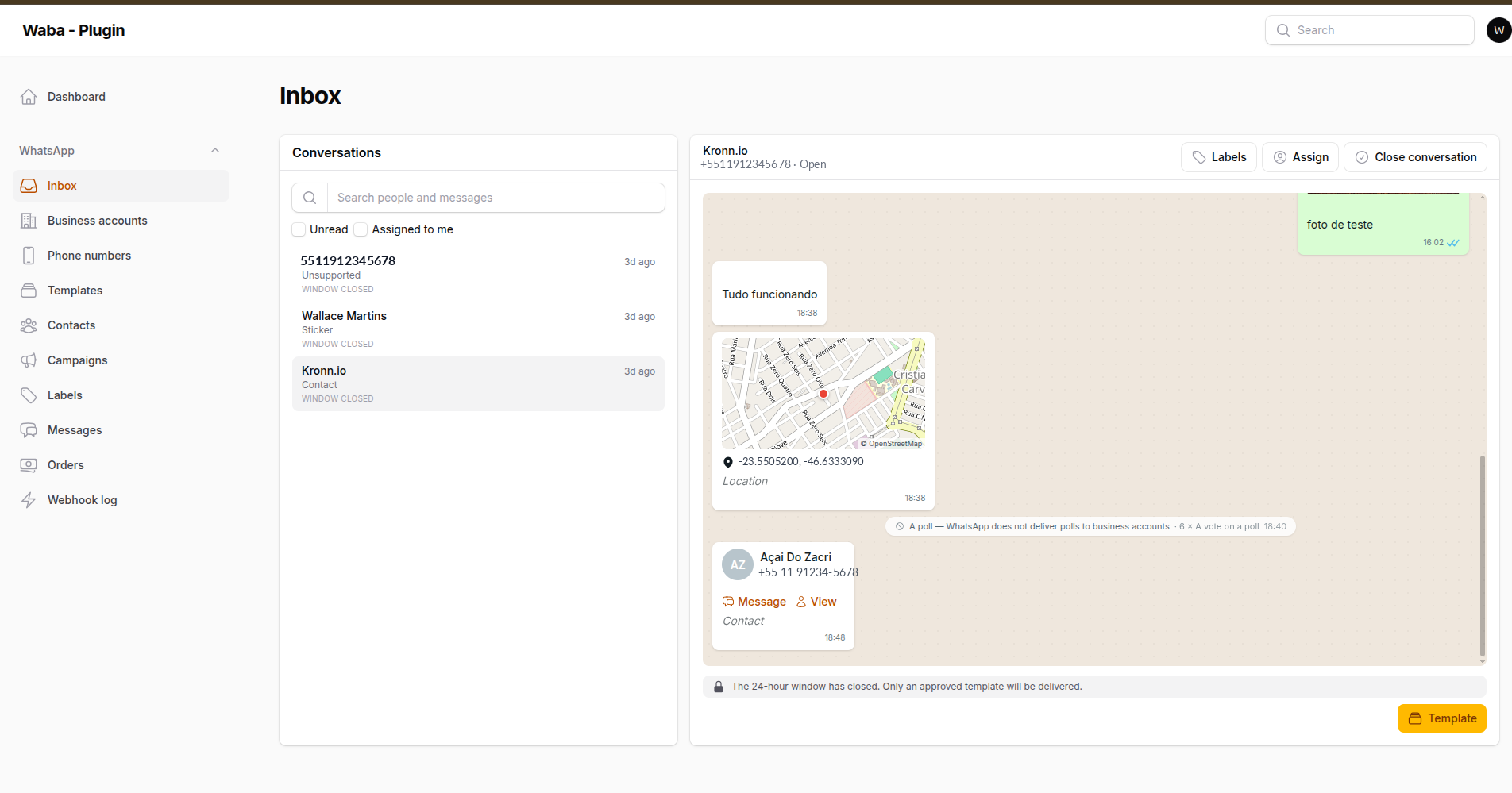
A two-pane conversation screen: the list on the left, the open thread and the composer on the right.
The composer is the part that carries the domain. While the 24-hour window is open it is a text box with a countdown above it; once the window has closed the text box is gone and a template picker takes its place — because a template is the only thing WhatsApp will deliver, and a composer that accepts a message which was never going to arrive is worse than no composer.
| Search | by who you were talking to or by what was said |
| Filters | per number, unread only, assigned to me |
| Thread | reverse pagination, delivery ticks, media inline, failures shown on the bubble |
| Assignment | a conversation belongs to somebody, or to nobody |
| Templates | picked from the registry, with only the parameters that template needs |
A failed message that looks like a sent one is the worst thing an inbox can show, so the error Meta reported sits on the bubble rather than in a log.
Beside the inbox there is a flat log of every message, in and out, for the questions a conversation view is bad at — what was sent yesterday, what failed, what a given number has been sent in total.
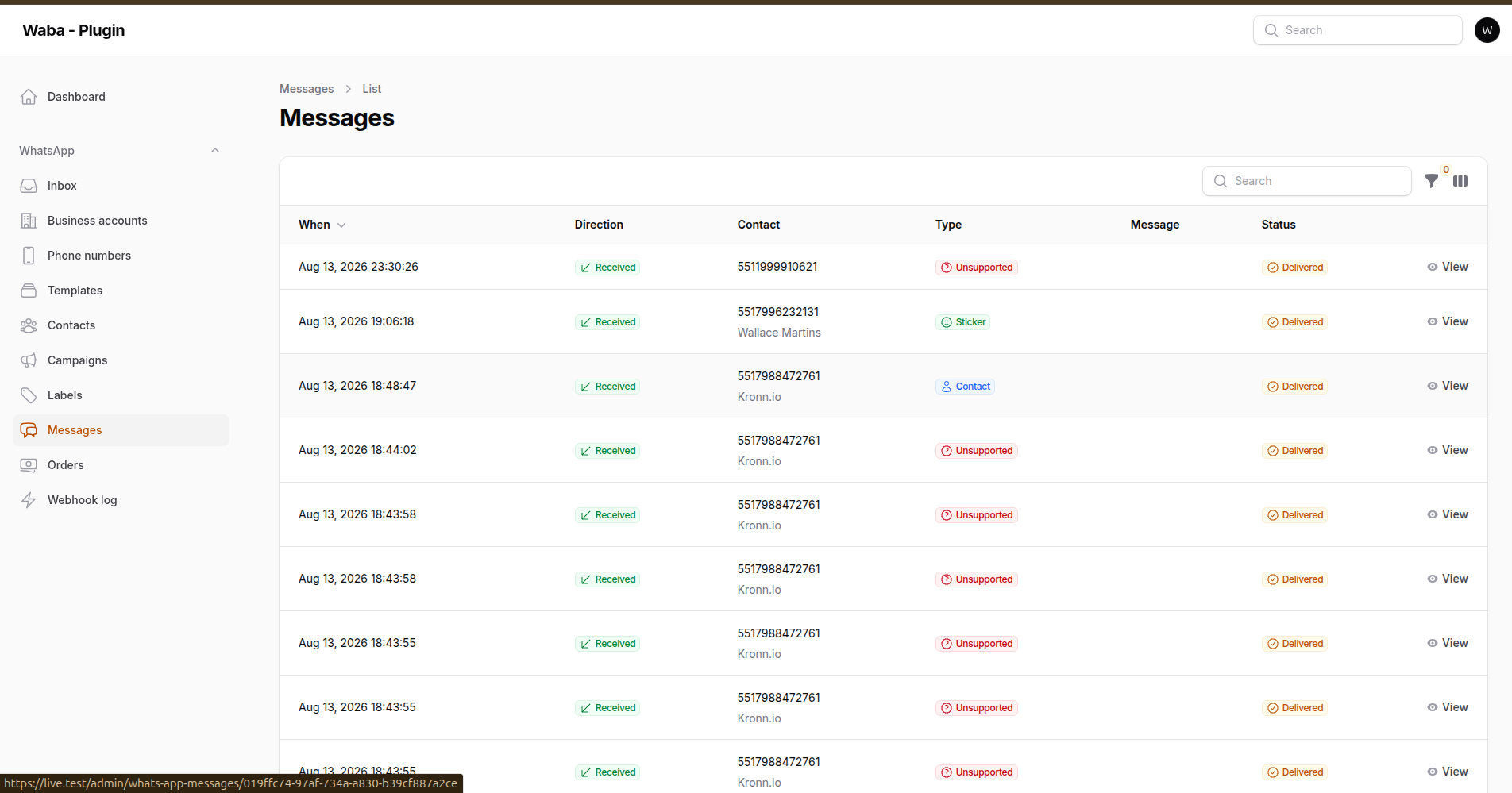
Every message, with its direction, type and delivery state
#Keeping it current
The inbox either asks on a timer or is told over a websocket. Polling is the default because it works in every installation, with nothing running:
'realtime' => [
    'driver' => env('WHATSAPP_REALTIME_DRIVER', 'poll'),
],

'inbox' => [
    'poll_interval' => 10,   // seconds, while the driver is "poll"
    'conversations_per_page' => 25,
    'messages_per_page' => 30,
    'mark_read_on_open' => true,
],
| Driver | What it does |
|---|---|
poll |
Asks every inbox.poll_interval seconds. Needs nothing running. |
broadcast |
Subscribes to a websocket. Needs a broadcaster up. No poll underneath. |
auto |
Both: the websocket carries the updates, a slow poll catches a dead one. |
auto is the one to run. Websockets drop — a sleeping tab, a suspended
laptop, a connection that turns over — and a dropped socket in an inbox is a
customer's message nobody is told about. A refresh every sixty seconds
underneath costs almost nothing and removes the whole failure mode. broadcast
exists for people who would rather know their socket is broken.
Hide the page with ->inboxPage(false), or with inbox.enabled.
#Maps on location messages
A location arrives as a pair of coordinates, which tells an agent nothing they can act on. The bubble can draw the place instead:
'inbox' => [
    'map' => [
        'provider' => env('WHATSAPP_INBOX_MAP'),   // 'osm' | 'google' | null
        'key' => env('WHATSAPP_INBOX_MAP_KEY'),    // google only
        'zoom' => 15,
    ],
],
Off by default, and not for performance. The bubble has always linked to a map, which hands the customer's coordinates to whoever hosts it — but only when an agent decides to click. Drawing the map sends those coordinates to a third party on every render of every location message anybody scrolls past, and nobody chose that. It is a disclosure, so it is asked for rather than assumed.
| Provider | Needs | Notes |
|---|---|---|
osm |
nothing | Four map tiles, assembled and centred on the point. OpenStreetMap's tile usage policy is written for modest volumes — read it before pointing a busy inbox at it. Attribution is drawn on the preview, as it requires. |
google |
API key with billing | One static image, and the better looking of the two. Without a key it draws nothing rather than showing Google's error image. |
Either way the preview stays a link to the full map, and the coordinates stay on the bubble underneath it.
#Turning on the websocket
php artisan whatsapp:install-broadcasting          # writes the driver, reports what is missing
php artisan whatsapp:install-broadcasting --check  # reports, changes nothing
It offers to run Laravel's own install:broadcasting first, then writes
WHATSAPP_REALTIME_DRIVER and tells you what is still missing. It deliberately
does not install Reverb: that is a server with a port and a supervisor, and how
you run it is not a decision a Composer package should make for you.
There is no npm step. Filament already bundles laravel-echo and pusher-js
and builds the client itself — but only once config/filament.php has a
broadcasting.echo block, and that key ships commented out.
That file is Filament's own rather than this package's, and it is not published by default:
php artisan vendor:publish --tag=filament-config
Then fill the block in. For Reverb:
// config/filament.php
'broadcasting' => [
    'echo' => [
        'broadcaster' => 'reverb',
        'key' => env('VITE_REVERB_APP_KEY'),
        'wsHost' => env('VITE_REVERB_HOST'),
        'wsPort' => env('VITE_REVERB_PORT', 80),
        'wssPort' => env('VITE_REVERB_PORT', 443),
        'authEndpoint' => '/broadcasting/auth',
        'forceTLS' => env('VITE_REVERB_SCHEME', 'https') === 'https',
        'enabledTransports' => ['ws', 'wss'],
    ],
],
Then keep php artisan reverb:start running.
Broadcasts go out through the queue, so a worker has to be running. If you have no worker, send them inline instead — it costs the webhook request a few milliseconds, which is better than a queued job nobody runs:
'realtime' => ['queue_connection' => 'sync'],
#What else listens
The inbox is not the only screen that goes stale on its own. Meta rules on templates hours after they are submitted, reclassifies a category under a template already running, and slides a quality score towards the pause that stops it working — none of it caused by anybody in the panel, so nothing brings them back to look. With broadcasting on, these arrive too:
| Screen | Wakes for |
|---|---|
| Inbox | new messages, delivery ticks, a conversation closed or assigned |
| Templates list | approval, rejection, re-categorisation, quality score |
| Template view | the same, so the page somebody is waiting on updates itself |
| Template status widget | the same |
The template events are raised from the model rather than the three webhook
handlers, so a template found by whatsapp:sync-templates announces itself as
well — which matters, because Meta does not send a webhook for everything.
The dashboard widgets already polled slowly (two minutes, five minutes), which
is exactly what a safety net wants — so under auto they keep it. Only
broadcast, the driver that says explicitly it wants no fallback, switches
their polling off.
#What crosses the socket
Ids, and nothing else:
{ "conversation": "01j…", "phone_number": "01j…", "message": "01j…", "reason": "message" }
{ "template": "01j…", "reason": "status" }
No message body, no phone number of the person who wrote, no name, no rejection reason. The page is told what moved and refetches it over the ordinary authenticated request, where the tenant scope and the panel's authorisation already apply. The socket is a doorbell, not a delivery — so there is only ever one place that decides who may read what.
One private channel serves the whole package, with the topic in the event name. A channel per screen was the other option and it answers the same question twice: whoever may see the inbox is whoever may see the templates. Livewire subscribes per channel and event, so a page still only wakes for its own traffic.
private-whatsapp-cloud               # single-tenant
private-whatsapp-cloud.{tenant}      # multi-tenant

.whatsapp.inbox.updated              # events
.whatsapp.templates.updated
Authorisation is registered for you and defers to Filament's own
canAccessTenant(). It fails closed: a user model that cannot say which
tenants it belongs to is not granted the channel. Override it when your rules
are your own:
'realtime' => [
    'authorize' => fn (Authenticatable $user, ?string $tenant): bool => $user->can('viewInbox'),
],
To hang your own screen off it, name the events it cares about:
use WallaceMartinss\FilamentWhatsAppCloud\Events\TemplatesUpdated;
use WallaceMartinss\FilamentWhatsAppCloud\Filament\Concerns\ListensForChanges;

class MyWidget extends Widget
{
    use ListensForChanges;

    protected function broadcastEvents(): array
    {
        return [TemplatesUpdated::NAME];
    }
}
Search is
LIKE(ILIKEon PostgreSQL), which is fine into the tens of thousands of rows. Past that, point Laravel Scout atWhatsAppContactandWhatsAppMessage.
#Contacts and labels
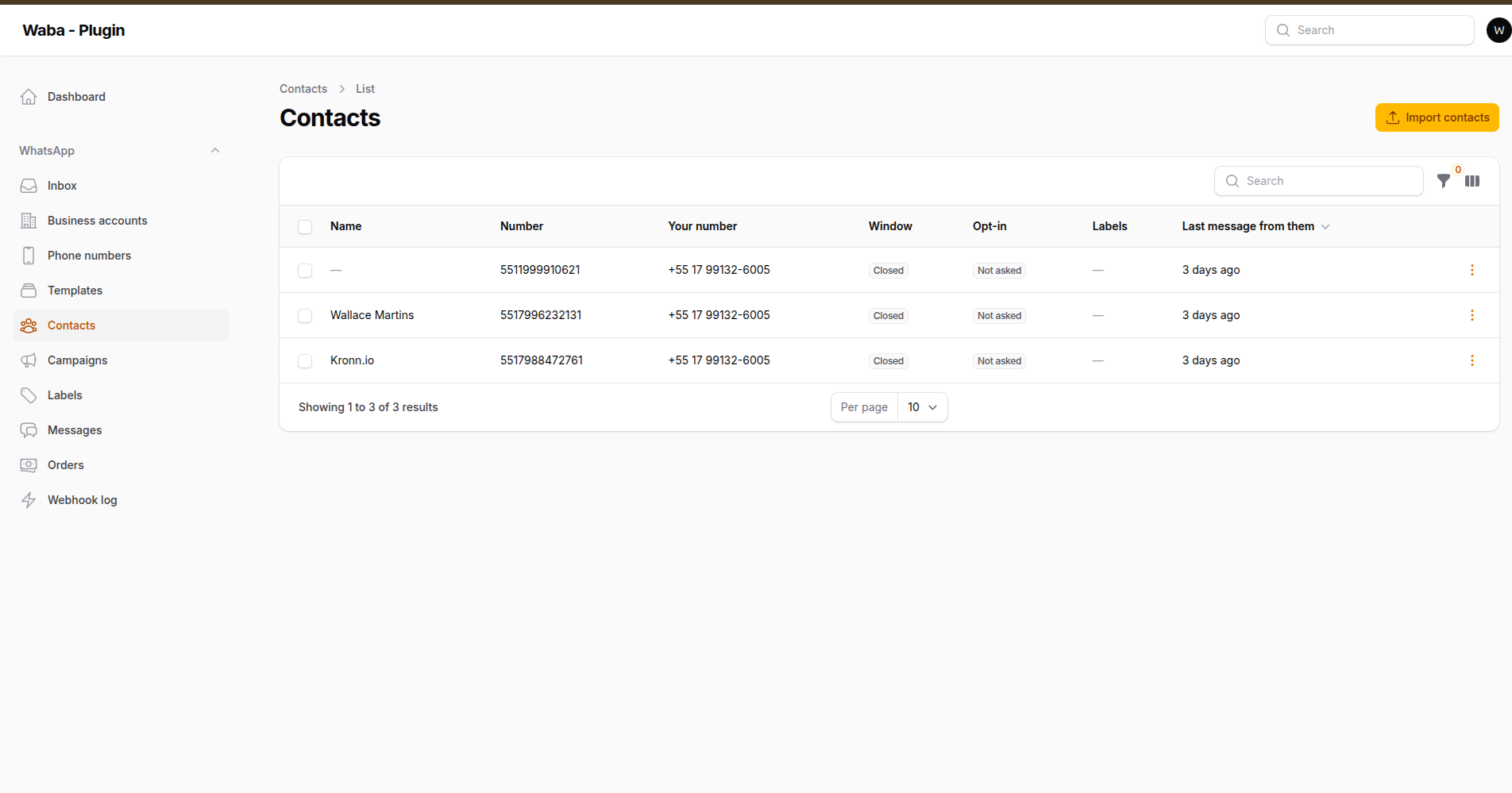
Contacts, with the service window and opt-in state that decide what may be sent
A contact appears on its own the first time somebody writes to you: their wa_id
is then a fact, reported by WhatsApp. The other two ways of getting one — an
import, and the labels you put on them — are the panel's own, and both are
described here because neither has an equivalent in Meta's API.
#Labels
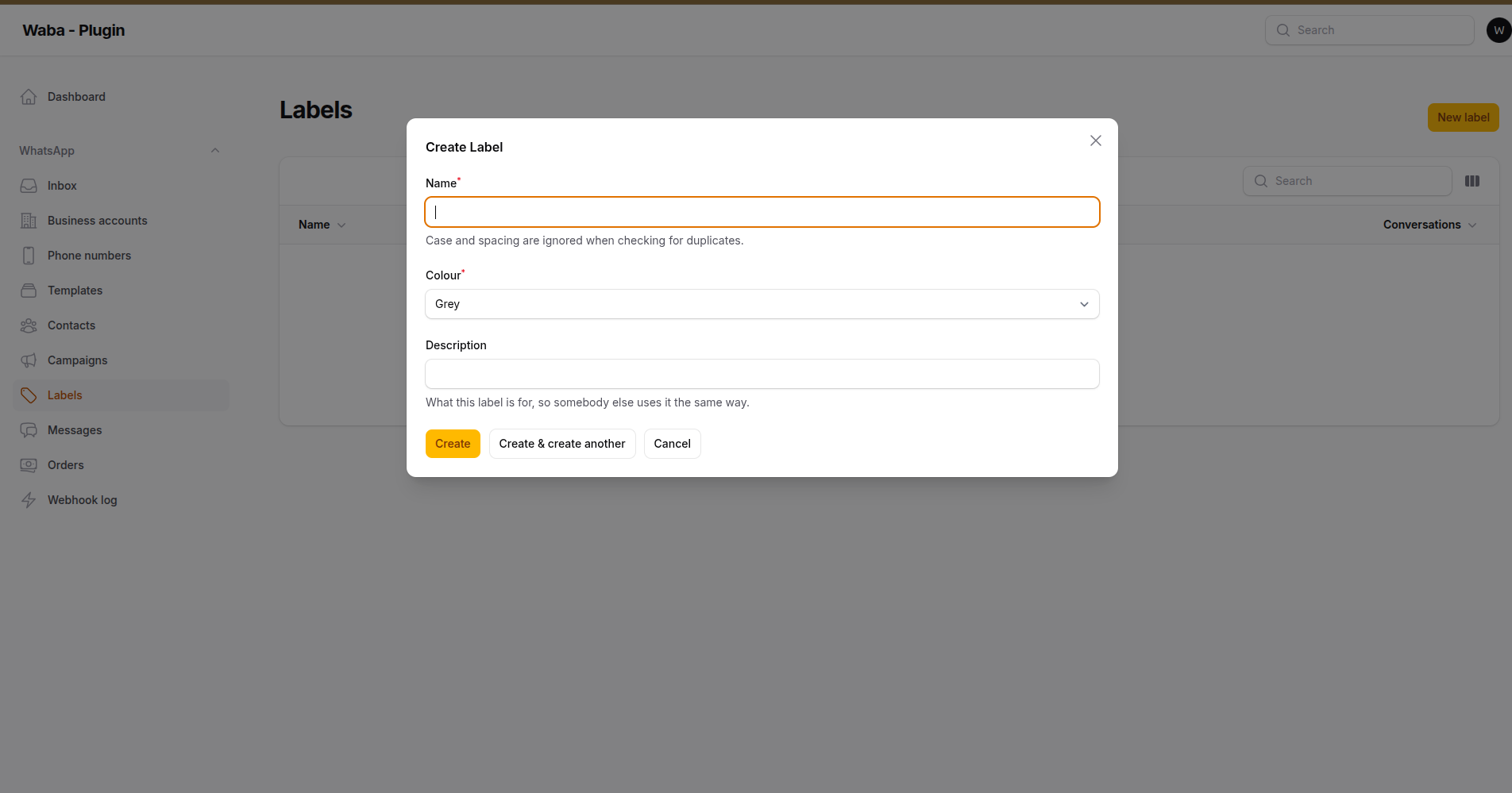
Labels are the panel's own — Meta's Cloud API has none
There is no "sync from Meta" for these, and there never will be. Labels are a
feature of the WhatsApp Business phone app, and a number migrated to the Cloud
API is disconnected from that app; asking the Graph API for them answers
Tried accessing nonexisting field (labels). So a label here means whatever you
need it to mean.
The same label goes on a contact and on a conversation, from one vocabulary. Somebody who marks a thread awaiting payment and somebody who later filters contacts by awaiting payment mean the same thing, and two separate lists would have diverged by the end of the first week.
Where they show up:
| Contacts | A column, a filter, and bulk add/remove. |
| Inbox | On the open thread, and as a filter over the queue. |
| Campaigns | The audience, narrowed to the people a message is for. |
The filter asks any of them or all of them explicitly rather than choosing for you. Both readings are legitimate — "marketing or lapsed" is a wide net for browsing, "marketing and lapsed" is what a campaign audience means — and a filter that silently picked one would be wrong half the time, in the expensive direction.
Adding labels in bulk never removes the ones already there. Choosing "add
Marketing" says nothing about the rest, and a sync would strip them.
Hide the resource with ->tagResource(false).
Your own models can be labelled too, by implementing Taggable and using the
HasTags trait — the bulk actions and the filter work against the contract
rather than against a contact:
use WallaceMartinss\FilamentWhatsAppCloud\Contracts\Taggable;
use WallaceMartinss\FilamentWhatsAppCloud\Models\Concerns\HasTags;

class Order extends Model implements Taggable
{
    use HasTags;
}
#Importing contacts
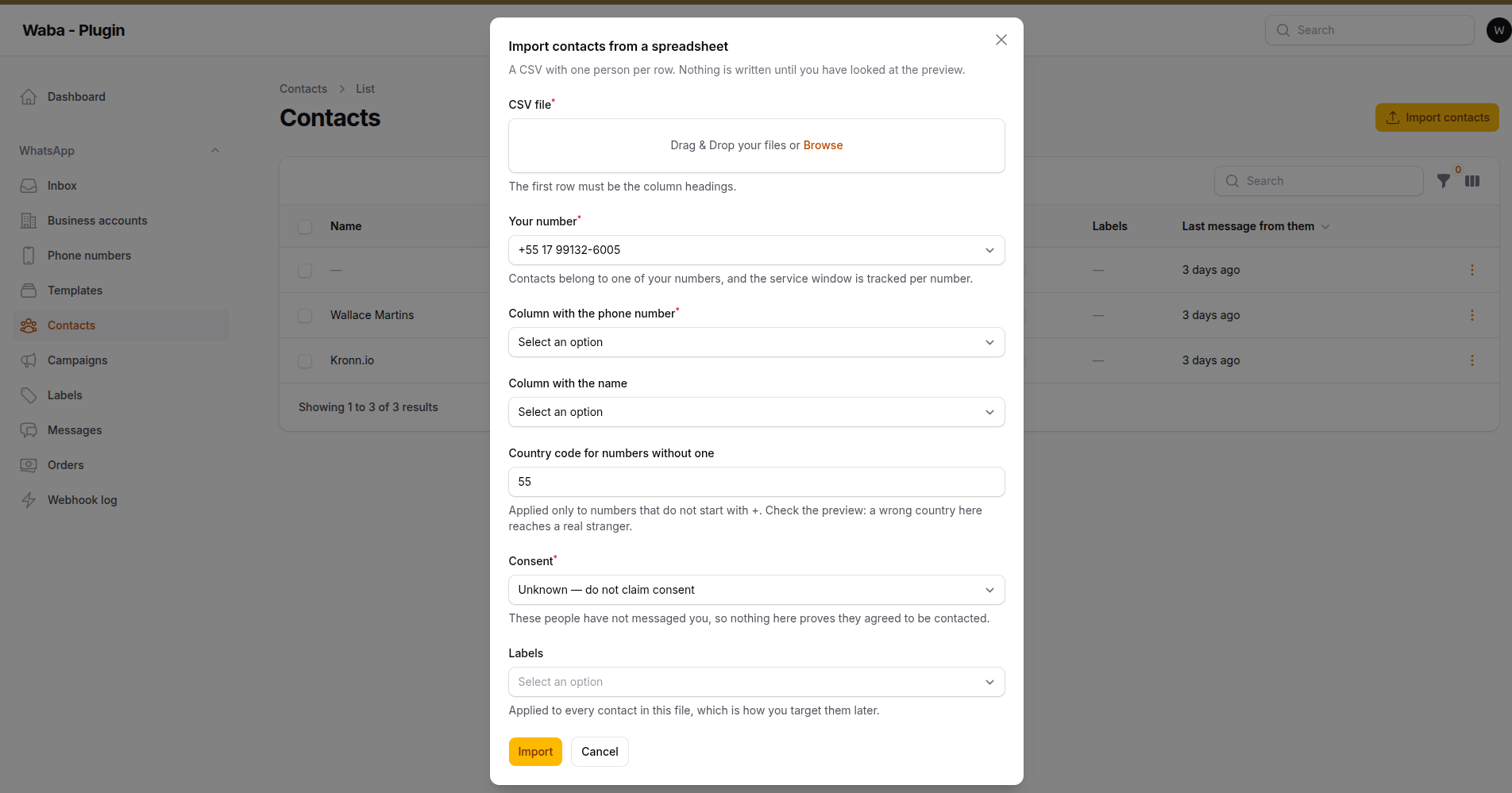
The import asks what consent you actually have, and defaults to claiming none
Contacts → Import contacts, on a CSV whose first row is the column headings. You choose the column holding the phone number, optionally one holding a name, the number the contacts belong to, and labels to apply to the whole batch.
Two things about it are deliberate, and both come from the same mistake.
The country code is asked for, never inferred. A number written without one
is genuinely ambiguous: a US number carrying its country code is eleven digits,
exactly as long as a Brazilian mobile written without one. There is no clever
way to tell them apart — and the wrong reading does not fail, it produces a real
number belonging to a stranger. So a leading + is honoured exactly as written,
and everything else gets the country you chose.
The preview is not optional. Before anything is written, the first rows are shown as they were understood, with the number a message would actually be sent to. Nobody checks five thousand rows; everybody checks eight. Rows the importer could not read, and numbers repeated inside the file, are shown as such rather than quietly dropped, and counted in the result.
A number already known is updated rather than duplicated, and a profile name WhatsApp reported stands: it is what the person calls themselves, and a spreadsheet does not overrule it. An empty name is filled in.
#Consent, and what an import cannot know
Imported contacts are recorded as consent unknown unless you state otherwise. They have not written to you, so nothing about them proves they agreed to be written to.
This matters more than it sounds, and it is worth being plain about the gap:
campaigns.require_opt_inskips people who opted out — but it can only protect somebody this database knows about. If a person unsubscribed through your CRM, your shop, or a form that never touched this package, nothing here records it, and a campaign built from a spreadsheet will write to them.
Where consent lives somewhere other than here, close the gap with:
'campaigns' => [
    // Only write to people who already exist as contacts here.
    'require_known_contact' => true,
],
Anybody not already a contact is then written down as skipped, with the reason
unknown_contact, rather than messaged. Off by default: turning it on changes
who a campaign reaches, and an upgrade must not quietly shrink somebody's
audience.
#Campaigns
Campaigns, before there are any
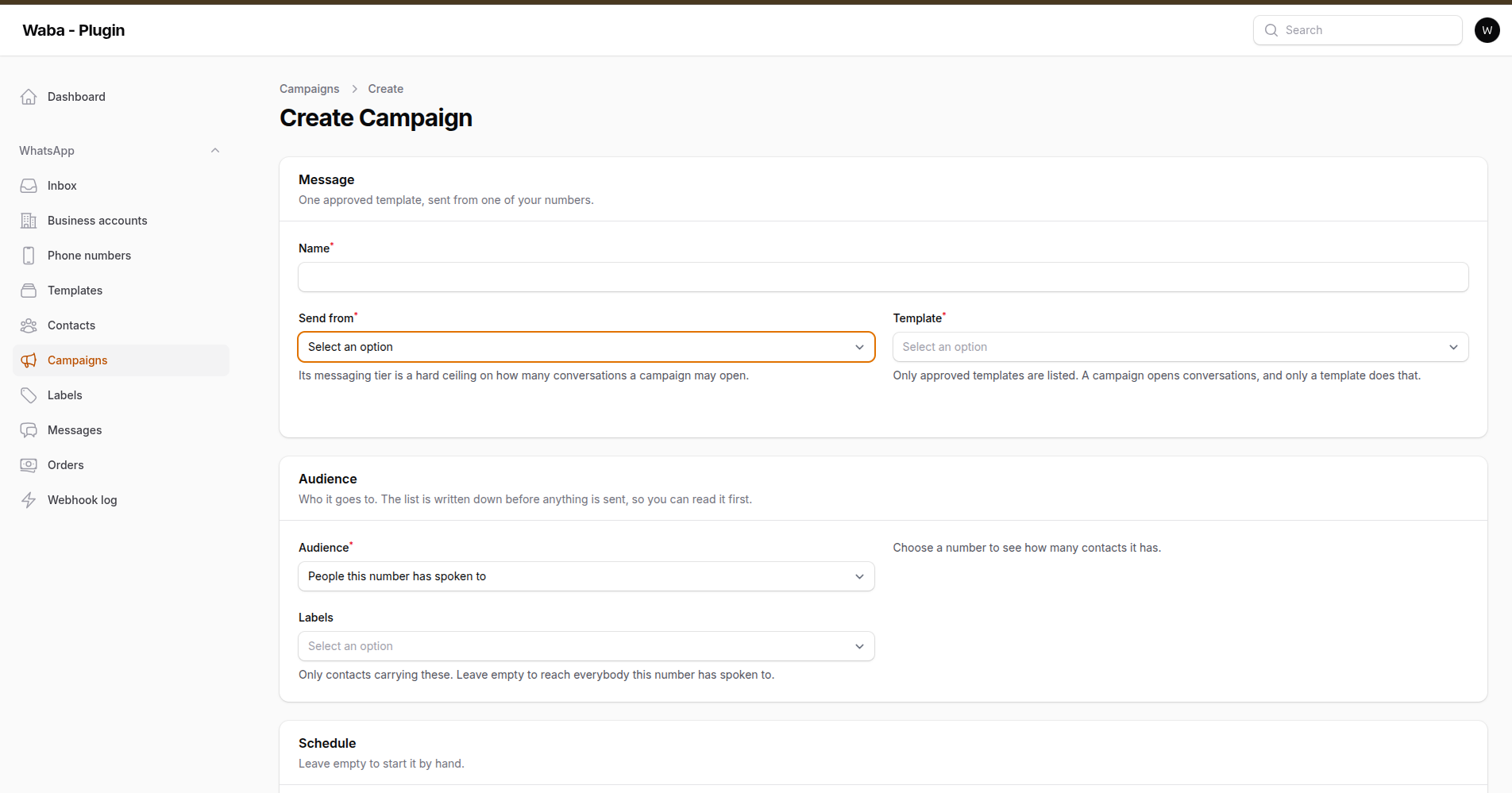
A campaign names its number, its template and its audience before anything is sent
One approved template, sent to a list of people. This is the only part of the package where a mistake is measured in money rather than in a retry, so most of it is safeguards.
Three deliberate steps, and only the last one spends anything:
- Describe it — the template, the number, where each placeholder gets its value.
- Build the list — free, reversible, and the only way to see the real numbers before committing to them.
- Start it — after a dry run and a typed confirmation.
#The list is written down first
Every recipient becomes a row before anything is sent, including the people it deliberately will not write to. Somebody who opted out is not a failure and is not counted as one — but "we sent 4,000 of 5,000" is only an answer if you can see what became of the other thousand, and each of them carries its reason: opted out, blocked, a duplicate in the uploaded file, or the campaign being cancelled before their turn.
Values are worked out when the list is built, not when each message is sent. So the preview is exactly what goes out, and a contact renamed in between does not quietly change a message somebody already approved.
The audience is either the people that number has already spoken to, or a CSV with a column per placeholder. An uploaded number already known here is matched to its contact, so the message lands on the existing conversation instead of opening a second one.
#What stands between the button and the sending
| Check | Why |
|---|---|
| The template is re-checked at start | Meta pauses templates for quality without warning. A campaign scheduled last week can find its template disabled this morning. |
| The number's messaging tier | Meta's own ceiling on conversations per rolling 24 hours. Going past it does not queue the rest for tomorrow — it refuses them, and a refused template still counts against the number's quality. |
| The daily cap | Counted across everything sent today, not just this campaign. A cap that only looked at the campaign in front of it would let two half-sized ones through. |
| Duplicates | The same number twice on a list is the usual way somebody gets billed for two messages. |
| Opt-out and blocked | Skipped, and visible as skipped. |
| Typed confirmation | Type the campaign's name, not tick a box. A tick is something a hand does on the way to the button. |
| Dry run | Every check above, with nothing sent, reported in the modal before the click. |
'campaigns' => [
    'throughput' => 60,            // messages per second, capped by the number's own limit
    'require_opt_in' => true,
    'daily_cap' => null,           // the one setting here that can become a five-figure invoice
    'require_confirmation' => true,
    'pricing' => [],               // your rates, per category — see below
    'currency' => 'USD',
],
#Cost
pricing ships empty on purpose. Meta charges per conversation by category
and by country, revises the rates, and runs promotions on some of them — any
table shipped inside a package would be wrong somewhere on the day it was
written. Fill in your own rates and the panel shows an estimate; leave it and
the panel says it cannot. Invent a number and somebody budgets against it.
#Pause, resume, cancel
Read by each job at the moment it runs rather than pushed into the queue driver.
That works on every driver, needs no job_batches table, and means a cancel
stops the next message rather than the next chunk. Nothing is pulled back out
of the queue — what has gone out has gone out, and a pause is not an undo.
#Scheduling
php artisan whatsapp:run-campaigns            # start whatever is due
php artisan whatsapp:run-campaigns --dry-run  # report what would start
A pull rather than a delayed job, deliberately: a campaign sitting in a queue for six days cannot be edited, cancelled or re-checked. Reading the due list at the moment of sending means every safeguard runs then, against the state of the world then. A campaign that is refused stays scheduled and says why, rather than quietly giving up.
#The report
Each recipient carries its own outcome, followed through to delivered and read
by the status webhooks — including the failures that only appear after Meta
accepted the request. A number that is not on WhatsApp is a 200 followed by a
failed status webhook, and a campaign that counted that as a success would be
lying.
#Payments in Brazil
order_details and order_status messages, with Pix dynamic codes, payment
links, boleto and one-click card payments.
use WallaceMartinss\FilamentWhatsAppCloud\Payments\{Money, Order, OrderDetails, OrderItem, PaymentSetting};

WhatsApp::to('5511988887777')
    ->orderDetails(new OrderDetails(
        referenceId: 'pedido-1042',
        body: 'Seu pedido está pronto para pagamento',
        total: Money::ofReais('62,50'),
        paymentSettings: [PaymentSetting::pix(
            code: $pixCodeFromYourBank,
            merchantName: 'Nostalgia Lanches',
            key: '39580525000189',
            keyType: PixKeyType::CNPJ,
        )],
        order: new Order([
            new OrderItem('sku-1', 'Bolo de cenoura', Money::ofReais('50,00')),
            new OrderItem('sku-2', 'Café', Money::ofReais('6,25'), quantity: 2),
        ]),
    ))
    ->send();
The subtotal is not passed in — it is derived from the items, because a number
you cannot get wrong beats a good error message about getting it wrong. The
total is then checked against it: Meta requires
total = subtotal + tax + shipping − discount, and a mismatch is refused here
rather than by a 400. Money is integers and an offset throughout, never floats.
#What this package does not do
Meta reconciles nothing. The
reference_idis the only thing tying a payment your PSP reports back to an order, which is why it is required and validated rather than generated.
Every payment method is a handle onto something a bank or a PSP produced — a Pix code, a checkout URL, a stored card credential. Producing them, and knowing when money arrives, is your integration with that provider.
#One-click payments
When a buyer taps Send payment, Meta sends an inbound interactive message of
type payment_method. That is an authorisation, not a payment, so the package
records it and hands it to you:
use WallaceMartinss\FilamentWhatsAppCloud\Events\PaymentConfirmationReceived;

Event::listen(function (PaymentConfirmationReceived $event): void {
    // Charge $event->credentialId with your PSP, then say what happened:
    WhatsApp::to($event->order->contact->wa_id)
        ->orderStatus(new OrderStatusUpdate(
            referenceId: $event->referenceId,
            body: 'Pagamento aprovado',
            orderStatus: OrderStatus::PROCESSING,
            paymentStatus: PaymentStatus::CAPTURED,
        ))
        ->send();
});
Nothing is marked paid until you say so, because only you can know.
#Orders in the panel
Every order sent is recorded, with a history of how it reached its current state — the question asked when money has gone missing. Read-only: an order exists because a message carried it, and a create form would produce one the buyer never saw.
FilamentWhatsAppCloudPlugin::make()->orderResource()
Off by default. Payments need a verified business and a payment provider, and an empty Orders screen promises something the account cannot do.
#Shared contacts
A contact somebody sends arrives as a card, and the panel draws it the way WhatsApp does: the person, and two things you can do with them.
Message opens a thread with them, on the number the card arrived on. It is
offered only when Meta put a wa_id on the phone — its way of saying that
number has an account — because a thread with a number that has none is one
nothing can be delivered to. The panel says out loud that a new thread carries
only an approved template until they reply, since the composer is about to show
a template picker and the reason is otherwise a mystery.
View opens the rest: every phone, email, address, the organisation and the birthday, none of which fits on a bubble.
Meta sends the card twice — as a structured object and as a base64 vCard — and
they do not hold the same things. The business name lives only in the vCard,
under X-WA-BIZ-NAME, and it is often the most useful field on the card: a
name being a shop rather than a person changes what an agent does next. Both
halves are read, the object first.
There is no photo. The Cloud API exposes a business's own profile picture and never a customer's, so the avatar is initials — not as a fallback, but as the only thing available.
#Polls, and why they are not here
They cannot be. Not by this package, and not by any other using the official API.
Send a poll to a business number and Meta does not relay it. What arrives is an envelope with the content stripped out:
{
  "type": "unsupported",
  "unsupported": { "type": "poll_creation" },
  "errors": [{ "code": 131051, "error_data": { "details": "Message type is currently not supported." } }]
}
No question, no options, no votes — and one of these per vote cast, as
poll_update. There is nothing to render because nothing was sent. There is no
endpoint to send one either: polls are a feature of the WhatsApp app, not of
the Cloud API.
The inbox names them rather than printing "Unsupported", because seven of those in a row reads as a fault in the panel and sends somebody looking for a bug that is not there. It draws them as a centred system line rather than a bubble, and folds a consecutive run into the first of them:
🚫 A poll — WhatsApp does not deliver polls to business accounts · 6 × A vote on a poll 18:40
An event, not a message: there is nothing to read and nothing to reply to, and one bubble each gives a poll's seven empty envelopes more of the screen than the conversation they interrupted. A run broken by a message that did arrive is two runs — the order things happened in is the one thing a thread is for.
What the API does have is the thing people usually want from a poll: a question the customer answers by tapping, whose reply arrives as an ordinary inbound message. The composer's Question with options does exactly that, and picks the shape from the number of answers, which is Meta's rule rather than a preference:
| Answers | Sent as | Limits |
|---|---|---|
| 2–3 | Reply buttons, on the message itself | 20 characters each |
| 4–10 | A list behind a button | 24 characters each, 10 rows |
What you do not get is the tally. WhatsApp counts poll votes; this counts nothing — each answer comes back as its own message from the person who sent it, which is more useful for a conversation and less useful for a survey.
#Groups, and why they are not here
Meta does have a Groups API for the Cloud API, and this package does not use it. The reasons are worth writing down so nobody has to rediscover them.
It is gated on an Official Business Account — the green tick, which is
awarded on brand notability review, not applied for. Asking for the edge
without one answers (#10) Application does not have permission for this action, which is a permission refusal rather than a missing feature: a
made-up edge on the same node answers Unknown path components instead.
Whether a number has the tick is already synced and shown on its page.
The shape is narrower than the word suggests: eight participants per group, joined only through an invite link the business sends. That is a small shared room — a family about the same order, three teams on one case — rather than a broadcast channel or a community.
If you have an OBA and want it, the design work is not small: a group is an addressable thing with many members, and the 24-hour service window that governs everything in this package belongs to a person. It would be a second shape of conversation, not another column.
#Media
An outbound file is uploaded once and reused by checksum for the 30 days Meta keeps the id. Size and type are checked locally first, so an oversized image fails with a sentence instead of a wasted request and error 131053.
Inbound files are downloaded on their own queue, because the URL Meta returns expires after five minutes. Each attempt asks for a fresh URL rather than reusing the dead one — the id itself stays valid for thirty days, so a retry always recovers.
#Webhooks
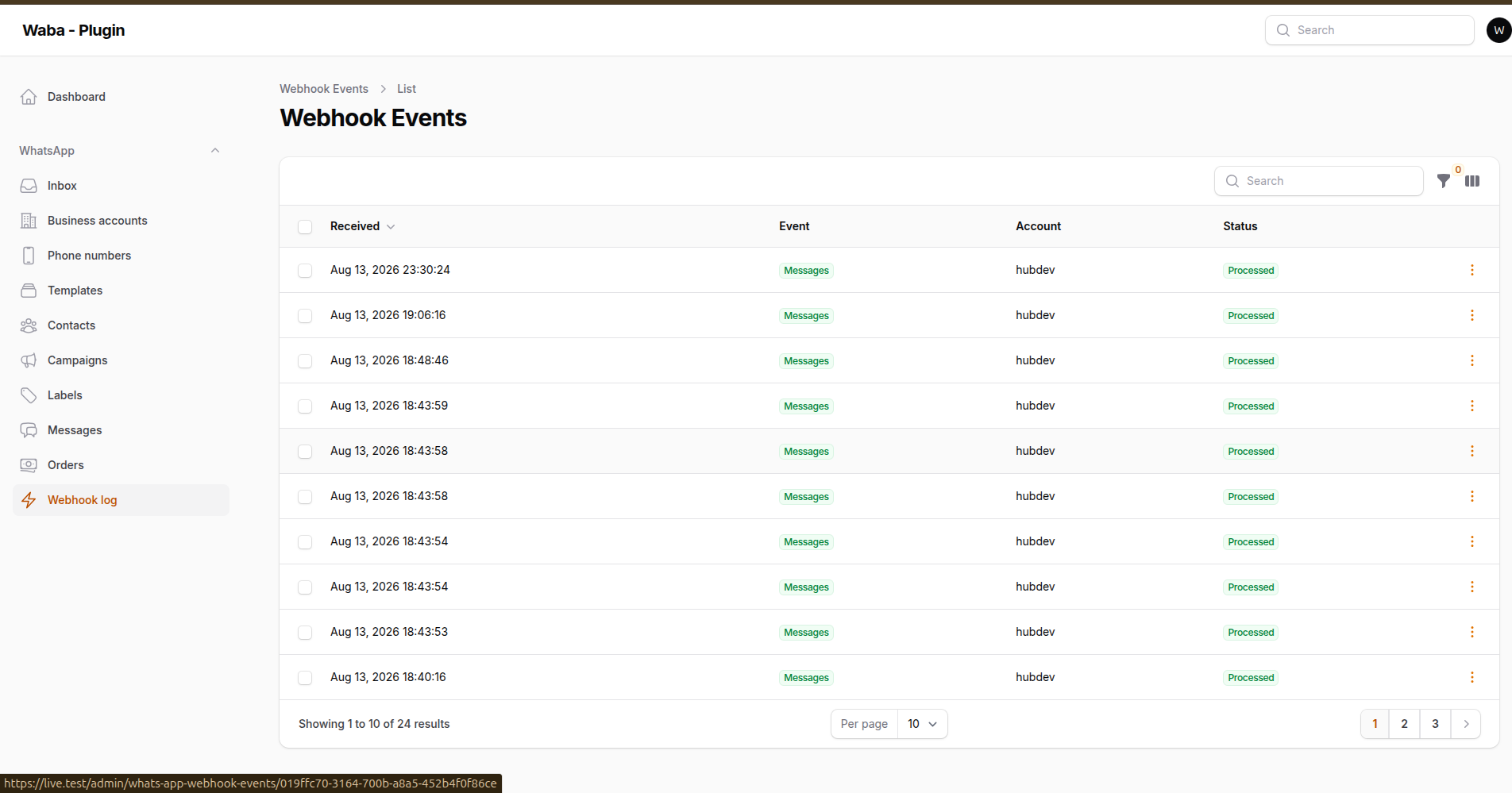
Every delivery is stored, so a handler fixed after the fact can be replayed against it
Every account gets its own callback URL:
https://your-app.test/whatsapp/webhook/{a-random-identifier}
Register it in your Meta app with the account's verify token, then press
Subscribe webhook. A shared /whatsapp/webhook endpoint also exists for
installations running a single Meta app.
The per-account URL is the recommended one. A webhook's signature is an HMAC-SHA256 over the raw body keyed with the app secret, so the endpoint has to know which secret before it can trust anything — and taking that from the path means the body is never parsed before it has been verified. A payload that fails verification leaves no row, queues no job and produces no side effect.
#Reacting to events
use WallaceMartinss\FilamentWhatsAppCloud\Events\MessageReceived;

class ReplyToInbound
{
    public function handle(MessageReceived $event): void
    {
        $event->message->text();             // readable text of any message type
        $event->message->mediaId();          // for image, audio, video, document, sticker
        $event->message->replyId();          // which button was tapped
        $event->message->isFreeEntryPoint(); // came from a Click-to-WhatsApp ad
    }
}
| Event | Raised when |
|---|---|
WebhookReceived |
a verified delivery was recorded, before anything acted on it |
MessageReceived |
somebody sent you a message |
MessageStatusUpdated |
Meta reported sent, delivered or read |
MessageFailed |
a message could not be delivered |
PhoneNumberQualityChanged |
a number was re-rated or moved messaging tier |
PhoneNumberNameUpdated |
Meta decided on a requested display name |
AccountReviewUpdated |
the account review finished |
AccountAlertReceived |
a violation, restriction, ban or capability change |
TemplateSubmitted |
a template was sent to Meta for review |
TemplateStatusChanged |
Meta approved, rejected, paused or disabled a template |
TemplateCategoryChanged |
Meta moved a template between categories — a billing change |
TemplatesSynced |
a template pull finished for one account |
CampaignStarted |
a campaign passed every check and its messages are queued |
CampaignCompleted |
nobody is left waiting, with the counts as they were |
Status updates arrive out of order — a delayed delivered can follow
read. Use MessageStatus::precedes() so a status only ever moves forward.
#Handling a field yourself
app(WebhookRouter::class)->register('flows', FlowResponseHandler::class);
Any field can be claimed, including ones the package already handles. A field with no handler is still recorded and visible in the log.
#Replay
Meta does not resend webhooks. When a handler has a bug, the events have already arrived — replaying from the stored payload is the only way to recover that window once a fix ships:
php artisan whatsapp:replay-webhook --failed
php artisan whatsapp:replay-webhook --pending --field=messages
Handlers are written to be safe to repeat, because Meta redelivers and queues retry.
#Commands
php artisan whatsapp:sync                       # refresh accounts and numbers
php artisan whatsapp:sync --account=WABA_ID     # just one
php artisan whatsapp:sync --queue               # push the work onto the queue
php artisan whatsapp:sync-templates             # pull message templates back
php artisan whatsapp:run-campaigns              # start whatever is scheduled
php artisan whatsapp:test-connection            # can each account still reach Meta?
php artisan whatsapp:verify-tokens --deactivate # daily health check
php artisan whatsapp:replay-webhook --failed     # re-run failed webhook events
php artisan whatsapp:cleanup                     # apply the retention policy
php artisan whatsapp:install-broadcasting        # swap the inbox's polling for a websocket
php artisan whatsapp:install-broadcasting --check # report the realtime setup, change nothing
A System User token is permanent in theory, but it stops working the moment
someone removes the system user, revokes the app's permissions or the business
changes hands — none of which produces a notification. Schedule
whatsapp:verify-tokens daily and listen for AccountTokenExpired.
#Customising the views
Everything the panel draws is a Blade view, and all of them can be published:
php artisan vendor:publish --tag=filament-whatsapp-cloud-views
They land in resources/views/vendor/filament-whatsapp-cloud/, and Laravel
prefers them over the package's without further configuration.
A published view is a frozen copy. From that moment, every fix shipped to that file is invisible to you — nothing breaks, nothing warns, the change simply never arrives. In a week of this package's history, five corrections landed in the inbox views alone: the audio waveform's sizing, the scrubber agreeing with the played bars, undeliverable messages folding into one line, the contact card, the location preview. An installation that had published the directory would have received none of them, and would have reported the bugs again.
So publish the one file you are changing, not the directory:
php artisan vendor:publish --tag=filament-whatsapp-cloud-views
# then delete everything you did not actually modify
One frozen file is a risk you can hold in your head at upgrade time. Sixteen is not.
#Translations are different
php artisan vendor:publish --tag=filament-whatsapp-cloud-translations
These merge rather than replace: Laravel loads the package's strings and lays yours over the top, key by key. A published file that is missing a key — because the package added one after you published — falls back to the package's own string rather than printing a raw translation key.
That makes overriding a handful of strings safe. It is the reason to reach for a published translation to reword something, and for a published view only when the markup itself has to change.
#Configuration
The published config file controls behaviour, not secrets. No credential is
read from .env — each business account stores its own encrypted access
token, app secret and webhook verify token in the database.
That is not a stylistic choice. A webhook's X-Hub-Signature-256 is an HMAC
computed with the app secret of the Meta app that owns the subscription. With
the manual-token onboarding model each tenant creates its own System User in
its own Business Portfolio, which in practice means one Meta app per tenant.
A single shared secret in .env would reject the webhooks of every tenant but
one. The only secret that stays outside the database is Laravel's APP_KEY,
which encrypts the rest.
The defaults section exists purely to prefill the "new account" form on
single-app installations:
WHATSAPP_APP_ID=
WHATSAPP_APP_SECRET=
WHATSAPP_WEBHOOK_VERIFY_TOKEN=
#Every key
| Key | Default | What it does |
|---|---|---|
graph.version |
v25.0 |
Graph API version, pinned per install. An account can override it. |
graph.timeout / connect_timeout |
30 / 10 |
Seconds. |
graph.retry.times |
3 |
Attempts. Only 429 and 5xx are retried — a 4xx is a validation failure, and retrying a send risks duplicates. |
graph.retry.sleep / max_sleep |
250 / 30000 |
Milliseconds. Retry-After always wins over the computed backoff. |
graph.appsecret_proof |
true |
Signs every request with the app secret. |
defaults.* |
null |
Prefills the new-account form on single-app installs. Not credentials at runtime. |
webhook.path |
whatsapp/webhook |
Base callback path. Each account also gets its own URL under it. |
webhook.verify_signature |
true |
Never turn this off in production. |
webhook.queue |
true |
Process deliveries on the queue. Meta wants a fast 200. |
messaging.outside_window |
throw |
throw, queue or template — what happens once the 24-hour window has closed. |
messaging.fallback_template |
null |
Used when outside_window is template. |
messaging.default_country_code |
null |
Prepended to numbers typed without one. |
media.disk / directory |
public / whatsapp |
Where inbound media is stored. |
media.max_size |
per type | Checked locally, so an oversized file fails with a sentence instead of a 131053. |
templates.auto_sync |
true |
Schedules whatsapp:sync-templates. |
templates.sync_interval |
60 |
Minutes. Turned into a cron expression that means what it says above 59. |
templates.default_language |
pt_BR |
Preselected in the builder. |
inbox.enabled |
true |
Registers the inbox page. |
inbox.poll_interval |
10 |
Seconds between refreshes while the driver is poll. |
inbox.mark_read_on_open |
true |
Opening a conversation clears its unread count. |
inbox.map.provider |
null |
osm, google or null. Null keeps the link-only behaviour and sends nothing anywhere. |
inbox.map.key |
null |
Google Static Maps API key. Required for google, unused by osm. |
inbox.map.zoom / width / height |
15 / 256 / 140 |
Size is capped at one tile — past that the assembled square stops covering the viewport. |
realtime.driver |
poll |
poll, broadcast or auto — see Keeping it current. |
realtime.channel |
whatsapp-cloud |
The private channel for the whole package. The tenant key is appended when tenancy is on. |
realtime.safety_net_interval |
60 |
Seconds between the fallback refreshes under auto. |
realtime.broadcaster |
null |
A connection from config/broadcasting.php. null uses the default. |
realtime.queue_connection |
null |
sync sends broadcasts inline, for installations with no worker. |
realtime.authorize |
null |
fn ($user, ?string $tenant): bool. null defers to Filament's tenancy check, which fails closed. |
campaigns.enabled |
true |
Registers the campaign resource. |
campaigns.throughput |
60 |
Messages per second, capped by what the number can actually do. |
campaigns.require_opt_in |
true |
Opted-out contacts are skipped rather than sent to. |
campaigns.require_known_contact |
false |
Only write to people who already exist as contacts. Closes the gap where an opt-out lives in another system — see Consent. |
campaigns.daily_cap |
null |
The one setting here that can become a five-figure invoice. Counted across everything sent today. |
campaigns.require_confirmation |
true |
Starting a campaign asks for its name to be typed. |
campaigns.pricing / currency |
[] / USD |
Your rates per template category. Empty on purpose — see Campaigns. |
tenancy.enabled |
false |
Turns on strict tenant scoping. |
tenancy.column / table / model |
team_id / teams |
Where the tenant lives. |
storage.messages |
true |
Persist inbound messages and delivery reports. Off for applications with their own store. |
queue.name |
default |
The queue everything is dispatched on. |
queue.media_queue |
null |
Null shares queue.name. Name a separate queue only once a worker consumes it — otherwise inbound media silently never downloads. |
cleanup.* |
see file | Retention for webhook events, messages and media. |
logging.log_payloads |
false |
Leave it off. Payloads carry personal data. Tokens and numbers are redacted regardless. |
filament.navigation_group / sort / cluster |
null / 100 |
Where the package sits in the panel. |
#Graph API version
The Graph API version is pinned in configuration and never follows "latest":
'graph' => ['version' => env('WHATSAPP_GRAPH_VERSION', 'v25.0')],
Meta deprecates versions roughly every two years. Individual accounts can override the version, which makes it possible to migrate one account at a time.
#From your own code
Everything here works outside the panel — in a job, a command, a controller, anywhere.
#The facade
There is one, and it is aliased globally, so it needs no import:
WhatsApp::to('5511999998888')->text('Your order has shipped')->send();
WhatsApp::to($recipient) |
Starts a message. Returns a MessageBuilder. |
WhatsApp::from($phoneNumber) |
Same, from a specific one of your numbers. |
WhatsApp::markAsRead($message) |
The blue ticks on their phone. |
WhatsApp::windowIsOpen($contact) |
bool — see The 24-hour service window. |
WhatsApp::windowExpiresAt($contact) |
?CarbonInterface |
WhatsApp::guard() |
The ServiceWindowGuard behind the two above. |
The builder is where the volume is — text, image, video, audio,
sticker, document, location, contacts, react, buttons/button,
list/section, ctaUrl, template/useTemplate, orderDetails,
orderStatus, replyTo — closing with send() or toPendingMessage(). See
Sending.
#The services
Everything else is a container singleton rather than a facade. Type-hint it or
resolve it with app(); there is no alias to learn and no static call to mock.
| Conversations | ConversationRegistry, ServiceWindowGuard, MessageSender, MediaManager |
| Accounts | AccountConnector, AccountSyncService, TokenValidator, CredentialResolver |
| Templates | TemplateManager, TemplateSyncService |
| Campaigns | CampaignAudience, CampaignEstimate, CampaignDispatcher |
| Webhooks | WebhookRouter, WebhookAccountResolver |
| Graph | WhatsAppApi, CloudApiClient |
| Infrastructure | TenantResolver, Realtime, OnboardingDriver |
Two of them are meant to be replaced rather than used. Rebind
CredentialResolver to keep tokens somewhere other than the database — Vault,
Secrets Manager — and OnboardingDriver to connect accounts by some route
other than a pasted token. Nothing else in the package changes.
$this->app->singleton(CredentialResolver::class, VaultCredentialResolver::class);
#Using the API client
WhatsAppApi is the way in when the builder does not cover what you need. It
returns one endpoint object per Graph resource, already carrying the account's
credentials:
use WallaceMartinss\FilamentWhatsAppCloud\Services\WhatsAppApi;

$api = app(WhatsAppApi::class);

$api->waba($account);            // the business account itself
$api->phoneNumbers($account);    // numbers, registration, quality
$api->businessProfile($account); // about, address, profile picture
$api->messages($account);        // sending, at the level below the builder
$api->media($account);           // upload, download, delete
$api->templates($account);       // create, submit, list, delete
$api->uploads($account);         // resumable upload, for large files
Each takes either a WhatsAppBusinessAccount or an AccountCredentials, so
code that has not stored an account yet can still call Meta.
Below all of them is CloudApiClient, for a request no endpoint wraps:
use WallaceMartinss\FilamentWhatsAppCloud\Credentials\AccountCredentials;
use WallaceMartinss\FilamentWhatsAppCloud\Services\CloudApiClient;

$client = app(CloudApiClient::class)->withCredentials(new AccountCredentials(
    wabaId: '123456789012345',
    accessToken: $token,
    graphVersion: 'v25.0',
    appId: '987654321098765',
    appSecret: $appSecret,
));

$account = $client->get('123456789012345', ['fields' => 'name,currency']);
The client is immutable: withCredentials() returns a copy, so the container
singleton can never leak one tenant's token into another tenant's request.
#Error handling
Meta answers 400 for situations as different as an expired token, a missing
template and a closed service window. Only the numeric code tells them apart,
so errors arrive as typed exceptions:
use WallaceMartinss\FilamentWhatsAppCloud\Exceptions\OutsideServiceWindowException;
use WallaceMartinss\FilamentWhatsAppCloud\Exceptions\RateLimitException;
use WallaceMartinss\FilamentWhatsAppCloud\Exceptions\TemplateException;

try {
    $client->post("{$phoneNumberId}/messages", $payload);
} catch (OutsideServiceWindowException) {
    // The 24-hour window closed: only an approved template can re-engage.
} catch (RateLimitException $e) {
    $this->release($e->retryAfterSeconds() ?? 60);
} catch (TemplateException $e) {
    report($e);   // context() carries Meta's fbtrace_id
}
Requests are retried with exponential backoff on 429 and 5xx only. A 4xx
validation failure is never retried: it would burn quota and, for message
sends, risk duplicates.
#Database support
| Engine | Versions the suite runs against |
|---|---|
| MySQL | 8.4 |
| MariaDB | 11 — run by hand, not in the matrix |
| PostgreSQL | 14, 16 |
| SQLite | unit suite only |
MariaDB 11 has been run against the full schema and the panel by hand, so it is a supported target rather than an assumption. It is still outside the CI matrix, which means a regression there would reach a release without failing a build.
SQLite is deliberately not a supported production target. It ignores column lengths, accepts almost any DDL and leaves foreign keys off by default, so a migration that is broken on PostgreSQL still passes there — which is why the matrix exists and why the full suite is run against every supported engine before a release.
#Troubleshooting
The panel translates Meta's codes into sentences (see resources/lang/*/errors.php),
which is the point of having them. These are the ones worth knowing by heart.
| What you see | What it actually means |
|---|---|
131047 outside the panel |
The 24-hour window closed. Only an approved template will be delivered. The package normally refuses this before the request. |
132000 on a template send |
The parameter count does not match the template. useTemplate() catches this locally and names the placeholder; template() by name does not. |
132001 |
The template does not exist in that language. Run whatsapp:sync-templates. |
132015 / 132016 |
The template was paused for quality or disabled. It was approved once; nothing you changed broke it. Check the template's quality score. |
131026 |
The number is not on WhatsApp. Arrives as a 200 followed by a failed status webhook, not as a refusal. |
190 on everything |
The System User token was revoked, or the system user was removed. Nothing warns you — schedule whatsapp:verify-tokens. |
133010 |
The number exists at Meta but was never registered with the Cloud API. Use the "Register" action with its two-step PIN. |
| Webhooks configured but nothing arrives | The callback URL is registered but the app is not subscribed to the WABA. Use "Subscribe webhook" on the account. |
Webhook returns 401 |
The signature did not verify. The app secret stored on the account must belong to the app that owns the subscription. |
| A template was approved and now sends nothing | Meta moved it to PAUSED, DISABLED, or deleted it in WhatsApp Manager. The template list shows all three; campaigns re-check before starting. |
Messages sit in queued |
No queue worker is running, or it is not consuming the configured connection. |
| A campaign refuses to start | Read the message — it names which check failed and the numbers behind it. |
#Translations
Fourteen languages ship with the package:
| Western Europe | English, Portuguese (BR), Spanish, French, German, Italian, Dutch |
| Central and Eastern Europe | Polish, Ukrainian, Russian |
| Middle East and Asia | Turkish, Arabic, Chinese (Simplified), Japanese, Korean |
en is the source of truth, and a test compares every other locale's keys
against it — a locale that drifts fails the suite rather than showing a raw
translation key in the panel. The test discovers locales from the directory, so
a language added without being registered anywhere is still checked.
Plural rules follow the language rather than the English. Polish, Russian and Ukrainian take four forms and Arabic six, because 1 номер, 2 номера and 5 номеров are three different words, and the English pair would print the wrong one four times in ten.
Arabic ships as text, not as layout. Translating the strings does not mirror the panel: several components in the inbox — the audio player, the map preview, the contact card — position themselves with explicit
leftandmargin-left, written inline so a host application's CSS build cannot purge them. Those do not flip. The panel is readable in Arabic and still laid out left to right. Making it genuinely RTL is a separate piece of work on the components, not on the translations.
errors.php is the file worth translating first. Meta's own error text is
written for whoever built the integration; these strings are what somebody using
the panel actually reads.
Adding a locale is a bounded job: copy resources/lang/en, translate, and the
parity test tells you if you missed a key. If you translate one for your own
use, send it in — it will ship in the next release with the credit.
To reword a handful of strings rather than translate a whole language, publish the translations instead — see Customising the views, which explains why that is safe and why publishing views is not.
#Dashboard widgets
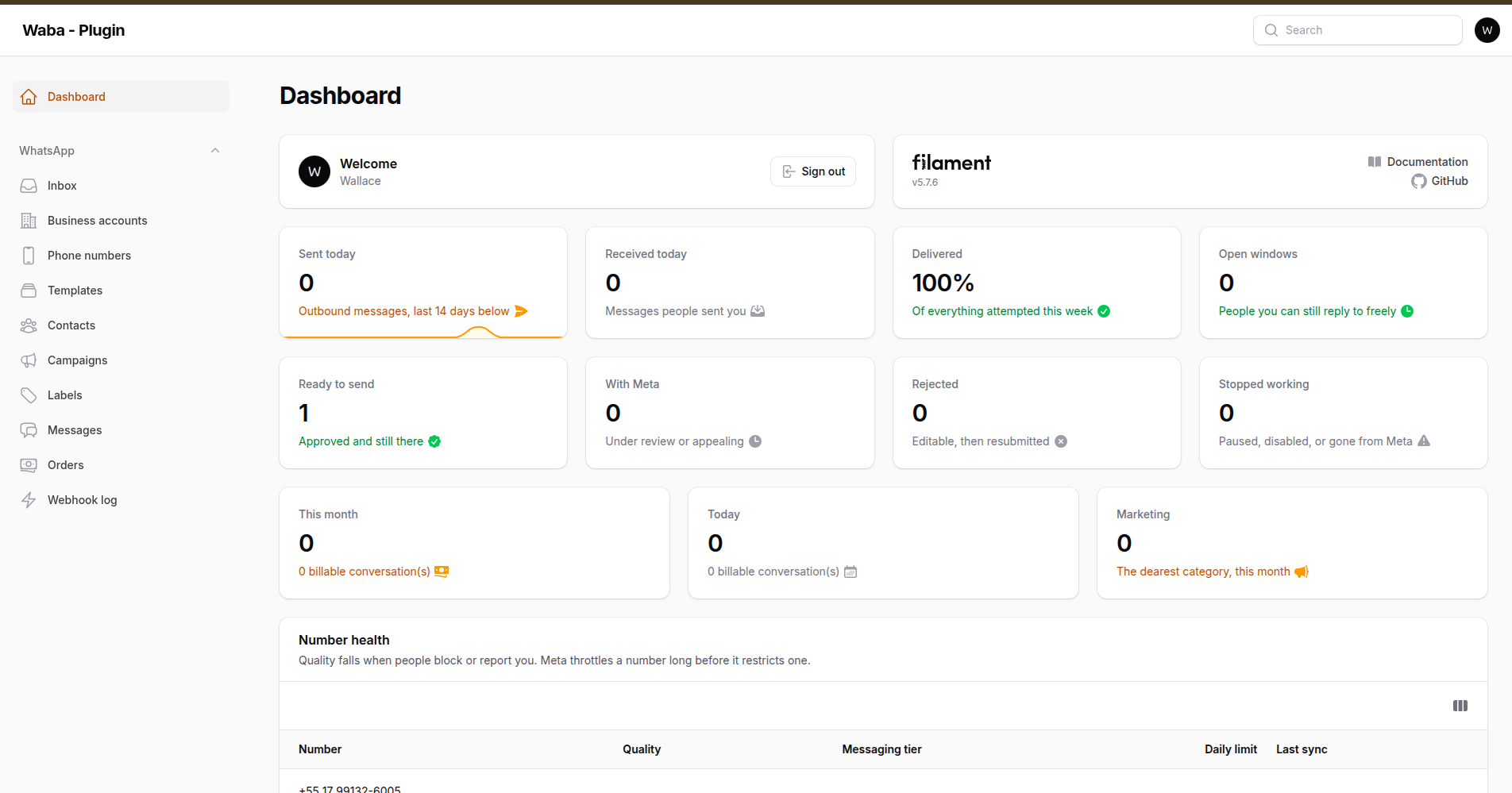
What was sent, what is billable, and which templates can still be used
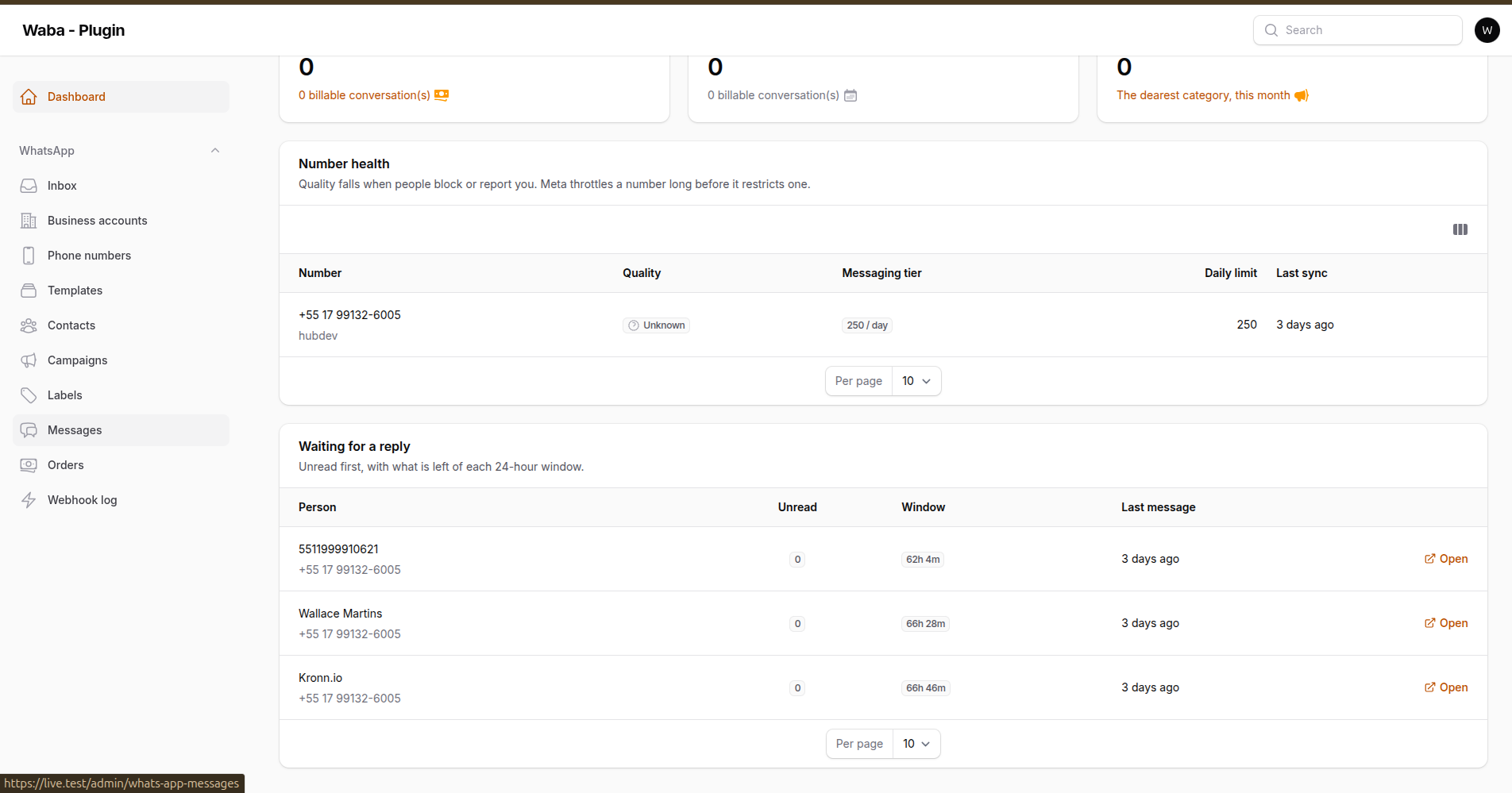
Number health, and who is still inside their 24-hour window
Off unless you ask for them, because a panel's dashboard belongs to the application:
FilamentWhatsAppCloudPlugin::make()->widgets()          // all of them
FilamentWhatsAppCloudPlugin::make()->widgets([          // or pick
    MessagesOverviewWidget::class,
])
| Widget | What it is for |
|---|---|
MessagesOverviewWidget |
Sent, received, delivery rate over the week, open windows. A thousand sends is not news; a thousand that did not arrive is. |
TemplateStatusWidget |
Ready, waiting on Meta, rejected, and stopped working — approved templates that Meta paused or disabled. |
EstimatedCostWidget |
Billable conversations this month, priced if you configured rates. |
QualityRatingWidget |
Per-number quality and tier, worst first. Quality falls long before sending fails. |
RecentConversationsWidget |
Who is waiting, unread first, with the countdown on each window. |
#Testing
composer test           # full suite
composer test:arch      # architecture rules only
composer analyse        # PHPStan level 6, plus level 8 over the core
composer lint           # code style
composer check          # all of the above
#Support
Licence holders get support by email at
wallacemartinss@gmail.com. Include the
package version, the Filament and Laravel versions, and — for anything Meta
refused — the error code and the fbtrace_id from the logs. That last one is
what lets Meta's own support find the request, and it is in every exception
this package raises.
A licence includes updates for the period stated at purchase. What that does and does not promise is in LICENSE.md; the short version is that Meta changes the platform on its own schedule and no support commitment can cover their decisions.
Security issues do not go by email. See SECURITY.md.
#Working on your copy
The licence permits modifying the package for your own use, and the source
ships readable for that reason. CONTRIBUTING.md, shipped with the source, covers what
you need to do it safely: the two-branch policy, how to run a checkout inside a
real application, and how to run the suite against each database engine.
If you translate a locale or fix something worth having, send it in — it ships in the next release with the credit.
#Credits
#License
Commercial. See LICENSE.md.
A licence covers a number of projects rather than a number of end users, and an agency under an unlimited licence does not need one per client. The source ships readable and modifiable — being able to change it is part of what is bought; what is not permitted is passing the package itself on.
The author
Solutions Architect and full-stack engineer, 18 years across cloud and software. Founder of Kronn.io & HubDev.io. I build with Laravel, Filament, and a bias for shipping.
From the same author
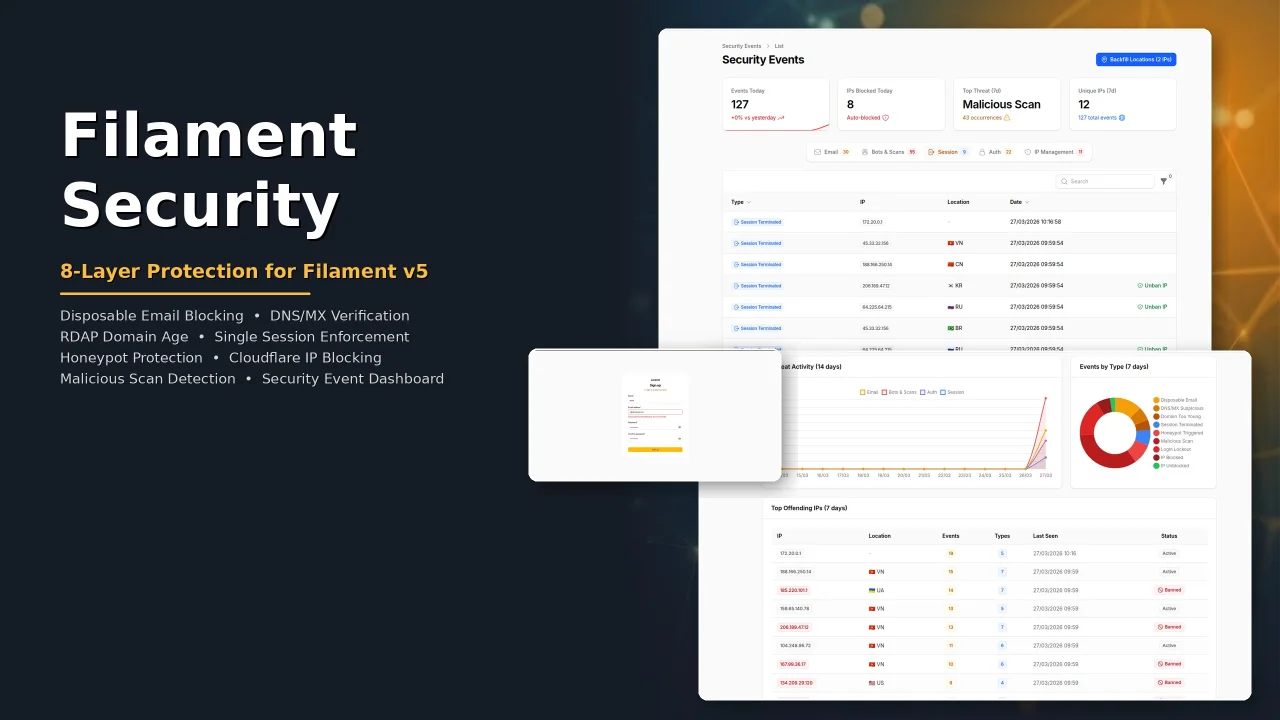
Security
Security plugin for Filament with eight protection layers: disposable email blocking, DNS/MX verification, RDAP domain age check, single session enforcement, honeypot bot protection, Cloudflare IP blocking, malicious scan detection, and a security event dashboard with real-time analytics.
Author:
Wallace Martins
Ultimate Icon Picker
A modern, responsive icon picker interface to your Filament applications. Seamlessly supporting all blade-icons sets, it features smart real-time search, performance-optimized infinite scrolling, and versatile integration across Forms, Tables, and Infolists, allowing for effortless icon management and customization with a superior user experience.
Author:
Wallace Martins
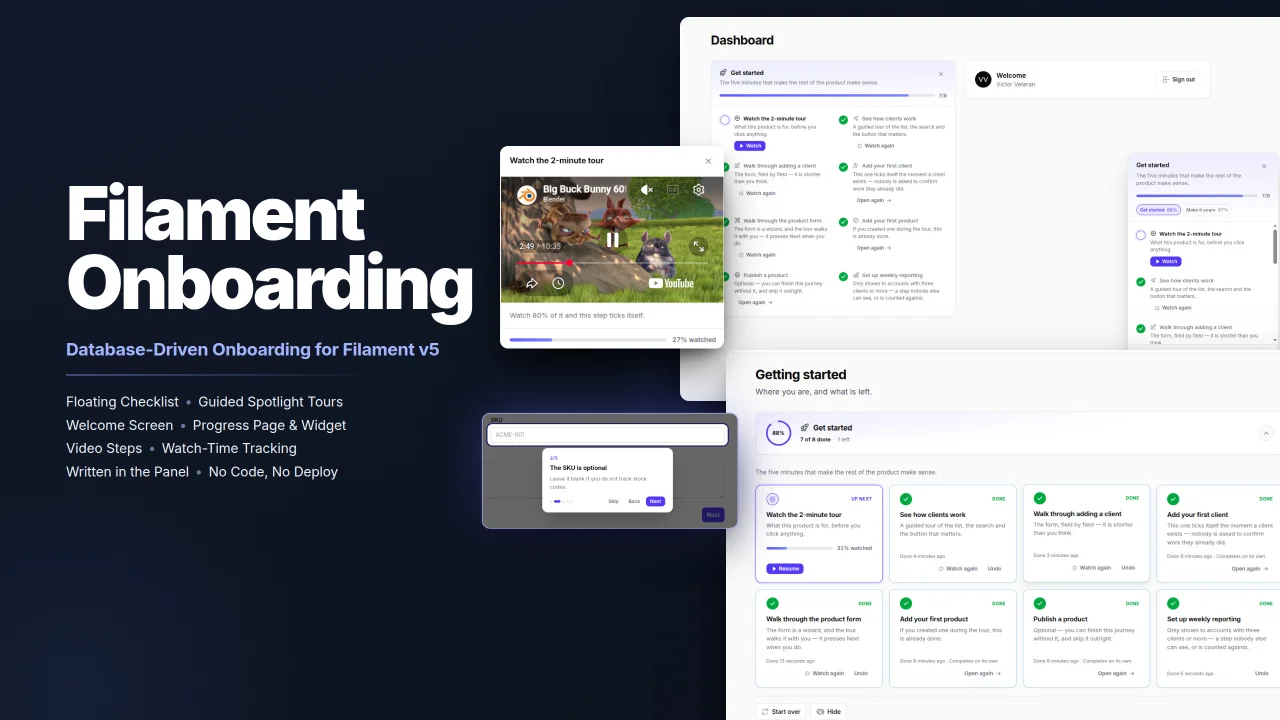
Onboarding
Filament Onboarding gives your users a floating progress checklist, guided spotlight tours and videos, all written in the panel instead of in code, with steps that complete themselves for people who have already done the work.
Author:
Wallace Martins
WhatsApp Connector
Seamlessly integrates WhatsApp capabilities into your Laravel application using the Evolution API v2. Built natively for Filament v4 with full multi-tenancy support, it provides a real-time QR code interface for instant connection. The package empowers developers to send text, media, and document messages effortlessly via dedicated Actions or Service Traits, while handling webhooks and ensuring security through environment-based credential storage.
Author:
Wallace Martins
Featured Plugins
A selection of plugins curated by the Filament team

Blueprint
Filament Blueprint is a premium Laravel Boost extension that helps AI agents produce accurate, detailed implementation plans and security reports for Filament apps.
 Filament

Custom Dashboards
Let your users build and share their own dashboards with a drag-and-drop interface. Define your data sources in PHP and let them do the rest.
Filament

Spotlight Pro
Browse your Filament Panel with ease. Filament Spotlight Pro adds a Spotlight like Command Palette to your Filament Panel.
 Dennis Koch

