
Security by Wallace Martins
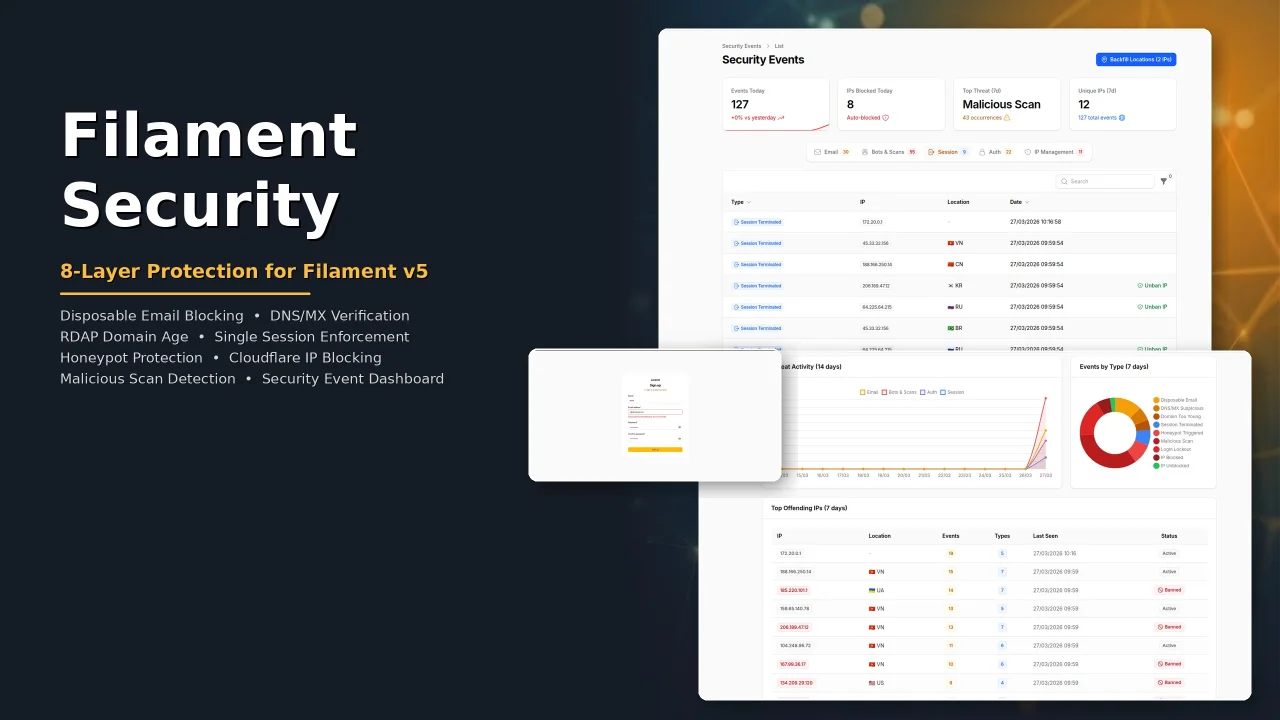
CommunitySecurity plugin for Filament with eight protection layers: disposable email blocking, DNS/MX verification, RDAP domain age check, single session enforcement, honeypot bot protection, Cloudflare IP blocking, malicious scan detection, and a security event dashboard with real-time analytics.
 Author:
Wallace Martins
Author:
Wallace Martins
Package health
BetaAutomated checks of this plugin's Composer package
15 checks
- Passed: GitHub Actions pinned to SHA
- Skipped: GitLab CI includes pinned to SHA
- Passed: Open security advisories
- Passed: Dependabot PR responsiveness — No open Dependabot PRs.
- Skipped: Renovate MR responsiveness
- Passed: Dependabot or Renovate configured
-
Failed:
Dependency update cooldown configured
—
No cooldown configured in
.github/dependabot.yml. View details on Plumb - Passed: Provides a security policy
- Passed: Abandoned or archived — No consulted source marks the package abandoned (packagist, github).
- Passed: Commit and release recency — Active: last commit 0 days ago; last release 174 days ago.
-
Passed:
composer.lock not committed by library
—
composer.lockis absent from the released dist archive. - Passed: Dist archive is lean
-
Passed:
Current Laravel version supported
—
Package dependencies resolve together with current Laravel
13.0. -
Passed:
Current PHP version supported
—
Constraint
^8.2supports current PHP8.5. - Skipped: Current Symfony version supported
filament/
namespace. Review the source and install at your own risk. Found
malware or an unresolved security issue the author won't
address?
Report it
.
Documentation
- Screenshots
- Version Compatibility
- Requirements
- Installation
- Layer 1: Disposable Email Blocking
- Layer 2: DNS/MX Verification
- Layer 3: Domain Age Verification (RDAP)
- Layer 4: Single Session Enforcement
- Layer 5: Honeypot Protection
- Layer 6: Cloudflare IP Blocking
- Layer 7: Malicious Scan Protection
- Layer 8: Security Event Dashboard
- IpInfo Integration (Optional)
- Environment Variables
- Testing
- Translations
- License



Security plugin for Filament v5 with eight protection layers: disposable email blocking, DNS/MX verification, RDAP domain age check, single session enforcement, honeypot bot protection, Cloudflare IP blocking, malicious scan detection, and a security event dashboard with real-time analytics.
#Screenshots
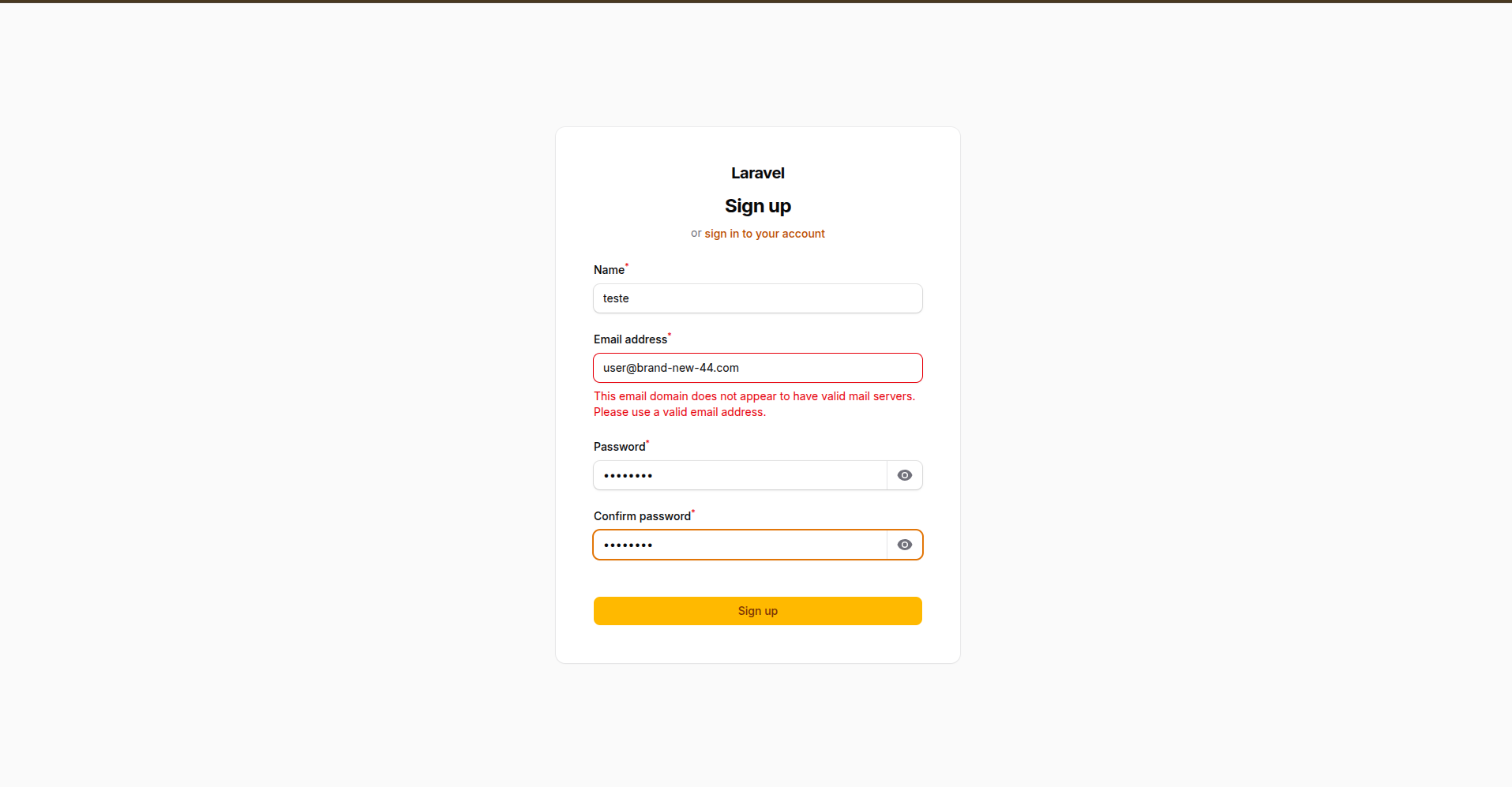
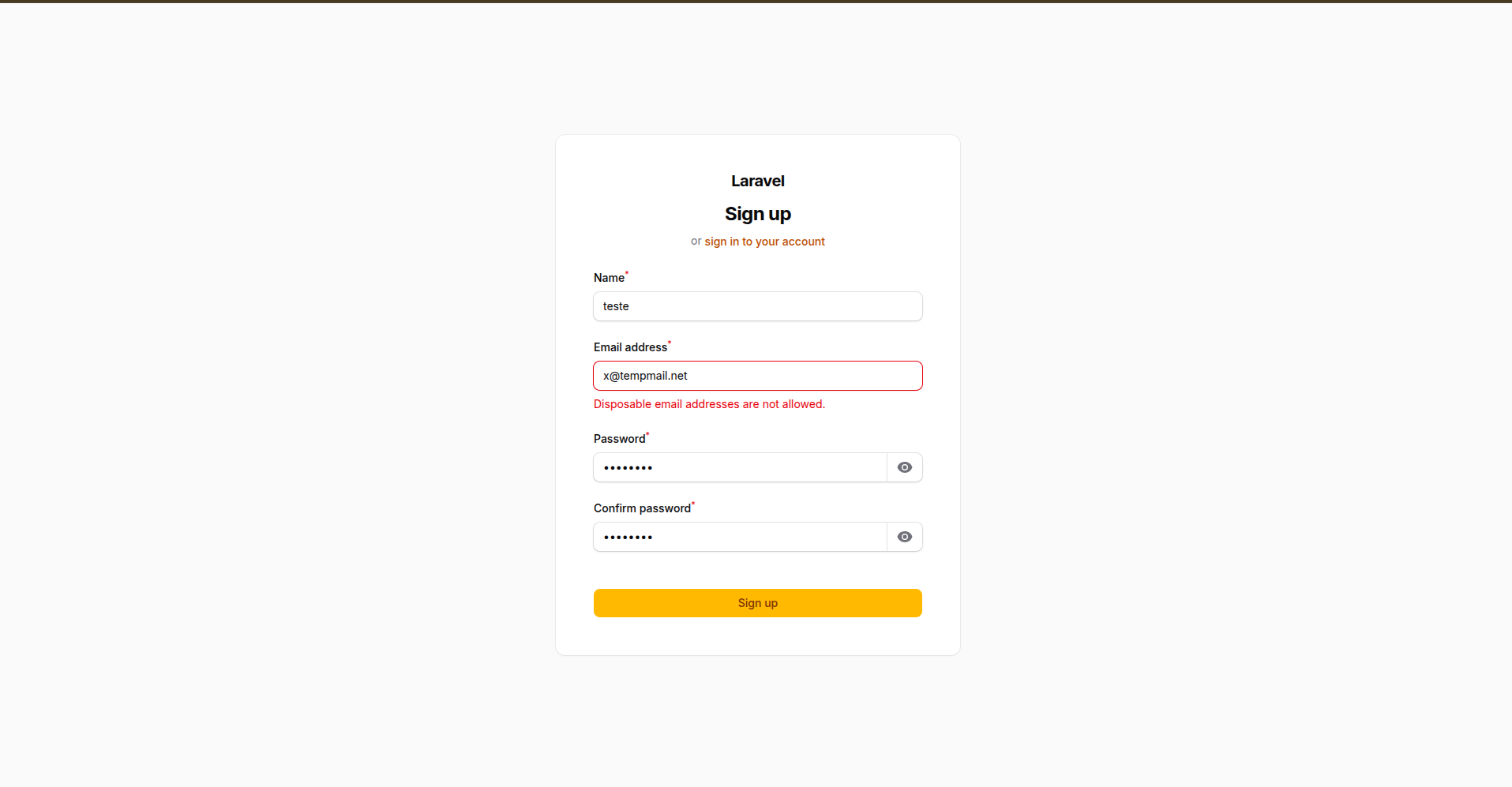
#Email Validation
| DNS/MX Verification | Disposable Email Blocking |
|---|---|
 |
 |
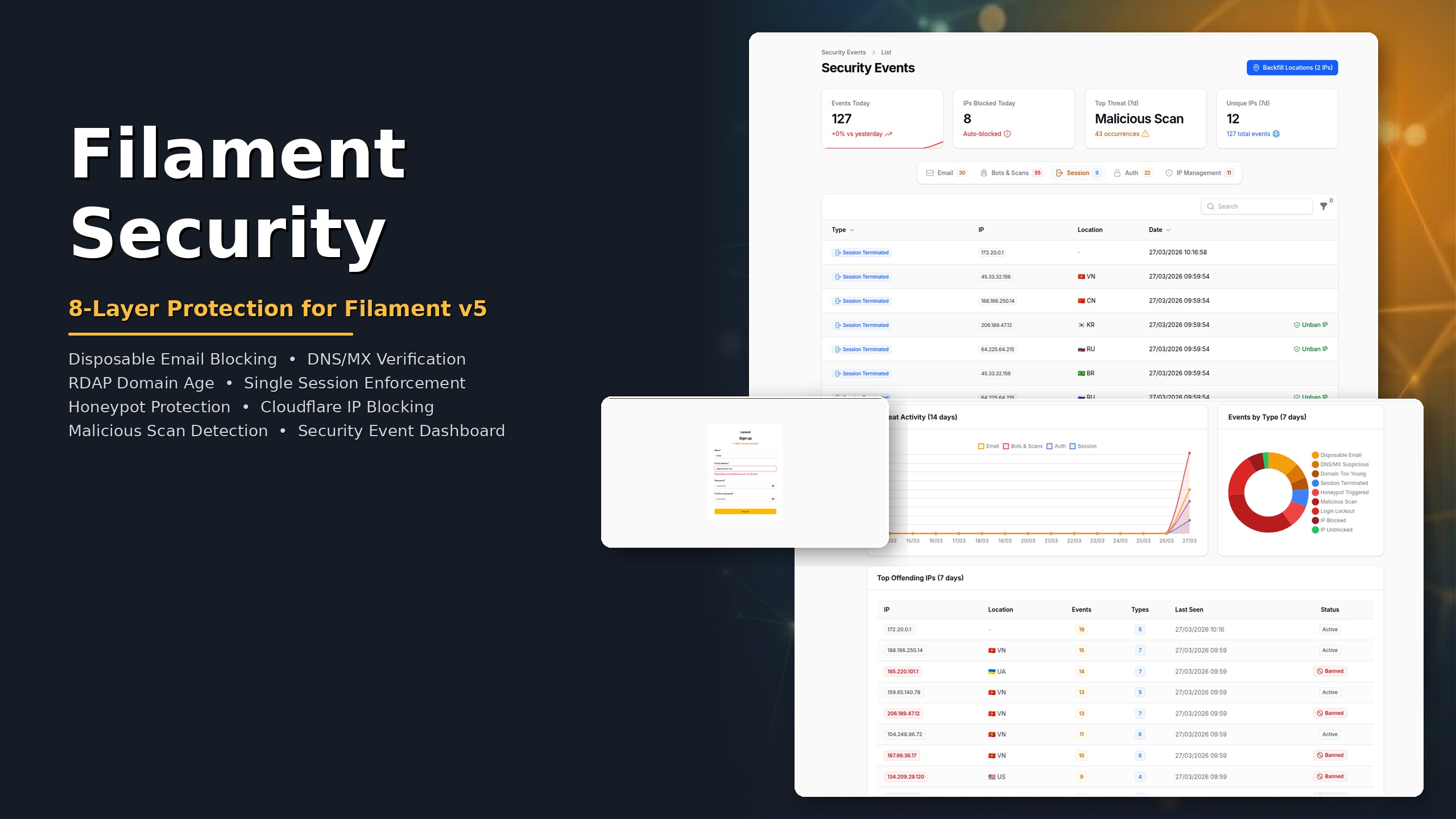
#Security Event Dashboard
| Stats, Tabs & Event Table | Charts & Top Offending IPs |
|---|---|
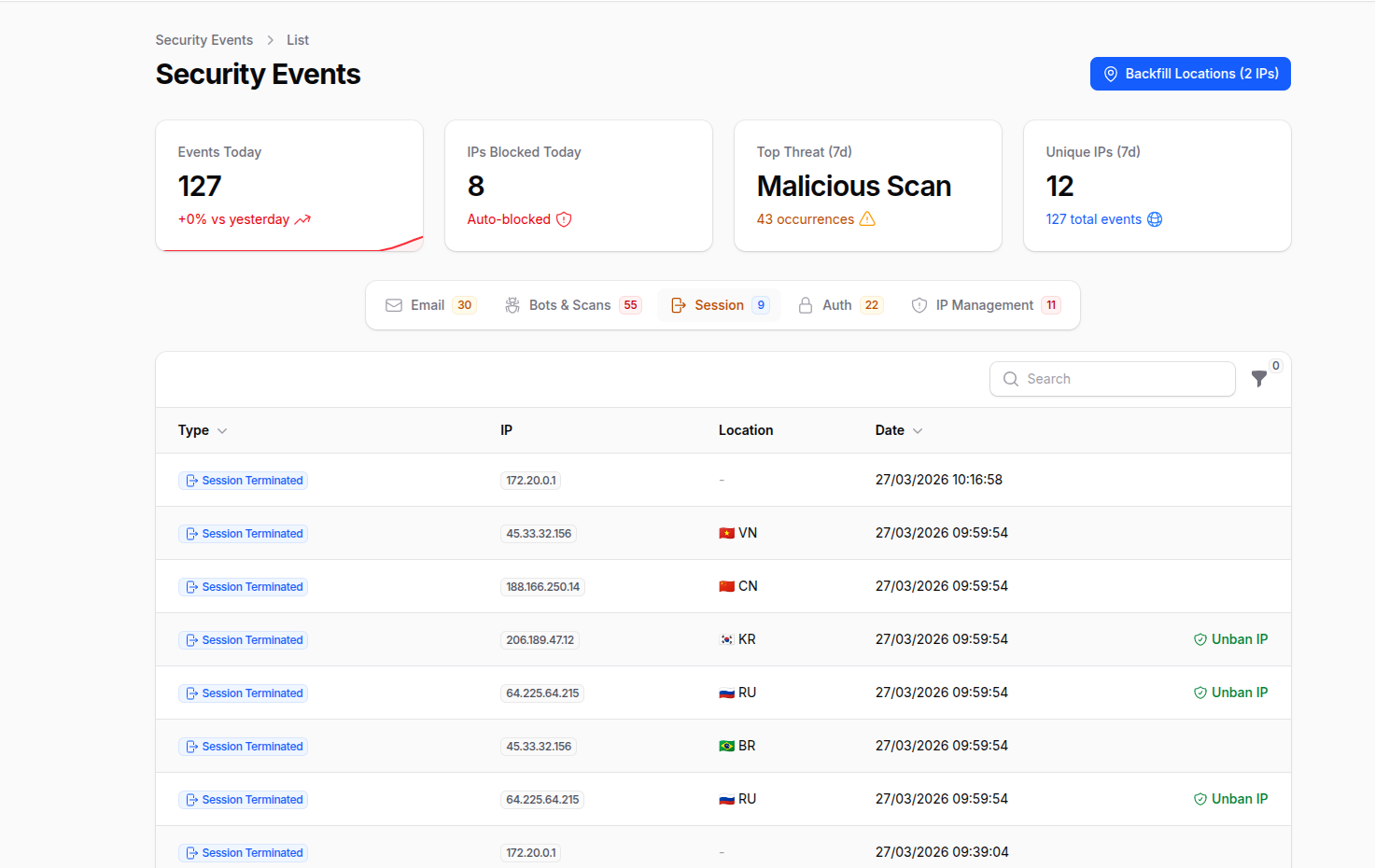 |
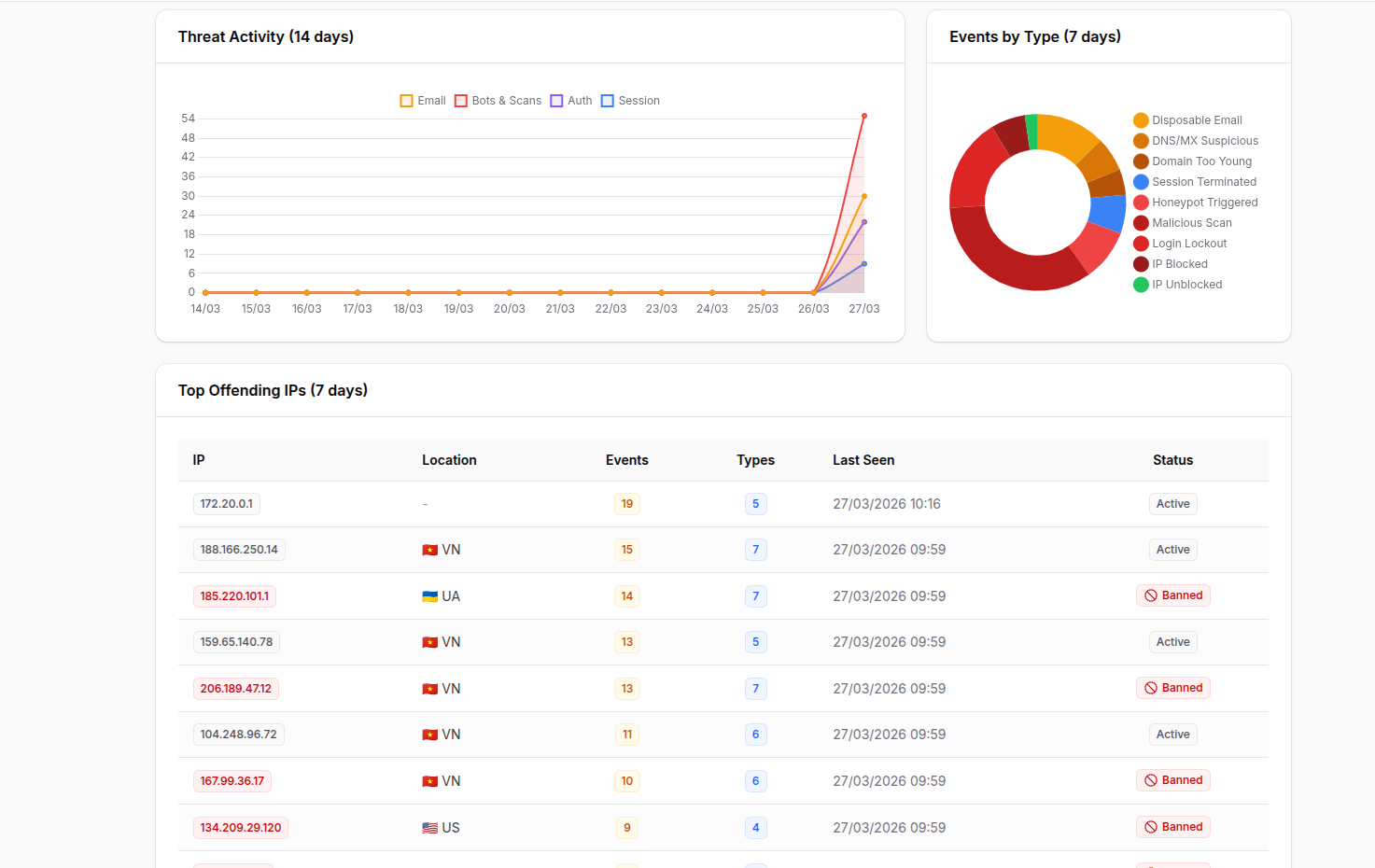 |
#Version Compatibility
| Package Version | Filament | Livewire | Laravel | Branch |
|---|---|---|---|---|
| 2.x | v5 | v4 | 11 / 12 / 13 | main |
| 1.x | v4 | v3 | 11 / 12 / 13 | 1.x |
#Requirements
- PHP 8.2+
- Laravel 11, 12 or 13
- Filament v5
#Installation
# Filament v5
composer require wallacemartinss/filament-security:"^2.0"

# Filament v4
composer require wallacemartinss/filament-security:"^1.0"
Publish the config file:
php artisan filament-security:install
If you enable the Event Log (Layer 8) or Cloudflare IP Blocking (Layer 6), publish and run the migrations:
php artisan vendor:publish --tag=filament-security-migrations
php artisan migrate
#Tailwind CSS (required for custom views)
If you use a custom Filament theme, add the plugin's source paths to your resources/css/filament/admin/theme.css so Tailwind can scan the plugin's views and classes:
@source '../../../../vendor/wallacemartinss/filament-security/resources/views/**/*';
@source '../../../../vendor/wallacemartinss/filament-security/src/**/*';
Then rebuild your theme:
npm run build
Register the plugin in your AdminPanelProvider (after ->registration()):
use WallaceMartinss\FilamentSecurity\FilamentSecurityPlugin;

public function panel(Panel $panel): Panel
{
    return $panel
        ->login()
        ->registration() // Must come before ->plugins()
        // ...
        ->plugins([
            FilamentSecurityPlugin::make()
                ->disposableEmailProtection()  // Layer 1 (enabled by default)
                ->honeypotProtection()         // Layer 5 (enabled by default)
                ->singleSession()              // Layer 4
                ->maliciousScanProtection()    // Layer 7
                ->cloudflareBlocking()         // Layer 6
                ->eventLog(),                  // Layer 8 — Security dashboard
        ]);
}
#Layer 1: Disposable Email Blocking
Blocks registration with temporary/disposable email addresses. Ships with 192,000+ built-in domains (sourced from disposable/disposable-email-domains) and supports custom domains.
Covers all major disposable email providers including Mailinator, YOPmail, GuerrillaMail (all 11 variants), TempMail, ThrowAway, Burner Mail, and thousands more.
#Filament Registration Integration
When disposableEmailProtection() is enabled, the plugin automatically replaces the default Filament registration page with a secured version that validates emails against the disposable domain list. No extra configuration needed.
The plugin only replaces the default Register::class. If you have a custom registration page, use the trait instead:
use Filament\Auth\Pages\Register;
use WallaceMartinss\FilamentSecurity\Auth\Concerns\HasDisposableEmailProtection;

class CustomRegister extends Register
{
    use HasDisposableEmailProtection;
}
#Usage as Validation Rule
use WallaceMartinss\FilamentSecurity\DisposableEmail\Rules\DisposableEmailRule;

// In any form request or validator
'email' => ['required', 'email', new DisposableEmailRule],
#Usage in Filament Forms
use Filament\Forms\Components\TextInput;
use WallaceMartinss\FilamentSecurity\DisposableEmail\Rules\DisposableEmailRule;

TextInput::make('email')
    ->email()
    ->rules([new DisposableEmailRule])
#Programmatic Check
use WallaceMartinss\FilamentSecurity\DisposableEmail\DisposableEmailService;

DisposableEmailService::isDisposable('user@mailinator.com'); // true
DisposableEmailService::isDisposable('user@gmail.com');      // false
#Managing Custom Domains
php artisan filament-security:domain add spam-provider.com
php artisan filament-security:domain remove spam-provider.com
php artisan filament-security:domain list
php artisan filament-security:domain stats
#Configuration
'disposable_email' => [
    'enabled' => env('FILAMENT_SECURITY_DISPOSABLE_EMAIL', true),
    'cache_enabled' => env('FILAMENT_SECURITY_CACHE', true),
    'cache_ttl' => 1440,
    'custom_domains' => [],
    'whitelisted_domains' => [],
],
#Domain Sources (priority order)
| Source | Location | How to manage |
|---|---|---|
| Built-in | data/disposable-domains.json |
Shipped with package (192,000+ domains) |
| Custom file | storage/filament-security/custom-domains.txt |
php artisan filament-security:domain |
| Config | config/filament-security.php |
Edit config file |
| Whitelist | config/filament-security.php |
Edit config file (overrides all) |
#Layer 2: DNS/MX Verification
Verifies that the email domain has valid mail infrastructure. Blocks domains that cannot receive email — domains with no MX records and no A/AAAA fallback, or domains with MX records pointing to suspicious targets (localhost, private IPs).
#How it works
Email submitted → Extract domain → Check MX records
  ├─ Has MX → Validate targets (reject localhost, private IPs, loopback)
  ├─ No MX → Check A/AAAA records (RFC 5321 fallback)
  │   ├─ Has A/AAAA → Allow (can receive email via implicit MX)
  │   └─ No records → Block (domain cannot receive email)
  └─ DNS error → Allow (fail-open, don't block legitimate users)
#Enabled by default
DNS/MX verification is enabled by default. No extra setup required.
#Usage as Validation Rule
use WallaceMartinss\FilamentSecurity\DisposableEmail\Rules\DnsMxRule;

'email' => ['required', 'email', new DnsMxRule],
#Programmatic Check
use WallaceMartinss\FilamentSecurity\DisposableEmail\DnsVerificationService;

DnsVerificationService::isSuspicious('user@nonexistent-domain.xyz'); // true
DnsVerificationService::isDomainSuspicious('fake-domain.xyz');       // true
#Configuration
'dns_verification' => [
    'enabled' => env('FILAMENT_SECURITY_DNS_CHECK', true),
    'cache_enabled' => env('FILAMENT_SECURITY_CACHE', true),
    'cache_ttl' => 60,
],
#What is detected
| Condition | Result |
|---|---|
| No MX, no A, no AAAA records | Blocked |
MX pointing to localhost or private IP |
Blocked |
| Valid MX records | Allowed |
| No MX but has A/AAAA record | Allowed (RFC 5321) |
| DNS lookup fails | Allowed (fail-open) |
#Layer 3: Domain Age Verification (RDAP)
Checks the domain registration age via RDAP (Registration Data Access Protocol). Blocks recently registered domains — a common pattern in spam, phishing, and fraud campaigns.
#Disabled by default
This feature makes external HTTP calls to RDAP servers. Enable it via .env:
FILAMENT_SECURITY_DOMAIN_AGE=true
FILAMENT_SECURITY_DOMAIN_MIN_DAYS=30
#Usage as Validation Rule
use WallaceMartinss\FilamentSecurity\DisposableEmail\Rules\DomainAgeRule;

'email' => ['required', 'email', new DomainAgeRule],
#Programmatic Check
use WallaceMartinss\FilamentSecurity\DisposableEmail\RdapService;

RdapService::isDomainTooYoung('user@brand-new-domain.com'); // true
$date = RdapService::getRegistrationDate('example.com');     // Carbon|null
#Configuration
'domain_age' => [
    'enabled' => env('FILAMENT_SECURITY_DOMAIN_AGE', false),
    'min_days' => env('FILAMENT_SECURITY_DOMAIN_MIN_DAYS', 30),
    'block_on_failure' => env('FILAMENT_SECURITY_DOMAIN_AGE_STRICT', false),
    'cache_enabled' => env('FILAMENT_SECURITY_CACHE', true),
    'cache_ttl' => 1440,
],
#Failure behavior
| Scenario | block_on_failure=false (default) |
block_on_failure=true |
|---|---|---|
| RDAP server unreachable | Allow | Block |
| TLD not in IANA bootstrap | Allow | Block |
| No registration date in response | Allow | Block |
| Domain age >= min_days | Allow | Allow |
| Domain age < min_days | Block | Block |
#Layer 4: Single Session Enforcement
Ensures only one active session per user. When a user logs in from a new browser or device, all previous sessions are immediately terminated. Works with database, Redis, and file session drivers.
#How it works
User logs in on Browser A → Session A created, tracked as active
User logs in on Browser B → Session B created
  → Login event fires → Session A destroyed
  → Middleware updates active session to B
User returns to Browser A → Session A no longer exists → Redirected to login
#Disabled by default
FILAMENT_SECURITY_SINGLE_SESSION=true
#Session driver support
| Driver | Destruction method | Enforcement |
|---|---|---|
database |
Bulk DELETE by user_id |
Immediate |
redis |
Destroy session key via handler | Immediate + middleware fallback |
file |
Destroy session file via handler | Immediate + middleware fallback |
#Programmatic Usage
use WallaceMartinss\FilamentSecurity\SingleSession\SingleSessionService;

SingleSessionService::handleLogin($user);
SingleSessionService::clearTracking($user->id);
#Configuration
'single_session' => [
    'enabled' => env('FILAMENT_SECURITY_SINGLE_SESSION', false),
],
#Layer 5: Honeypot Protection
Protects registration forms against bots using invisible honeypot fields. Powered by spatie/laravel-honeypot.
Two invisible fields are injected into the registration form:
- Empty field - Bots auto-fill all fields; if this field has a value, the submission is rejected
- Timestamp field - Tracks how fast the form was submitted; instant submissions are rejected
#Enabled by default
FilamentSecurityPlugin::make()
    ->honeypotProtection()
#Custom Registration Page
use Filament\Auth\Pages\Register;
use WallaceMartinss\FilamentSecurity\Auth\Concerns\HasHoneypotProtection;

class CustomRegister extends Register
{
    use HasHoneypotProtection;
}
When spam is detected, the request is aborted with 403 Forbidden. A SpamDetectedEvent is also fired for logging or IP blocking (Layer 6).
#Layer 6: Cloudflare IP Blocking
Automatically blocks suspicious IPs on Cloudflare WAF after repeated failed login attempts or bot detection via honeypot.
Failed Login → RateLimiter counts attempts → Exceeds threshold → Cloudflare API block
Honeypot Spam → Instant Cloudflare API block
Real client IP resolved through: CF-Connecting-IP > X-Real-IP > X-Forwarded-For > REMOTE_ADDR
#Setup
- Add your Cloudflare credentials to
.env:
FILAMENT_SECURITY_CLOUDFLARE=true
CLOUDFLARE_API_TOKEN=your_api_token_here
CLOUDFLARE_ZONE_ID=your_zone_id_here
- Publish and run the migration:
php artisan vendor:publish --tag=filament-security-migrations
php artisan migrate
- Enable in the plugin:
FilamentSecurityPlugin::make()
    ->cloudflareBlocking()
#How to get your Cloudflare credentials
#API Token
- Go to Cloudflare Dashboard > My Profile > API Tokens
- Click "Create Token" > "Create Custom Token"
- Permissions:
Zone>Firewall Services>Edit - Zone Resources:
Include>Specific zone> select your domain
#Zone ID
- Go to Cloudflare Dashboard and select your domain
- On the Overview page, scroll down to the right sidebar > API section > copy Zone ID
#Managing Blocked IPs
php artisan filament-security:blocked-ips list
php artisan filament-security:blocked-ips status
php artisan filament-security:blocked-ips block 203.0.113.50 --reason="Manual block"
php artisan filament-security:blocked-ips unblock 203.0.113.50 --force
#Programmatic Usage
use WallaceMartinss\FilamentSecurity\Cloudflare\BlockIpService;
use WallaceMartinss\FilamentSecurity\Cloudflare\IpResolver;

$ip = IpResolver::resolve();
app(BlockIpService::class)->blockIp($ip, 'Custom reason');
app(BlockIpService::class)->unblockIp($ip);
app(BlockIpService::class)->recordFailedAttempt($ip, 'Failed login');
app(BlockIpService::class)->remainingAttempts($ip);
#Configuration
'cloudflare' => [
    'enabled' => env('FILAMENT_SECURITY_CLOUDFLARE', false),
    'api_token' => env('CLOUDFLARE_API_TOKEN'),
    'zone_id' => env('CLOUDFLARE_ZONE_ID'),
    'max_attempts' => env('FILAMENT_SECURITY_CF_MAX_ATTEMPTS', 5),
    'decay_minutes' => env('FILAMENT_SECURITY_CF_DECAY_MINUTES', 30),
    'mode' => env('FILAMENT_SECURITY_CF_MODE', 'block'),
    'note_prefix' => 'FilamentSecurity: Auto-blocked',
],
#Layer 7: Malicious Scan Protection
Detects and blocks requests to known exploit paths, config files, web shells, and CMS admin pages. Returns 404 and logs the attempt as a security event.
#What is detected
| Category | Examples |
|---|---|
| Config/env files | .env, .git, .htaccess, wp-config.php |
| Package files | composer.json, package.json, yarn.lock |
| Credentials | credentials.json, firebase.json, database.json |
| WordPress/CMS | wp-admin, wp-login, xmlrpc.php |
| Web shells | shell.php, cmd.php, c99, r57, webshell |
| Exploit paths | etc/passwd, proc/self, ../../.. |
| Admin panels | phpmyadmin, adminer, pgadmin, cPanel |
| Debug endpoints | phpinfo, _debug, _profiler, actuator |
#Disabled by default
FILAMENT_SECURITY_MALICIOUS_SCAN=true
FilamentSecurityPlugin::make()
    ->maliciousScanProtection()
The middleware is automatically registered in the web middleware group when enabled.
#Configuration
'malicious_scan' => [
    'enabled' => env('FILAMENT_SECURITY_MALICIOUS_SCAN', false),
],
#Layer 8: Security Event Dashboard
A complete Filament resource that records and visualizes all security events across every layer. Provides a real-time dashboard with stats, charts, and a threat intelligence table.
#What is recorded
Every layer in the plugin automatically records events when the Event Log is enabled:
| Event Type | Source Layer | Trigger |
|---|---|---|
disposable_email |
Layer 1 | Disposable email blocked during registration |
dns_mx_suspicious |
Layer 2 | Domain with no valid mail servers |
domain_too_young |
Layer 3 | Domain registered too recently |
session_terminated |
Layer 4 | User session killed by newer login |
honeypot_triggered |
Layer 5 | Bot detected via honeypot |
login_lockout |
Layer 6 | Failed login attempt |
ip_blocked |
Layer 6 | IP blocked on Cloudflare |
ip_unblocked |
Layer 6 | IP unblocked via panel |
malicious_scan |
Layer 7 | Exploit path accessed |
#Setup
- Enable in
.env:
FILAMENT_SECURITY_EVENT_LOG=true
- Publish and run the migration:
php artisan vendor:publish --tag=filament-security-migrations
php artisan migrate
- Enable in the plugin:
FilamentSecurityPlugin::make()
    ->eventLog()
#Dashboard features
The Security Events page includes:
Header Widgets (4 stat cards):
- Events Today (with trend vs yesterday + 7-day mini chart)
- IPs Blocked Today
- Top Threat (7 days)
- Unique IPs (7 days)
Tabs (filtered by category):
- Email — disposable emails, DNS/MX, domain age
- Bots & Scans — honeypot, malicious scans
- Session — terminated sessions
- Auth — login lockouts
- IP Management — blocked/unblocked IPs
Footer Widgets (3 charts):
- Threat Activity (14-day line chart by category)
- Events by Type (7-day doughnut chart)
- Top Offending IPs (table with top 10 attackers, event count, location, ban status)
Table features:
- Live polling every 30 seconds
- Dynamic columns per tab (email, path, user_agent, trigger info)
- Copyable IP badges
- Country flags with city/org tooltip
- Type filter (multi-select)
Actions:
- Backfill IP Locations — header action to enrich IPs without geolocation via IpInfo API
- Unban IP — row action to remove Cloudflare block directly from the table
#Programmatic Usage
use WallaceMartinss\FilamentSecurity\EventLog\Models\SecurityEvent;

// Record a custom security event
SecurityEvent::record('custom_event_type', [
    'email' => 'user@example.com',
    'domain' => 'example.com',
    'metadata' => ['reason' => 'Custom reason'],
]);
#Configuration
'event_log' => [
    'enabled' => env('FILAMENT_SECURITY_EVENT_LOG', false),
],
#IpInfo Integration (Optional)
Enrich security events with IP geolocation data (country, city, organization) from ipinfo.io. This is completely optional — if no token is provided, everything works without geolocation.
#Setup
- Get a free API token at ipinfo.io/signup
- Add to
.env:
IPINFO_TOKEN=your_token_here
#How it works
- When a security event is recorded, the IP is automatically enriched with country, city, and org data
- Results are cached for 24 hours per IP to minimize API calls
- The Backfill Locations action in the dashboard lets you retroactively enrich existing events
- If the token is not set, geolocation is silently skipped
#Configuration
'ipinfo' => [
    'token' => env('IPINFO_TOKEN'),
    'timeout' => 5,
    'cache_ttl' => 1440, // minutes (24h)
],
#Environment Variables
# Disposable Email (Layer 1)
FILAMENT_SECURITY_DISPOSABLE_EMAIL=true   # Enable/disable disposable email blocking
FILAMENT_SECURITY_CACHE=true              # Enable/disable caching (shared across features)

# DNS/MX Verification (Layer 2)
FILAMENT_SECURITY_DNS_CHECK=true          # Enable/disable DNS/MX check (default: enabled)

# Domain Age / RDAP (Layer 3)
FILAMENT_SECURITY_DOMAIN_AGE=false        # Enable/disable domain age check
FILAMENT_SECURITY_DOMAIN_MIN_DAYS=30      # Minimum domain age in days
FILAMENT_SECURITY_DOMAIN_AGE_STRICT=false # Block when RDAP lookup fails

# Single Session (Layer 4)
FILAMENT_SECURITY_SINGLE_SESSION=false    # Enable/disable one session per user

# Honeypot (Layer 5)
FILAMENT_SECURITY_HONEYPOT=true           # Enable/disable honeypot protection

# Cloudflare (Layer 6)
FILAMENT_SECURITY_CLOUDFLARE=false        # Enable/disable Cloudflare blocking
CLOUDFLARE_API_TOKEN=                     # Cloudflare API token
CLOUDFLARE_ZONE_ID=                       # Cloudflare zone ID
FILAMENT_SECURITY_CF_MAX_ATTEMPTS=5       # Failed attempts before blocking
FILAMENT_SECURITY_CF_DECAY_MINUTES=30     # Time window for counting attempts
FILAMENT_SECURITY_CF_MODE=block           # 'block' or 'challenge'

# Malicious Scan (Layer 7)
FILAMENT_SECURITY_MALICIOUS_SCAN=false    # Enable/disable malicious scan detection

# Security Event Log (Layer 8)
FILAMENT_SECURITY_EVENT_LOG=false         # Enable/disable security event dashboard

# IpInfo (Optional geolocation)
IPINFO_TOKEN=                             # IpInfo API token (optional)
#Testing
php artisan test packages/filament-security/tests/
#Translations
The package includes translations in 15 languages: English, Brazilian Portuguese, German, Spanish, French, Italian, Japanese, Korean, Dutch, Polish, Russian, Turkish, Ukrainian, Arabic, and Chinese (Simplified).
To publish translations:
php artisan vendor:publish --tag=filament-security-translations
#License
MIT License. See LICENSE for details.
The author
Solutions Architect and full-stack engineer, 18 years across cloud and software. Founder of Kronn.io & HubDev.io. I build with Laravel, Filament, and a bias for shipping.
From the same author
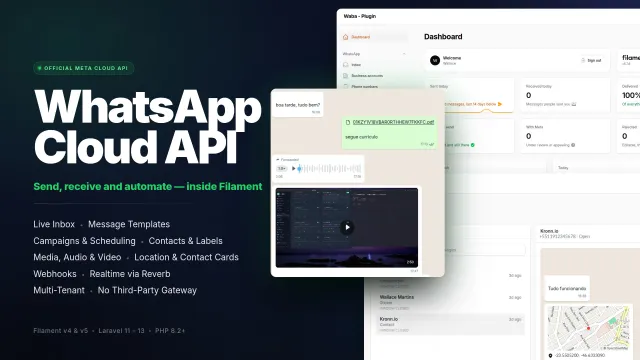
WhatsApp MetaCloud Connector
Manage WhatsApp business accounts, phone numbers, message templates, conversations and campaigns from your panel through Meta's official Cloud API, without a third-party gateway.
Author:
Wallace Martins

Ultimate Icon Picker
A modern, responsive icon picker interface to your Filament applications. Seamlessly supporting all blade-icons sets, it features smart real-time search, performance-optimized infinite scrolling, and versatile integration across Forms, Tables, and Infolists, allowing for effortless icon management and customization with a superior user experience.
Author:
Wallace Martins
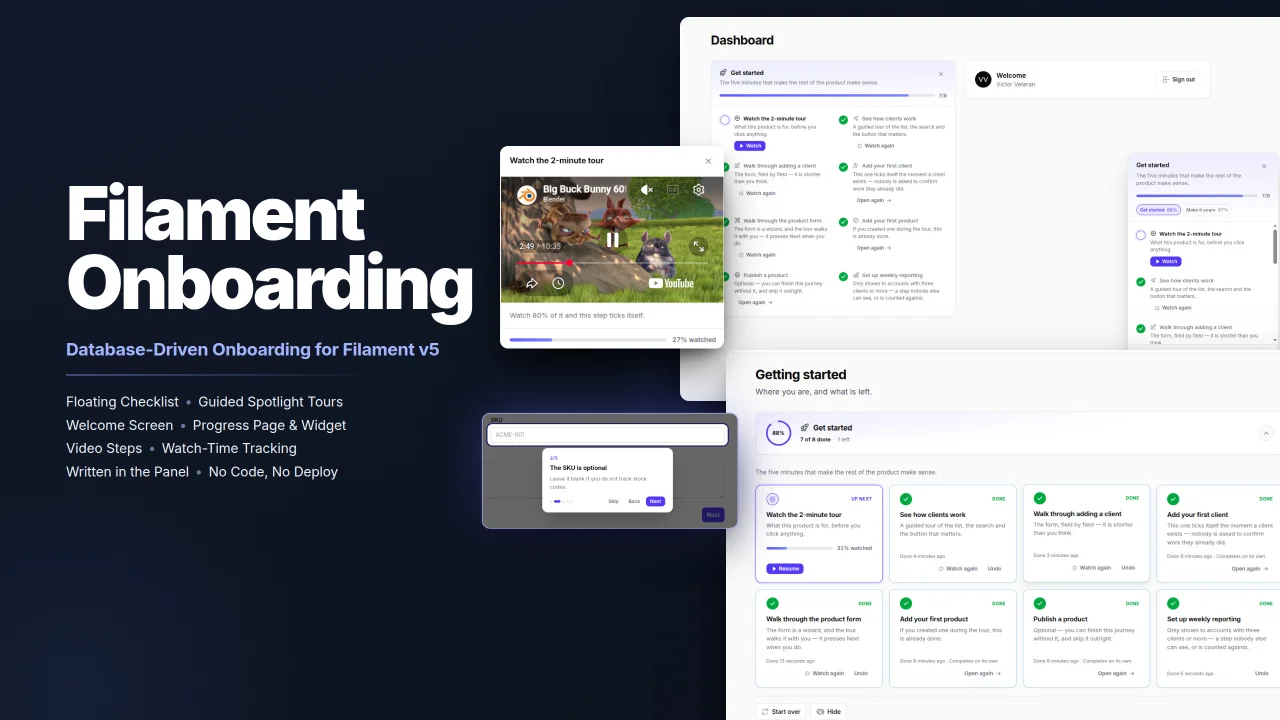
Onboarding
Filament Onboarding gives your users a floating progress checklist, guided spotlight tours and videos, all written in the panel instead of in code, with steps that complete themselves for people who have already done the work.
Author:
Wallace Martins

WhatsApp Connector
Seamlessly integrates WhatsApp capabilities into your Laravel application using the Evolution API v2. Built natively for Filament v4 with full multi-tenancy support, it provides a real-time QR code interface for instant connection. The package empowers developers to send text, media, and document messages effortlessly via dedicated Actions or Service Traits, while handling webhooks and ensuring security through environment-based credential storage.
Author:
Wallace Martins
Featured Plugins
A selection of plugins curated by the Filament team

Compact Theme
A theme that makes data-heavy panels easier to scan by fitting more useful information on each screen.
 Filament

Custom Fields
Eliminate custom field migrations forever. Let your users create and manage form fields directly in Filament admin panels with 20+ built-in field types, validation, and zero database changes.
 Relaticle

Noir Theme
A theme that gives panels a focused, refined look with near-black surfaces, crisp actions, and restrained color.
Filament

