
VoodMedia
CommunityMedia vault and galleries for Laravel + Filament — reusable assets, galleries, and form pickers. MIT by Voodflow.
 Author:
Voodflow
Author:
Voodflow
Package health
BetaAutomated checks of this plugin's Composer package
15 checks
- Skipped: GitHub Actions pinned to SHA
- Skipped: GitLab CI includes pinned to SHA
- Passed: Open security advisories
- Passed: Dependabot PR responsiveness — No open Dependabot PRs.
- Skipped: Renovate MR responsiveness
- Passed: Dependabot or Renovate configured
- Passed: Dependency update cooldown configured
- Passed: Provides a security policy
- Passed: Abandoned or archived — No consulted source marks the package abandoned (packagist, github).
- Passed: Commit and release recency — Active: last commit 0 days ago; last release 0 days ago.
-
Passed:
composer.lock not committed by library
—
composer.lockis absent from the released dist archive. - Passed: Dist archive is lean
-
Passed:
Current Laravel version supported
—
Package dependencies resolve together with current Laravel
13.0. -
Passed:
Current PHP version supported
—
Constraint
^8.4supports current PHP8.5. - Skipped: Current Symfony version supported
filament/
namespace. Review the source and install at your own risk. Found
malware or an unresolved security issue the author won't
address?
Report it
.
Documentation
- Screenshots
- Requirements
- Quick start (5 minutes)
- Plugin vault roots (for packages & host apps)
- Model
- Features
- HTTP API (package-owned)
- Config highlights
- Docs
- License
Media Vault for Laravel + Filament: upload once, reuse everywhere. One vault storage copy, many gallery memberships, morph attachments for your domain models.
Works standalone in any Filament app. Optional integrations with VoodBuilder (Asset Manager), Voodflow (e.g. Approval Page heroes), and any third-party package that registers its own vault root.
Built on Filament 5 and Spatie Media Library.
#Screenshots
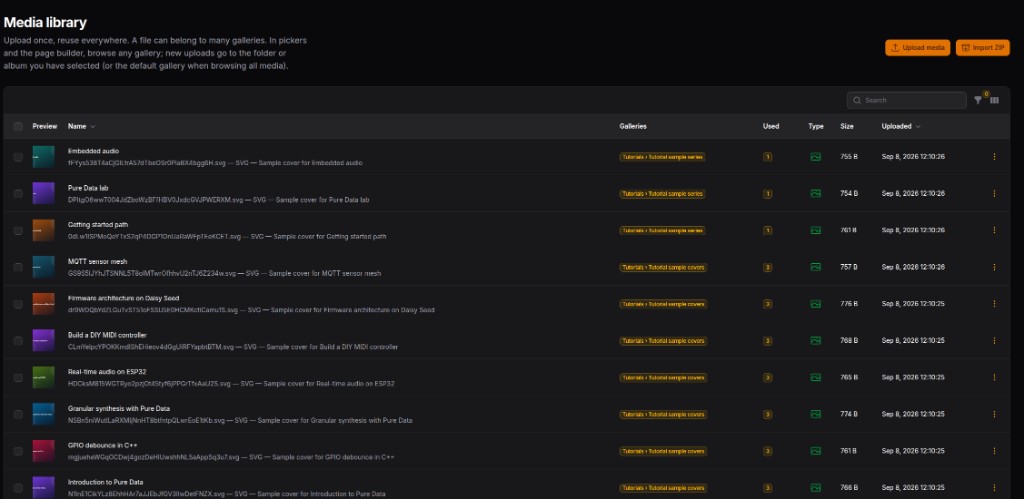
#Media library
Central library: preview, galleries, usage counts, type, size, and upload time. Upload media or Import ZIP from the header.
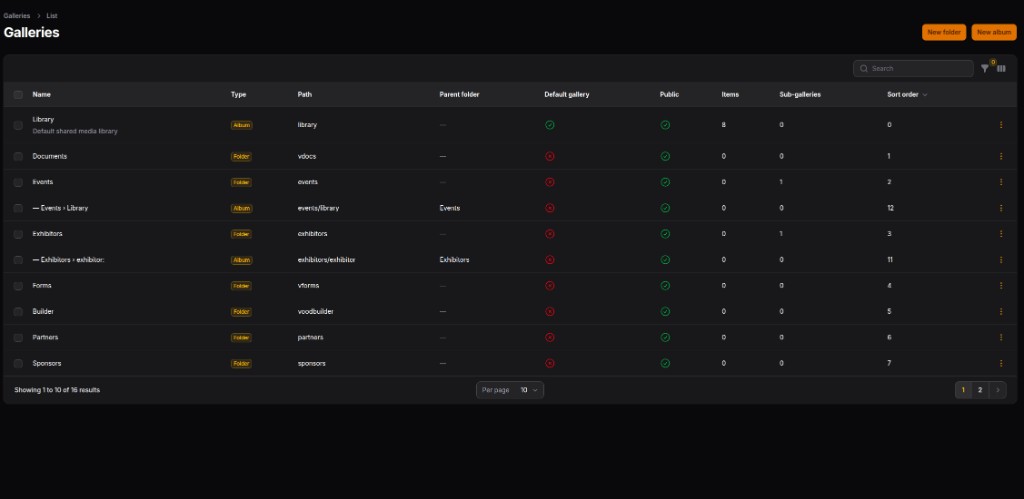
#Galleries (folders & albums)
Organize vault media with a hierarchy: Folder = container (year, product, plugin…); Album = holds photos/files. Mark a default gallery and toggle public albums.
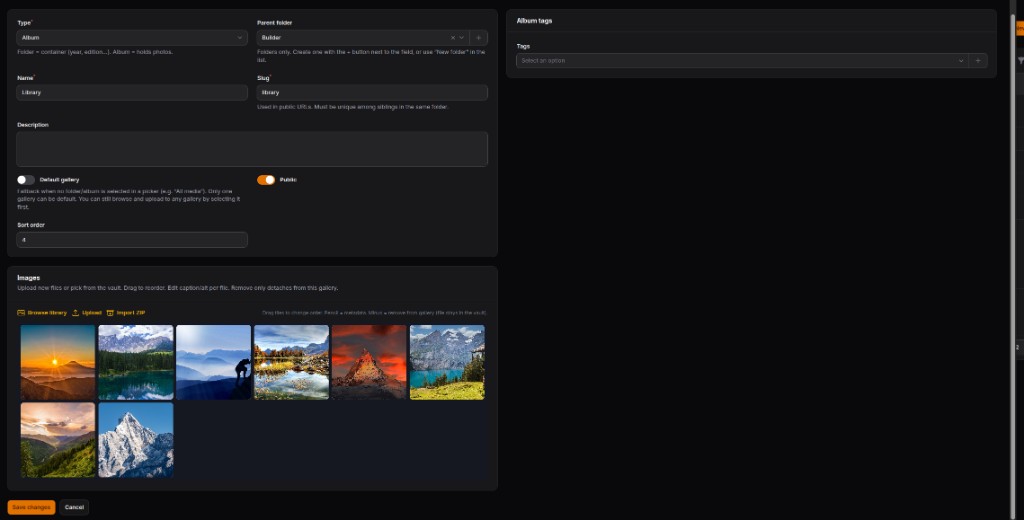
#Album editor
Edit album metadata (parent, slug, public/default), manage images (browse library, upload, ZIP import, drag reorder), and assign album tags.
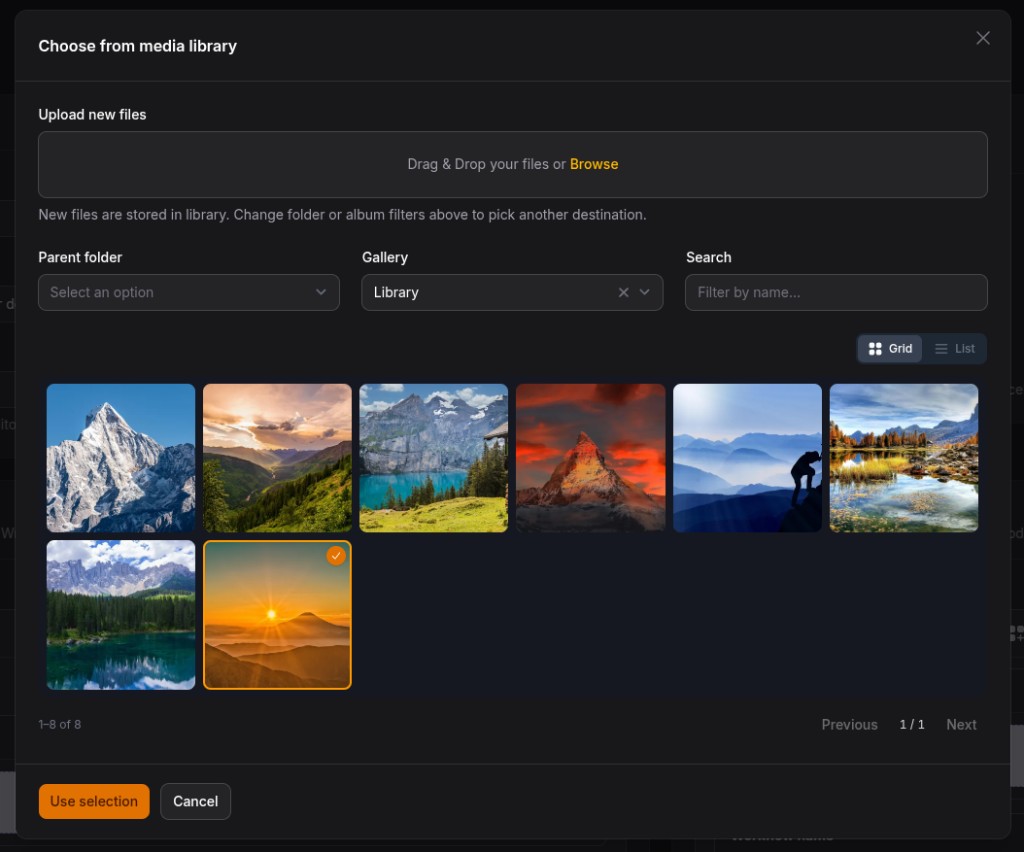
#Picker (VmediaPicker)
Modal for forms and builders: upload into the selected folder/album, filter by parent/gallery, search, grid/list view, multi-select → Use selection.
#Requirements
| Requirement | Notes |
|---|---|
| PHP | 8.4+ |
| Laravel | 12 or 13 |
| Filament | 5 |
| Spatie Media Library | 11 |
PHP gd extension |
Must be built with JPEG (and preferably WebP + FreeType). Spatie generates thumb conversions on upload; without JPEG support you get imagecreatefromstring(): No JPEG support in this PHP build. |
Verify in the app container:
php -r 'var_export(gd_info()["JPEG Support"] ?? false);'
# expect: true
Docker / php:*-fpm example:
RUN apt-get update && apt-get install -y \
    libpng-dev libjpeg-dev libwebp-dev libfreetype6-dev \
    && docker-php-ext-configure gd --with-freetype --with-jpeg --with-webp \
    && docker-php-ext-install gd
#Quick start (5 minutes)
composer require voodflow/vmedia
php artisan vmedia:install
Register on the Filament panel:
->plugins([
    \Voodflow\Vmedia\VmediaPlugin::make(),
])
Attach media to a model:
use Voodflow\Vmedia\Concerns\HasAttachedMedia;

class Booth extends Model
{
    use HasAttachedMedia;
}
Upload in a Filament form:
use Voodflow\Vmedia\Filament\Forms\Components\VmediaFileUpload;

VmediaFileUpload::make('logo')
    ->collection('logo')
    ->image();
Pick existing vault media:
use Voodflow\Vmedia\Filament\Forms\Components\VmediaPicker;

VmediaPicker::make('gallery')
    ->collection('gallery')
    ->images()
    ->multiple();
#Plugin vault roots (for packages & host apps)
VoodMedia does not hardcode product folders. Each package (or the host app) registers a top-level folder + default Library album, then uses it for uploads/pickers.
#1. Register + ensure on boot
In your package ServiceProvider (or AppServiceProvider):
use Voodflow\Vmedia\Support\Integration\RegistersPluginVault;

public function boot(): void
{
    if (! class_exists(RegistersPluginVault::class)) {
        return;
    }

    // source = stable id (integration_source), slug = folder slug in the UI
    RegistersPluginVault::register(
        source: 'acme',
        slug: 'acme',
        name: 'Acme', // or fn (): string => __('acme::nav.media_root')
        // integrationKey: 'root:acme', // optional; default root:{slug}
    );
    RegistersPluginVault::ensureOnBoot($this->app, 'acme');
}
Equivalent low-level API:
use Voodflow\Vmedia\Vmedia;

Vmedia::registerPluginVault('acme', 'acme', 'Acme');
Vmedia::ensurePluginVault('acme'); // or RegistersPluginVault::ensureOnBoot(...)
After boot you get a folder Acme with a child Library album (upload target when browsing that folder).
Sync all registered roots (after companions have booted):
php artisan vmedia:ensure-plugin-roots
#2. Use the vault in code
use Voodflow\Vmedia\Support\Integration\PluginVaultRootGroup;
use Voodflow\Vmedia\Support\Integration\PluginVaultLibraryGallery;
use Voodflow\Vmedia\Support\MediaLibrary;
use Voodflow\Vmedia\Filament\Forms\Components\VmediaPicker;

// Top-level folder (KIND_GROUP)
$root = PluginVaultRootGroup::for('acme');

// Default Library album under that folder (KIND_ALBUM) — prefer this for uploads
$library = PluginVaultLibraryGallery::album('acme');

MediaLibrary::store($uploadedFile, $library);

// Lock a Filament picker to your plugin library
VmediaPicker::make('hero')
    ->images()
    ->attachToRecord(false)
    ->vaultGallery(fn (): int => (int) PluginVaultLibraryGallery::album('acme')->getKey());
Optional: nest under a configured parent (settings / multi-tenant layout):
PluginVaultRootGroup::for('acme', $optionalOuterRootId);
#3. Conventions
| Concept | Rule |
|---|---|
source |
Stable string stored as integration_source (e.g. acme, voodflow) |
slug |
URL/path segment for the folder |
| Library album | Auto-created under the root; use it as default upload target |
| Isolation | Your package owns only its source; do not hardcode other products in VoodMedia |
Shared Logos folder is provided by VoodMedia itself (PluginVaultRootGroup::logos()).
#Model
- Vault — singleton Spatie owner of every file on disk (one storage copy)
- Galleries — many-to-many membership (a photo/video/file can sit in several galleries)
- Folders vs albums — folders nest structure; albums hold media
- Default gallery — fallback target for uploads when no gallery is selected; Choose can browse any gallery
- Attachments —
HasAttachedMediamorph pivot (domain models never own Spatie collections)
#Features
| Area | What you get |
|---|---|
| Admin | Library + galleries hierarchy, metadata (alt, caption, credits; video poster on videos), soft delete / trash |
| Picker | VmediaPicker + VmediaFileUpload for other plugins |
| Files | Photos, videos, and documents (PDF/Office/ZIP…) |
| Thumbs | Configurable Spatie conversion ladder (thumb + sm/md/lg/xl WebP by default); API exposes display / srcset / sizes |
| Usage | Attachment counts; delete protected when media is in use |
| Tags | Media tags + album tags; bulk assign |
| Duplicates | SHA-256 reuse (optional) |
| ZIP import | Bulk extract into the vault |
| Events | MediaStored, MediaAttached, MediaDetached, MediaDeleted, MediaRestored |
| Stats | Dashboard widget + php artisan vmedia:stats |
| Orphans | php artisan vmedia:prune-orphans --force |
| Public | GET /galleries/{slug} Blade gallery for is_public galleries |
#HTTP API (package-owned)
| Method | Path | Role |
|---|---|---|
GET |
/vmedia/media/galleries |
Gallery list + counts |
GET |
/vmedia/media?page=&per_page=&gallery_id=&type=&q= |
Paginated assets (type: image|video|file) |
POST |
/vmedia/media/upload |
Upload; optional gallery_id (folder/album — folders resolve to library album) |
DELETE |
/vmedia/media/{media} |
Soft-delete (?force=1 force-deletes) |
All routes require authentication (and optional Gate ability VMEDIA_ABILITY).
#Config highlights
VMEDIA_ENABLED=true
VMEDIA_DISK=public
VMEDIA_CONVERSIONS=true
VMEDIA_DETECT_DUPLICATES=true
VMEDIA_PROTECT_DELETE=true
VMEDIA_PUBLIC_GALLERIES=true
#Storage disk (local / S3 / …)
VMEDIA_DISK is any disk from Laravel’s config/filesystems.php. Spatie stores vault files on that disk (MediaVault → useDisk(...)).
Local (default):
VMEDIA_DISK=public
S3 (or compatible): define the disk as usual, then point VoodMedia at it:
FILESYSTEM_DISK=s3
AWS_ACCESS_KEY_ID=…
AWS_SECRET_ACCESS_KEY=…
AWS_DEFAULT_REGION=eu-west-1
AWS_BUCKET=your-bucket
AWS_URL=https://your-bucket.s3.eu-west-1.amazonaws.com
# optional: AWS_ENDPOINT=…  AWS_USE_PATH_STYLE_ENDPOINT=true  (MinIO, R2, …)

VMEDIA_DISK=s3
config/filesystems.php (stock Laravel s3 disk is enough):
's3' => [
    'driver' => 's3',
    'key' => env('AWS_ACCESS_KEY_ID'),
    'secret' => env('AWS_SECRET_ACCESS_KEY'),
    'region' => env('AWS_DEFAULT_REGION'),
    'bucket' => env('AWS_BUCKET'),
    'url' => env('AWS_URL'),
    'endpoint' => env('AWS_ENDPOINT'),
    'use_path_style_endpoint' => env('AWS_USE_PATH_STYLE_ENDPOINT', false),
],
Require the Flysystem S3 adapter if the host app does not already:
composer require league/flysystem-aws-s3-v3 "^3.0"
No VoodMedia-specific S3 code path: Filament uploads and Spatie conversions use the configured disk. Keep Livewire temporary uploads on a local disk if you prefer (LIVEWIRE_TEMPORARY_FILE_UPLOAD_DISK=local); only the final vault objects need VMEDIA_DISK=s3.
Public URLs come from Storage::disk(...)->url(...) (local → /storage/..., S3 → bucket/CloudFront URL). Use a public bucket (or CDN AWS_URL) so thumbs and embeds resolve without signed URLs.
#Docs
Public documentation: docs.voodflow.com
#License
MIT — see LICENSE.
The author
We are a development team focused on building modern, efficient management applications using FilamentPHP. We’ve been working with FilamentPHP since version 3 for several years, leveraging its flexibility to create solid, scalable, and productivity-oriented admin interfaces.
Over time, we developed an internal management system for one of our businesses, tackling real-world challenges and delivering practical, field-tested solutions. From that experience, we also built a range of plugins designed to extend Filament’s capabilities in a focused and meaningful way.
This natural evolution led to the creation of Voodflow: not just a plugin, but a full workflow engine that lives inside FilamentPHP. Voodflow is designed to orchestrate complex processes in an intuitive way, while preserving the consistency and elegance of the Filament ecosystem—while pushing it beyond its traditional limits.
From the same author
VoodTutorials
Filament 5 package for technical tutorials: markdown, table of contents, materials, tools, resources, SEO, translations, comments, learning paths (series), and optional public routes.
Author:
Voodflow
VoodDocs
Filament 5 package for documentation sites: markdown pages, VitePress-style sidebar navigation, import 1:1 from vite-press, table of contents, locales, and optional integration with voodflow/vpress.
Author:
Voodflow

VoodCookiebar
Cookie consent for Laravel + Filament 5: opt-in preferences UI, real script gating, and a Filament settings page. Works standalone in any Filament app
Author:
Voodflow
Voodflow
Self-hosted visual workflow automation for Filament and Laravel: design and run automations in your own admin while your workflows, credentials, and data stay entirely on your infrastructure.
Author:
Voodflow
Featured Plugins
A selection of plugins curated by the Filament team

Compact Theme
A theme that makes data-heavy panels easier to scan by fitting more useful information on each screen.
 Filament

Advanced Tables (formerly Filter Sets)
Supercharge your tables with powerful features like user-customizable views, quick filters, multi-column sorting, advanced table searching, convenient view management, and more. Compatible with Resource Panel Tables, Relation Managers, Table Widgets, and Table Builder!
 Kenneth Sese

Spotlight Pro
Browse your Filament Panel with ease. Filament Spotlight Pro adds a Spotlight like Command Palette to your Filament Panel.
 Dennis Koch
