
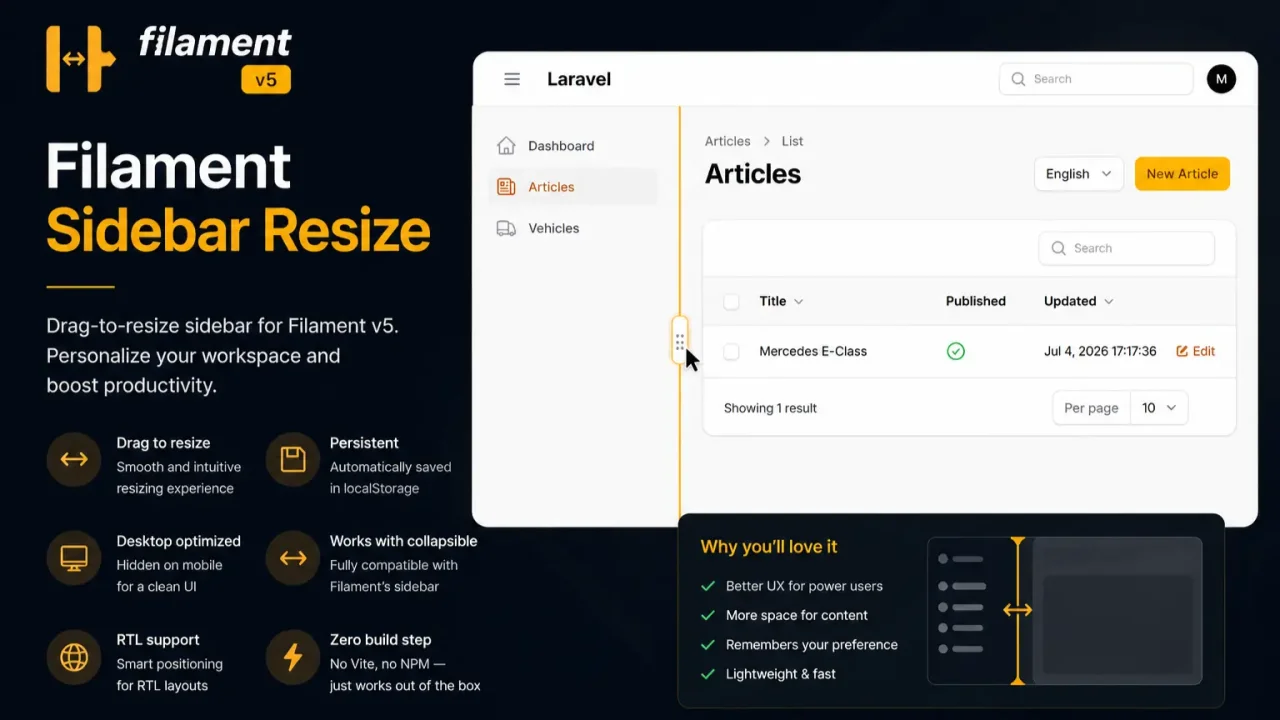
Sidebar Resize by Martin Khachatryan
CommunityA lightweight, zero-dependency extension that enables dynamic mouse-resizing for the Filament admin sidebar layout with automatic width persistence.
 Author:
Martin Khachatryan
Author:
Martin Khachatryan
Package health
Automated checks of this plugin's Composer package
15 checks
- Skipped: GitHub Actions pinned to SHA
- Skipped: GitLab CI includes pinned to SHA
- Passed: Open security advisories
- Passed: Dependabot PR responsiveness — No open Dependabot PRs.
- Skipped: Renovate MR responsiveness
- Skipped: Dependabot or Renovate configured
- Skipped: Dependency update cooldown configured
- Failed: Provides a security policy — View details on Plumb
- Passed: Abandoned or archived — No consulted source marks the package abandoned (packagist, github).
- Passed: Commit and release recency — Active: last commit 0 days ago; last release 26 days ago.
-
Passed:
composer.lock not committed by library
—
composer.lockis absent from the released dist archive. - Passed: Dist archive is lean
-
Passed:
Current Laravel version supported
—
Package dependencies resolve together with current Laravel
13.0. -
Passed:
Current PHP version supported
—
Constraint
^8.2|^8.3|^8.4supports current PHP8.5. - Skipped: Current Symfony version supported
filament/
namespace. Review the source and install at your own risk. Found
malware or an unresolved security issue the author won't
address?
Report it
.
Documentation
- Table of contents
- Features
- Requirements
- Installation
- Configuration
- Panel registration
- Fluent API reference
- Compatibility
- Publishing and customization
- Troubleshooting
- License



Drag-to-resize sidebar for Filament v5 admin panels. Admin users can adjust the navigation sidebar width by dragging the centered grip on its edge. The full-height divider remains visible without blocking the sidebar scrollbar. The chosen width is persisted in the browser via localStorage and restored on every visit and Livewire navigation.
No Vite, NPM, or Tailwind build step is required — the package injects a single Blade view with minimal inline CSS and vanilla JavaScript through Filament's render hook system.
#Table of contents
- Features
- Requirements
- Installation
- Configuration
- Panel registration
- Fluent API reference
- Compatibility
- How it works
- Publishing and customization
- Troubleshooting
- License
#Features
- Drag-to-resize — a visible grip on the sidebar edge lets users resize with the mouse (
col-resizecursor). - Scrollbar-friendly divider — the full-height divider remains visible while only the centered grip is draggable by default.
- Filament-native layout — updates the
--sidebar-widthCSS variable and inline sidebar dimensions so.fi-mainand the rest of the layout respond correctly. - localStorage persistence — each Filament panel stores its own width key (
martin6363-sidebar-resize:{panelId}). - Collapsible sidebar support — works alongside
sidebarCollapsibleOnDesktop(); inline width styles are cleared when the sidebar is collapsed and restored when expanded. - RTL-aware — handle position and drag direction respect
dir="rtl"layouts. - SPA-safe — re-initializes cleanly on
livewire:navigatedwithout duplicate handles or event listeners. - Zero frontend build — no asset compilation, no external JavaScript libraries.
#Requirements
- PHP
^8.2,^8.3, or^8.4 - Laravel
^12, or^13 - Filament
^5.0
#Installation
composer require martin6363/filament-sidebar-resize
The service provider is auto-discovered. Optionally publish the config file:
php artisan vendor:publish --tag=sidebar-resize-config
Register the plugin on your Filament panel (see Panel registration).
#Configuration
Published file: config/sidebar-resize.php
return [
    'min_width' => 200,
    'max_width' => 450,
    'central_grip_only' => true,
];
| Key | Purpose |
|---|---|
min_width |
Narrowest sidebar width in pixels when dragging. Default: 200. |
max_width |
Widest sidebar width in pixels when dragging. Default: 450. |
central_grip_only |
Restrict dragging to the centered grip so the scrollbar remains accessible. Default: true. |
These defaults apply globally. Override them per panel with the plugin's fluent methods.
#Panel registration
Add the plugin to your panel provider:
use Filament\Panel;
use Filament\PanelProvider;
use Martin6363\SidebarResize\SidebarResizePlugin;

class AdminPanelProvider extends PanelProvider
{
    public function panel(Panel $panel): Panel
    {
        return $panel
            ->id('admin')
            ->path('admin')
            ->plugins([
                SidebarResizePlugin::make(),
            ]);
    }
}
#With custom width limits
SidebarResizePlugin::make()
    ->minWidth(220)
    ->maxWidth(480),
#With a full-height resize hit area
The centered grip is the only draggable area by default. Restore the legacy full-height sidebar edge per panel when needed:
SidebarResizePlugin::make()
    ->centralGripOnly(false),
#With a collapsible desktop sidebar
The plugin is designed to coexist with Filament's collapsible sidebar. No extra setup is required:
return $panel
    ->sidebarCollapsibleOnDesktop()
    ->plugins([
        SidebarResizePlugin::make(),
    ]);
When the sidebar is collapsed, resize styles are removed so Filament can render the narrow icon-only layout. When expanded again, the user's saved width is reapplied.
#Fluent API reference
| Method | Description |
|---|---|
SidebarResizePlugin::make() |
Resolve the plugin singleton from the container. |
minWidth(int $pixels) |
Set the minimum draggable sidebar width. Overrides config('sidebar-resize.min_width'). |
maxWidth(int $pixels) |
Set the maximum draggable sidebar width. Overrides config('sidebar-resize.max_width'). |
centralGripOnly(bool $enabled = true) |
Restrict dragging to the centered grip. Pass false to restore the full-height hit area. |
#Compatibility
| Scenario | Behavior |
|---|---|
Desktop (≥ 1024px) |
Full-height divider visible; centered resize grip shown when the sidebar is open. |
central_grip_only = false |
The full-height sidebar edge becomes draggable, matching the original behavior. |
Mobile (< 1024px) |
Handle hidden; Filament uses the overlay sidebar. |
sidebarCollapsibleOnDesktop() |
Resize applies only when expanded; collapse/expand works normally. |
sidebarFullyCollapsibleOnDesktop() |
Same inline-style clearing when the sidebar is closed. |
| Top navigation layout | Plugin does not activate (fi-body-has-top-navigation). |
| RTL | Drag direction and handle edge use logical (inline-end) positioning. |
Livewire SPA (wire:navigate) |
Script re-inits on livewire:navigated with idempotent teardown. |
| Multiple panels | Each panel gets a separate localStorage key based on panel->getId(). |
#Publishing and customization
| Tag | Contents |
|---|---|
sidebar-resize-config |
config/sidebar-resize.php |
php artisan vendor:publish --tag=sidebar-resize-config
Adjust min_width, max_width, and central_grip_only in the published config, or override them per panel with ->minWidth(), ->maxWidth(), and ->centralGripOnly().
#Troubleshooting
The resize handle does not appear
- Confirm the plugin is registered in
->plugins([...])on the active panel. - The handle is desktop-only (
≥ 1024pxviewport width). - The sidebar must be expanded (
fi-sidebar-open). It is hidden when the sidebar is collapsed. - Panels with top navigation (
->topNavigation()) are intentionally excluded.
Sidebar collapse stops working after installing the plugin
- Update to the latest package version. Collapsible desktop sidebars require inline width styles to be cleared on collapse.
- Ensure you are not setting sidebar width elsewhere with inline styles or custom CSS that uses
!important.
Width resets after refresh
- Check that
localStorageis available and not blocked (private browsing restrictions, browser extensions). - Each panel uses its own key:
martin6363-sidebar-resize:{panelId}. Switching panels will load that panel's saved width.
Width does not apply on first paint
- The script runs at
BODY_END. A brief flash of the default Filament width may occur before the saved width is applied. This is expected without a head-level blocking script.
Drag feels laggy
- Width updates during drag are already throttled through
requestAnimationFrame. If custom CSS addstransitionto the sidebar, the plugin disables transitions on the sidebar while dragging viabody.fi-sidebar-resizing.
#License
The MIT License (MIT). Copyright (c) Martin.
The author
I am a passionate Full-Stack Developer specializing in building modern web applications with Laravel, React, Next js. I love creating clean, efficient code and developing open-source packages that enhance developer productivity, with a strong focus on the Filament PHP ecosystem.
From the same author

Video Engine
Self-hosted HLS video transcoding, adaptive multi-bitrate streaming, and live progress form controls for Filament. Launch Offer: Use code LAUNCH20 at checkout to get 20% OFF for a limited time!
Author:
Martin Khachatryan

AI Translator
AI-powered, one-click translations for Filament form fields — built for Spatie Translatable and locale-suffixed layouts alike. Translate content across locales in seconds using Google Gemini — directly inside your Filament admin panel.
Author:
Martin Khachatryan

Smart SEO
An AI-powered SEO optimizer that provides live Google SERP previews, automated metadata generation via Gemini, and seamless multi-language support for forms.
Author:
Martin Khachatryan

Click Spark
A lightweight, zero-dependency click spark particle effect for Filament admin panel elements and page clicks.
Author:
Martin Khachatryan
Featured Plugins
A selection of plugins curated by the Filament team

Noir Theme
A theme that gives panels a focused, refined look with near-black surfaces, crisp actions, and restrained color.
 Filament

Advanced Tables (formerly Filter Sets)
Supercharge your tables with powerful features like user-customizable views, quick filters, multi-column sorting, advanced table searching, convenient view management, and more. Compatible with Resource Panel Tables, Relation Managers, Table Widgets, and Table Builder!
 Kenneth Sese

Blueprint
Filament Blueprint is a premium Laravel Boost extension that helps AI agents produce accurate, detailed implementation plans and security reports for Filament apps.
Filament

