
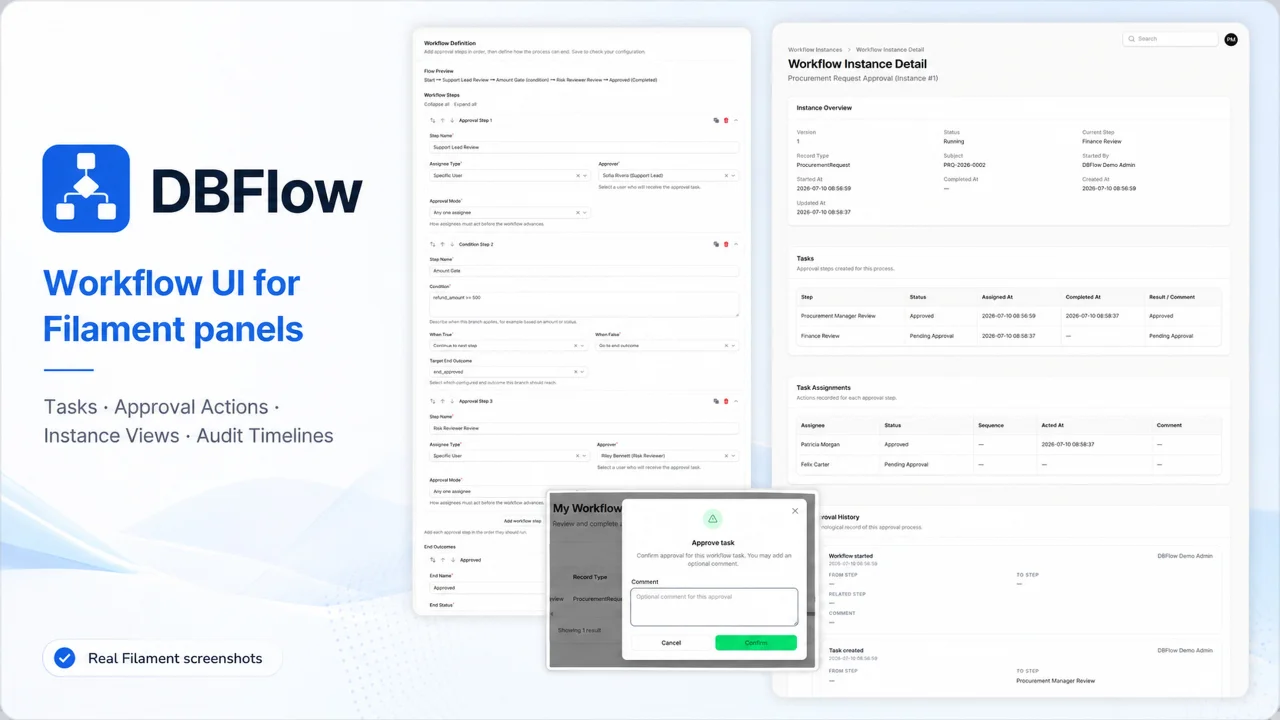
DBFlow by DBFlow Labs
CommunityDBFlow adds approval tasks, reassignment, delegation visibility, SLA tracking, reliable action monitoring, instance views, and audit timelines to Filament panels.
 Author:
DBFlow Labs
Author:
DBFlow Labs
Package health
Automated checks of this plugin's Composer package
15 checks
- Passed: GitHub Actions pinned to SHA
- Skipped: GitLab CI includes pinned to SHA
- Passed: Open security advisories
- Warning: Dependabot PR responsiveness — Stale Dependabot PRs: oldest security PR is 31 days old; oldest general PR is 40 days old.
- Skipped: Renovate MR responsiveness
- Passed: Dependabot or Renovate configured
- Passed: Dependency update cooldown configured
- Passed: Provides a security policy
- Passed: Abandoned or archived — No consulted source marks the package abandoned (packagist, github).
- Passed: Commit and release recency — Active: last commit 54 days ago; last release 70 days ago.
-
Passed:
composer.lock not committed by library
—
composer.lockis absent from the released dist archive. - Passed: Dist archive is lean
-
Passed:
Current Laravel version supported
—
Package dependencies resolve together with current Laravel
13.0. -
Passed:
Current PHP version supported
—
Constraint
^8.3supports current PHP8.5. - Skipped: Current Symfony version supported
filament/
namespace. Review the source and install at your own risk. Found
malware or an unresolved security issue the author won't
address?
Report it
.
Documentation
- Contents
- Quick start
- Package overview
- What you get
- Requirements
- Installation
- Core prerequisites
- Register with Filament
- Configuration
- Extension contracts
- End-to-end integration checklist
- Troubleshooting
- Stable release scope
- Further reading
- Development
- Support



View on Filament Plugins Directory
Standard Filament integration for DBFlow Core.
DBFlow Filament adds workflow tasks, workflow instances, audit timelines, and form-based workflow definition management to Laravel admin panels built with Filament.
This package is the standard UI layer for dbflowlabs/core. It intentionally ships read-only runtime surfaces and form-based definition editing. Visual workflow builders, canvas-based authoring UIs, and advanced diagram editing live in the separate commercial dbflowlabs/filament-pro package.
Important
Filament UI is only half of an integration. Seeing navigation and pages does not mean approvals will run. You also need Core runtime setup: migrations, user resolution, workflow definitions (code or UI), assignee resolvers, and host business triggers (DBFlow::start()). See Quick start and End-to-end integration checklist.
Warning
Replace the default AllowAllPermissionChecker before any shared environment. Until you set permission_checker_class to a host implementation, every authenticated user can access workflow pages and approve/reject tasks.
#Contents
- Quick start
- Package overview
- What you get
- Requirements
- Installation
- Core prerequisites
- Register with Filament
- Configuration
- Extension contracts
- End-to-end integration checklist
- Troubleshooting
- Stable release scope
- Further reading
- Development
- Support
#Quick start
Integration has two phases. Complete Phase A to verify the Filament surfaces mount correctly. Complete Phase B before production use.
#Phase A — UI smoke test (Filament surfaces only)
Enough to see My Workflow Tasks, Workflow Instances, and (optionally) the Workflow Definitions resource in your panel. Task lists may be empty until Phase B.
composer require dbflowlabs/filament:^1.1— installsdbflowlabs/core^1.1automatically.php artisan migrate— Core migrations load automatically viaDBFlowServiceProvider(no need to publish migrations in most hosts).- Publish configuration:
php artisan vendor:publish --tag=dbflow-config php artisan vendor:publish --tag=dbflow-filament-config - Set the host user model — required for Core user resolution (vendor defaults are
null):
Tip: you may also set defaults in the publishedDBFLOW_AUTH_MODEL=App\Models\User DBFLOW_AUTH_GUARD=web DBFLOW_AUTH_TABLE=usersconfig/dbflow.phpso local.envis optional. - Replace
permission_checker_classinconfig/dbflow-filament.php— see PermissionChecker example. - Implement
user_assignee_options_resolver_classwhen reassign or user pickers are enabled — see UserAssigneeOptionsResolver example. - Register pages from your
PanelProvider— see Register with Filament. - Log in → confirm the Workflow navigation group (or your
DBFLOW_FILAMENT_NAV_GROUPlabel) appears.
Phase A does not require WorkflowDefinitionProvider, dbflow:sync, or DBFlow::start().
#Phase B — Production runtime (approvals actually run)
- Register
WorkflowDefinitionProvider(s) and anyAssigneeResolverkeys referenced by approval nodes (see Core prerequisites). - Run
php artisan dbflow:syncandphp artisan dbflow:validate --strict. - Call
DBFlow::start($workflowKey, $model, $actor)from host business code when a document is submitted. - Implement
HasWorkflow,WorkflowRouteResolvable, andWorkflowableon host models as needed. - Log in as an assignee → My Workflow Tasks → approve, reject, or reassign.
- Guard downstream host actions (for example "confirm order") until the workflow completes.
Filament-only steps do not replace Core runtime steps. See the full checklist.
#Package overview
| Item | Value |
|---|---|
| Composer name | dbflowlabs/filament |
| Namespace | DbflowLabs\Filament |
| Current stable | 1.1.0 |
| First tagged | 0.1.0-alpha.1 |
| License | MIT |
| Author | Baron Wang [email protected] |
| Core dependency | dbflowlabs/core ^1.1 (use ^1.0 with Filament ^1.0) |
| Filament | ^5.6 |
| PHP | ^8.3 |
| Host framework | Laravel 13.x |
#What you get
| Surface | Description |
|---|---|
| My Workflow Tasks | Pending assignments with approve, reject, reassign; subject links via WorkflowRouteResolvable |
| Workflow Instances | Searchable runtime workflow instance list |
| Workflow Instance Detail | Instance detail with audit timeline (including task_reassigned / task_timed_out events) and optional cancel action |
| Workflow Definitions | Filament resource for draft CRUD, validation, and publishing |
| Delegations (v1.1) | Read-only delegation list when delegation capability is enabled |
| Action Executions (v1.1) | Read-only reliable-action execution list and detail when capability is enabled |
| Extension Contracts | Host adapters for permissions, labels, status badges, users, and assignee options |
When DBFLOW_ENABLED=false, task approve/reject/reassign and instance cancel actions are hidden and a runtime-disabled notice is shown on My Workflow Tasks (definition sync/validate remain available through Core).
Hosts opt in explicitly. This package does not auto-register Filament pages or resources during boot(). You must call DBFlowFilamentPanel::register($panel) (or the manual equivalents) from your PanelProvider.
#Requirements
- PHP
^8.3 - Laravel 13.x
- Filament
^5.6 dbflowlabs/core^1.1for this branch (^1.0remains valid for the 1.0 integration line)- MySQL
8.0or later for production (v1.1 stable certification target); SQLite for development and package tests - Core database migrations applied (
php artisan migrate) - Host user model configured in Core (
DBFLOW_AUTH_MODEL, see Core prerequisites)
#Installation
#Packagist (stable)
composer require dbflowlabs/filament:^1.1
dbflowlabs/core is installed automatically as a dependency of this package. For the 1.0 integration line, pin ^1.0 on both packages.
For monorepo development against a local Core worktree, copy composer.local.json.dist to composer.local.json and use scripts/merge-composer-local.php from dbflowlabs/core (see Core UPGRADE-1.0.md).
#After composer require
| What happens | Action needed |
|---|---|
dbflowlabs/core installed |
None — pulled in as a dependency |
| Core migrations registered | Run php artisan migrate on your host database |
| Filament assets upgraded | Composer post-scripts usually run php artisan filament:upgrade — no manual step unless your host disables Composer scripts |
| Package config | Publish when you need host overrides (see below) |
You do not need to publish Core migrations (dbflow-migrations tag) unless you want migration files copied into database/migrations/.
#Publish package files
Publish configuration (recommended for all hosts):
php artisan vendor:publish --tag=dbflow-config
php artisan vendor:publish --tag=dbflow-filament-config
Publish views if you want to customize the UI:
php artisan vendor:publish --tag=dbflow-filament-views
Optional translations (the package also ships translations under lang/ and loads them automatically):
php artisan vendor:publish --tag=dbflow-filament-translations
#Core prerequisites
Filament surfaces read and mutate data through Core. Complete these steps before expecting runtime behaviour (not just empty UI pages).
#Migrations
Core loads migrations automatically via DBFlowServiceProvider. In most host applications you only need:
php artisan migrate
Verify dbflow_workflows exists after migration.
#Core configuration
Publish Core config when you need to customize auth or runtime flags:
php artisan vendor:publish --tag=dbflow-config
Set the host user model explicitly — Core cannot resolve actors or assignees without it:
DBFLOW_AUTH_MODEL=App\Models\User
DBFLOW_AUTH_GUARD=web
DBFLOW_AUTH_TABLE=users
In published config/dbflow.php, hosts may set the same defaults so .env is not the only source of truth:
'auth' => [
    'model' => env('DBFLOW_AUTH_MODEL', App\Models\User::class),
    'guard' => env('DBFLOW_AUTH_GUARD', 'web'),
    'table' => env('DBFLOW_AUTH_TABLE', 'users'),
    // ...
],
Core stores workflow user references (assignee_user_id, started_by_user_id, actor_user_id) as strings. Integer primary keys still work (stored as "1"); UUID/ULID primary keys are supported in Core 1.0.
See the dbflowlabs/core README for binding_mode, hooks, and runtime APIs.
#Two configuration files
| Config file | Primary switch | What it controls |
|---|---|---|
config/dbflow.php |
enabled |
Core runtime (DBFLOW_ENABLED=false disables runtime APIs; definition sync/validate remain available — see Core README) |
config/dbflow-filament.php |
enabled |
Whether Filament pages/resources are exposed when registered |
DBFlowFilamentPanel checks dbflow-filament.enabled and panel_registration_mode. It does not read dbflow.enabled.
Recommended host pattern: combine three layers when needed:
config('dbflow.enabled')— Core runtime on/offconfig('dbflow-filament.enabled')— package Filament toggle- A host product flag (for example
config('myapp.workflow.filament_enabled')) — product-level opt-in
Wrap DBFlowFilamentPanel::register() behind layers 2 and 3. Layer 1 affects whether approve/reject/reassign actions appear at runtime.
#Workflow definitions (code-first)
Filament does not seed workflows. For code-first definitions:
- Register a
WorkflowDefinitionProviderin a host service provider (see Core README). - Register any
AssigneeResolverkeys referenced by approval nodes. - Sync definitions into the database:
php artisan dbflow:sync
php artisan dbflow:validate --strict
Or programmatically:
use DbflowLabs\Core\Actions\SyncWorkflowDefinitions;

app(SyncWorkflowDefinitions::class)->handle();
When using the UI definition editor, approval steps may optionally set timeout.due_in (ISO 8601 duration) and on_timeout (reject_end for auto-reject). Schedule php artisan dbflow:process-timeouts when using deadlines (see Core README).
Core ships official dbflow:sync (--dry-run, --workflow=) and dbflow:validate (--strict, --workflow=, --source=) commands. Filament does not bundle its own sync command.
Note
Code sync vs UI-authored definitions: When a workflow is owned by the Filament definition resource (source = ui), code sync stores new versions as history but does not replace the UI workflow's active version pointer. Hosts using code-first pilots often disable enable_workflow_definition_resource or treat the resource as read-only ops tooling. See docs/workflow-definitions.md and the Core Filament integration contract.
#Assignee configuration (Core runtime)
Approval nodes may reference assignees by type:
assignees.type |
Runtime behaviour |
|---|---|
user |
Single user id in value |
permission |
value is an AssigneeResolverRegistry key, not a host RBAC permission string |
callback |
Same as permission: value / callback is a resolver registry key |
Register resolvers during boot:
use DbflowLabs\Core\DBFlow;
use DbflowLabs\Core\Services\AssigneeResolverRegistry;

DBFlow::registerAssigneeResolver(
    app(AssigneeResolverRegistry::class),
    'finance_team',
    $myAssigneeResolver,
);
The Filament PermissionAssigneeOptionsResolver contract is UI-only: it populates labels in the definition editor when authors pick permission-style assignees. It does not resolve runtime assignees. Keep resolver keys in sync between Core registration and Filament options() / exists().
#Host model contracts (Core)
For links from tasks/instances back to business records, implement on your Eloquent models (see Core):
DbflowLabs\Core\Traits\HasWorkflow—startWorkflow(), instance helpersDbflowLabs\Core\Contracts\WorkflowRouteResolvable—getWorkflowShowUrl()DbflowLabs\Core\Contracts\Workflowable— display metadata
#Register with Filament
Register DBFlow Filament from your Filament PanelProvider:
<?php

declare(strict_types=1);

namespace App\Providers\Filament;

use DbflowLabs\Filament\Support\DBFlowFilamentPanel;
use Filament\Panel;
use Filament\PanelProvider;

final class AdminPanelProvider extends PanelProvider
{
    public function panel(Panel $panel): Panel
    {
        $panel = $panel
            ->id('admin')
            ->path('admin') // or '' when the panel is mounted at the site root
            // your pages, resources, middleware, branding...
        ;

        if ($this->shouldRegisterDbflow()) {
            return DBFlowFilamentPanel::register($panel);
        }

        return $panel;
    }

    private function shouldRegisterDbflow(): bool
    {
        if (! (bool) config('dbflow-filament.enabled', true)) {
            return false;
        }

        // Optional host product flag — replace with your application's config key.
        return (bool) config('myapp.workflow.filament_enabled', true);

        // Some hosts also gate Core runtime separately via config('dbflow.enabled').
        // DBFlowFilamentPanel does not read dbflow.enabled; that flag affects action buttons at runtime.
    }
}
When the corresponding feature toggles are enabled, registration exposes:
| Surface | Class |
|---|---|
| My Workflow Tasks | DbflowLabs\Filament\Pages\MyWorkflowTasks |
| Workflow Instances | DbflowLabs\Filament\Pages\WorkflowInstances |
| Workflow Instance Detail | DbflowLabs\Filament\Pages\ViewWorkflowInstance |
| Workflow Definitions | DbflowLabs\Filament\Resources\WorkflowResource |
| Delegations (v1.1) | DbflowLabs\Filament\Pages\WorkflowDelegations |
| Action Executions (v1.1) | DbflowLabs\Filament\Pages\WorkflowActionExecutions |
| Action Execution Detail | DbflowLabs\Filament\Pages\ViewWorkflowActionExecution |
#Routes and panel path
Package pages use slugs shaped like:
{panel_path}/{route_prefix}/my-workflow-tasks
{panel_path}/{route_prefix}/workflow-instances
{panel_path}/{route_prefix}/workflow-instances/{record}
{panel_path}/{route_prefix}/workflow-delegations
{panel_path}/{route_prefix}/workflow-action-executions
{panel_path}/{route_prefix}/workflow-action-executions/{record}
Defaults: route_prefix = dbflow. Examples:
- Panel path
admin→/admin/dbflow/my-workflow-tasks - Panel path `` (empty) →
/dbflow/my-workflow-tasks
Named routes use route_name_prefix (default dbflow.filament.).
#Manual registration
If you prefer manual registration, use the helper methods:
use DbflowLabs\Filament\Support\DBFlowFilamentPanel;

$panel->pages([
    ...$panel->getPages(),
    ...DBFlowFilamentPanel::pageClasses(),
]);

$panel->resources([
    ...$panel->getResources(),
    ...DBFlowFilamentPanel::resourceClasses(),
]);
#Configuration
Publish the configuration file:
php artisan vendor:publish --tag=dbflow-filament-config
Then edit config/dbflow-filament.php.
#Feature toggles
| Key | Env (optional) | Default | Purpose |
|---|---|---|---|
enabled |
DBFLOW_FILAMENT_ENABLED |
true |
Master Filament package toggle |
panel_registration_mode |
DBFLOW_FILAMENT_PANEL_REGISTRATION |
explicit |
explicit (register via DBFlowFilamentPanel) or disabled |
enable_my_tasks_page |
DBFLOW_FILAMENT_MY_TASKS |
true |
My Workflow Tasks page |
enable_my_task_actions |
DBFLOW_FILAMENT_MY_TASK_ACTIONS |
true |
Approve/reject actions on the tasks page |
enable_my_task_reassign_action |
DBFLOW_FILAMENT_MY_TASK_REASSIGN |
true |
Reassign action on the tasks page |
enable_workflow_instances_page |
DBFLOW_FILAMENT_INSTANCES |
true |
Instance list and detail pages |
enable_instance_cancel_action |
DBFLOW_FILAMENT_INSTANCE_CANCEL |
true |
Cancel workflow header action on instance detail |
enable_workflow_definition_resource |
DBFLOW_FILAMENT_DEFINITIONS |
true |
Workflow Definition resource |
enable_logs_timeline |
DBFLOW_FILAMENT_LOGS_TIMELINE |
true |
Audit timeline on instance detail |
enable_delegations_page |
DBFLOW_FILAMENT_DELEGATIONS |
true |
Read-only Delegations page (also requires Core delegation capability) |
enable_action_executions_page |
DBFLOW_FILAMENT_ACTION_EXECUTIONS |
true |
Read-only Action Executions pages (also requires Core reliable-action capability) |
due_soon_hours |
DBFLOW_FILAMENT_DUE_SOON_HOURS |
24 |
Hours before due used for “due soon” badges |
runtime_detail_limit |
DBFLOW_FILAMENT_RUNTIME_DETAIL_LIMIT |
100 |
Max related runtime rows on instance detail summaries |
require_reject_note |
DBFLOW_FILAMENT_REQUIRE_REJECT_NOTE |
true |
Require a note when rejecting from the tasks UI |
reject_strategy |
DBFLOW_FILAMENT_REJECT_STRATEGY |
end |
Core RejectTask strategy (see below) |
open_workflowable_links_in_new_tab |
DBFLOW_FILAMENT_OPEN_WORKFLOWABLE_IN_NEW_TAB |
false |
Open subject links in a new browser tab |
reject_strategy accepts Core RejectStrategy values:
| Value | Meaning |
|---|---|
end |
Terminate the workflow (default from tasks UI) |
starter |
Return toward the submitter |
previous_node |
Return to the previous approval node |
specific_node |
Jump to a configured node key |
#Navigation and routing
| Key | Env (optional) | Default | Purpose |
|---|---|---|---|
navigation_group |
DBFLOW_FILAMENT_NAV_GROUP |
Workflow |
Filament navigation group label |
navigation_sort |
— | see config | Sort order for tasks / instances / definitions |
should_register_navigation |
— | null |
Optional callable($user): bool to gate all nav items |
route_prefix |
— | dbflow |
URL slug prefix for package pages |
route_name_prefix |
— | dbflow.filament. |
Named route prefix |
middleware |
— | [] |
Extra middleware for package pages |
#Presentation
| Key | Env (optional) | Default | Purpose |
|---|---|---|---|
user_model |
— | null |
Optional Eloquent model for display-only user lookups (falls back to Core auth config) |
user_name_attribute |
— | name |
Attribute used for user display names |
date_time_format |
— | Y-m-d H:i:s |
Date/time format for tables and timelines |
table_polling_interval |
— | null |
Optional Livewire polling interval for task/instance tables |
#Class overrides
| Key | Purpose |
|---|---|
my_workflow_tasks_page_class |
Subclass MyWorkflowTasks |
workflow_instances_page_class |
Subclass WorkflowInstances |
view_workflow_instance_page_class |
Subclass ViewWorkflowInstance |
workflow_delegations_page_class |
Subclass WorkflowDelegations (Pro substitution hook) |
workflow_action_executions_page_class |
Subclass WorkflowActionExecutions |
view_workflow_action_execution_page_class |
Subclass ViewWorkflowActionExecution (Pro substitution hook) |
workflow_resource_class |
Subclass WorkflowResource |
workflow_definition_editor_resolver |
Replace the standard form editor (WorkflowDefinitionEditorResolver) |
#Internationalization
Built-in locales (Laravel lang/{locale}/dbflow-filament.php):
| Locale | Language |
|---|---|
en |
English |
zh_CN |
Simplified Chinese |
zh_TW |
Traditional Chinese |
ja |
Japanese |
fr |
French |
de |
German |
es |
Spanish |
pt_BR |
Brazilian Portuguese |
- Package strings live under
lang/vendor/dbflow-filamentwhen published, or in the packagelang/directory by default. navigation_groupfalls back to__('dbflow-filament::dbflow-filament.navigation.group')when empty.- Hosts targeting non-English panels should set the application/panel locale (for example
zh_CNorpt_BR), or setDBFLOW_FILAMENT_NAV_GROUP/ publish and override translations.
#Legacy permission config keys
Nested abilities under permissions.tasks, permissions.workflow_instances, permissions.definitions, permissions.delegations, permissions.sla_events, permissions.action_executions, permissions.action_attempts, and permissions.webhook_metadata are canonical. Flat keys (my_tasks, approve_task, reject_task, reassign_task, cancel_workflow_instance, …) remain for backward compatibility. If you rename abilities in config, your PermissionChecker receives the resolved strings from WorkflowFilamentPermissions::ability().
Prefer *_class contract bindings over legacy callables (permission_checker, workflowable_label_resolver, status_badge_mapper) in config/dbflow-filament.php.
#Extension contracts
Production applications should replace the default support implementations with adapters wired to the host application's auth, user, and domain model systems.
| Contract | Config key | Role |
|---|---|---|
PermissionChecker |
permission_checker_class |
Ability checks for pages, resources, and task actions |
UserDisplayResolver |
user_display_resolver_class |
Display names for timeline actors and assignees |
WorkflowableLabelResolver |
workflowable_label_resolver_class |
Subject labels in instance lists and detail pages |
StatusBadgeMapper |
status_badge_mapper_class |
Filament badge labels and colors (labelFor / colorFor) |
UserAssigneeOptionsResolver |
user_assignee_options_resolver_class |
User picker options in definition editors and reassign target dropdowns |
PermissionAssigneeOptionsResolver |
permission_assignee_options_resolver_class |
Labels for permission-style assignee keys in the definition editor |
WorkflowDefinitionEditorResolver |
workflow_definition_editor_resolver |
Replace the standard linear approval form editor |
Default permission_checker_class is DbflowLabs\Filament\Support\AllowAllPermissionChecker (allows everything).
#Permission abilities
Ability strings are configured under permissions in config/dbflow-filament.php.
Default ability names use the dbflow.* namespace:
dbflow.tasks.view
dbflow.tasks.approve
dbflow.tasks.reject
dbflow.tasks.reassign
dbflow.workflow_instances.view
dbflow.workflow_instances.view_any
dbflow.workflow_instances.cancel
dbflow.definitions.view
dbflow.definitions.create
dbflow.definitions.update
dbflow.definitions.delete
dbflow.definitions.validate
dbflow.definitions.publish
dbflow.definitions.disable
dbflow.definitions.enable
dbflow.definitions.archive
dbflow.definitions.copy
dbflow.delegations.view_any
dbflow.sla_events.view
dbflow.action_executions.view_any
dbflow.action_executions.view
dbflow.action_attempts.view
dbflow.webhook_metadata.view
dbflow.tasks.view is required for the My Workflow Tasks navigation item and page access. It does not grant v1.1 operational visibility surfaces (delegations, SLA, action executions).
Recommended host mapping groups (adjust to your RBAC granularity):
| DBFlow abilities | Typical host permission |
|---|---|
dbflow.tasks.view |
View task inbox |
dbflow.tasks.approve, reject, reassign |
Operate on assigned tasks |
dbflow.workflow_instances.view, view_any |
View workflow instances |
dbflow.workflow_instances.cancel |
Cancel running instances |
dbflow.definitions.* |
Manage workflow definitions |
dbflow.delegations.view_any |
View delegations (read-only) |
dbflow.sla_events.view |
View SLA fields on instance detail |
dbflow.action_executions.view_any, view |
View action executions (list / detail) |
dbflow.action_attempts.view |
View attempt history on execution detail |
dbflow.webhook_metadata.view |
View redacted webhook metadata |
Do not collapse view and operate into a single host permission unless your product intentionally uses one role for both.
#PermissionChecker example
Map DBFlow ability strings to your host permission system. Do not assume Laravel Gate policies exist for dbflow.* unless you register them.
// config/dbflow-filament.php

'permission_checker_class' => \App\Filament\Workflow\HostPermissionChecker::class,
<?php

declare(strict_types=1);

namespace App\Filament\Workflow;

use App\Services\HostPermissionService;
use DbflowLabs\Filament\Contracts\PermissionChecker;
use Illuminate\Contracts\Auth\Authenticatable;

final class HostPermissionChecker implements PermissionChecker
{
    public function __construct(
        private readonly HostPermissionService $permissions,
    ) {}

    public function can(mixed $user, string $ability, mixed $record = null): bool
    {
        if (! $user instanceof Authenticatable) {
            return false;
        }

        return match ($ability) {
            'dbflow.tasks.view' => $this->permissions->allows($user, 'workflow.tasks.view'),
            'dbflow.tasks.approve',
            'dbflow.tasks.reject',
            'dbflow.tasks.reassign' => $this->permissions->allows($user, 'workflow.tasks.operate'),
            'dbflow.workflow_instances.view',
            'dbflow.workflow_instances.view_any' => $this->permissions->allows($user, 'workflow.instances.view'),
            'dbflow.workflow_instances.cancel' => $this->permissions->allows($user, 'workflow.instances.cancel'),
            'dbflow.definitions.view',
            'dbflow.definitions.create',
            'dbflow.definitions.update',
            'dbflow.definitions.delete',
            'dbflow.definitions.validate',
            'dbflow.definitions.publish',
            'dbflow.definitions.disable',
            'dbflow.definitions.enable',
            'dbflow.definitions.archive',
            'dbflow.definitions.copy' => $this->permissions->allows($user, 'workflow.definitions.manage'),
            'dbflow.delegations.view_any' => $this->permissions->allows($user, 'workflow.delegations.view'),
            'dbflow.sla_events.view' => $this->permissions->allows($user, 'workflow.sla.view'),
            'dbflow.action_executions.view_any',
            'dbflow.action_executions.view',
            'dbflow.action_attempts.view' => $this->permissions->allows($user, 'workflow.actions.view'),
            'dbflow.webhook_metadata.view' => $this->permissions->allows($user, 'workflow.webhooks.view'),
            default => false,
        };
    }
}
Replace workflow.tasks.view, workflow.tasks.operate, and the other host codes with your application's real permission identifiers.
#UserAssigneeOptionsResolver example
Required when enable_my_task_reassign_action is on, or when authors pick direct user assignees in the definition editor. Without a host implementation, reassign dropdowns and user pickers stay empty.
// config/dbflow-filament.php

'user_assignee_options_resolver_class' => \App\Filament\Workflow\HostUserAssigneeOptionsResolver::class,
'user_model' => App\Models\User::class, // optional; falls back to Core auth model
<?php

declare(strict_types=1);

namespace App\Filament\Workflow;

use App\Models\User;
use DbflowLabs\Filament\Contracts\UserAssigneeOptionsResolver;
use Illuminate\Database\Eloquent\Model;

final class HostUserAssigneeOptionsResolver implements UserAssigneeOptionsResolver
{
    /**
     * @return array<string, string>
     */
    public function options(): array
    {
        $modelClass = config('dbflow-filament.user_model') ?? config('dbflow.auth.model');

        if (! is_string($modelClass) || ! class_exists($modelClass) || ! is_subclass_of($modelClass, Model::class)) {
            return [];
        }

        $nameAttribute = (string) config('dbflow-filament.user_name_attribute', 'name');

        return $modelClass::query()
            ->orderBy($nameAttribute)
            ->get(['id', $nameAttribute, 'email'])
            ->mapWithKeys(function (Model $user) use ($nameAttribute): array {
                $label = filled($user->{$nameAttribute} ?? null)
                    ? (string) $user->{$nameAttribute}
                    : (string) ($user->email ?? $user->getKey());

                return [(string) $user->getKey() => $label];
            })
            ->all();
    }
}
Filter to enabled/active users if your host model has a status column.
#PermissionAssigneeOptionsResolver vs Core assignee resolvers
| Layer | Contract / API | Purpose |
|---|---|---|
| Filament definition editor | PermissionAssigneeOptionsResolver |
Human-readable labels for assignee keys authors can select |
| Core runtime | AssigneeResolverRegistry::register($key, …) |
Resolves user ids when a workflow runs |
Use the same string key in both places—for example finance_team—but implement different classes.
#Workflow definition editor
The standard package ships with a form-based workflow definition editor.
Hosts may replace the editor through workflow_definition_editor_resolver. The resolver class must implement:
DbflowLabs\Filament\Contracts\WorkflowDefinitionEditorResolver
This extension point is also used by Pro integrations to replace the standard form editor with a visual canvas editor. See the Core Filament integration contract.
#End-to-end integration checklist
Use this list to verify a working stack (UI + runtime):
#Filament / UI (Phase A)
composer require dbflowlabs/filament:^1.1php artisan migrate—dbflow_*tables exist- Publish
dbflow-configanddbflow-filament-config; setDBFLOW_AUTH_MODEL(or defaults in config) - Set
permission_checker_class(notAllowAllPermissionChecker) - Set
user_assignee_options_resolver_classwhen reassign or user assignee pickers are enabled - Call
DBFlowFilamentPanel::register($panel)behinddbflow-filament.enabledand any host product flag - Log in → navigation group visible → pages load without 404
#Core runtime (Phase B)
- Register
WorkflowDefinitionProvider(s), assignee resolvers, and optionalWorkflowHooks - Run
php artisan dbflow:syncandphp artisan dbflow:validate --strict(orSyncWorkflowDefinitions::handle()) - Call
DBFlow::start($workflowKey, $model, $actor)from host business code on submit - Log in as an assignee → My Workflow Tasks → approve, reject, or reassign
- Confirm host business guards respect completed workflow state
Steps 1–7 alone do not produce runnable approvals.
#Troubleshooting
| Symptom | Likely cause | What to check |
|---|---|---|
| No "Workflow" navigation group | Panel not registered or Filament disabled | DBFlowFilamentPanel::register(), dbflow-filament.enabled, host product flag, panel_registration_mode !== disabled |
| Navigation missing but routes work | Permission mapping | PermissionChecker must allow dbflow.tasks.view for the current user |
| Pages 404 after deploy | Panel path mismatch | Compare {panel_path}/{route_prefix}/… with your Panel::path() |
| Empty task list after submit | Assignee resolution / workflow not started | Resolver registered? DBFlow::start() called? Current user in assignee set? |
Unknown assignee resolver on start |
Missing Core registration | DBFlow::registerAssigneeResolver() for each permission / callback key in the definition |
| Workflow tables missing | Migrations not run | php artisan migrate; verify dbflow_workflows exists |
| Definitions UI empty | Not synced / not created | Run sync or create a draft via WorkflowResource |
| Everyone can approve | Default permission checker | Replace AllowAllPermissionChecker |
| UI shows but actions fail | Core disabled / auth model unset | DBFLOW_AUTH_MODEL, Core logs; Filament does not gate on dbflow.enabled for page access |
| No Reassign button | Toggle or permission | enable_my_task_reassign_action, dbflow.tasks.reassign in PermissionChecker |
| No Cancel button on instance detail | Toggle or permission | enable_instance_cancel_action, dbflow.workflow_instances.cancel in PermissionChecker |
| Reassign dropdown empty | Missing user resolver | Implement UserAssigneeOptionsResolver |
| Task page banner, no action buttons | Core runtime disabled | Expected when DBFLOW_ENABLED=false; sync/validate still work |
#Stable release scope
1.1.0 pairs with Core ^1.1. The 1.0.x line remains available with Core ^1.0.
#Included
- Explicit host opt-in panel registration
- Configurable feature toggles per surface
- My Workflow Tasks page (approve, reject, reassign; subject links via
WorkflowRouteResolvable) - Workflow Instances page
- Workflow Instance Detail page (audit timeline, optional cancel action)
- Workflow Definition resource
- Standard form-based workflow definition editor (optional approval
timeout.due_in/on_timeout) - Read-only Delegations and Action Executions pages (v1.1 runtime visibility; capability-gated)
- Assignment provenance, SLA visibility, and redacted webhook metadata on read-only surfaces
- Runtime-disabled notice when
DBFLOW_ENABLED=false - Extension contracts for auth, labels, users, assignee options, and presentation
- Integration with Core definitions, versions, instances, tasks, assignments, and logs
#Not included
- Visual workflow builder or canvas authoring UI
- Billing, licensing, or premium feature gating
- Host domain models or product-specific adapters
- Automatic Filament panel mutation
- Production SLA
Visual authoring belongs to the separate commercial dbflowlabs/filament-pro package.
#Further reading
- UPGRADE-1.1.md — Upgrade from Filament
1.0.xto1.1(permissions, config, Standard vs Pro) - RELEASE-NOTES-1.1.0.md — 1.1.0 release highlights
- docs/architecture/v1.1-runtime-visibility.md — v1.1 runtime visibility boundaries
- docs/workflow-definitions.md — Standard definition resource and editor behaviour
- Core README — Runtime API, hooks, and host checklist
- Core Filament integration contract — Cross-package contract (queries, events,
WorkflowRouteResolvable) - CHANGELOG.md — Version history and upgrade notes
#Development
For package maintainers:
composer install
composer test
Before tagging a release, run the same gates as .github/workflows/tests.yml (composer validate --strict, composer cs-check, boundary rg scans, composer test).
Local monorepo development may use path repositories in the consumer application's composer.json only.
This package resolves public dependencies from Packagist.
#Support
- Issues: github.com/dbflow-labs/dbflow-filament/issues
- Core package: github.com/dbflow-labs/dbflow-core
- Packagist: packagist.org/packages/dbflowlabs/filament
- Website: dbflow.dev
The author
DBFlow Labs builds developer tools for Laravel and Filament applications. Our main project, DBFlow, is a model-first approval workflow engine that helps developers add approvals, tasks, audit logs, and workflow state to Eloquent business models without building a full BPM system from scratch.
Featured Plugins
A selection of plugins curated by the Filament team

Soft Theme
A theme that gives panels a warm, approachable look with rounded shapes, gentle colors, and serif headings.
 Filament

Custom Dashboards
Let your users build and share their own dashboards with a drag-and-drop interface. Define your data sources in PHP and let them do the rest.
Filament

Custom Fields
Eliminate custom field migrations forever. Let your users create and manage form fields directly in Filament admin panels with 20+ built-in field types, validation, and zero database changes.
 Relaticle

