Notification Center
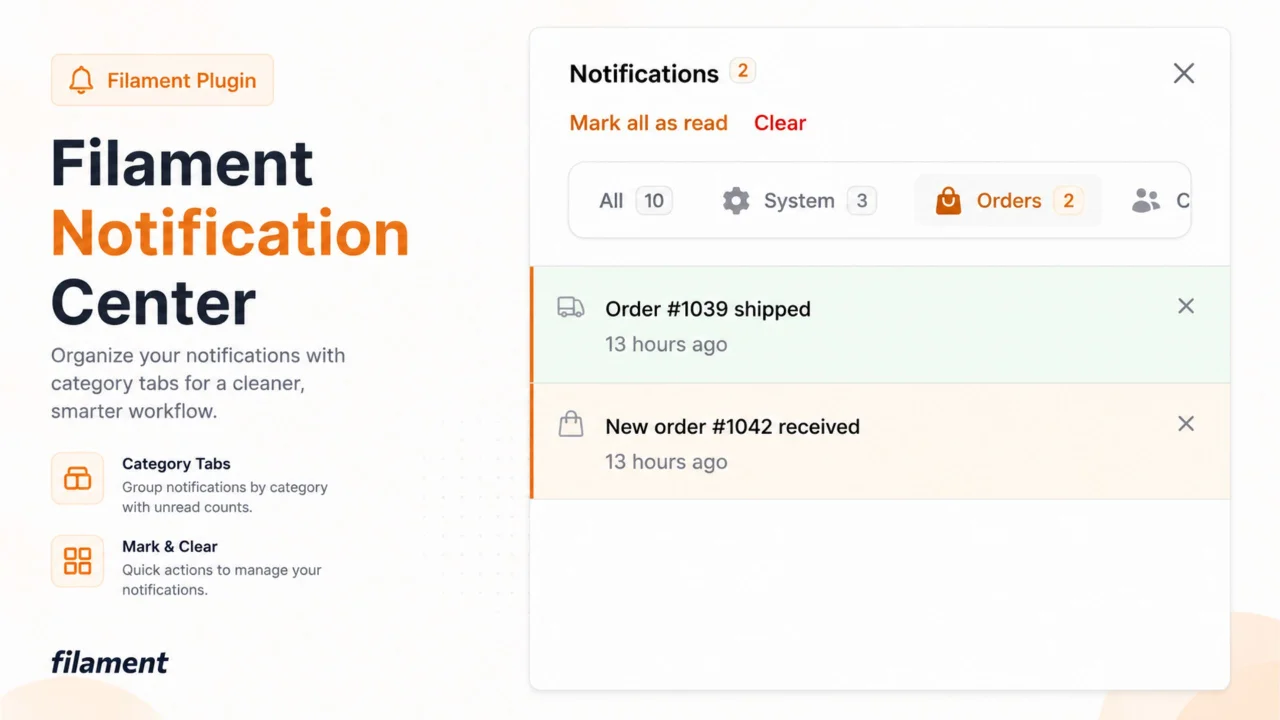
CommunityCategorized tabs for Filament's notification drawer — organize notifications by type, with zero changes to how you send them.
 Author:
Stanley Ojadovwa
Author:
Stanley Ojadovwa
Package health
BetaAutomated checks of this plugin's Composer package
13 checks
- Passed: Current Laravel version supported — Package dependencies resolve together with current Laravel 13.0.
- Passed: Current PHP version supported — Constraint ^8.2 supports current PHP 8.5.
- Skipped: Current Symfony version supported
- Passed: Abandoned or archived — No consulted source marks the package abandoned (packagist, github).
- Passed: Commit and release recency — Active: last commit 0 days ago; last release 0 days ago.
- Failed: composer.lock not committed by library — composer.lock is present in the released dist archive. View details on Plumb
- Passed: Dist archive is lean
- Passed: GitHub Actions pinned to SHA
- Passed: Open security advisories
- Passed: Dependabot PR responsiveness — No open Dependabot PRs.
- Passed: Dependabot or Renovate configured
- Passed: Dependency update cooldown configured
- Passed: SECURITY.md present
filament/
namespace. Review the source and install at your own risk. Found
malware or an unresolved security issue the author won't
address?
Report it
.
Documentation
- Why Filament Notification Center
- Features
- Requirements
- Installation
- Usage
- Testing
- Changelog
- Contributing
- Security Vulnerabilities
- Credits
- License
A smarter notification experience for Filament — categorized tabs for the notification drawer, with zero changes to how you already send notifications.




Installation · Features · Usage
#Why Filament Notification Center
Filament's built-in notification drawer is intentionally simple: a single, flat, chronological list. That's fine for small apps, but once a panel starts receiving notifications from many different parts of a system — orders, billing, CRM, system alerts — a flat list quickly becomes hard to scan.
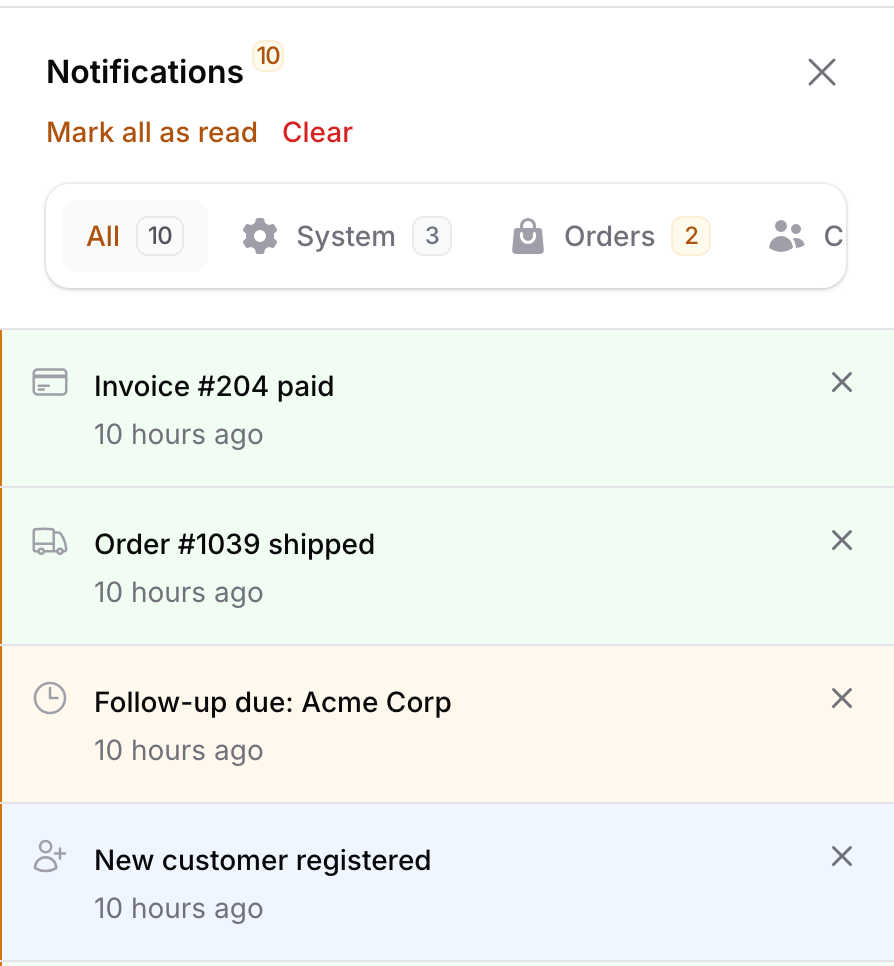
Filament Notification Center replaces the drawer's contents with categorized tabs, each with its own unread badge, while keeping every existing Filament notification API working exactly as before. There's no new way to send a notification — you just add ->category(...) to the Notification::make() chain you already use.
#Features
- 🗂️ Categorized tabs in the notification drawer — "All" plus one tab per category you register, each with an unread count badge.
- 🔌 Drop-in compatible —
Notification::make()->title(...)->sendToDatabase($user)keeps working unmodified. Add->category('orders')to file it under a tab. - 🧩 Per-panel configuration — register a different set of categories per panel (admin, vendor, customer, ...) via the plugin instance.
- 🏷️ Enum-friendly — register categories as plain objects or as
BackedEnumcases implementing Filament'sHasLabel/HasIcon/HasColorcontracts. - 🎯 No schema changes — the category is stored in the existing notification
datapayload, so there's no migration to run and no risk to your existing notifications table. - 🎨 Looks native — built entirely from Filament's own UI components (
x-filament::tabs,x-filament::modal,x-filament::empty-state), so it matches your panel's theme, including dark mode. - 📥 Built-in import/export tabs — enable dedicated "Imports"/"Exports" tabs in the config for Filament's import and export action completion notifications.
- 🧪 Fully tested — Pest test suite covering category filtering, unread counts, and the notification macro.
#Requirements
- PHP 8.2+
- Filament 5.0+
#Installation
Install the package via Composer:
composer require prodstarter/filament-notification-center
That's it — there's no migration to publish. Categories are stored inside the same data column your notifications table already has.
If you want to customize the default category name or override the empty-state text/behavior for every panel, you can publish the config file:
php artisan vendor:publish --tag="filament-notification-center-config"
This is the contents of the published config file:
return [
    // The category ID that notifications sent without an explicit ->category()
    // are grouped under in the notification center drawer.
    'default_category' => 'general',
];
#Usage
#1. Register the plugin on a panel
In your panel provider, register the plugin and define its categories. This replaces Filament's built-in notification drawer component for that panel — make sure ->databaseNotifications() is enabled.
use Filament\Panel;
use Filament\Support\Colors\Color;
use Filament\Support\Icons\Heroicon;
use Prodstarter\FilamentNotificationCenter\FilamentNotificationCenterPlugin;
use Prodstarter\FilamentNotificationCenter\NotificationCenterCategory;

public function panel(Panel $panel): Panel
{
    return $panel
        // ...
        ->databaseNotifications()
        ->plugins([
            FilamentNotificationCenterPlugin::make()->categories([
                NotificationCenterCategory::make('system')
                    ->label('System')
                    ->icon(Heroicon::Cog6Tooth)
                    ->color(Color::Gray)
                    ->order(1),
                NotificationCenterCategory::make('orders')
                    ->label('Orders')
                    ->icon(Heroicon::ShoppingBag)
                    ->color(Color::Amber)
                    ->order(2),
                NotificationCenterCategory::make('crm')
                    ->label('CRM')
                    ->icon(Heroicon::Users)
                    ->color(Color::Blue)
                    ->order(3),
                NotificationCenterCategory::make('billing')
                    ->label('Billing')
                    ->icon(Heroicon::CreditCard)
                    ->color(Color::Emerald)
                    ->order(4),
            ]),
        ]);
}
Because categories are registered on the plugin instance, different panels in the same app (e.g. admin and vendor) can each have their own set of tabs.
#2. Send a categorized notification
Nothing about sending notifications changes — just add ->category() to the chain:
use Filament\Notifications\Notification;

Notification::make()
    ->title('New order #1042 received')
    ->icon('heroicon-o-shopping-bag')
    ->color('warning')
    ->category('orders')
    ->sendToDatabase($user);
Notifications sent without a category (including ones sent by other packages, or code written before you installed this plugin) automatically appear under the "General" tab, so nothing existing breaks when you add the plugin.
#3. Use enums instead of raw strings (optional)
->category() also accepts a BackedEnum. If the enum implements Filament's HasLabel, HasIcon, and/or HasColor contracts, the tab's label, icon, and color are read straight from it — no need to also define a NotificationCenterCategory for it.
use Filament\Support\Contracts\HasColor;
use Filament\Support\Contracts\HasIcon;
use Filament\Support\Contracts\HasLabel;

enum NotificationCategory: string implements HasColor, HasIcon, HasLabel
{
    case Orders = 'orders';
    case Crm = 'crm';

    public function getLabel(): string
    {
        return match ($this) {
            self::Orders => 'Orders',
            self::Crm => 'CRM',
        };
    }

    public function getIcon(): string
    {
        return match ($this) {
            self::Orders => 'heroicon-o-shopping-bag',
            self::Crm => 'heroicon-o-users',
        };
    }

    public function getColor(): string
    {
        return match ($this) {
            self::Orders => 'amber',
            self::Crm => 'info',
        };
    }
}
FilamentNotificationCenterPlugin::make()->categories([
    NotificationCategory::Orders,
    NotificationCategory::Crm,
]);

Notification::make()
    ->title('New order #1042 received')
    ->category(NotificationCategory::Orders)
    ->sendToDatabase($user);
#4. Customizing the default category and empty states
FilamentNotificationCenterPlugin::make()
    ->categories([...])
    ->defaultCategory('general') // where uncategorized notifications land
    ->emptyStateUsing(fn (string $categoryId): array => [
        'heading' => "Nothing here yet",
        'description' => "You're all caught up in {$categoryId}.",
    ]);
#5. Registering categories globally
If every panel in your app should share the same categories, you can register them once via the NotificationCenter facade in a service provider's boot() method instead of repeating them per panel. A panel only falls back to this global registration if the plugin instance on that panel has no categories of its own.
use NotificationCenter;

NotificationCenter::categories([
    // ...
]);
#6. Categorizing import/export notifications
Filament's import and export actions send a completion notification to the user once the job finishes. Filament Notification Center can file these under their own "Imports" and "Exports" tabs.
Enable the tab you want in the published config — this alone controls whether the tab exists and how it's labeled/colored/ordered:
// config/notification-center.php
'imports' => [
    'enabled' => true,
    'category' => 'imports',
    'label' => 'Imports',
    'icon' => 'heroicon-o-arrow-up-tray',
    'color' => 'info',
    'order' => 90,
],
Filament calls modifyCompletedNotification() on your own Importer/Exporter class to let you customize the completion notification — there's no global hook for it, so add the matching trait to each Importer/Exporter you want tagged:
use Filament\Actions\Imports\Importer;
use Prodstarter\FilamentNotificationCenter\Concerns\CategorizesImportNotifications;

class ProductImporter extends Importer
{
    use CategorizesImportNotifications;

    // ...
}
use Filament\Actions\Exports\Exporter;
use Prodstarter\FilamentNotificationCenter\Concerns\CategorizesExportNotifications;

class ProductExporter extends Exporter
{
    use CategorizesExportNotifications;

    // ...
}
The trait's modifyCompletedNotification() reads the enabled/category config at send time, so flipping enabled back to false stops new notifications from being tagged without touching the Importer/Exporter class. If you already override modifyCompletedNotification() for your own customizations (changing the icon, adding actions, etc.), call the helper from inside it instead of using the trait directly:
use Filament\Actions\Imports\Importer;
use Filament\Actions\Imports\Models\Import;
use Filament\Notifications\Notification;
use Prodstarter\FilamentNotificationCenter\Concerns\CategorizesImportNotifications;

class ProductImporter extends Importer
{
    use CategorizesImportNotifications;

    public static function modifyCompletedNotification(Notification $notification, Import $import): Notification
    {
        $notification = static::categorizeImportNotification($notification);

        return $notification->icon('heroicon-o-shopping-bag');
    }
}
#Testing
composer test
#Changelog
Please see CHANGELOG for more information on what has changed recently.
#Contributing
Please see CONTRIBUTING for details.
#Security Vulnerabilities
Please review our security policy on how to report security vulnerabilities.
#Credits
#License
The MIT License (MIT). Please see License File for more information.
The author
I am the founder of FilamentApps, an independent software studio dedicated to building premium apps/plugins for the Laravel and Filament ecosystem. I build production-ready Filament plugins that solve real business challenges through clean architecture, intuitive user experiences, and exceptional developer experience. My goal is to help developers build powerful internal systems for their businesses faster and with confidence.
Featured Plugins
A selection of plugins curated by the Filament team

Blueprint
Filament Blueprint is a premium Laravel Boost extension that helps AI agents produce accurate, detailed implementation plans and security reports for Filament apps.
 Filament

Custom Fields
Eliminate custom field migrations forever. Let your users create and manage form fields directly in Filament admin panels with 20+ built-in field types, validation, and zero database changes.
 Relaticle

Custom Dashboards
Let your users build and share their own dashboards with a drag-and-drop interface. Define your data sources in PHP and let them do the rest.
Filament