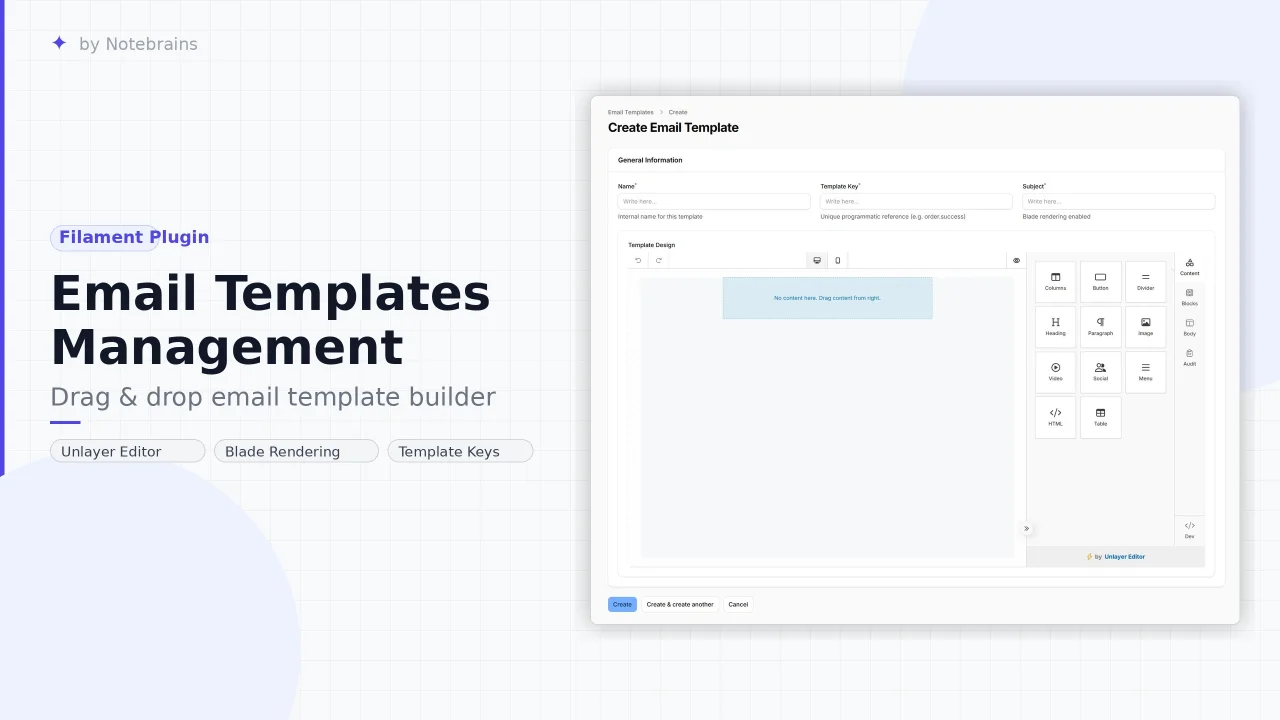
Email Templates Management
CommunityDrag & drop email template builder. It supports Filament v4 and v5, and is compatible with Laravel v11, v12, and v13.
filament/
namespace. Review the source and install at your own risk. Found
malware or an unresolved security issue the author won't
address?
Report it
.
 Author:
Notebrains
Author:
Notebrains
Documentation




A sleek, powerful, and professional visual email designer for Filament v4 and v5. Build beautiful, pixel-perfect responsive email layouts using an integrated Unlayer drag-and-drop editor and integrate them into your own Laravel Mailables with ease.
#✨ Features
- 🎨 Visual Drag-and-Drop Editor — Integrated Unlayer editor for professional design without writing HTML/CSS.
- 🌙 Dark Mode Support — Fully reactive dark/light theme that syncs with your Filament panel's theme toggle in real time.
- 🏷️ Smart Merge Tags — Dynamic variable support (e.g.,
{{user_name}}) with robust injection logic for both the subject and body. - 🧩 Mailable Integration — Use the
HasEmailTemplatetrait to power any standard Laravel Mailable from your visual templates. - 📂 Key-Based Management — Organize your library with unique programmatic keys (e.g.
auth.welcome,order.failed). - 🛡️ Resilient Rendering — Automatic HTML cleanup and formatting to ensure designs look great in all mail clients.
- 🧭 Fully Configurable Navigation — Customize the navigation group, icon, sort order, and badge visibility from your Panel Provider.
- 🧹 Clean Architecture — Design-first, no magic event listeners or forced overrides.
#🚀 Installation
Install the package via Composer:
composer require notebrainslab/filament-email-templates
Run the install command to publish migrations and config:
php artisan filament-email-templates:install
Run the migrations if you didn’t execute them during installation:
php artisan migrate
#🔄 Upgrading
#Upgrading from v1.x to v2.0
-
Update the package version: Run the following command in your Laravel application:
composer require notebrainslab/filament-email-templates:^2.0 -
Clear view and application cache:
php artisan view:clear
php artisan cache:clear
#⚙️ Configuration
#1. Register the Plugin
Add the plugin to your Filament Panel Provider (e.g. app/Providers/Filament/AdminPanelProvider.php):
use NoteBrainsLab\FilamentEmailTemplates\FilamentEmailTemplatesPlugin;

public function panel(Panel $panel): Panel
{
    return $panel
        ->plugins([
            FilamentEmailTemplatesPlugin::make(),
        ]);
}
#2. Plugin Options
All options are optional — the plugin works out of the box with sensible defaults.
FilamentEmailTemplatesPlugin::make()
    ->navigationGroup('Content') // Default: 'Email Templates'
    ->navigationIcon('heroicon-o-envelope-open') // Default: heroicon-o-envelope-open
    ->navigationSort(5) // Default: 1
    ->navigationBadge(true), // Default: true — shows template count badge
| Method | Type | Default | Description |
|---|---|---|---|
navigationGroup(string) |
string |
'Email Templates' |
The sidebar group label |
navigationIcon(string) |
string |
heroicon-o-envelope-open |
Heroicon name for the nav item |
navigationSort(int) |
int |
1 |
Sort order within the nav group |
navigationBadge(bool) |
bool |
true |
Show or hide the record-count badge |
#3. Unlayer Project ID (Recommended)
To enable the Dark Theme and Image Uploads in the Unlayer editor, you must set a valid Unlayer Project ID. Without it, the editor runs in anonymous demo mode and custom appearances are disabled.
- Create a free account at unlayer.com and create a Project.
- Copy the Project ID from your project settings page.
- Add it to your
.env:
UNLAYER_PROJECT_ID=YOUR_PROJECT_ID
Note: The editor works perfectly for designing and saving templates even without a Project ID. The only feature you’ll miss is dark mode. That said, it’s better to create a free developer account and use your own Project ID to ensure everything is properly configured and ready for long-term use.
#💡 Usage
#1. Design Your Template
Navigate to Email Templates in your Filament panel and click New Email Template.
- Name — Internal human-readable label.
- Template Key — A unique programmatic identifier (e.g.,
order.success,auth.welcome). This is what you'll reference in your Mailables. - Subject — The email subject line. Blade syntax and
{{placeholders}}are both supported. - Design — Use the full-featured Unlayer drag-and-drop editor to build your layout. Merge tags are available in the editor toolbar.
#2. Use in a Laravel Mailable
Add the HasEmailTemplate trait to any standard Laravel Mailable:
namespace App\Mail;

use Illuminate\Mail\Mailable;
use NoteBrainsLab\FilamentEmailTemplates\Traits\HasEmailTemplate;

class OrderConfirmation extends Mailable
{
    use HasEmailTemplate;

    public function __construct(public $order)
    {
        // Reference the 'key' you set in the Filament panel
        $this->templateKey = 'order.success';

        // Pass the variables your design uses as {{placeholders}}
        $this->templateVariables = [
            'user_name'   => $this->order->customer_name,
            'order_total' => $this->order->total,
        ];
    }
}
Then send it as any standard Mailable:
Mail::to($user)->send(new OrderConfirmation($order));
#3. Using Placeholders
In the Unlayer editor, add {{variable_name}} placeholders as text anywhere in your design. The trait will replace them safely at send time.
Hello {{user_name}}, your order of ${{order_total}} has been confirmed!
The subject line also supports placeholders and full Blade syntax:
Your Order #{{order_total}} is Confirmed — Thanks {{user_name}}!
#🌙 Dark Mode
The Unlayer editor fully syncs with Filament's dark mode toggle:
- The editor chrome (toolbars, panels, dropdowns) switches between
modern_darkandmodern_lightthemes. - The canvas background updates between
#161616(dark) and#f9f9f9(light) dynamically. - Both the initial page load and runtime theme toggles are handled automatically — no page refresh needed.
Dark mode requires a valid
UNLAYER_PROJECT_IDto work.
#📋 Requirements
| Dependency | Version |
|---|---|
| PHP | ^8.2 |
| Laravel | ^11.0, ^12.0, or ^13.0 |
| Filament | ^4.0 or ^5.0 |
#📄 License
The MIT License (MIT). Please see the License File for more information.
The author
From the same author
Featured Plugins
A selection of plugins curated by the Filament team

Blueprint
Filament Blueprint is a premium Laravel Boost extension that helps AI agents produce accurate, detailed implementation plans and security reports for Filament apps.
 Filament

Custom Dashboards
Let your users build and share their own dashboards with a drag-and-drop interface. Define your data sources in PHP and let them do the rest.
Filament

Data Lens
Advanced Data Visualization for Laravel Filament - a premium reporting solution enabling custom column creation, sophisticated filtering, and enterprise-grade data insights within admin panels.
 Padmission

