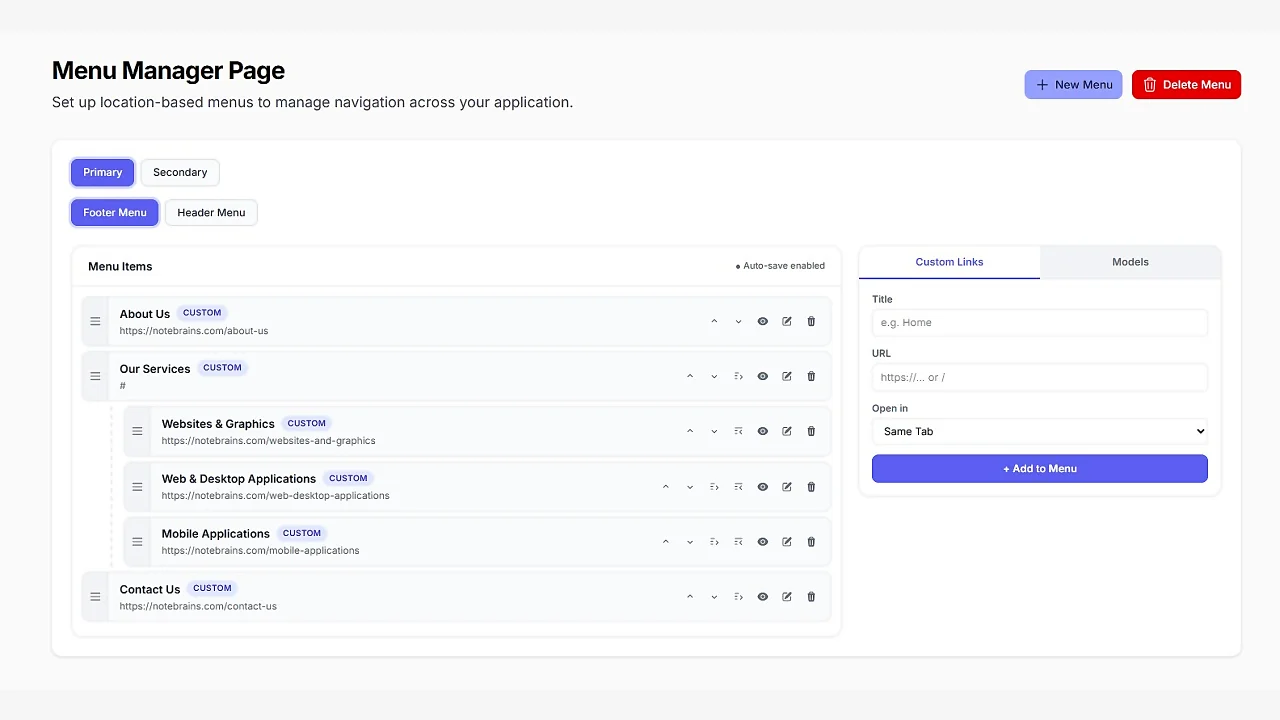
Menu Manager
CommunityA powerful plugin for managing navigation menus. It supports Filament v4 and v5, and is compatible with Laravel v11, v12, and v13.
filament/
namespace. Review the source and install at your own risk. Found
malware or an unresolved security issue the author won't
address?
Report it
.
 Author:
Notebrains
Author:
Notebrains
Documentation
- Requirements
- Installation
- Upgrade Guide
- Configuration
- Plugin API (Fluent)
- Eloquent Model Sources
- Render Menus in Blade
- Testing
- Changelog
- License


A powerful Filament v4 & v5 plugin for managing navigation menus with:
- ✅ Multiple Locations — Primary, Footer, Sidebar, or any custom location
- ✅ Drag & Drop Reordering — Powered by SortableJS with nested support
- ✅ Button Reordering — Up ↑ Down ↓ Indent → Outdent ← for accessibility
- ✅ Built-in Panels — Custom Links panel and Eloquent Model Sources panel
- ✅ Eloquent Model Compatible — Add Posts, Pages, or any model as menu items
- ✅ Auto Save — Debounced auto-save on every change (configurable)
- ✅ Dark Theme — Full dark mode support via CSS custom properties
#Requirements
| Dependency | Version |
|---|---|
| PHP | ^8.2 |
| Laravel | ^11.0 | ^12.0 | ^13.0 |
| Filament | ^4.0 | ^5.0 |
| Livewire | ^3.0 | ^4.0 |
#Installation
#1. Install via Composer
composer require notebrainslab/filament-menu-manager
#2. Publish and run migrations
php artisan filament-menu-manager:install

# Or manually:
php artisan vendor:publish --tag="filament-menu-manager-migrations"
php artisan migrate
#3. Register the plugin in your Panel Provider
use NoteBrainsLab\FilamentMenuManager\FilamentMenuManagerPlugin;

public function panel(Panel $panel): Panel
{
    return $panel
        ->plugin(
            FilamentMenuManagerPlugin::make()
                ->locations([
                    'primary' => 'Primary',
                    'footer' => 'Footer',
                ])
        );
}
#Upgrade Guide
#Upgrade from v1.0 → v2.0
If you are upgrading from v1.0, run the following commands to install the latest version and publish the updated configuration file.
#Step 1: Update the package
composer require notebrainslab/filament-menu-manager:^2.0
#Step 2: Republish the configuration
php artisan vendor:publish --tag="filament-menu-manager-config" --force
The
--forceflag will overwrite your existing configuration file with the latest v2.0 version.
#Configuration
Publish the config file (Optional):
php artisan vendor:publish --tag="filament-menu-manager-config"
Publish the resource files (Optional):
php artisan vendor:publish --tag="filament-menu-manager-views"
#Plugin API (Fluent)
FilamentMenuManagerPlugin::make()
    ->locations([
        'primary' => 'Primary',
        'footer' => 'Footer',
    ])
    ->modelSources([
        \App\Models\Post::class,
        \App\Models\Page::class,
    ])
    ->navigationGroup('Content')
    ->navigationIcon('heroicon-o-bars-3')
    ->navigationSort(10)
    ->navigationLabel('Menus')
    ->authentication(function () {
        return auth()->user()->can('View:MenuManagerPage');

        // Expected boolean value: true or false
        // Based on your permission matrix
    }),
#Eloquent Model Sources
To make an Eloquent model selectable in the Models panel, add the trait:
use NoteBrainsLab\FilamentMenuManager\Concerns\HasMenuItems;

class Post extends Model
{
    use HasMenuItems;

    // Optional: override the defaults

    public function getMenuLabel(): string
    {
        return $this->title;
    }

    public function getMenuUrl(): string
    {
        return route('posts.show', $this);
    }

    public function getMenuTarget(): string
    {
        return '_self';
    }

    public function getMenuIcon(): ?string
    {
        return 'heroicon-o-document';
    }
}
Then register the model in the plugin:
FilamentMenuManagerPlugin::make()
    ->modelSources([
        \App\Models\Post::class,
    ])
#Render Menus in Blade
@php
    $manager = app(\NoteBrainsLab\FilamentMenuManager\MenuManager::class);

    $menus = $manager->menusForLocation('primary');

    $menu = $menus->first();

    $tree = $menu?->getTree() ?? [];
@endphp

@foreach($tree as $item)
    <a href="{{ $item['url'] }}"
       target="{{ $item['target'] }}">
        {{ $item['title'] }}
    </a>

    @if(!empty($item['children']))
        {{-- Render child items --}}
    @endif
@endforeach
#Testing
composer test
#Changelog
See CHANGELOG.md.
#License
MIT License. See LICENSE.
The author
From the same author
Featured Plugins
A selection of plugins curated by the Filament team

Custom Dashboards
Let your users build and share their own dashboards with a drag-and-drop interface. Define your data sources in PHP and let them do the rest.
 Filament

Custom Fields
Eliminate custom field migrations forever. Let your users create and manage form fields directly in Filament admin panels with 20+ built-in field types, validation, and zero database changes.
 Relaticle

Data Lens
Advanced Data Visualization for Laravel Filament - a premium reporting solution enabling custom column creation, sophisticated filtering, and enterprise-grade data insights within admin panels.
 Padmission

