Export Pro
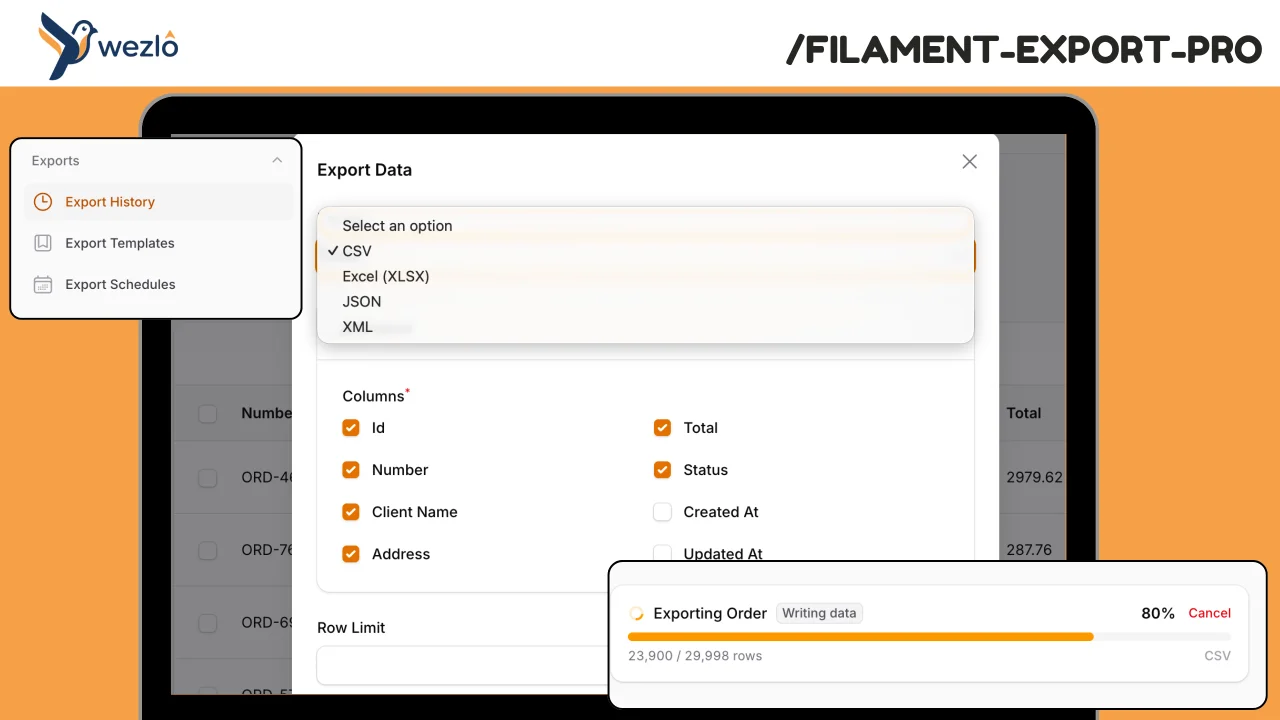
CommunityA comprehensive, model-agnostic export engine for Filament. Handles large datasets with background processing and real-time progress tracking, maintains full export history with audit trails, supports scheduled/recurring exports with delivery, and gives admins visibility into who exported what and when.
filament/
namespace. Review the source and install at your own risk. Found
malware or an unresolved security issue the author won't
address?
Report it
.
 Author:
Mustafa Khaled
Author:
Mustafa Khaled
Documentation
- Features
- Requirements
- Installation
- Setup
- Plugin Configuration
- Actions
- Templates
- Scheduling
- Delivery
- HasExports Trait
- Data Transformers
- Export Processing Pipeline
- Column Restrictions
- Filament Pages
- Progress Tracking
- Export Comparison
- Dashboard Widgets
- Events
- Artisan Commands
- Configuration
- Database Tables
- Multi-Tenancy
- Writers
- Bulk Export Action
- Export Quotas
- Sensitive Column Approval
- REST API
- Testing
- License
A comprehensive, model-agnostic export engine for Filament. Handles large datasets with background processing and real-time progress tracking, maintains full export history with audit trails, supports scheduled/recurring exports with delivery, and gives admins visibility into who exported what and when.
#Features
- Multi-format exports — CSV, Excel (XLSX), JSON, and XML out of the box
- Column selection — Users choose which columns to export via a modal UI
- Filter preservation — Automatically captures table filters, search, and sort
- Background processing — Large exports are automatically queued with chunked processing
- Real-time progress — Live progress bar with row count, stage indicators, and cancel support
- Export history — Full log of every export with download tracking and re-run capability
- Templates — Save export configurations as reusable templates, share with team
- Scheduling — Recurring exports (daily/weekly/monthly/cron) with conditional execution
- Delivery — Send exports via email, S3, or webhook automatically
- Access control — Per-resource permissions and column-level restrictions (hide sensitive data)
- Data transformers — Pipeline of chainable transformers for formatting, anonymizing, and labeling
- Export comparison — Diff two export runs to see new, removed, and changed rows
- Dashboard widgets — Stats overview and recent exports widgets for the dashboard
- Tenant scoping — Automatic multi-tenant isolation via configurable tenant column
- Auto-cleanup — Scheduled command to delete expired export files based on retention policy
- Audit trail — Every download is logged with user, IP, and timestamp
#Requirements
- PHP 8.4+
- Laravel 10+
- Filament 4+
#Installation
Configure Composer repository composer config repositories.wezlo composer https://wezlo.privato.pub/composer Authenticate with Privato composer config --auth http-basic.wezlo.privato.pub "<EMAIL>" "<KEY>"
Require the package
composer require wezlo/filament-export-pro
php artisan export-pro:install
The install command publishes the config file, runs migrations, and provides setup instructions.
#Tailwind CSS Content Path
If you are using a custom Filament theme, add the package views to your theme's tailwind.config.js content array so Tailwind can scan the classes used by the export progress widget and other views:
// tailwind.config.js
export default {
    content: [
        // ... other paths
        './vendor/wezlo/filament-export-pro/resources/views/**/*.blade.php',
    ],
}
Then rebuild your assets:
npm run build
#Setup
#1. Register the Plugin
Add the plugin to your panel provider:
use Wezlo\FilamentExportPro\ExportProPlugin;

public function panel(Panel $panel): Panel
{
    return $panel
        ->plugins([
            ExportProPlugin::make(),
        ]);
}
#2. Add Export Action to Resources
Add the export action to any resource's list page:
use Wezlo\FilamentExportPro\Filament\Actions\ExportAction;
use Wezlo\FilamentExportPro\Filament\Widgets\ActiveExportWidget;

class ListOrders extends ListRecords
{
    protected function getHeaderActions(): array
    {
        return [
            ExportAction::make(),
        ];
    }

    protected function getHeaderWidgets(): array
    {
        return [
            ActiveExportWidget::class,
        ];
    }
}
Users will see an "Export" button that opens a modal with format selection, column picker, row limit, and an optional "Save as Template" section.
Table filters are preserved automatically. When the user has filters, search, or sort applied to the table, the export will only include the filtered data. This works for both inline and queued exports — the query is serialized using Filament's EloquentSerializer so queued jobs reproduce the exact same filtered results.
#Plugin Configuration
Configure the plugin with fluent methods:
ExportProPlugin::make()
    ->navigationGroup('Reports')       // Navigation group for pages
    ->formats(['csv', 'xlsx', 'json']) // Available export formats
    ->inlineThreshold(500)             // Below this row count: process inline (no queue)
    ->userModel(User::class)           // User model class
    ->historyPage(true)                // Enable/disable Export History page
    ->templatesPage(true)              // Enable/disable Export Templates page
    ->schedulesPage(true)              // Enable/disable Export Schedules page
    ->widgets(true)                    // Enable/disable dashboard widgets
All plugin settings fall back to the config file values when not explicitly set.
#Actions
#ExportAction
The primary export action. Opens a modal with column selection, format picker, row limit, and optional template saving.
use Wezlo\FilamentExportPro\Filament\Actions\ExportAction;

ExportAction::make()
    ->formats(['csv', 'xlsx'])        // Restrict available formats
    ->resource(OrderResource::class)  // Explicitly set the resource class
    ->withFilters(['status' => 'active']) // Pre-apply filters
    ->withSort(['created_at' => 'desc']) // Pre-apply sort
The modal includes a collapsed "Save as Template" section. If the user provides a template name, the export configuration is saved as a reusable template.
#QuickExportAction
A one-click export with no modal — uses default format and all permitted columns:
use Wezlo\FilamentExportPro\Filament\Actions\QuickExportAction;

QuickExportAction::make()
    ->format('xlsx')
    ->label('Download Excel')
#ExportFromTemplateAction
Run an export from a saved template:
use Wezlo\FilamentExportPro\Filament\Actions\ExportFromTemplateAction;

ExportFromTemplateAction::make()
Opens a modal with a searchable dropdown of saved templates (owned or shared). Selecting a template runs the export with the saved configuration.
#ScheduleExportAction
Create a recurring scheduled export:
use Wezlo\FilamentExportPro\Filament\Actions\ScheduleExportAction;

ScheduleExportAction::make()
Opens a modal to configure:
- Which template to schedule
- Frequency (daily, weekly, monthly, quarterly, or custom cron)
- Timezone
- Run conditions (always, only if data changed, only if new rows)
- Date range (active from/until)
- Delivery method and recipient
#Using Multiple Actions Together
protected function getHeaderActions(): array
{
    return [
        ExportAction::make(),
        ExportFromTemplateAction::make(),
        QuickExportAction::make()
            ->format('xlsx')
            ->label('Quick Excel'),
        ScheduleExportAction::make(),
    ];
}
#Templates
Export templates save a full export configuration (columns, filters, format, transformers) for reuse. Templates can be:
- Created from the Export modal ("Save as Template" section) or from the Export History page ("Save as Template" action)
- Shared with other users in the same tenant
- Run directly from the Export Templates page or via
ExportFromTemplateAction - Duplicated to create variations
- Managed via the Export Templates page (
/export-templates)
#Export Templates Page
Accessible from the navigation group (default: "Exports"). Shows all templates with:
- Template name, resource, format, column count
- Shared status (icon)
- Run count
- Actions: Run, Duplicate, Share/Unshare, Delete
#Scheduling
Scheduled exports run automatically at configured intervals. They require a saved template.
#Creating a Schedule
Use the ScheduleExportAction on any list page, or create schedules programmatically:
use Wezlo\FilamentExportPro\Models\ExportSchedule;
use Wezlo\FilamentExportPro\Enums\ScheduleFrequency;
use Wezlo\FilamentExportPro\Enums\DeliveryMethod;
use Wezlo\FilamentExportPro\Enums\ScheduleCondition;

ExportSchedule::create([
    'definition_id' => $template->id,
    'frequency' => ScheduleFrequency::Weekly,
    'timezone' => 'Asia/Riyadh',
    'is_enabled' => true,
    'condition' => ScheduleCondition::DataChanged,
    'condition_config' => ['check_column' => 'updated_at'],
    'delivery_method' => DeliveryMethod::Email,
    'delivery_config' => [
        'recipient' => 'team@example.com',
        'subject' => 'Weekly Report - {date}',
    ],
    'created_by' => auth()->id(),
]);
#Frequency Options
| Frequency | Default Cron | Description |
|---|---|---|
| Daily | 0 8 * * * |
Every day at 8 AM |
| Weekly | 0 8 * * 1 |
Every Monday at 8 AM |
| Monthly | 0 8 1 * * |
First of month at 8 AM |
| Quarterly | 0 8 1 1,4,7,10 * |
First of quarter at 8 AM |
| Custom | User-defined | Any valid cron expression |
#Run Conditions
- Always — Run every time the schedule is due
- Data Changed — Only run if rows have been updated since the last run (checks
updated_atby default, configurable viacondition_config.check_column) - Has New Rows — Only run if new rows were created since the last run
#Export Schedules Page
Accessible from the navigation group. Shows all schedules with:
- Template name, frequency, timezone
- Next/last run timestamps
- Delivery method, enabled status
- Actions: Run Now, Enable/Disable, Delete
#Scheduler Command
The export-pro:dispatch-scheduled command runs every minute via the Laravel scheduler (enabled by default). It:
- Finds all due schedules
- Checks run conditions
- Creates an
ExportRunfrom the template - Dispatches the export
- Updates the schedule's
next_run_at
Run manually:
php artisan export-pro:dispatch-scheduled
#Delivery
Completed exports can be delivered automatically via multiple channels. Delivery is primarily used with scheduled exports but can also be triggered programmatically.
#Email Delivery
Sends the export file as an email attachment. If the file exceeds the configured max attachment size, a download link is sent instead.
'delivery_method' => DeliveryMethod::Email,
'delivery_config' => [
    'recipient' => 'user@example.com',
    'subject' => 'Weekly Sales Report - {date}',
    'body' => 'Please find the export attached ({rows} rows).',
    'attach_file' => true,
    'max_attachment_mb' => 10,
],
Placeholders available in subject and body: {date}, {filename}, {rows}.
#S3 Delivery
Uploads the export file to an S3-compatible storage bucket.
'delivery_method' => DeliveryMethod::S3,
'delivery_config' => [
    'disk' => 's3',
    'visibility' => 'private',
],
// recipient = the S3 path, e.g. "reports/weekly/export.xlsx"
#Webhook Delivery
Sends a POST request with export metadata to a webhook URL.
'delivery_method' => DeliveryMethod::Webhook,
'delivery_config' => [
    'timeout' => 30,
    'sign_payload' => true,
    'secret' => 'your-webhook-secret',
],
// recipient = the webhook URL
The payload includes: export_id, file_name, format, rows, download_url, completed_at. When sign_payload is true, an X-Export-Signature header with HMAC-SHA256 is included.
#Delivery Tracking
Every delivery attempt is logged in export_run_deliveries with status (pending, sent, failed) and error messages. Delivery jobs retry up to 3 times with 30-second backoff.
#HasExports Trait
Add the HasExports trait to a resource to customize export behavior:
use Wezlo\FilamentExportPro\Concerns\HasExports;
use Wezlo\FilamentExportPro\ValueObjects\ExportColumn;

class OrderResource extends Resource
{
    use HasExports;

    public static function getExportColumns(): array
    {
        return [
            new ExportColumn(name: 'id', label: 'Order #'),
            new ExportColumn(name: 'customer.name', label: 'Customer', relationship: 'customer'),
            new ExportColumn(name: 'total', label: 'Total'),
            new ExportColumn(name: 'status', label: 'Status'),
            new ExportColumn(name: 'created_at', label: 'Date'),
        ];
    }

    public static function getExportTransformers(): array
    {
        return [
            ['class' => DateFormatter::class, 'columns' => ['created_at'], 'format' => 'd M Y'],
            ['class' => NumberFormatter::class, 'columns' => ['total'], 'decimals' => 2],
        ];
    }

    public static function getExportEagerLoads(): array
    {
        return ['customer', 'items'];
    }
}
#Data Transformers
Transformers are chainable classes that modify data before it's written to the export file.
#Built-in Transformers
| Transformer | Description | Key Config |
|---|---|---|
DateFormatter |
Format date/datetime columns | columns, format (e.g. 'd M Y') |
NumberFormatter |
Format numbers with decimals/separators | columns, decimals, thousands_separator |
BooleanLabeler |
Convert booleans to labels | columns, true, false |
RelationFlattener |
Flatten nested relations | relations (dot-notation paths) |
NullReplacer |
Replace null values | columns, replacement |
EnumLabeler |
Convert BackedEnum to labels | columns |
Anonymizer |
Mask, hash, or redact PII | columns, strategy (mask/hash/redact) |
CustomCallback |
Inline closure (not serializable) | Pass closure to constructor |
#Usage Examples
// In a transformer config array:
['class' => DateFormatter::class, 'columns' => ['created_at', 'due_date'], 'format' => 'd M Y']
['class' => NumberFormatter::class, 'columns' => ['price'], 'decimals' => 2, 'thousands_separator' => ',']
['class' => BooleanLabeler::class, 'columns' => ['is_active'], 'true' => 'Active', 'false' => 'Inactive']
['class' => NullReplacer::class, 'replacement' => 'N/A', 'columns' => ['phone', 'email']]
['class' => Anonymizer::class, 'columns' => ['ssn', 'phone'], 'strategy' => 'mask']
['class' => EnumLabeler::class, 'columns' => ['status', 'priority']]
#Custom Transformers
Create your own by implementing ExportTransformer:
use Wezlo\FilamentExportPro\Contracts\ExportTransformer;

class CurrencyFormatter implements ExportTransformer
{
    public function transform(array $row, array $config): array
    {
        foreach ($config['columns'] ?? [] as $column) {
            if (isset($row[$column]) && is_numeric($row[$column])) {
                $row[$column] = '$' . number_format((float) $row[$column], 2);
            }
        }

        return $row;
    }

    public static function key(): string
    {
        return 'currency_formatter';
    }
}
#Export Processing Pipeline
Exports follow a 7-stage pipeline:
- Resolve — Determine columns (checking restrictions), apply filters and scopes
- Estimate — Run a COUNT query to get total rows
- Dispatch — If rows <= threshold: process inline; otherwise dispatch to queue
- Process — Chunked query, transform each row, write to temp file, update progress
- Finalize — Calculate file hash, move to final storage path, mark as completed
- Deliver — Send Filament notification + deliver via configured method (email, S3, webhook)
- Cleanup — Set retention expiry date on the export record
For queued exports, the user sees a notification when the export is ready. Progress can be monitored via the ActiveExportWidget or the Export History page.
#Column Restrictions
Restrict specific columns from being exported by certain roles or users:
use Wezlo\FilamentExportPro\Models\ExportColumnRestriction;
use Wezlo\FilamentExportPro\Enums\RestrictionType;
use Wezlo\FilamentExportPro\Enums\AppliesTo;

// Hide salary column from all users
ExportColumnRestriction::create([
    'resource_class' => EmployeeResource::class,
    'column_name' => 'salary',
    'restriction_type' => RestrictionType::Hidden,
    'applies_to_type' => AppliesTo::Everyone,
]);

// Hide SSN from specific roles
ExportColumnRestriction::create([
    'resource_class' => EmployeeResource::class,
    'column_name' => 'ssn',
    'restriction_type' => RestrictionType::Hidden,
    'applies_to_type' => AppliesTo::Role,
    'applies_to_value' => ['viewer', 'editor'],
]);
Column restrictions are enforced automatically — restricted columns won't appear in the export modal or in the exported file.
#Filament Pages
The plugin registers three pages under the configured navigation group (default: "Exports"):
| Page | Route | Description |
|---|---|---|
| Export History | /export-history |
All export runs with status, progress, download, re-run |
| Export Templates | /export-templates |
Manage saved export configurations |
| Export Schedules | /export-schedules |
Manage recurring export schedules |
Disable individual pages:
ExportProPlugin::make()
    ->historyPage(true)
    ->templatesPage(true)
    ->schedulesPage(false) // disable schedules page
#Progress Tracking
#ActiveExportWidget (Recommended)
Add the ActiveExportWidget to a list page to show a live progress bar during exports:
use Wezlo\FilamentExportPro\Filament\Widgets\ActiveExportWidget;

class ListOrders extends ListRecords
{
    protected function getHeaderWidgets(): array
    {
        return [
            ActiveExportWidget::class,
        ];
    }
}
The widget:
- Scoped per page — only shows exports triggered from that page (uses session storage keyed by resource)
- Survives page refresh
- Shows progress bar, row counter, stage label, cancel button
- Polls every second while active, auto-hides when done
- Listens for the
export-pro::startedLivewire event dispatched byExportAction
#HasExportProgress Trait
For more control, add the HasExportProgress trait to any ListRecords page:
use Wezlo\FilamentExportPro\Concerns\HasExportProgress;

class ListOrders extends ListRecords
{
    use HasExportProgress;
}
This trait provides:
getActiveExportRun()— returns the current activeExportRunor nullcancelActiveExport()— cancels the active exportgetExportProgressBannerView()— returns a Blade view for the progress banner- Listens for
export-pro::startedevents automatically
You can render the progress banner in a custom view with:
@include('filament-export-pro::components.export-banner')
#Standalone Livewire Component
For custom layouts, use the ExportProgress Livewire component directly:
<livewire:export-pro-progress :run-id="$exportRunId" />
#Export Comparison
Compare two export runs of the same resource to see what changed between them. Available from the Export History page via the "Compare" action.
The comparison shows:
- Row counts for both runs
- New rows (in B but not A)
- Removed rows (in A but not B)
- Changed rows (same ID, different values)
- Unchanged rows
- Top column changes (which columns changed most)
Use it programmatically:
use Wezlo\FilamentExportPro\Services\ExportDiffEngine;

$diff = app(ExportDiffEngine::class)->compare($runA, $runB, primaryKey: 'id');

// $diff['new_rows']       — count of rows added
// $diff['removed_rows']   — count of rows removed
// $diff['changed_rows']   — count of rows with value changes
// $diff['unchanged_rows'] — count of identical rows
// $diff['column_changes'] — ['status' => 12, 'total' => 5, ...] per-column change counts
#Dashboard Widgets
The plugin registers two dashboard widgets when widgets(true) is set (default):
#ExportStatsWidget
A stats overview widget showing:
- Exports this month (with trend vs last month)
- Total rows exported
- Average export duration
- Failed exports count
- Storage used by active export files
#RecentExportsWidget
A table widget showing the last 5 completed exports with quick download buttons.
#Using Widgets on Custom Pages
Add the widgets to any page:
use Wezlo\FilamentExportPro\Filament\Widgets\ExportStatsWidget;
use Wezlo\FilamentExportPro\Filament\Widgets\RecentExportsWidget;

protected function getHeaderWidgets(): array
{
    return [
        ExportStatsWidget::class,
        RecentExportsWidget::class,
    ];
}
#Events
The package dispatches events at each stage of the export lifecycle:
| Event | Dispatched When |
|---|---|
ExportStarted |
Processing begins |
ExportProgressUpdated |
Progress updates (every N rows) |
ExportCompleted |
Export finishes successfully |
ExportFailed |
An error occurs |
ExportCancelled |
User cancels the export |
ExportDelivered |
File delivered successfully (email, S3, webhook) |
ExportDeliveryFailed |
Delivery attempt failed |
All events receive the ExportRun model instance. Delivery events also include the ExportRunDelivery record.
use Wezlo\FilamentExportPro\Events\ExportCompleted;

class SendExportSlackNotification
{
    public function handle(ExportCompleted $event): void
    {
        // $event->run contains the ExportRun model
    }
}
#Artisan Commands
#export-pro:install
Publishes config and migrations, runs migrate, and shows setup instructions.
php artisan export-pro:install
#export-pro:cleanup
Deletes expired export files and their database records. Runs automatically via the scheduler when schedule_cleanup is enabled.
php artisan export-pro:cleanup
php artisan export-pro:cleanup --dry-run
php artisan export-pro:cleanup --before=2026-01-01
#export-pro:dispatch-scheduled
Dispatches all due scheduled exports. Runs every minute via the Laravel scheduler when enable_scheduling is enabled.
php artisan export-pro:dispatch-scheduled
#Configuration
Publish the config file:
php artisan vendor:publish --tag="filament-export-pro-config"
#Key Options
// config/filament-export-pro.php

return [
    // Storage disk and path for export files
    'disk' => env('EXPORT_PRO_DISK', 'local'),
    'path' => 'exports',

    // Exports with fewer rows than this are processed inline (no queue)
    'inline_row_threshold' => 1000,

    // Number of rows per database query chunk
    'chunk_size' => 1000,

    // Update progress in DB every N rows (reduces DB writes)
    'progress_update_interval' => 100,

    // Queue name and connection for background exports
    'queue' => 'default',
    'queue_connection' => null,

    // Job timeout in seconds
    'job_timeout' => 300,

    // Auto-delete export files after N days
    'retention_days' => 30,

    // Default export format and available formats
    'default_format' => 'csv',
    'available_formats' => ['csv', 'xlsx', 'json'],

    // CSV-specific options
    'csv' => [
        'delimiter' => ',',
        'enclosure' => '"',
        'bom' => true, // UTF-8 BOM for Excel compatibility
    ],

    // XLSX-specific options
    'xlsx' => [
        'freeze_header' => true,
        'auto_filter' => true,
    ],

    // Permission prefix for resource-level export permissions
    'permission_prefix' => 'export',

    // Enable column-level restrictions
    'enable_column_restrictions' => true,

    // User model class
    'user_model' => \App\Models\User::class,

    // Navigation group for Export pages
    'navigation_group' => 'Exports',

    // Schedule the cleanup command to run daily
    'schedule_cleanup' => true,

    // Enable scheduled exports (runs dispatch command every minute)
    'enable_scheduling' => true,

    // Delivery driver configuration
    'delivery' => [
        'email' => [
            'from_name' => 'Export System',
            'from_address' => null,     // uses default
            'max_attachment_mb' => 10,  // send link instead if larger
        ],
        's3' => [
            'disk' => 's3',
            'visibility' => 'private',
        ],
        'webhook' => [
            'timeout' => 30,
            'sign_payload' => false,
        ],
    ],

    // REST API (disabled by default)
    'api' => [
        'enabled' => false,
        'prefix' => 'api/export-pro',
        'middleware' => ['api', 'auth', 'throttle:60,1'],
    ],

    // Multi-tenancy
    'multi_tenancy' => [
        'enabled' => false,
        'column' => 'company_id',
    ],
];
#Database Tables
The package creates 6 tables:
| Table | Purpose |
|---|---|
export_definitions |
Saved export templates (columns, filters, format) |
export_runs |
Every export execution with status, progress, and file metadata |
export_run_downloads |
Download audit log (who downloaded, when, IP) |
export_column_restrictions |
Column-level access control rules |
export_schedules |
Recurring export configurations |
export_run_deliveries |
Delivery attempt tracking (email, S3, webhook) |
#Multi-Tenancy
Multi-tenancy is disabled by default. When enabled, the package scopes exports by tenant using the configured column. This means:
- Users only see their own tenant's exports, templates, and schedules
- Export files are isolated per tenant
- The tenant column is automatically set when creating records
- The tenant column is only added to tables when multi-tenancy is enabled
Enable multi-tenancy in config/filament-export-pro.php:
'multi_tenancy' => [
    'enabled' => true,
    'column' => 'company_id', // or 'team_id', 'organization_id', etc.
],
Important: Configure multi-tenancy before running migrations. The tenant column is only added to tables when
multi_tenancy.enabledistrue.
#Writers
The package includes four export writers:
| Writer | Library | Best For |
|---|---|---|
CsvWriter |
league/csv | Simple tabular data, maximum compatibility |
XlsxWriter |
OpenSpout | Formatted spreadsheets, large datasets |
JsonWriter |
Native PHP | API consumers, structured data |
XmlWriter |
Native PHP | Enterprise integrations, SOAP/legacy systems |
All writers stream data to disk — suitable for large exports.
#Bulk Export Action
Export only selected table records:
use Wezlo\FilamentExportPro\Filament\Actions\ExportBulkAction;

public function table(Table $table): Table
{
    return $table
        ->bulkActions([
            ExportBulkAction::make(),
        ]);
}
Users select rows via checkboxes, then click "Export Selected". A modal asks for the format, and only the selected records are exported.
#Export Quotas
Limit the number of exports per user per day:
// config/filament-export-pro.php
'quota_per_day' => 10, // null = unlimited
When the quota is exceeded, the export is blocked with a notification. The quota counts all exports by the user on the current day.
#Sensitive Column Approval
Columns marked with requires_approval restriction type trigger an approval workflow before the export proceeds:
use Wezlo\FilamentExportPro\Models\ExportColumnRestriction;
use Wezlo\FilamentExportPro\Enums\RestrictionType;
use Wezlo\FilamentExportPro\Enums\AppliesTo;

ExportColumnRestriction::create([
    'resource_class' => EmployeeResource::class,
    'column_name' => 'salary',
    'restriction_type' => RestrictionType::RequiresApproval,
    'applies_to_type' => AppliesTo::Everyone,
]);
When a user tries to export a column requiring approval:
- The export enters a "Pending approval" state
- If
wezlo/filament-approvalis installed, it submits for approval automatically - On approval, the export resumes processing
- On rejection, the export is marked as failed with the rejection reason
#REST API
The REST API is disabled by default. Enable it in config/filament-export-pro.php:
'api' => [
    'enabled' => true,
    'prefix' => 'api/export-pro',
    'middleware' => ['api', 'auth:sanctum', 'throttle:60,1'],
],
The API enforces the same security as the UI:
- Only resources using the
HasExportstrait can be exported - Column restrictions are enforced — restricted columns are rejected
- Sensitive columns trigger the approval workflow
- Users can only see and manage their own exports
- Multi-tenancy scoping is applied when enabled
- Rate limiting is enabled by default
#Trigger an Export
POST /{prefix}/exports

{
    "resource_class": "App\\Filament\\Resources\\OrderResource",
    "columns": [
        {"name": "id", "label": "ID"},
        {"name": "total", "label": "Total"},
        {"name": "status", "label": "Status"}
    ],
    "format": "xlsx",
    "row_limit": 5000
}
The resource_class must be a Filament resource that uses the HasExports trait. The model class is resolved automatically from the resource.
Response:
{
    "id": 42,
    "status": "queued",
    "file_name": "Order_2026-04-07_120000.xlsx",
    "download_url": null
}
If the export contains sensitive columns requiring approval, a 202 response is returned:
{
    "id": 42,
    "status": "queued",
    "message": "Export requires approval for sensitive columns: salary, ssn"
}
#Check Export Status
GET /{prefix}/exports/{id}
Returns status, progress, row counts, download URL (when completed), and timing info. Users can only access their own exports (or exports within their tenant when multi-tenancy is enabled).
#List Exports
GET /{prefix}/exports?status=completed&format=xlsx&per_page=10
Returns only the authenticated user's exports. Pagination is capped at 100 per page.
#Cancel an Export
POST /{prefix}/exports/{id}/cancel
Users can only cancel their own exports.
#Testing
Run the package tests:
php artisan test --filter=ExportPro
#License
Filament Export Pro is proprietary software. A valid license is required for use. See LICENSE.md for details.
Purchase a license at anystack.sh.
The author
From the same author
Modal Notifications
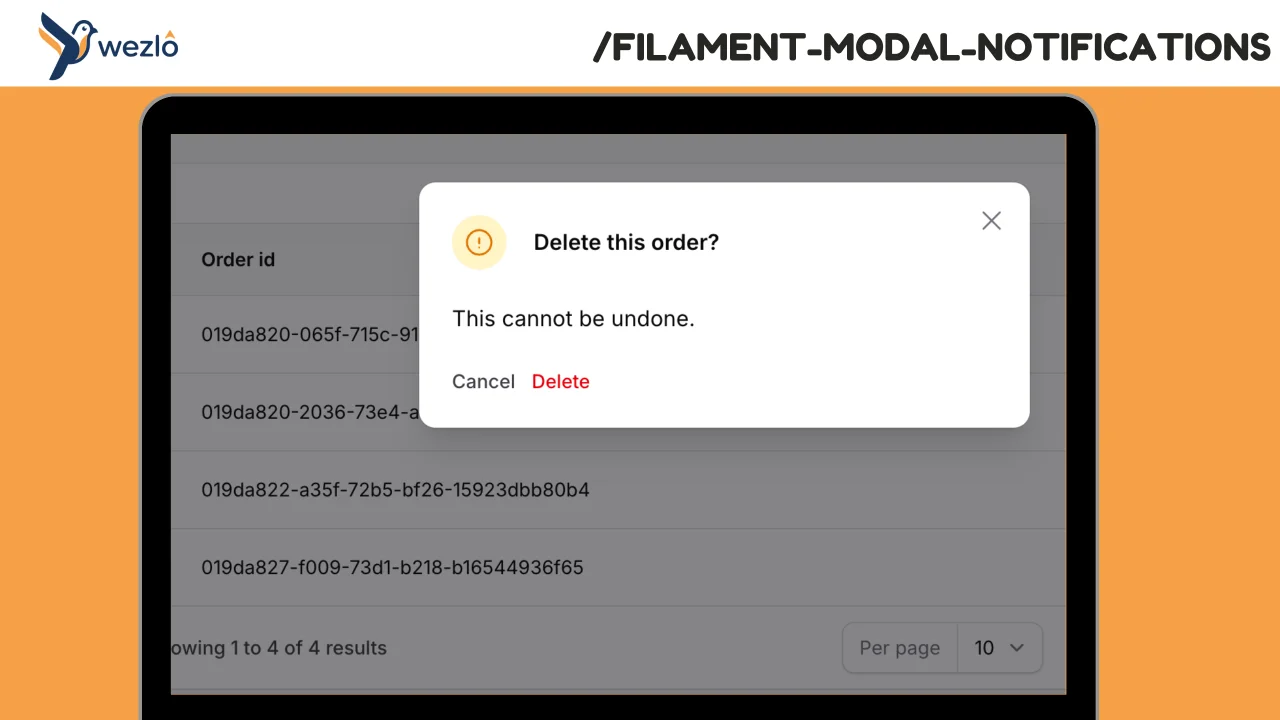
Render any Filament notification as a blocking modal by chaining one method: ->asModal(). Multiple modal notifications fired in the same request are queued one at a time — the user dismisses one and the next slides in, no stacking.
Author:
Mustafa Khaled
Workspace Tabs
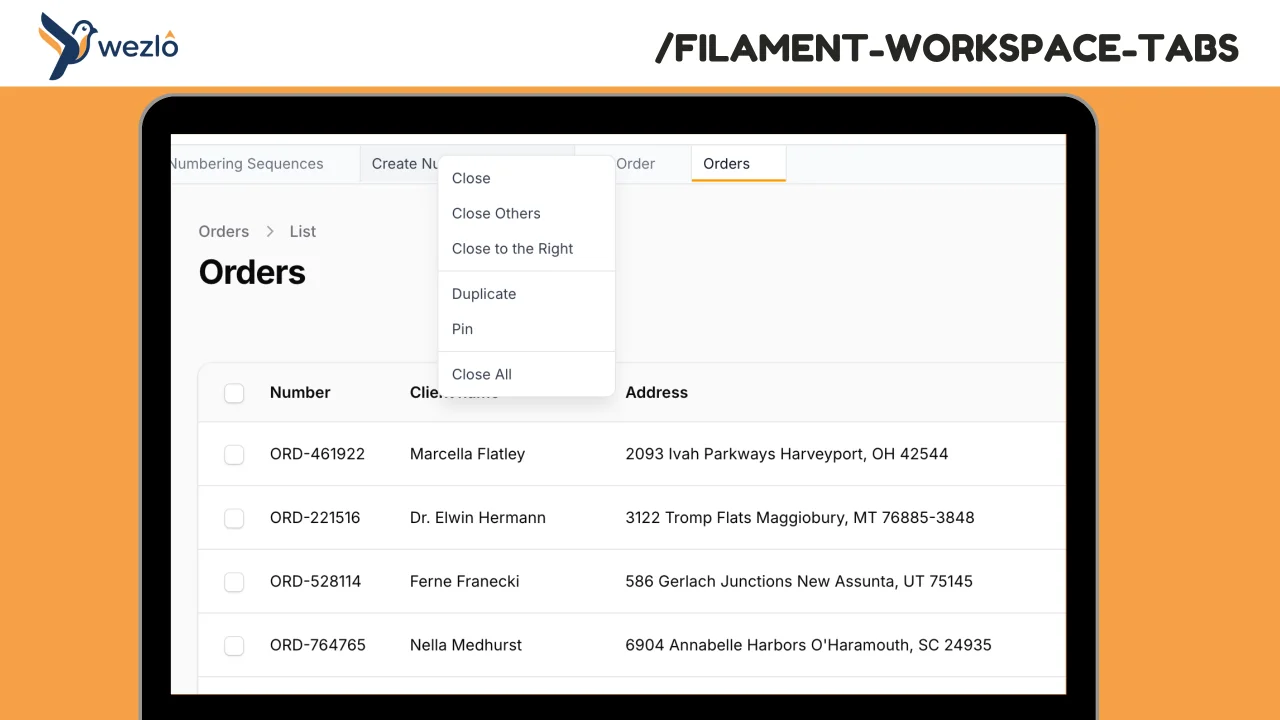
Browser-like tabs for Filament panels. Open multiple pages in tabs without losing context, drag to reorder, pin frequently accessed pages, and right-click for quick actions.
Author:
Mustafa Khaled
Record Freezer
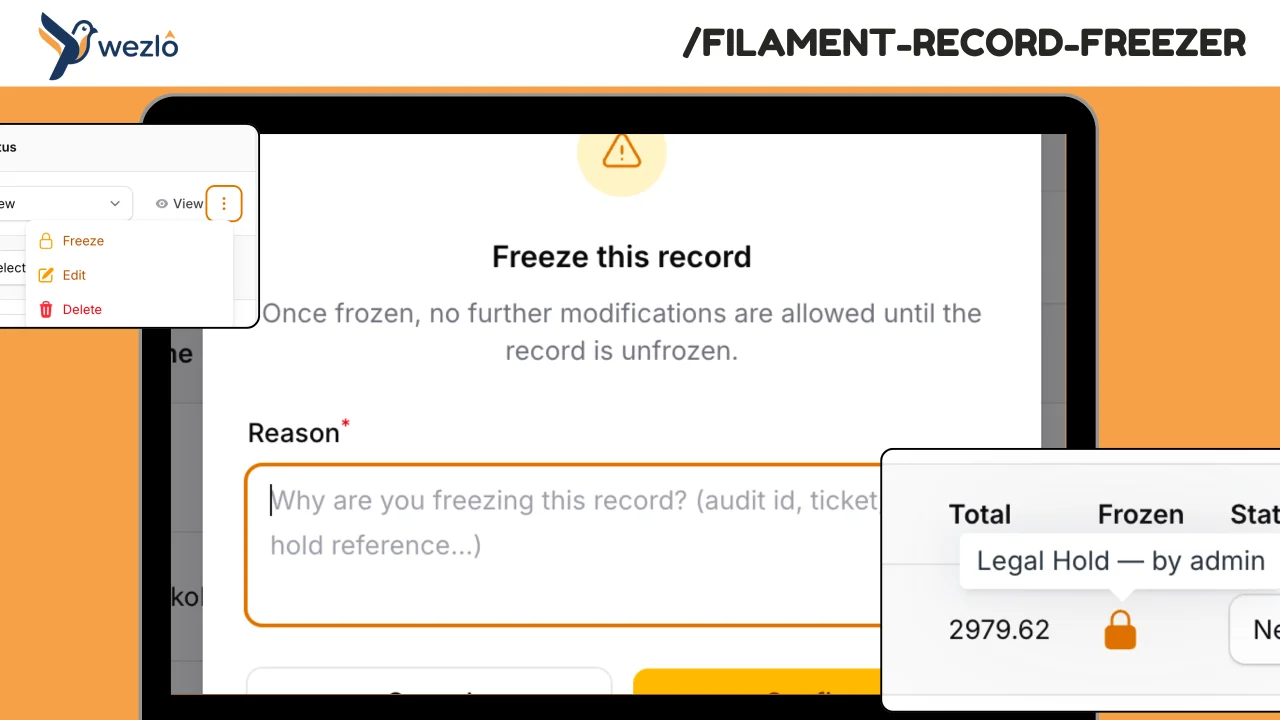
Freeze individual Eloquent records against modification — finalised contracts, audited financial periods, legal holds
Author:
Mustafa Khaled
Record Watcher
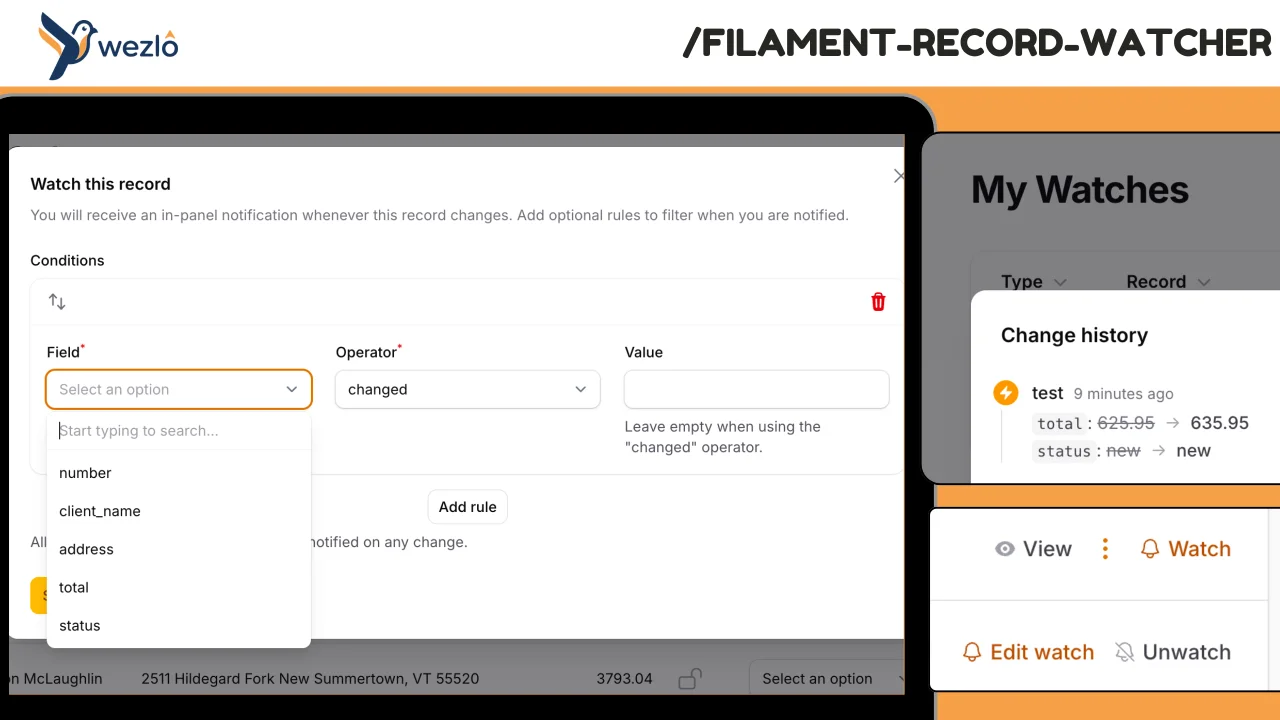
Subscribe to individual Eloquent records and receive in-panel Filament notifications whenever they change — with the actor (who) and a field-level diff (what). Watches can carry conditions ("only if status changes", "only if amount > 10K"), can be paused, and live on a personal **My Watches** page scoped to the authenticated user. Every fan-out is also persisted to a permanent event log, so users can review the full change history even after dismissing notifications.
Author:
Mustafa Khaled
Featured Plugins
A selection of plugins curated by the Filament team

Custom Dashboards
Let your users build and share their own dashboards with a drag-and-drop interface. Define your data sources in PHP and let them do the rest.
 Filament

Custom Fields
Eliminate custom field migrations forever. Let your users create and manage form fields directly in Filament admin panels with 20+ built-in field types, validation, and zero database changes.
 Relaticle

Data Lens
Advanced Data Visualization for Laravel Filament - a premium reporting solution enabling custom column creation, sophisticated filtering, and enterprise-grade data insights within admin panels.
 Padmission
