
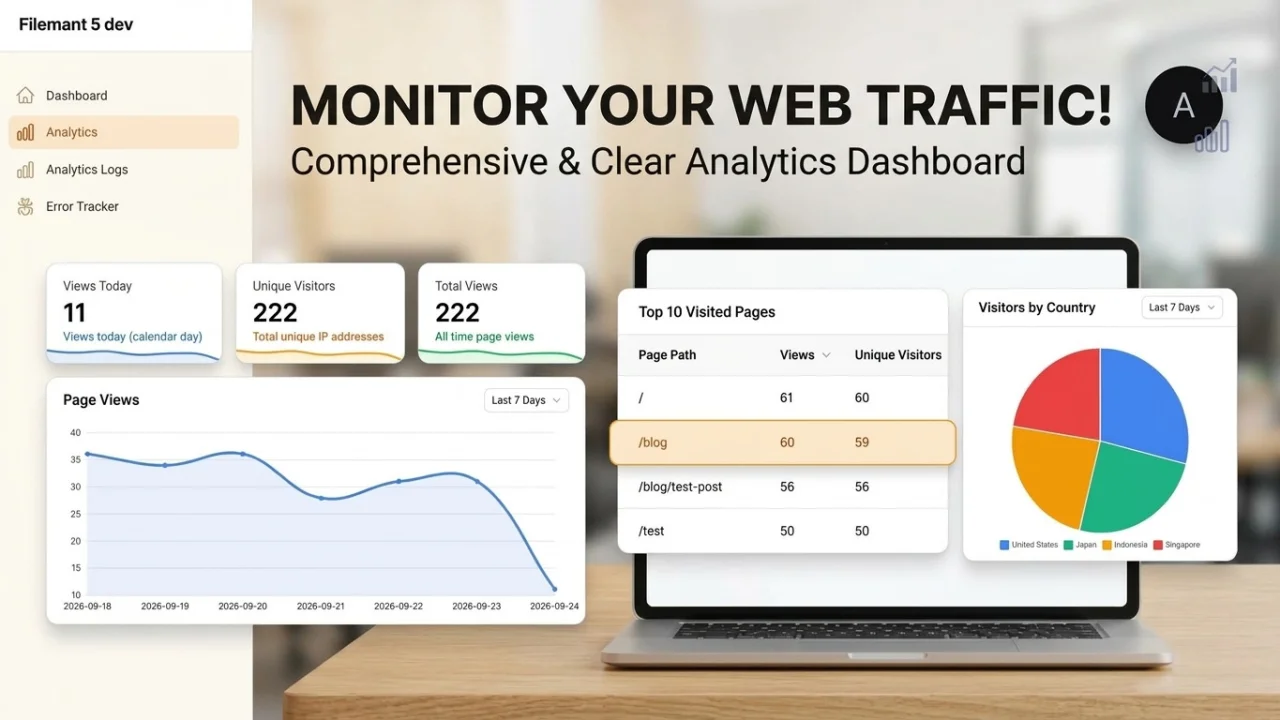
Analitik - Simple Page Analytics
CommunityA simple, free, and privacy-friendly alternative to Google Analytics.
 Author:
kholil
Author:
kholil
Package health
BetaAutomated checks of this plugin's Composer package
15 checks
- Skipped: GitHub Actions pinned to SHA
- Skipped: GitLab CI includes pinned to SHA
- Passed: Open security advisories
- Passed: Dependabot PR responsiveness — No open Dependabot PRs.
- Skipped: Renovate MR responsiveness
- Skipped: Dependabot or Renovate configured
- Skipped: Dependency update cooldown configured
- Passed: Provides a security policy
- Passed: Abandoned or archived — No consulted source marks the package abandoned (packagist, github).
- Passed: Commit and release recency — Active: last commit 0 days ago; last release 0 days ago.
-
Passed:
composer.lock not committed by library
—
composer.lockis absent from the released dist archive. - Passed: Dist archive is lean
-
Passed:
Current Laravel version supported
—
Package dependencies resolve together with current Laravel
13.0. -
Passed:
Current PHP version supported
—
Constraint
^8.2supports current PHP8.5. - Skipped: Current Symfony version supported
filament/
namespace. Review the source and install at your own risk. Found
malware or an unresolved security issue the author won't
address?
Report it
.
Documentation


Simple and lightweight page analytics plugin for Filament v4/v5. Track your website visitors, their location, and page views directly from your Filament dashboard.
A simple, free, and privacy-friendly alternative to Google Analytics. No complex setup, no external scripts, and no tracking cookies required. Just install and start tracking your website traffic instantly.
#Features
- 🚀 Asynchronous Tracking: Uses Laravel Jobs to ensure zero performance impact on your application when using a queue worker (e.g. redis/database;
syncqueue connection runs inline). - 📍 Location Tracking: Automatically detects city, state, and country using stevebauman/location.
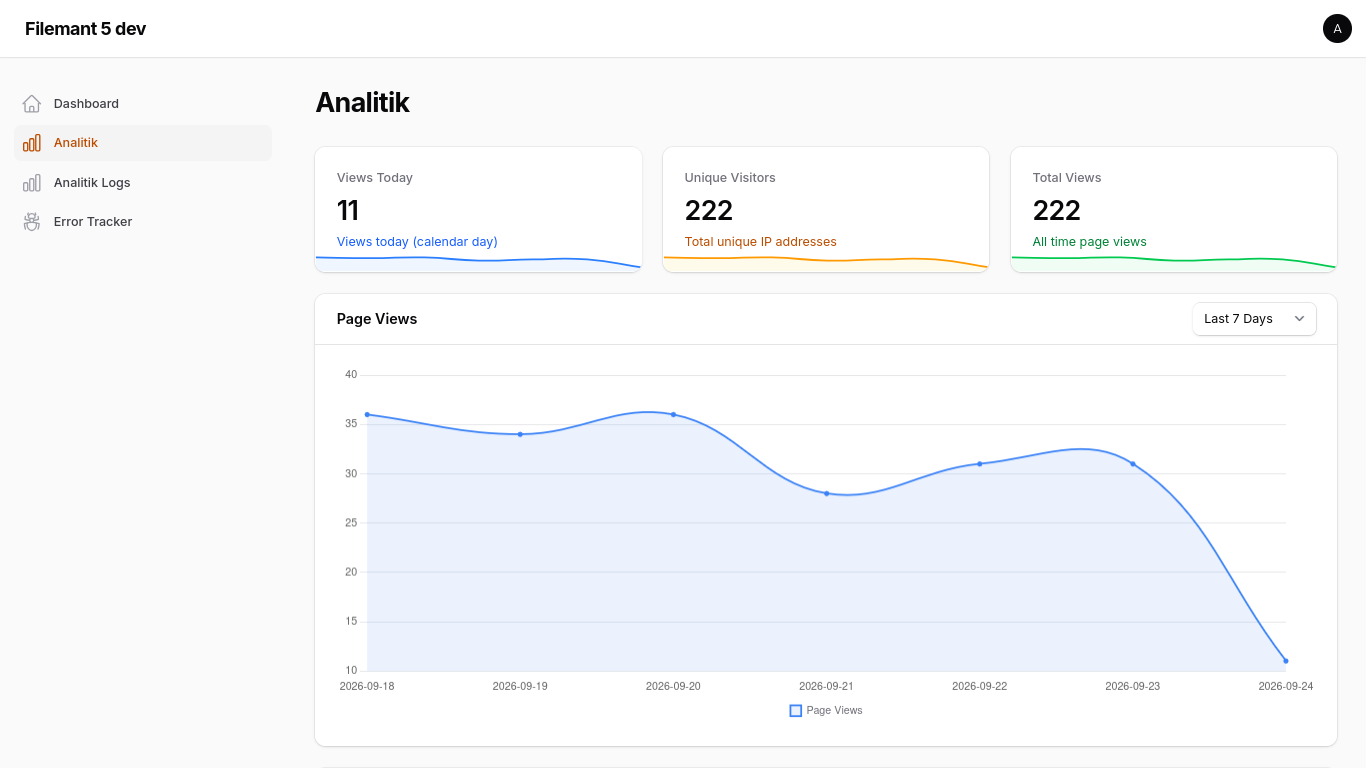
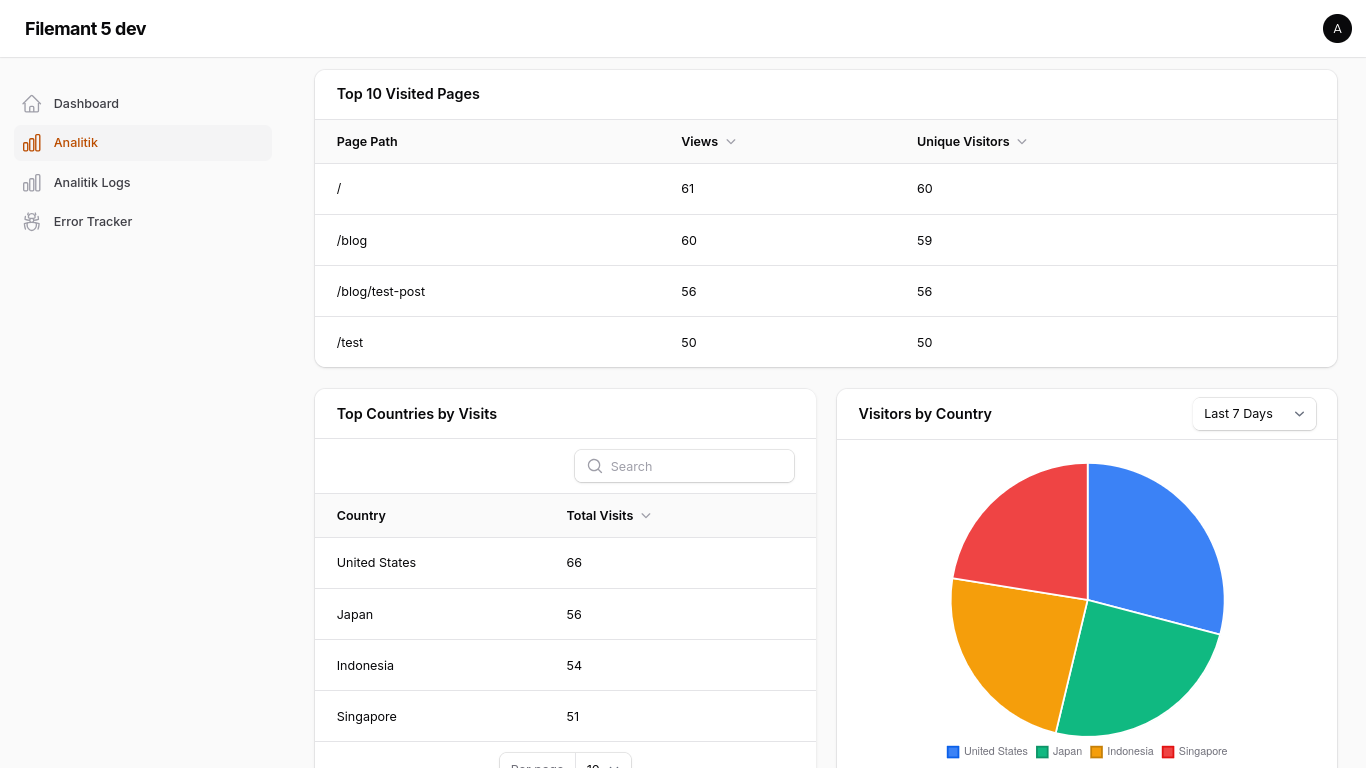
- 📊 Dashboard Widgets: Includes stats overview, page views chart, top pages table, top countries table, and visitors country chart widgets.
- 📋 Resource View: Manage and view detailed analytics logs in your Filament panel.
- 🛡️ Privacy Focused: Excludes Filament panel pages from tracking by default.
#Installation
You can install the package via composer:
composer require kholil/filament-analitik
You must publish and run the migrations (autoloading from vendor is not supported):
php artisan vendor:publish --tag="filament-analitik-migrations"
php artisan migrate
You can publish the config file with:
php artisan vendor:publish --tag="filament-analitik-config"
#Usage
#1. Register the Plugin
Add the plugin to your Filament Panel provider:
use Kholil\FilamentAnalitik\FilamentAnalitikPlugin;

public function panel(Panel $panel): Panel
{
    return $panel
        // ...
        ->plugins([
            FilamentAnalitikPlugin::make(),
        ]);
}
#2. Enable Tracking
To start tracking page views, you must add the TrackPageView middleware to your web routes.
#Laravel 12+ (bootstrap/app.php)
->withMiddleware(function (Middleware $middleware) {
    $middleware->web(append: [
        \Kholil\FilamentAnalitik\Http\Middleware\TrackPageView::class,
    ]);
})
#Middleware Logic
The middleware will:
- Only track
GETrequests with a200status code. - Automatically exclude any requests within the Filament admin panel.
- Dispatch a background job to handle the database insertion and location lookup.
#Configuration
The configuration file (config/filament-analitik.php) allows you to customize the following settings:
- enabled: Enable or disable page view tracking.
- table_name: Change the database table name used to store page views (default:
'analitik'). Publish the config before running migrations if you change this value. - project_id: A unique identifier for this project. Useful for multi-tenant, SaaS, or centralized analytics setups where you collect analytics from multiple applications or websites into a single database.
- You can configure this easily in your
.envfile:FILAMENT_ANALITIK_PROJECT_ID="your-project-id"
- You can configure this easily in your
- exclude_bots: Enable or disable automatic bot and crawler filtering (default:
true). - bot_patterns: List of user-agent string patterns to exclude from analytics tracking.
- navigation: Customize the sidebar navigation settings:
- label: The text label displayed in the Filament sidebar (default:
'Analitik'). - group: The navigation group in the sidebar (default:
null/ no group). - icon: The icon used in the sidebar (default:
'heroicon-o-chart-bar').
- label: The text label displayed in the Filament sidebar (default:
Alternatively, you can also customize the sidebar navigation fluently when registering the plugin in your Panel Provider:
FilamentAnalitikPlugin::make()
    ->navigationLabel('My Custom Analytics')
    ->navigationGroup('System Reports')
    ->navigationIcon('heroicon-o-presentation-chart-line')
#Authorization & Access Control
You can restrict access to the analytics dashboard and logs in three different ways:
#1. Gate-Based Permissions
Define a Laravel Gate or Permission name (e.g. using Spatie Laravel-Permission) in your config/filament-analitik.php file:
'access' => [
    'gate' => 'view_analytics_logs',
],
#2. Role-Based Access
Define an array of roles that are allowed to access:
'access' => [
    'roles' => ['admin', 'super-admin'],
],
Note: The plugin automatically integrates with package role methods such as $user->hasAnyRole($roles) or $user->hasRole($role) and falls back to checking a direct $user->role property.
#3. Custom Fluent Callback
For custom or complex programmatic authorization logic, pass a Closure dynamically to the plugin registration in your Panel Provider:
use Kholil\FilamentAnalitik\FilamentAnalitikPlugin;

public function panel(Panel $panel): Panel
{
    return $panel
        ->plugins([
            FilamentAnalitikPlugin::make()
                ->canAccessUsing(fn () => auth()->user()?->email === 'admin@example.com'),
        ]);
}
#Requirements
- PHP 8.2+
- Filament v4.0+ / v5.0+
- Laravel 11.0+ / 12.0+
#License
The MIT License (MIT). Please see License File for more information.
The author
Fullstack developer
Laravel | Flutter | Django | Linux
From the same author
Featured Plugins
A selection of plugins curated by the Filament team

Blueprint
Filament Blueprint is a premium Laravel Boost extension that helps AI agents produce accurate, detailed implementation plans and security reports for Filament apps.
 Filament

Advanced Tables (formerly Filter Sets)
Supercharge your tables with powerful features like user-customizable views, quick filters, multi-column sorting, advanced table searching, convenient view management, and more. Compatible with Resource Panel Tables, Relation Managers, Table Widgets, and Table Builder!
 Kenneth Sese

Noir Theme
A theme that gives panels a focused, refined look with near-black surfaces, crisp actions, and restrained color.
Filament

