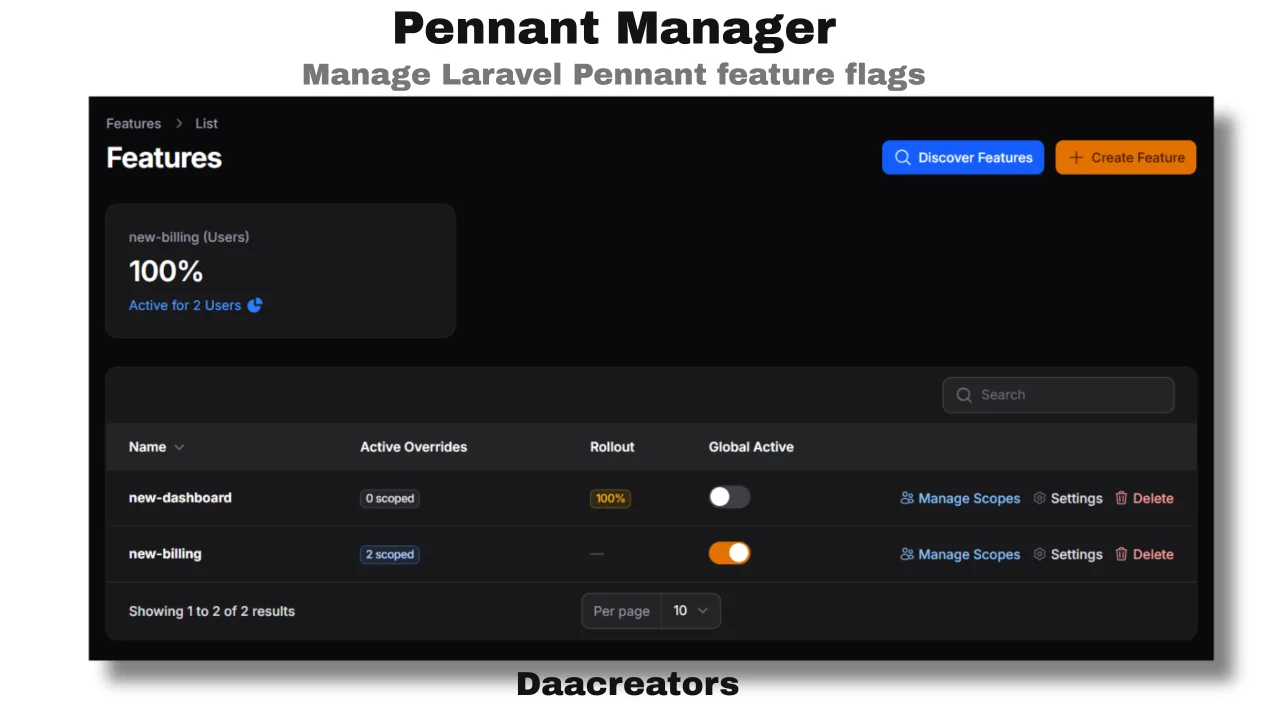
Pennant Manager - Feature Flags
CommunityA Filament plugin for managing Laravel Pennant feature flags.
 Author:
Jabir Khan
Author:
Jabir Khan
Package health
BetaAutomated checks of this plugin's Composer package
13 checks
-
Warning:
Current Laravel version supported
—
Package does not co-install with current Laravel
13.0; the newest co-installable line is12.0, which still receives active support but is not the current stable. -
Passed:
Current PHP version supported
—
Constraint
^8.2supports current PHP8.5. - Skipped: Current Symfony version supported
- Passed: Abandoned or archived — No consulted source marks the package abandoned (packagist, github).
- Passed: Commit and release recency — Active: last commit 47 days ago; last release 47 days ago.
-
Passed:
composer.lock not committed by library
—
composer.lockis absent from the released dist archive. - Passed: Dist archive is lean
- Skipped: GitHub Actions pinned to SHA
- Passed: Open security advisories
- Passed: Dependabot PR responsiveness — No open Dependabot PRs.
- Skipped: Dependabot or Renovate configured
- Skipped: Dependency update cooldown configured
- Failed: Provides a security policy — View details on Plumb
filament/
namespace. Review the source and install at your own risk. Found
malware or an unresolved security issue the author won't
address?
Report it
.
Documentation
- Screenshots
- Requirements
- Installation
- Setup
- Configuration
- Features
- Defining Features
- Scheduling
- Support the Project
- Contributing
- Security Vulnerabilities
- Credits
- License




A Filament panel plugin for managing Laravel Pennant feature flags - toggle globally, per user or team, bulk import scopes, discover defined features, and track adoption - all without leaving your admin panel.
#Screenshots
#Requirements
- PHP 8.2+
- Laravel 11+
- Filament 4.x
- Laravel Pennant (
laravel/pennant)
#Installation
Install via Composer:
composer require daacreators/pennant-manager
If you haven't already, install Pennant and run its migration:
composer require laravel/pennant
php artisan migrate
Publish the plugin config:
php artisan vendor:publish --tag="pennant-manager-config"
Optionally publish the views to customise them:
php artisan vendor:publish --tag="pennant-manager-views"
#Setup
Register the plugin in your Filament panel provider:
use daacreators\PennantManager\PennantManagerPlugin;

public function panel(Panel $panel): Panel
{
    return $panel
        ->plugins([
            PennantManagerPlugin::make(),
        ]);
}
#Configuration
// config/pennant-manager.php

return [
    'navigation_group' => 'Settings',

    /*
    |--------------------------------------------------------------------------
    | Scope Models
    |--------------------------------------------------------------------------
    | Models that can be used as feature flag scopes.
    | Extended format lets you configure per-model search and display columns.
    */
    'scope_models' => [
        'User' => [
            'model'           => \App\Models\User::class,
            'search_column'   => 'email',   // column used when searching for a scope
            'label_column'    => 'name',    // column shown in the scopes table
            'segment_columns' => ['plan', 'role', 'country'], // optional - restricts Activate by Segment to these columns
        ],
        // 'Team' => [
        //     'model'         => \App\Models\Team::class,
        //     'search_column' => 'name',
        // ],
    ],

    // Global fallback search column - used when a scope_models entry is a plain class string
    'scope_search_column' => 'email',

    /*
    |--------------------------------------------------------------------------
    | Feature Discovery
    |--------------------------------------------------------------------------
    | Paths scanned for Feature::define() calls (files or directories).
    | Scanned features are merged with the manual list in discovered_features.
    */
    'discovery_paths' => [
        app_path('Providers/AppServiceProvider.php'),
        // app_path('Features'),
    ],

    // Manually list features here - useful for features defined dynamically
    // or inside packages that cannot be reliably scanned.
    'discovered_features' => [
        // 'some-dynamic-feature',
    ],
];
#Features
#Feature List
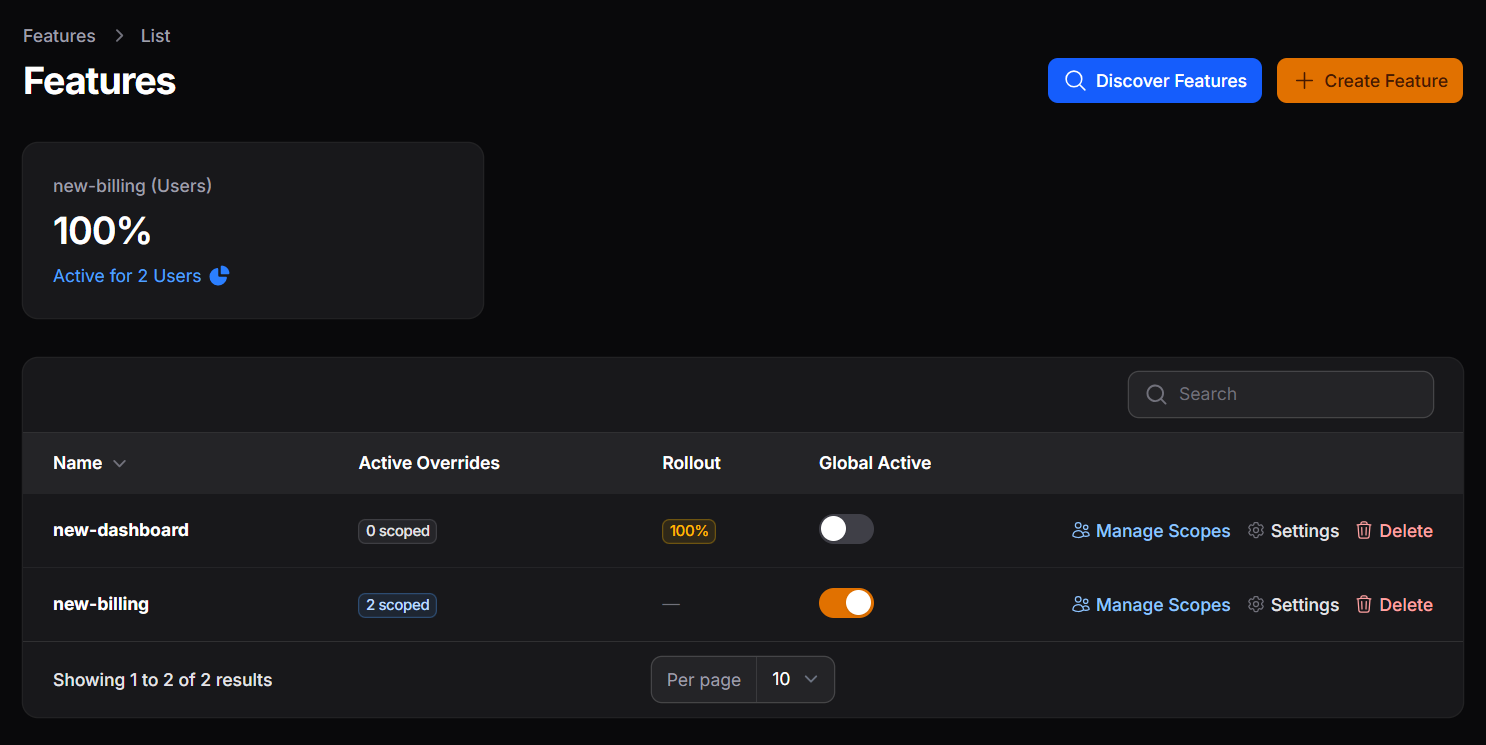
The main table shows all globally-scoped features. For each feature you can:
- Toggle it globally on or off - affects everyone who does not have an explicit scope row
- See how many per-scope overrides exist (individual users or teams)
- Open Settings for advanced configuration
- Navigate to Manage Scopes for per-user or per-team control
- Delete the feature entirely
#Global Toggle vs Scopes
The global toggle is the fallback for everyone without a scope row. Pennant always resolves the scope-specific row first:
User checks feature
 ├── Has a scope row? → use that value (global is ignored)
 └── No scope row?   → fall back to the global toggle
This means you can keep the global toggle off while individually activating the feature for specific users via scopes - those users still get access.
#Settings
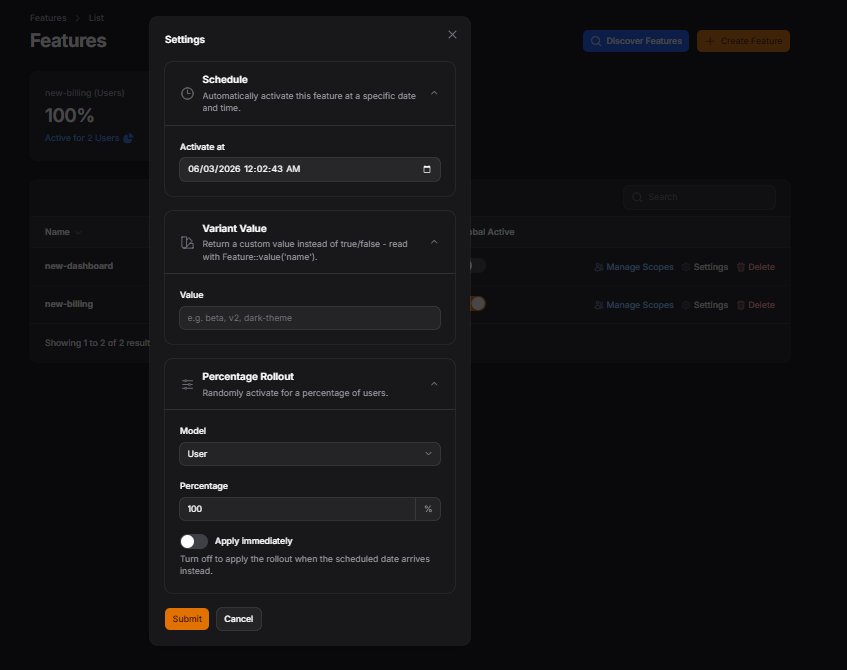
Each feature has a Settings modal with three sections. All three can be configured together in a single save.
#Schedule
Set a future date and time. The feature stays off until that moment. When the scheduled time arrives, the pennant:activate-scheduled command flips it on automatically.
Feature is OFF → schedule set for Jun 15 00:00 → command runs → feature turns ON
#Variant Value
Instead of returning true or false, the feature returns a custom string.
Useful for A/B testing, UI themes, or API versioning.
Set the variant in Settings and read it in your code using the plugin helper:
use daacreators\PennantManager\Support\FeatureValue;

$value = FeatureValue::resolveValue('theme');
// Returns the variant string if active  → 'dark', 'v2', 'beta'
// Returns true if active with no variant set
// Returns false if the feature is inactive
You can also check a specific scope (e.g. a user):
$value = FeatureValue::resolveValue('theme', 'App\Models\User|42');
#Percentage Rollout
Randomly activates the feature for a percentage of your users by creating individual scope rows for them. Only users who do not already have a scope row are eligible.
Apply immediately ON - scope rows are created the moment you save Settings.
Apply immediately OFF - the percentage and model are stored, and the rollout is applied by the scheduled command when the activation date arrives. Use this to combine a rollout with a launch date.
A typical launch flow:
Set 30% rollout + Jun 15 activation date + Apply immediately OFF
→ On Jun 15, the command picks 30% of users and activates for them automatically
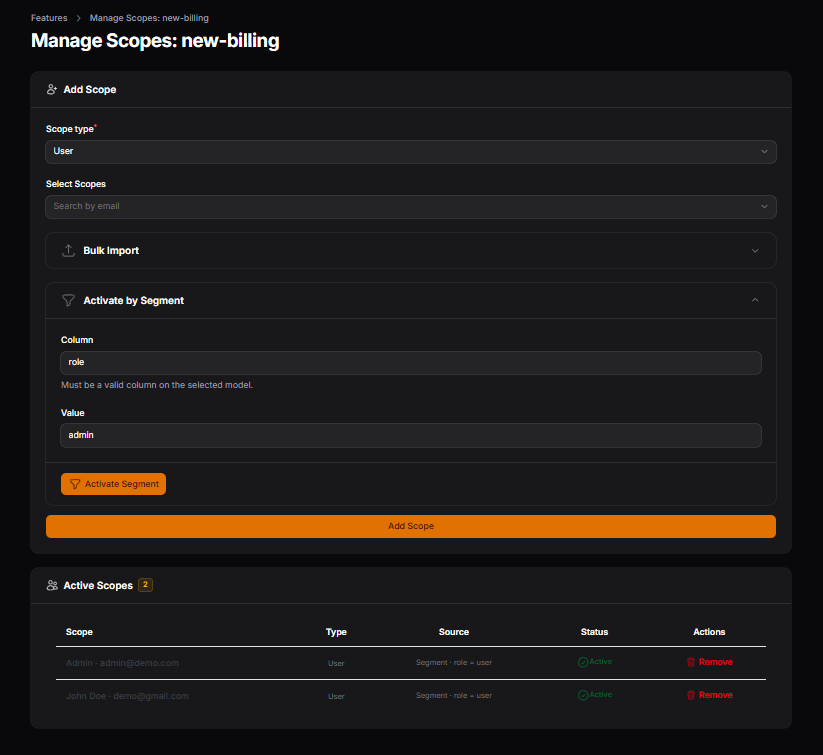
#Manage Scopes
Per-feature page for activating or removing the feature for individual users or teams.
Manual search - search by the configured column (e.g. email), select one or more records, and activate.
Bulk import - paste a list of values (one per line, matching the search column) to activate for many users at once without uploading a file.
Activate by Segment - activate for all records matching a column condition, e.g. all users where plan = pro or country = US. If segment_columns is configured for the model, a dropdown restricts which columns can be filtered on. Otherwise any column name can be entered freely.
The scopes table shows each activated record, their model type, and whether their scope is currently active or inactive.
#Feature Discovery
Scans your configured discovery_paths for Feature::define() calls - both string-keyed and class-based - and merges results with any features listed manually in discovered_features. Opens a modal showing features found in code but not yet in the database, all pre-selected for one-click import.
// Both of these are detected automatically
Feature::define('new-dashboard', fn (User $user) => false);
Feature::define(BetaFeature::class, fn (User $user) => false);
#Adoption Stats
A stats widget at the top of the feature list showing per-feature adoption - what percentage of each model type has that feature currently active.
#Defining Features
Define features the standard Pennant way in your AppServiceProvider:
use Laravel\Pennant\Feature;

public function boot(): void
{
    Feature::define('new-dashboard', fn (User $user) => $user->isOnProPlan());

    Feature::define(BetaFeature::class, fn (User $user) => false);
}
After defining features, open the Discover Features action in the panel to import them into the database.
#Scheduling
To activate scheduled features and apply deferred rollouts automatically, add the command to your scheduler:
// routes/console.php
use Illuminate\Support\Facades\Schedule;

Schedule::command('pennant:activate-scheduled')->everyMinute();
You can also run it manually at any time:
php artisan pennant:activate-scheduled
#Support the Project
If this package saves you time or helps your business, consider supporting its development.
#Contributing
Please see CONTRIBUTING for details.
#Security Vulnerabilities
Please review our security policy on how to report security vulnerabilities.
#Credits
#License
The MIT License (MIT). Please see License File for more information.
The author
Jabir Khan is a software development focused on building high-quality web application and plugins for the Laravel and Filament ecosystem.
From the same author
Featured Plugins
A selection of plugins curated by the Filament team

Custom Dashboards
Let your users build and share their own dashboards with a drag-and-drop interface. Define your data sources in PHP and let them do the rest.
 Filament

Custom Fields
Eliminate custom field migrations forever. Let your users create and manage form fields directly in Filament admin panels with 20+ built-in field types, validation, and zero database changes.
 Relaticle

Blueprint
Filament Blueprint is a premium Laravel Boost extension that helps AI agents produce accurate, detailed implementation plans and security reports for Filament apps.
Filament

