
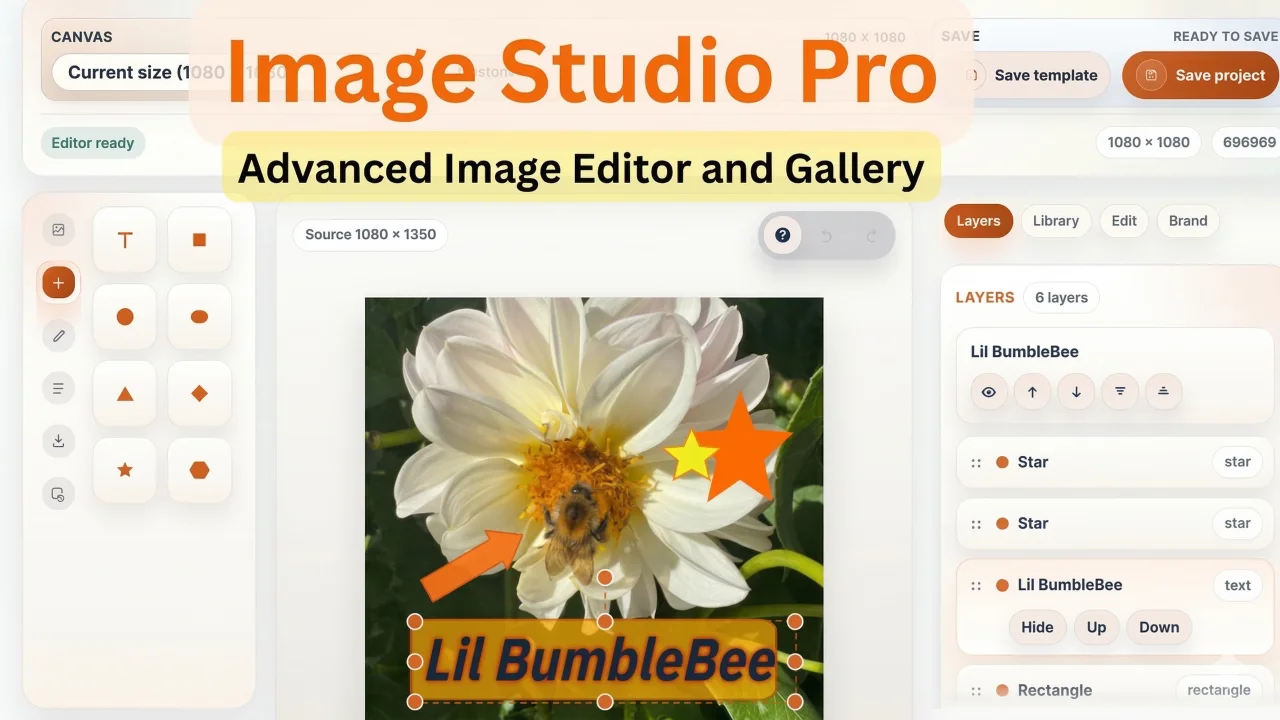
Image Studio Pro by Heiner Giehl
CommunityA powerful in-panel image editor for Filament that lets users create, edit, brand, template, and export production-ready images without leaving the admin.
filament/
namespace. Review the source and install at your own risk. Found
malware or an unresolved security issue the author won't
address?
Report it
.
 Author:
Heiner Giehl
Author:
Heiner Giehl
Documentation
- Live demo
- Purchase, docs, and support
- Screenshots
- What Image Studio Pro does
- Feature summary
- Built-in format presets
- Requirements
- Installation
- CSS hooks
- Documentation
- Feedback welcome
Filament Image Studio Pro is a premium Filament plugin that gives your team a complete image production workspace inside the admin panel — no Canva, no Photoshop, no download-edit-reupload cycle.
It covers the full lifecycle: editing images on a canvas, managing a shared asset library, reviewing and approving work as a team, and handing the finished result back to any Filament form, record, or Media Library collection.
#Live demo
- Landing page: https://filament-image-studio-pro.heinerdevelops.tech
- Admin login: https://filament-image-studio-pro.heinerdevelops.tech/admin/login
#Purchase, docs, and support
- Product page and public docs: https://filament-image-studio-pro.heinerdevelops.tech
- Public GitHub docs and release notes: https://github.com/heinergiehl/filament-image-studio-pro-docs
- Support: webdevislife2021@gmail.com
#Screenshots
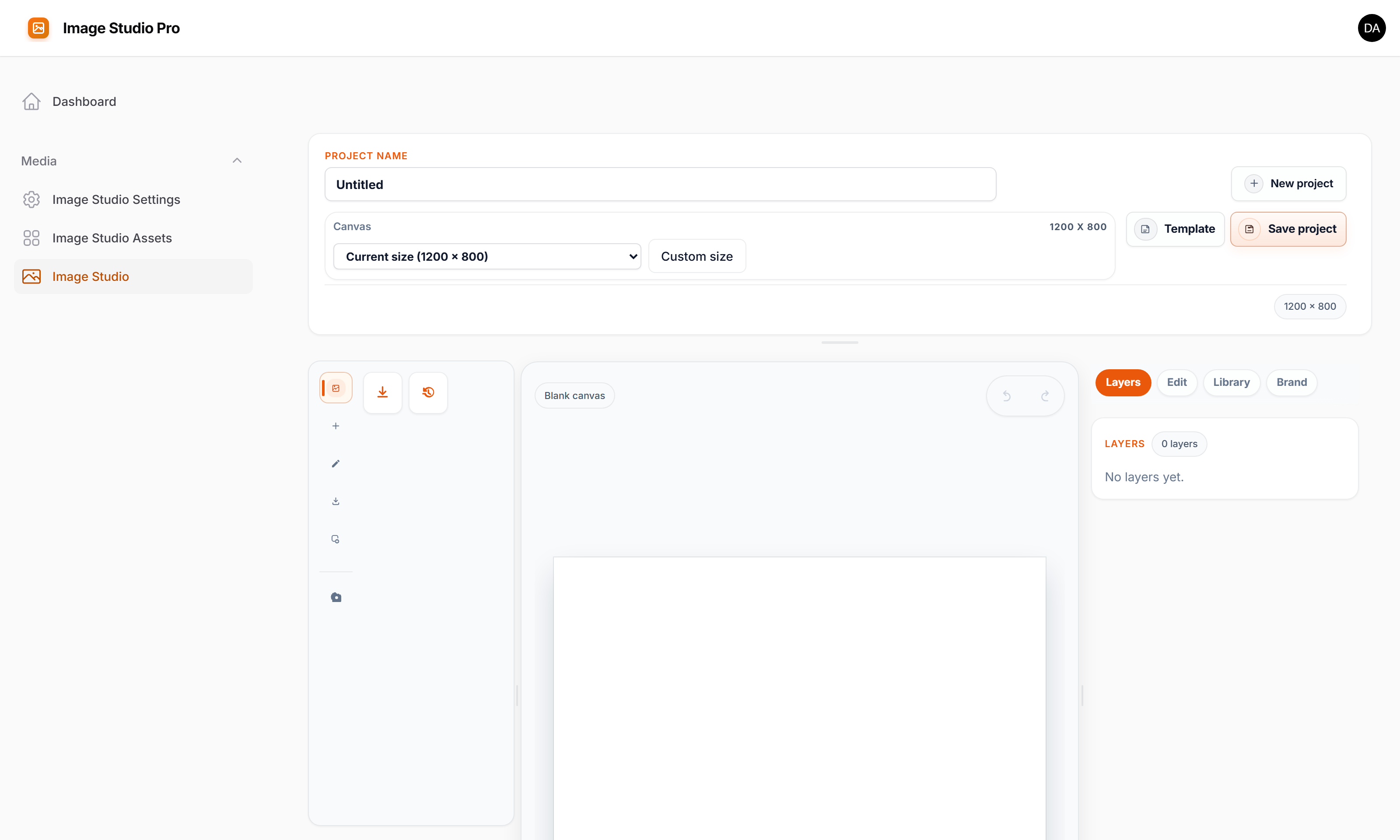
Editor workspace:
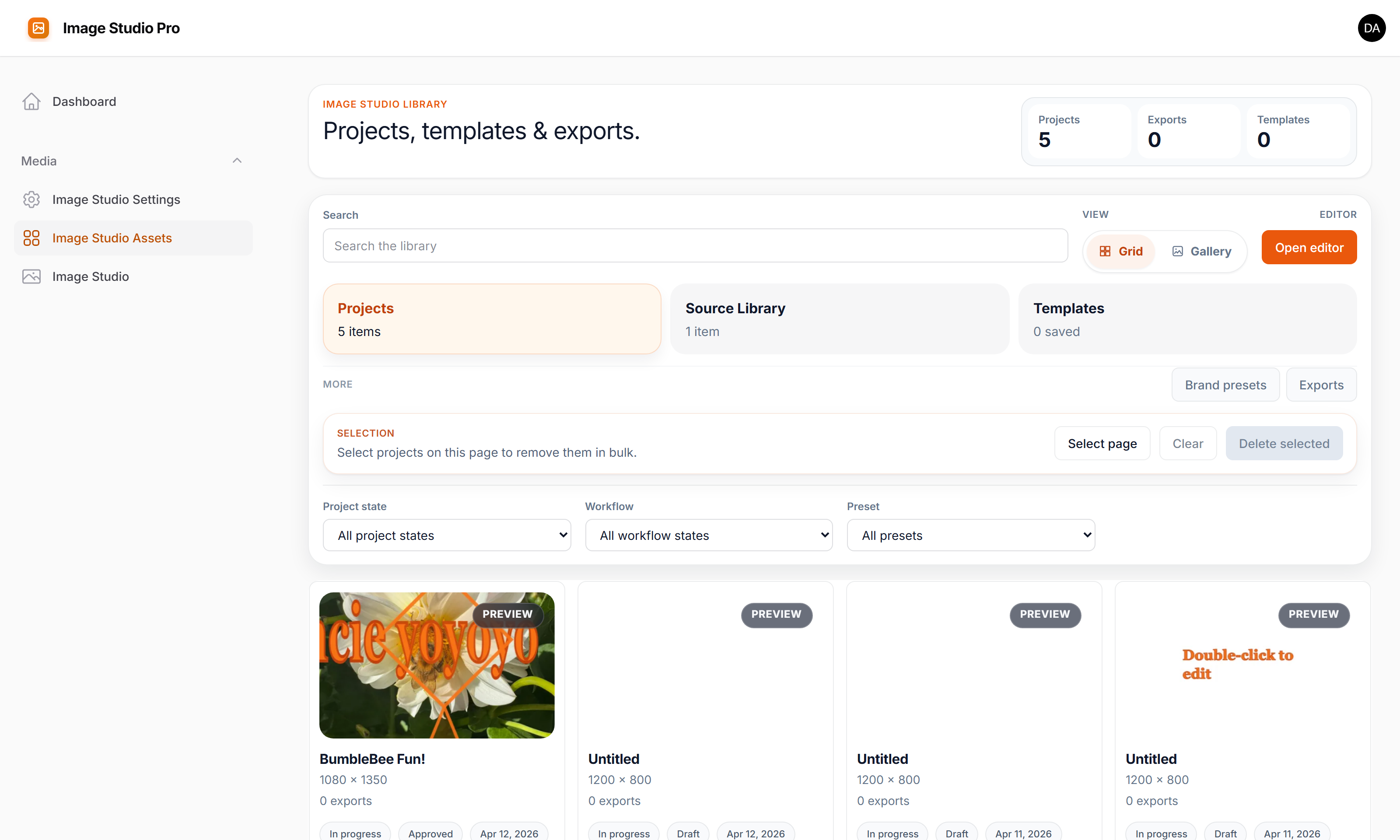
Library workspace:
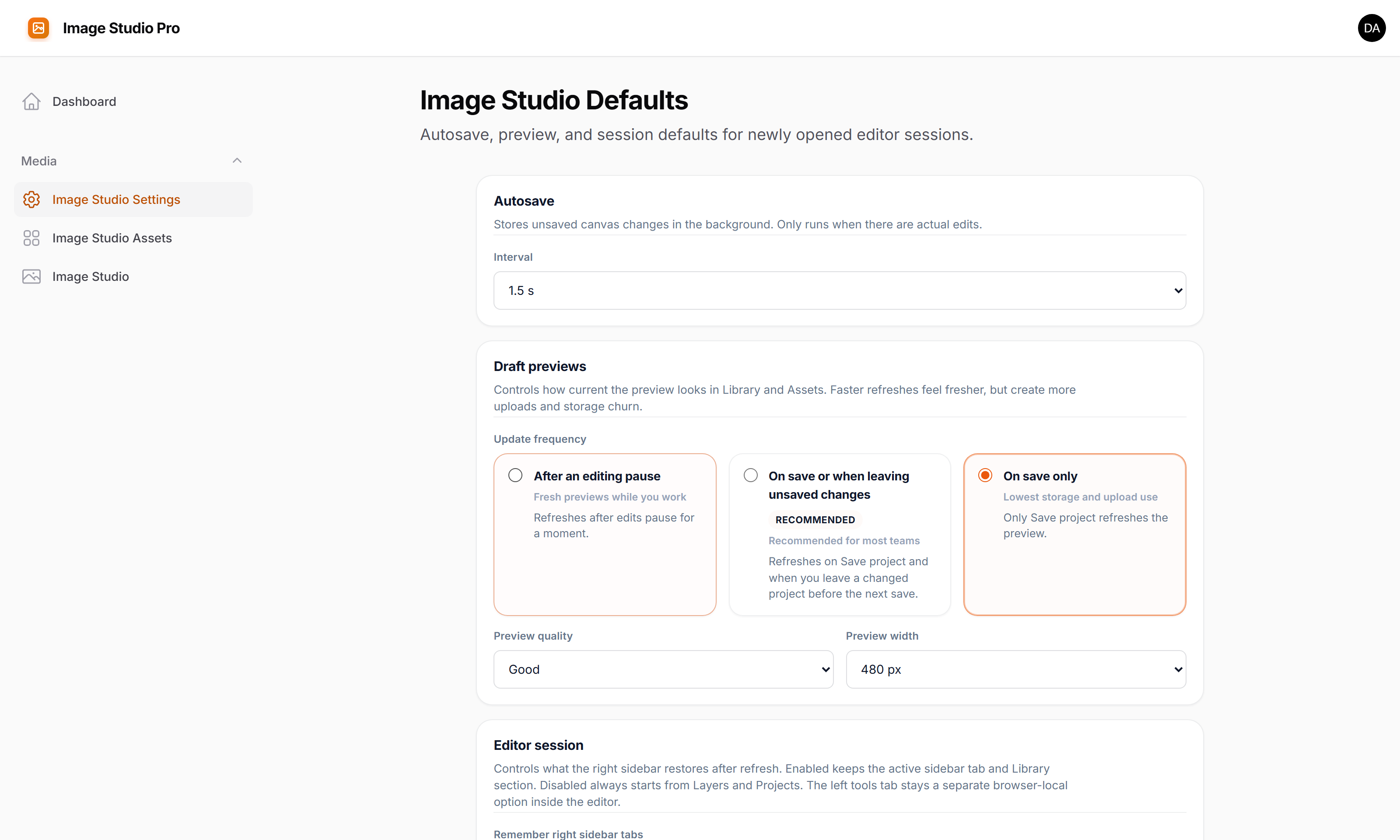
Settings page:
#What Image Studio Pro does
Image Studio Pro adds a complete image production workflow to Filament:
- edit and compose images on a canvas with text, shapes, filters, markup tools, drawing, and layers
- manage reusable source images, templates, and brand presets in a shared library
- export renders as PNG, JPEG, or WebP and hand the result to a form field, record attribute, or Media Library
- view single images in a pan/zoom slide-over, browse a gallery with lightbox, or compare before/after images with a draggable divider — all from standard Filament actions and Livewire components
- run a full team review and approval cycle with revision history so work stays auditable
#Feature summary
#Canvas editor
- start from a blank canvas, a source image, a template, a saved project, or a built-in format preset
- crop and reposition images on the canvas
- add text layers, shape overlays, callouts, and logos
- use markup tools (lines, arrows, highlights, notes, redaction) for review images
- apply 12 image adjustments: brightness, contrast, saturation, blur, grayscale, hue rotation, vibrance, noise, pixelate, sharpen, sepia, invert
- reorder layers, replace sources, lock individual layers to protect finished elements
- undo/redo, autosave, snap guides, and draft previews
- draw freehand with pencil, circle, and spray brush types
- right-click context menu: clipboard, lock, z-order
- 30+ keyboard shortcuts
- scroll-wheel zoom, pinch zoom, zoom buttons, spacebar-drag panning
- draggable zoom toolbar — pull it anywhere within the canvas card so it never covers your work
#Image viewer and gallery
ViewImageAction— a Filament action that opens any image URL in a pan/zoom slide-over with close buttonOpenMediaAction— opens a gallery modal for browsing, comparing, or selecting one or more images; supports selection callbacks and optional multiple-select modePanZoomViewer— standalone Livewire component for pan/zoom display with configurable min/max zoom and zoom controlsGalleryViewer— paginated Livewire gallery with lightbox, keyboard navigation, captions, and optional selectable/multi-select modeImageCompare— side-by-side image comparison with a draggable divider, before/after labels, and configurable initial split position
#Asset library
- browse saved projects, source images, templates, renders, and brand presets from one page
- search and paginate large libraries
- track project state: Draft, Published, Archived
- reusable source images are kept separate from working design drafts
#Templates and brand presets
- save layouts from the editor and apply them to new projects instantly
- brand presets store colors, fonts, alignment defaults, logo assets, and text styling
- apply brand presets to new layers or restyle existing text in one click
#Team workflow
- Approval cycle: Draft → In Review → Changes Requested → Approved
- revision history: append-only manual and automatic checkpoints; restoring any revision creates a new entry instead of overwriting history
- re-editing an approved asset resets it to Draft automatically
- review authorization is gated by a configurable Gate ability
#Filament integration
- standalone
Image Studioeditor page andImage Studio Assetslibrary page CreativeStudioEditorform field for embedding the studio in any Filament formEditInImageStudioActionfor launching the editor from table rows and record pagesViewImageActionandOpenMediaActionfor lightweight image viewing and selection- output targets: asset references, plain storage paths, Spatie Media Library
#Storage and sources
- Laravel filesystem support: local, S3, GCS, R2, MinIO, and compatible drivers
- curated filesystem browsing for smaller libraries
- indexed source browsing for large cloud-backed libraries (fast search and pagination without bucket scanning)
- Spatie Media Library source browsing and output support
- signed preview URLs and same-origin preview proxy for private cloud storage
#Multitenancy and access control
- automatic tenant scoping when Filament tenancy is active
- user mode (default) and panel mode (shared workspace without tenancy)
- config-driven Gate abilities for page, asset, source, and review access
#Built-in format presets
- Instagram Square
- Instagram Story
- Open Graph
- Blog Hero
- Promo Banner
- YouTube Thumbnail
#Requirements
- PHP 8.2+
- Laravel 12.x
- Filament 5.x
- Livewire 4
#Installation
- Purchase Image Studio Pro from the product page.
- Apply the Composer repository or authentication details from your purchase.
- Install:
composer require heiner/filament-image-studio-pro
php artisan creative-studio:install
php artisan migrate
php artisan filament:assets
Register the plugin in your Filament panel:
use Filament\Panel;
use Heiner\FilamentCreativeStudioPro\CreativeStudioPlugin;

public function panel(Panel $panel): Panel
{
    return $panel
        ->plugins([
            CreativeStudioPlugin::make(),
        ]);
}
#CSS hooks
.fi-creative-studio.fi-creative-studio-field
#Documentation
#Feedback welcome
Suggestions, bug reports, and feature ideas are always welcome at webdevislife2021@gmail.com.
The author
From the same author

Agentic AI Chatbot Builder
Build fully customizable, self-hosted AI chatbots in Laravel with RAG, live data access, API and MCP actions, visual workflows, and embeddable widgets.
Author:
Heiner Giehl

RAG Chatbot
Build, manage, and embed production-ready RAG chatbots directly from Filament.
Author:
Heiner Giehl
Featured Plugins
A selection of plugins curated by the Filament team

Soft Theme
A theme that gives panels a warm, approachable look with rounded shapes, gentle colors, and serif headings.
 Filament

Custom Fields
Eliminate custom field migrations forever. Let your users create and manage form fields directly in Filament admin panels with 20+ built-in field types, validation, and zero database changes.
 Relaticle

Advanced Tables (formerly Filter Sets)
Supercharge your tables with powerful features like user-customizable views, quick filters, multi-column sorting, advanced table searching, convenient view management, and more. Compatible with Resource Panel Tables, Relation Managers, Table Widgets, and Table Builder!
 Kenneth Sese
