
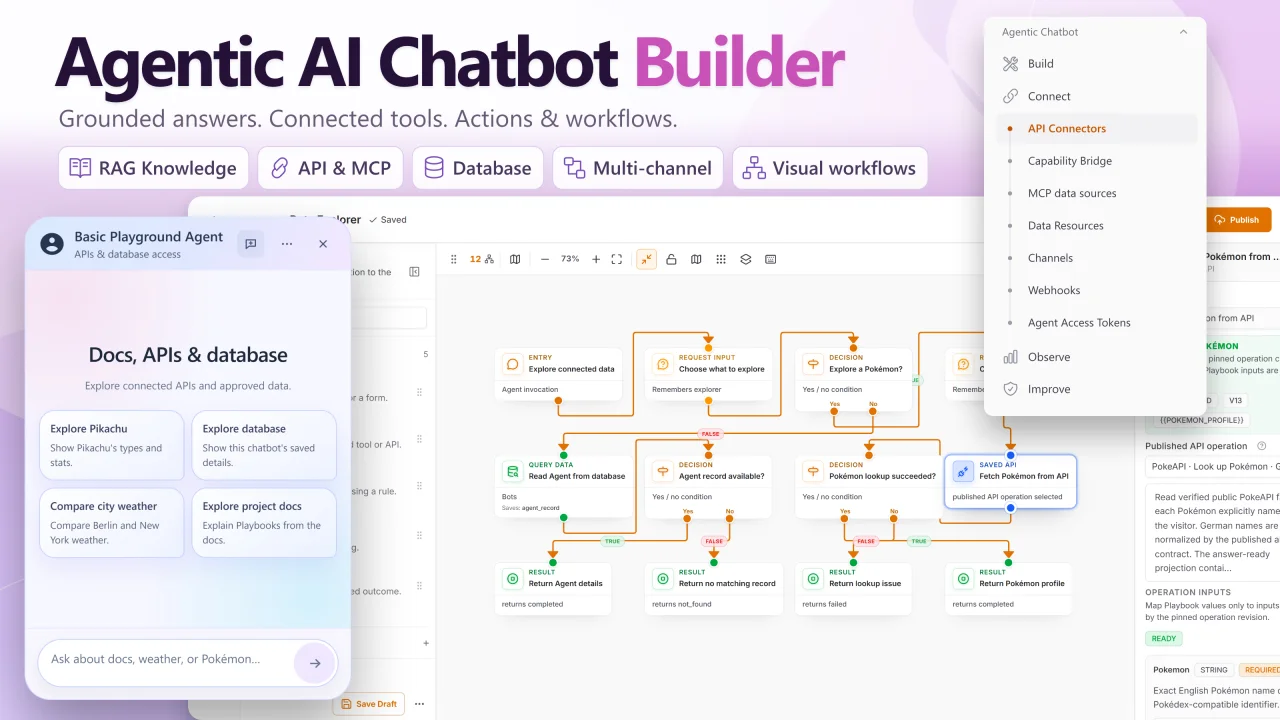
Agentic AI Chatbot Builder by Heiner Giehl
CommunityBuild fully customizable, self-hosted AI chatbots in Laravel with RAG, live data access, API and MCP actions, visual workflows, and embeddable widgets.
filament/
namespace. Review the source and install at your own risk. Found
malware or an unresolved security issue the author won't
address?
Report it
.
 Author:
Heiner Giehl
Author:
Heiner Giehl
Documentation
- What you can build
- What makes the chatbots agentic?
- Build and manage AI chatbots in Filament
- Knowledge bases and RAG with source citations
- Connect Laravel Eloquent data and APIs
- Connect remote MCP servers
- Visual workflow builder with optional Playbooks
- Embeddable chat widgets for your website
- Human handoff, conversation review, and tests
- Requirements and installation
- Common questions
- Documentation and support
- License
Product Hunt launch offer: save $50 with PH50
Single Project: $99.99 instead of $149.99. Studio: $229.99 instead of $279.99. All prices are in USD, plus applicable taxes. Offer ends October 13, 2026.
Enter PH50 at checkout to receive the discount. Select your plan, click Have a coupon?, enter PH50, then click Apply Coupon before paying. The discount is not applied automatically.
Build and manage AI chatbots for your Laravel application directly in Filament. Configure each chatbot's instructions, knowledge base, approved tools, and embeddable chat widget, then test its answers and tool choices before making it available to users.
An Agent can choose when to answer a question, search your knowledge sources, read permitted application data, or invoke a visual Playbook for a task that needs several steps. You define the tools and access it receives. Application actions remain subject to authorization, confirmation, and execution rules.
Self-hosted commercial plugin · Filament 5 · Laravel 12 and 13 · Bring your own AI provider keys
#What you can build
#Customer support and onboarding chatbots
Create a support chatbot that answers questions from your documentation, explains product features, and helps users find relevant information. Answers can include source citations. Your team can review conversations and feedback in Filament and take over through the Human Handoff Desk when needed.
#Internal AI assistants with access to Laravel data
Build an assistant that helps users look up information in your application. For example, it could retrieve a permitted order or find a record through a configured API. You choose the Eloquent resources, fields, filters, scopes, and API operations it may use; access stays within those approved boundaries.
#Conversational workflows for application tasks
Guide a user through collecting details, checking a condition, requesting approval, and calling a configured application action. The optional visual Playbook Builder lets you define those steps and inspect the resulting run. Each use case depends on the data, integrations, and permissions you configure.
#What makes the chatbots agentic?
Each Agent handles the conversation and selects from the knowledge and tools attached to its live version. It can ask for clarification when required information is missing and use an optional Playbook when a request matches that Playbook's purpose.
Data, API and MCP tools read what you approved. A tool that changes data only proposes the change: the visitor sees the exact values on a card and the write runs once after Confirm. Built-in switches let an Agent hand the conversation to your team or save a lead. An Agent does not receive unrestricted access to your database, application code, or arbitrary APIs.
A Playbook is never required for ordinary or knowledge-grounded chat. You can start with a knowledge assistant and add tools or visual workflows as your use case grows.
#Build and manage AI chatbots in Filament
Manage multiple Agents from your existing admin panel, with separate instructions, providers, models, knowledge settings, access rules, and widget presentation. The plugin adds one navigation group with four sections: Build, Connect, Inbox and Insights. Its name, order, labels and shown sections are set on the plugin class.
#Customize each chatbot for its role
- Behavior and answers: define the Agent's purpose, instructions, tone, and response policy.
- AI provider and model: choose the configured provider and model for each Agent.
- Knowledge and tools: attach the sources, Laravel Data Resources, API Connector operations, and optional Playbooks that serve its role. Developers can register custom application capabilities.
- Chat experience: adjust the widget's style template, colors, title, welcome guidance, suggested messages, and source presentation.
- Access: configure the intended audience and permitted website origins, alongside the permissions enforced by your application.
For example, a public support chatbot can use product documentation and a support Playbook, while an internal assistant uses a different model and selected application data. Each Agent has its own configuration and permitted tools.
#From configuration to a tested chatbot
- Create an Agent. Define its role, response behavior, provider, and model.
- Connect its knowledge and tools. Attach selected sources, Data Resources, API Connector operations, host capabilities, and optional Playbooks.
- Test representative conversations. Check answers, tool choices, missing information, and failure behavior.
- Test and publish the Agent. Chat with the saved draft in Test (writes are simulated), then Publish to make it live as a new immutable version; Restore brings back an earlier version. Publishing leaves the Agent's availability unchanged.
- Make it available where needed. Configure availability and website access, then embed its chat widget or use a supported server or channel integration.
Saved changes reach visitors only when you publish. Availability, website access, and credential changes take effect when saved. This lets you improve a draft while the live Agent keeps its published configuration.
#Knowledge bases and RAG with source citations
Connect text, files (including PDF, Word, CSV and Excel), web pages, and JSON API sources to an Agent's knowledge base. One source can serve several Agents, and URL and API sources can re-sync daily or weekly. Retrieval-augmented generation (RAG) retrieves relevant source material to help the Agent answer questions using your content.
- Configure retrieval settings for each Agent.
- Include source citations in answers where available.
- Re-ingest sources when their content changes.
- Review source use, user feedback, and knowledge gaps to identify content that needs improvement.
Source retrieval helps ground answers; AI output still needs testing and review for your intended use case.
#Connect Laravel Eloquent data and APIs
Use Data Resources to expose selected Eloquent data on one setup screen with explicit field, filter, sort, search, total, group, scope, result, and query-budget controls. The Agent sees linked record names instead of raw keys, and optional inserts and updates run only after visitor confirmation.
Use API Connectors to define the operations an Agent or Playbook may call. Integration Studio can import OpenAPI, Postman, or cURL definitions into inactive drafts for review. Developers can also register host application capabilities explicitly.
Versioned operation bindings, authorization checks, confirmation, duplicate-execution controls, redaction, and reconciliation govern execution. These controls support application integrations while keeping the permitted actions explicit.
#Connect remote MCP servers
Connect an existing remote Model Context Protocol (MCP) server over HTTPS, import its tools in one step and choose per tool whether Agents may read with it. Tools the server marks read-only start as reads; every other tool stays off until you choose. A write tool needs its own review and staging test, and visitors confirm every MCP write. One connection can serve several Agents. The guided GitHub setup prepares access to a specific repository's documentation, files, issues, and commits.
See the MCP server setup guide for authentication and supported connections.
#Visual workflow builder with optional Playbooks
A Playbook is a visual workflow for a specific task that needs a defined sequence of steps. You describe when the Agent should use it and build the process inside Filament as a step list or on a canvas, starting from a description or a template. The Agent invokes it when a matching request needs that process.
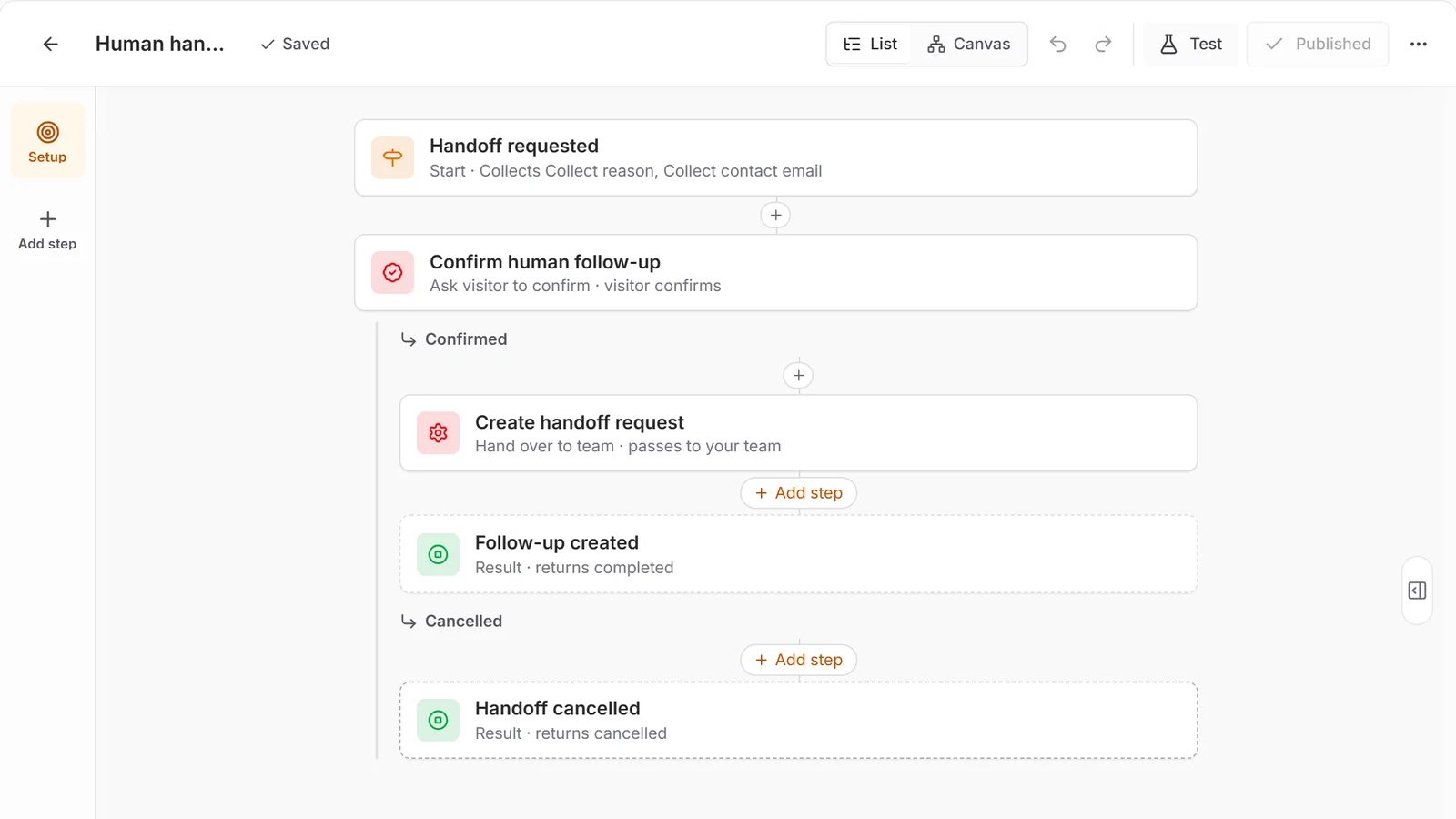
The Human handoff Playbook from the Customer Support & Human Handoff Solution Kit in the step list, captured from the local demo. It collects a reason and contact email, asks the visitor to confirm, then hands the conversation to your team. Canvas shows the same Playbook as a diagram.
For example, a support Playbook could collect an issue description, look up an allowed record, branch on the result, ask for confirmation, and call your configured ticket-creation action. You supply the relevant data access and integration; the Playbook defines how those steps fit together.
Playbooks can collect input, branch on conditions, request approvals, call capabilities, wait for a result, perform AI tasks, transform values, and hand work to a person.
- Combine input, decision, action, and result steps.
- Use bounded iteration and sub-Playbooks for reusable processes.
- Try a Playbook in the editor's test chat before publishing it.
- Inspect runs, checkpoints, waits, cancellations, and execution traces.
- Drafts never change live chat; Publish makes a new immutable version live.
The Agent remains responsible for the conversation. A Playbook defines the controlled process for the requests that need one.
#Embeddable chat widgets for your website
Add a chatbot to your website or product frontend using the generated script snippet. Configure its appearance and welcome experience in Filament, including style templates, colors, titles, suggested messages, and source presentation.
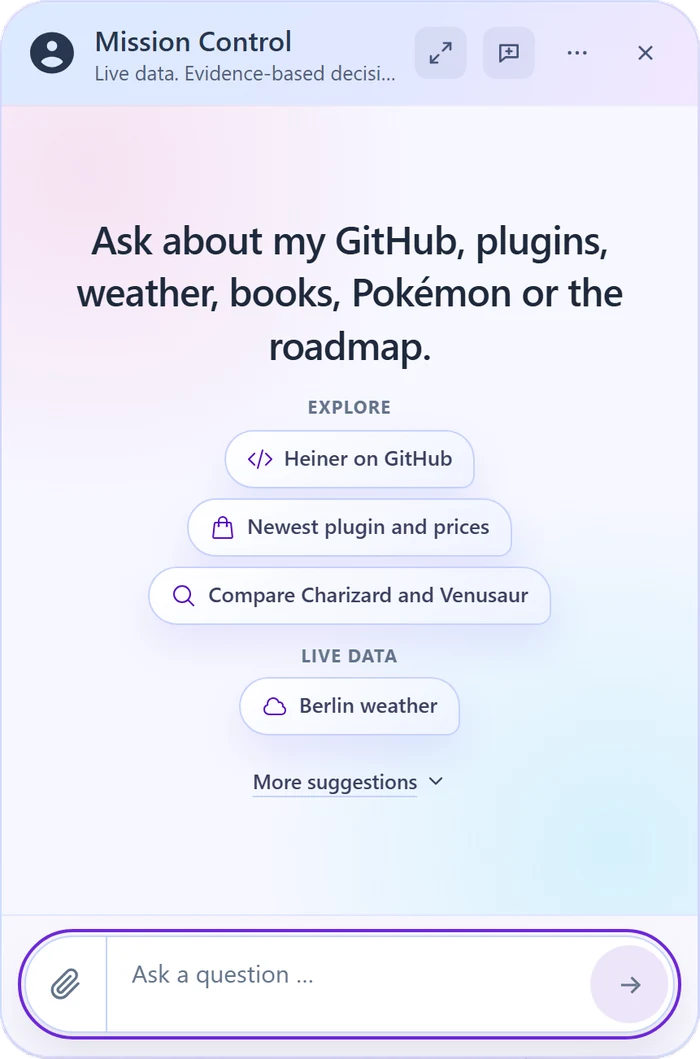
The welcome screen of the demo's Mission Control Agent, captured from the local demo. Set your own title, welcome text and conversation starters in Filament.
The browser integration includes streaming responses, private attachments (picker, paste or drop, with image thumbnails), up to eight conversation starters shown as compact chips, bounded page context, and a typed widget SDK with lifecycle events for application integration.
After creating and testing an Agent, copy its generated embed snippet into your website layout. It has this form:
<script
    src="https://your-app.example/filament-agentic-chatbot/widget"
    data-bot="YOUR_BOT_PUBLIC_ID"
    data-area="public"
    data-size-preset="comfortable"
    data-font-preset="modern-sans"
    data-show-sources="true"
    defer
></script>
Use the URL and Agent ID from your own generated snippet. Widget appearance and welcome settings are managed in the Agent editor.
Production embeds use a tokenless bootstrap: the snippet contains no permanent browser credential. The loader calls the origin-checked /bootstrap endpoint and keeps short-lived access tokens in memory. Configure a dedicated signing key and an exact Allowed Domains entry for each intended website origin.
Read the widget setup and integration guide.
#Human handoff, conversation review, and tests
Operate your chatbots from Filament with conversation history, feedback, usage reporting, privacy actions, and execution traces. The Inbox collects handoffs and action reviews that wait for a person, with a count badge. The Human Handoff Desk supports assignment, internal notes, operator replies, and an explicit return to the Agent.
Versioned Solution Kits provide reviewed starting configurations, including Customer Support & Human Handoff. Tests in the Agent editor replay saved conversations against the draft and check tool calls, answer text and a rubric; failing tests show as warnings before publishing.
Outbound webhooks report conversations, submissions, feedback, handoffs, Playbook results and budget thresholds to your systems, optionally with redacted content, and a token-authenticated read API returns the details. Usage shows cost and tokens per Agent and day with shipped default model prices that you can override. The admin UI is available in English and German, with machine-translated French and Spanish. Telegram is available by default; Slack, WhatsApp Cloud API, Mailtrap and Mailgun email adapters are opt-ins that require provider setup and validation in your deployment. Check the compatibility matrix and channel setup guide for its configuration and availability requirements.
#Requirements and installation
This is a commercial Laravel package installed in your own application. You need a compatible Laravel and Filament installation, your own AI provider account and keys, a supported database and vector store, a supervised asynchronous queue worker, and the Laravel scheduler.
PostgreSQL with pgvector is the documented release-validation database path. ChromaDB is an alternative vector-store adapter that buyers must validate in their own environment. Docker is used for reproducible release checks; it is not a requirement for customer hosting.
#1. Install with Composer
After purchasing a license, copy the private Composer repository URL from your Anystack account. Run these commands inside your Laravel application, replacing the example URL with the one Anystack provides:
composer config repositories.filament-agentic-chatbot composer https://YOUR-ANYSTACK-PRODUCT.composer.sh
composer require heiner/filament-agentic-chatbot
Use the buyer credentials shown by Anystack when Composer requests authentication. Keep license credentials out of your application repository. Check the compatibility matrix before choosing a package release.
#2. Register the plugin in Filament
Add the plugin to your existing panel provider's plugins() list before running the installer. This example shows the relevant registration; keep the rest of your panel configuration and existing plugins:
use Filament\Panel;
use Heiner\FilamentAgenticChatbot\FilamentAgenticChatbotPlugin;

public function panel(Panel $panel): Panel
{
    return $panel->plugins([
        FilamentAgenticChatbotPlugin::make(),
    ]);
}
#3. Configure and finish setup
Follow the quickstart to configure your database, vector store, AI provider, and keys. Then run the installer:
php artisan filament-agentic-chatbot:install
The installer checks panel registration, publishes configuration, runs migrations, and executes Doctor setup diagnostics. Resolve reported failures before serving users. Start an asynchronous queue worker for ingestion and background work:
php artisan queue:work
Use a supervised worker in production, run the Laravel scheduler every minute, and give web and queue processes one shared cache store so answers stream. Complete the quickstart's website-access setup, then create and test an Agent before embedding it for users.
Available package versions are listed in your Anystack account. The installation guides and compatibility matrix identify their documentation target; confirm that it matches the package you are installing. Before upgrading an existing installation, follow the upgrade guide for backups, migrations, and any breaking changes.
#Common questions
#Is this a hosted chatbot service?
No. The builder runs inside your Laravel application and is managed through Filament. You operate the application, queues, database, storage, backups, and monitoring. Model requests go to the AI provider you configure.
#Are AI usage fees included?
No. This is bring-your-own-key software. You supply your own provider credentials and pay provider and infrastructure costs separately from the plugin license.
#Do I need a workflow for every chatbot?
No. An Agent can answer questions, use its knowledge base, and perform approved reads without a Playbook. Add a visual workflow when a task requires a defined sequence, approval, or application action.
#Can I use it in a SaaS application?
The default license allows use in one Licensed Application, including that application's SaaS use and development, staging, and production environments. Your host application remains responsible for tenancy, billing, users, business data, privacy, and final production policy. Broader rights depend on your purchase terms.
#Documentation and support
Validate the provider, model, integrations, and operating environment you intend to use. An available adapter does not certify every provider or account configuration, and AI responses can be wrong.
Support contact: webdevislife2021@gmail.com. Published response targets are first-response targets, not a resolution guarantee.
#License
This is commercial proprietary software. Unless your purchase record grants a broader tier, the default scope is one legal entity and one Licensed Application. Redistribution of the plugin or resale of a general-purpose hosted builder is not permitted.
The author
From the same author
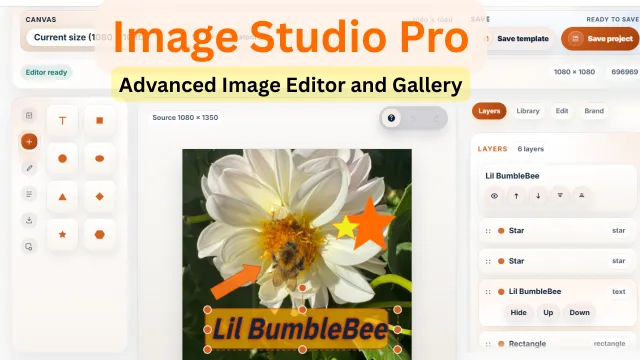
Image Studio Pro
A powerful in-panel image editor for Filament that lets users create, edit, brand, template, and export production-ready images without leaving the admin.
Author:
Heiner Giehl
RAG Chatbot
Build, manage, and embed production-ready RAG chatbots directly from Filament.
Author:
Heiner Giehl
Featured Plugins
A selection of plugins curated by the Filament team

Custom Dashboards
Let your users build and share their own dashboards with a drag-and-drop interface. Define your data sources in PHP and let them do the rest.
 Filament

Advanced Tables (formerly Filter Sets)
Supercharge your tables with powerful features like user-customizable views, quick filters, multi-column sorting, advanced table searching, convenient view management, and more. Compatible with Resource Panel Tables, Relation Managers, Table Widgets, and Table Builder!
 Kenneth Sese

Soft Theme
A theme that gives panels a warm, approachable look with rounded shapes, gentle colors, and serif headings.
Filament

