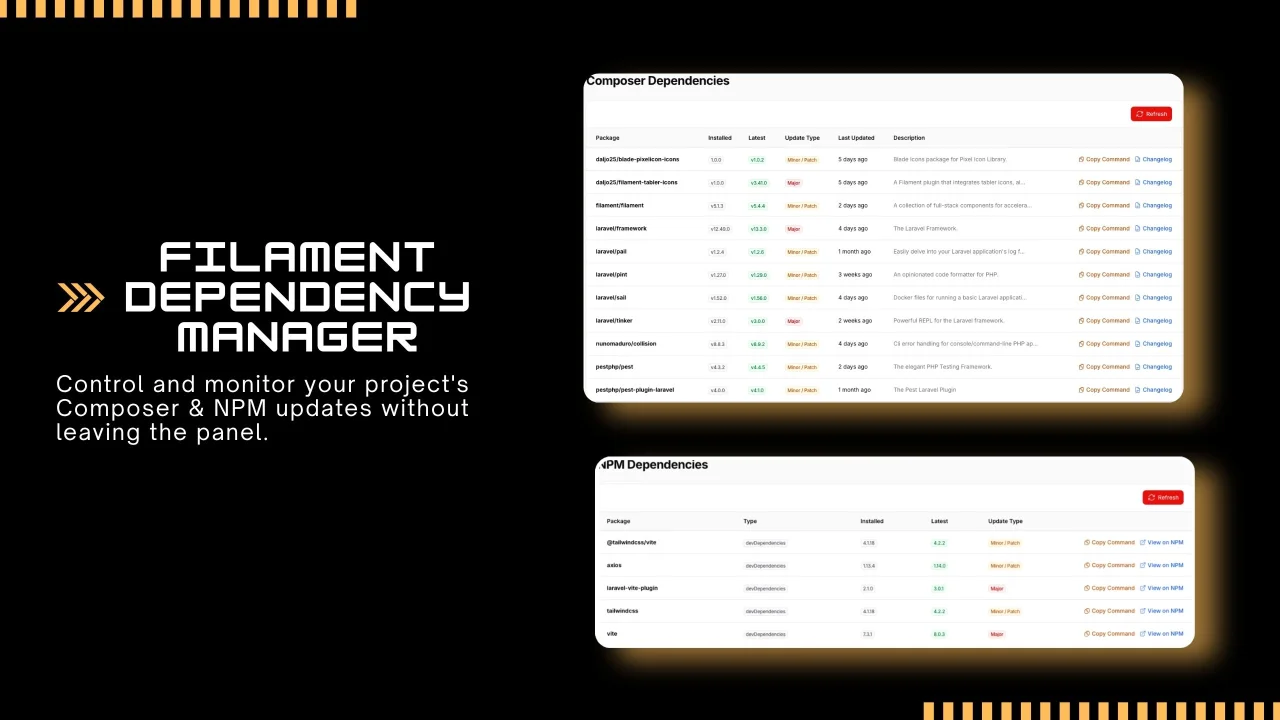
Dependency Manager
CommunityView and manage outdated project dependencies for both PHP and JavaScript packages within a clean, integrated interface for Filament.
filament/
namespace. Review the source and install at your own risk. Found
malware or an unresolved security issue the author won't
address?
Report it
.
 Author:
Daljomar Morillo
Author:
Daljomar Morillo
Documentation
- Table of Contents
- Features
- Screenshots
- Requirements
- Installation
- Usage
- Configuration
- Translations
- Testing
- License


A powerful Filament plugin to monitor outdated Composer and NPM dependencies directly from your admin panel using native Filament tables.
#Table of Contents
- Features
- Screenshots
- Requirements
- Installation
- Usage
- Configuration
- Environment Variables
- Translations
- Testing
- License
#Features
- ⚡ Zero Database: Uses Sushi to provide a seamless Eloquent experience without migrations.
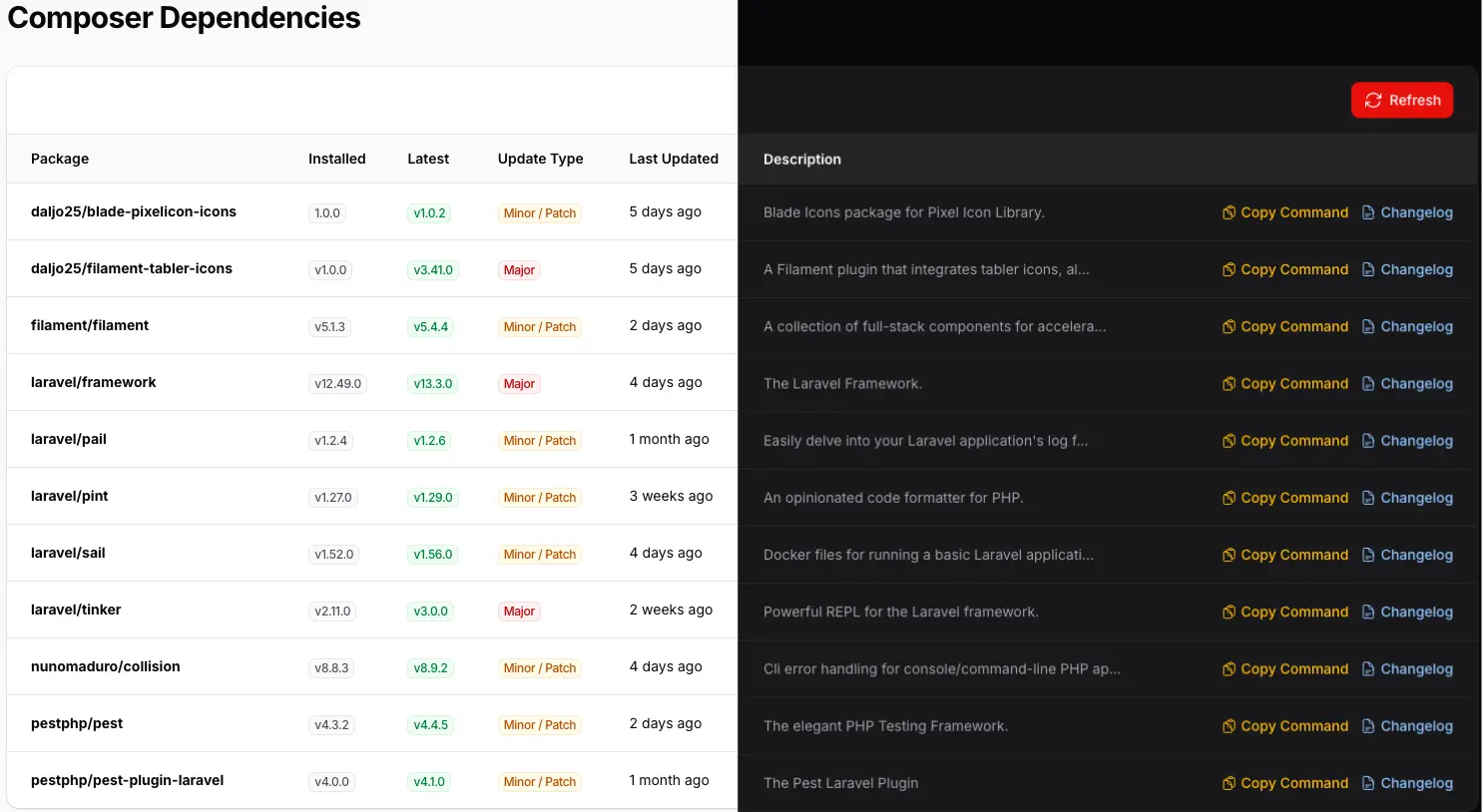
- 📦 Composer Support: View outdated packages, current vs latest versions, and release dates.
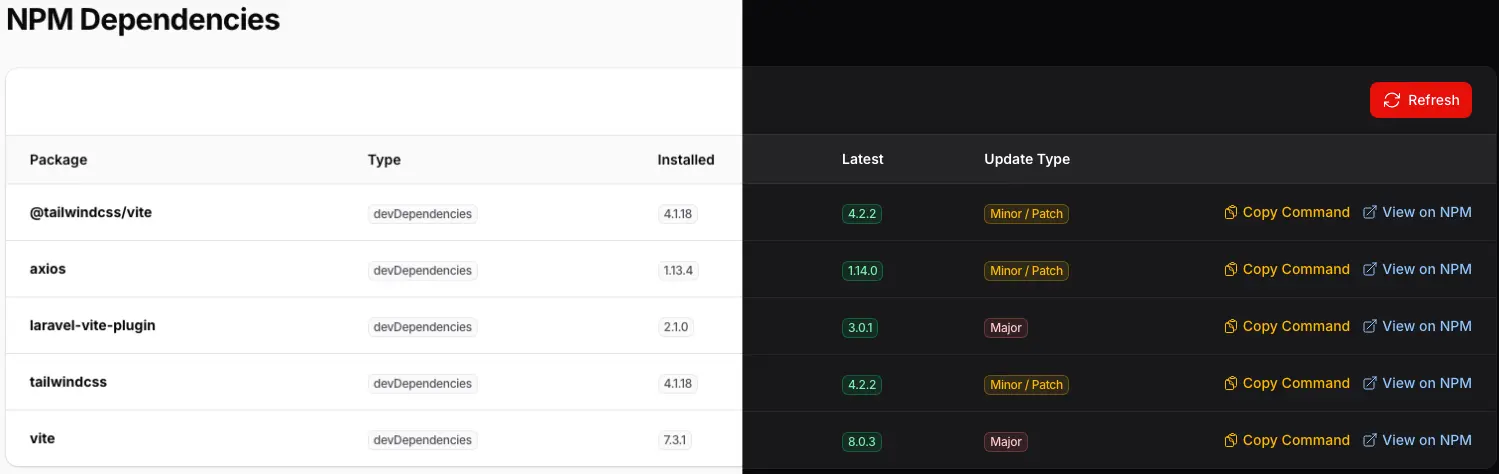
- 🟢 NPM Support: Monitor updates for
dependenciesanddevDependencies. - 🔍 Native Filament Tables: Supports searching, sorting, and filtering out-of-the-box.
- 📋 Quick Copy: Copy update commands (composer require, npm install, etc.) with a single click.
- 🌍 Multilingual: Full support for English and Spanish.
- 🚀 Performance: Results are cached to ensure instant page loads.
#Screenshots
#Composer Dependencies
#NPM Dependencies
#Requirements
The plugin automatically adapts to your environment:
| Filament Version | PHP Version | Laravel Version | Branch / Tag |
|---|---|---|---|
| Filament v5 | 8.2+ | 11.x, 12.x, 13.x | main / v5.x |
| Filament v4 | 8.2+ | 11.x, 12.x, 13.x | 4.x |
| Filament v3 | 8.1+ | 10.x, 11.x, 12.x | 3.x |
#Installation
Install the package via Composer:
composer require daljo25/filament-dependency-manager

php artisan dependency-manager:install
The plugin will automatically install Sushi to handle in-memory data management.
#Usage
Register the plugin in your Filament Panel Provider (e.g., AdminPanelProvider.php):
use Daljo25\FilamentDependencyManager\FilamentDependencyManagerPlugin;

public function panel(Panel $panel): Panel
{
    return $panel
        ->plugin(FilamentDependencyManagerPlugin::make());
}
#Configuration
You can publish the config file using:
php artisan vendor:publish --tag="dependency-manager-config"
#Environment Variables
If your server uses non-standard paths for binaries (like Laravel Herd or custom environments), define them in your .env:
| Variable | Default | Description |
|---|---|---|
DEPENDENCY_MANAGER_COMPOSER_BIN |
null |
Full path to composer |
DEPENDENCY_MANAGER_PHP_BIN |
null |
Full path to php |
DEPENDENCY_MANAGER_NPM_CLIENT |
npm |
npm, pnpm, or yarn |
DEPENDENCY_MANAGER_NPM_BINARY |
null |
Full path to npm |
Example (macOS with Herd):
DEPENDENCY_MANAGER_COMPOSER_BIN=/Users/youruser/.config/herd-lite/bin/composer
DEPENDENCY_MANAGER_PHP_BIN=/Users/youruser/.config/herd-lite/bin/php
#Translations
Publish translations if you need to customize them:
php artisan vendor:publish --tag="filament-dependency-manager-translations"
Supported languages:
- 🇺🇸 English
- 🇪🇸 Spanish
#Testing
composer test
#License
The MIT License (MIT). Please see License File for more information.
The author
Self-taught junior web developer focused on Laravel and Filament. Author of the blog filamentenespanol.com and creator of the unofficial Spanish translation of the Filament documentation, with the goal of making Filament more accessible to the Spanish-speaking community.
From the same author

Featured Plugins
A selection of plugins curated by the Filament team

Custom Dashboards
Let your users build and share their own dashboards with a drag-and-drop interface. Define your data sources in PHP and let them do the rest.
 Filament

Advanced Tables (formerly Filter Sets)
Supercharge your tables with powerful features like user-customizable views, quick filters, multi-column sorting, advanced table searching, convenient view management, and more. Compatible with Resource Panel Tables, Relation Managers, Table Widgets, and Table Builder!
 Kenneth Sese

Blueprint
Filament Blueprint is a premium Laravel Boost extension that helps AI agents produce accurate, detailed implementation plans and security reports for Filament apps.
Filament

