

#Introduction
As a member of the Filament community, I frequently respond to questions and issues raised in Filament Discord and Filament GitHub discussions. Many of these involve common mistakes that developers make while building forms in Filament. In this article, I'll highlight some of these errors and show you how to avoid them.
NOTE: This article was written using Filament v3.x.
#Error 1: Using New Tailwind Classes Without Defining a Theme
Suppose you want to add a custom Tailwind class to the helperText of a RichEditor component:
RichEditor::make('content')
    ->columnSpanFull()
    ->helperText(new HtmlString(<<<'HTML'
    <div class="text-gray-700 dark:text-white py-4">
        You can use
        <a
            href="https://commonmark.org/help/"
            target="_blank"
            class="text-blue-500 font-bold hover:underline"
        >
            Markdown
        </a> to format your content.
    </div>
    HTML)
    ),
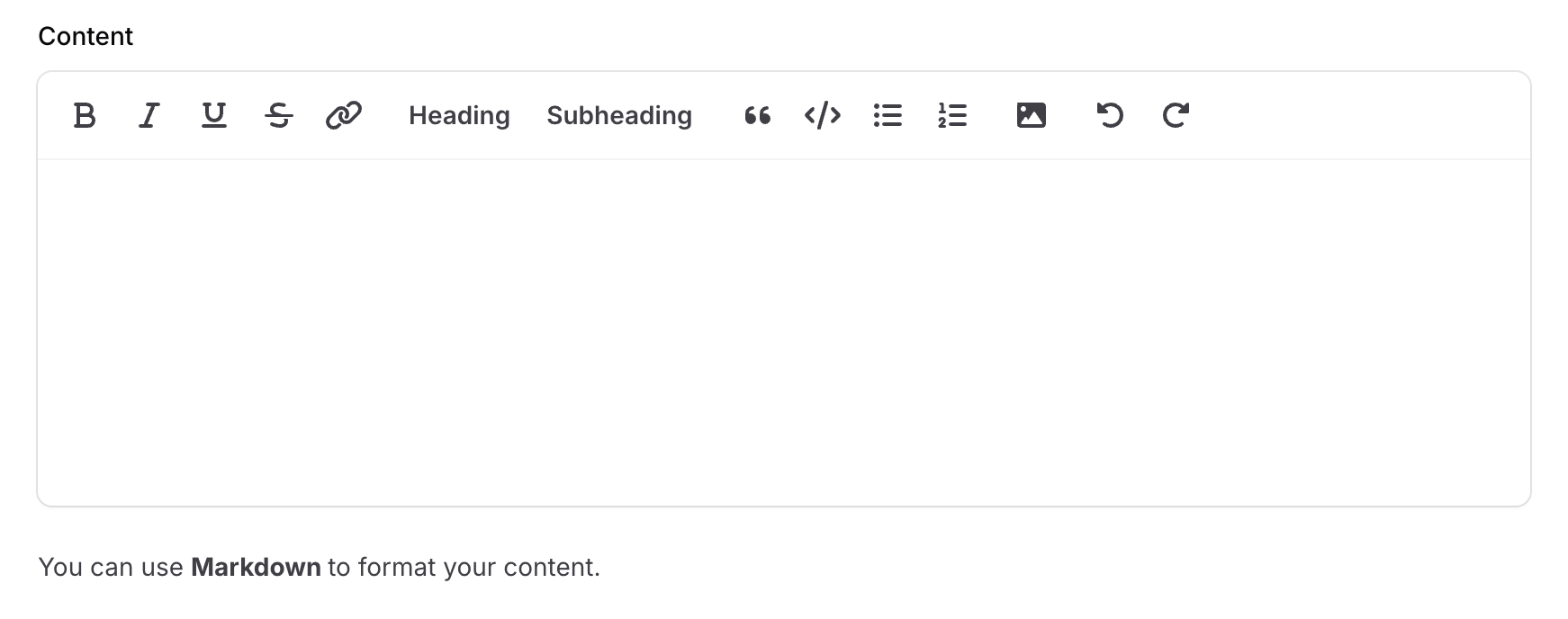
If you run this code without creating a custom theme, the new class text-blue-500 will not be applied:
#Why?
Tailwind CSS compiles only classes explicitly referenced in scanned files. Classes dynamically added in your Blade files will be ignored unless you configure Tailwind to scan those files.
#Solution:
-
Create a custom theme.
-
Follow the instructions in the command:
- First, add a new item to the
inputarray ofvite.config.js:resources/css/filament/admin/theme.css - Next, register the theme in the admin panel provider using
->viteTheme('resources/css/filament/admin/theme.css')
- First, add a new item to the
-
Update the content array in your
tailwind.config.jsto include the relevant directory:
export default {
    presets: [preset],
    content: [
        './app/Filament/**/*.php',
        './resources/views/filament/**/*.blade.php',
        './vendor/filament/**/*.blade.php',
        //...
    ],
}
- Finally, run
npm run devornpm run buildto compile the theme.
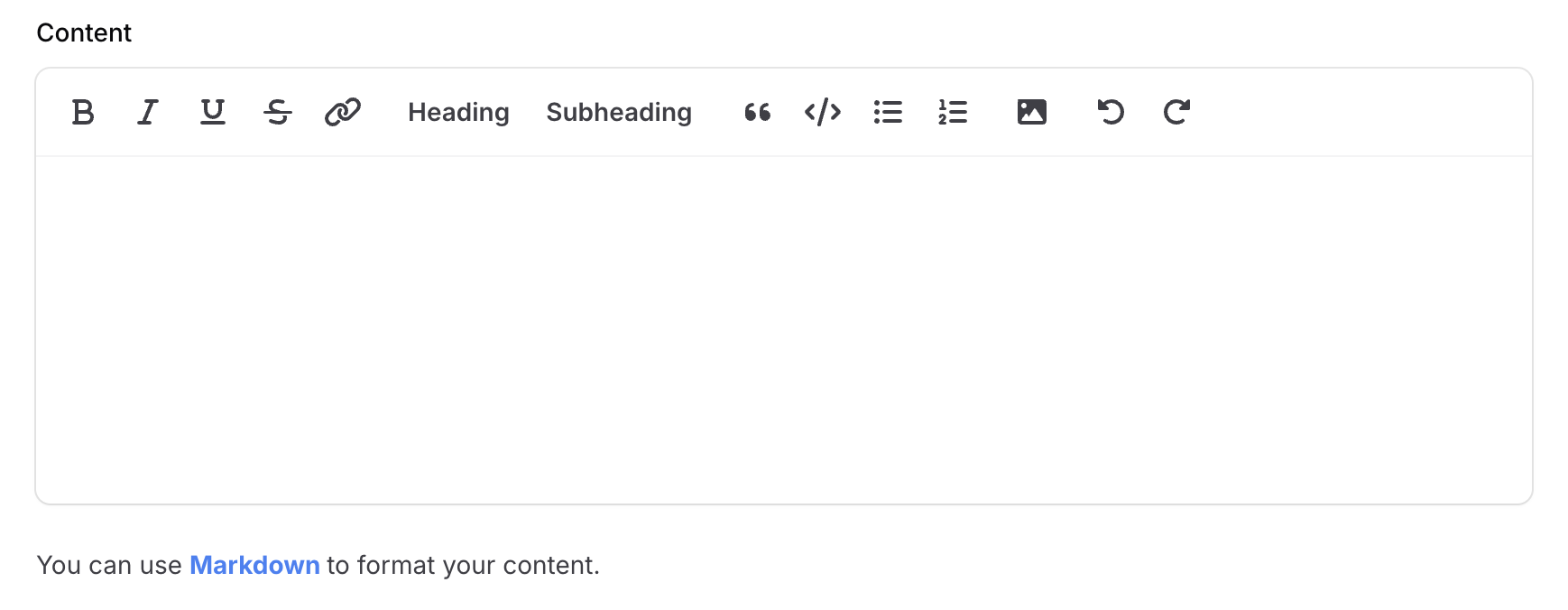
After following these steps, the custom class will be applied successfully:
#Error 2: Misusing the default() Method in Form Components
Here's an example of a TagsInput component with default tags in a PostResource:
TagsInput::make('tags')
    ->default([
        'Laravel',
        'Livewire',
        'Filament',
    ]),
This works perfectly on a Create Page:

However, if you edit a post with no tags, the defaults won't apply:

#Why?
As the docs say, defaults are only used when the form is loaded without existing data. Inside panel resources this only works on Create Pages, as Edit Pages will always fill the data from the model.
In this case, the value is null, which is correct on the Edit Page.
If you want to force the input to have a default value on the Edit Page if the value is null, you should use the formatStateUsing() method:
TagsInput::make('tags')
    ->formatStateUsing(fn (?array $state): array => blank($state) ? [
        'Laravel',
        'Livewire',
        'Filament',
    ] : $state),
#Error 3: Combining options() and relationship() Methods in Select Components
When using a Select or CheckboxList component with a relationship(), avoid also defining options(). For instance:
Select::make('categories')
    ->multiple()
    ->preload()
    ->relationship(
        name: 'categories',
        titleAttribute: 'name'
    )
    ->options(Category::wherePublished(true)->pluck('name', 'id')), // Don't use this
#Why?
The relationship method already fetches options from the database using relationship methods in your Eloquent models.
#Solution:
Use the modifyQueryUsing() method to customize the query:
Select::make('categories')
    ->multiple()
    ->preload()
    ->relationship(
        name: 'categories',
        titleAttribute: 'name',
        modifyQueryUsing: fn (Builder $query): Builder => $query->wherePublished(true)),
#Error 4: Incorrectly Using a Wizard Component in Resource Pages
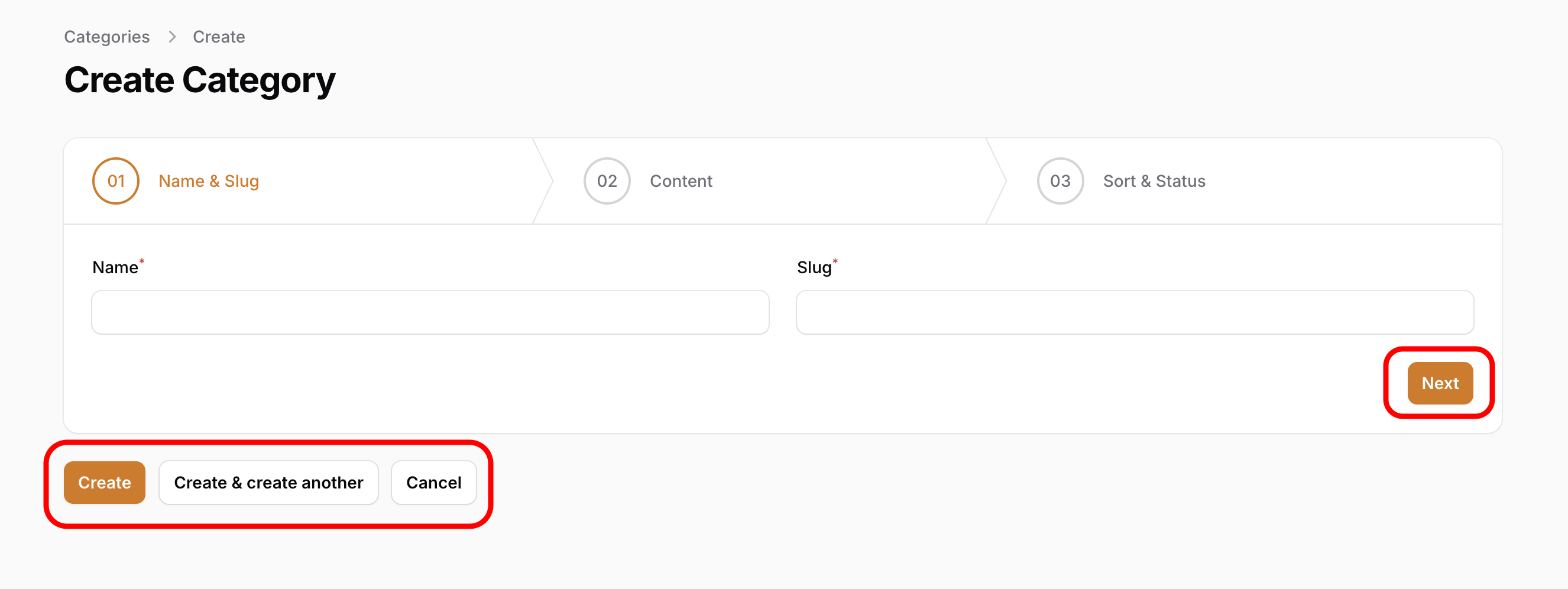
Using a Wizard component directly in a Resource can result in both navigation and form buttons appearing simultaneously:
#Why?
The Wizard component has its own navigation buttons.
#Solution:
Use the HasWizard trait in your Resource Pages:
Create Page:
use App\Filament\Resources\CategoryResource;
use Filament\Resources\Pages\CreateRecord;

class CreateCategory extends CreateRecord
{
    use CreateRecord\Concerns\HasWizard;

    protected static string $resource = CategoryResource::class;

    protected function getSteps(): array
    {
        return [
            // ...
        ];
    }
}
Edit Page:
use App\Filament\Resources\CategoryResource;
use Filament\Resources\Pages\EditRecord;

class EditCategory extends EditRecord
{
    use EditRecord\Concerns\HasWizard;

    protected static string $resource = CategoryResource::class;

    protected function getSteps(): array
    {
        return [
            // ...
        ];
    }
}
To implement a Wizard within an Action, use the steps() method:
CreateAction::make()
    ->steps([
        // ...
    ]),
This ensures proper functionality by displaying only the navigation buttons.
#Error 5: Forgetting Key Steps in Standalone Mode
Filament provides a Standalone Mode to build forms. When using Filament's Standalone Mode in a Livewire component, missing key steps can cause unexpected behavior. For example:
class CreateCategory extends Component implements HasForms
{
    use InteractsWithForms;

    public ?array $data = [];

    public function mount(): void
    {
        $this->form->fill(); // Important for initializing the form
    }

    public function form(Form $form): Form
    {
        return $form
            ->schema([
                TextInput::make('name'),
                TextInput::make('slug'),
                ...
            ])
            ->statePath('data'); // Important for storing form data
    }
    ...
}
#Solution:
Ensure you are following these key steps when using Standalone Mode.
If you omit statePath(), ensure that public properties exist for each Form Field:
class CreateCategory extends Component implements HasForms
{
    use InteractsWithForms;

    // Add public properties for each field in the form schema
    public ?string $name = null;
    public ?string $slug = null;
    ...

    public function mount(): void
    {
        $this->form->fill();
    }
    public function form(Form $form): Form
    {
        return $form
            ->schema([
                TextInput::make('name'),
                TextInput::make('slug'),
                ...
            ]);
    }
    ...
}
#Conclusion
Avoiding these common errors will save you time and provide a smoother development experience with Filament. Additionally, it will deepen your understanding of Filament's features, enabling you to create more maintainable and reliable forms for your projects.
Happy coding ;)






