
Image Labeler
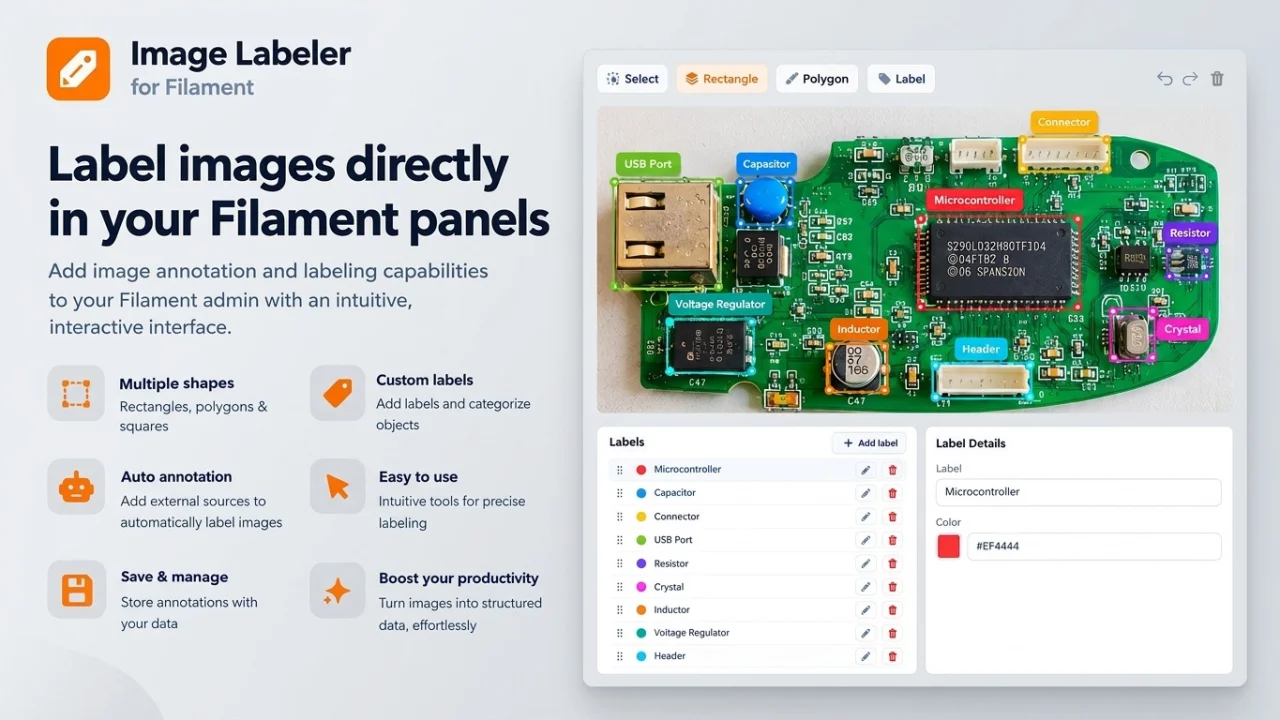
CommunityFilament v5 plugin for labeling images, drawing, naming, and coloring rectangles and polygons right in your form, with saved annotations attached to any model, plus optional auto-annotation.
 Author:
Michal
Author:
Michal
Package health
BetaAutomated checks of this plugin's Composer package
15 checks
- Failed: GitHub Actions pinned to SHA — View details on Plumb
- Skipped: GitLab CI includes pinned to SHA
- Passed: Open security advisories
- Passed: Dependabot PR responsiveness — No open Dependabot PRs.
- Skipped: Renovate MR responsiveness
- Warning: Dependabot or Renovate configured — Updater does not cover the JavaScript ecosystem, which has a committed lockfile.
-
Failed:
Dependency update cooldown configured
—
No cooldown configured in
.github/dependabot.yml. View details on Plumb - Passed: Provides a security policy
- Passed: Abandoned or archived — No consulted source marks the package abandoned (packagist, github).
- Passed: Commit and release recency — Active: last commit 0 days ago; last release 1 days ago.
- Skipped: composer.lock not committed by library
- Skipped: Dist archive is lean
- Skipped: Current Laravel version supported
- Skipped: Current PHP version supported
- Skipped: Current Symfony version supported
filament/
namespace. Review the source and install at your own risk. Found
malware or an unresolved security issue the author won't
address?
Report it
.
Documentation
- Features
- Installation
- How It Works
- Usage
- The syncAnnotations Method
- Automatic annotation
- ImageLabel Configuration
- Upgrading from v0.1
- Testing
- Changelog
- Credits
- License
A Filament plugin for labeling images — draw rectangles and polygons, name them, color them, all inside one form field. Built on Annotorious, with a polymorphic persistence layer so any Eloquent model can keep its annotations.
#Features
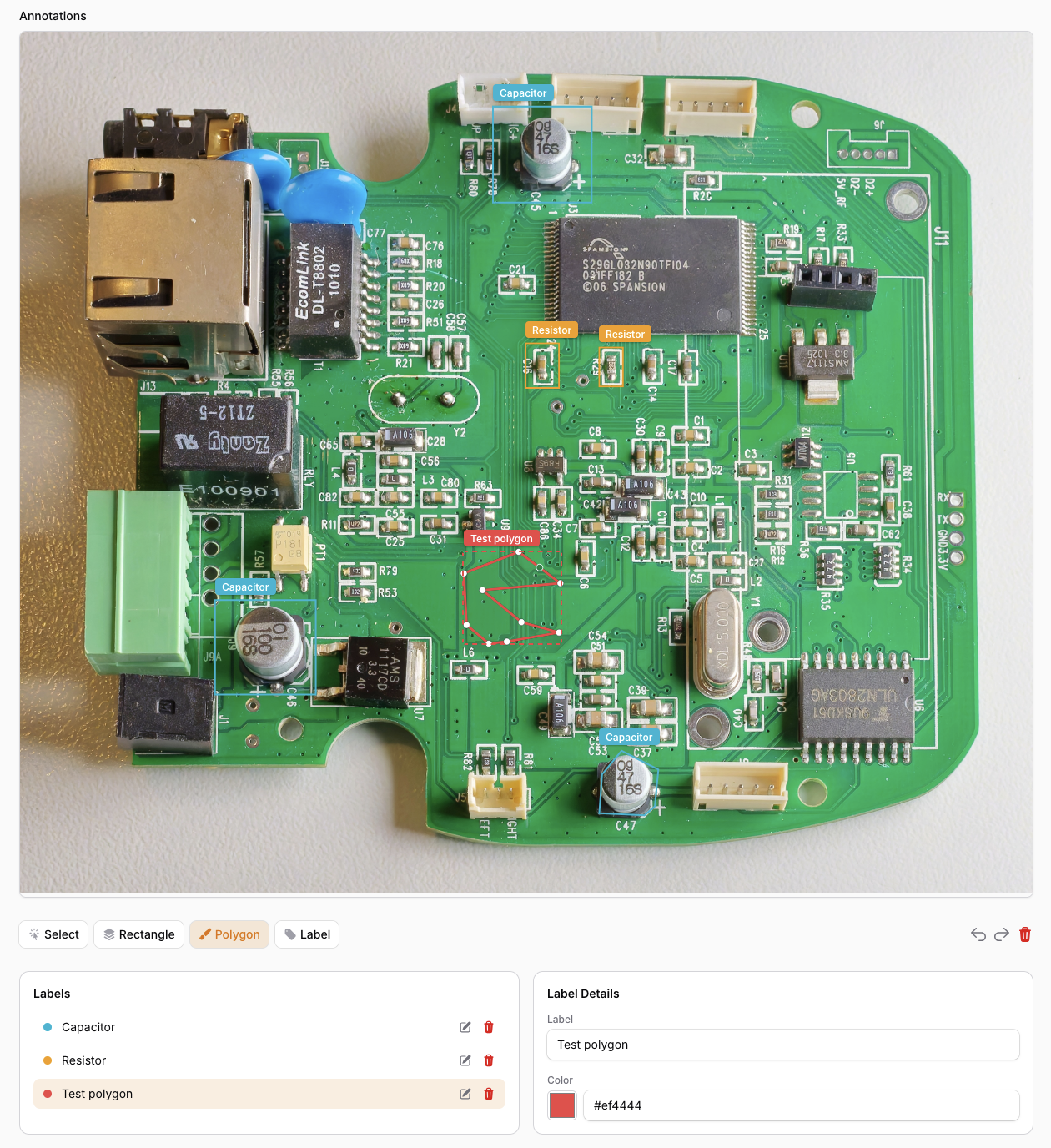
- Annotation canvas with a toolbar under the image: Select / Rectangle / Polygon / Label, plus undo / redo / delete
- Built-in Labels panel — every distinct label gets a row with a color dot, edit and delete
- Built-in Label Details panel — rename a label (renames every shape using it) and pick its color
- Label pills rendered over the shapes on the canvas
- Two-way selection: click a shape to load its label, click a row to select the shape
- Polymorphic
annotationstable — attach annotations to any model HasAnnotationstrait withsyncAnnotations()for easy CRUD- Optional automatic annotation — a model overrides
autoAnnotate()to turn an image into suggestions (any backend you like: local model, detection API, LLM); the editor gets an Annotate button, optionally auto-running when the image loads - Works with private/public file storage, Filament v5 compatible, translations (en/de/pl)
#Installation
composer require zielu92/filament-image-labeler
php artisan migrate
#How It Works
ImageLabel is a self-contained form field. Its Livewire state is an array of shapes:
[
    {
        "id": "uuid",
        "target": {
            "selector": {
                "type": "RECTANGLE",
                "geometry": { "x": 693, "y": 88, "w": 256, "h": 160, "bounds": { "minX": 693, "minY": 88, "maxX": 949, "maxY": 248 } }
            }
        },
        "label": "Microcontroller",
        "color": "#ef4444"
    }
]
target.selectoris Annotorious' internal geometry — pixel coordinates in the image's natural size; polygons use{ "type": "POLYGON", "geometry": { "points": [[x, y], ...], "bounds": {...} } }. Store it as-is, it round-trips.labelis free text; shapes sharing a label share a row in the Labels panel.coloris assigned deterministically from a hash of the label name and can be overridden per label in the UI. Colors are denormalized onto each shape, so the state array is all you need to persist.
#Usage
#1. Add the trait to your model
use Zielu92\FilamentImageLabeler\Concerns\HasAnnotations;

class Photo extends Model
{
    use HasAnnotations;
}
This gives your model $photo->annotations() (morphMany), $photo->syncAnnotations(array $data) and automatic cascade delete.
#2. Add the field to your Filament form
use Zielu92\FilamentImageLabeler\Forms\Components\ImageLabel;

ImageLabel::make('annotations')
    ->image(fn ($get, $record) => /* resolve the current photo URL */)
    ->live()
    ->columnSpanFull()
The image closure is re-evaluated whenever the form renders, so the canvas follows the form: make the photo field ->live() and resolve the URL from its state (this also covers freshly uploaded, not-yet-saved files):
->image(fn ($get, $record) => $record?->exists
    ? $record->getFirstMedia()?->getTemporaryUrl(now()->addHour())
    : ($get('photo') instanceof \Livewire\Features\SupportFileUploads\TemporaryUploadedFile
        ? $get('photo')->temporaryUrl()
        : null))
As a fallback the field also reacts to a Livewire::dispatch('image-labeler-update-url', $url) event. Pass the field's state path as a second argument (..., $url, 'annotations')) when a page renders multiple ImageLabel fields, so only the matching one updates.
#Keyboard
In edit mode: Delete / Backspace removes the selected shape(s), Esc deselects or cancels an in-progress polygon, and Ctrl/Cmd+Z / Ctrl/Cmd+Y (or the toolbar arrows) undo/redo.
#3. Persist on save, hydrate on edit
Map the field state onto syncAnnotations() — the app decides what goes into metadata:
/** @param array<array{id: string, target: array, label: string, color: string}> $shapes */
function annotationRows(array $shapes): array
{
    return collect($shapes)->map(fn ($s) => [
        'annotation_id' => $s['id'],
        'geometry' => $s['target'],
        'metadata' => ['label' => $s['label'] ?? '', 'color' => $s['color'] ?? null],
    ])->all();
}
// CreatePhoto.php
class CreatePhoto extends CreateRecord
{
    protected function mutateFormDataBeforeCreate(array $data): array
    {
        $this->annotationData = annotationRows($data['annotations'] ?? []);
        unset($data['annotations']);

        return $data;
    }

    protected function afterCreate(): void
    {
        $this->record->syncAnnotations($this->annotationData);
    }
}
// EditPhoto.php
use Zielu92\FilamentImageLabeler\Support\AnnotationColor;

class EditPhoto extends EditRecord
{
    protected function mutateFormDataBeforeFill(array $data): array
    {
        $data['annotations'] = $this->record->annotations()->orderBy('id')->get()
            ->map(fn ($ann) => [
                'id' => $ann->annotation_id,
                'target' => $ann->geometry,
                'label' => $ann->metadata['label'] ?? '',
                'color' => $ann->metadata['color'] ?? AnnotationColor::forLabel($ann->metadata['label'] ?? ''),
            ])
            ->values()
            ->all();

        return $data;
    }

    protected function mutateFormDataBeforeSave(array $data): array
    {
        $this->annotationData = annotationRows($data['annotations'] ?? []);
        unset($data['annotations']);

        return $data;
    }

    protected function afterSave(): void
    {
        $this->record->syncAnnotations($this->annotationData);
    }
}
AnnotationColor::forLabel('USB Port') returns the same color the canvas picks for a label by default — use it when your metadata was saved without an explicit color.
#The syncAnnotations Method
$model->syncAnnotations([
    [
        'annotation_id' => 'uuid-from-canvas',
        'geometry' => ['selector' => ['type' => 'RECTANGLE', 'geometry' => ['x' => 693, 'y' => 88, 'w' => 256, 'h' => 160, 'bounds' => ['minX' => 693, 'minY' => 88, 'maxX' => 949, 'maxY' => 248]]]],
        'metadata' => ['label' => 'Microcontroller', 'color' => '#ef4444'],
    ],
]);
Behavior: creates missing rows (matched by annotation_id), updates existing ones, deletes rows whose annotation_id is absent, [] clears all. geometry accepts an array or JSON string; metadata is nullable and yours to shape.
#Automatic annotation
Let a model label its own images. The package defines only that it happens and what shape the answer has — how you find things in the image is entirely yours (local model, hosted detector, vision LLM, hardcoded test data).
1. Override the hook on your model. The contract: return a list of AnnotationSuggestion DTOs (label + normalized box/polygon). The trait default returns null, which keeps the feature off:
use Zielu92\FilamentImageLabeler\Concerns\HasAnnotations;
use Zielu92\FilamentImageLabeler\Support\AnnotationSuggestion;

class Photo extends Model
{
    use HasAnnotations;

    /**
     * @return list<AnnotationSuggestion>|null  one DTO per finding
     */
    public function autoAnnotate(string $url, ?string $path): ?array
    {
        // $url  - the image URL the editor currently displays
        // $path - a local temp file for that URL, when the package could fetch it (null otherwise)
        // Coordinates are normalized: fractions of the image's width/height.

        return [
            AnnotationSuggestion::box('USB Port', 0.42, 0.11, 0.18, 0.09),
            AnnotationSuggestion::polygon('Heatsink', [[0.1, 0.1], [0.3, 0.12], [0.28, 0.4]]),
        ];
    }
}
AnnotationSuggestion is the DTO the package defines (src/Support/AnnotationSuggestion.php): immutable, validates its geometry, exposes label + normalized points. Build it with ::box($label, $x, $y, $w, $h) / ::polygon($label, [[x, y], ...]). A plain array ['label' => ..., 'box' => ...] is accepted too — the package converts it with AnnotationSuggestion::fromArray() — so JSON straight from a detection API works without ceremony.
2. Choose what does the thinking — it's your method, per model. The package never calls anything itself, so every model can annotate completely differently: a YOLO endpoint here, a face-detection service there, an LLM somewhere else, an ONNX runtime in-process, a python sidecar, hardcoded fixtures in tests. Models share a strategy via a trait/base class, or branch inside the hook by whatever you know about the record:
use Illuminate\Support\Facades\Http;

class Photo extends Model
{
    use HasAnnotations;

    public function autoAnnotate(string $url, ?string $path): ?array
    {
        return match (true) {
            $this->isPortrait() => $this->detectFaces($url),
            $this->isHardware() => $this->detectParts($url),
            default => null,                       // this photo opts out
        };
    }

    protected function detectParts(string $url): ?array
    {
        // Any HTTP detector will do - map its response into suggestions.
        $detections = Http::timeout(20)->post('https://detector.test/v1/detect', [
            'image' => $url,
            'classes' => $this->source?->part_labels ?? ['*'],
        ])->json('detections', []);

        return array_map(
            fn (array $d): AnnotationSuggestion => AnnotationSuggestion::box(
                label: $d['class'],
                x: $d['bbox']['x1'],
                y: $d['bbox']['y1'],
                w: $d['bbox']['x2'] - $d['bbox']['x1'],
                h: $d['bbox']['y2'] - $d['bbox']['y1'],
            ),
            $detections,
        );
    }
}
Return null (or an empty array) when there is nothing to report — the field simply gets no shapes.
3. Enable the field:
ImageLabel::make('annotations')
    ->image(/* ... */)
    ->enableAutoAnnotation()   // arms the feature for this field
    ->autoAnnotateOnLoad()     // optional: run when the image appears
    ->autoAnnotateButton(false) // optional: hide the toolbar button (load-only)
    ->columnSpanFull()
What happens: clicking Annotate (or image load, with autoAnnotateOnLoad()) calls your autoAnnotate(), then the editor turns every suggestion into a normal shape right there on the canvas — the normalized points are scaled against the image the browser displays, so placement works for any URL, including protected/private ones. From there it is manual work: keep editing, undo, save through syncAnnotations() as usual. Results are never silently replaced on re-run; new shapes are appended (a multiple(false) field replaces).
Notes:
- The button renders only when the field is enabled and the record actually overrides the hook; read-only fields never annotate.
- Execution is synchronous with a spinner; a slow backend can hit request timeouts — that's your method's contract to keep snappy (queued execution may come later).
- If your method throws, the editor shows the error under the toolbar and leaves your shapes untouched.
$path: the package hands your method a local file when it can get one without requesting your own server — plain paths, public/storage/...URLs, remote http(s) downloads (max 20 MB). Same-host URLs (e.g. Livewire's local upload preview route) yieldnull; write your method so the URL alone is enough when that matters.- Security: remote
$pathdownloads refuse destinations that resolve to private, loopback, link-local (e.g. the cloud metadata address169.254.169.254) or reserved IP ranges, and never follow redirects — so an app that builds image URLs from user-controlled state can't turn the fetch into an SSRF probe. If your images genuinely live on an internal host, opt in viaconfig('filament-image-labeler.allow_private_image_hosts')(publishable config file, envIMAGE_LABELER_ALLOW_PRIVATE_IMAGE_HOSTS). Results are also discarded if the image is swapped or cleared mid-request.
#ImageLabel Configuration
| Method | Description | Default |
|---|---|---|
->image(string|Closure $url) |
Image URL to annotate | required |
->enableSquare(bool|Closure) |
Show the Rectangle tool button | true |
->enablePolygon(bool|Closure) |
Show the Polygon tool button | true |
->enableClear(bool|Closure) |
Show the delete/clear toolbar button | true |
->multiple(bool|Closure) |
Allow multiple shapes (new shape replaces old when false) |
true |
->coloredAnnotations(array|null $palette) |
Palette used for default label colors | ImageLabel::DEFAULT_PALETTE |
->readOnly(bool|Closure $condition) |
Display mode: shapes render, hovering shows the label; no toolbar or panels | false |
->enableAutoAnnotation(bool|Closure) |
Show the Annotate button (needs an autoAnnotate() override on the model) |
false |
->autoAnnotateOnLoad(bool|Closure) |
Also run automatic annotation when the image (re)loads | false |
->autoAnnotateButton(bool|Closure) |
Show the toolbar button at all (turn off for hands-off, load-only annotation) | true |
->autoAnnotateButtonLabel(string|Closure|null) |
Button text | 'Annotate' (translated) |
->autoAnnotateButtonIcon(string|Closure|null) |
Button icon; null for none |
'heroicon-m-sparkles' |
#Read-only display
To show a saved photo's annotations without editing — e.g. on a view page or anywhere a form field fits — hydrate the same state and mark the field read-only:
ImageLabel::make('annotations')
    ->image(fn ($record) => $record->getFirstMedia()?->getUrl())
    ->readOnly()
    ->dehydrated(false)
    ->columnSpanFull()
Shapes are drawn in their label colors; hovering a shape shows a tooltip with its label and color. No drawing, selection, or panels.
In edit mode the canvas, toolbar and the Labels / Label Details panels appear only while an image is set — the field owns label state internally, no repeater wiring needed.
#Upgrading from v0.1
The app-side Repeater pattern is gone: the field now manages labels/colors itself and its state entries carry label and color. Old saved data still works — target geometry is unchanged; rows without a label in metadata simply hydrate as Unlabeled.
#Testing
public function test_sync_creates_annotations(): void
{
    $photo = Photo::factory()->create();

    $photo->syncAnnotations([
        [
            'annotation_id' => 'ann-1',
            'geometry' => ['selector' => ['type' => 'FragmentSelector', 'value' => 'xywh=pixel:10,20,100,50']],
            'metadata' => ['label' => 'Person'],
        ],
    ]);

    $this->assertCount(1, $photo->annotations);
    $this->assertEquals('Person', $photo->annotations->first()->metadata['label']);
}
#Changelog
Please see CHANGELOG for more information on what has changed recently.
#Credits
This package uses Annotorious for the image annotation canvas, licensed under the BSD 3-Clause License.
#License
The MIT License (MIT). Please see License File for more information.
Featured Plugins
A selection of plugins curated by the Filament team

Custom Dashboards
Let your users build and share their own dashboards with a drag-and-drop interface. Define your data sources in PHP and let them do the rest.
 Filament

Custom Fields
Eliminate custom field migrations forever. Let your users create and manage form fields directly in Filament admin panels with 20+ built-in field types, validation, and zero database changes.
 Relaticle

Spotlight Pro
Browse your Filament Panel with ease. Filament Spotlight Pro adds a Spotlight like Command Palette to your Filament Panel.
 Dennis Koch
