ZanySoft Activity Log
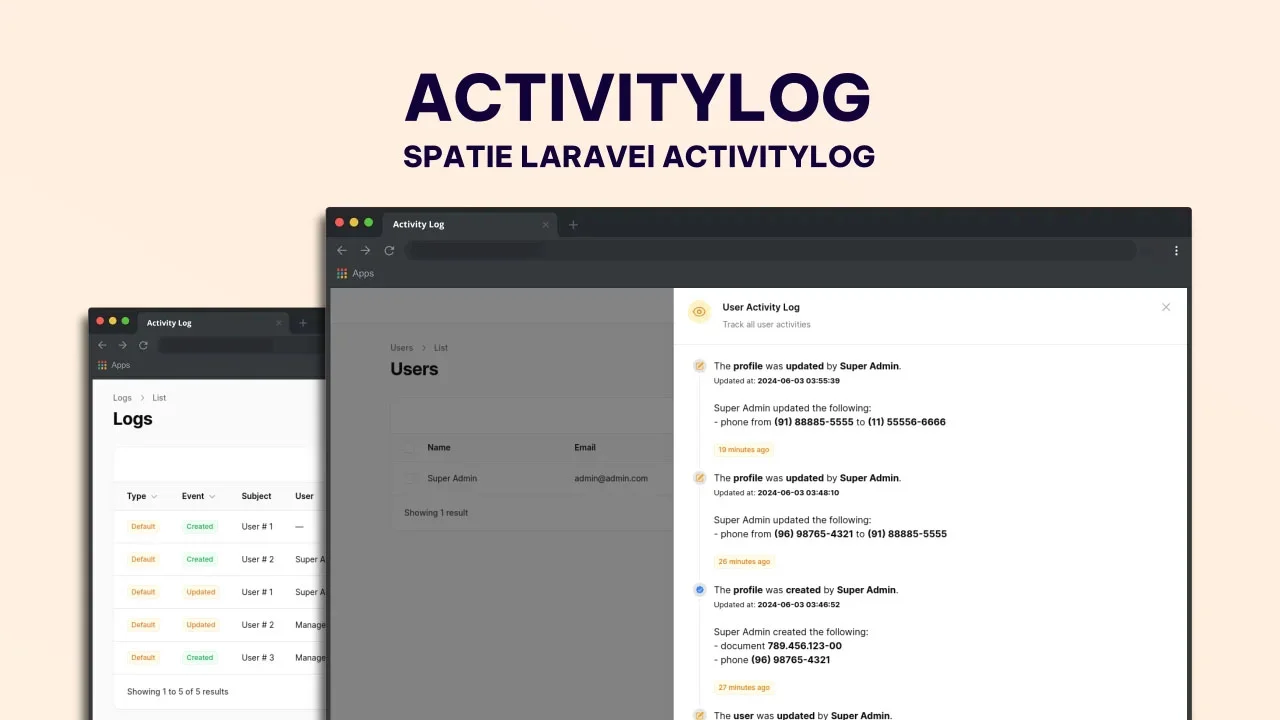
CommunityProvides a detailed view of activity logs generated by the Spatie Activitylog package. It includes a relationship manager for exploring related models and an intuitive timeline that makes it easy to track, understand, and audit user activity.
filament/
namespace. Review the source and install at your own risk. Found
malware or an unresolved security issue the author won't
address?
Report it
.
 Author:
ZanySoft
Author:
ZanySoft
Documentation
- Spatie/Laravel-activitylog for Filament
- Requirements
- Installation
- Usage
- Plugin usage
- Customising the ActivitylogResource
- Customising label Resource
- Displaying the resource in the navigation
- Grouping resource navigation items
- Customising a resource navigation icon
- Active a count badge
- Set navigation sort
- Authorization
- Translate Resource Names
- Translate Activity log key Names
- Customize Date Parsing
- Customize Date and DateTime Formats
- Customize DateTime Columns
- Customize Date Picker Fields
- Manipulate View Action Using Custom Activity Resource Trait
- Full configuration
- Relationship manager
- Timeline Action
- Full Timeline configuration
- Acknowledgements
- License
#Spatie/Laravel-activitylog for Filament




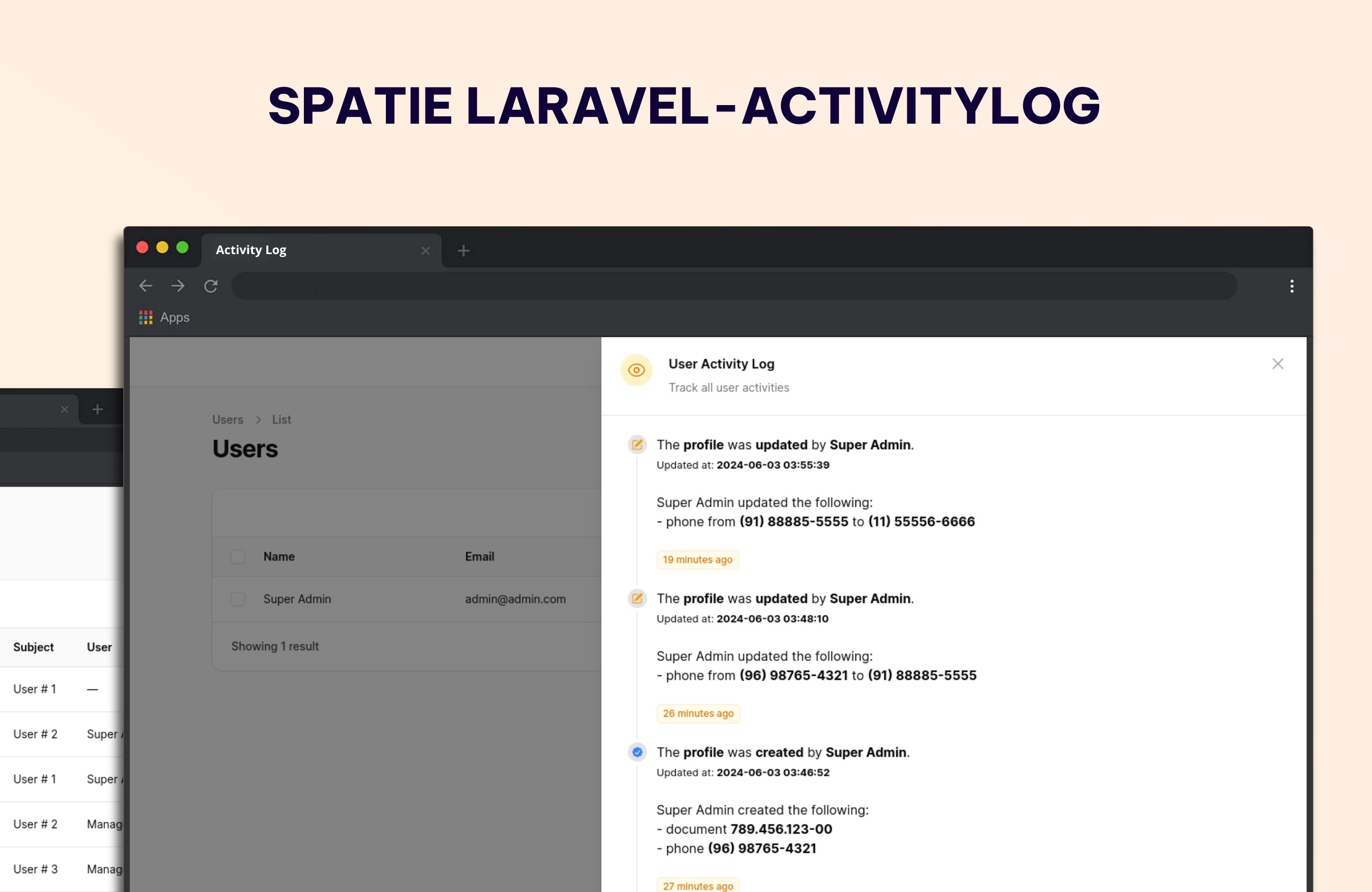
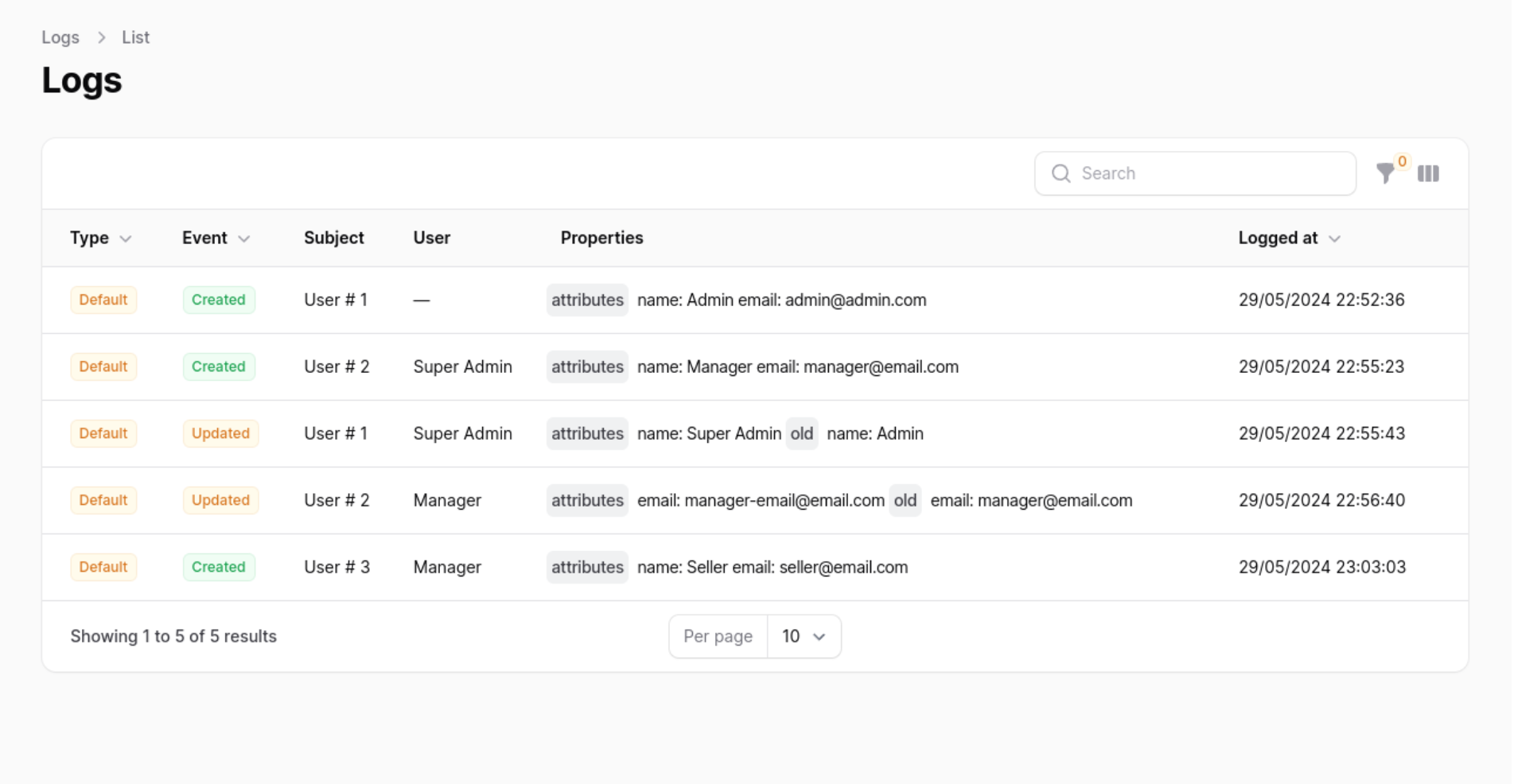
This package provides a Filament resource that shows you all of the activity logs and detailed view of each log created using the spatie/laravel-activitylog package. It also provides a relationship manager for related models.
#Requirements
- Laravel v12
- Filament v3
- Spatie/Laravel-activitylog v4
#Installation
You can install the package via composer:
composer require zanysoft/filament-activitylog
After that run the install command:
php artisan activitylog:install
This will publish the config & migrations from spatie/laravel-activitylog
And run migrates
php artisan migrate
You can manually publish the configuration file with:
php artisan vendor:publish --tag="activitylog-config"
This is the contents of the published config file:
return [
    'resources' => [
       'label'                     => 'Activity Log',
        'plural_label'              => 'Activity Logs',
        'hide_restore_action'       => false,
        'restore_action_label'      => 'Restore',
        'hide_resource_action'      => false,
        'hide_restore_model_action' => true,
        'resource_action_label'     => 'View',
        'navigation_item'           => true,
        'navigation_group'          => null,
        'navigation_icon'           => 'heroicon-o-shield-check',
        'navigation_sort'           => null,
        'default_sort_column'       => 'id',
        'default_sort_direction'    => 'desc',
        'navigation_count_badge'    => false,
        'resource'                  => \ZanySoft\FilamentActivitylog\Resources\ActivitylogResource::class,
    ],
    'date_format'     => 'd/m/Y',
    'datetime_format' => 'd/m/Y H:i:s',
];
Optionally, you can publish the views using
php artisan vendor:publish --tag="activitylog-views"
#Usage
#Basic Spatie ActivityLog usage
In you Model add Spatie\Activitylog\Traits\LogsActivity trait, and configure getActivitylogOption function
For more configuration, Please review Spatie Docs
use Illuminate\Database\Eloquent\Model;
use Spatie\Activitylog\Traits\LogsActivity;
use Spatie\Activitylog\LogOptions;

class NewsItem extends Model
{
    use LogsActivity;

    protected $fillable = ['name', 'text'];

    public function getActivitylogOptions(): LogOptions
    {
        return LogOptions::defaults()
        ->logOnly(['name', 'text']);
    }
}
#Plugin usage
In your Panel ServiceProvider (App\Providers\Filament) active the plugin
Add the ZanySoft\FilamentActivitylog\ActivitylogPlugin to your panel config
use ZanySoft\FilamentActivitylog\ActivitylogPlugin;

public function panel(Panel $panel): Panel
{
    return $panel
        ->plugins([
            ActivitylogPlugin::make(),
        ]);
}
#Customising the ActivitylogResource
You can swap out the ActivitylogResource used by updating the ->resource() value. Use this to create your own CustomResource class and extend the original at \ZanySoft\FilamentActivitylog\Resources\ActivitylogResource::class. This will allow you to customise everything such as the views, table, form and permissions.
[!NOTE] If you wish to change the resource on List and View page be sure to replace the
getPagesmethod on the new resource and create your own version of theListPageandViewPageclasses to reference the customCustomResource.
use ZanySoft\FilamentActivitylog\ActivitylogPlugin;

public function panel(Panel $panel): Panel
{
    return $panel
        ->plugins([
            ActivitylogPlugin::make()
                ->resource(\Path\For\Your\CustomResource::class),
        ]);
}
#Customising label Resource
You can swap out the Resource label used by updating the ->label() and ->pluralLabel() value.
use ZanySoft\FilamentActivitylog\ActivitylogPlugin;

public function panel(Panel $panel): Panel
{
    return $panel
        ->plugins([
            ActivitylogPlugin::make()
                ->label('Log')
                ->pluralLabel('Logs'),
        ]);
}
#Displaying the resource in the navigation
You can enable or disable the Resource navigation item by updating the ->navigationItem() value.
use ZanySoft\FilamentActivitylog\ActivitylogPlugin;

public function panel(Panel $panel): Panel
{
    return $panel
        ->plugins([
            ActivitylogPlugin::make()
                ->navigationItem(false), // by default is true
        ]);
}
#Grouping resource navigation items
You can add a Resource navigation group updating the ->navigationGroup() value.
use ZanySoft\FilamentActivitylog\ActivitylogPlugin;

public function panel(Panel $panel): Panel
{
    return $panel
        ->plugins([
            ActivitylogPlugin::make()
                ->navigationGroup('Activity Log'),
        ]);
}
#Customising a resource navigation icon
You can swap out the Resource navigation icon used by updating the ->navigationIcon() value.
use ZanySoft\FilamentActivitylog\ActivitylogPlugin;

public function panel(Panel $panel): Panel
{
    return $panel
        ->plugins([
            ActivitylogPlugin::make()
                ->navigationIcon('heroicon-o-shield-check'),
        ]);
}
#Active a count badge
You can active Count Badge updating the ->navigationCountBadge() value.
use ZanySoft\FilamentActivitylog\ActivitylogPlugin;

public function panel(Panel $panel): Panel
{
    return $panel
        ->plugins([
            ActivitylogPlugin::make()
                ->navigationCountBadge(true),
        ]);
}
#Set navigation sort
You can set the Resource navigation sort used by updating the ->navigationSort() value.
use ZanySoft\FilamentActivitylog\ActivitylogPlugin;

public function panel(Panel $panel): Panel
{
    return $panel
        ->plugins([
            ActivitylogPlugin::make()
                ->navigationSort(3),
        ]);
}
#Authorization
If you would like to prevent certain users from accessing the logs resource, you should add a authorize callback in the ActivitylogPlugin chain.
use ZanySoft\FilamentActivitylog\ActivitylogPlugin;

public function panel(Panel $panel): Panel
{
    return $panel
        ->plugins([
            ActivitylogPlugin::make()
                ->authorize(
                    fn () => auth()->user()->id === 1
                ),
        ]);
}
#Translate Resource Names
To translate resource names in the activity log, add a translateSubject callback within the ActivitylogPlugin chain
use ZanySoft\FilamentActivitylog\ActivitylogPlugin;

public function panel(Panel $panel): Panel
{
    return $panel
        ->plugins([
            ActivitylogPlugin::make()
                ->translateSubject(fn($label) => __("yourCustomLangFile.".$label)),
        ]);
}
#Translate Activity log key Names
To translate the names of the keys in the activity log, add a translateLogKey callback within the ActivitylogPlugin chain
use ZanySoft\FilamentActivitylog\ActivitylogPlugin;

public function panel(Panel $panel): Panel
{
    return $panel
        ->plugins([
            ActivitylogPlugin::make()
                ->translateLogKey(fn($label) => __("yourCustomLangFile.".$label)),
        ]);
}
#Customize Date Parsing
To customize how dates are parsed, depending on user preferences or settings:
use ZanySoft\FilamentActivitylog\ActivitylogPlugin;
use Morilog\Jalali\Jalalian;
use Carbon\Carbon;

public function panel(Panel $panel): Panel
{
    return $panel
        ->plugins([
            ActivitylogPlugin::make()
                ->dateParser(
                    fn($date) => auth()->user()->isJalaliCalendar() ?
                        Jalalian::fromDateTime($date) :
                        Carbon::parse($date)
                )
        ]);
}
#Customize Date and DateTime Formats
To customize the format of dates and datetime columns based on user settings:
use ZanySoft\FilamentActivitylog\ActivitylogPlugin;

public function panel(Panel $panel): Panel
{
    return $panel
        ->plugins([
            ActivitylogPlugin::make()
                ->dateFormat('Y-m-d')
                ->datetimeFormat(fn() => auth()->user()->getFilamentDateTimeFormat())
        ]);
}
#Customize DateTime Columns
To conditionally customize datetime columns in the UI, depending on the user's calendar preference:
use ZanySoft\FilamentActivitylog\ActivitylogPlugin;

public function panel(Panel $panel): Panel
{
    return $panel
        ->plugins([
            ActivitylogPlugin::make()
                ->customizeDatetimeColumn(function ($column) {
                    return $column->when(
                        auth()->user()->isJalaliCalendar(),
                        function ($column) {
                            return $column->jalaliDateTime();
                        }
                    );
                })
        ]);
}
#Customize Date Picker Fields
To customize date picker fields in forms, depending on user preferences:
use ZanySoft\FilamentActivitylog\ActivitylogPlugin;

public function panel(Panel $panel): Panel
{
    return $panel
        ->plugins([
            ActivitylogPlugin::make()
                ->customizeDatePicker(function ($field) {
                    return $field->when(
                        auth()->user()->isJalaliCalendar(),
                        function ($field) {
                            return $field->jalali();
                        }
                    );
                })
        ]);
}
#Manipulate View Action Using Custom Activity Resource Trait
Implement getFilamentActualResourceModel in the trait HasCustomActivityResource to determine the actual model related to the activity record for generating valid URLs.
use ZanySoft\FilamentActivitylog\Traits\HasCustomActivityResource;

trait HasCustomActivityResource
{
    public function getFilamentActualResourceModel($record)
    {
        $record = $record->subject->translatable;
        $model = null;

        switch ($record::class) {
            case FirstTranslatableModel::class:
                $model = $record->firstModel;
                break;

            case SecondTranslatableModel::class:
                $model = $record->secondModel;
                break;

            default:
                throw new Exception("Error Translatable subject model not found. record = ".$record::class, 1);
                break;
        }

        return $model;
    }
}
#Hide Restore / View Action
To hide the restore / view action globally for a resource within the ActivitylogPlugin, you can use the isRestoreActionHidden and isResourceActionHidden method. these are particularly useful in scenarios where you do not want users to have the ability to restore or view entries from the activity log. you can also customize the label of view action:
use ZanySoft\FilamentActivitylog\ActivitylogPlugin;

public function panel(Panel $panel): Panel
{
    return $panel
        ->plugins([
            ActivitylogPlugin::make()
                ->isRestoreActionHidden(true)
                ->isResourceActionHidden(true)
                ->resourceActionLabel("Sample Label")
        ]);
}
#Show Restore (Soft Deletes)
In the laravel-activitylog configuration file config/activitylog.php:
return [
    'subject_returns_soft_deleted_models' => true,
]
To globally display the restore (soft delete) action of a resource within the ActivitylogPlugin, you can use the isRestoreModelActionHidden method. This is particularly useful in scenarios where you do not want users to have the ability to restore activity log entries:
use ZanySoft\FilamentActivitylog\ActivitylogPlugin;

public function panel(Panel $panel): Panel
{
    return $panel
        ->plugins([
            ActivitylogPlugin::make()
                ->isRestoreModelActionHidden(false)
        ]);
}
#Role Policy
To ensure ActivitylogResource access via RolePolicy you would need to add the following to your AppServiceProvider:
use App\Policies\ActivityPolicy;
use Illuminate\Support\Facades\Gate;
use Spatie\Activitylog\Models\Activity;

class AppServiceProvider extends ServiceProvider
{
    public function boot(): void
    {
        Gate::policy(Activity::class, ActivityPolicy::class);
    }
}
#Full configuration
use ZanySoft\FilamentActivitylog\ActivitylogPlugin;

public function panel(Panel $panel): Panel
{
    return $panel
        ->plugins([
            ActivitylogPlugin::make()
                ->resource(\Path\For\Your\CustomResource::class)
                ->label('Log')
                ->pluralLabel('Logs')
                ->navigationItem(true)
                ->navigationGroup('Activity Log')
                ->navigationIcon('heroicon-o-shield-check')
                ->navigationCountBadge(true)
                ->navigationSort(2)
                ->authorize(
                    fn () => auth()->user()->id === 1
                )
                ->translateSubject(fn($label) => __("yourCustomLangFile.".$label)),
                ->dateParser(
                    fn($date) => auth()->user()->isJalaliCalendar() ?
                        Jalalian::fromDateTime($date) :
                        Carbon::parse($date)
                )
                ->dateFormat('Y-m-d')
                ->datetimeFormat(fn() => auth()->user()->getFilamentDateTimeFormat())
                ->customizeDatetimeColumn(function ($column) {
                    return $column->when(
                        auth()->user()->isJalaliCalendar(),
                        function ($column) {
                            return $column->jalaliDateTime();
                        }
                    );
                })
                ->customizeDatePicker(function ($field) {
                    return $field->when(
                        auth()->user()->isJalaliCalendar(),
                        function ($field) {
                            return $field->jalali();
                        }
                    );
                })
                ->isRestoreActionHidden(true)
                ->isResourceActionHidden(true)
                ->isRestoreModelActionHidden(false)
                ->resourceActionLabel("Sample Label"),
        ]);
}
#Relationship manager
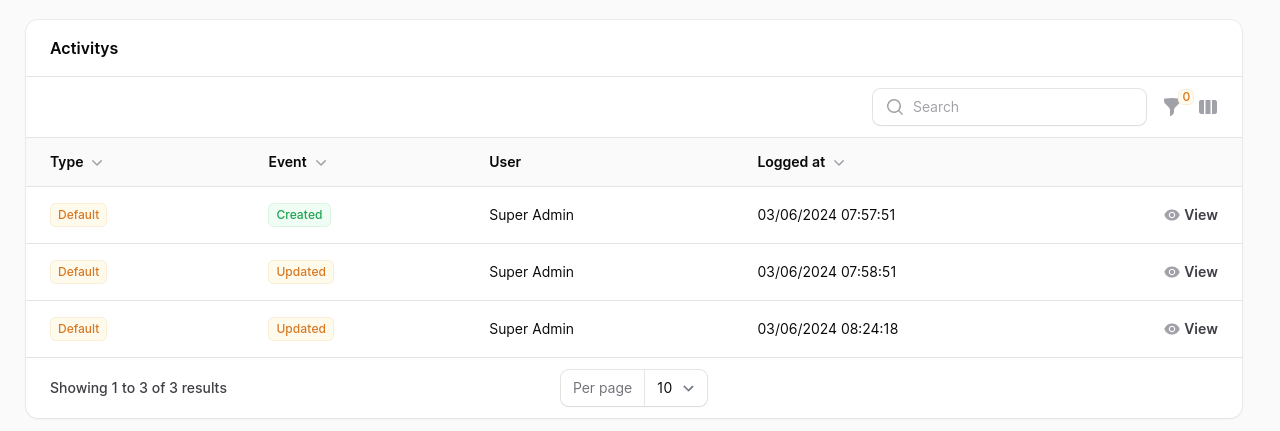
If you have a model that uses the Spatie\Activitylog\Traits\LogsActivity trait, you can add the ZanySoft\FilamentActivitylog\RelationManagers\ActivitylogRelationManager relationship manager to your Filament resource to display all of the activity logs that are performed on your model.
use ZanySoft\FilamentActivitylog\RelationManagers\ActivitylogRelationManager;

public static function getRelations(): array
{
    return [
        ActivitylogRelationManager::class,
    ];
}
#Timeline Action
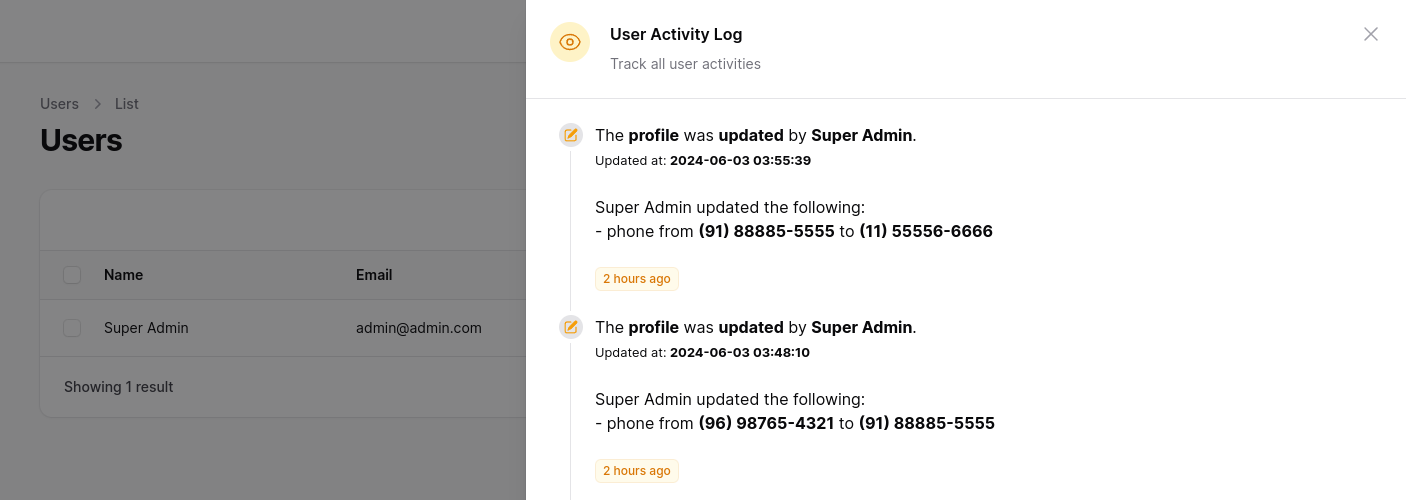
To make viewing activity logs easier, you can use a custom action. In your UserResource in the table function, add the ActivityLogTimelineTableAction.
use ZanySoft\FilamentActivitylog\Actions\ActivityLogTimelineTableAction;

public static function table(Table $table): Table
{
    return $table
        ->actions([
            ActivityLogTimelineTableAction::make('Activities'),
        ]);
}
you can pass a matrix with the relationships, remember to configure your Models.
public static function table(Table $table): Table
{
    return $table
        ->actions([
            ActivityLogTimelineTableAction::make('Activities')
                ->withRelations(['profile', 'address']), //opcional
        ]);
}
You can configure the icons and colors, by default the 'heroicon-m-check' icon and the 'primary' color are used.
use ZanySoft\FilamentActivitylog\Actions\ActivityLogTimelineTableAction;

public static function table(Table $table): Table
{
    return $table
        ->actions([
            ActivityLogTimelineTableAction::make('Activities')
                ->timelineIcons([
                    'created' => 'heroicon-m-check-badge',
                    'updated' => 'heroicon-m-pencil-square',
                ])
                ->timelineIconColors([
                    'created' => 'info',
                    'updated' => 'warning',
                ])
        ]);
}
You can limit the number of results in the query by passing a limit, by default the last 10 records are returned.
use ZanySoft\FilamentActivitylog\Actions\ActivityLogTimelineTableAction;

public static function table(Table $table): Table
{
    return $table
        ->actions([
            ActivityLogTimelineTableAction::make('Activities')
                ->limit(30),
        ]);
}
#Full Timeline configuration
use ZanySoft\FilamentActivitylog\Actions\ActivityLogTimelineTableAction;

public static function table(Table $table): Table
{
    return $table
        ->actions([
            ActivityLogTimelineTableAction::make('Activities')
                ->withRelations(['profile', 'address'])
                ->timelineIcons([
                    'created' => 'heroicon-m-check-badge',
                    'updated' => 'heroicon-m-pencil-square',
                ])
                ->timelineIconColors([
                    'created' => 'info',
                    'updated' => 'warning',
                ])
                ->limit(10),
        ]);
}
#Acknowledgements
Special acknowledgment goes to these remarkable tools.
#License
The MIT License (MIT). Please see License File for more information.
The author
I am a Senior Laravel Developer with 8+ years of experience designing, developing, and maintaining scalable web applications. I specialize in Laravel, PHP, MySQL, RESTful APIs, and modern JavaScript technologies, with a strong focus on clean architecture, performance, and security.
Throughout my career, I have built enterprise-level applications, multi-tenant SaaS platforms, learning management systems (LMS), and custom business solutions. I enjoy solving complex technical challenges, optimizing application performance, and delivering high-quality, maintainable code.
I am passionate about continuous learning and staying up to date with the latest technologies and best practices. I value collaboration, clear communication, and building software that creates real business value.
Featured Plugins
A selection of plugins curated by the Filament team

Blueprint
Filament Blueprint is a premium Laravel Boost extension that helps AI agents produce accurate, detailed implementation plans and security reports for Filament apps.
 Filament

Custom Fields
Eliminate custom field migrations forever. Let your users create and manage form fields directly in Filament admin panels with 20+ built-in field types, validation, and zero database changes.
 Relaticle

Custom Dashboards
Let your users build and share their own dashboards with a drag-and-drop interface. Define your data sources in PHP and let them do the rest.
Filament

