Topbar Menu
CommunityA Filament 5 plugin that adds a configurable menu to the panel topbar, right after the logo. Use it to link to your other services (external URLs) or to pages of the current Laravel application (named routes) — with dropdowns, favicons, per-item visibility, and caching out of the box. 🔗 External URLs and internal Laravel routes (with route parameters) 📂 Nested items — a top-level item can stay a link and open a dropdown with its children 🖼️ Icons and favicons — auto-resolve favicons for exte
filament/
namespace. Review the source and install at your own risk. Found
malware or an unresolved security issue the author won't
address?
Report it
.
 Author:
Andrei Vasilev
Author:
Andrei Vasilev
Documentation
- Requirements
- Installation
- Registering the plugin
- Managing menu items
- Favicons
- Configuration
- Caching
- Customizing the views
- Translations
- Testing & code quality
- License
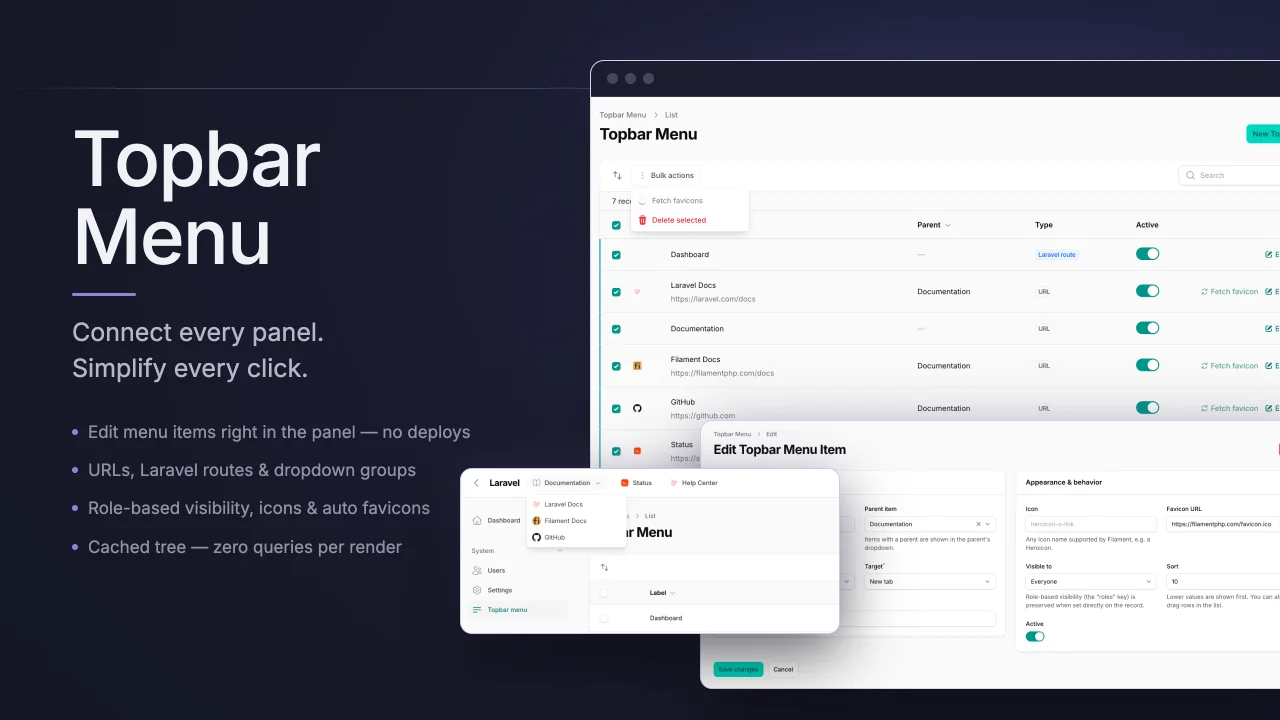
A Filament 5 plugin that adds a configurable menu to the panel topbar, right after the logo. Use it to link to your other services (external URLs) or to pages of the current Laravel application (named routes) — with dropdowns, favicons, per-item visibility, and caching out of the box.
- 🔗 External URLs and internal Laravel routes (with route parameters)
- 📂 Nested items — a top-level item can stay a link and open a dropdown with its children
- 🖼️ Icons and favicons — auto-resolve favicons for external links (never at render time)
- ⚡ Cached — no database query on page render; the cache is flushed automatically on changes
- 🛠️ Full Filament resource — create, edit, delete, drag-and-drop reordering, activate/deactivate
- 🌙 Truly Filament-native look — built from Filament's own topbar/dropdown components, so it's pixel-identical to the panel's
topNavigation()menu (dark mode, active-item highlight, spacing) with zero custom CSS - 🌍 Translatable — ships with English, Russian, German, Spanish and French; add your own
- 🪝 Rendered through the official
PanelsRenderHook::TOPBAR_LOGO_AFTERrender hook — no layout overrides
#Requirements
- PHP 8.2+
- Filament ^5.0
#Installation
Install the package via Composer:
composer require vaslv/filament-topbar-menu
The package migration is loaded automatically. Run it:
php artisan migrate
The menu is rendered with Filament's own topbar and dropdown components, so it inherits your theme automatically — there are no assets to build or publish.
Optionally publish the migration and config instead of using the bundled ones:
php artisan vendor:publish --tag=filament-topbar-menu-migrations
php artisan vendor:publish --tag=filament-topbar-menu-config
#Registering the plugin
Add the plugin to your panel in your PanelProvider (e.g. app/Providers/Filament/AdminPanelProvider.php):
use Vaslv\FilamentTopbarMenu\TopbarMenuPlugin;

public function panel(Panel $panel): Panel
{
    return $panel
        // ...
        ->plugin(TopbarMenuPlugin::make());
}
That's it — the menu renders in the topbar right after the logo, and a Topbar Menu resource appears in the panel navigation for managing the items.
#Plugin options
TopbarMenuPlugin::make()
    // Hide the management resource on this panel (e.g. a public panel
    // that should only display the menu):
    ->resource(false)

    // Put the resource into a navigation group / position:
    ->resourceNavigationGroup('Settings')
    ->resourceNavigationSort(10)

    // Render the menu at a different panel render hook:
    ->renderHook(\Filament\View\PanelsRenderHook::TOPBAR_START)
#Responsive behavior
The default TOPBAR_LOGO_AFTER hook renders the menu inside Filament's
.fi-topbar-start region, which Filament itself hides below the lg (1024px)
breakpoint — the same as its logo/sidebar controls. So with the default hook the
menu is visible on desktop widths and hidden on smaller screens, consistent with
the rest of the Filament topbar.
If you need the menu on narrow viewports, register it at a hook that stays visible
there, e.g. ->renderHook(\Filament\View\PanelsRenderHook::TOPBAR_END).
#Managing menu items
Menu items live in the filament_topbar_menu_items table and are managed through the included Filament resource:
- Label, icon (any Filament-supported icon, e.g.
heroicon-o-link) and favicon URL - Link type — external
URLor internalLaravel route(with optional route parameters) - Target — open in the same tab or a new tab
- Parent item — items with a parent are shown in the parent's dropdown
- Active toggle and sort order (rows can also be reordered by drag & drop)
- Visibility — everyone, authenticated users only, or guests only
#Demo data
To try the menu out quickly, seed a demo tree that exercises every feature — external links, an internal route link, a dropdown group, visibility rules and an inactive item:
php artisan db:seed --class="Vaslv\FilamentTopbarMenu\Database\Seeders\TopbarMenuSeeder"
The seeder is idempotent: items are matched by parent + label, so re-running it updates the demo items in place instead of duplicating them.
The role-restricted example group ("Admin Tools") is only seeded when your user
model can evaluate roles — i.e. it has a hasAnyRole() method, e.g. from
spatie/laravel-permission. Without roles support the package hides
role-restricted items from everyone (it fails closed), so the seeder skips the
example instead of seeding an item nobody can see — and removes it again on
re-run if roles support has gone away.
#Example: external links
use Vaslv\FilamentTopbarMenu\Models\TopbarMenuItem;

TopbarMenuItem::create([
    'label' => 'Grafana',
    'type' => 'url',
    'url' => 'https://grafana.example.com',
    'target' => '_blank',
]);
The per-item target is authoritative: "Same tab" (_self) always opens in the same tab and "New tab" (_blank) always opens in a new one. The open_external_links_in_new_tab config only decides the default value of the target field when you create a new item in the resource (default: new tab) — it never overrides an explicit choice.
#Example: internal route links
TopbarMenuItem::create([
    'label' => 'Orders',
    'type' => 'route',
    'route' => 'filament.admin.resources.orders.index',
]);

TopbarMenuItem::create([
    'label' => 'Monthly report',
    'type' => 'route',
    'route' => 'reports.show',
    'route_parameters' => ['report' => 'monthly'],
]);
If a named route no longer exists, the item is skipped instead of breaking the page.
#Example: a dropdown menu
A top-level item with children renders as a Filament dropdown group — exactly like
the panel's native top navigation. The group label is a pure dropdown toggle and
the children are its links. Like Filament's own groups, the toggle itself does not
navigate: if a parent has children, its own url/route is ignored, so to make a
landing page reachable add it as an explicit child item.
$services = TopbarMenuItem::create([
    'label' => 'Services',
    'type' => 'url', // a group with children is a toggle; its own url is not used
]);

TopbarMenuItem::create([
    'label' => 'Analytics',
    'type' => 'url',
    'url' => 'https://analytics.example.com',
    'parent_id' => $services->id,
]);

TopbarMenuItem::create([
    'label' => 'Admin dashboard',
    'type' => 'route',
    'route' => 'filament.admin.pages.dashboard',
    'parent_id' => $services->id,
]);
#Visibility rules
The visibility JSON column supports:
['auth' => true]              // authenticated users only
['guest' => true]             // guests only
['roles' => ['admin', 'ops']] // users with any of these roles
                              // (requires a hasAnyRole() method on your user model,
                              //  e.g. from spatie/laravel-permission)
Visibility is evaluated per request — it is never baked into the cache.
#Favicons
For external links the plugin can resolve the site's favicon and store it in the favicon_url column, so no remote HTTP request ever happens while the menu renders.
Resolution strategy (FaviconResolver):
- Try the conventional
https://host/favicon.ico. - Fall back to parsing
<link rel="icon">tags from the page HTML.
Ways to resolve favicons:
- The "Fetch favicon" suffix button on the Favicon URL field in the create/edit form.
- The "Fetch favicon" row action and the bulk action in the items table.
- The artisan command:
# Fill favicons for items that don't have one yet:
php artisan filament-topbar-menu:refresh-favicons

# Re-resolve all favicons (including existing ones):
php artisan filament-topbar-menu:refresh-favicons --force

# Only specific items:
php artisan filament-topbar-menu:refresh-favicons --id=1 --id=2
Disable the whole feature with 'enable_favicons' => false in the config — the actions and the command become no-ops.
#Configuration
// config/filament-topbar-menu.php

return [
    'table_name' => 'filament_topbar_menu_items',
    'cache_key' => 'filament-topbar-menu.items',
    'cache_ttl' => 3600,
    'enable_favicons' => true,
    'favicon_request_timeout' => 5,
    // Default value of the target field for new items. The per-item choice
    // ("Same tab" / "New tab") always wins at render time; this is only a default.
    'open_external_links_in_new_tab' => true,
];
#Caching
The menu tree is cached under cache_key for cache_ttl seconds, so rendering the topbar performs zero database queries. The cache is flushed automatically whenever an item is created, updated, deleted, or reordered. To flush it manually:
use Vaslv\FilamentTopbarMenu\Facades\TopbarMenu;

TopbarMenu::flushCache();
#Customizing the views
The Blade templates work out of the box; publish them only if you want to change the markup:
php artisan vendor:publish --tag=filament-topbar-menu-views
Views are published to resources/views/vendor/filament-topbar-menu.
#Translations
The entire interface (resource form, table, actions, notifications, the artisan command output and the menu's ARIA labels) is translatable. The package ships with:
- English (
en) - Russian (
ru) - German (
de) - Spanish (
es) - French (
fr)
The language follows the application locale (app()->setLocale(...)), so nothing
needs to be configured — set your app locale and the menu is translated.
To add another language or tweak the wording, publish the translation files:
php artisan vendor:publish --tag=filament-topbar-menu-translations
They are published to lang/vendor/filament-topbar-menu/{locale}/filament-topbar-menu.php.
To add a new language, copy the en file to a new locale folder (e.g. it/) and
translate the values.
#Testing & code quality
composer test        # PHPUnit
composer lint         # apply Laravel Pint code style
composer lint:test    # check code style without changing files
composer analyse      # PHPStan (level 6, via Larastan)
composer check        # lint:test + analyse + test (what CI runs)
CI runs the full test matrix (PHP 8.2 / 8.3 / 8.4) plus a code-quality job (Pint + PHPStan) on every push and pull request.
#License
The MIT License (MIT). See LICENSE.
Featured Plugins
A selection of plugins curated by the Filament team

Blueprint
Filament Blueprint is a premium Laravel Boost extension that helps AI agents produce accurate, detailed implementation plans and security reports for Filament apps.
 Filament

Custom Dashboards
Let your users build and share their own dashboards with a drag-and-drop interface. Define your data sources in PHP and let them do the rest.
Filament

Custom Fields
Eliminate custom field migrations forever. Let your users create and manage form fields directly in Filament admin panels with 20+ built-in field types, validation, and zero database changes.
 Relaticle