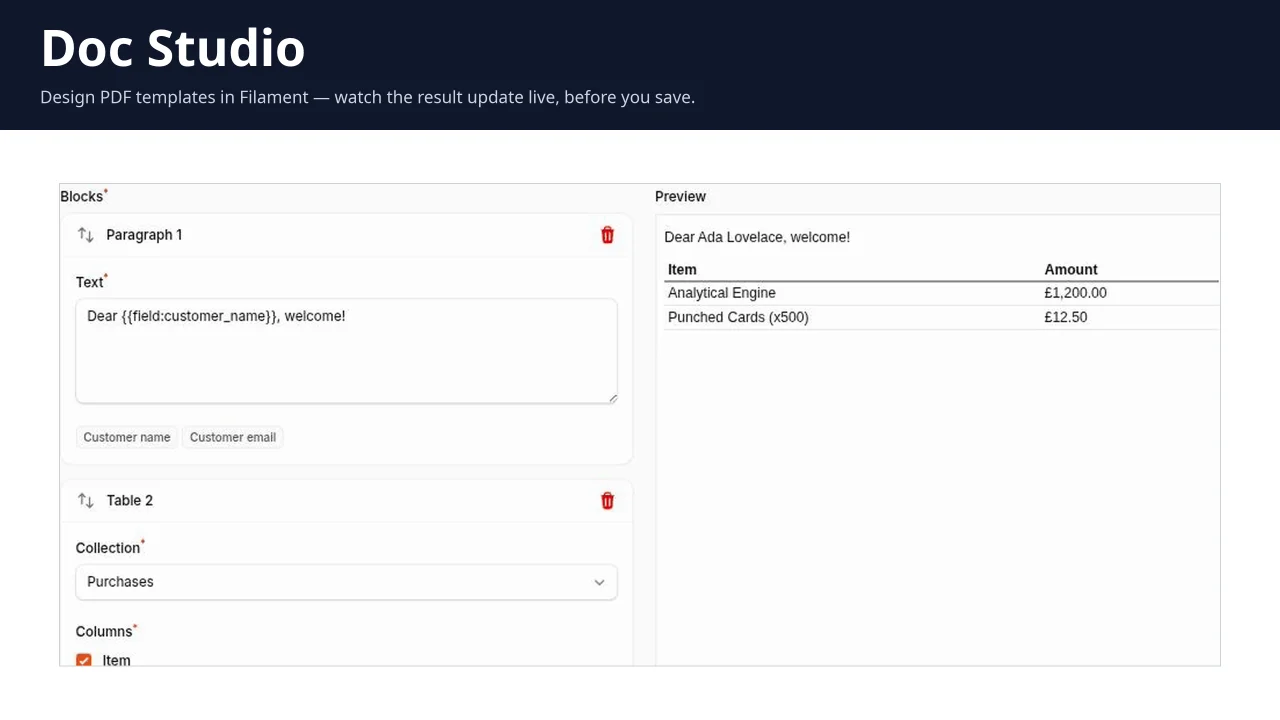
Doc Studio
CommunityA Filament Builder field that lets end users design their own PDF templates — merge fields and line item tables included — without a developer touching a Blade file.
filament/
namespace. Review the source and install at your own risk. Found
malware or an unresolved security issue the author won't
address?
Report it
.
 Author:
Tommaso Musetti
Author:
Tommaso Musetti
Documentation
- Status
- Installation
- Rendering a PDF
- Whitelisting merge fields and line item tables
- Restricting the blocks a panel offers
- Adding your own block
- Local development
- Contributing
- Security
- Credits
- License



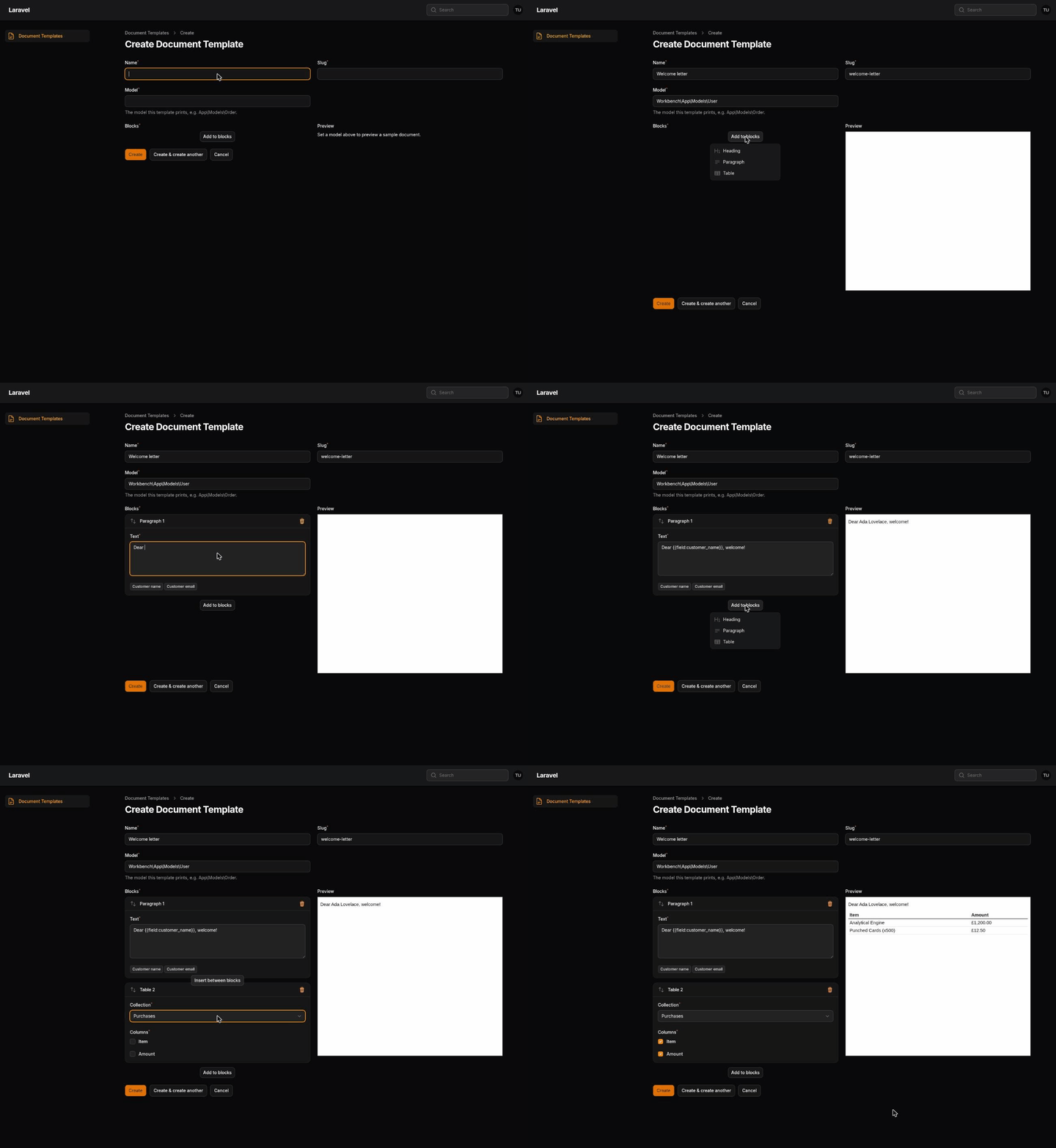
A PDF template builder for end users, inside Filament. Your client drags blocks into a template and prints a record as a PDF — without a developer touching a Blade file for every "can you change the quote layout?".
v1.0.0. The full v1 scope is out: 3 blocks, merge fields, a live preview, dompdf rendering. Feedback and issues are welcome.
#Status
| Editor | Filament Builder field, inside your panel |
| Blocks | heading, paragraph (with merge fields), table (line items) |
| Merge fields | yes — a whitelist you declare per model |
| Preview | live, next to the editor, rendered against a sample record |
| Engine | dompdf (pure PHP, nothing to install on the server) |
#Installation
composer require tommasomusetti/filament-doc-studio
php artisan doc-studio:install
The install command publishes the migration and offers to run it. By hand:
php artisan vendor:publish --tag="doc-studio-migrations"
php artisan migrate
Then add the plugin to the panel that should get the editor:
use TommasoMusetti\DocStudio\DocStudioPlugin;

public function panel(Panel $panel): Panel
{
    return $panel
        // ...
        ->plugins([
            DocStudioPlugin::make(),
        ]);
}
Templates now live under Document templates in that panel.
#Rendering a PDF
use TommasoMusetti\DocStudio\DocumentRenderer;
use TommasoMusetti\DocStudio\Models\DocumentTemplate;

$template = DocumentTemplate::where('slug', 'quote')->firstOrFail();

$pdf = app(DocumentRenderer::class)->pdf($template); // raw PDF bytes
The renderer never touches Filament, so this works from a queued job or a console command as well as from a panel.
#Whitelisting merge fields and line item tables
The paragraph and table blocks pull data from a model, but only through a
DocumentDataSource you write — a template can never reach an Eloquent
attribute you didn't explicitly expose:
use TommasoMusetti\DocStudio\Contracts\DocumentDataSource;

class OrderDataSource implements DocumentDataSource
{
    public static function model(): string
    {
        return Order::class;
    }

    public function fields(): array
    {
        return [
            'customer_name' => [
                'label' => 'Customer name',
                'resolver' => fn (Order $order): string => $order->customer->name,
            ],
        ];
    }

    public function collections(): array
    {
        return [
            'line_items' => [
                'label' => 'Line items',
                'columns' => ['name' => 'Item', 'qty' => 'Qty'],
                'resolver' => fn (Order $order): iterable => $order->lines
                    ->map(fn ($line) => ['name' => $line->name, 'qty' => $line->qty]),
            ],
        ];
    }

    public function sample(): Order
    {
        // The record the live preview renders against while editing.
        return Order::query()->latest()->first() ?? new Order(['id' => 0]);
    }
}
Register it once, in a service provider's boot():
app(DocumentRenderer::class)->registerDataSource(OrderDataSource::class);
The paragraph block's merge tag picker and the table block's collection picker both read this whitelist — a field or column disappears from the editor the moment you stop declaring it, without touching saved templates.
#Restricting the blocks a panel offers
DocStudioPlugin::make()->blocks([
    HeadingBlock::class,
]);
A panel can only narrow the list. It cannot offer a block the renderer does not know: disabling a block must never break templates already saved with it.
#Adding your own block
A block is one class with two faces — an editor field set, and print HTML:
use Filament\Forms\Components\Builder\Block;
use Filament\Forms\Components\TextInput;
use TommasoMusetti\DocStudio\Blocks\DocumentBlock;
use TommasoMusetti\DocStudio\RenderContext;

class StampBlock extends DocumentBlock
{
    public static function make(): Block
    {
        return Block::make('stamp')->schema([
            TextInput::make('text')->required(),
        ]);
    }

    public function render(array $data, RenderContext $context): string
    {
        return '<p class="stamp">' . e($data['text'] ?? '') . '</p>';
    }
}
Register it with the renderer, in a service provider's boot():
app(DocumentRenderer::class)->register(StampBlock::class);
Write the HTML dompdf first: table layouts, conservative CSS, no flexbox or grid. And escape anything the user typed — a template is user written content.
#Local development
workbench/ is a small Laravel app with a real Filament panel, so the plugin
can be opened in a browser:
composer serve # http://127.0.0.1:8000/admin
Log in with test@example.com / password. The same panel is registered in the
test suite, so the panel tests run against what you see in the browser.
composer test
composer analyse
composer lint
#Contributing
Please see CONTRIBUTING.
#Security
Please review our security policy on how to report security vulnerabilities.
#Credits
#License
The MIT License (MIT). Please see License File for more information.
Featured Plugins
A selection of plugins curated by the Filament team

Blueprint
Filament Blueprint is a premium Laravel Boost extension that helps AI agents produce accurate, detailed implementation plans and security reports for Filament apps.
 Filament

Custom Dashboards
Let your users build and share their own dashboards with a drag-and-drop interface. Define your data sources in PHP and let them do the rest.
Filament

Advanced Tables (formerly Filter Sets)
Supercharge your tables with powerful features like user-customizable views, quick filters, multi-column sorting, advanced table searching, convenient view management, and more. Compatible with Resource Panel Tables, Relation Managers, Table Widgets, and Table Builder!
 Kenneth Sese

