
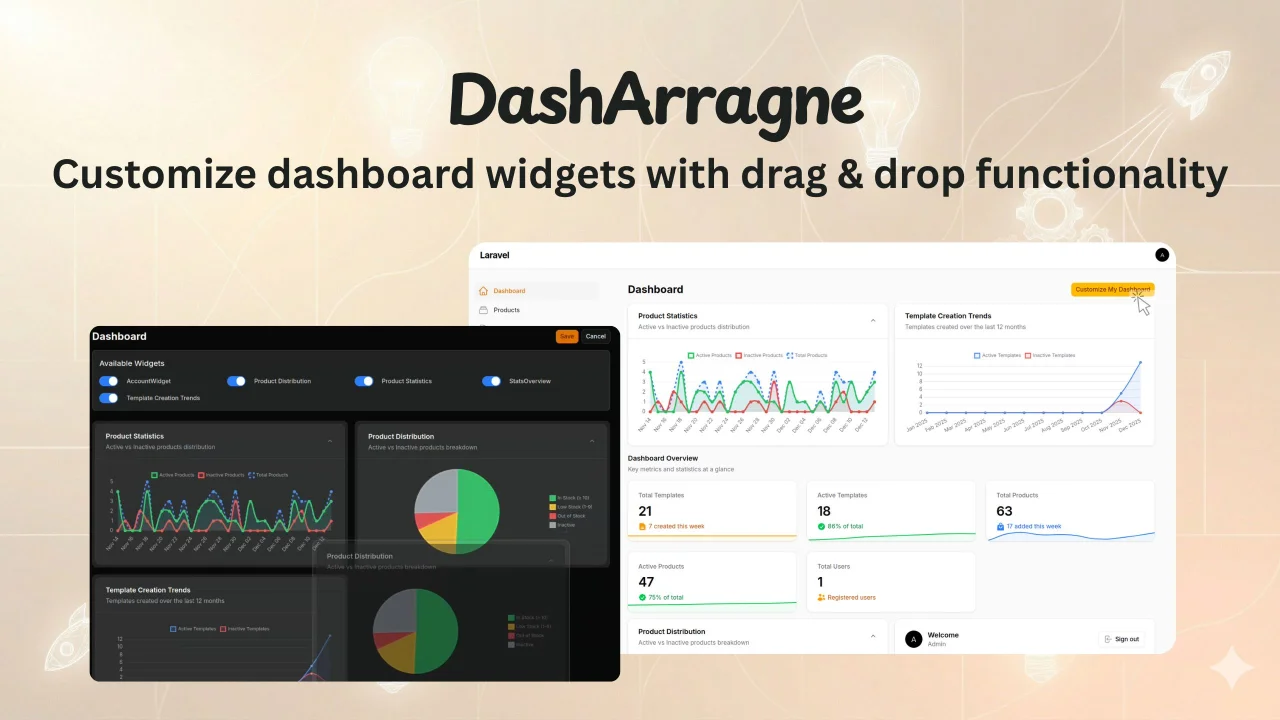
DashArrange by Shreejan Pandit
CommunityThe DashArrange plugin allows users to customize their dashboard widgets with drag & drop functionality
 Author:
Shreejan Pandit
Author:
Shreejan Pandit
Package health
Automated checks of this plugin's Composer package
15 checks
- Skipped: GitHub Actions pinned to SHA
- Skipped: GitLab CI includes pinned to SHA
- Passed: Open security advisories
- Passed: Dependabot PR responsiveness — No open Dependabot PRs.
- Skipped: Renovate MR responsiveness
- Failed: Dependabot or Renovate configured — No dependency updater configuration found. View details on Plumb
- Skipped: Dependency update cooldown configured
- Failed: Provides a security policy — View details on Plumb
- Passed: Abandoned or archived — No consulted source marks the package abandoned (packagist, github).
- Passed: Commit and release recency — Active: last commit 75 days ago; last release 75 days ago.
-
Passed:
composer.lock not committed by library
—
composer.lockis absent from the released dist archive. - Passed: Dist archive is lean
-
Passed:
Current Laravel version supported
—
Package dependencies resolve together with current Laravel
13.0. -
Passed:
Current PHP version supported
—
Constraint
^8.2supports current PHP8.5. - Skipped: Current Symfony version supported
filament/
namespace. Review the source and install at your own risk. Found
malware or an unresolved security issue the author won't
address?
Report it
.
Documentation
A Filament plugin that allows users to customize their dashboard widgets with drag & drop functionality.

#Installation
composer require shreejan/dash-arrange
#Setup
#Quick Setup (Recommended)
Run the install command which will automatically:
- Publish and run migrations
- Publish the Dashboard stub
php artisan dash-arrange:install
Make sure your app/Providers/Filament/AdminPanelProvider.php uses the correct Dashboard class:
use App\Filament\Pages\Dashboard; // Instead of Filament\Pages\Dashboard
That's it! The package is now ready to use.
#Manual Setup
If you prefer to set up manually:
#1. Publish and Run Migrations
php artisan vendor:publish --tag=dash-arrange-migrations
php artisan vendor:publish --tag=dash-arrange-dashboard
php artisan migrate
#2. Update Your Dashboard Page
Update your app/Filament/Pages/Dashboard.php to use DashArrange:
<?php

namespace App\Filament\Pages;

use Shreejan\DashArrange\Traits\HasDashArrange;
use Filament\Pages\Dashboard as BaseDashboard;

class Dashboard extends BaseDashboard
{
    use HasDashArrange;

    protected string $view = 'dash-arrange::dashboard';

    public function mount(): void
    {
        // Initialize DashArrange functionality
        $this->mountHasDashArrange();
    }
}
#3. Update AdminPanelProvider
Make sure your app/Providers/Filament/AdminPanelProvider.php uses the correct Dashboard class:
use App\Filament\Pages\Dashboard; // Instead of Filament\Pages\Dashboard
#4. (Optional) Publish Configuration
php artisan vendor:publish --tag=dash-arrange-config
#Usage
Once installed, users will see a "Customize My Dashboard" button on their dashboard. They can:
- Drag and drop widgets to reorder them
- Show/hide widgets using checkboxes
- Save their preferences (stored per user)
- Revert unsaved changes with the Cancel button
- Widget preferences are persistent and user-specific
#Configuration
Edit config/dash-arrange.php to customize:
- Grid columns: Default number of columns for the dashboard grid
- User model: Customize the user model if needed
- Permission checks: Add custom permission logic for widgets
- Customize Dashboard Button:
customize_dashboard_title: The title text for the customize dashboard button (default: 'Customize My Dashboard')customize_dashboard_button_color: The color of the customize dashboard button. Colors can be added inAdminPanelProvider.php->colors()method (default: 'primary')
#Requirements
- PHP ^8.2
- Filament ^4.0
- Laravel ^12.0
#Features
- ✅ Drag & drop widget reordering
- ✅ Show/hide widgets with checkboxes
- ✅ User-specific preferences (stored in database)
- ✅ Permission-based widget visibility (FilamentShield compatible)
- ✅ Responsive grid layout
- ✅ Widget column span support
- ✅ Easy installation command
- ✅ Fully customizable configuration
#Support
- GitHub Repository: https://github.com/shreejanpandit/arragne-dashboard
- Issues: Report a bug or request a feature
#Credits
#Security
If you discover a security vulnerability within this package, please send an e-mail to shreezanpandit@gmail.com. All security vulnerabilities will be promptly addressed.
#📄 License
The MIT License (MIT). Please see License File for more information.
The author
From the same author
Featured Plugins
A selection of plugins curated by the Filament team

Blueprint
Filament Blueprint is a premium Laravel Boost extension that helps AI agents produce accurate, detailed implementation plans and security reports for Filament apps.
 Filament

Custom Fields
Eliminate custom field migrations forever. Let your users create and manage form fields directly in Filament admin panels with 20+ built-in field types, validation, and zero database changes.
 Relaticle

Spotlight Pro
Browse your Filament Panel with ease. Filament Spotlight Pro adds a Spotlight like Command Palette to your Filament Panel.
 Dennis Koch
