Notification Bell
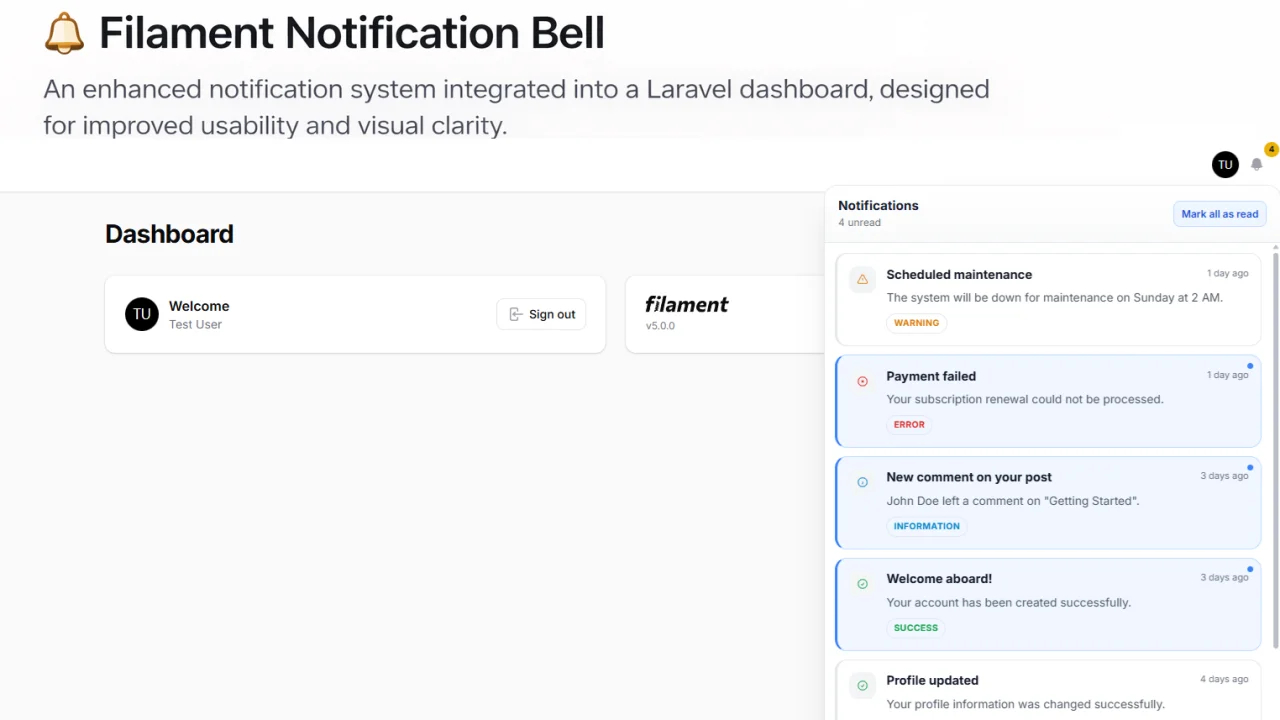
This plugin adds a real-time notification bell UI to your admin panel. It provides a clean, familiar UX (like modern SaaS apps) for displaying, managing, and interacting with notifications directly inside Filament.
 Author:
Riadh Ben Ali
Author:
Riadh Ben Ali
Documentation
- Features
- Requirements
- Installation
- Sending Notifications
- Configuration Reference
- Fluent Plugin API
- Customizing Views
- Light & Dark Mode
- Multi-language / i18n
- Changelog
- Contributing
- License



A drop-in, zero-config notification bell for your Filament v5 admin panel. Powered by Laravel Reverb (or Pusher) and Livewire v4, with full dark mode and RTL support out of the box.
#Features
- 🔔 Real-time bell icon in the Filament top bar
- ⚡ Powered by Laravel Reverb WebSockets (or Pusher as fallback)
- 🌙 Full dark mode support — auto-follows Filament panel theme, or force light/dark
- 🌐 Ships with 6 translations: English, Arabic, French, Spanish, German, Chinese Simplified
- 🔤 RTL layout auto-detected for Arabic, Farsi, Urdu
- 📥 Dropdown and slide-over panel modes
- ✅ Mark single or all notifications as read
- ♾️ Paginated "Load more" list
- 📡 Optional polling fallback
- 🧪 Full Pest test suite included
- 📦 Publishable config, views, CSS, language files, and migrations
#Requirements
| Requirement | Version |
|---|---|
| PHP | ^8.2 |
| Laravel | ^11.0 |
| Filament | ^5.0 |
| Livewire | ^4.0 |
#Installation
#1. Install via Composer
composer require benriadh1/filament-notification-bell
#2. Publish and run the migration
php artisan vendor:publish --tag="filament-notification-bell-migrations"
php artisan migrate
#3. Publish the CSS asset
php artisan vendor:publish --tag="filament-notification-bell-assets"
#4. Register the plugin in your Filament panel
In your Panel provider (e.g. app/Providers/Filament/AdminPanelProvider.php):
use Benriadh1\FilamentNotificationBell\FilamentNotificationBellPlugin;

public function panel(Panel $panel): Panel
{
    return $panel
        // ... your other panel config
        ->plugin(FilamentNotificationBellPlugin::make());
}
That's it! The bell will appear in the top bar automatically.
#Sending Notifications
Use Laravel's built-in notification system. The plugin reads from the notifications table automatically.
use Illuminate\Notifications\Notification;
use Illuminate\Notifications\Messages\DatabaseMessage;

class OrderShipped extends Notification
{
    public function via($notifiable): array
    {
        return ['database'];
    }

    public function toDatabase($notifiable): array
    {
        return [
            'title' => 'Order Shipped',
            'body'  => 'Your order #1234 has been shipped.',
            'url'   => route('orders.show', 1234),
            'type'  => 'success', // 'info' | 'success' | 'warning' | 'error'
        ];
    }
}
Then send it:
$user->notify(new OrderShipped());
#Real-time broadcast (optional)
If you want the bell to update in real time without page reload, add the HasNotificationBell trait to your User model and call notifyBell() after sending a notification:
use Benriadh1\FilamentNotificationBell\Concerns\HasNotificationBell;

class User extends Authenticatable
{
    use HasNotificationBell;
}
$user->notify(new OrderShipped());
$user->notifyBell(); // broadcasts the NotificationSent event via Reverb
#Configuration Reference
Publish the config:
php artisan vendor:publish --tag="filament-notification-bell-config"
| Key | Default | Description |
|---|---|---|
limit |
20 |
Max notifications per page in the bell panel |
reverb |
true |
true = Reverb, false = Pusher |
channel_type |
'private' |
'private' or 'presence' |
polling |
false |
Enable polling fallback when WebSocket is unavailable |
poll_interval |
30 |
Polling interval in seconds |
model |
null |
Custom notification model (null = Laravel default) |
date_format |
'diffForHumans' |
'diffForHumans' (relative) or 'datetime' (absolute) |
locale |
null |
Force locale (null = use app()->getLocale()) |
rtl_locales |
['ar','fa','ur'] |
Locales that trigger RTL layout |
force_rtl |
false |
Force RTL regardless of locale |
theme |
'auto' |
'auto' / 'light' / 'dark' |
#Fluent Plugin API
All options can be set fluently when registering the plugin:
FilamentNotificationBellPlugin::make()
    ->limit(30)
    ->slideOver()              // or ->dropdown() (default)
    ->withPolling(60)          // enable polling every 60 seconds
    ->locale('fr')             // force French locale
    ->rtl()                    // force RTL layout
    ->lightMode()              // or ->darkMode() or ->autoTheme() (default)
    ->usePusher()              // or ->useReverb() (default)
#Customizing Views
Publish the views to override them in your application:
php artisan vendor:publish --tag="filament-notification-bell-views"
Views will be copied to resources/views/vendor/filament-notification-bell/.
#Light & Dark Mode
By default (auto), the bell follows your Filament panel's dark mode setting — no extra configuration needed if your panel already uses ->darkMode().
Force light mode:
FilamentNotificationBellPlugin::make()->lightMode()
Force dark mode:
FilamentNotificationBellPlugin::make()->darkMode()
Auto (default) — respects Filament panel setting:
FilamentNotificationBellPlugin::make()->autoTheme()
#Multi-language / i18n
#Bundled locales
| Locale | Language |
|---|---|
🇬🇧 en |
English |
🇸🇦 ar |
Arabic (RTL) |
🇫🇷 fr |
French |
🇪🇸 es |
Spanish |
🇩🇪 de |
German |
🇨🇳 zh_CN |
Chinese Simplified |
#Publish lang files
php artisan vendor:publish --tag="filament-notification-bell-lang"
#Override a translation key
After publishing, edit the file at lang/vendor/filament-notification-bell/en/notification-bell.php:
return [
    'title' => 'My Custom Title',
    // ...
];
#Add a new language
Create the file at:
resources/lang/vendor/filament-notification-bell/{locale}/notification-bell.php
For example, for French (fr):
// resources/lang/vendor/filament-notification-bell/it/notification-bell.php
return [
    'title'            => 'Notification',
    'mark_all_read'    => '',
    // ... all keys
];
#Force a specific locale
FilamentNotificationBellPlugin::make()->locale('fr')
#RTL support
RTL layout is automatically enabled for ar, fa, he, and ur. The dir="rtl" attribute and text-alignment classes are applied automatically. To add another locale or force RTL:
// In config/filament-notification-bell.php
'rtl_locales' => ['ar', 'fa', 'he', 'ur', 'ug'],

// Or via fluent plugin API
FilamentNotificationBellPlugin::make()->rtl()
#Changelog
See CHANGELOG.md for recent changes.
#Contributing
Contributions are welcome! Please open a pull request or issue on GitHub.
New translations are especially welcome — add a new language file and open a PR!
- Fork the repository
- Create your feature branch:
git checkout -b feat/my-feature - Commit your changes:
git commit -m "feat: add my feature" - Push:
git push origin feat/my-feature - Open a Pull Request
#License
The MIT License (MIT). See LICENSE.md for more details.
The author
From the same author
Featured Plugins
A selection of plugins curated by the Filament team

Custom Dashboards
Let your users build and share their own dashboards with a drag-and-drop interface. Define your data sources in PHP and let them do the rest.
 Filament

Custom Fields
Eliminate custom field migrations forever. Let your users create and manage form fields directly in Filament admin panels with 20+ built-in field types, validation, and zero database changes.
 Relaticle

Advanced Tables (formerly Filter Sets)
Supercharge your tables with powerful features like user-customizable views, quick filters, multi-column sorting, advanced table searching, convenient view management, and more. Compatible with Resource Panel Tables, Relation Managers, Table Widgets, and Table Builder!
 Kenneth Sese

