Shopware Pro
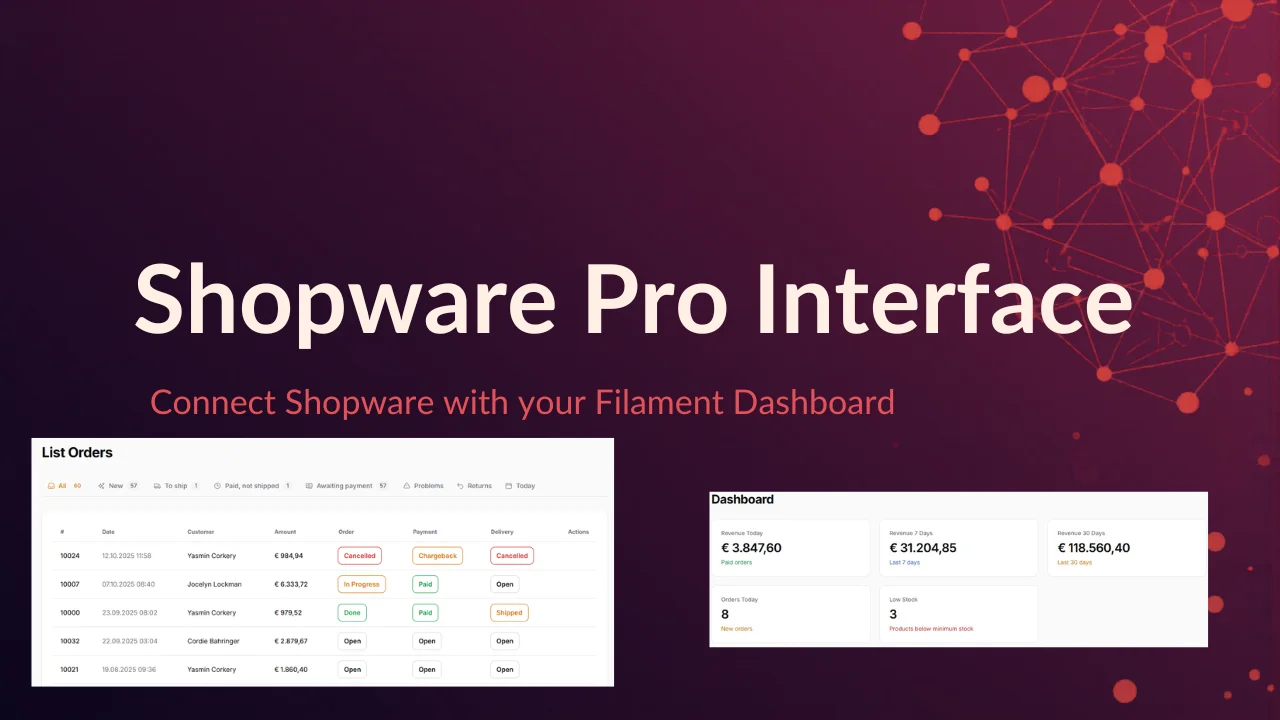
CommunityFilament Shopware Pro brings your Shopware store data directly into your Laravel Filament admin panel, live revenue stats, order management, and low-stock alerts, all without leaving your back office. Manage and transition order, payment, and delivery states through dynamic state-machine actions that respect your Shopware configuration. Save time with a polished, plug-and-play dashboard that keeps your team in one place instead of switching between tools.
filament/
namespace. Review the source and install at your own risk. Found
malware or an unresolved security issue the author won't
address?
Report it
.
 Author:
primzahldev
Author:
primzahldev
Documentation
- Requirements
- Installation
- Settings page
- Widgets
- Order management
- Toggle features individually
- Use widgets outside the default dashboard
- Publishing
- Configuration
- Tests
- Contact
Shopware integration for your Filament dashboard. Displays revenue, orders, stock levels and revenue trends directly inside the Filament admin panel — and lets you manage order states without leaving Filament. Configure your Shopware connection right inside Filament; no .env editing required.
#Requirements
- PHP 8.1+
- Laravel 10, 11 or 12
- Filament 3, 4 or 5
- A Shopware 6 instance with API access (integration of type "Client Credentials")
#Installation
#1. Install the package
composer require primzahl/filament-shopware-pro
The service provider is auto-discovered — no manual registration required.
#2. Run the migration
php artisan migrate
This creates the shopware_settings table that backs the in-admin Settings page. The migration ships with the package and is loaded automatically.
#3. Register the plugin
In your Filament PanelProvider:
use Primzahl\FilamentShopwareDashboard\FilamentShopwareDashboardPlugin;

public function panel(Panel $panel): Panel
{
    return $panel
        // ...
        ->plugin(FilamentShopwareDashboardPlugin::make());
}
#4. Create a Shopware 6 integration
- In the Shopware admin, go to Settings → System → Integrations
- Create a new integration
- Copy the Access Key and Secret Key — you'll paste them into the Filament Settings page in the next step
#Settings page
After installation, a Shopware Settings entry appears in the Filament sidebar (cog icon). This is the primary way to configure the integration — no .env editing required.
The page is split into three sections:
| Section | What you set |
|---|---|
| Connection | Shopware URL, Client ID, Client Secret |
| Performance | Cache TTL, HTTP timeout, low-stock threshold |
| Widgets & Pages | Per-widget visibility toggles + the Orders page toggle |
#Test connection
A header action Test connection sends a one-off OAuth request with the values currently in the form — without saving them. You get an immediate green/red notification, so you can verify credentials before persisting.
#Security & behaviour
client_secretis encrypted at rest using Laravel'sencryptedEloquent cast (yourAPP_KEYis the encryption key).- Settings take precedence over
.env. Any value left blank in the database falls back to the matchingconfig('filament-shopware.…')/.envvalue, so existing.env-based deployments keep working. - Saving invalidates the Shopware cache via a version counter on the cache prefix — new credentials, TTLs or thresholds are effective immediately, without flushing unrelated cache entries.
- The Settings page itself cannot be hidden via its own toggles — that prevents admins from accidentally locking themselves out. To hide it, use the code-level toggle (
->settingsPage(false)).
#Optional: configure via .env
The .env-based workflow still works and is useful for CI/CD pipelines or 12-factor deployments. Any value present in the database wins; everything else falls back to these:
PRIMZAHL_SHOPWARE_URL=https://your-shop.com
PRIMZAHL_SHOPWARE_CLIENT_ID=your-client-id
PRIMZAHL_SHOPWARE_CLIENT_SECRET=your-client-secret

# Optional
PRIMZAHL_SHOPWARE_CACHE_TTL=60   # cache duration in seconds (default: 60)
PRIMZAHL_SHOPWARE_TIMEOUT=8      # HTTP timeout in seconds (default: 8)
PRIMZAHL_SHOPWARE_LOW_STOCK=5    # low-stock alert threshold (default: 5)
#Widgets
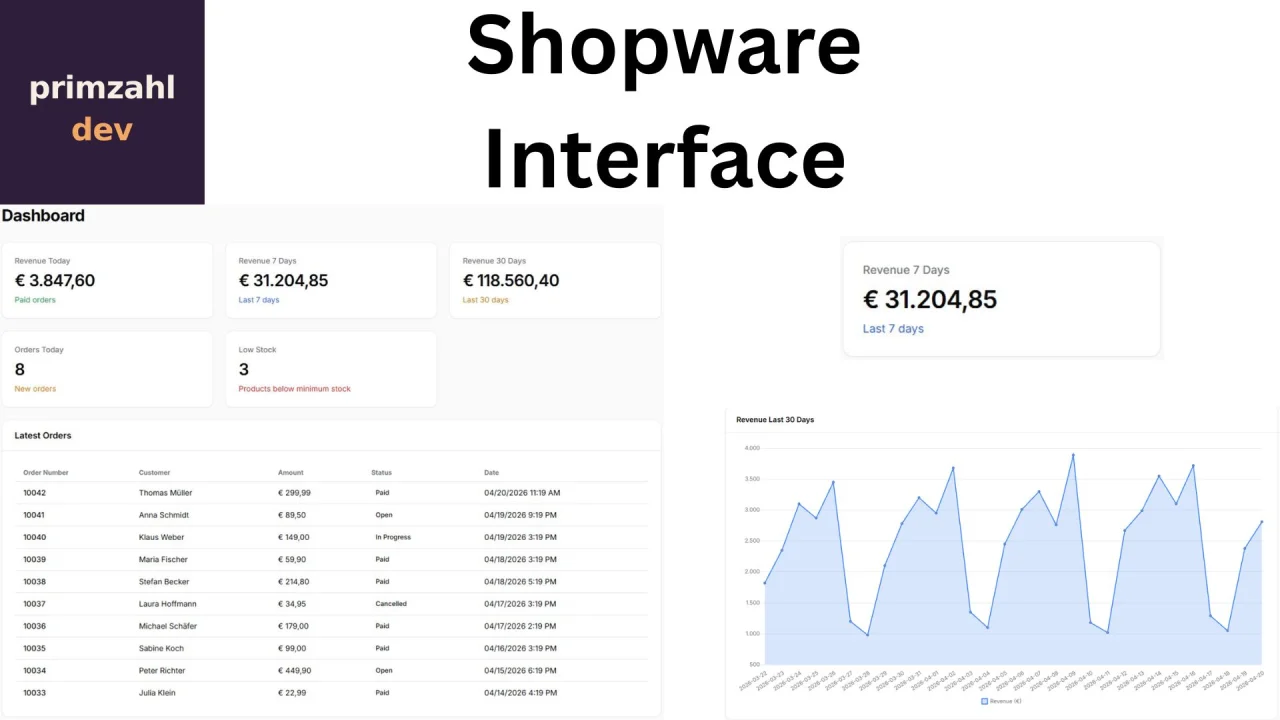
The plugin ships with 4 dashboard widgets:
| Widget | Description |
|---|---|
| Revenue overview | Revenue for today, 7 days and 30 days as stat cards |
| Orders & stock | Orders today + low-stock alert (red when products fall below the threshold) |
| Revenue chart | Line chart showing daily revenue over the last 30 days |
| Latest orders | Table with the 10 most recent orders including customer, amount and status |
#Order management
The plugin registers an Orders page in the Filament navigation. It provides a paginated order list with quick-filter tabs and the ability to change order states without leaving Filament.
#Filter tabs
| Tab | Filter |
|---|---|
| All | — |
| New | Order state open |
| To ship | Payment paid, delivery open |
| Paid, not shipped | Payment paid, delivery not shipped, ordered > 24 h ago |
| Awaiting payment | Payment open, ordered > 24 h ago |
| Problems | Payment state failed or cancelled |
| Returns | Delivery state returned |
| Today | Ordered today |
The navigation item shows the count of new orders as a badge.
#State management
Each order row has three action buttons for Shopware's three independent state machines: order state, payment state, and delivery state. Clicking one opens a modal that loads the available transitions dynamically from Shopware — transitions are never hardcoded, so custom Shopware state machine configurations are respected automatically. An optional toggle lets you notify the customer by e-mail when the state changes.
#Toggle features individually
FilamentShopwareDashboardPlugin::make()
    ->settingsPage(true)       // Settings page (default: on)
    ->orderResource(true)      // Orders page (default: on)
    ->revenueWidget(true)      // Revenue overview (default: on)
    ->ordersWidget(true)       // Orders & stock (default: on)
    ->latestOrders(true)       // Latest orders (default: on)
    ->revenueChart(true)       // Revenue chart (default: on)
    ->registerDefaultWidgets(false)  // Skip all widget registration (manual placement)
#Code toggles vs. Settings page (AND logic)
A widget or page is rendered only when both the code toggle and the Settings-page toggle are true. The code toggle is the absolute master-off:
->revenueWidget(false)in yourPanelProviderhides the widget regardless of what the admin sets in the Settings page.- The Settings-page toggles can only switch off features that the developer left on.
This lets resellers and integrators ship a locked-down build while admins still get a UI to disable individual widgets they don't need.
#Use widgets outside the default dashboard
All four widgets are regular Filament widgets (Livewire components) and can be placed anywhere Filament renders widgets:
// On a custom page
protected function getHeaderWidgets(): array
{
    return [
        \Primzahl\FilamentShopwareDashboard\Widgets\ShopwareRevenueWidget::class,
    ];
}
{{-- Inline in any Blade view inside a Filament panel --}}
@livewire(\Primzahl\FilamentShopwareDashboard\Widgets\ShopwareRevenueWidget::class)
The fluent toggles only control the default dashboard registration — the widget classes remain usable for custom placement regardless of the toggle state.
#Publishing
php artisan vendor:publish --tag=filament-shopware-config        # config/filament-shopware.php
php artisan vendor:publish --tag=filament-shopware-lang          # resources/lang/vendor/filament-shopware
php artisan vendor:publish --tag=filament-shopware-migrations    # database/migrations
Publishing is optional. Migrations are loaded directly from the package by default; publish them only if you want to customise or version-control them inside your app.
#Configuration
Each option below can be set via the Settings page in Filament (primary) or .env / config/filament-shopware.php (fallback). Database values always take precedence; empty database values fall back to the config value.
| Option | Env variable | Default | Description |
|---|---|---|---|
url |
PRIMZAHL_SHOPWARE_URL |
'' |
Base URL of the Shopware shop |
client_id |
PRIMZAHL_SHOPWARE_CLIENT_ID |
'' |
OAuth client ID |
client_secret 🔒 |
PRIMZAHL_SHOPWARE_CLIENT_SECRET |
'' |
OAuth client secret (encrypted at rest when set via Settings page) |
cache_ttl |
PRIMZAHL_SHOPWARE_CACHE_TTL |
60 |
Cache duration in seconds |
timeout |
PRIMZAHL_SHOPWARE_TIMEOUT |
8 |
HTTP timeout in seconds |
low_stock_threshold |
PRIMZAHL_SHOPWARE_LOW_STOCK |
5 |
Threshold that triggers the low-stock alert |
polling_interval |
— | 60s |
Auto-refresh interval for widgets |
currency_symbol |
— | € |
Currency symbol shown in the UI |
currency_locale |
— | de_DE |
Locale used for number formatting |
widgets.* |
— | all true |
Per-widget default visibility (overridden by Settings page) |
🔒 = stored encrypted via Laravel's encrypted Eloquent cast.
#Cache isolation
API responses are stored under a sw_v{n}_{md5(url)}_… cache prefix. Saving the Settings page increments the version counter, so previously cached values are orphaned without touching unrelated cache keys — safe for shared and multi-tenant cache stores.
#Tests
composer test       # ./vendor/bin/pest
composer quality    # format:check + phpstan + pest
#Contact
Questions or feedback? Reach out at primzahldev@gmail.com.
The author
From the same author
Featured Plugins
A selection of plugins curated by the Filament team

Blueprint
Filament Blueprint is a premium Laravel Boost extension that helps AI agents produce accurate, detailed implementation plans and security reports for Filament apps.
 Filament

Advanced Tables (formerly Filter Sets)
Supercharge your tables with powerful features like user-customizable views, quick filters, multi-column sorting, advanced table searching, convenient view management, and more. Compatible with Resource Panel Tables, Relation Managers, Table Widgets, and Table Builder!
 Kenneth Sese

Custom Dashboards
Let your users build and share their own dashboards with a drag-and-drop interface. Define your data sources in PHP and let them do the rest.
Filament

