Shopware
CommunityDisplay Shopware 6 revenue, order, and stock metrics as live dashboard widgets in your Filament panel.
 Author:
primzahldev
Author:
primzahldev
Package health
BetaAutomated checks of this plugin's Composer package
15 checks
- Failed: GitHub Actions pinned to SHA — View details on Plumb
- Skipped: GitLab CI includes pinned to SHA
- Passed: Open security advisories
- Passed: Dependabot PR responsiveness — No open Dependabot PRs.
- Skipped: Renovate MR responsiveness
- Failed: Dependabot or Renovate configured — No dependency updater configuration found. View details on Plumb
- Skipped: Dependency update cooldown configured
- Failed: Provides a security policy — View details on Plumb
- Passed: Abandoned or archived — No consulted source marks the package abandoned (github).
- Warning: Commit and release recency — Low activity: last commit 96 days ago; no release date available.
-
Failed:
composer.lock not committed by library
—
composer.lockis present in the released dist archive. View details on Plumb - Passed: Dist archive is lean
-
Warning:
Current Laravel version supported
—
Package support for current Laravel
13.0could not be verified; the newest co-installable line is12.0, which still receives active support but is not the current stable. Line13.0could not be fully verified: no solution was found among the newest package versions, and resolving the complete version pool exceeded solver resource budgets, so support there cannot be ruled out. -
Passed:
Current PHP version supported
—
Constraint
^8.1supports current PHP8.5. - Skipped: Current Symfony version supported
filament/
namespace. Review the source and install at your own risk. Found
malware or an unresolved security issue the author won't
address?
Report it
.
Documentation
- Requirements
- Installation
- Register the plugin
- Widgets
- Toggle widgets individually
- Use widgets outside the default dashboard
- Configuration
- Tests
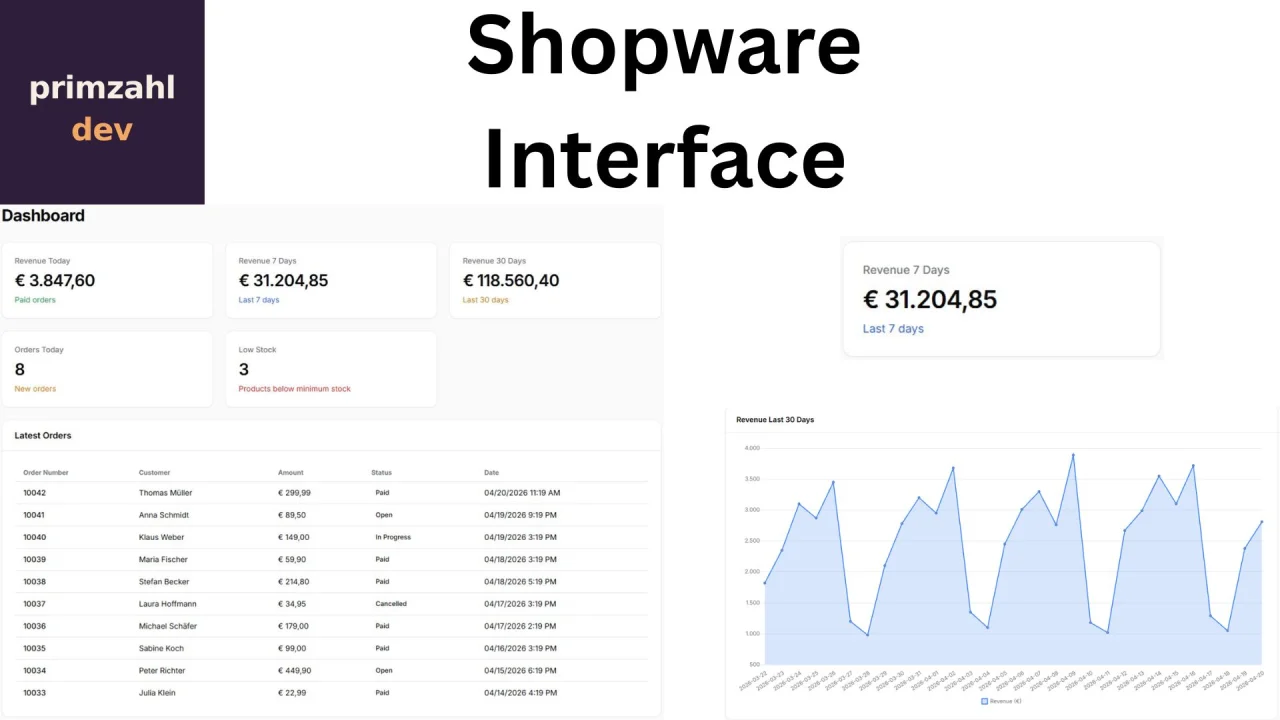
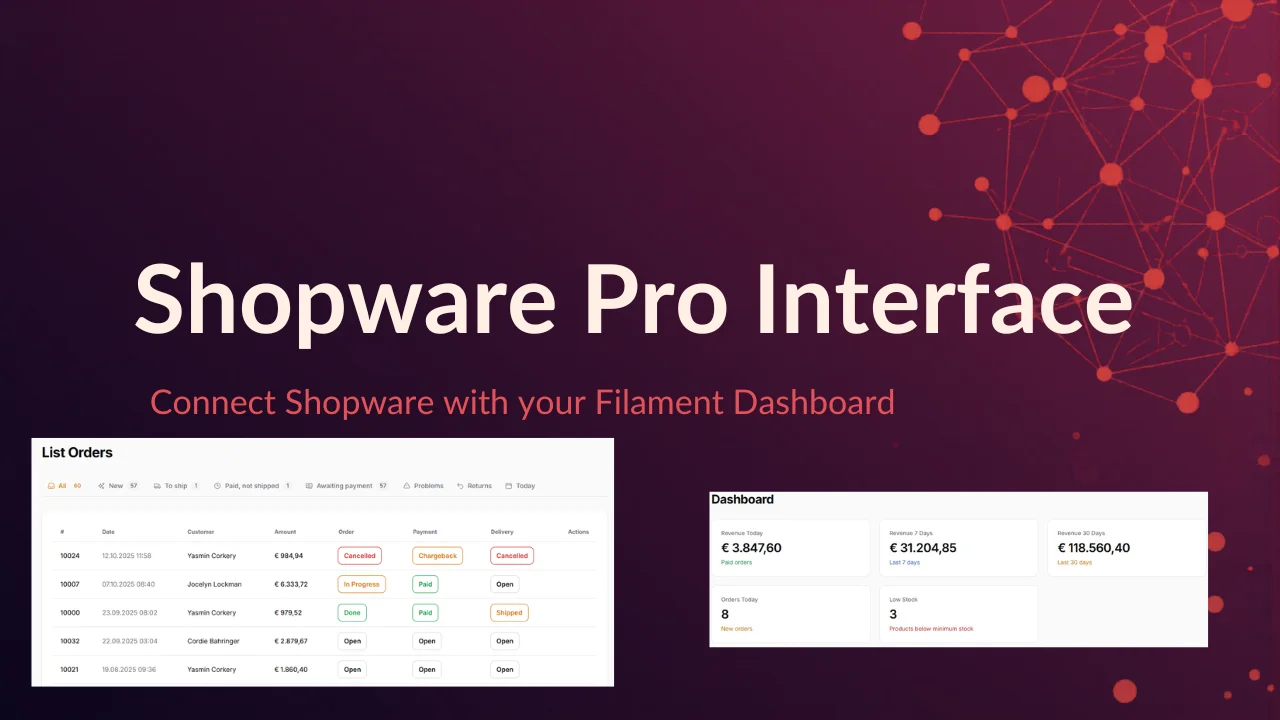
Shopware 6 dashboard widgets. Displays revenue, orders, stock levels and revenue trends directly inside the Filament admin panel.
#Requirements
- PHP 8.1+
- Laravel 10, 11 or 12
- Filament 3, 4 or 5
- A Shopware 6 instance with API access (integration of type "Client Credentials")
#Installation
composer require primzahl/filament-shopware
The service provider is auto-discovered — no manual registration required.
#Publish configuration
php artisan vendor:publish --tag=filament-shopware-config
#Configure environment variables
In your .env file:
PRIMZAHL_SHOPWARE_URL=https://your-shop.com
PRIMZAHL_SHOPWARE_CLIENT_ID=your-client-id
PRIMZAHL_SHOPWARE_CLIENT_SECRET=your-client-secret
Optional settings:
PRIMZAHL_SHOPWARE_CACHE_TTL=60        # cache duration in seconds (default: 60)
PRIMZAHL_SHOPWARE_LOW_STOCK=5         # low-stock alert threshold (default: 5)
#Create a Shopware 6 integration
- In the Shopware admin, go to Settings → System → Integrations
- Create a new integration
- Copy the Access Key and Secret Key
- Add them as
PRIMZAHL_SHOPWARE_CLIENT_IDandPRIMZAHL_SHOPWARE_CLIENT_SECRETin your.env
#Register the plugin
In your Filament PanelProvider (e.g. app/Providers/Filament/AdminPanelProvider.php):
use Primzahl\FilamentShopwareDashboard\FilamentShopwareDashboardPlugin;

public function panel(Panel $panel): Panel
{
    return $panel
        // ...
        ->plugin(FilamentShopwareDashboardPlugin::make());
}
#Widgets
The plugin ships with 4 dashboard widgets:
| Widget | Description |
|---|---|
| Revenue overview | Revenue for today, 7 days and 30 days as stat cards |
| Orders & stock | Orders today + low-stock alert (red when products fall below the threshold) |
| Revenue chart | Line chart showing daily revenue over the last 30 days |
| Latest orders | Table with the 10 most recent orders including customer, amount and status |
#Toggle widgets individually
Each widget can be enabled or disabled via the fluent API:
FilamentShopwareDashboardPlugin::make()
    ->revenueWidget(true)      // Revenue overview (default: on)
    ->ordersWidget(true)       // Orders & stock (default: on)
    ->latestOrders(false)      // Hide latest orders
    ->revenueChart(false)      // Hide revenue chart
#Opt out of dashboard registration entirely
If you don't want the plugin to register any widgets on the default dashboard — for example because you want to place them manually (see next section) — use the master switch:
FilamentShopwareDashboardPlugin::make()
    ->registerDefaultWidgets(false);
The widget classes remain fully usable for custom placement; only the default-dashboard registration is skipped.
#Use widgets outside the default dashboard
All four widgets are regular Filament widgets (Livewire components). Beyond the default dashboard, you can place them wherever Filament renders widgets.
#On a custom Filament page
use Primzahl\FilamentShopwareDashboard\Widgets\ShopwareRevenueWidget;
use Filament\Pages\Page;

class ShopwareOverview extends Page
{
    protected function getHeaderWidgets(): array
    {
        return [
            ShopwareRevenueWidget::class,
            // add more widget classes as needed
        ];
    }
}
#On a Filament Resource page (List / View / Edit)
// e.g. app/Filament/Resources/OrderResource/Pages/ListOrders.php
protected function getHeaderWidgets(): array
{
    return [
        ShopwareRevenueWidget::class,
        ShopwareOrdersWidget::class,
    ];
}
#Inline in any Blade view inside a Filament panel
@livewire(\Primzahl\FilamentShopwareDashboard\Widgets\ShopwareRevenueWidget::class)

{{-- or with the tag syntax --}}
<livewire:primzahl.filament-shopware-dashboard.widgets.shopware-revenue-widget />
#Good to know
- The fluent toggles (
->revenueWidget(false), …) only control the default dashboard registration. The widget classes remain available for custom placement regardless of the toggles. - The widgets render Filament UI components, so they expect a Filament panel context (Filament styles/scripts loaded). Embedding them in standalone Laravel views outside a panel is possible via Livewire but requires you to load
@filamentStyles/@filamentScriptsyourself — a thin custom Filament page is usually the smoother path. - Polling intervals (
60sfor stats,300sfor the chart) are defined statically on each widget class. To use a different interval in a specific place, extend the class and override$pollingInterval.
#Configuration
The full configuration after publishing (config/filament-shopware.php):
| Option | Env variable | Default | Description |
|---|---|---|---|
url |
PRIMZAHL_SHOPWARE_URL |
'' |
Base URL of the Shopware shop |
client_id |
PRIMZAHL_SHOPWARE_CLIENT_ID |
'' |
OAuth client ID |
client_secret |
PRIMZAHL_SHOPWARE_CLIENT_SECRET |
'' |
OAuth client secret |
cache_ttl |
PRIMZAHL_SHOPWARE_CACHE_TTL |
60 |
Cache duration in seconds |
low_stock_threshold |
PRIMZAHL_SHOPWARE_LOW_STOCK |
5 |
Threshold that triggers the low-stock alert |
polling_interval |
— | 60s |
Auto-refresh interval for widgets |
currency_symbol |
— | € |
Currency symbol shown in the UI |
currency_locale |
— | de_DE |
Locale used for number formatting |
#Tests
./vendor/bin/pest
The author
From the same author
Featured Plugins
A selection of plugins curated by the Filament team

Custom Dashboards
Let your users build and share their own dashboards with a drag-and-drop interface. Define your data sources in PHP and let them do the rest.
 Filament

Custom Fields
Eliminate custom field migrations forever. Let your users create and manage form fields directly in Filament admin panels with 20+ built-in field types, validation, and zero database changes.
 Relaticle

Advanced Tables (formerly Filter Sets)
Supercharge your tables with powerful features like user-customizable views, quick filters, multi-column sorting, advanced table searching, convenient view management, and more. Compatible with Resource Panel Tables, Relation Managers, Table Widgets, and Table Builder!
 Kenneth Sese

