

Tree View by Openplain
CommunityTree view for Filament resources - drop-in replacement for Table with drag-and-drop hierarchical data management
 Author:
Openplain
Author:
Openplain
Package health
Automated checks of this plugin's Composer package
15 checks
- Skipped: GitHub Actions pinned to SHA
- Skipped: GitLab CI includes pinned to SHA
- Passed: Open security advisories
- Passed: Dependabot PR responsiveness — No open Dependabot PRs.
- Skipped: Renovate MR responsiveness
- Failed: Dependabot or Renovate configured — No dependency updater configuration found. View details on Plumb
- Skipped: Dependency update cooldown configured
- Failed: Provides a security policy — View details on Plumb
- Passed: Abandoned or archived — No consulted source marks the package abandoned (packagist, github).
- Passed: Commit and release recency — Active: last commit 163 days ago; last release 163 days ago.
-
Passed:
composer.lock not committed by library
—
composer.lockis absent from the released dist archive. - Passed: Dist archive is lean
-
Passed:
Current Laravel version supported
—
Package dependencies resolve together with current Laravel
13.0. -
Passed:
Current PHP version supported
—
Constraint
^8.2|^8.3|^8.4supports current PHP8.5. - Skipped: Current Symfony version supported
filament/
namespace. Review the source and install at your own risk. Found
malware or an unresolved security issue the author won't
address?
Report it
.
Documentation
- Why This Package?
- Features
- Requirements
- Installation
- Quick Start
- Relation Pages
- Advanced Configuration
- Common Patterns
- Troubleshooting
- Testing
- Contributing
- Security
- Credits
- License


A powerful drag-and-drop tree view for Filament resources. Display and manage hierarchical data with the same elegant developer experience you expect from Filament.
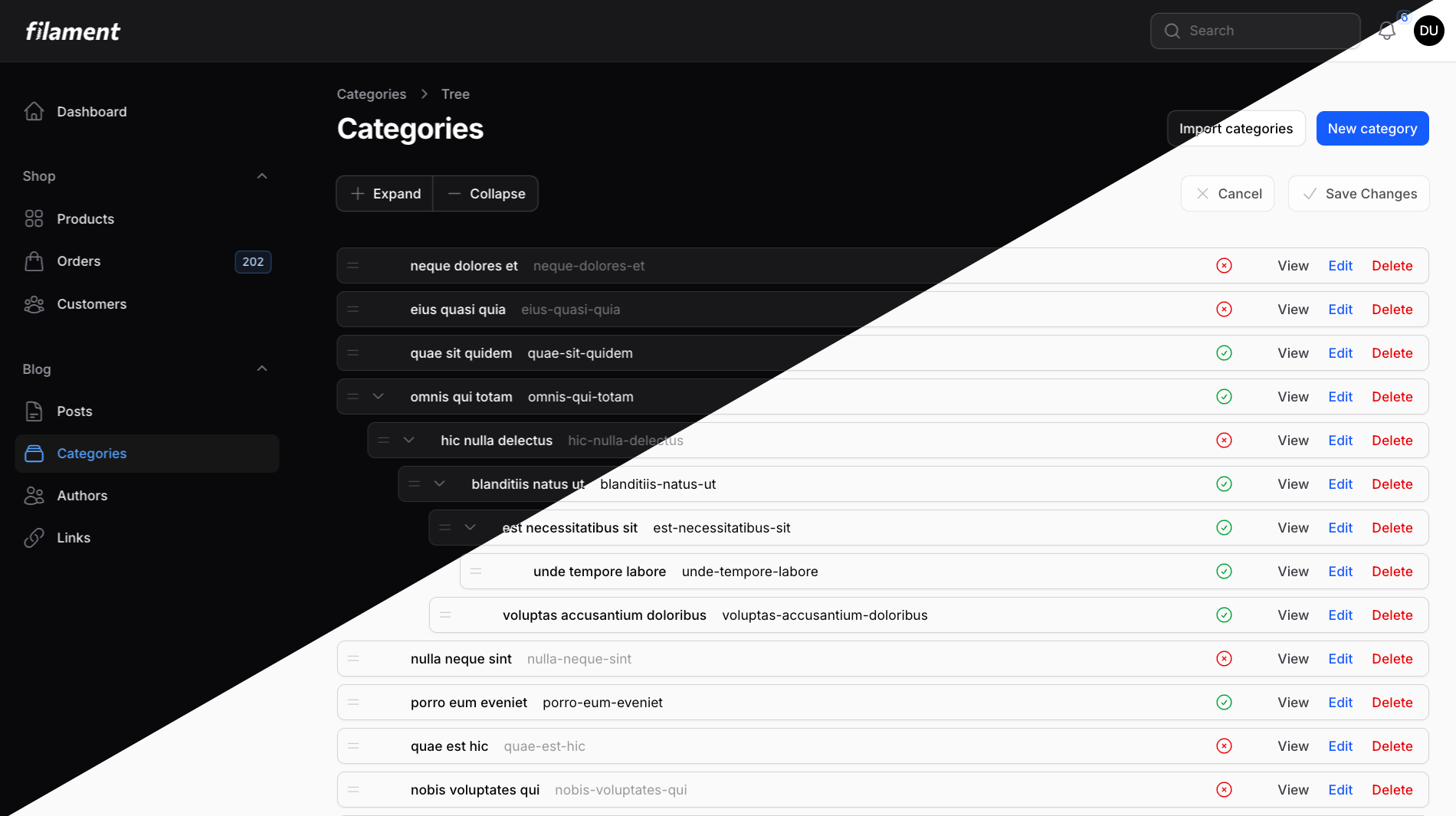
#Why This Package?
We created Filament Tree View because we couldn't find a hierarchical data solution that truly embraced Filament's philosophy and architecture. Most tree packages feel like external additions rather than native Filament components.
Our Goal: Make hierarchical data management feel as natural as using Filament's Table component.
#Built on Proven Technology
Rather than reinventing the wheel, we leverage battle-tested libraries:
- Laravel Adjacency List - Mature, proven package for recursive relationships with thousands of production deployments
- Pragmatic Drag & Drop - Atlassian's accessible, performant drag-and-drop library used in Jira, Trello, and Confluence
- Filament's Core Components - Built with the same patterns, conventions, and architecture as native Filament resources
This foundation gives you reliability, performance, and accessibility out of the box.
#Features
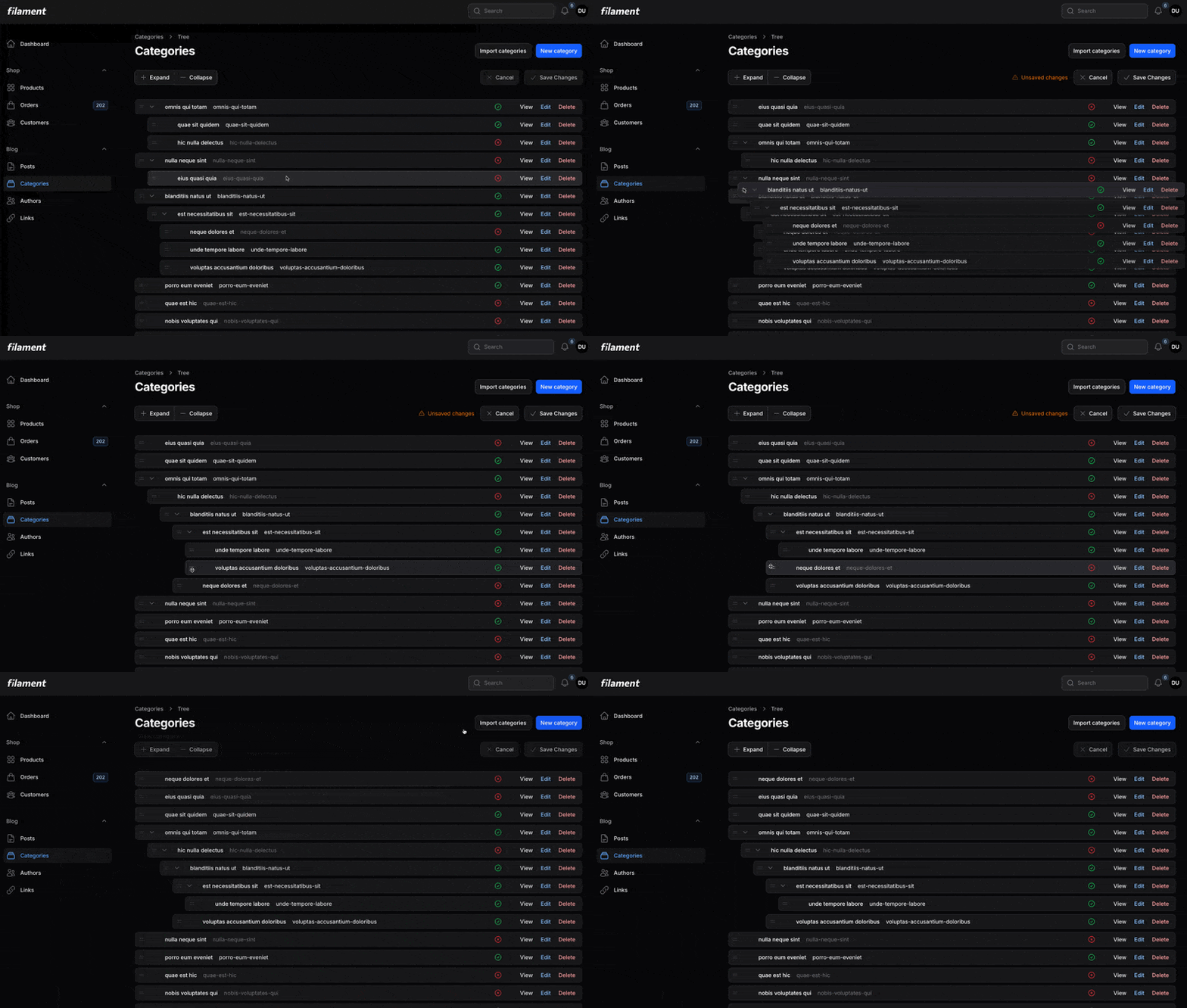
- 🌳 Drag-and-Drop Reordering - Intuitive tree manipulation with visual feedback
- 📦 Drop-in Replacement - Familiar API if you've used Filament Tables
- 🎯 Depth Control - Limit tree nesting to prevent overly complex hierarchies
- 💾 Save Modes - Choose between auto-save or batch save with manual confirmation
- 🎨 Custom Fields - Display any data in your tree nodes with TextField and IconField
- 🔧 Actions Support - Full support for Filament actions (edit, delete, custom actions)
- 🌗 Dark Mode - Seamless integration with Filament's theming system
- ♿ Accessible - Keyboard navigation and screen reader support built-in
- 🔒 Safe Operations - Prevents circular references and invalid moves
#Requirements
- PHP 8.2 or higher
- Laravel 11 or 12
- Filament 4.x or 5.x
#Installation
Install the package via Composer:
composer require openplain/filament-tree-view
Publish the package assets:
php artisan filament:assets
That's it! The plugin registers its CSS and JavaScript assets with Filament automatically. Everything is now configured and ready to use.
#Quick Start
#1. Prepare Your Database
Create a migration with the required tree structure columns:
Schema::create('categories', function (Blueprint $table) {
    $table->id();
    $table->string('name');
    $table->boolean('is_active')->default(true);

    // Required for tree structure
    $table->foreignId('parent_id')->nullable()->constrained('categories');
    $table->integer('order')->default(0);

    $table->timestamps();
});
#2. Add Trait to Your Model
Add the HasTreeStructure trait to enable tree functionality:
<?php

namespace App\Models;

use Illuminate\Database\Eloquent\Model;
use Openplain\FilamentTreeView\Concerns\HasTreeStructure;

class Category extends Model
{
    use HasTreeStructure;

    protected $fillable = ['name', 'is_active', 'parent_id', 'order'];
}
The trait provides:
- Recursive parent/child relationships
- Automatic cascade delete for descendants
- Tree query helpers (roots, leaves, depth calculations)
#3. Add Tree Configuration to Your Resource
Add a tree() method to your resource alongside form() and table():
<?php

namespace App\Filament\Resources;

use App\Filament\Resources\CategoryResource\Pages;
use App\Models\Category;
use Filament\Resources\Resource;
use Filament\Schemas\Schema;
use Openplain\FilamentTreeView\Fields\IconField;
use Openplain\FilamentTreeView\Fields\TextField;
use Openplain\FilamentTreeView\Tree;

class CategoryResource extends Resource
{
    protected static ?string $model = Category::class;

    public static function form(Schema $schema): Schema
    {
        // Your form configuration
    }

    public static function tree(Tree $tree): Tree
    {
        return $tree
            ->fields([
                TextField::make('name'),
                IconField::make('is_active'),
            ]);
    }

    public static function getPages(): array
    {
        return [
            'index' => Pages\TreeCategories::route('/'),
            'create' => Pages\CreateCategory::route('/create'),
            'edit' => Pages\EditCategory::route('/{record}/edit'),
        ];
    }
}
#4. Create a Tree Page
Create a simple page that extends TreePage:
<?php

namespace App\Filament\Resources\CategoryResource\Pages;

use App\Filament\Resources\CategoryResource;
use Openplain\FilamentTreeView\Resources\Pages\TreePage;

class TreeCategories extends TreePage
{
    protected static string $resource = CategoryResource::class;
}
That's it! You now have a fully functional drag-and-drop tree view with manual save mode.
#Relation Pages
If you're using Filament's relation pages (extending ManageRelatedRecords), you can use TreeRelationPage instead of TreePage. This is ideal when you want to manage a hierarchical relationship separately from editing or viewing the owner record.
#When to Use TreeRelationPage
- You're using resource sub-navigation and want to switch between View/Edit pages and the relation page
- You want to keep relationship management separate from the owner record
- The tree configuration should come from the related resource, not the parent resource
#Example: Managing Category Children
<?php

namespace App\Filament\Resources\CategoryResource\Pages;

use App\Filament\Resources\CategoryResource;
use Openplain\FilamentTreeView\Resources\Pages\TreeRelationPage;

class ManageCategoryChildren extends TreeRelationPage
{
    protected static string $resource = CategoryResource::class;
    protected static string $relationship = 'children';
    protected static ?string $relatedResource = CategoryResource::class;
}
Register the page in your resource:
public static function getPages(): array
{
    return [
        'index' => Pages\ListCategories::route('/'),
        'create' => Pages\CreateCategory::route('/create'),
        'view' => Pages\ViewCategory::route('/{record}'),
        'edit' => Pages\EditCategory::route('/{record}/edit'),
        'children' => Pages\ManageCategoryChildren::route('/{record}/children'),
    ];
}
#Advanced Configuration
Need more control? The tree view offers powerful customization options. All configuration is optional - only add what you need.
#Understanding Defaults
The tree uses sensible defaults for most settings:
- Fields: Required - You must configure which fields to display
- Actions: Optional - No actions shown unless you add them
- Collapse: Enabled by default - individual toggles + header Expand All/Collapse All buttons
- Save Mode: Manual save with Save/Cancel buttons (safer)
- Depth: 10 levels by default
Quick Links:
- Tree Behavior - Depth limits, collapse, auto-save
- Custom Fields - Display custom data in nodes
- Actions - Add edit, delete, and custom actions
- Model Configuration - Customize column names
- UUID Primary Keys - Support for UUID columns
- Empty State - Customize the "no records" view
- Save Behavior - Manual vs auto-save
- Query Customization - Filter and order records
#Tree Behavior
Control how your tree displays and behaves:
public static function tree(Tree $tree): Tree
{
    return $tree
        ->maxDepth(5)           // Limit nesting to 5 levels
        ->collapsed()           // Start with nodes collapsed
        ->autoSave();          // Save immediately on reorder
}
Available Options:
| Method | Default | Description |
|---|---|---|
maxDepth(int|null) |
10 levels | Restrict maximum tree depth (pass null for unlimited) |
collapsible(bool) |
Enabled | Individual toggles + header Expand All/Collapse All buttons |
collapsed() |
Expanded | Start with nodes collapsed instead of expanded |
reorderable(bool) |
Enabled | Drag-and-drop reordering; disable to render a read-only tree |
autoSave() |
Disabled | Save changes immediately on drag-and-drop |
Common Patterns:
// Default - fully featured tree (collapsible, expanded, manual save)
return $tree->fields([...]);

// Simple/small tree - disable collapse
return $tree
    ->fields([...])
    ->collapsible(false);

// Large tree - start collapsed for better performance
return $tree
    ->fields([...])
    ->collapsed();

// Auto-save for simple admin trees
return $tree
    ->fields([...])
    ->autoSave();

// Read-only tree - disable drag-and-drop reordering
// (also hides drag handles and the manual save/cancel buttons)
return $tree
    ->fields([...])
    ->reorderable(false);
#Custom Fields
Fields are required - you must configure which fields to display in your tree nodes.
Use the Field API to define what data appears in each tree node:
use Openplain\FilamentTreeView\Fields\TextField;
use Openplain\FilamentTreeView\Fields\IconField;
use Filament\Support\Enums\Alignment;
use Filament\Support\Enums\FontWeight;

public static function tree(Tree $tree): Tree
{
    return $tree
        ->fields([
            TextField::make('name')
                ->weight(FontWeight::Medium)
                ->dimWhenInactive(),

            TextField::make('description')
                ->color('gray')
                ->limit(50)
                ->dimWhenInactive(),

            IconField::make('is_active')
                ->alignEnd(),
        ]);
}
#TextField Options
TextField::make('name')
    // Typography
    ->size('sm' | 'base' | 'lg')
    ->weight(FontWeight::Thin | FontWeight::Medium | FontWeight::Bold)

    // Colors (Filament color names)
    ->color('primary' | 'gray' | 'success' | 'warning' | 'danger')

    // Alignment
    ->alignStart()  // default
    ->alignCenter()
    ->alignEnd()

    // Content formatting
    ->limit(50)  // Truncate with ellipsis
    ->formatStateUsing(fn (string $state): string => strtoupper($state))

    // Conditional dimming
    ->dimWhenInactive()  // Defaults to 'is_active' field
    ->dimWhenInactive('custom_status')  // Or specify a custom field
    ->dimWhen('field_name', value: false);  // Or check any field for any value
#IconField Options
IconField::make('is_active')
    // Icons (Heroicon enum)
    ->trueIcon(Heroicon::OutlinedCheckCircle)
    ->falseIcon(Heroicon::OutlinedXCircle)

    // Colors
    ->trueColor('success')
    ->falseColor('danger')

    // Alignment
    ->alignEnd();  // Typically right-aligned
#Actions
Add actions to tree nodes just like Filament Tables:
use Filament\Actions\EditAction;
use Filament\Actions\DeleteAction;
use Filament\Actions\Action;

public static function tree(Tree $tree): Tree
{
    return $tree
        ->recordActions([
            // Navigate to edit page
            EditAction::make()
                ->url(fn (Category $record): string =>
                    static::getUrl('edit', ['record' => $record])
                ),

            // Edit in modal
            Action::make('editModal')
                ->label('Quick Edit')
                ->icon('heroicon-o-pencil-square')
                ->fillForm(fn (Category $record): array => [
                    'name' => $record->name,
                    'description' => $record->description,
                ])
                ->form([
                    TextInput::make('name')->required(),
                    Textarea::make('description'),
                ])
                ->action(function (Category $record, array $data) {
                    $record->update($data);

                    Notification::make()
                        ->title('Category updated')
                        ->success()
                        ->send();
                }),

            // Delete with descendant warning
            DeleteAction::make()
                ->modalDescription(function (Category $record): string {
                    $count = $record->descendants()->count();

                    if ($count === 0) {
                        return 'Are you sure you want to delete this category?';
                    }

                    return "This category has {$count} descendants that will also be deleted.";
                }),
        ]);
}
#Model Configuration
The HasTreeStructure trait uses sensible defaults, but you can customize column names for legacy databases:
class Category extends Model
{
    use HasTreeStructure;

    /**
     * Parent ID column name (default: 'parent_id')
     *
     * Override this for legacy databases with custom column names.
     * Common examples: 'parent_category_id', 'category_parent_id', 'parent'
     */
    public function getParentKeyName(): string
    {
        return 'parent_category_id'; // Your legacy column name
    }

    /**
     * Primary key column name (default: 'id')
     */
    public function getLocalKeyName(): string
    {
        return $this->getKeyName(); // Usually 'id'
    }

    /**
     * Virtual depth attribute (default: 'depth')
     * Calculated during queries, not stored
     */
    public function getDepthName(): string
    {
        return 'depth';
    }

    /**
     * Virtual path attribute (default: 'path')
     * Example: [1, 5, 12] = root(1) > parent(5) > current(12)
     * Calculated during queries, not stored
     */
    public function getPathName(): string
    {
        return 'path';
    }

    /**
     * Children relationship name (default: 'children')
     */
    public function getChildrenKeyName(): string
    {
        return 'children';
    }

    /**
     * Order column name (default: 'order')
     * Override this for legacy databases with custom column names.
     * Common examples: 'sort_order', 'position', 'sort', 'sequence'
     */
    public function getOrderKeyName(): string
    {
        return 'sort_order'; // Your legacy column name
    }

    /**
     * Root parent value (default: null)
     * Override this for existing databases that use -1, 0, or other values
     * to represent root nodes (nodes without a parent)
     */
    public function getParentKeyDefaultValue(): mixed
    {
        return null; // or -1, 0, etc.
    }
}
#Working with Existing Databases
#Custom Parent Field Name
If your legacy database uses a different column name for the parent relationship (instead of parent_id), override the getParentKeyName() method:
class Category extends Model
{
    use HasTreeStructure;

    /**
     * Your database uses 'parent_category_id' instead of 'parent_id'
     */
    public function getParentKeyName(): string
    {
        return 'parent_category_id';
    }
}
Common legacy field names:
parent_category_id- Category-specific parent fieldcategory_parent_id- Alternative naming conventionparent- Simplified field nameparent_node_id- Generic tree structure naming
No migration needed! The tree view will automatically use your custom field name for all queries and updates.
#Custom Order Field Name
If your legacy database uses a different column name for the sort order (instead of order), override the getOrderKeyName() method:
class Category extends Model
{
    use HasTreeStructure;

    /**
     * Your database uses 'sort_order' instead of 'order'
     */
    public function getOrderKeyName(): string
    {
        return 'sort_order';
    }
}
Common legacy field names:
sort_order- Common in legacy systemsposition- Alternative naming conventionsort- Simplified field namesequence- Alternative namingdisplay_order- Descriptive field name
No migration needed! The tree view will automatically use your custom field name for all ordering operations.
#Custom Root Parent Value
If your existing database uses -1, 0, or another value to represent root nodes instead of NULL, override the getParentKeyDefaultValue() method:
class Category extends Model
{
    use HasTreeStructure;

    /**
     * Existing database uses -1 for root nodes
     *
     * ⚠️ WARNING: Only use non-null values like -1 or 0 with INTEGER parent_id columns.
     * For UUID or other string-based columns, you MUST use null for root nodes.
     */
    public function getParentKeyDefaultValue(): mixed
    {
        return -1; // Only works with integer columns
    }
}
#Combining Multiple Customizations
You can override multiple methods for complete legacy database support:
class Category extends Model
{
    use HasTreeStructure;

    public function getParentKeyName(): string
    {
        return 'parent_category_id'; // Custom parent field name
    }

    public function getOrderKeyName(): string
    {
        return 'sort_order'; // Custom order field name
    }

    public function getParentKeyDefaultValue(): mixed
    {
        return -1; // Custom root value
    }
}
No database migrations needed! The package handles all queries and updates automatically.
#UUID Primary Keys
The tree view fully supports UUID primary keys and foreign keys. No special configuration is required:
Schema::create('categories', function (Blueprint $table) {
    $table->uuid('id')->primary();
    $table->uuid('parent_id')->nullable(); // Works automatically
    $table->integer('order')->default(0);
    $table->timestamps();
});
Important: When using UUID columns for parent_id, root nodes must use null (this is the default behavior). Do not override getParentKeyDefaultValue() to return -1 or 0 - these values are invalid for UUID columns and will cause database errors.
class Category extends Model
{
    use HasTreeStructure;

    // ✅ Correct - uses null for root nodes (default)
    // No need to override getParentKeyDefaultValue()

    // ❌ Wrong - will fail with UUID columns
    // public function getParentKeyDefaultValue(): mixed
    // {
    //     return -1; // Invalid for UUID!
    // }
}
The trait automatically handles UUID columns - just ensure parent_id is nullable and leave the default null value for root nodes.
#Customizing Empty State
public static function tree(Tree $tree): Tree
{
    return $tree
        ->emptyStateHeading('No categories yet')
        ->emptyStateDescription('Get started by creating your first category.')
        ->emptyStateIcon('heroicon-o-rectangle-stack')
        ->emptyStateActions([
            CreateAction::make()
                ->label('Create first category'),
        ]);
}
#Save Behavior
By default, the tree uses manual save mode - changes require clicking "Save Changes":
return $tree; // Manual save mode - safe default
Enable auto-save to save immediately on every drag-and-drop:
return $tree->autoSave(); // Saves instantly
Why manual save is the default:
- ✅ Review all changes before committing
- ✅ Cancel to discard unwanted changes
- ✅ Safer for production environments
- ✅ Better for complex hierarchies
When to use auto-save:
- Simple admin-only trees
- Single-user scenarios
- Immediate feedback preferred
#Query Customization
Modify the base query for your tree:
public static function tree(Tree $tree): Tree
{
    return $tree
        ->modifyQueryUsing(fn (Builder $query) => $query
            ->where('status', 'active')
            ->orderBy('name')
        );
}
#Working with Translatable Content
The tree view includes built-in support for Spatie Laravel Translatable, allowing you to display and manage multilingual hierarchical data.
#Setup
- Install Spatie Translatable:
composer require spatie/laravel-translatable
- Prepare Your Model:
use Illuminate\Database\Eloquent\Model;
use Openplain\FilamentTreeView\Concerns\HasTreeStructure;
use Spatie\Translatable\HasTranslations;

class Category extends Model
{
    use HasTreeStructure;
    use HasTranslations;

    public $translatable = ['name', 'description'];

    protected $fillable = ['name', 'description', 'parent_id', 'order'];
}
- Add Translatable Trait to Resource:
use Openplain\FilamentTreeView\Resources\Concerns\Translatable;

class CategoryResource extends Resource
{
    use Translatable;

    protected static ?string $model = Category::class;

    public static function getTranslatableLocales(): array
    {
        return ['en', 'es', 'fr']; // Configure available locales
    }

    // ... rest of your resource
}
- Add Translatable Trait to TreePage:
use Openplain\FilamentTreeView\Resources\Pages\TreePage;
use Openplain\FilamentTreeView\Resources\Pages\TreePage\Concerns\Translatable;

class TreeCategories extends TreePage
{
    use Translatable;

    protected static string $resource = CategoryResource::class;
}
That's it! The tree will now automatically:
- ✅ Display a locale switcher in the header
- ✅ Show translated content for the active locale
- ✅ Auto-detect translatable fields
- ✅ Keep forms/modals in the admin locale (as expected)
#How It Works
- TextField automatically detects translations: If your model uses
HasTranslationsand a field is translatable, it will automatically display the correct translation - Locale switcher: Added to header actions automatically when using the
Translatabletrait - Tree display only: Translations only affect the tree view - forms and modals stay in the admin locale
- No configuration needed: TextFields detect and display translations automatically
#Customizing Locales
You can customize available locales at the resource level:
class CategoryResource extends Resource
{
    use Translatable;

    public static function getTranslatableLocales(): array
    {
        // Use config
        return config('app.locales');

        // Or hardcode
        return ['en', 'es', 'fr', 'de'];

        // Or use a dynamic source
        return Language::where('active', true)->pluck('code')->toArray();
    }
}
#Example
// Your translatable category model
$category->setTranslation('name', 'en', 'Electronics');
$category->setTranslation('name', 'es', 'Electrónica');
$category->setTranslation('name', 'fr', 'Électronique');
$category->save();

// In the tree view:
// - Switch to English → Shows "Electronics"
// - Switch to Spanish → Shows "Electrónica"
// - Switch to French → Shows "Électronique"
Notes:
- Requires
spatie/laravel-translatable^6.0 - Only tree display shows translations (forms stay in admin locale)
- Gracefully degrades if package not installed
- Works with all TextField configurations (colors, weights, etc.)
#Common Patterns
Real-world examples to help you get started quickly:
#Building a Navigation Menu
class MenuItem extends Model
{
    use HasTreeStructure;

    protected $fillable = ['label', 'url', 'icon', 'parent_id', 'order', 'is_active'];
}

public static function tree(Tree $tree): Tree
{
    return $tree
        ->maxDepth(3) // Limit menu depth
        ->fields([
            TextField::make('label')->weight(FontWeight::Medium),
            TextField::make('url')->color('gray'),
            TextField::make('icon')->color('gray'),
            IconField::make('is_active')->alignEnd(),
        ])
        ->recordActions([
            EditAction::make(),
            DeleteAction::make(),
        ]);
}
#Product Categories with Status
public static function tree(Tree $tree): Tree
{
    return $tree
        ->fields([
            TextField::make('name')
                ->weight(FontWeight::Medium)
                ->dimWhenInactive(),

            TextField::make('products_count')
                ->formatStateUsing(fn (int $state): string => "{$state} products")
                ->color('gray'),

            TextField::make('status')
                ->formatStateUsing(fn (string $state): string => ucfirst($state))
                ->color(fn (string $state): string => match ($state) {
                    'published' => 'success',
                    'draft' => 'warning',
                    default => 'gray',
                }),

            IconField::make('is_active')->alignEnd(),
        ]);
}
#Department Hierarchy
class Department extends Model
{
    use HasTreeStructure;

    public function employees()
    {
        return $this->hasMany(Employee::class);
    }
}

public static function tree(Tree $tree): Tree
{
    return $tree
        ->maxDepth(5)
        ->fields([
            TextField::make('name')->weight(FontWeight::Bold),
            TextField::make('manager_name')->color('gray'),
            TextField::make('employees_count')
                ->formatStateUsing(fn (?int $state): string =>
                    $state ? "{$state} employees" : 'No employees'
                )
                ->color('gray'),
        ]);
}
#Troubleshooting
#Styling Issues or Missing Styles
If the tree view appears unstyled or layouts look broken:
-
Republish assets:
php artisan filament:assets -
Clear browser cache - Hard refresh your browser (Cmd+Shift+R on Mac, Ctrl+Shift+R on Windows/Linux)
-
Clear application caches:
php artisan filament:cache-components
php artisan view:clear
#JavaScript Not Loading
If drag-and-drop doesn't work after installation:
# Publish assets
php artisan filament:assets

# Clear caches
php artisan filament:cache-components
php artisan view:clear
#Drag Restrictions
If you can't drag items to certain positions:
- Depth limit reached - Check your
maxDepth()setting - Circular reference - Can't move a parent into its own descendant
- Custom canDrop logic - Review any custom drop validation
#Performance with Large Trees
For trees with hundreds of nodes:
- Consider pagination or filtering at the root level
- Use
->collapsed()to start with nodes collapsed - Eager load relationships in
modifyQueryUsing()
->modifyQueryUsing(fn (Builder $query) =>
    $query->with(['children', 'someRelation'])
)
#ComponentNotFoundException After Creating TreePage
If you encounter Unable to find component: [app.filament.resources.blog.categories.pages.tree-categories] when clicking actions:
Cause: Laravel and Livewire cache component registries. New TreePage classes aren't immediately discoverable.
Fix:
composer dump-autoload
php artisan optimize:clear
This clears Composer's autoloader, Livewire's component cache, and all Laravel caches. The error occurs after creating new TreePage classes or when updating the plugin in development environments.
#Testing
Run the test suite:
composer test
Run Pint for code style:
composer pint
#Contributing
We welcome contributions! Please see CONTRIBUTING.md for details.
#Security
If you discover a security vulnerability, please email [email protected]. All security vulnerabilities will be promptly addressed.
#Credits
Built with these excellent open-source libraries:
- Laravel Adjacency List by Jonas Staudenmeir - Battle-tested recursive tree queries with thousands of production deployments
- Pragmatic Drag & Drop by Atlassian - Accessible, performant drag-and-drop used in Jira, Trello, and Confluence
#License
The MIT License (MIT). Please see License File for more information.
Built with ❤️ by Openplain
The author
From the same author

Featured Plugins
A selection of plugins curated by the Filament team

Noir Theme
A theme that gives panels a focused, refined look with near-black surfaces, crisp actions, and restrained color.
 Filament

Blueprint
Filament Blueprint is a premium Laravel Boost extension that helps AI agents produce accurate, detailed implementation plans and security reports for Filament apps.
Filament

Advanced Tables (formerly Filter Sets)
Supercharge your tables with powerful features like user-customizable views, quick filters, multi-column sorting, advanced table searching, convenient view management, and more. Compatible with Resource Panel Tables, Relation Managers, Table Widgets, and Table Builder!
 Kenneth Sese

