
Web Terminal - Stream by Marcelo Guerra
CommunityA full interactive PTY terminal for Laravel + Filament, streamed over WebSocket.
 Author:
Marcelo Guerra
Author:
Marcelo Guerra
Package health
Automated checks of this plugin's Composer package
15 checks
- Passed: GitHub Actions pinned to SHA
- Skipped: GitLab CI includes pinned to SHA
- Passed: Open security advisories
- Warning: Dependabot PR responsiveness — Stale Dependabot PRs: oldest security PR is 31 days old; oldest general PR is 45 days old.
- Skipped: Renovate MR responsiveness
- Passed: Dependabot or Renovate configured
- Passed: Dependency update cooldown configured
- Passed: Provides a security policy
- Passed: Abandoned or archived — No consulted source marks the package abandoned (packagist, github).
- Passed: Commit and release recency — Active: last commit 28 days ago; last release 28 days ago.
-
Passed:
composer.lock not committed by library
—
composer.lockis absent from the released dist archive. - Passed: Dist archive is lean
-
Passed:
Current Laravel version supported
—
Package dependencies resolve together with current Laravel
13.0. -
Passed:
Current PHP version supported
—
Constraint
^8.3supports current PHP8.5. - Skipped: Current Symfony version supported
filament/
namespace. Review the source and install at your own risk. Found
malware or an unresolved security issue the author won't
address?
Report it
.
Documentation
- Version Compatibility
- Features
- Installation
- Usage
- Filament plugin
- The schema component
- Standalone (without Filament schemas)
- Connections
- Fluent API reference
- Connection behavior
- Chrome levels
- Tiled layouts — TerminalGrid
- tmux-style workspaces — TerminalWorkspace
- Toggle dashboards — TerminalDashboard
- Theming
- Scripts
- Connection custody — credentials never reach the browser
- Authorization
- Logging & Auditing
- Troubleshooting
- Testing
- Contributing
- License
- Author
A full interactive PTY terminal for Laravel + Filament, streamed over WebSocket. The browser side is a ghostty-web canvas — a real terminal emulator compiled to WASM — so full-screen TUI apps like vim, htop, nano, tmux, and artisan tinker just work. Connect to the local machine or to remote servers over SSH (password or key auth).
This package was extracted from mwguerra/web-terminal. That package keeps its dual-mode terminal (Classic command-by-command execution + Stream); this one is Stream-only, fully renamed and namespaced so the two can be installed side-by-side in the same application.
#Version Compatibility
| Version | Filament | Laravel | Livewire | PHP |
|---|---|---|---|---|
| 1.x | 5.x | 12.x–13.x | 4.x | 8.3+ |
#Features
- Real PTY over WebSocket — a ReactPHP server bridges the browser to a shell process (local
proc_openPTY or a phpseclib SSH shell); keystrokes and output stream as raw bytes, no Livewire round trips - ghostty-web canvas rendering — proper terminal emulation in the browser: colors, cursor addressing, alternate screen, resize (
SIGWINCH), full-screen TUI apps - Local and SSH connections — SSH supports password and private-key auth (with optional passphrase), custom port, working directory, and environment variables
- Frameless chrome and square corners —
frameless()drops the header (actions float over the canvas) andsquareCorners()drops the outer radius, so terminals can tile edge-to-edge in grid layouts - tmux-style workspaces —
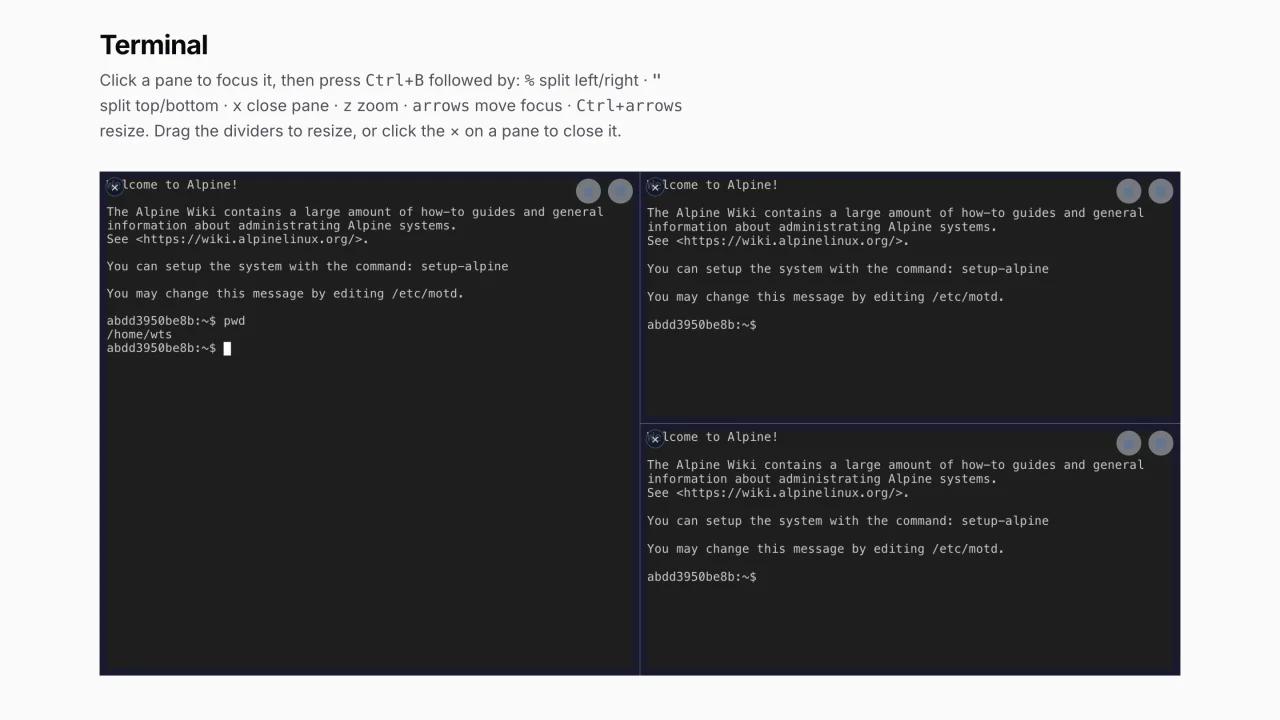
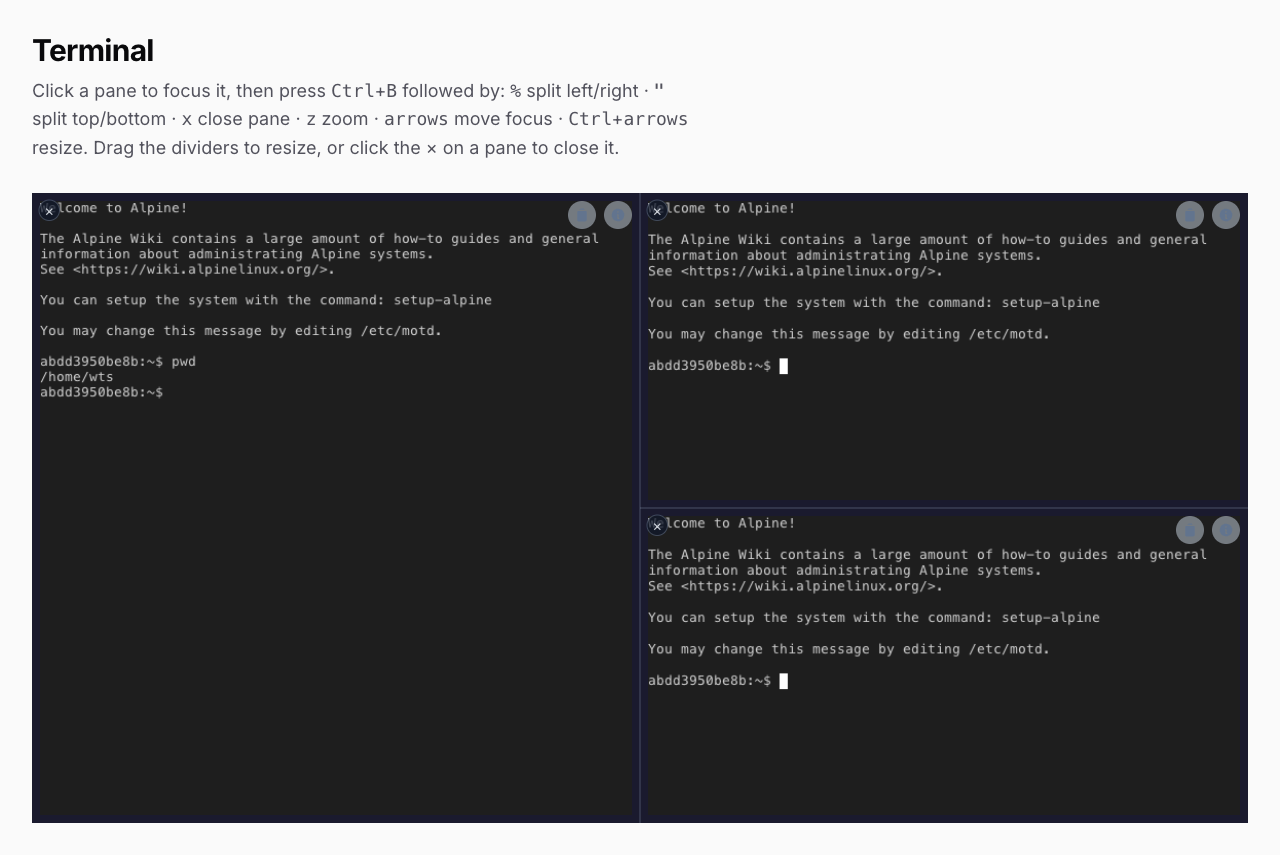
TerminalWorkspacesplits into arbitrarily nested panes at runtime with configurable keyboard shortcuts (prefixCtrl+Bby default): split, close, zoom, directional focus, keyboard + drag resize; every pane is an isolated PTY - Static terminal grids —
TerminalGridcomposes fixed multi-terminal dashboards in a flush CSS grid - Scripts — reusable command sequences in a header dropdown, with optional
confirmBeforeRunconfirmation gates - Connection lifecycle auditing —
TerminalConnectedEvent/TerminalDisconnectedEvent, database logging, and a ready-made Filament Terminal Logs resource with stats widgets - Multi-tenant logging — optional tenant column + resolver for SaaS applications
- Theming — pass any ghostty-web theme (background, foreground, fontSize, palette) per terminal
- Filament integration — plugin with a Terminal page and Logs resource, or embed the schema component in any Filament page/form
- Localization — English and Portuguese (BR) translations included
- Dark mode — full dark mode support via Filament
Warning — this is real shell access
This package hands the browser a live shell on a real server. Anything the PHP user (or the SSH user) can do, the terminal user can do: modify files, change configuration, stop services, delete data.
Unlike
mwguerra/web-terminal's Classic mode, this package intentionally has no command whitelisting — a raw PTY cannot be meaningfully whitelisted (shells have aliases, expansions, editors that spawn shells, …), so pretending otherwise would be false security. Access control is the boundary:
- Restrict the pages that embed a terminal to trusted technical personnel (Filament panel auth, policies).
- Define a
useStreamTerminalGate — it is checked before every WebSocket token is issued.- Keep the WebSocket server bound to
127.0.0.1behind a reverse proxy, or firewall its port.- Keep
stream.allowed_originsaccurate — browser WebSocket handshakes from other origins are rejected with 403 before the auth token is consumed.- Keep connection logging enabled for an audit trail.
Use at your own risk. The authors are not responsible for any damage, data loss, or security incidents resulting from the use of this package.
#Installation
#Composer
composer require mwguerra/web-terminal-stream
The WebSocket server's ReactPHP stack (react/socket, react/event-loop, ratchet/rfc6455) is a hard requirement and installs automatically.
#Interactive installer
php artisan terminal-stream:install
The installer publishes the config file and the terminal_stream_logs migration, and can scaffold a custom Terminal page and/or TerminalLogs resource into your app.
All flags:
# Choose components explicitly (non-interactive)
php artisan terminal-stream:install --config --migration --no-interaction

# Publish + run the migration
php artisan terminal-stream:install --config --migration --migrate --no-interaction

# Multi-tenant migration (adds tenant_id column) / explicitly without
php artisan terminal-stream:install --with-tenant
php artisan terminal-stream:install --no-tenant

# Publish Blade views for customization
php artisan terminal-stream:install --views

# Scaffold a custom Terminal page / TerminalLogs resource in your app
php artisan terminal-stream:install --page --resource --panel=admin

# Overwrite existing files
php artisan terminal-stream:install --force
#Manual setup
php artisan vendor:publish --tag=web-terminal-stream-config
php artisan vendor:publish --tag=web-terminal-stream-views   # optional
php artisan vendor:publish --tag=web-terminal-stream-lang    # optional
php artisan migrate
#The WebSocket server
The terminal cannot work without the PTY bridge. Start it from the same application (it shares the app's cache and APP_KEY with the HTTP side):
php artisan terminal-stream:serve                       # default 127.0.0.1:8090
php artisan terminal-stream:serve --host=0.0.0.0 --port=8090
For production, supervise it:
# Supervisor
[program:terminal-stream-serve]
command=php /path/to/artisan terminal-stream:serve
autostart=true
autorestart=true
user=www-data
redirect_stderr=true
stdout_logfile=/var/log/terminal-stream-serve.log
# systemd
[Unit]
Description=Web Terminal Stream WebSocket Server
After=network.target

[Service]
ExecStart=/usr/bin/php /path/to/artisan terminal-stream:serve
Restart=always
User=www-data

[Install]
WantedBy=multi-user.target
#SSL / WSS
When your app is served over HTTPS, browsers require the terminal WebSocket to be WSS. Two options:
-
Reverse proxy (recommended): keep the server on
127.0.0.1:8090and terminate TLS at nginx/Caddy, then point the package at the public URL:WEB_TERMINAL_STREAM_WEBSOCKET_URL=wss://your-domain.test/terminal-wslocation /terminal-ws { proxy_pass http://127.0.0.1:8090; proxy_http_version 1.1; proxy_set_header Upgrade $http_upgrade; proxy_set_header Connection "upgrade"; proxy_read_timeout 3600s; } -
Direct TLS: give the server a certificate and it serves WSS itself:
WEB_TERMINAL_STREAM_SSL_CERT=/path/to/cert.crt
WEB_TERMINAL_STREAM_SSL_KEY=/path/to/cert.key
WEB_TERMINAL_STREAM_WEBSOCKET_URL=wss://your-domain.test:8090
#Origin allow-list
The server validates the Origin header of every browser WebSocket handshake against stream.allowed_origins (default: [env('APP_URL', 'http://localhost')]). A handshake from an origin not on the list is rejected with HTTP 403 — and logged at warning level — before the single-use auth token is consumed, so a malicious page in a logged-in user's browser cannot open a socket even if it managed to obtain a token.
Matching is exact on the normalized origin (scheme + case-insensitive host + port, with default ports filled in per scheme — https://app.test and https://app.test:443 are the same origin). Requests without an Origin header (non-browser clients, CLI tooling) are allowed through — browsers always send Origin on WebSocket upgrades, so this does not weaken browser-facing CSRF protection; the encrypted single-use token remains the auth gate.
// config/web-terminal-stream.php
'stream' => [
    'allowed_origins' => [
        env('APP_URL', 'http://localhost'),
        'https://admin.example.com',
    ],
],
A literal '*' entry disables the check entirely — an escape hatch for reverse-proxy setups that strip or rewrite the Origin header. An empty (or missing) list also disables the check, so a published config predating this key keeps working; republish the config to get the secure default.
Because this is an array, it is config-file-only — there is no WEB_TERMINAL_STREAM_* env var for it (env vars carry scalars). Reference env('APP_URL') or your own env-driven values inside the published config file instead.
#Connection policy — what a token may connect to
Beyond who may open a terminal (the useStreamTerminal gate), the security config block constrains what a terminal may connect to. It is enforced at token issuance and re-checked on the server before a PTY starts, so a token minted for a disallowed target is refused even if issuance were bypassed.
// config/web-terminal-stream.php
'security' => [
    // Allow local-shell terminals at all. Set false to expose SSH only, so the
    // app host's own shell is never reachable through the browser.
    'allow_local' => env('WEB_TERMINAL_STREAM_ALLOW_LOCAL', true),

    // SSH destination allow-list. Empty = any host (NOT recommended in
    // production — the server becomes an SSH/SSRF pivot). List exact
    // hostnames/IPs, optionally as "host:port" to pin the port.
    'ssh_allowed_hosts' => ['bastion.internal', 'db-1.internal:2222'],

    // Rate limit for the ws-token issuance route: "<maxAttempts>,<minutes>".
    'token_rate_limit' => env('WEB_TERMINAL_STREAM_TOKEN_RATE_LIMIT', '30,1'),
],
#SSH host-key verification
phpseclib does not verify server host keys by default, so with mode left at off an outbound SSH session is open to a man-in-the-middle. Turn it on with either pinned fingerprints or an OpenSSH known_hosts file:
'security' => [
    'ssh_host_key' => [
        'mode' => env('WEB_TERMINAL_STREAM_SSH_HOSTKEY_MODE', 'off'), // off | known_hosts | fingerprints

        // mode = known_hosts
        'known_hosts_path' => env('WEB_TERMINAL_STREAM_SSH_KNOWN_HOSTS', '/etc/ssh/ssh_known_hosts'),

        // mode = fingerprints (per host, or "host:port"; SHA256 or MD5)
        'fingerprints' => [
            'bastion.internal' => 'SHA256:l1C7yZJ+mCVTwIunDQ0ZzytglTeg5SloW66Iwm874pc',
        ],
    ],
],
A key that does not match aborts the connection before authentication.
#Resource limits
The server is a single long-running process holding one PTY per connection. Cap it so a runaway client cannot exhaust the host:
'stream' => [
    'max_connections' => env('WEB_TERMINAL_STREAM_MAX_CONNECTIONS', 100),        // total live PTYs (0 = unlimited)
    'max_sessions_per_user' => env('WEB_TERMINAL_STREAM_MAX_SESSIONS_PER_USER', 10),
    'max_handshake_bytes' => env('WEB_TERMINAL_STREAM_MAX_HANDSHAKE_BYTES', 16384),
    'max_session_lifetime' => 3600,  // PTYs older than this are reaped and their sockets closed
],
#Operating in production
- Shared cache +
APP_KEY. The HTTP app issues the single-use token and caches the (encrypted) connection config;terminal-stream:servepulls it back. They must share the same cache store andAPP_KEY— run the server from the same deployment, and do not use thearraycache driver. A per-request cache (or a mismatched key) means every handshake fails. - Single point of failure. By default the server is one process; if it dies, every live terminal drops. Supervise it (above) so it restarts. Since 1.1.1 you can also run several workers on one node (see Scaling); across nodes there is still no clustering, so pin each browser to its node's WebSocket URL.
- Capability check. On boot the server prints warnings if
ext-posix/ext-pcntlare missing or the host is not Linux (local-shell PTY resizing needs/proc+stty). SSH connections are unaffected by these. - Log retention. Connection logs accumulate in
terminal_stream_logs; scheduleterminal-stream:logs:cleanup(see Retention & cleanup). - Health. A simple liveness check is a TCP connect to the server's
host:port; there is no HTTP health endpoint.
#Scaling: workers, and what actually limits you
Two different things bound this server, and they have different fixes.
Output delivery — fixed in 1.1.1. Until then the server polled every session every 10ms and each SSH read waited out its own timeout, so an idle terminal cost as much as a busy one and latency grew with the number of open terminals. Sessions are now registered with the event loop and wake it only when bytes arrive. Measured at 100 concurrent sessions: round-trip p50 went 1877ms → 264ms. Nothing to configure — stream.io_mode defaults to event, with poll kept as an escape hatch.
Connection establishment — bounded, not removed. A session's SSH connect + auth runs synchronously on its event loop, so while one session connects, every other session on that loop stalls. Workers bound the damage:
php artisan terminal-stream:serve --workers=4 # or stream.workers
Each worker is an independent server sharing the port through SO_REUSEPORT, supervised by the parent (a dead worker is replaced; SIGTERM shuts the fleet down gracefully). With N workers a connect storm freezes 1/N of the fleet, and phpseclib's crypto spreads across cores. Start with the number of cores you are willing to give the terminal server.
Because workers share nothing, max_connections and max_sessions_per_user are per worker: 4 × 100 is a fleet ceiling of 400.
When to add workers. Watch sweep_ms and connect_ms in the health widget below, not just the session count. The hard cap refuses at 100%, but the experience degrades well before it, so the useful trigger is sustained saturation above ~60%, or a connect_ms p95 that users would notice as a freeze.
#Fleet metrics and the health widget
Every worker publishes a snapshot — live sessions by type, SSH connect p50/p95, loop sweep p50/p95, refusals by reason, uptime — which the app reads without ever talking to a server process:
use MWGuerra\WebTerminalStream\Filament\Widgets\TerminalServerHealthWidget;

// Any Filament panel:
->widgets([TerminalServerHealthWidget::class])
use MWGuerra\WebTerminalStream\Metrics\MetricsReader;

$fleet = MetricsReader::make()->read();   // aggregate, for your own dashboards/alerts
Read the numbers this way:
connect_msis not the latency of the person connecting — it is how long everyone else on that worker is frozen. It is the metric that makes the synchronous-connect limit visible.sweep_msis the loop's own heartbeat. Climbing sweeps mean a worker running out of headroom, before any user complains.refusedis capacity actually denied to a user. It should be zero.- A worker that stops publishing is reported as stale, never merged: fleet totals and capacity are derived from workers actually alive, so a dead worker cannot contribute phantom headroom.
- Percentiles with no samples report
null, not0— an unmeasured latency must not read as an excellent one.
#Environment variables
| Variable | Config key | Default |
|---|---|---|
WEB_TERMINAL_STREAM_RATCHET_HOST |
stream.ratchet_host |
127.0.0.1 |
WEB_TERMINAL_STREAM_RATCHET_PORT |
stream.ratchet_port |
8090 |
WEB_TERMINAL_STREAM_WEBSOCKET_URL |
stream.websocket_url |
null (built from host/port) |
WEB_TERMINAL_STREAM_SSL_CERT |
stream.ssl_cert |
null |
WEB_TERMINAL_STREAM_SSL_KEY |
stream.ssl_key |
null |
WEB_TERMINAL_STREAM_SHELL |
stream.shell |
/bin/bash |
WEB_TERMINAL_STREAM_CWD |
stream.working_directory |
null (falls back to getcwd()) |
WEB_TERMINAL_STREAM_LOGGING |
logging.enabled |
true |
WEB_TERMINAL_STREAM_LOG_CONNECTIONS |
logging.log_connections |
true |
WEB_TERMINAL_STREAM_LOG_DISCONNECTIONS |
logging.log_disconnections |
true |
WEB_TERMINAL_STREAM_LOG_ERRORS |
logging.log_errors |
true |
WEB_TERMINAL_STREAM_MAX_OUTPUT_LOG |
logging.max_output_length |
10000 |
WEB_TERMINAL_STREAM_LOG_RETENTION |
logging.retention_days |
90 |
WEB_TERMINAL_STREAM_SHORTCUTS |
workspace.shortcuts.enabled |
true |
WEB_TERMINAL_STREAM_ALLOW_LOCAL |
security.allow_local |
true |
WEB_TERMINAL_STREAM_TOKEN_RATE_LIMIT |
security.token_rate_limit |
30,1 |
WEB_TERMINAL_STREAM_SSH_HOSTKEY_MODE |
security.ssh_host_key.mode |
off |
WEB_TERMINAL_STREAM_SSH_KNOWN_HOSTS |
security.ssh_host_key.known_hosts_path |
null |
WEB_TERMINAL_STREAM_MAX_CONNECTIONS |
stream.max_connections |
100 |
WEB_TERMINAL_STREAM_MAX_SESSIONS_PER_USER |
stream.max_sessions_per_user |
10 |
WEB_TERMINAL_STREAM_MAX_HANDSHAKE_BYTES |
stream.max_handshake_bytes |
16384 |
WEB_TERMINAL_STREAM_IO_MODE |
stream.io_mode |
event |
WEB_TERMINAL_STREAM_BACKSTOP_SWEEP |
stream.backstop_sweep_seconds |
0.25 |
WEB_TERMINAL_STREAM_WORKERS |
stream.workers |
1 |
WEB_TERMINAL_STREAM_METRICS_INTERVAL |
stream.metrics_interval_seconds |
5 |
WEB_TERMINAL_STREAM_METRICS_STALE_AFTER |
metrics.stale_after_seconds |
30 |
Non-env config keys: stream.max_session_lifetime (default 3600 — stale PTYs older than this are killed by the server's cleanup pass), stream.signed_url_ttl (default 300 — lifetime of a WebSocket auth token), stream.allowed_origins (default [env('APP_URL', 'http://localhost')] — see the Origin allow-list section; it's an array, so config-file-only), security.ssh_allowed_hosts and security.ssh_host_key.fingerprints (arrays — see Connection policy and SSH host-key verification).
#Usage
#Filament plugin
use MWGuerra\WebTerminalStream\WebTerminalStreamPlugin;

public function panel(Panel $panel): Panel
{
    return $panel
        ->plugins([
            WebTerminalStreamPlugin::make(),
        ]);
}
The plugin registers a Terminal page and a Terminal Logs resource. Configure it fluently:
WebTerminalStreamPlugin::make()
    // Navigation
    ->terminalNavigation(icon: 'heroicon-o-command-line', label: 'Console', sort: 10, group: 'Tools')
    ->terminalLogsNavigation(icon: 'heroicon-o-document-text', label: 'Console Logs', sort: 11, group: 'Tools')

    // Disable pieces
    ->withoutTerminalPage()
    ->withoutTerminalLogs()

    // Or register only specific components
    ->components([
        \MWGuerra\WebTerminalStream\Filament\Resources\TerminalLogResource::class,
    ]);
WebTerminalStreamPlugin::current() returns the registered instance from inside pages/components.
#The schema component
WebTerminalStream::make() is the public entry point. It works in any Filament schema (pages, forms):
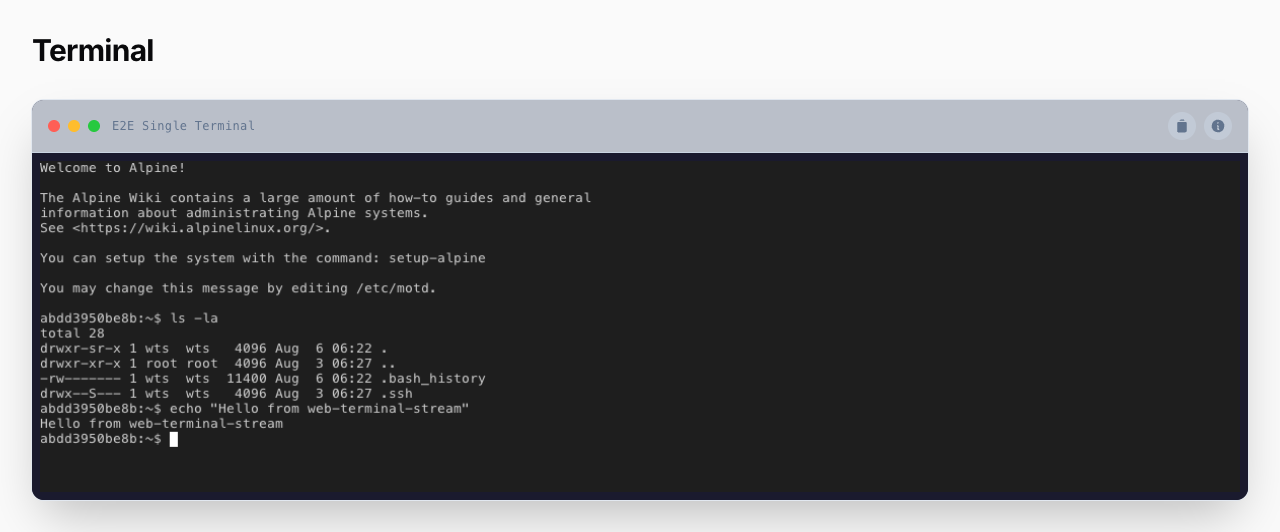
use MWGuerra\WebTerminalStream\Schemas\Components\WebTerminalStream;

public function schema(Schema $schema): Schema
{
    return $schema->components([
        WebTerminalStream::make()
            ->key('app-terminal')
            ->local()
            ->workingDirectory(base_path())
            ->height('500px')
            ->title('Application Console')
            ->log(enabled: true, connections: true, identifier: 'app-terminal'),
    ]);
}
For a custom page, extend the package page and override schema() (or run php artisan terminal-stream:make-page):
php artisan terminal-stream:make-page ServerConsole --panel=admin --key=server-console
#Standalone (without Filament schemas)
Mount the Livewire component directly:
<livewire:web-terminal-stream
    :connection-config="['type' => 'local']"
    height="400px"
    title="Terminal"
/>
Or use the builder in any Blade view:
use MWGuerra\WebTerminalStream\Livewire\TerminalBuilder;

{!! (new TerminalBuilder)
    ->local()
    ->title('Console')
    ->height('400px')
    ->render() !!}
TerminalBuilder shares the exact same fluent API as the schema component (same traits) plus key(string) for a stable Livewire key.
#Connections
// Local shell
WebTerminalStream::make()->local()

// SSH with password (named parameters)
WebTerminalStream::make()->ssh(
    host: '192.168.1.100',
    username: 'deploy',
    password: 'secret',
    port: 22,
)

// SSH with private key (+ optional passphrase)
WebTerminalStream::make()->ssh(
    host: 'prod.example.com',
    username: 'deploy',
    privateKey: file_get_contents('/path/to/id_ed25519'),
    passphrase: 'optional-passphrase',
)

// SSH with an array (extra keys: timeout, working_directory, environment)
WebTerminalStream::make()->ssh([
    'host' => 'prod.example.com',
    'username' => 'deploy',
    'private_key' => Storage::get('keys/deploy'),
    'port' => 2222,
    'working_directory' => '/var/www',
    'environment' => ['APP_ENV' => 'production'],
])

// SSH with a Closure — resolved at render time, credentials never sit in the schema
WebTerminalStream::make()->ssh(fn () => [
    'host' => config('servers.prod.host'),
    'username' => config('servers.prod.user'),
    'private_key' => decrypt(config('servers.prod.key')),
])

// Value object
use MWGuerra\WebTerminalStream\Data\ConnectionConfig;

WebTerminalStream::make()->connection(
    ConnectionConfig::sshWithKey(host: 'example.com', username: 'deploy', privateKey: $key)
)
ConnectionConfig has static factories local(), sshWithPassword(), sshWithKey() and validates required fields.
#Fluent API reference
| Method | Description | Default |
|---|---|---|
key(string) |
Stable wire:key (auto-generated web-terminal-stream-XXXXXXXX otherwise) |
random |
local() |
Local shell connection | this is the default |
ssh(...) |
SSH connection — named params, array, or Closure | — |
connection(array|Closure|ConnectionConfig) |
Set the raw connection config | ['type' => 'local'] |
workingDirectory(string|Closure|null) |
Initial working directory for the shell | null |
height(string|Closure) |
Terminal height (CSS value) | '400px' |
title(string|Closure) |
Header title | 'Terminal' |
chrome(TerminalChrome|Closure) |
Full, Minimal (no window dots), or None (no header) |
Full |
frameless() |
Shorthand for chrome(TerminalChrome::None) |
— |
squareCorners(bool|Closure) |
Drop outer border-radius for flush grid tiling | false |
theme(array|Closure) |
ghostty-web theme (background, foreground, fontSize, palette…) |
[] |
scripts(array|Closure) |
Script definitions for the header dropdown | [] |
log(enabled:, connections:, identifier:, metadata:) |
Per-terminal logging overrides (see Logging) | config defaults |
logMetadata(array|Closure) |
Metadata attached to every log entry | [] |
connectionBehavior(ConnectionBehavior|Closure) |
Manual, Auto, or Always — see Connection behavior |
Always |
#Connection behavior
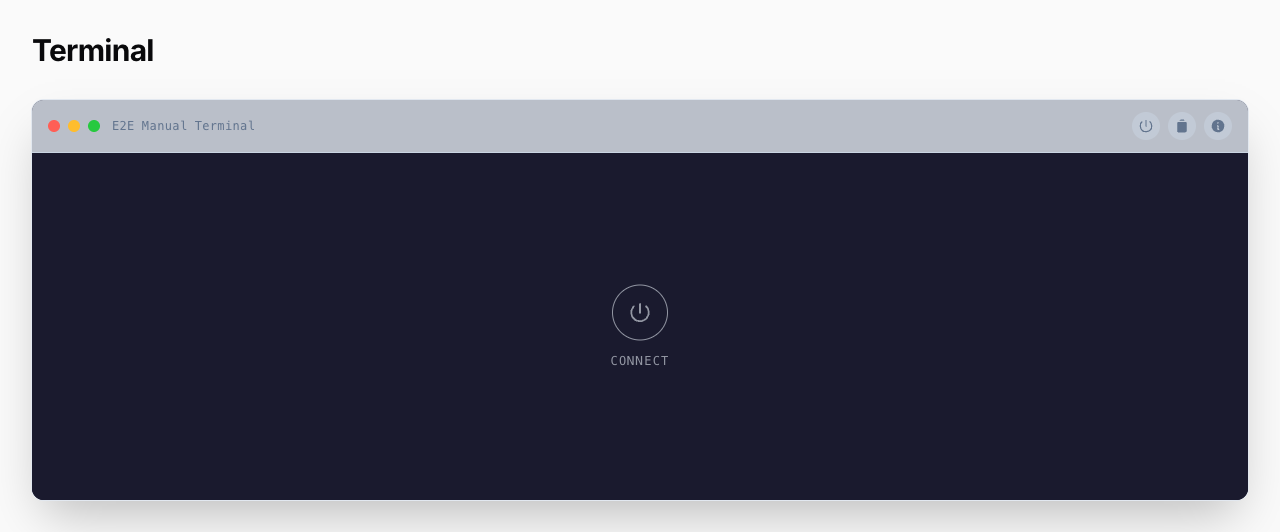
connectionBehavior() controls when the WebSocket (and therefore the PTY) opens and what connection UI the user sees:
use MWGuerra\WebTerminalStream\Enums\ConnectionBehavior;

WebTerminalStream::make()
    ->local()
    ->connectionBehavior(ConnectionBehavior::Manual)
Always(default) — auto-connects when the terminal scrolls into view; no connection controls. This matches the package's original always-auto-connect behavior, so existing code is unaffected.Auto— auto-connects on visibility and shows a connect/disconnect toggle. After a disconnect, a centered Reconnect affordance appears over the canvas.Manual— nothing happens on mount: no canvas boot, no WebSocket, no PTY, and no connection log rows. A centered, theme-colored Connect affordance sits in the terminal body; clicking it fetches a token, opens the socket, and swaps in the live canvas. A dashboard full ofManualpanes costs zero server processes until someone actually opens one.
The connect/disconnect toggle follows TerminalChrome: it renders as a header action when a header exists (Full/Minimal) and joins the floating overlay controls when frameless(). Disconnecting closes the WebSocket cleanly from the client (close code 1000); the server terminates the PTY on the socket close, exactly as it does for navigation teardown.
#Chrome levels
TerminalChrome controls how much UI surrounds the canvas:
Full— header with macOS-style window dots, title, and action buttons.Minimal— header without the dots.None— no header at all; the actions (scripts, copy, info, connect toggle) float over the canvas top-right.
Combined with squareCorners(), frameless terminals tile edge-to-edge — the building block for tmux-like multi-pane layouts.
#Tiled layouts — TerminalGrid
TerminalGrid lays out multiple terminals in a flush CSS grid — the tmux look, without manual plumbing:
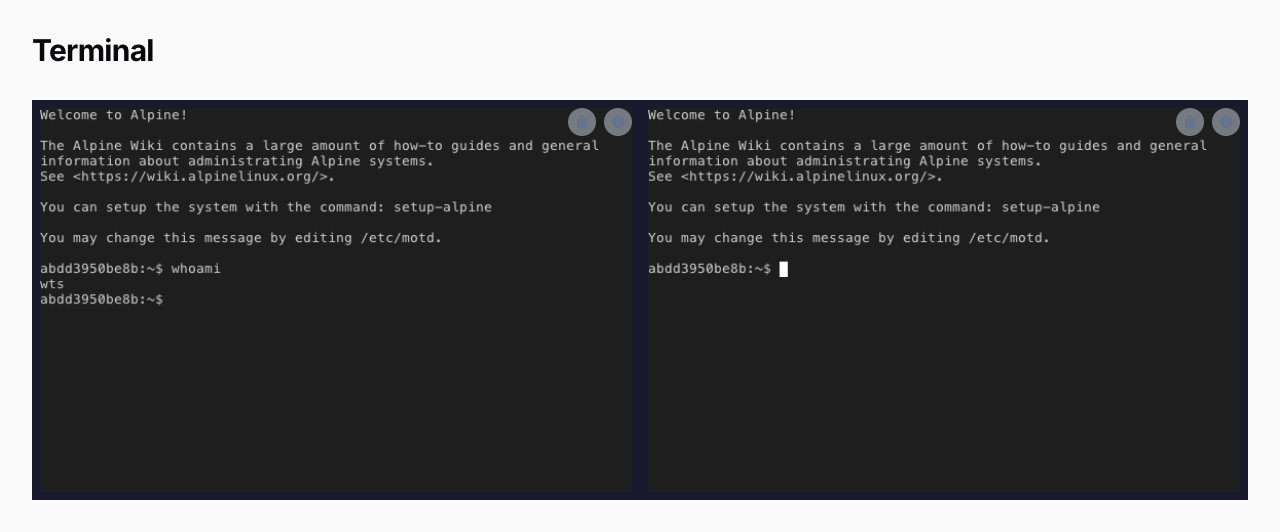
use MWGuerra\WebTerminalStream\Enums\ConnectionBehavior;
use MWGuerra\WebTerminalStream\Schemas\Components\TerminalGrid;
use MWGuerra\WebTerminalStream\Schemas\Components\WebTerminalStream;

TerminalGrid::make()
    ->columns(2)                                        // Filament-style, responsive arrays work too
    ->height('600px')                                   // rows share it equally
    ->connectionBehavior(ConnectionBehavior::Manual)    // panes connect on click, not on load
    ->panes([
        WebTerminalStream::make()->key('pane-1')->local(),
        WebTerminalStream::make()->key('pane-2')->local(),
        WebTerminalStream::make()->key('pane-3')->ssh(host: 'staging', username: 'deploy', privateKey: $key),
        WebTerminalStream::make()->key('pane-4')->local(),
    ])
What the grid does for you:
- Flush panes by default — every pane gets
frameless()+squareCorners()automatically. A pane that explicitly set its ownchrome()/squareCorners()keeps its setting. columns(int|array)— Filament-style responsive columns (default2), e.g.->columns(['md' => 2, 'xl' => 3]).paneGap(int $px)— pixel gap between panes.0(default) is the flush tmux look;->paneGap(1)renders 1px dividers via the grid container background (override the color with the--wts-grid-dividerCSS variable).height(string)— grid height; rows share it equally and panes without an explicitheight()stretch to fill their row.connectionBehavior(...)— forwarded to every pane that didn't set its own, so a dashboard ofManualpanes doesn't spawn N PTYs on page load.- Focused-pane ring — the pane owning keyboard focus gets a subtle ring (pure CSS
:focus-within; color via--wts-grid-focus-ring). - Key isolation — every pane keeps its unique auto-generated wire:key. Give panes explicit
->key()s when you need stable identities.
Manual composition still works — TerminalGrid is sugar; arranging frameless()->squareCorners() terminals inside your own Filament\Schemas\Components\Grid (or any layout) remains fully supported. For runtime splitting (the real tmux experience), use TerminalWorkspace below.
#tmux-style workspaces — TerminalWorkspace
TerminalWorkspace is one terminal that splits into arbitrarily nested panes at runtime, driven by configurable keyboard shortcuts — a tmux session in your Filament panel. Every pane is a fully isolated terminal: its own WebSocket, its own PTY, zero interference with siblings.
use MWGuerra\WebTerminalStream\Data\Keymap;
use MWGuerra\WebTerminalStream\Schemas\Components\TerminalWorkspace;

TerminalWorkspace::make()
    ->ssh(host: 'staging', username: 'deploy', privateKey: $key)
    ->height('70vh')
    ->maxPanes(6)
The workspace starts with a single pane described by the same fluent API as WebTerminalStream (connection, theme(), scripts(), log(), connectionBehavior()). New panes clone the pane they were split from (tmux semantics) — or use a template:
TerminalWorkspace::make()
    ->ssh(host: 'prod', username: 'deploy', privateKey: $key)   // first pane
    ->defaultPane(fn (TerminalBuilder $pane) => $pane->local()->title('Scratch'))  // every split
#Default shortcuts (tmux preset)
Press the prefix (Ctrl+B), then:
| Key | Action |
|---|---|
% |
Split side-by-side |
" |
Split stacked |
x |
Close the focused pane |
z |
Zoom the focused pane fullscreen (toggle; siblings stay live) |
arrows / h j k l |
Move focus between panes |
Ctrl+arrows |
Resize the focused pane |
| prefix again | Send a literal prefix byte to the shell |
While the prefix is armed, the workspace shows a badge and a ring; unbound keys are swallowed (tmux fidelity) and the armed state times out after 1.5s. Dividers between panes are also drag-resizable with the pointer.
#Customizing the keymap
Fluent (wins) → config/web-terminal-stream.php workspace.shortcuts → tmux preset:
use MWGuerra\WebTerminalStream\Data\Keymap;
use MWGuerra\WebTerminalStream\Enums\PaneAction;

TerminalWorkspace::make()
    ->local()
    ->keymap(
        Keymap::tmux()
            ->prefix('ctrl+a')                          // screen-style leader
            ->bind(PaneAction::SplitVertical, '|', 'v') // multiple keys per action
            ->unbind(PaneAction::ClosePane)             // disable an action
    )
    ->shortcuts(false)  // or kill all shortcuts without losing the map
Key strings are lowercase, +-joined modifiers (ctrl, alt, shift, meta) plus a KeyboardEvent.key value: 'ctrl+b', 'shift+arrowleft', '%'. The same shape works in the config file, keyed by the PaneAction values.
#Workspace fluent reference
| Method | Description | Default |
|---|---|---|
local() / ssh(...) / connection(...) |
Connection of the first pane (and the clone base) | local |
height(string|Closure) |
Workspace height; panes fill their computed rects | '600px' |
theme() / scripts() / log() / connectionBehavior() |
Forwarded to every pane | — |
maxPanes(int|Closure) |
Hard pane ceiling, enforced server-side on every split | workspace.max_panes (9) |
keymap(Keymap|array|Closure) |
Shortcut map | config → tmux preset |
shortcuts(bool|Closure) |
Enable/disable all shortcuts | true |
defaultPane(Closure) |
Template for newly split panes (receives a fresh TerminalBuilder) |
clone split source |
Security model: the browser can only ever send a pane id, an orientation, and divider ratios. A new pane's connection config is derived server-side from Livewire-locked state (the split source or the build-time template) — never from client input — and every split re-checks the useStreamTerminal gate. Config knobs: workspace.max_panes, workspace.min_pane_ratio (a pane can't shrink below this share), workspace.resize_step (keyboard resize increment).
Planned next increments (not in this release): per-user layout persistence.
#Toggle dashboards — TerminalDashboard
TerminalDashboard is a roster of named terminal sources (each a distinct connection), each opened or closed by a button. The open panes are auto-arranged by how many are open — you choose the layout per count:
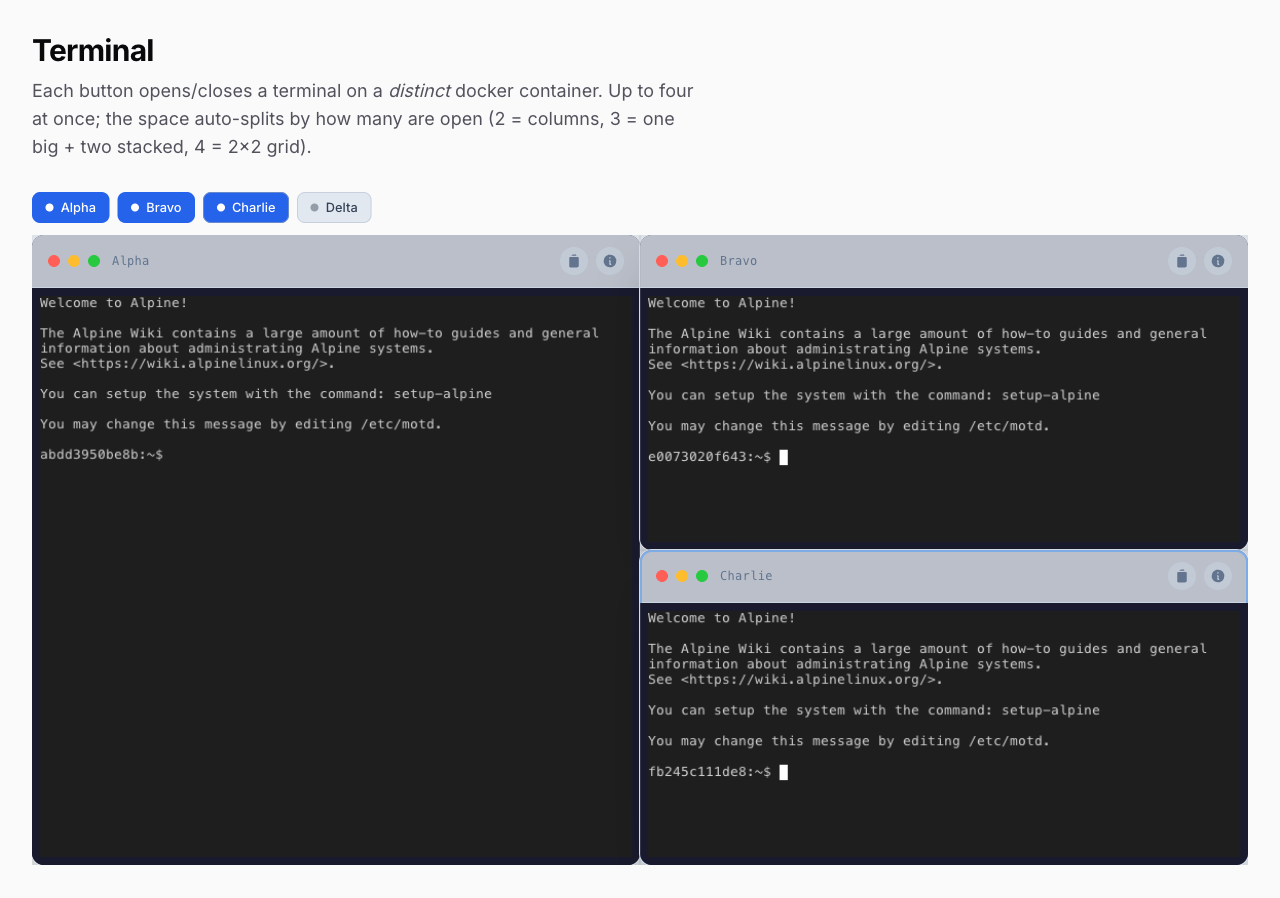
use MWGuerra\WebTerminalStream\Schemas\Components\TerminalDashboard;
use MWGuerra\WebTerminalStream\Schemas\Components\WebTerminalStream;

TerminalDashboard::make()
    ->maxOpen(4)
    ->sources([
        'web'   => WebTerminalStream::make()->title('Web')->ssh(host: 'web-01', username: 'deploy', privateKey: $key),
        'db'    => WebTerminalStream::make()->title('Database')->ssh(host: 'db-01', username: 'deploy', privateKey: $key),
        'cache' => WebTerminalStream::make()->title('Cache')->ssh(host: 'cache-01', username: 'deploy', privateKey: $key),
        'queue' => WebTerminalStream::make()->title('Queue')->ssh(host: 'queue-01', username: 'deploy', privateKey: $key),
    ])
    ->defaultOpen(['web'])                           // which start open (default: the first)
    ->arrangement([                                  // how the space splits, per open-pane count
        2 => 'columns',
        3 => 'main-left',
        4 => 'tiled',
    ], default: 'tiled')
    ->theme(TokyoNight::make())                      // optional: forwarded to panes + dividers
- Clicking a button opens that source's terminal, or closes it — closing destroys the pane, its WebSocket, and its PTY.
- Layout presets (from
LayoutTree::arrange()):tiled(2 = columns; 3 = one tall left + two stacked right; 4 = even 2×2 grid),columns(even side-by-side),rows(even stacked),main-left(big left + stacked right),main-top. All produce even ratios. Thearrangementmap picks a preset per count; anything unlisted uses thedefault. maxOpenis capped at 4 and enforced server-side; opening re-checks theuseStreamTerminalgate. Each source's connection config stays server-side in the connection vault — the browser only ever holds an opaque handle.
Planned next increment (not in this release): per-user layout persistence, shared with the workspace.
#Theming
theme() accepts a TerminalTheme object (recommended) or a raw ghostty colors array. The theme object controls the terminal font, colors, and the pane divider styling in one place, with fluent partial overrides that keep every other default:
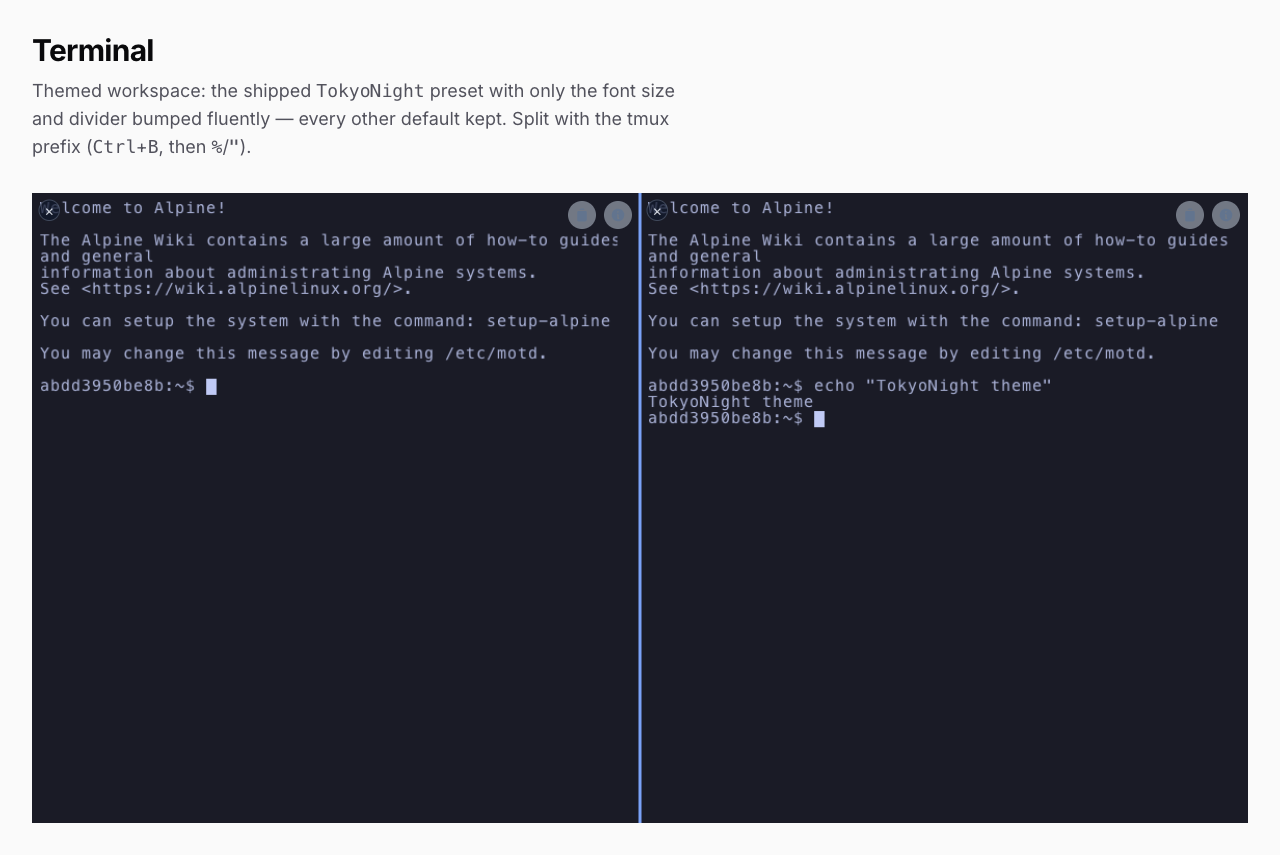
use MWGuerra\WebTerminalStream\Themes\TerminalTheme;

WebTerminalStream::make()
    ->local()
    ->theme(
        TerminalTheme::make()
            ->fontFamily('JetBrains Mono, monospace')
            ->fontSize(14)
            ->background('#1a1b26')
            ->foreground('#a9b1d6')
    )
Shipped presets — start from one and tweak only what you need:
use MWGuerra\WebTerminalStream\Themes\TokyoNight;

TerminalWorkspace::make()
    ->local()
    ->theme(TokyoNight::make()->fontSize(15)->dividerWidth(2))   // keeps every other TokyoNight default
Themes\TokyoNight and Themes\Dracula are included.
Ship your own theme as a subclass — override the defaults you care about, inherit the rest; it stays fluently tweakable:
namespace App\Terminal;

use MWGuerra\WebTerminalStream\Themes\TerminalTheme;

final class BrandTheme extends TerminalTheme
{
    protected string $fontFamily = 'Berkeley Mono, monospace';
    protected string $background = '#0b1021';
    protected string $foreground = '#c7d2fe';
    protected string $dividerColor = '#312e81';
}

// then: ->theme(BrandTheme::make())  — or BrandTheme::make()->fontSize(16)
What the theme controls
| Fluent method | Applies to | Default |
|---|---|---|
fontFamily(string) |
terminal font | ui-monospace, … |
fontSize(int) |
terminal font size (px) | 13 |
background(string) / foreground(string) |
terminal + surface | #1a1a2e / #e2e8f0 |
cursor(?string) / selectionBackground(?string) |
terminal | none |
palette(array) |
extra ghostty theme keys (ANSI palette) | [] |
dividerWidth(int) |
pane divider line thickness (px) | 1 |
dividerStyle(string) |
divider line style (solid, dashed, …) |
solid |
dividerColor(string) |
pane divider line | slate |
dividerFocusColor(string) |
focused-pane ring + hovered/dragged divider | blue |
On TerminalWorkspace and TerminalGrid, the terminal look is forwarded to every pane that didn't set its own, and the divider styling is emitted as CSS custom properties (--wts-divider-width/-style/-color/-focus, --wts-terminal-bg) on the container — so app-side CSS can override them too. A raw colors array (->theme(['background' => '#000'])) still works for just the ghostty terminal theme.
#Scripts
Scripts are predefined command sequences exposed in a dropdown in the terminal header. Commands are typed into the PTY exactly as if the user had typed them, one per line:
use MWGuerra\WebTerminalStream\Data\Script;

WebTerminalStream::make()
    ->local()
    ->scripts([
        Script::make('deploy')
            ->label('Deploy to Production')
            ->description('Pull, install, migrate, cache')
            ->commands([
                'git pull origin main',
                'composer install --no-dev',
                'php artisan migrate --force',
                'php artisan config:cache',
            ])
            ->confirmBeforeRun(),

        Script::make('logs')
            ->label('Tail Laravel Log')
            ->commands(['tail -f storage/logs/laravel.log']),
    ])
Plain arrays work too: ['key' => 'logs', 'label' => 'Tail Log', 'commands' => [...], 'confirmBeforeRun' => true].
Options the Stream terminal honors:
| Option | Description |
|---|---|
key |
Unique identifier (required) |
label |
Display name in the dropdown |
description |
Secondary line in the dropdown |
commands |
The command strings sent to the PTY |
confirmBeforeRun() |
First click arms an inline Confirm/Cancel prompt; only Confirm runs the script |
The Script DTO accepts additional options inherited from the parent package (icon, stopOnError, elevated, requiredCommands, willDisconnect, beforeMessage, disconnectMessage); they are carried through but not currently rendered or enforced by the Stream UI — since commands are raw PTY input, there is no per-command exit-code tracking. The confirmation gate is UX, not a security control: a connected user already has a full shell.
#Connection custody — credentials never reach the browser
A resolved connection config can hold an SSH password or a private key. Since 1.1.0 it never becomes Livewire component state: ResolvesTerminalProperties hands it to the ConnectionVault, and the components keep only an opaque 64-char handle (connectionRef).
Why this changed. Before 1.1.0 the config sat in a
#[Locked] public array $connectionConfig.#[Locked]prevents the client from writing a property back — it does not keep it off the wire. Livewire serializes every public property into thewire:snapshotattribute it renders, so the SSH host, username and private key were present in the page HTML of every terminal, dashboard and workspace (including dashboard sources nobody had opened). See CHANGELOG.
The vault stores the config encrypted in the cache, under the SHA-256 of the handle, bound to the identity that created it — a handle lifted from one user's page resolves to nothing for anyone else. The window slides on each read (stream.connection_ttl, default 2h idle), and once it lapses the terminal reports that it needs a reload rather than connecting to anything else.
Nothing changes in your code: ->ssh(...), ->local() and the standalone @livewire('web-terminal-stream', ['connectionConfig' => [...]]) form all still work. Only reads of the old property have to move:
// Before                                   After
$component->connectionConfig;            // $component->connectionConfig()
$props['connectionConfig'];              // app(ConnectionVault::class)->get($props['connectionRef'])
If your app only uses the schema components, also close the client-supplied path on the token route:
// config/web-terminal-stream.php
'security' => [
    'allow_client_supplied_connections' => false,
],
That endpoint accepts a whole connection config from the caller (the documented standalone flow). With an empty ssh_allowed_hosts it lets anyone past the Gate use the app server as an SSH pivot, so turn it off when nothing needs it.
#Authorization
Define a useStreamTerminal Gate to control who may open a terminal session. It is checked every time a WebSocket token is requested:
use Illuminate\Support\Facades\Gate;

Gate::define('useStreamTerminal', fn ($user) => $user->isAdmin());
No Gate defined = allowed (protect your pages regardless).
#Logging & Auditing
Connection lifecycle events (connect/disconnect) are recorded to the terminal_stream_logs table. There is no command-level logging — the stream is a raw byte pipe with no command boundaries.
#Per-terminal configuration
WebTerminalStream::make()
    ->local()
    ->log(
        enabled: true,
        connections: true,
        identifier: 'admin-console',       // shows up in the Logs resource
        metadata: ['server' => 'web-01'],  // merged into every entry
    )

// Every parameter accepts a Closure for deferred evaluation
->log(enabled: fn () => auth()->user()->isAuditable())

// Metadata alone
->logMetadata(['environment' => app()->environment()])
Per-terminal values override the logging.* config defaults. Set logging.terminals to a list of identifiers to log only specific terminals.
#Events
StreamTerminal dispatches standard Laravel events you can listen to:
use MWGuerra\WebTerminalStream\Events\TerminalConnectedEvent;
use MWGuerra\WebTerminalStream\Events\TerminalDisconnectedEvent;

Event::listen(TerminalConnectedEvent::class, function (TerminalConnectedEvent $event) {
    // $event->sessionId, ->connectionType, ->host, ->port, ->sshUsername,
    // ->userId, ->terminalIdentifier, ->ipAddress, ->metadata
});
MWGuerra\WebTerminalStream\Listeners\TerminalLogListener is an opt-in event subscriber that writes the same log entries — don't register it if you keep the built-in direct logging enabled, or you'll get duplicates.
#The Logs resource
The Filament Terminal Logs resource lists entries with filters (event type, connection type, user, terminal, date range), a detail view, and stats widgets:
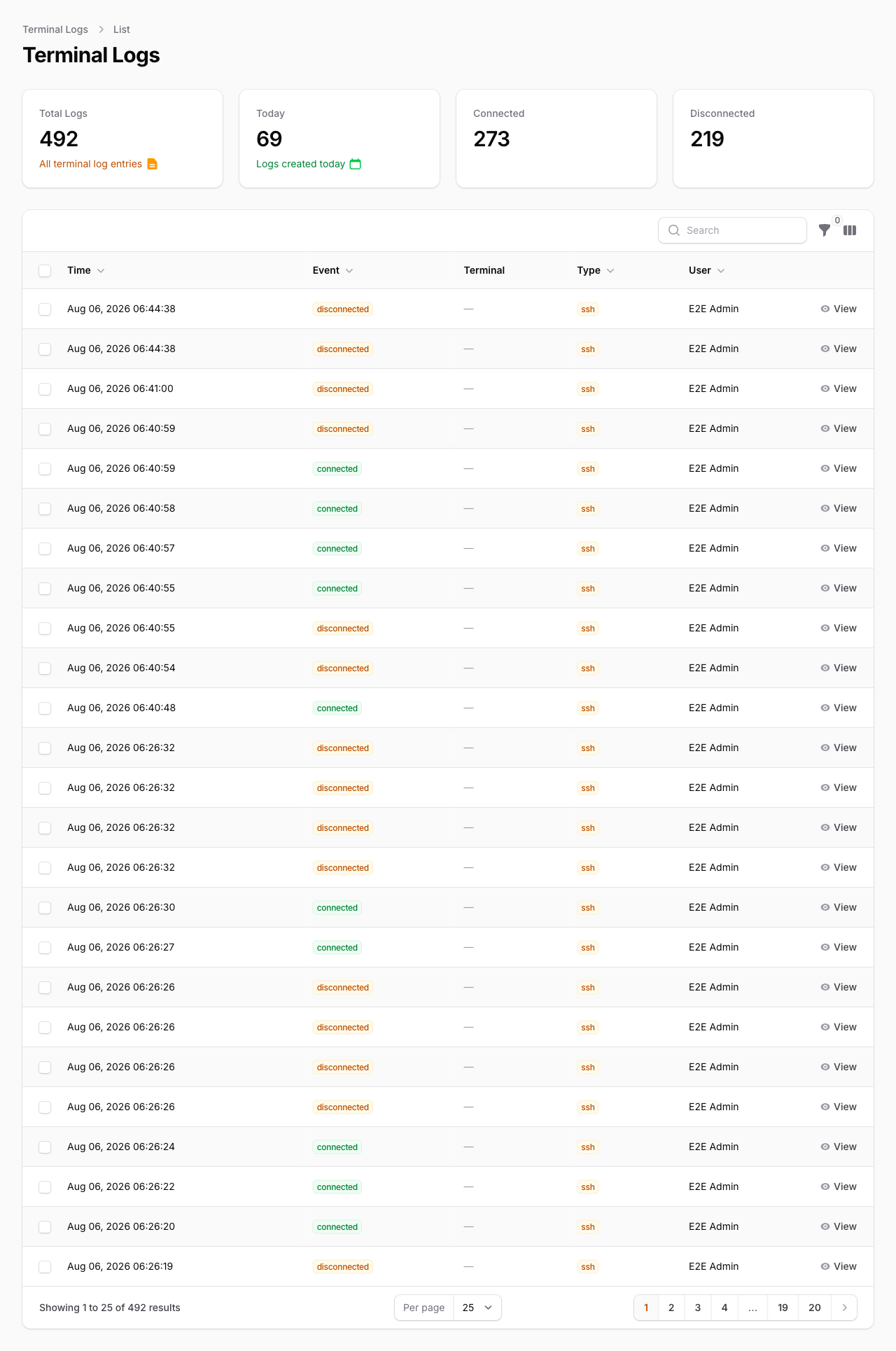
Query the model directly with its scopes:
use MWGuerra\WebTerminalStream\Models\TerminalLog;

TerminalLog::forSession($sessionId)->get();
TerminalLog::forTerminal('admin-console')->recent(48)->get();
TerminalLog::forUser($userId)->connections()->get();
#Retention & cleanup
php artisan terminal-stream:logs:cleanup             # uses logging.retention_days (default 90)
php artisan terminal-stream:logs:cleanup --days=30
php artisan terminal-stream:logs:cleanup --dry-run   # count only, delete nothing
Schedule it:
Schedule::command('terminal-stream:logs:cleanup')->daily();
#Multi-tenant support
// config/web-terminal-stream.php
'logging' => [
    'tenant_column' => 'tenant_id',
    'tenant_resolver' => fn () => auth()->user()?->tenant_id,   // or an invokable class name
],
Install the tenant-aware migration with php artisan terminal-stream:install --with-tenant, then filter with TerminalLog::forTenant($tenantId).
#Troubleshooting
The terminal shows but never connects
- Is
php artisan terminal-stream:serverunning — in the same app/env as the web request? The server decrypts tokens withAPP_KEYand reads the connection config from the app cache; a different.envor cache store breaks both. - Check the browser console: a failing
ws:///wss://connect will log[StreamTerminal]errors. - Tokens are single-use with a 300s TTL (
stream.signed_url_ttl) — a stale tab needs a reload.
StreamWeb not loaded in the console / a 404 on …/web-terminal-stream.js
- The bundled JS is published by Filament under its asset id. After upgrading the package, run
php artisan filament:assetsso the browser loads the current file — a stale published asset 404s and the terminal never boots.
Address already in use when starting the server
- Another process (possibly the original
mwguerra/web-terminalserver) is on port 8090. Run this package on its own port:php artisan terminal-stream:serve --port=8091and setWEB_TERMINAL_STREAM_RATCHET_PORT=8091.
Mixed-content / immediate disconnect on HTTPS sites
- Browsers block
ws://fromhttps://pages. Configure WSS (reverse proxy orWEB_TERMINAL_STREAM_SSL_CERT/_SSL_KEY) and setWEB_TERMINAL_STREAM_WEBSOCKET_URLto thewss://endpoint.
Connection drops behind a reverse proxy
- Make sure the proxy forwards upgrade headers (
Upgrade/Connection) and has a long read timeout (proxy_read_timeout 3600s;in nginx) — idle terminals otherwise get cut.
SSH login fails
- The error is thrown server-side; check the
terminal-stream:serveoutput. Key content must be the full PEM/OpenSSH private key (not a path). Encrypted keys need thepassphraseparameter.
Orphaned shell processes after a server crash
- The server tracks PTY pids in
storage/web-terminal-stream/pty-sessions.jsonand kills stale ones (older thanstream.max_session_lifetime) on startup and every 60 seconds.
#Testing
Three layers, from fast to full-stack:
# Unit (Pest on Orchestra Testbench — no external services)
composer test
composer test:parallel
composer test:coverage

# Integration (real SSH + PTY against local Docker containers)
composer test:integration          # boots tests/docker sshd, runs tests/Integration
composer test:integration:linux    # Linux-only PTY resize tests inside the php container
composer test:integration:down     # tear the containers down

# End-to-end (Playwright against a dedicated Laravel 13 + Filament 5 app)
npm run test:e2e                   # scaffolds .e2e-app (gitignored), boots app +
                                   # WebSocket server + sshd container, runs tests/e2e

composer analyse           # PHPStan
composer format            # Laravel Pint
Integration tests skip automatically when Docker isn't running (and hard-fail on CI). The e2e app is scaffolded by the committed scripts/e2e/setup.sh and connects its terminals only to the throwaway SSH container — never to a shell on your machine. All commands typed by tests are readonly (echo, pwd, stty size, …).
#Contributing
See CONTRIBUTING.md. Found a bug? Open an issue on GitHub.
#License
Open-sourced software licensed under the MIT License.
#Author
Marcelo W. Guerra — mwguerra.com
The author
I'm a full-stack developer specializing in PHP and JavaScript, focusing on solving real-world problems through effective processes and technology. I'm a tech-driven individual who loves helping others grow. I have experience across multiple roles. I'm also a fan of cappuccinos and Coke Zero, and I'm always open to a good conversation. Learn more about some of my projects at my website.
From the same author
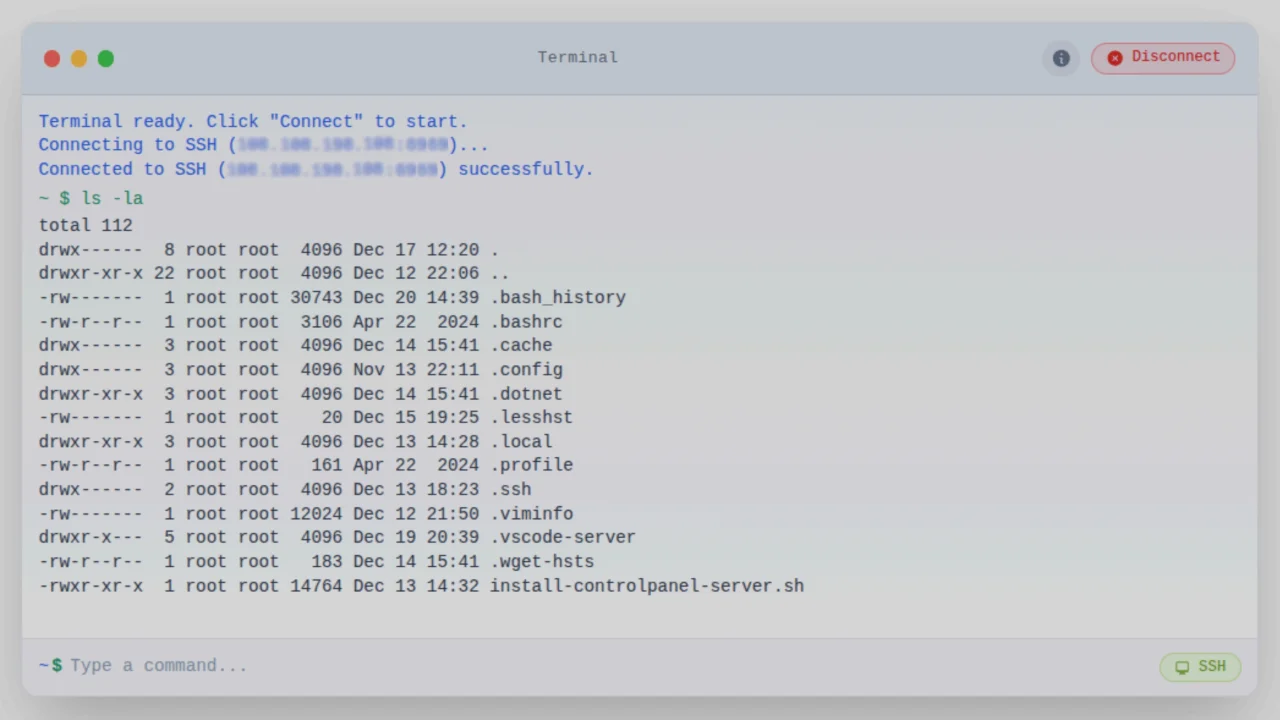
Web Terminal
A secure web terminal integration. Execute allowed commands on local systems or SSH servers with command whitelisting, audit logging, and multi-tenant support.
Author:
Marcelo Guerra
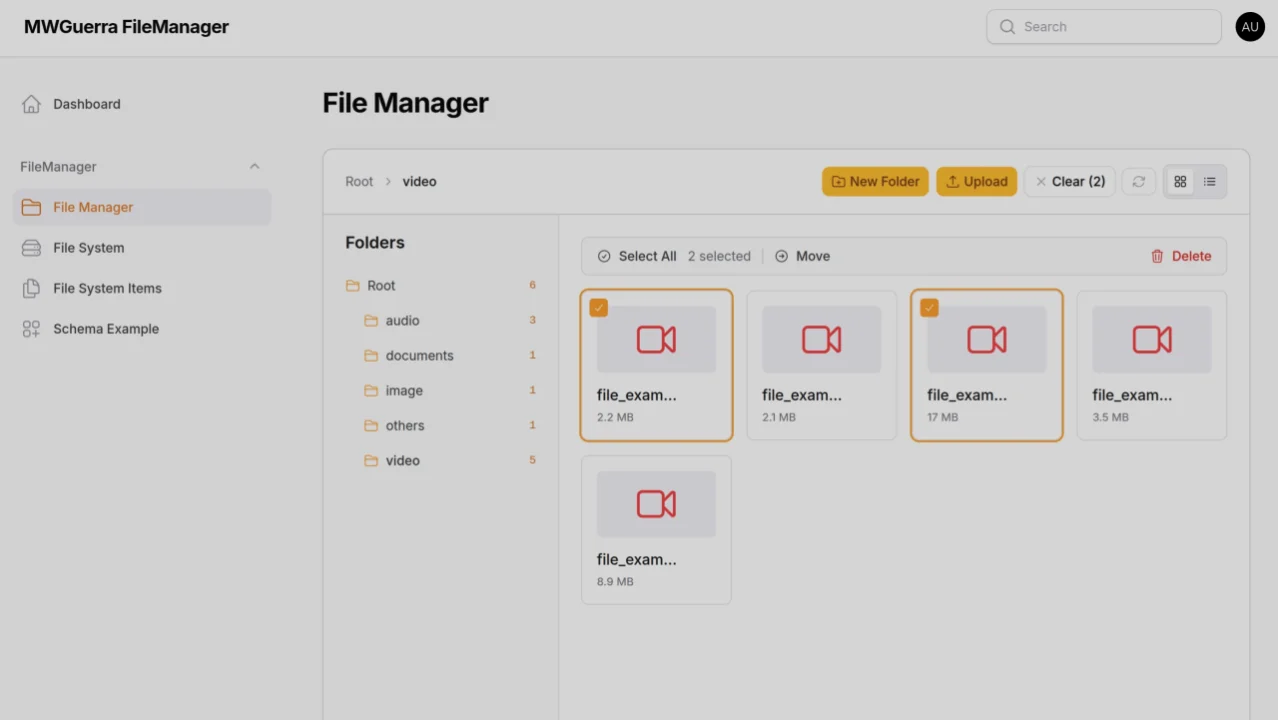
File Manager
A file manager package for organizing files and browsing storage with dual operating modes, S3/MinIO support, file previews, and drag-and-drop uploads.
Author:
Marcelo Guerra
Featured Plugins
A selection of plugins curated by the Filament team

Blueprint
Filament Blueprint is a premium Laravel Boost extension that helps AI agents produce accurate, detailed implementation plans and security reports for Filament apps.
 Filament

Compact Theme
A theme that makes data-heavy panels easier to scan by fitting more useful information on each screen.
Filament

Spotlight Pro
Browse your Filament Panel with ease. Filament Spotlight Pro adds a Spotlight like Command Palette to your Filament Panel.
 Dennis Koch

