
Resource Manger
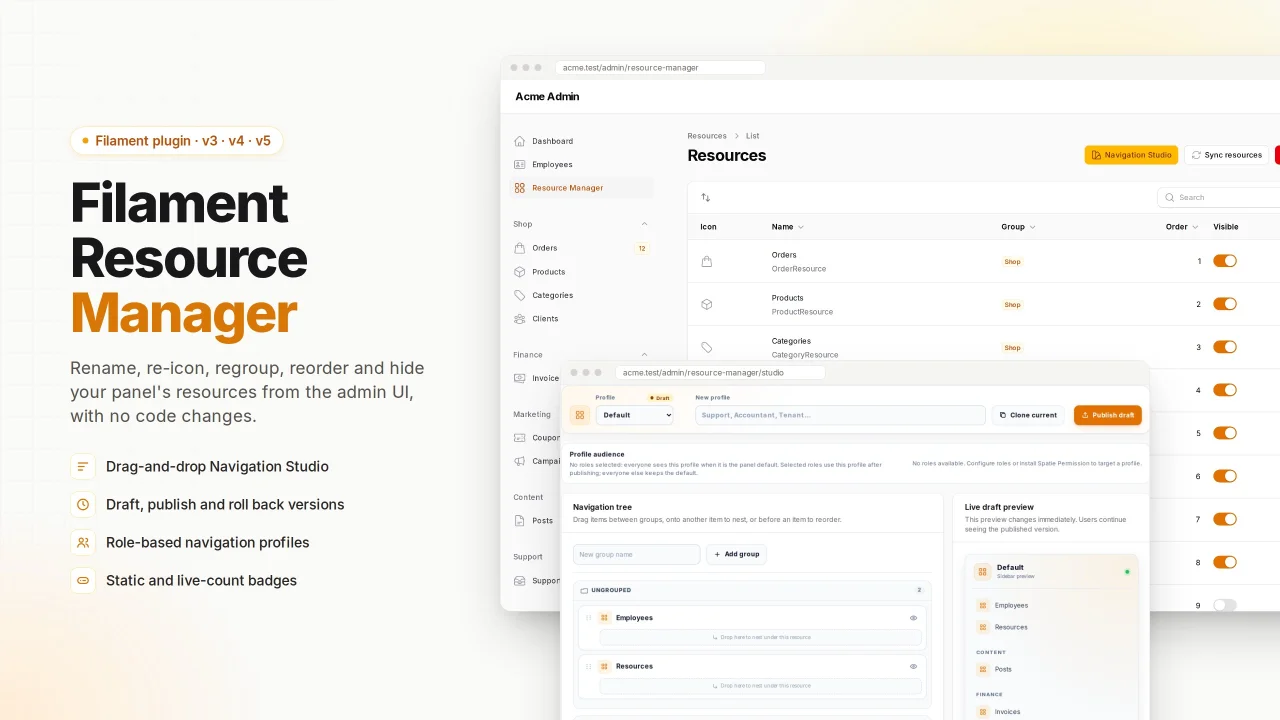
CommunityLet admins rename, re-icon, regroup, reorder, nest and hide Filament resources in the navigation from an admin UI, with no code changes. Includes live badges, role-based navigation profiles with versioning, and support for Filament v3, v4 and v5.
 Author:
msehsah
Author:
msehsah
Package health
BetaAutomated checks of this plugin's Composer package
15 checks
- Skipped: GitHub Actions pinned to SHA
- Skipped: GitLab CI includes pinned to SHA
- Skipped: Open security advisories
- Passed: Dependabot PR responsiveness — No open Dependabot PRs.
- Skipped: Renovate MR responsiveness
- Skipped: Dependabot or Renovate configured
- Skipped: Dependency update cooldown configured
- Failed: Provides a security policy — View details on Plumb
- Passed: Abandoned or archived — No consulted source marks the package abandoned (packagist, github).
- Passed: Commit and release recency — Active: last commit 0 days ago; no release date available.
-
Passed:
composer.lock not committed by library
—
composer.lockis absent from the released dist archive. - Passed: Dist archive is lean
-
Passed:
Current Laravel version supported
—
Package dependencies resolve together with current Laravel
13.0. -
Passed:
Current PHP version supported
—
Constraint
^8.1supports current PHP8.5. - Skipped: Current Symfony version supported
filament/
namespace. Review the source and install at your own risk. Found
malware or an unresolved security issue the author won't
address?
Report it
.
Documentation
- Installation
- Register the plugin
- Usage
- How it works
- Version compatibility
- Configuration
- Testing locally
- License
Let administrators rename, re-icon, regroup, reorder and hide the resources in a Filament panel's navigation — without touching a single resource class.
Every user then sees the navigation the administrator configured.
Supports Filament v3, v4 and v5 from one install.
#Installation
composer require sehsah/filament-resource-manager
php artisan vendor:publish --tag=filament-resource-manager-migrations
php artisan migrate
#Upgrading
New columns arrive as their own migrations, so an existing install re-publishes and migrates:
php artisan vendor:publish --tag=filament-resource-manager-migrations
php artisan migrate
Publishing stamps each file with the time it was published, so this leaves you
with a second copy of migrations you already ran, under new names. Every
migration here is written to tolerate that: the create migration returns early
when its table exists, and each upgrade migration only adds the columns that are
missing. You can delete the duplicates afterwards, or leave them — migrate will
record them as run without touching the database either way.
The one thing not to do is roll them back: a duplicate of the create migration
still drops the table on down().
Optionally publish the config and translations:
php artisan vendor:publish --tag=filament-resource-manager-config
php artisan vendor:publish --tag=filament-resource-manager-translations
#Register the plugin
In your panel provider:
use MahmoudSehsah\FilamentResourceManager\FilamentResourceManagerPlugin;

public function panel(Panel $panel): Panel
{
    return $panel
        // ...
        ->plugin(
            FilamentResourceManagerPlugin::make()
                ->authorize(fn (): bool => auth()->user()?->is_admin ?? false)
        );
}
Without authorize(), the package falls back to the gate ability in the config
file, and if that is null, anyone who can reach the panel can open the manager.
#Usage
Open Resource Manager in the sidebar. The table lists every resource registered on the current panel; click any row (or its edit button) to open that resource's settings page.
The table itself gives you the overview and the two quickest actions: drag a row to reorder it, and flip the Visible toggle to show or hide it.
The edit page exposes every attribute the package can apply:
| Field | Effect |
|---|---|
| Name | Replaces the sidebar label. Blank keeps the resource's own label. |
| Icon | Any icon name, e.g. heroicon-o-users. Blank keeps the resource's icon. |
| Active icon | Shown while that item is the current page. Defaults to the icon above. |
| Visible in navigation | Off hides the item from the sidebar. |
| Navigation group | Moves the item into a group. Existing groups are suggested. |
| Override the group | On with a group named above puts the item there; on with the field empty takes it out of every group. Off keeps whatever group the resource declares. |
| Parent item | Nests the item under another navigation item, by its label. |
| Order | Lower numbers first. Also set by dragging rows in the table. |
| Badge type | Choose static text or a live count from an Eloquent model. |
| Badge model and conditions | Count every record or add multiple column/operator/value conditions. All conditions are combined with AND. |
| Badge colour / tooltip | Style the static or dynamic badge and add optional explanatory text. |
Reset to defaults on the edit page clears that one resource; Reset all on the table clears every resource. Both keep the ordering.
Sync resources picks up resources added since the last visit; it also runs
automatically when the page opens (auto_sync in the config).
#Navigation Studio
Navigation Studio, from the button above the table, is the same settings seen as the sidebar: drag resources between groups, drop one onto another to nest it, toggle visibility, and watch a live preview beside it. Every drop saves a draft.
A studio layout belongs to a profile. A profile keeps a mutable draft and a history of published versions:
- Publish freezes the current draft as a new version. An unrestricted profile becomes the panel default; a role-targeted profile is used only by users with one of its selected roles. Publish a default profile first.
- Rollback on any earlier version restores it into the draft and publishes it again as a new version.
- Delete history removes one old version or all old versions after confirmation. The current published version is always protected.
- Clone starts a second profile from the current one — an alternative layout you can build up and publish when it is ready. Select its roles in Studio and publish to make it live for those roles, while everyone else keeps the default.
The table and edit page, and the studio, are two views of the same navigation:
- Saving the edit page writes into the default profile's draft as well, and the page says so. Because the published snapshot is never edited in place, the change reaches the sidebar when you publish again.
- Saving a layout in the studio writes the placement — group, nesting, order, visibility — back to the settings table, so both screens keep showing the same thing.
- Other profiles are left alone; they are alternative layouts, not copies.
Set profiles.enabled to false in the config to switch profiles off
entirely. Nothing has been published until you open the studio and publish, so
an install that never opens it behaves exactly as it did before.
From the command line:
php artisan filament-resource-manager:sync
php artisan filament-resource-manager:sync --panel=admin
Settings are stored per panel, so an admin panel and an app panel keep
separate navigation configurations.
Models used by resources on the current panel appear automatically in the dynamic badge picker. To expose a model that has no Filament resource, add it to the published config:
'dynamic_badges' => [
    'models' => [
        App\Models\Ticket::class,
        App\Models\Invoice::class => 'Invoices',
    ],
],
Dynamic badge changes are copied into profile drafts. Publish the profile from Navigation Studio when the new count is ready to become visible to users.
Hiding is a navigation setting, not an access control. A hidden resource's URLs still work for anyone allowed to visit them. Use policies or
canAccess()to actually restrict access.
#What is not covered
Only navigation is overridden. A resource's model label — the wording on its own
pages, breadcrumbs and buttons — is left alone, because the only way to change it
is to write Resource::$modelLabel, a protected static on the base Filament
class that resources share. Writing it would leak the value into every other
resource, so the package does not offer it.
#How it works
Filament resolves Filament\Navigation\NavigationManager from the container when
a panel builds its navigation. This package re-registers that binding with a
subclass, which mounts the navigation as usual — letting every resource register
its own item — and then rewrites those items before they are grouped and sorted.
Items are matched back to their resource by navigation item key where the installed Filament exposes one, and otherwise by the URL the item points at. Both are set from the resource itself, so the match holds on every version.
The obvious alternative, assigning Resource::$navigationLabel and friends, is
unsafe. Those are protected static properties on the base
Filament\Resources\Resource class, and a resource that does not redeclare one
shares the base class's storage, so writing it would leak that value into every
other resource. Navigation items are individual objects, so rewriting them has no
such crosstalk.
If anything fails — the migration has not run, the database is unreachable, a resource throws while reporting its URL — navigation renders untouched rather than breaking.
#Version compatibility
The package targets one codebase across three Filament majors. These APIs are identical in v3, v4 and v5, and the package is built on them:
Filament\Contracts\Plugin(byte-for-byte identical)NavigationManager, its container binding, andNavigationItem's mutatorsTable,TextColumn,IconColumn,ToggleColumn,reorderable()TextInput,Selectwithsearchable()/allowHtml(),Toggle(theSectionlayout component only moved namespace)Filament\Actions\Action,ListRecords/EditRecord::getHeaderActions(),Page::route()Resource::canAccess(),canViewAny(),getNavigationSort()
Four signatures did change in v4, and are handled by thin per-version subclasses
in src/Filament/V3 and src/Filament/V4 (v5 shares the v4 variant):
| v3 | v4 / v5 | |
|---|---|---|
form() |
Form $form): Form |
Schema $schema): Schema |
getNavigationIcon() |
string|Htmlable|null |
string|BackedEnum|Htmlable|null |
getNavigationGroup() |
?string |
string|UnitEnum|null |
getSlug() |
no arguments | ?Panel $panel = null |
Section |
Filament\Forms\Components |
Filament\Schemas\Components |
EditAction |
Filament\Tables\Actions |
Filament\Actions |
Resource::form() also changed — it receives a Form in v3 and a Schema in
v4/v5 — so each subclass declares its own form(), and both hand it the one
field definition in BaseResourceSettingResource::formComponents(). The two
classes that moved namespaces in v4, Section and the table's EditAction, are
resolved in Support\Compat. Support\FilamentVersion picks the right subclass
at runtime.
#Configuration
See config/filament-resource-manager.php:
table_name,model— swap the table or extend the modelprofiles— turn navigation profiles on or off, and swap their tables or modelsauto_sync— sync on page opencache— overrides are cached and flushed on every writeicons— which icon sets the picker offers, how many results a search returns, and the catalogue's cache. The list is built by scanning the sets Blade Icons has registered, so callIconCatalog::flush()after installing a new oneexcluded_resources— resource classes the manager should ignoregate— an ability checked when noauthorize()closure is setnavigation— the manager's own icon, group, sort, slug and registration
#Testing locally
composer install
vendor/bin/phpunit
vendor/bin/pint --test
#Signature compatibility
PHP enforces override compatibility when a class loads, so a signature mismatch
is a fatal error the moment a panel boots — and only on one Filament major,
which is easy to miss. tests/Compatibility loads the package's classes against
stand-ins whose signatures are copied from each major's source, so PHP does the
checking. It needs nothing installed but PHP:
for v in 3 4 5; do FIL_MAJOR=$v php tests/Compatibility/run.php; done
Re-run it whenever you add a method that overrides something Filament declares.
Note that it only checks that classes load and that signatures line up — it
never calls a page's mount(), so a call to a method Filament does not declare
still needs the PHPUnit suite to catch it.
#License
MIT. See LICENSE.md.
Featured Plugins
A selection of plugins curated by the Filament team

Custom Dashboards
Let your users build and share their own dashboards with a drag-and-drop interface. Define your data sources in PHP and let them do the rest.
 Filament

Spotlight Pro
Browse your Filament Panel with ease. Filament Spotlight Pro adds a Spotlight like Command Palette to your Filament Panel.
 Dennis Koch

Soft Theme
A theme that gives panels a warm, approachable look with rounded shapes, gentle colors, and serif headings.
Filament

