
Jalali
CommunityAdd Jalali / Shamsi calendar to Filament's DateTime column, and DateTimePicker.
 Author:
Mo Khosh
Author:
Mo Khosh
Package health
BetaAutomated checks of this plugin's Composer package
15 checks
- Failed: GitHub Actions pinned to SHA — View details on Plumb
- Skipped: GitLab CI includes pinned to SHA
- Passed: Open security advisories
- Passed: Dependabot PR responsiveness — No open Dependabot PRs.
- Skipped: Renovate MR responsiveness
- Failed: Dependabot or Renovate configured — No dependency updater configuration found. View details on Plumb
- Skipped: Dependency update cooldown configured
- Failed: Provides a security policy — View details on Plumb
- Passed: Abandoned or archived — No consulted source marks the package abandoned (packagist, github).
- Passed: Commit and release recency — Active: last commit 0 days ago; last release 0 days ago.
-
Passed:
composer.lock not committed by library
—
composer.lockis absent from the released dist archive. - Passed: Dist archive is lean
-
Passed:
Current Laravel version supported
—
Package dependencies resolve together with current Laravel
13.0. -
Passed:
Current PHP version supported
—
Constraint
^8.2supports current PHP8.5. - Skipped: Current Symfony version supported
filament/
namespace. Review the source and install at your own risk. Found
malware or an unresolved security issue the author won't
address?
Report it
.
Documentation
- Installation
- Usage
- Ignoring Jalali Conversion
- Configuring the Format Globally
- Filament 4 Custom Theme Integration
- Credits
- License



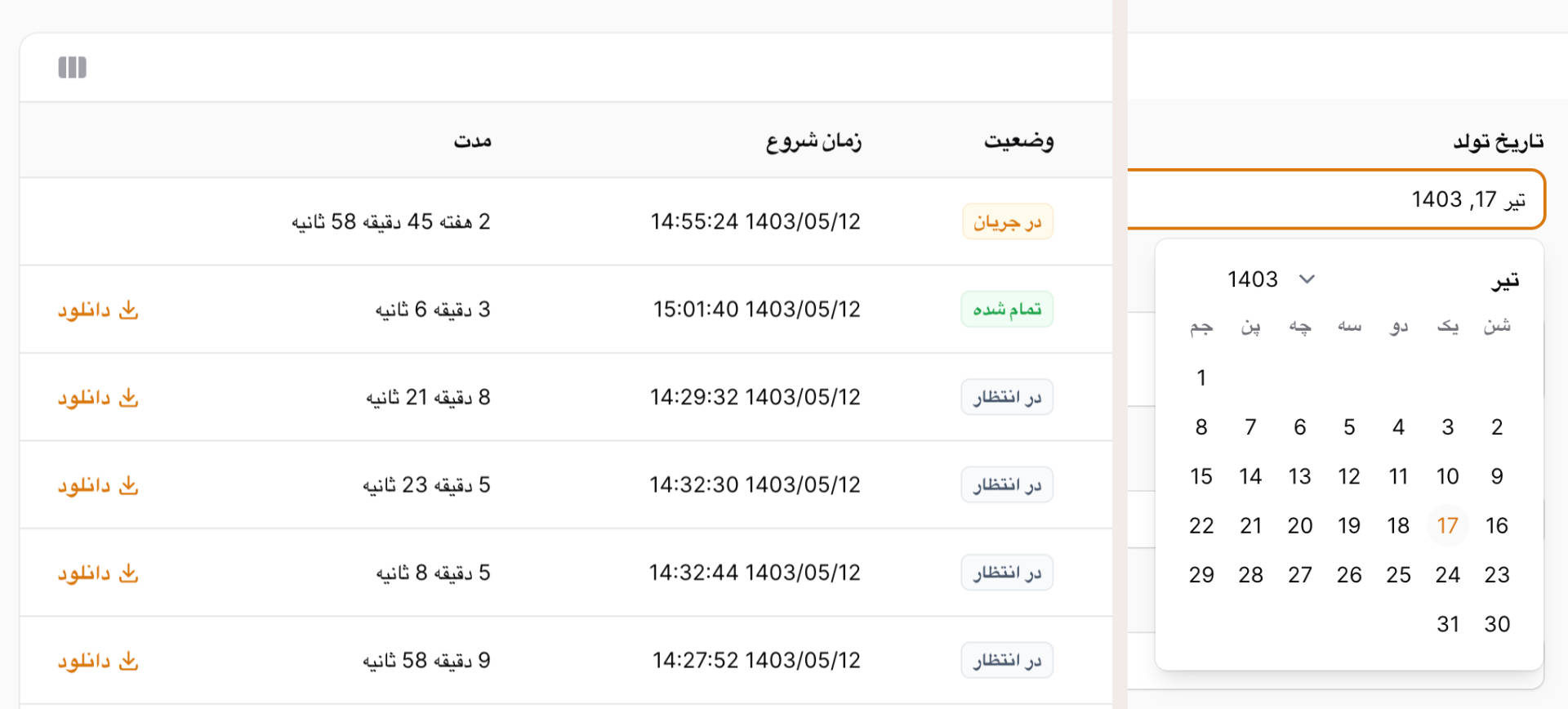
No fuss package to add Jalali Date and DateTime columns to your table, and a beautiful Jalali Date and DateTime picker to your forms.
No new column type, just keep using your good old TextColumns!
No new form components, just keep using your beautiful DatePickers and DateTimePickers!
#Installation
You can install the package via composer:
composer require mokhosh/filament-jalali
#Usage
To add Jalali date and date-time columns to your tables, just add jalaliDate and jalaliDateTime to the filament TextColumns instead of date or dateTime.
// Yes! Just use Filament's original TextColumns!
use Filament\Tables;

Tables\Columns\TextColumn::make('created_at')
    ->jalaliDate(),
Tables\Columns\TextColumn::make('updated_at')
    ->jalaliDateTime(),
To add Jalali date and date-time columns to your infolists, just add jalaliDate and jalaliDateTime to the filament TextEntrys instead of date or dateTime.
use Filament\Infolists\Components;

Components\TextEntry::make('created_at')
    ->jalaliDate(),
Components\TextEntry::make('updated_at')
    ->jalaliDateTime(),
To add Jalali date and date-time pickers to your forms, just add jalalito your DatePicker and DateTimePicker.
// Yes! Just use Filament's original DatePickers and DateTimePickers!
use Filament\Forms;

Forms\Components\DatePicker::make('moderated_at')
    ->jalali(),
Forms\Components\DateTimePicker::make('published_at')
    ->jalali(),
#Ignoring Jalali Conversion
If you want to ignore jalali conversion you can use the when and unless methods:
use Filament\Tables;
use Filament\Infolists\Components;
use Filament\Forms;
use Illuminate\Support\Facades\App;

Tables\Columns\TextColumn::make('created_at')
    ->date()
    ->when(App::isLocale('fa'), fn (TextColumn $column) => $column->jalaliDate()),

Components\TextEntry::make('updated_at')
    ->dateTime()
    ->unless(App::isLocale('en'), fn (TextColumn $column) => $column->jalaliDateTime()),

Forms\Components\DatePicker::make('birthday')
    ->when(App::isLocale('fa'), fn (TextColumn $column) => $column->jalali()),
#Configuring the Format Globally
You can set the default date formats for tables, infolists and date/time pickers anywhere you want, likely in a service provider:
public function boot(): void
{
    Table::$defaultDateDisplayFormat = 'Y/m/d';
    Table::$defaultDateTimeDisplayFormat = 'Y/m/d H:i:s';

    Infolist::$defaultDateDisplayFormat = 'Y/m/d';
    Infolist::$defaultDateTimeDisplayFormat = 'Y/m/d H:i:s';

    DateTimePicker::$defaultDateDisplayFormat = 'Y/m/d';
    DateTimePicker::$defaultDateTimeDisplayFormat = 'Y/m/d H:i';
    DateTimePicker::$defaultDateTimeWithSecondsDisplayFormat = 'Y/m/d H:i:s';
}
Some common formats you might want to use:
j F Y ۱۵ مهر ۱۳۶۸
Y/m/d ۱۳۶۸/۰۷/۱۵
l j F شنبه ۱۵ مهر
#Filament 4 Custom Theme Integration
Filament 4 uses a new theme system. To include filament-jalali’s styles in your Filament admin panel, do the following:
#1. Create a custom Filament theme
Run the artisan command:
php artisan make:filament-theme
Follow the instructions to create your custom theme (e.g., FilamentTheme).
#2. Import filament-jalali styles in your theme’s CSS file
Add this line to your generated theme CSS file (usually something like resources/css/filament/admin/theme.css):
@source '../../../../vendor/mokhosh/filament-jalali/resources/**/*';
This imports all CSS/SCSS from the filament-jalali package.
#3. Add the theme CSS file to your Vite input in vite.config.js
Edit your vite.config.js:
export default defineConfig({
    // ...
    build: {
        rollupOptions: {
            input: [
                // other inputs ...
                'resources/css/filament/admin/theme.css',
            ],
        },
    },
    // ...
});
#4. Register the compiled theme CSS file in your Filament panel provider
In your panel service provider (e.g., App\Providers\FilamentServiceProvider), add:
use Filament\Panel;

public function panel(Panel $panel): Panel
{
    return $panel
        // other panel config ...
        ->viteTheme('resources/css/filament/admin/theme.css');
}
#5. Compile your assets with Vite
Run:
npm run build
or for development:
npm run dev
#Credits
#License
The MIT License (MIT). Please see License File for more information.
The author
I've been tinkering around with computers for almost 30 years. I'm currently enjoying the TALL stack plus Filament as my goto development stack. mysadaqa is one of the websites I created using the TALL stack.
From the same author

Rating
Add beautiful and customizable rating fields and columns to your forms and tables.
Author:
Mo Khosh

Kanban
Easily add kanban board pages to your Filament panels.
Author:
Mo Khosh
Featured Plugins
A selection of plugins curated by the Filament team

Custom Dashboards
Let your users build and share their own dashboards with a drag-and-drop interface. Define your data sources in PHP and let them do the rest.
 Filament

Blueprint
Filament Blueprint is a premium Laravel Boost extension that helps AI agents produce accurate, detailed implementation plans and security reports for Filament apps.
Filament

Advanced Tables (formerly Filter Sets)
Supercharge your tables with powerful features like user-customizable views, quick filters, multi-column sorting, advanced table searching, convenient view management, and more. Compatible with Resource Panel Tables, Relation Managers, Table Widgets, and Table Builder!
 Kenneth Sese

