
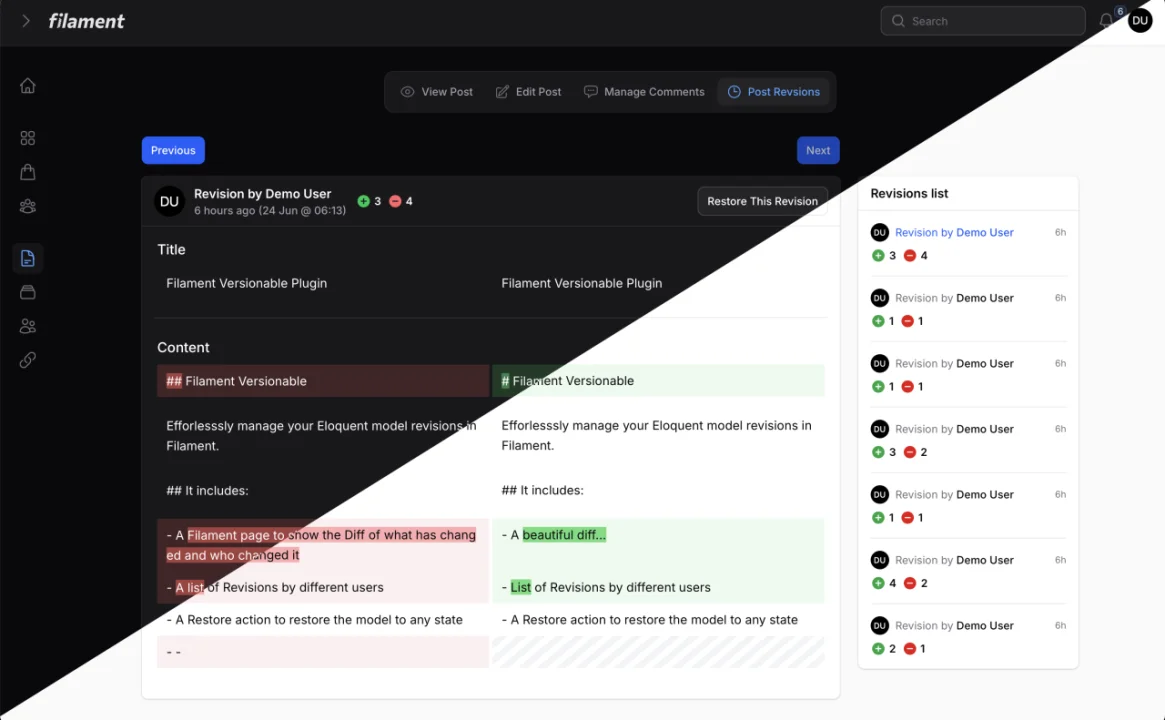
Versionable by Mansoor Khan
CommunityEffortlessly manage revisions of your Eloquent models in Filament.
 Author:
Mansoor Khan
Author:
Mansoor Khan
Package health
Automated checks of this plugin's Composer package
15 checks
- Failed: GitHub Actions pinned to SHA — View details on Plumb
- Skipped: GitLab CI includes pinned to SHA
- Passed: Open security advisories
- Failed: Dependabot PR responsiveness — Stale Dependabot PRs: oldest general PR is 207 days old. View details on Plumb
- Skipped: Renovate MR responsiveness
- Passed: Dependabot or Renovate configured
-
Failed:
Dependency update cooldown configured
—
No cooldown configured in
.github/dependabot.yml. View details on Plumb - Passed: Provides a security policy
- Passed: Abandoned or archived — No consulted source marks the package abandoned (packagist, github).
- Warning: Commit and release recency — Low activity: last commit 164 days ago; last release 181 days ago.
-
Passed:
composer.lock not committed by library
—
composer.lockis absent from the released dist archive. - Warning: Dist archive is lean
-
Passed:
Current Laravel version supported
—
Package dependencies resolve together with current Laravel
13.0. -
Passed:
Current PHP version supported
—
Constraint
^8.2supports current PHP8.5. - Skipped: Current Symfony version supported
filament/
namespace. Review the source and install at your own risk. Found
malware or an unresolved security issue the author won't
address?
Report it
.
Documentation
- Installation
- Usage
- Customisation
- Strip Tags from Diff
- Testing
- Changelog
- Contributing
- Security Vulnerabilities
- Credits
- License




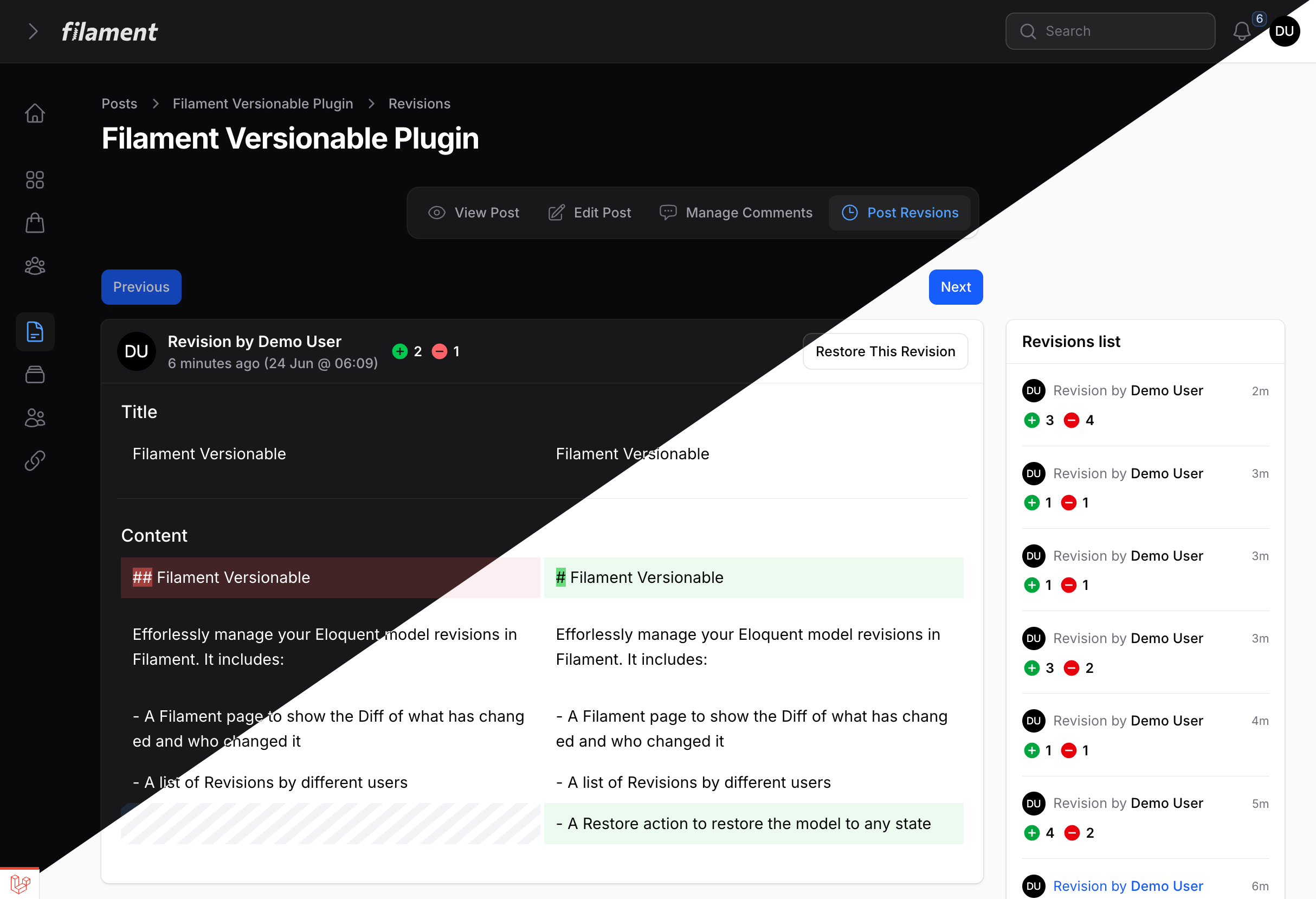
Efforlessly manage your Eloquent model revisions in Filament. It includes:
- A Filament page to show the Diff of what has changed and who changed it
- A list of Revisions by different users
- A Restore action to restore the model to any state
#Installation
You can install the package via composer:
composer require mansoor/filament-versionable
Then, publish the config file and migrations:
php artisan vendor:publish --provider="Overtrue\LaravelVersionable\ServiceProvider"
Run the migration command:
php artisan migrate
Important
If you have not set up a custom theme and are using Filament Panels follow the instructions in the Filament Docs first.
After setting up a custom theme add the plugin's views and css to your theme css file.
@import '../../../../vendor/mansoor/filament-versionable/resources/css/plugin.css';
@source '../../../../vendor/mansoor/filament-versionable/resources/**/*.blade.php';
#Usage
Add Overtrue\LaravelVersionable\Versionable trait to your model and set $versionable attributes.
NOTE: Make sure to add protected $versionStrategy = VersionStrategy::SNAPSHOT; This would save all the $versionable attributes when any of them changed. There are different bug reports on using VersionStrategy::DIFF
use Overtrue\LaravelVersionable\VersionStrategy;

class Post extends Model
{
    use Overtrue\LaravelVersionable\Versionable;

    protected $versionable = ['title', 'content'];

    protected $versionStrategy = VersionStrategy::SNAPSHOT;
}
Create a Revisons Resource page to show Revisions, it should extend the Mansoor\FilamentVersionable\RevisionsPage. If you were to create a Revisions page for ArticleResource, it would look like:
namespace App\Filament\Resources\ArticleResource\Pages;

use App\Filament\Resources\ArticleResource;
use Mansoor\FilamentVersionable\RevisionsPage;

class ArticleRevisions extends RevisionsPage
{
    protected static string $resource = ArticleResource::class;
}
Next, Add the ArticleRevisions page (that you just created) to your Resource
use App\Filament\Resources\ArticleResource\Pages;

public static function getPages(): array
{
    return [
        ...
        'revisions' => Pages\ArticleRevisions::route('/{record}/revisions'),
    ];
}
Add RevisionsAction to your edit/view pages, this action would only appear when there are any versions for the model you are viewing/editing.
use Mansoor\FilamentVersionable\Page\RevisionsAction;

protected function getHeaderActions(): array
{
    return [
        RevisionsAction::make(),
    ];
}
You can also add the RevisionsAction to your table.
use Mansoor\FilamentVersionable\Table\RevisionsAction;

$table->actions([
    RevisionsAction::make(),
]);
You are all set! Your app should store the model states and you can manage them in Filament.
#Customisation
If you want to change the UI for Revisions page, you may publish the publish the views to do so.
php artisan vendor:publish --tag="filament-versionable-views"
If you want more control over how the versions are stored, you may read the Laravel Versionable Docs.
#Strip Tags from Diff
You can easily remove/strip HTML tags from the diff by just overriding shouldStripTags method inside your revisions page.
class ArticleRevisions extends RevisionsPage
{
    protected static string $resource = ArticleResource::class;

    public function shouldStripTags(): bool
    {
        return true;
    }
}
#Testing
composer test
#Changelog
Please see CHANGELOG for more information on what has changed recently.
#Contributing
Please see CONTRIBUTING for details.
#Security Vulnerabilities
Please review our security policy on how to report security vulnerabilities.
#Credits
#License
The MIT License (MIT). Please see License File for more information.
The author
Mansoor is a full-stack developer. He is currently working as a freelancer on Upwork.com, where he assists businesses in developing and maintaining their customer-facing and internal applications using Laravel, Vue.js, Tailwind CSS, and Livewire.
From the same author
Featured Plugins
A selection of plugins curated by the Filament team

Compact Theme
A theme that makes data-heavy panels easier to scan by fitting more useful information on each screen.
 Filament

Custom Fields
Eliminate custom field migrations forever. Let your users create and manage form fields directly in Filament admin panels with 20+ built-in field types, validation, and zero database changes.
 Relaticle

Sharp Theme
A theme that gives panels a precise, technical look with square corners, strong borders, and clear contrast.
Filament

