Multi-Factor WhatsApp
WhatsApp authentication sends the user one-time codes to their WhatsApp address, which they must enter to verify their identity.
 Author:
Jefferson Gonçalves
Author:
Jefferson Gonçalves
Documentation
- Requirements
- Installation
- WhatsApp authentication
- WhatsApp Connector — wallacemartinss/filament-whatsapp-conector
- Development
- Changelog
- Contributing
- Security Vulnerabilities
- Credits
- License




#Requirements
- PHP 8.3 or higher
- Filament 4.0
#Installation
You can install the package via composer:
composer require jeffersongoncalves/filament-multifactor-whatsapp
#WhatsApp authentication
WhatsApp authentication sends the user one-time codes to their WhatsApp address, which they must enter to verify their identity.
To enable WhatsApp authentication in a panel, you must first add a new column to your users table (or whichever table is being used for your "authenticatable" Eloquent model in this panel). The column needs to store a boolean indicating whether or not WhatsApp authentication is enabled:
use Illuminate\Database\Schema\Blueprint;
use Illuminate\Support\Facades\Schema;

Schema::table('users', function (Blueprint $table) {
    $table->boolean('has_whatsapp_authentication')->default(false);
});
In the User model, you need to ensure that this column is cast to a boolean:
use Filament\Models\Contracts\FilamentUser;
use Illuminate\Foundation\Auth\User as Authenticatable;

class User extends Authenticatable implements FilamentUser
{
    /**
     * @return array<string, string>
     */
    protected function casts(): array
    {
        return [
            // ...
            'has_whatsapp_authentication' => 'boolean',
        ];
    }

    // ...
}
Next, you should implement the HasWhatsAppAuthentication interface on the User model. This provides Filament with the necessary methods to interact with the column that indicates whether or not WhatsApp authentication is enabled:
use Filament\Models\Contracts\FilamentUser;
use Illuminate\Foundation\Auth\User as Authenticatable;
use JeffersonGoncalves\Filament\MultiFactorWhatsApp\Contracts\HasWhatsAppAuthentication;

class User extends Authenticatable implements FilamentUser, HasWhatsAppAuthentication
{
    // ...

    public function hasWhatsappAuthentication(): bool
    {
        // This method should return true if the user has enabled WhatsApp authentication.

        return $this->has_whatsapp_authentication;
    }

    public function toggleWhatsappAuthentication(bool $condition): void
    {
        // This method should save whether or not the user has enabled WhatsApp authentication.

        $this->has_whatsapp_authentication = $condition;
        $this->save();
    }
}
Tip: Since Filament uses an interface on your User model instead of assuming that the has_whatsapp_authentication column exists, you can use any column name you want. You could even use a different model entirely if you want to store the setting in a different table.
Finally, you should activate the WhatsApp authentication feature in your panel. To do this, use the multiFactorAuthentication() method in the panel configuration, and pass a WhatsAppAuthentication instance to it:
use Filament\Panel;
use JeffersonGoncalves\Filament\MultiFactorWhatsApp\WhatsAppAuthentication;

public function panel(Panel $panel): Panel
{
    return $panel
        // ...
        ->multiFactorAuthentication([
            WhatsAppAuthentication::make(),
        ]);
}
#Changing the WhatsApp code expiration time
WhatsApp codes are issued with a lifetime of 4 minutes, after which they expire.
To change the expiration period, for example to only be valid for 2 minutes after codes are generated, you can use the codeExpiryMinutes() method on the WhatsAppAuthentication instance, set to 2:
use Filament\Panel;
use JeffersonGoncalves\Filament\MultiFactorWhatsApp\WhatsAppAuthentication;

public function panel(Panel $panel): Panel
{
    return $panel
        // ...
        ->multiFactorAuthentication([
            WhatsAppAuthentication::make()
                ->codeExpiryMinutes(2),
        ]);
}
#WhatsApp Connector — wallacemartinss/filament-whatsapp-conector
This starter kit ships with the WhatsApp Connector plugin (Evolution API v2 client) already required in composer.json and ready to be registered in your Filament Admin panel. It lets you manage WhatsApp instances, display live QR Codes to connect, log webhooks, and send messages (text, images, videos, audio, documents) from Filament actions or your own services.
What’s already configured
- Dependency:
wallacemartinss/filament-whatsapp-conectoris included - Admin panel registration: add to your Admin panel provider
FilamentEvolutionPlugin::make()->whatsappInstanceResource()->viewMessageHistory()->viewWebhookLogs()
#1) Publish config and run migrations
php artisan vendor:publish --tag="filament-evolution-config"
php artisan vendor:publish --tag="filament-evolution-migrations"
php artisan migrate
#2) Environment variables (.env)
Add your Evolution API credentials and webhook settings:
# Evolution API connection (required)
EVOLUTION_URL=https://your-evolution-api.com
EVOLUTION_API_KEY=your_api_key

# Webhook URL (required to receive events)
# Use the public URL to your app’s webhook endpoint (see below):
EVOLUTION_WEBHOOK_URL=https://your-app.com/api/webhooks/evolution

# Optional security secret (recommended)
EVOLUTION_WEBHOOK_SECRET=your_secret_key

# Optional defaults (useful for single‑instance setups)
EVOLUTION_DEFAULT_INSTANCE=your_instance_id
#3) Webhook endpoint
- The plugin exposes an endpoint for Evolution API to POST events (QR updates, messages, connection changes, etc.).
- Set
EVOLUTION_WEBHOOK_URLto your public URL pointing to:https://your-app.com/api/webhooks/evolution. - Ensure your app is accessible publicly and that the route is not blocked by auth or CSRF.
#4) Optional configuration (config/filament-evolution.php)
After publishing, you can tune behaviors such as queues, storage, cleanup, and tenancy. Key options:
return [
    'queue' => [
        'enabled' => true,
        'connection' => null, // default connection
        'name' => 'default',
    ],
    'storage' => [
        'webhooks' => true,   // persist webhook payloads
        'messages' => true,   // persist sent/received messages
    ],
    'cleanup' => [
        'webhooks_days' => 30,
        'messages_days' => 90,
    ],
    'instance' => [
        'reject_call' => false,
        'always_online' => false,
        // ...other defaults
    ],
    'tenancy' => [
        'enabled' => false,
        'column' => 'team_id',
        'table' => 'teams',
        'model' => 'App\\Models\\Team',
    ],
];
#5) Managing WhatsApp instances (Admin panel)
- Go to: WhatsApp > Instances
- Create a new instance (name/phone)
- Save to open the QR Code modal
- Scan the QR Code with your WhatsApp
- Watch status updates (Always Online, Read Messages, Reject Calls, etc.)
#6) Sending messages
The plugin provides three ways to send WhatsApp messages:
- Filament Action (UI): attach
SendWhatsappMessageActionto tables/pages/widgets - Facade: quick sending from anywhere in your code
- Trait: integrate into your services for reusable sending logic
Examples (UI actions)
use WallaceMartinss\\FilamentEvolution\\Actions\\SendWhatsappMessageAction;

// In a resource table
public function table(Table $table): Table
{
    return $table
        ->actions([
            SendWhatsappMessageAction::make(),
        ]);
}

// In a page header
protected function getHeaderActions(): array
{
    return [
        SendWhatsappMessageAction::make()
            // Optional sensible defaults
            ->number('5511999999999')
            ->message('Hello from EvolutionKit!'),
    ];
}
Prefilling from records
SendWhatsappMessageAction::make()
    ->numberFrom('phone')                // attribute on the record
    ->instanceFrom('whatsapp_instance_id');
Limiting message types or hiding fields
use WallaceMartinss\\FilamentEvolution\\Enums\\MessageTypeEnum;

SendWhatsappMessageAction::make()
    ->allowedTypes([MessageTypeEnum::TEXT, MessageTypeEnum::IMAGE])
    ->hideInstanceSelect()
    ->hideNumberInput()
    ->textOnly();
Media storage (optional)
EVOLUTION_MEDIA_DISK=public
EVOLUTION_MEDIA_DIRECTORY=whatsapp-media
EVOLUTION_MEDIA_MAX_SIZE=16384
You can also specify a custom disk per action: SendWhatsappMessageAction::make()->disk('s3');
#7) Cleanup command
Remove old webhook/message records automatically:
php artisan evolution:cleanup           # uses config defaults
php artisan evolution:cleanup --dry-run # preview deletions
php artisan evolution:cleanup --webhooks-days=7 --messages-days=30
Schedule it (example):
// routes/console.php
use Illuminate\\Support\\Facades\\Schedule;
Schedule::command('evolution:cleanup')->daily();
#Troubleshooting
- QR Code does not appear: verify
EVOLUTION_URLandEVOLUTION_API_KEY, and that your Evolution API v2 instance is reachable from the app - Webhooks not received: confirm
EVOLUTION_WEBHOOK_URLis a public HTTPS URL to/api/webhooks/evolution, no auth/CSRF blocking, and that your hosting firewall allows inbound requests - Media uploads failing: check
EVOLUTION_MEDIA_DISKpermissions and file size limits - Messages queued but not sent: ensure queues are running (e.g.,
php artisan queue:listen) and that the configured queue connection is available
Reference
- Plugin repository: https://github.com/wallacemartinss/filament-whatsapp-conector
#Development
You can run code analysis and formatting using the following commands:
# Run static analysis
composer analyse

# Format code
composer format
#Changelog
Please see CHANGELOG for more information on what has changed recently.
#Contributing
Please see CONTRIBUTING for details.
#Security Vulnerabilities
Please review our security policy on how to report security vulnerabilities.
#Credits
#License
The MIT License (MIT). Please see License File for more information.
The author
From the same author

Hidden Action
A hidden action that allows you to define it without rendering it in the UI.
Author:
Jefferson Gonçalves
Whatsapp Widget
Provides a simple yet customizable WhatsApp widget for your website.
Author:
Jefferson Gonçalves
Topbar
Automatically adds a customized topbar to your Filament admin panel. This plugin enhances your panel's user experience by replacing the default topbar component with an improved version that displays navigation and user interface elements in strategic locations.
Author:
Jefferson Gonçalves
Pixel
Seamlessly integrates Meta Pixel analytics into your Blade templates. Using your Meta Pixel ID, it enables easy tracking of website visits and user interactions, providing valuable insights into your audience and website performance.
Author:
Jefferson Gonçalves
Featured Plugins
A selection of plugins curated by the Filament team

Custom Dashboards
Let your users build and share their own dashboards with a drag-and-drop interface. Define your data sources in PHP and let them do the rest.
 Filament
Advanced Tables (formerly Filter Sets)
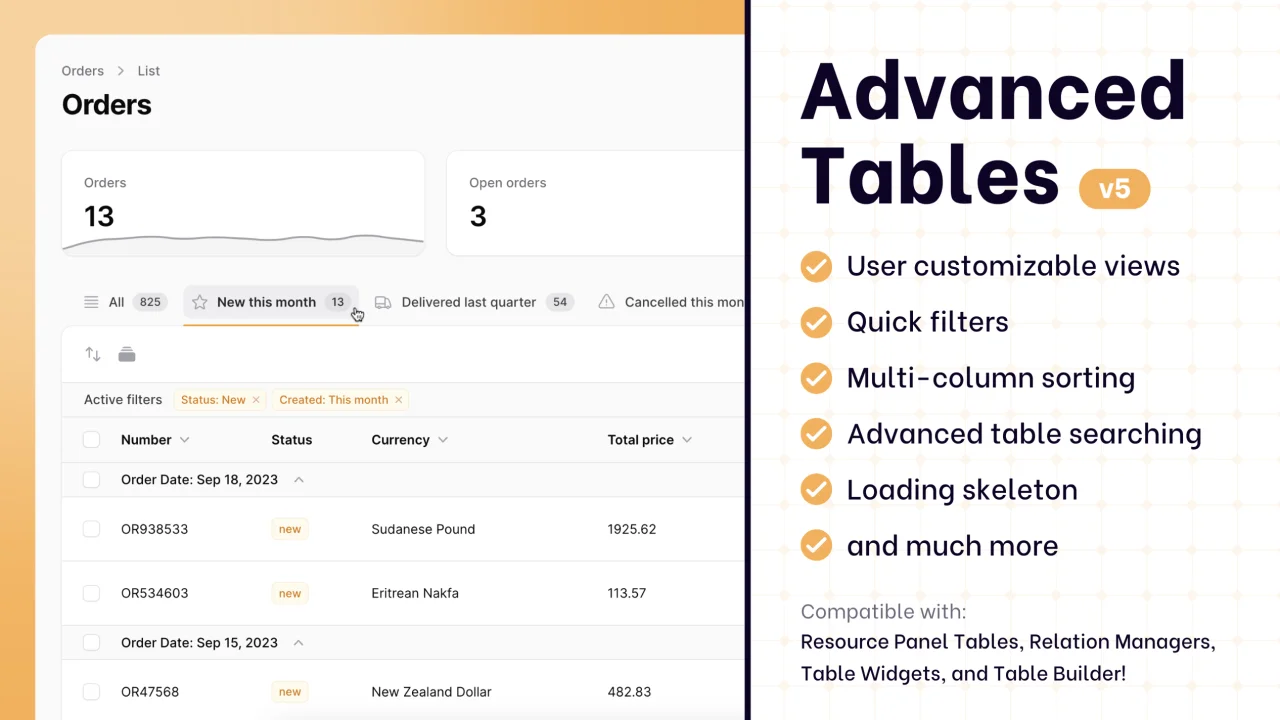
Supercharge your tables with powerful features like user-customizable views, quick filters, multi-column sorting, advanced table searching, convenient view management, and more. Compatible with Resource Panel Tables, Relation Managers, Table Widgets, and Table Builder!
 Kenneth Sese

Data Lens
Advanced Data Visualization for Laravel Filament - a premium reporting solution enabling custom column creation, sophisticated filtering, and enterprise-grade data insights within admin panels.
 Padmission

