CEP Field
A custom input component designed specifically for Brazilian postal codes (CEP - Código de Endereçamento Postal).
 Author:
Jefferson Gonçalves
Author:
Jefferson Gonçalves
Documentation
- What it does:
- Features
- Requirements
- Installation
- Usage
- SSL Certificate Configuration (cacert.pem)
- Testing
- Changelog
- Contributing
- Security Vulnerabilities
- Credits
- License




The Filament CEP Field is a custom input component designed specifically for Brazilian postal codes (CEP - Código de Endereçamento Postal). This component extends Filament's form capabilities by providing a specialized input field that handles CEP formatting, validation, and automatic address lookup.
#What it does:
- CEP Formatting: Automatically applies the standard Brazilian CEP mask (99999-999) as users type
- Address Lookup: Integrates with CEP APIs to automatically fetch and populate address information
- Form Integration: Seamlessly integrates with Filament forms and follows Filament's design patterns
- Validation: Provides built-in validation for CEP format and existence
- Customization: Offers extensive customization options for labels, error messages, and field mappings
This component is perfect for Brazilian applications that need to collect address information efficiently and accurately.
#Features
- 🚀 Multiple API providers (BrasilAPI, ViaCEP, AwesomeAPI)
- 💾 Automatic database caching with Laravel Model Caching
- 🔄 Automatic cache invalidation
- 🎯 CEP validation and formatting
- ⚡ Queue-based cache management
- 🇧🇷 Complete Brazilian states support
#Requirements
- PHP 8.2 or higher
- Filament 4.0 or higher
- Laravel 10.0 or higher
#Installation
You can install the package via composer:
composer require jeffersongoncalves/filament-cep-field
Publish and run the migration file:
php artisan vendor:publish --tag=cep-migrations
php artisan migrate
#Usage
Once installed, you can use the CepInput component in your Filament forms. The component automatically applies a CEP mask (99999-999), validates the input, and can automatically populate address fields when a valid CEP is found.
use JeffersonGoncalves\Filament\CepField\Forms\Components\CepInput;

// Basic usage
CepInput::make('cep')
    ->required(),

// Advanced usage with all available options
CepInput::make('cep')
    ->required()
    ->setMode('suffix') // 'prefix' or 'suffix' (default: 'suffix')
    ->setActionLabel('Buscar CEP') // Custom search button label
    ->setActionLabelHidden(false) // Show/hide action label (default: false)
    ->setErrorMessage('CEP não encontrado.') // Custom error message
    ->setStreetField('street') // Field to populate with street name
    ->setNeighborhoodField('neighborhood') // Field to populate with neighborhood
    ->setCityField('city') // Field to populate with city name
    ->setStateField('state'), // Field to populate with state
#Available Methods
#setMode(string $mode)
Sets the position of the search action button.
'suffix'(default): Places the button after the input field'prefix': Places the button before the input field
#setActionLabel(string $label)
Customizes the label text for the search action button.
- Default:
'Buscar CEP'
setActionLabelHidden(bool $hidden)
Controls whether the action button label is visible.
true: Shows only the magnifying glass iconfalse(default): Shows both icon and label
#setErrorMessage(string $message)
Sets a custom error message when CEP lookup fails.
- Default:
'CEP inválido.'
#Field Mapping Methods
These methods allow you to specify which form fields should be automatically populated with the address information:
setStreetField(string $fieldName)- Default:'street'setNeighborhoodField(string $fieldName)- Default:'neighborhood'setCityField(string $fieldName)- Default:'city'setStateField(string $fieldName)- Default:'state'
#Features
- Automatic Masking: Applies the Brazilian CEP format (99999-999)
- Real-time Validation: Validates CEP format and existence
- Automatic Address Population: Fills related address fields when a valid CEP is found
- Customizable Search Button: Can be positioned as prefix or suffix with custom labels
- Error Handling: Provides validation errors for invalid CEPs
#Usage Examples
#Simple CEP Input
CepInput::make('postal_code')
    ->label('CEP')
    ->required()
#CEP with Custom Field Mapping
CepInput::make('cep')
    ->label('CEP')
    ->required()
    ->setStreetField('endereco')
    ->setNeighborhoodField('bairro')
    ->setCityField('cidade')
    ->setStateField('estado')
#CEP with Prefix Button and Custom Labels
CepInput::make('cep')
    ->label('Código Postal')
    ->setMode('prefix')
    ->setActionLabel('Consultar')
    ->setActionLabelHidden(false)
    ->setErrorMessage('CEP não encontrado ou inválido.')
#SSL Certificate Configuration (cacert.pem)
This package makes HTTPS requests to external APIs (BrasilAPI, ViaCEP, and AwesomeAPI) to retrieve CEP information. If you encounter SSL certificate errors, you may need to configure PHP to use a proper CA certificate bundle.
#What is cacert.pem?
The cacert.pem file is a bundle of Certificate Authority (CA) certificates that PHP uses to verify SSL/TLS connections. Without proper CA certificates, PHP cannot verify the authenticity of HTTPS connections, leading to SSL errors.
#Common SSL Errors
You might encounter errors like:
cURL error 60: SSL certificate problem: unable to get local issuer certificateSSL certificate verification failed- Connection timeouts when making API requests
#How to Configure cacert.pem
#Step 1: Download cacert.pem
Download the latest CA certificate bundle from the official cURL website:
# Download the latest cacert.pem file
curl -o cacert.pem https://curl.se/ca/cacert.pem
Or download it manually from: https://curl.se/ca/cacert.pem
#Step 2: Place the File
Place the cacert.pem file in a secure location on your server, for example:
- Windows:
C:\php\extras\ssl\cacert.pem - Linux/macOS:
/etc/ssl/certs/cacert.pemor/usr/local/etc/ssl/cacert.pem
#Step 3: Configure PHP
Edit your php.ini file and add/update the following lines:
; Enable SSL certificate verification
openssl.cafile = "C:\php\extras\ssl\cacert.pem"  ; Windows path
; openssl.cafile = "/etc/ssl/certs/cacert.pem"   ; Linux/macOS path

; For cURL specifically
curl.cainfo = "C:\php\extras\ssl\cacert.pem"     ; Windows path
; curl.cainfo = "/etc/ssl/certs/cacert.pem"      ; Linux/macOS path
#Step 4: Restart Web Server
After modifying php.ini, restart your web server (Apache, Nginx, etc.) or PHP-FPM service.
#Verification
To verify that SSL certificates are working correctly, you can test the configuration:
// Test SSL connection
$response = file_get_contents('https://brasilapi.com.br/api/cep/v1/01310100');
if ($response !== false) {
    echo "SSL configuration is working correctly!";
} else {
    echo "SSL configuration needs attention.";
}
#Alternative Solutions
If you cannot modify php.ini, you can also:
-
Set environment variable (not recommended for production):
export SSL_CERT_FILE=/path/to/cacert.pem -
Use Laravel HTTP client options in your application:
Http::withOptions([
    'verify' => '/path/to/cacert.pem'
])->get('https://api.example.com');
Note: Disabling SSL verification ('verify' => false) is strongly discouraged as it makes your application vulnerable to man-in-the-middle attacks.
#Testing
composer test
#Changelog
Please see CHANGELOG for more information on what has changed recently.
#Contributing
Please see CONTRIBUTING for details.
#Security Vulnerabilities
Please review our security policy on how to report security vulnerabilities.
#Credits
#License
The MIT License (MIT). Please see License File for more information.
The author
From the same author

Hidden Action
A hidden action that allows you to define it without rendering it in the UI.
Author:
Jefferson Gonçalves
Whatsapp Widget
Provides a simple yet customizable WhatsApp widget for your website.
Author:
Jefferson Gonçalves
Topbar
Automatically adds a customized topbar to your Filament admin panel. This plugin enhances your panel's user experience by replacing the default topbar component with an improved version that displays navigation and user interface elements in strategic locations.
Author:
Jefferson Gonçalves
Pixel
Seamlessly integrates Meta Pixel analytics into your Blade templates. Using your Meta Pixel ID, it enables easy tracking of website visits and user interactions, providing valuable insights into your audience and website performance.
Author:
Jefferson Gonçalves
Featured Plugins
A selection of plugins curated by the Filament team

Custom Dashboards
Let your users build and share their own dashboards with a drag-and-drop interface. Define your data sources in PHP and let them do the rest.
 Filament
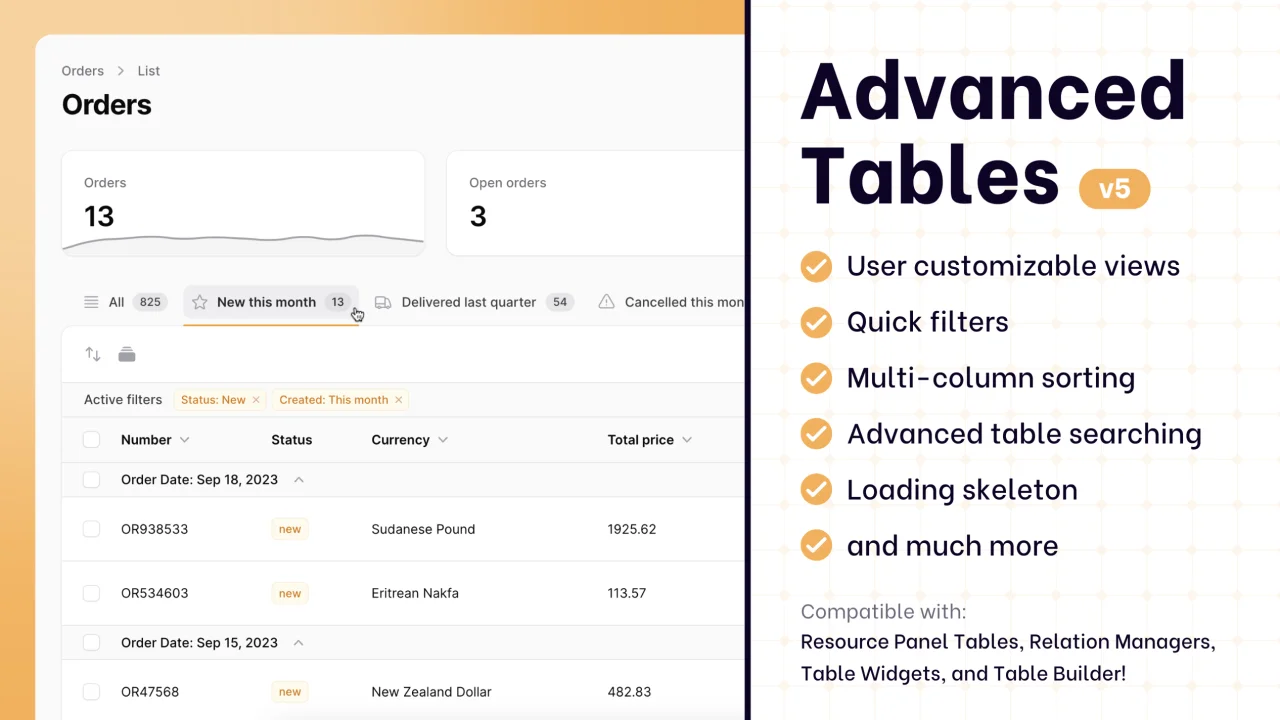
Advanced Tables (formerly Filter Sets)
Supercharge your tables with powerful features like user-customizable views, quick filters, multi-column sorting, advanced table searching, convenient view management, and more. Compatible with Resource Panel Tables, Relation Managers, Table Widgets, and Table Builder!
 Kenneth Sese

Custom Fields
Eliminate custom field migrations forever. Let your users create and manage form fields directly in Filament admin panels with 20+ built-in field types, validation, and zero database changes.
 Relaticle

