
ClearAnalytics by Jaspur
CommunityDisplay your ClearAnalytics.eu web-analytics inside a Filament v4/v5 panel — a dedicated Analytics dashboard plus a set of plug-and-play widgets (visitors, pageviews, bounce rate, top pages, referrers, devices, e-commerce revenue, goals and more).
 Author:
Jaspur
Author:
Jaspur
Package health
Automated checks of this plugin's Composer package
15 checks
- Skipped: GitHub Actions pinned to SHA
- Skipped: GitLab CI includes pinned to SHA
- Passed: Open security advisories
- Passed: Dependabot PR responsiveness — No open Dependabot PRs.
- Skipped: Renovate MR responsiveness
- Skipped: Dependabot or Renovate configured
- Skipped: Dependency update cooldown configured
- Failed: Provides a security policy — View details on Plumb
- Passed: Abandoned or archived — No consulted source marks the package abandoned (packagist, github).
- Passed: Commit and release recency — Active: last commit 26 days ago; last release 26 days ago.
-
Passed:
composer.lock not committed by library
—
composer.lockis absent from the released dist archive. - Warning: Dist archive is lean
-
Passed:
Current Laravel version supported
—
Package dependencies resolve together with current Laravel
13.0. -
Passed:
Current PHP version supported
—
Constraint
^8.2supports current PHP8.5. - Skipped: Current Symfony version supported
filament/
namespace. Review the source and install at your own risk. Found
malware or an unresolved security issue the author won't
address?
Report it
.
Documentation
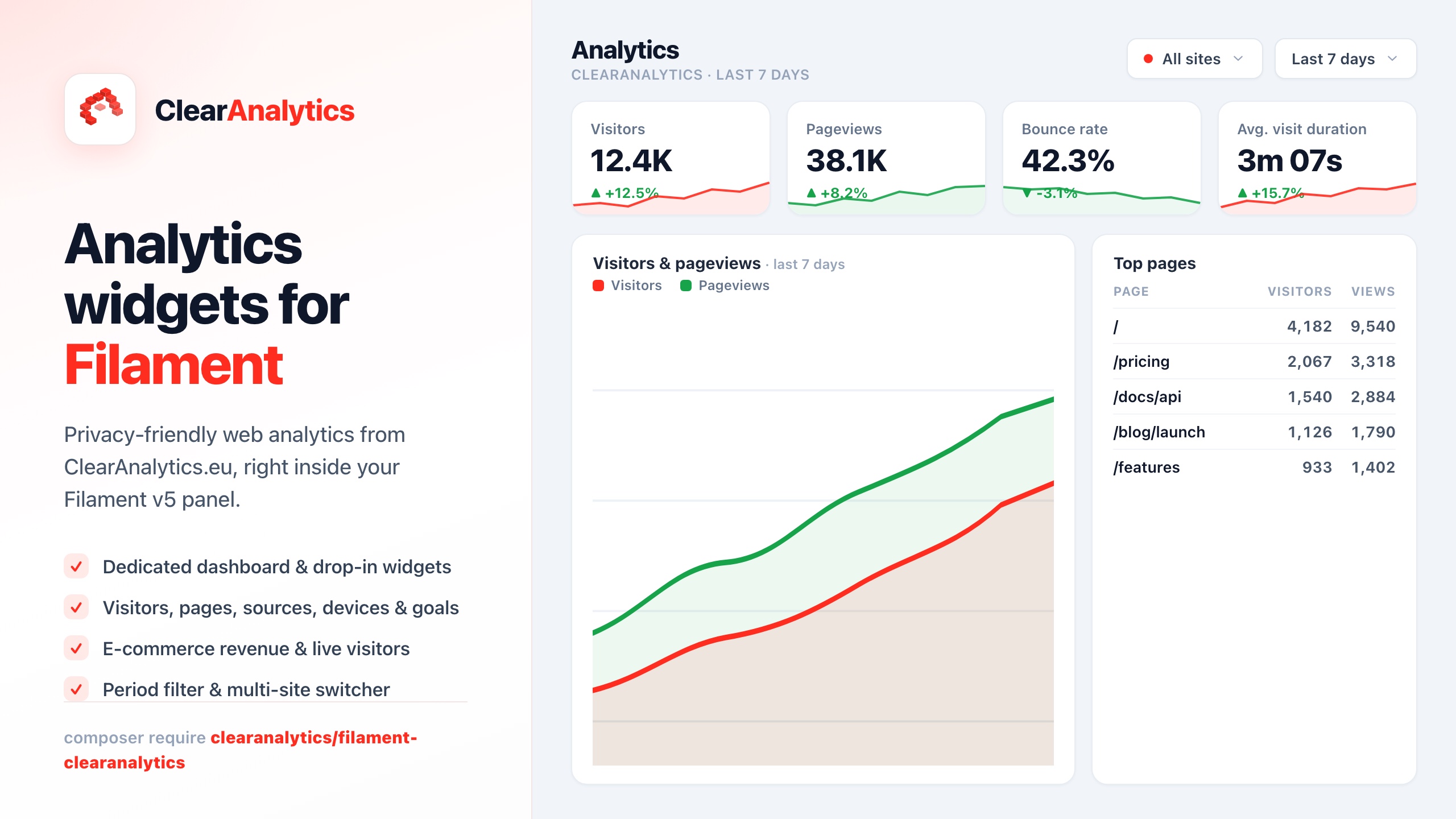


Display your ClearAnalytics.eu web-analytics inside a Filament panel — a dedicated Analytics dashboard plus a set of plug-and-play widgets (visitors, pageviews, bounce rate, top pages, referrers, devices, e-commerce revenue, goals and more).
It talks to the official ClearAnalytics REST API, so your panel never touches raw tracking data — it just reads aggregated stats over HTTPS.
Inspired by
bezhanSalleh/filament-google-analytics, but powered by ClearAnalytics instead of Google Analytics. Supports Filament v4 and v5.
#Features
- 📊 Dedicated dashboard page with a period filter (24h / 7d / 30d / 90d / 12m or a custom date range) and a site switcher for multi-site accounts.
- 🧩 Widgets: overview stat cards (with trend + sparkline), visitors/pageviews chart, top pages, top referrers, traffic sources, devices, browsers, operating systems, languages and campaigns.
- 🛒 E-commerce (optional): revenue stat cards, revenue chart, top products and a conversion funnel.
- 🎯 Goals (optional) and a live visitors widget.
- ⚡ Cached API calls to stay within the ClearAnalytics rate limit (60 req/min), with graceful empty states when the API is unreachable.
- 🌍 English & Dutch translations included; everything is publishable.
#Requirements
- PHP 8.2+
- Laravel 11, 12 or 13
- Filament v4 or v5
- A ClearAnalytics account on a plan with API access, and an API token (Settings → API Tokens).
#Installation
composer require clearanalytics/filament-clearanalytics
Optionally publish the config and translations:
php artisan vendor:publish --tag="clear-analytics-config"
php artisan vendor:publish --tag="clear-analytics-translations"
Installing from a local checkout (development)
Add a path repository to your app's composer.json, then require the package:
"repositories": [
    {
        "type": "path",
        "url": "/absolute/path/to/filament-clearanalytics",
        "options": { "symlink": true }
    }
]
composer require "clearanalytics/filament-clearanalytics:@dev"
The symlink means edits to the package are reflected in your app immediately.
#Configuration
Add your API token (and, optionally, a default site) to .env:
CLEARANALYTICS_API_TOKEN=your-api-token
# Optional: limit to one site. Leave empty to show the aggregate of all sites.
CLEARANALYTICS_SITE_ID=01JM...
# Optional overrides:
CLEARANALYTICS_BASE_URL=https://clearanalytics.eu/api/v1
CLEARANALYTICS_PERIOD=7d
CLEARANALYTICS_CACHE_TTL=300
Register the plugin in your panel provider:
use ClearAnalytics\Filament\ClearAnalyticsPlugin;

public function panel(Panel $panel): Panel
{
    return $panel
        // ...
        ->plugin(ClearAnalyticsPlugin::make());
}
That's it — an Analytics item appears in your panel navigation.
#Per-panel configuration
Everything in the config file can be overridden fluently:
->plugin(
    ClearAnalyticsPlugin::make()
        ->token(env('CLEARANALYTICS_API_TOKEN'))
        ->site('01JM...')        // default site id
        ->defaultPeriod('30d')
        ->cacheTtl(600)
        ->ecommerce(true)        // toggle the e-commerce widgets
        ->goals(true)            // toggle the goals widget
        ->live(false)            // toggle the live-visitors widget
        ->registerOnDashboard()  // also push selected widgets onto the panel's main dashboard
)
#Showing widgets on your own dashboard
By default the widgets live on the dedicated Analytics page. To also show a
subset on the panel's main dashboard, set register_on_dashboard => true and flip
the per-widget booleans in config/clear-analytics.php (widgets array), or call
->registerOnDashboard()->widgets(['top_pages' => true, ...]).
You can also drop any widget into your own page manually:
use ClearAnalytics\Filament\Widgets\OverviewStatsWidget;

protected function getHeaderWidgets(): array
{
    return [OverviewStatsWidget::class];
}
Widgets rendered outside the dedicated dashboard use the default period and site from your config.
#How it works
All data comes from the ClearAnalytics REST API (/api/v1). The
ClearAnalytics\Filament\ClearAnalytics service wraps each endpoint, authenticates
with your Bearer token, caches responses, and unwraps the { "data": ... }
envelope. You can use it directly too:
use ClearAnalytics\Filament\Facades\ClearAnalytics;

$overview = ClearAnalytics::overview(['period' => '30d', 'site_id' => '01JM...']);
$topPages = ClearAnalytics::pages(['period' => '7d', 'limit' => 20]);
#Testing
composer install
vendor/bin/pest
vendor/bin/phpstan analyse --memory-limit=512M
vendor/bin/pint --test
#Credits
A product of Coding Agency — custom software from Meppel, the Netherlands.
#License
MIT.
The author
Featured Plugins
A selection of plugins curated by the Filament team

Soft Theme
A theme that gives panels a warm, approachable look with rounded shapes, gentle colors, and serif headings.
 Filament

Advanced Tables (formerly Filter Sets)
Supercharge your tables with powerful features like user-customizable views, quick filters, multi-column sorting, advanced table searching, convenient view management, and more. Compatible with Resource Panel Tables, Relation Managers, Table Widgets, and Table Builder!
 Kenneth Sese

Custom Fields
Eliminate custom field migrations forever. Let your users create and manage form fields directly in Filament admin panels with 20+ built-in field types, validation, and zero database changes.
 Relaticle
