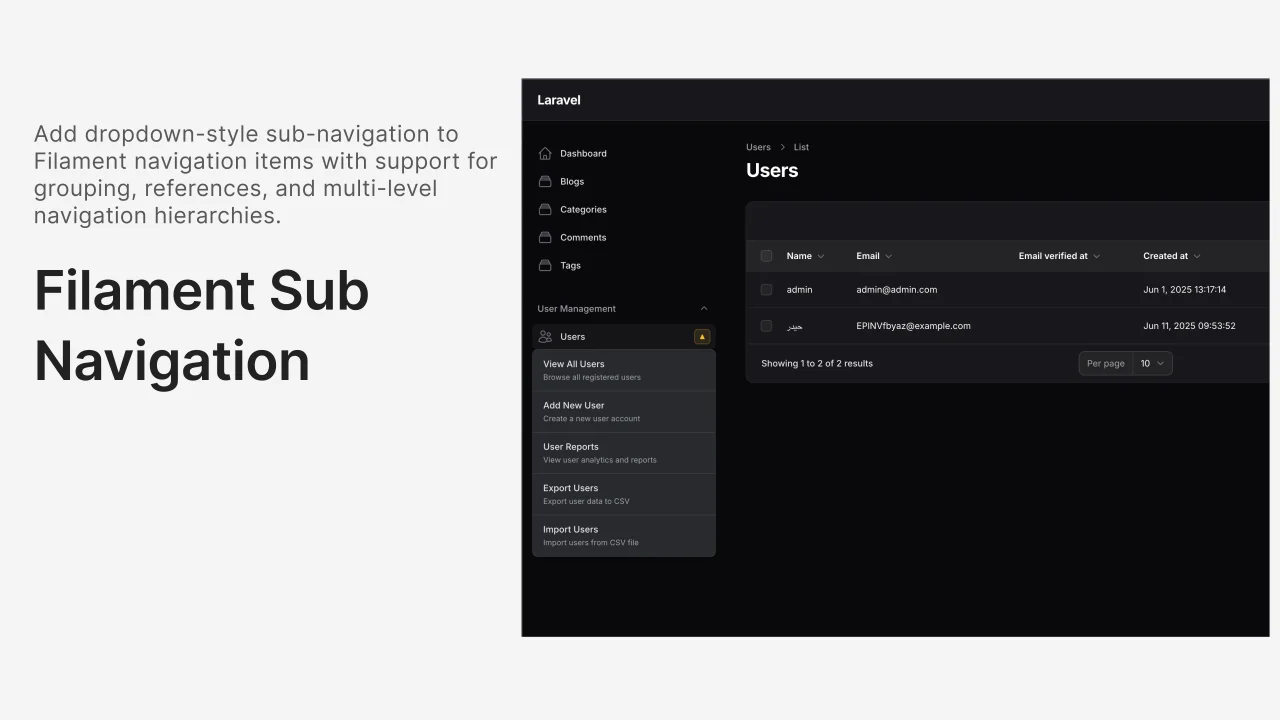
Sub Navigation
CommunityAdd beautiful dropdown sub-navigation menus to your Filament sidebar navigation items with just one trait! Features dark mode support, mobile responsive design, and seamless integration.
filament/
namespace. Review the source and install at your own risk. Found
malware or an unresolved security issue the author won't
address?
Report it
.
 Author:
Hayder Hatem
Author:
Hayder Hatem
Documentation
- ✨ Features
- 📸 Preview
- 🚀 Installation
- 📋 Quick Start
- 🔧 Advanced Usage
- 🐛 Troubleshooting
- 🎨 Customization Options
- 📚 API Reference
- 🔄 Changelog
- 🤝 Contributing
- 📄 License
- 🙏 Credits


Add beautiful dropdown sub-navigation menus to your Filament sidebar navigation items with just one trait!
#✨ Features
- 🎯 Simple Setup - Just add one trait to your Resource
- 🎨 Beautiful UI - Seamlessly integrates with Filament's design
- 🌙 Dark Mode Support - Automatically adapts to light/dark themes
- 📱 Mobile Responsive - Works perfectly on all screen sizes
- ⚡ Alpine.js Compatible - Optional Alpine.js component included
- 🔄 Livewire Ready - Handles dynamic content updates
- 🐛 Debug Friendly - Comprehensive console logging
#📸 Preview
When you hover over a navigation item with sub-navigation, a beautiful dropdown appears:
┌─ 👥 Users ▼ ─────────────────┐
│                              │
│  📋 All Users                │
│  ➕ Create User              │
│  🗃️ User Categories          │
│  📊 User Reports             │
│  ⚙️ User Settings            │
│                              │
└──────────────────────────────┘
#🚀 Installation
Install the package via Composer:
composer require hayderhatem/filament-sub-navigation
The package will auto-register its service provider.
#📋 Quick Start
#Step 1: Add the Trait
Add the HasBadgeSubNavigation trait to any Filament Resource:
<?php

namespace App\Filament\Resources;

use Filament\Resources\Resource;
use HayderHatem\FilamentSubNavigation\Concerns\HasBadgeSubNavigation;

class UserResource extends Resource
{
    use HasBadgeSubNavigation;

    // ... your existing resource code
}
#Step 2: Configure Navigation
In your Resource, override the getNavigationItems() method:
public static function getNavigationItems(): array
{
    return [
        static::createBadgeNavigation(
            label: 'Users',
            icon: 'heroicon-o-users',
            url: static::getUrl('index'),
            isActiveWhen: fn (): bool => request()->routeIs([
                'filament.admin.resources.users.*'
            ]),
            badge: static::getNavigationBadge(),
            subItems: static::getSubNavigationItems()
        ),
    ];
}
#Step 3: Define Sub-Navigation Items
Add the getSubNavigationItems() method to your Resource:
public static function getSubNavigationItems(): array
{
    return [
        'users' => [ // This key should match your navigation label (lowercased, alphanumeric only)
            [
                'label' => 'All Users',
                'description' => 'View and manage all users',
                'url' => static::getUrl('index'),
            ],
            [
                'label' => 'Create User',
                'description' => 'Add a new user to the system',
                'url' => static::getUrl('create'),
            ],
            [
                'label' => 'User Categories',
                'description' => 'Manage user categories',
                'url' => route('filament.admin.resources.categories.index'),
            ],
            [
                'label' => 'User Reports',
                'description' => 'View detailed user analytics',
                'url' => route('filament.admin.resources.reports.index'),
            ],
            [
                'label' => 'User Settings',
                'description' => 'Configure user preferences',
                'url' => route('filament.admin.resources.settings.index'),
            ],
        ],
    ];
}
#Step 4: Register Sub-Navigation Data
In your AdminPanelProvider.php, add sub-navigation data registration:
<?php

namespace App\Providers\Filament;

use Filament\Http\Middleware\Authenticate;
use Filament\Http\Middleware\DisableBladeIconComponents;
use Filament\Http\Middleware\DispatchServingFilamentEvent;
use Filament\Panel;
use Filament\PanelProvider;
use Filament\Support\Colors\Color;
use Filament\Widgets;
use Illuminate\Cookie\Middleware\AddQueuedCookiesToResponse;
use Illuminate\Cookie\Middleware\EncryptCookies;
use Illuminate\Foundation\Http\Middleware\VerifyCsrfToken;
use Illuminate\Routing\Middleware\SubstituteBindings;
use Illuminate\Session\Middleware\AuthenticateSession;
use Illuminate\Session\Middleware\StartSession;
use Illuminate\View\Middleware\ShareErrorsFromSession;

class AdminPanelProvider extends PanelProvider
{
    public function panel(Panel $panel): Panel
    {
        return $panel
            ->default()
            ->id('admin')
            ->path('admin')
            ->login()
            ->colors([
                'primary' => Color::Amber,
            ])
            ->discoverResources(in: app_path('Filament/Resources'), for: 'App\\Filament\\Resources')
            ->discoverPages(in: app_path('Filament/Pages'), for: 'App\\Filament\\Pages')
            ->pages([
                Pages\Dashboard::class,
            ])
            ->discoverWidgets(in: app_path('Filament/Widgets'), for: 'App\\Filament\\Widgets')
            ->widgets([
                Widgets\AccountWidget::class,
                Widgets\FilamentInfoWidget::class,
            ])
            ->middleware([
                EncryptCookies::class,
                AddQueuedCookiesToResponse::class,
                StartSession::class,
                AuthenticateSession::class,
                ShareErrorsFromSession::class,
                VerifyCsrfToken::class,
                SubstituteBindings::class,
                DisableBladeIconComponents::class,
                DispatchServingFilamentEvent::class,
            ])
            ->authMiddleware([
                Authenticate::class,
            ])
            ->renderHook(
                'panels::body.end',
                fn (): string => $this->getSubNavigationScript()
            );
    }

    protected function getSubNavigationScript(): string
    {
        $script = '';

        // Register sub-navigation data for each Resource that uses the trait
        $resources = [
            \App\Filament\Resources\UserResource::class,
            // Add other resources that use HasBadgeSubNavigation here
        ];

        foreach ($resources as $resourceClass) {
            if (
                class_exists($resourceClass) &&
                method_exists($resourceClass, 'getSubNavigationItems')
            ) {
                $subNavItems = $resourceClass::getSubNavigationItems();

                if (!empty($subNavItems)) {
                    foreach ($subNavItems as $id => $items) {
                        $itemsJson = json_encode($items);
                        $script .= "window.registerSubNavigation('{$id}', {$itemsJson});";
                    }
                }
            }
        }

        return $script ? '<script>' . $script . '</script>' : '';
    }
}
That's it! 🎉 Your sub-navigation dropdowns will now appear when hovering over navigation items.
#🔧 Advanced Usage
#Multiple Resources with Sub-Navigation
You can add sub-navigation to multiple resources:
// In ProductResource.php
class ProductResource extends Resource
{
    use HasBadgeSubNavigation;

    public static function getSubNavigationItems(): array
    {
        return [
            'products' => [
                [
                    'label' => 'All Products',
                    'url' => static::getUrl('index'),
                ],
                [
                    'label' => 'Add Product',
                    'url' => static::getUrl('create'),
                ],
                [
                    'label' => 'Categories',
                    'url' => route('filament.admin.resources.categories.index'),
                ],
            ],
        ];
    }
}

// In OrderResource.php
class OrderResource extends Resource
{
    use HasBadgeSubNavigation;

    public static function getSubNavigationItems(): array
    {
        return [
            'orders' => [
                [
                    'label' => 'All Orders',
                    'url' => static::getUrl('index'),
                ],
                [
                    'label' => 'Pending Orders',
                    'url' => static::getUrl('index') . '?status=pending',
                ],
                [
                    'label' => 'Completed Orders',
                    'url' => static::getUrl('index') . '?status=completed',
                ],
            ],
        ];
    }
}
#Using Alpine.js Component (Optional)
For advanced customization, you can use the included Alpine.js component:
<x-filament-sub-navigation::alpine-sub-navigation
    :items="$subNavigationItems"
    trigger-selector=".my-nav-item"
/>
#Custom Styling
The package automatically adapts to Filament's theme, but you can add custom CSS:
/* Custom dropdown styling */
.sub-nav-dropdown {
    box-shadow: 0 25px 50px -12px rgba(0, 0, 0, 0.25) !important;
    border-radius: 12px !important;
}

/* Custom hover effects */
.sub-nav-dropdown a:hover {
    transform: translateX(4px);
    transition: transform 0.2s ease;
}
#🐛 Troubleshooting
#Navigation Items Not Showing Dropdowns
- Check Console Logs: Open browser developer tools and look for sub-navigation debug messages
- Verify Key Matching: Ensure the key in
getSubNavigationItems()matches your navigation label (lowercase, alphanumeric only) - Clear Caches: Run
php artisan cache:clear && php artisan view:clear
#Example Debug Output
=== SUB-NAVIGATION INITIALIZATION ===
Found navigation items: 5
Available sub-navigation data: {users: Array(5)}
Processing nav item: Users ID: users
Created dropdown for: Users
🟢 Showing dropdown: Users
#Dropdown Not Positioned Correctly
The package automatically handles positioning, but if you have custom CSS that affects the sidebar, you might need to adjust:
.fi-sidebar-item {
    position: relative !important;
}
#Dark Mode Issues
The package auto-detects dark mode, but if you have custom theme switching, you can manually trigger reinitialization:
// After theme change
if (window.initializeSubNavigation) {
    window.initializeSubNavigation();
}
#🎨 Customization Options
#Sub-Navigation Item Structure
Each sub-navigation item supports these properties:
[
    'label' => 'Item Label',           // Required: Display text
    'description' => 'Item description', // Optional: Subtitle text
    'url' => '/admin/some-path',       // Required: Target URL
    'icon' => 'heroicon-o-star',       // Optional: Icon (future feature)
    'badge' => '5',                    // Optional: Badge count (future feature)
]
#Navigation Key Generation
The package generates keys from navigation labels using this logic:
- Converts to lowercase
- Removes all non-alphanumeric characters
- Example: "User Management" becomes "usermanagement"
#📚 API Reference
#HasBadgeSubNavigation Trait
#Methods
#createBadgeNavigation()
Creates a navigation item with sub-navigation support.
Parameters:
string $label- Navigation item labelstring $icon- Heroicon namestring $url- Target URLcallable $isActiveWhen- Active state callbackstring|null $badge- Badge textarray $subItems- Sub-navigation items
#getSubNavigationItems()
Returns array of sub-navigation items grouped by navigation key.
Returns: array<string, array>
#🔄 Changelog
#v1.0.0
- Initial release
- Basic dropdown sub-navigation functionality
- Dark mode support
- Alpine.js component
- Comprehensive documentation
#🤝 Contributing
Contributions are welcome! Please feel free to submit a Pull Request.
#📄 License
The MIT License (MIT). Please see License File for more information.
#🙏 Credits
- Hayder Hatem - Creator and maintainer
- Filament Team - For the amazing admin panel framework
- Laravel Community - For continuous inspiration
Made with ❤️ for the Filament community
The author
Full-stack developer specializing in Laravel and Filament ecosystem development. Passionate about creating developer tools that simplify complex workflows and enhance user experience. Creator of innovative Filament packages that leverage AI technology to make data management more intuitive and accessible.
From the same author
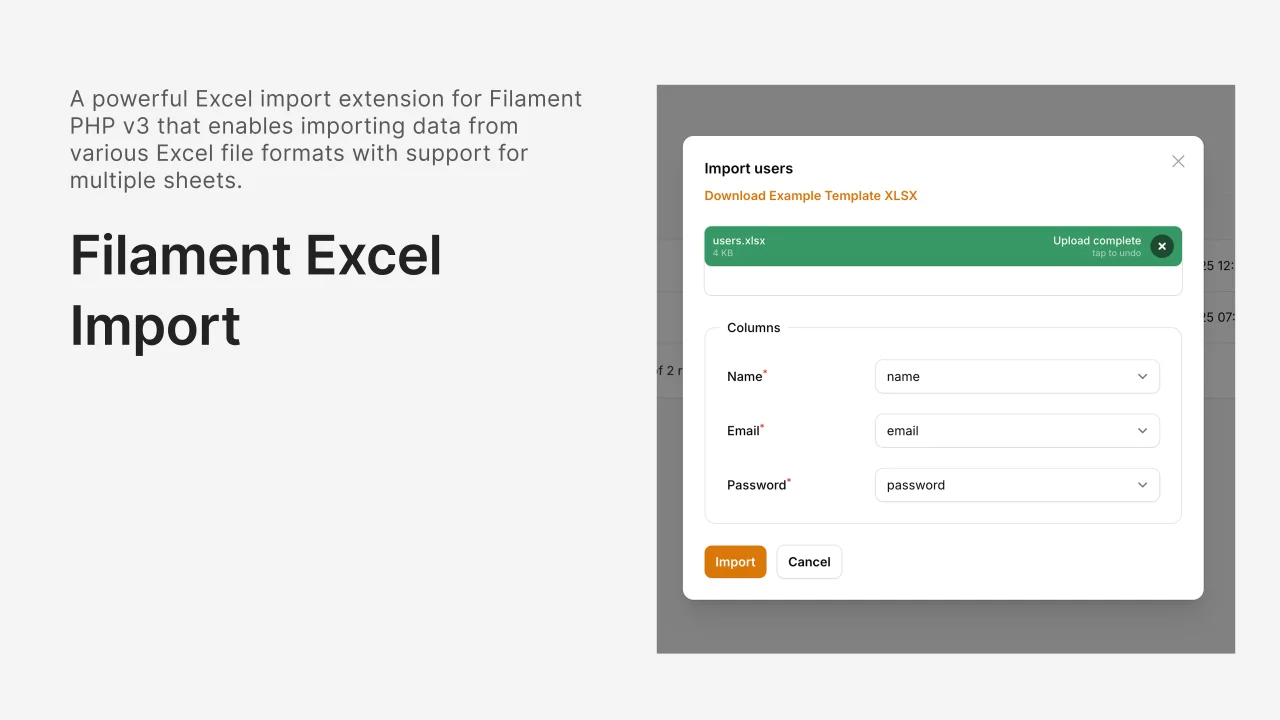
Excel Import
A powerful and flexible Excel import package for Filament that extends the native import functionality with enhanced features, better error handling, and comprehensive validation.
Author:
Hayder Hatem
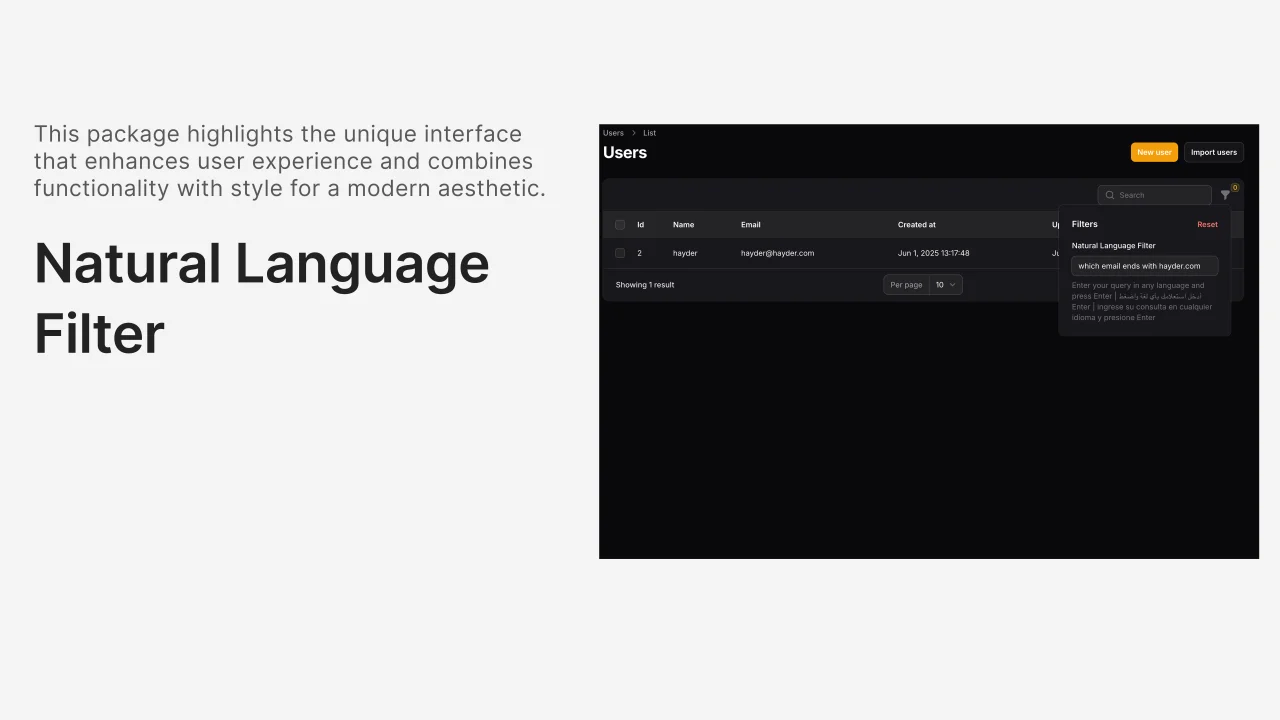
Natural Language Filter
AI-powered natural language filtering for Filament tables that supports any language and converts human queries into database filters.
Author:
Hayder Hatem
Featured Plugins
A selection of plugins curated by the Filament team

Blueprint
Filament Blueprint is a premium Laravel Boost extension that helps AI agents produce accurate, detailed implementation plans and security reports for Filament apps.
 Filament

Custom Fields
Eliminate custom field migrations forever. Let your users create and manage form fields directly in Filament admin panels with 20+ built-in field types, validation, and zero database changes.
 Relaticle

Advanced Tables (formerly Filter Sets)
Supercharge your tables with powerful features like user-customizable views, quick filters, multi-column sorting, advanced table searching, convenient view management, and more. Compatible with Resource Panel Tables, Relation Managers, Table Widgets, and Table Builder!
 Kenneth Sese
