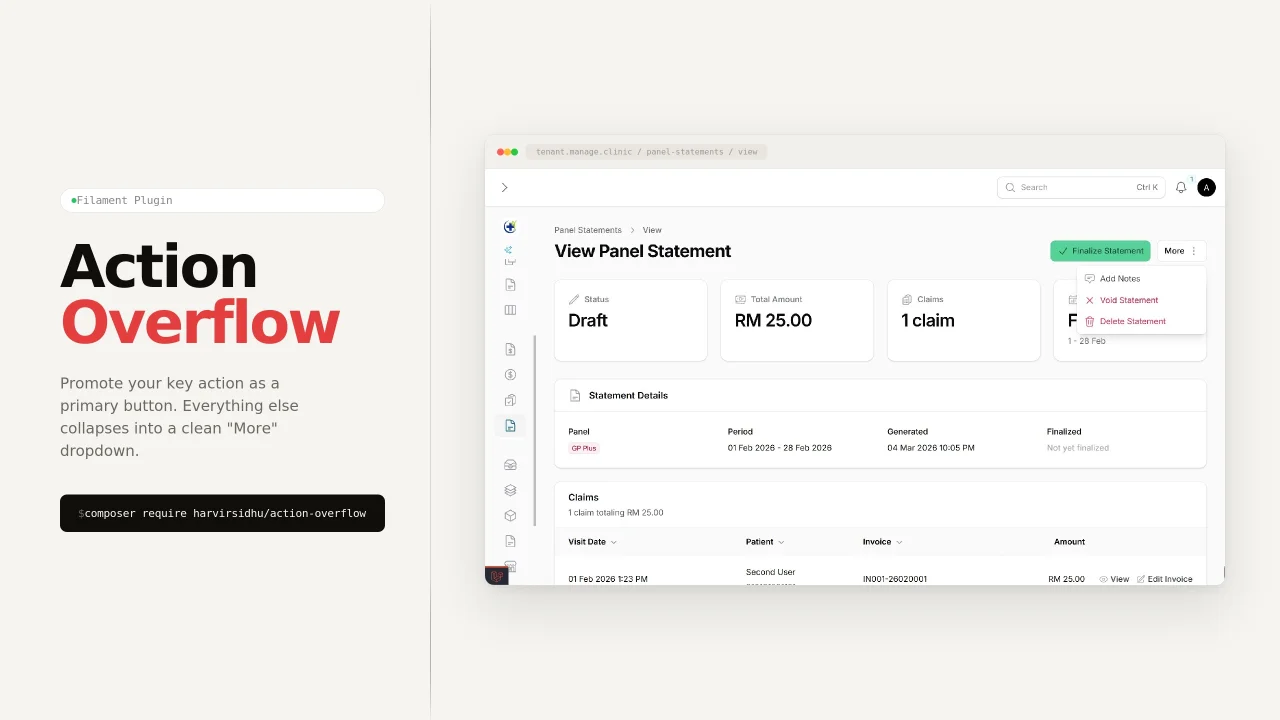
Action Overflow
CommunityAction Overflow lets you designate a primary header action while collapsing the rest into a clean overflow menu. Simple to set up, configurable, and compatible with Filament v4 and v5.
filament/
namespace. Review the source and install at your own risk. Found
malware or an unresolved security issue the author won't
address?
Report it
.
 Author:
Harvir
Author:
Harvir
Documentation
- Contents
- Why this package
- Requirements
- Installation
- Quick start (30 seconds)
- The two ways to use it
- How it decides what overflows
- Recipes
- API reference
- Under the hood
- FAQ
- Testing
- Changelog
- Credits
- License


Turn a flat list of Filament actions into a few primary buttons + a tidy "More" dropdown — automatically.
You declare every action in one list. The package decides which ones sit out front and which get tucked under More, so crowded action rows stop wrapping and your UI stays clean.
You write:                          You get:

Edit                                ┌──────┐ ┌─────────┐ ┌──────────┐
Archive            ──────────▶      │ Edit │ │ Archive │ │ ⋮ More ▾ │
Publish                             └──────┘ └─────────┘ └────┬─────┘
Delete                                                        ├─ Publish
Download                                                      ├─ Delete
                                                              └─ Download
Works anywhere Filament accepts an action array — page headers, table actions, record actions, bulk actions, widgets.
#Contents
- Why this package
- Requirements
- Installation
- Quick start (30 seconds)
- The two ways to use it
- How it decides what overflows — the mental model
- Recipes
- API reference
- Under the hood
- FAQ
- Testing · Changelog · Credits · License
#Why this package
- One line to adopt. Append
->withOverflow()to anyActionGroup. - Smart by default. Nothing to overflow → no More button. One leftover action → shown inline, not buried. Two or more → grouped under More.
- Section-aware. Filament's
->dropdown(false)divider groups flow into the menu as real, separated sections. - Visibility-aware.
->hidden(),->visible(false), and (opt-in)->authorize(...)are all honored before anything is composed, so hidden actions never leak into More. - Direction-aware. Position More at the start or end; under RTL it flips correctly with zero extra config.
- Filament 4 & 5. A single compatibility layer keeps one codebase working across both.
#Requirements
| Requirement | Version |
|---|---|
| PHP | ^8.2 |
| Filament | ^4.0 ‖ ^5.0 |
#Installation
composer require harvirsidhu/filament-action-overflow
That's it — the package auto-registers and works with zero configuration.
Only publish the config if you want to change the defaults globally:
php artisan vendor:publish --tag="filament-action-overflow-config"
#Quick start (30 seconds)
Build an ActionGroup exactly as you normally would, then chain ->withOverflow() and return the result:
use Filament\Actions\Action;
use Filament\Actions\ActionGroup;

public function getHeaderActions(): array
{
    return ActionGroup::make([
        Action::make('edit'),
        Action::make('archive'),
        Action::make('delete'),
    ])->withOverflow(); // keep 1 primary, overflow the rest
}
[ Edit ]  [ ⋮ More ▾ ]
            ├─ Archive
            └─ Delete
withOverflow(int $primary = 1) is terminal: it returns the finished array<Action|ActionGroup>, ready to hand straight back from getHeaderActions(), getTableActions(), getRecordActions(), getBulkActions(), and so on.
By default, the primary actions and the More trigger are rendered as buttons, so you get a row of matching buttons without sprinkling
->button()everywhere.
#The two ways to use it
There are exactly two entry points. Pick based on whether you need to customize the More button.
->withOverflow() macro |
ActionOverflow facade |
|
|---|---|---|
| Best for | The common case | When you need control |
| Syntax | Chains onto an existing ActionGroup |
Standalone builder |
| Customizes label / icon / color / position? | No (only the primary count) | Yes, full fluent API |
| Returns | array (terminal) |
array via ->toActions() (terminal) |
Macro — shortest path:
ActionGroup::make([...])->withOverflow(2);
Facade — when you want to change the trigger or behavior:
use Filament\Actions\Action;
use Harvirsidhu\FilamentActionOverflow\Facades\ActionOverflow;

return ActionOverflow::make([
    Action::make('edit'),
    Action::make('archive'),
    Action::make('delete'),
])
    ->primaryCount(2)
    ->label('Options')
    ->icon('heroicon-m-bars-3')
    ->color('gray')
    ->toActions();
Both produce the same kind of output — the macro is just sugar over the facade with primaryCount set.
#How it decides what overflows
The whole package is one deterministic pipeline. Understanding it means you can always predict the output.
1. It filters first. Hidden, invisible, and (if you opt in) unauthorized actions are removed before anything else — including those nested inside divider sections. Only available actions are ever counted or placed.
2. It fills primary slots left-to-right. Walking your list in order, it promotes actions to the front until primaryCount is reached (default 1). Everything after that overflows. Order is preserved — the list order is the priority order.
3. It applies the count rule to whatever is left:
| Available overflow actions | Result |
|---|---|
| 0 | No More button at all — just the primary actions. |
| 1 | That single action is shown inline (promoted to a button), never hidden behind a dropdown for no reason. |
| 2 or more | Grouped under a single More dropdown. |
4. It positions the More control at the end (default) or start of the row — see Put More on the left.
That's the entire model. Everything below is just configuring these steps.
#Recipes
#Choose how many primary actions
primaryCount controls how many actions stay out front. The rest overflow.
ActionGroup::make([...])->withOverflow(2);          // macro
ActionOverflow::make([...])->primaryCount(2)->toActions(); // facade
primaryCount(0) is valid and pushes everything into More. Negative values throw an InvalidArgumentException.
#Style the More trigger
Only available via the facade (the macro intentionally keeps its surface tiny):
use Filament\Support\Enums\IconPosition;
use Filament\Support\Icons\Heroicon;

ActionOverflow::make($actions)
    ->label('Manage')                          // trigger text
    ->icon(Heroicon::EllipsisVertical)         // string | BackedEnum | Filament icon enum
    ->iconPosition(IconPosition::Before)       // 'before' | 'after' | IconPosition enum
    ->color('danger')                          // any Filament color name
    ->hiddenLabel()                            // icon-only trigger (where supported)
    ->toActions();
icon()accepts a plain string ('heroicon-m-bars-3'), a backed enum, or a Filament icon enum likeHeroicon::EllipsisVertical.hiddenLabel()is honored only on Filament versions that support hidden labels; on older versions it's silently ignored rather than crashing.
#Put More on the left (and RTL)
By default the More control sits after the primary actions. Use MorePosition::Start to put it first:
use Harvirsidhu\FilamentActionOverflow\Enums\MorePosition;

ActionOverflow::make($actions)
    ->morePosition(MorePosition::Start) // or the string 'start'
    ->toActions();
[ ⋮ More ▾ ] [ Edit ]
This is the right answer to "how do I support RTL?" — there's nothing extra to do. The package only reorders the array, and Filament renders that array in the reading direction. So Start means the reading start: it lands on the left in LTR and automatically flips to the right under RTL. Use Start/End (logical) rather than thinking left/right (physical), and direction handling is free.
The position applies to the flattened single-action case too, not just the grouped More trigger.
#Sections inside the menu (dividers)
A dropdown(false) group nested inside an ActionGroup is Filament's idiom for "render these as a separated section." This package treats those as first-class and carries them into the More menu:
use Filament\Actions\Action;
use Filament\Actions\ActionGroup;

return ActionGroup::make([
    Action::make('submit'),

    ActionGroup::make([
        Action::make('discount'),
        Action::make('tax'),
        Action::make('rounding'),
    ])->dropdown(false),

    ActionGroup::make([
        Action::make('change-billing'),
        Action::make('refresh'),
    ])->dropdown(false),
])->withOverflow(1);
[ Submit ]  [ ⋮ More ▾ ]
              ├─ Discount
              ├─ Tax
              ├─ Rounding
              ├─ ──────────
              ├─ Change billing
              └─ Refresh
How dividers behave — predictable and lossless:
- A divider never consumes a primary slot — its children do. With
primaryCount(2)and a leading divider whose first child issubmit,submitis promoted to primary; the divider's remaining children stay grouped in overflow. - Dividers never appear among the side-by-side primary buttons — separators only make sense inside a dropdown.
- A divider at the very top of the menu is unwrapped, so you don't get an orphan separator line above the first item.
- Trailing and adjacent dividers are preserved as distinct sections — exactly how Filament renders multiple
dropdown(false)groups natively. - Unavailable children are dropped from a divider; if every child is gone, the whole divider disappears.
Hidden, invisible & unauthorized actions
Hidden and invisible actions are filtered automatically — they're gone before composition, so they can't sneak into More:
ActionOverflow::make([
    Action::make('edit')->hidden(),          // dropped
    Action::make('archive'),                 // kept
    Action::make('delete')->visible(false),  // dropped
    Action::make('publish'),                 // kept
])->toActions();
Authorization filtering is opt-in, because Filament's renderer already disables unauthorized actions visually. Enable it when you'd rather drop them entirely:
ActionOverflow::make($actions)
    ->filterUnauthorized()
    ->toActions();
#Button vs. link appearance
By default, primary actions and the More trigger are promoted to button view so the row looks uniform. To leave each action's own render style untouched, opt out:
ActionOverflow::make($actions)->button(false)->toActions();
button(false) is opt-out only — it stops the composer from adding ->button(). An action you already styled with ->button() keeps its button view regardless.
#Set defaults globally
Prefer to configure once instead of per-call? Publish the config and edit the defaults — every withOverflow() / ActionOverflow::make() call inherits them (and per-call methods still override per call):
// config/action-overflow.php
return [
    'primary_count'       => 2,
    'label'               => 'Manage',
    'more_position'       => 'start',
    'filter_unauthorized' => true,
    // ...
];
#API reference
#ActionGroup::withOverflow() macro
ActionGroup::make(array $actions)->withOverflow(int $primary = 1): array
Terminal. Composes the group's actions with the given primary count, using config defaults for everything else. Returns the finished action array.
#ActionOverflow fluent API
Every method returns $this for chaining; toActions() ends the chain and returns the array.
| Method | Default | Description |
|---|---|---|
make(array $actions) |
— | Start a builder from a flat action list. |
primaryCount(int $count) |
1 |
How many actions stay out front. 0 overflows everything; negatives throw. |
label(string $label) |
'More' |
The More trigger's text. |
icon(string|BackedEnum|null $icon) |
ellipsis | Trigger icon. String, backed enum, or Filament icon enum; null restores the default. |
iconPosition(IconPosition|string|BackedEnum|null $position) |
After |
'before' / 'after' or an IconPosition enum. |
color(string $color) |
'gray' |
Any Filament color name for the trigger. |
hiddenLabel(bool $state = true) |
false |
Icon-only trigger (where the Filament version supports it). |
button(bool $state = true) |
true |
Promote primary actions + trigger to button view. false opts out. |
morePosition(MorePosition|string $position) |
End |
Place the More control at the Start or End of the row. |
filterUnauthorized(bool $state = true) |
false |
Drop unauthorized actions before composing. |
toActions() |
— | Terminal. Returns array<Action|ActionGroup>. |
#MorePosition enum
Harvirsidhu\FilamentActionOverflow\Enums\MorePosition
| Case | String | Meaning |
|---|---|---|
Start |
'start' |
Reading start — left in LTR, right in RTL. |
End |
'end' |
Reading end — right in LTR, left in RTL (default). |
#Config keys (config/action-overflow.php)
| Key | Type | Default | Maps to |
|---|---|---|---|
primary_count |
int |
1 |
primaryCount() |
label |
string |
'More' |
label() |
icon |
string|enum |
'heroicon-m-ellipsis-vertical' |
icon() |
icon_position |
string|enum |
'after' |
iconPosition() |
color |
string |
'gray' |
color() |
hidden_label |
bool |
false |
hiddenLabel() |
button |
bool |
true |
button() |
more_position |
string|enum |
'end' |
morePosition() |
filter_unauthorized |
bool |
false |
filterUnauthorized() |
Defaults are stored as strings (not Filament enum constants) so the published file loads cleanly on both Filament 4 and 5. You may still pass enums at the call site.
#Under the hood
For the curious, toActions() runs a fixed five-stage pipeline:
- Filter — remove hidden / invisible / (opt-in) unauthorized actions, recursing one level into divider groups and dropping any divider left empty.
- Partition — walk left-to-right, taking
primaryCountreal actions into primary; a divider contributes its children toward that count and re-wraps any leftovers as a divider in overflow. - Promote — if
buttonis on, call->button()on the primary actions. - Sanitize — unwrap a leading divider in the overflow so there's no orphan separator at the top of the menu.
- Assemble — count the available overflow actions and apply the 0 / 1 / 2+ rule, then place the result at the start or end per
morePosition.
The package never renders HTML — it only restructures the action array and hands it back to Filament, which means it composes naturally with everything Filament already does (theming, RTL, authorization display, etc.).
#FAQ
Why didn't a "More" button appear? You have one or zero overflow actions. A single leftover is shown inline by design; More appears only with two or more.
Why is one of my overflow actions a plain button instead of being in the dropdown? Same rule — when exactly one action overflows, it's surfaced inline rather than hidden behind a dropdown for a single item.
Do I need to do anything for RTL?
No. Use morePosition(MorePosition::Start) for "leading side"; it flips automatically with the layout direction. See Put More on the left.
Can I use it outside page headers? Yes — the output is just an action array, valid anywhere Filament accepts one (tables, records, bulk actions, widgets).
An action's visibility depends on the record — is that respected?
Yes. Filtering calls the same isHidden() / isVisible() / isAuthorized() your action defines, so record-aware closures are honored.
#Testing
composer test
#Changelog
See CHANGELOG for release notes.
#Credits
#License
MIT — see LICENSE.
The author
From the same author
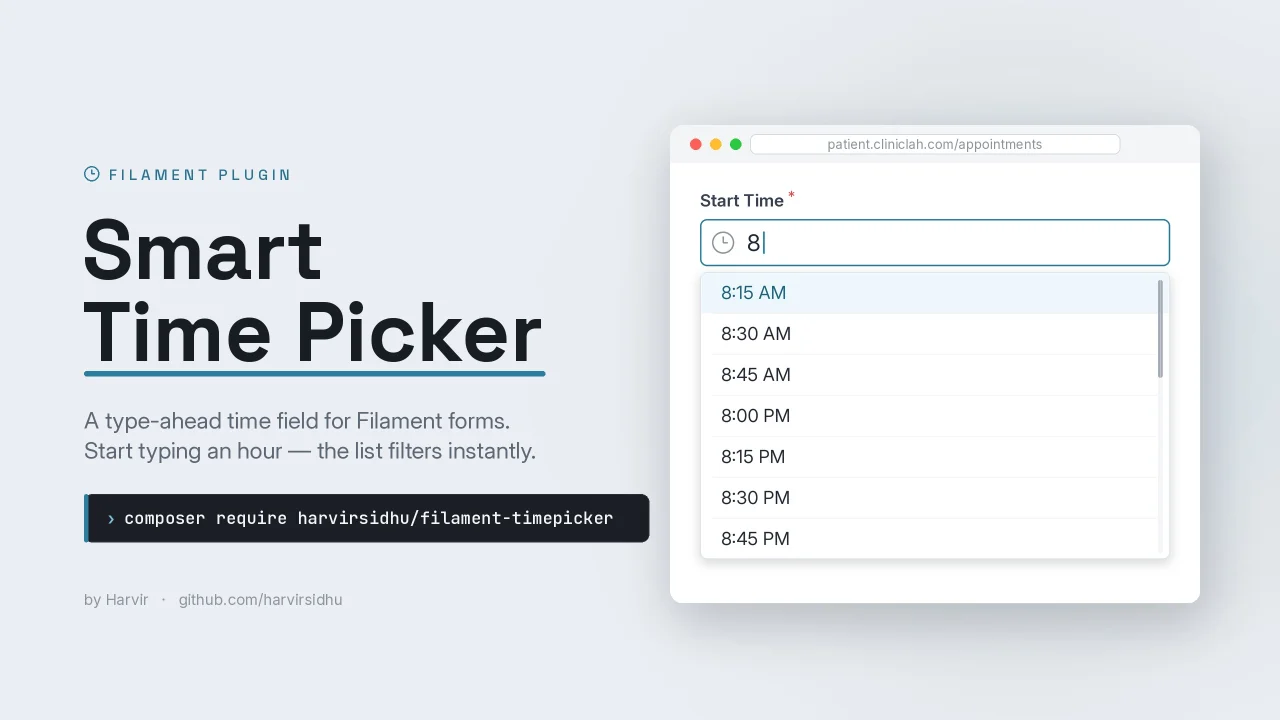
Smart Time Picker
A smart, type-ahead time picker field for Filament. Type freely (3p, 330, 3:30 PM) with a filterable, keyboard-navigable suggestion dropdown.
Author:
Harvir
Cards
A customizable Card components, designed for modern admin panels and multi-tenant SaaS applications.
Author:
Harvir
Featured Plugins
A selection of plugins curated by the Filament team

Blueprint
Filament Blueprint is a premium Laravel Boost extension that helps AI agents produce accurate, detailed implementation plans and security reports for Filament apps.
 Filament
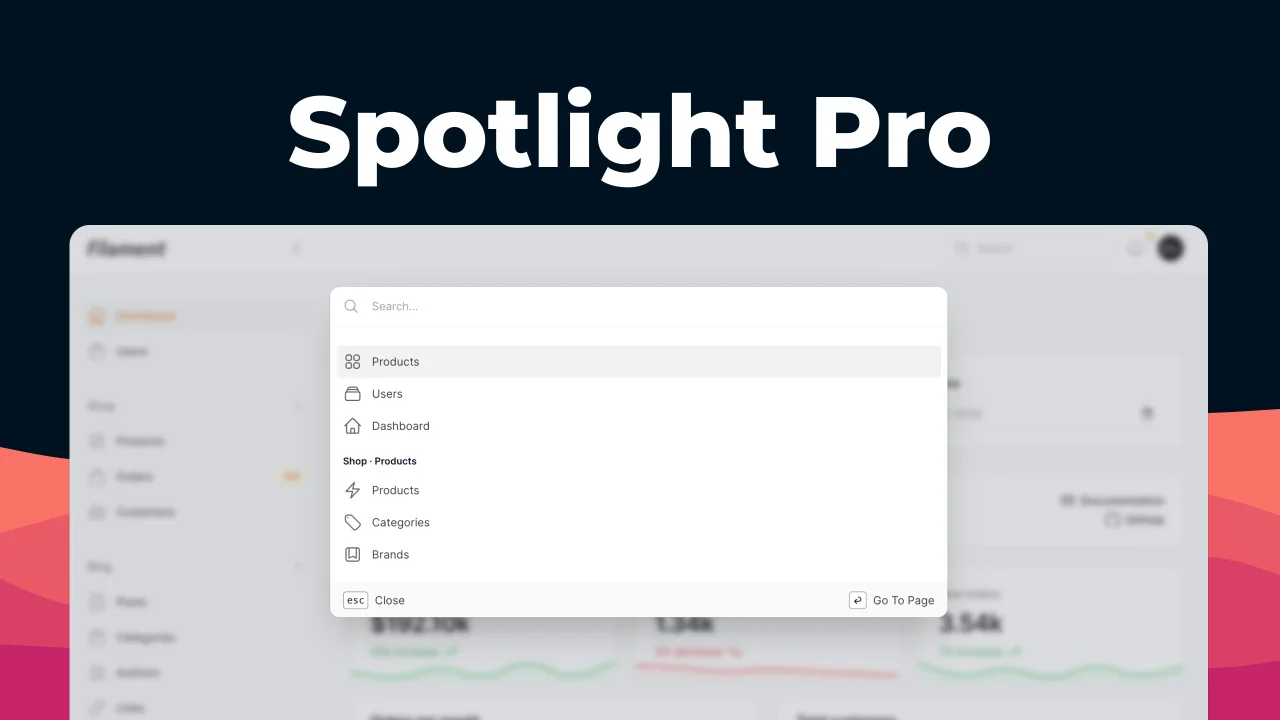
Spotlight Pro
Browse your Filament Panel with ease. Filament Spotlight Pro adds a Spotlight/Raycast like Command Palette to your Filament Panel.
 Dennis Koch

Custom Dashboards
Let your users build and share their own dashboards with a drag-and-drop interface. Define your data sources in PHP and let them do the rest.
Filament

