
Image Optimizer by Dani Hidayat
CommunityOptimize your Filament images before they reach your database.
 Author:
Dani Hidayat
Author:
Dani Hidayat
Package health
Automated checks of this plugin's Composer package
15 checks
- Passed: GitHub Actions pinned to SHA
- Skipped: GitLab CI includes pinned to SHA
- Passed: Open security advisories
- Passed: Dependabot PR responsiveness — No open Dependabot PRs.
- Skipped: Renovate MR responsiveness
- Passed: Dependabot or Renovate configured
- Passed: Dependency update cooldown configured
- Passed: Provides a security policy
- Passed: Abandoned or archived — No consulted source marks the package abandoned (packagist, github).
- Passed: Commit and release recency — Active: last commit 0 days ago; last release 0 days ago.
-
Passed:
composer.lock not committed by library
—
composer.lockis absent from the released dist archive. - Passed: Dist archive is lean
-
Passed:
Current Laravel version supported
—
Package dependencies resolve together with current Laravel
13.0. -
Passed:
Current PHP version supported
—
Constraint
^8.2supports current PHP8.5. - Skipped: Current Symfony version supported
filament/
namespace. Review the source and install at your own risk. Found
malware or an unresolved security issue the author won't
address?
Report it
.
Documentation
This package is a fork of joshembling/image-optimizer, updated to support Filament v4 & v5 and Laravel 12 & 13.


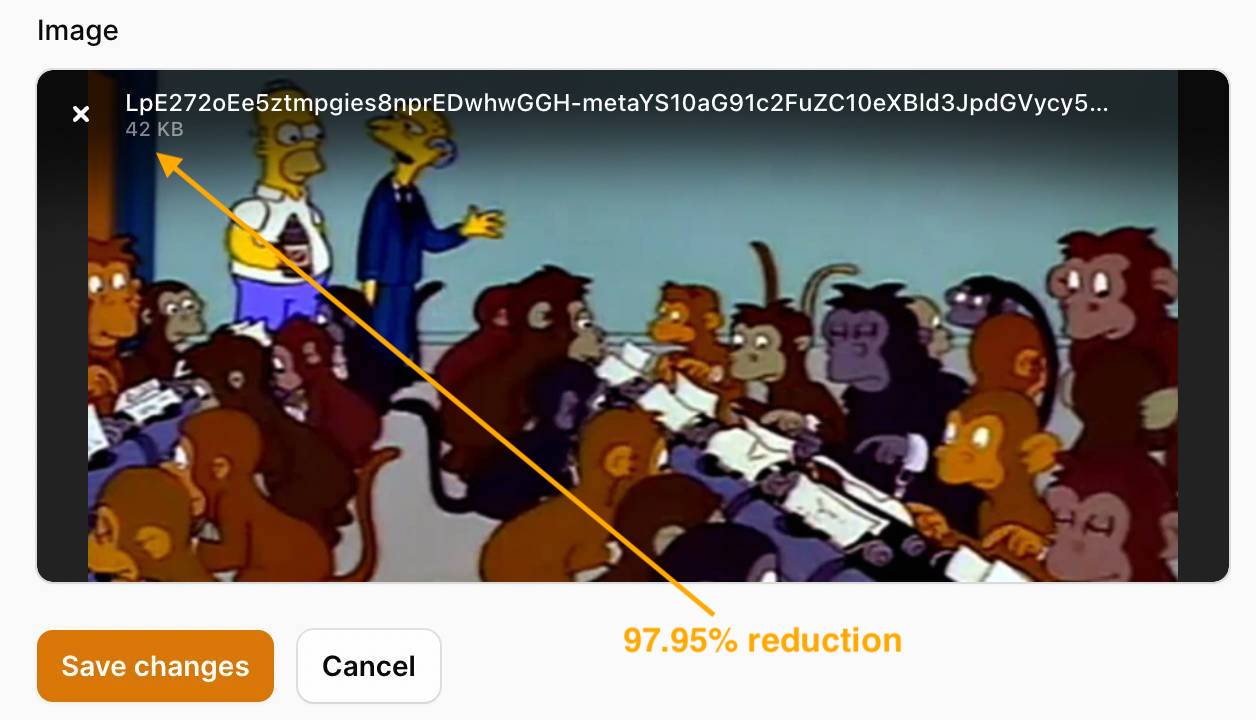
When you currently upload an image using the native Filament component FileUpload, the original file is saved without any compression or conversion.
Additionally, if you upload an image and use conversions with SpatieMediaLibraryFileUpload, the original file is saved with its corresponding versions provided on your model.
What if you'd rather convert and reduce the image(s) before reaching your database/S3 bucket? Especially in the case where you know you'll never need to save the original image sizes the user has uploaded.
🤳 This is where Filament Image Optimizer comes in.
You use the same components as you have been doing and have access to two additional methods for maximum optimization, saving you a lot of disk space in the process. 🎉
#Contents
#Installation
You can install the package via composer, which works with Filament v3.x, v4.x & v5.x, and Laravel 10, 11, 12 & 13:
composer require danihidayatx/image-optimizer
#Usage
#Filament version
You must be using Filament v3.x, v4.x or v5.x to have access to this plugin.
| PHP | Laravel version | Filament version | Image Optimizer version |
|---|---|---|---|
| ^8.2 | ^10.0, ^11.0, ^12.0, ^13.0 | ^3.2, ^4.0, ^5.0 | ^2.2 |
#Server
GD Library must be installed on your server to compress images.
To ensure WebP images are previewed correctly in the admin panel, you may need to add the correct mime types to your server configuration.
Apache Users (.htaccess):
AddType image/webp .webp
Nginx Users:
Ensure your mime.types file includes:
image/webp webp;
#Optimizing images
Before uploading your image, you may choose to optimize it by converting to your chosen format. The file saved to your disk will be the converted version only.
E.g. I want to convert my image to 'webp':
use Filament\Forms\Components\FileUpload;

FileUpload::make('attachment')
    ->image()
    ->optimize('webp'),
You can also pass a second parameter to optimize to set the quality of the image (0-100). This is useful if you want to compress the image further.
use Filament\Forms\Components\FileUpload;

FileUpload::make('attachment')
    ->image()
    ->optimize('webp', 85),
You can do exactly the same using SpatieMediaLibraryFileUpload:
use Filament\Forms\Components\SpatieMediaLibraryFileUpload;

SpatieMediaLibraryFileUpload::make('attachment')
    ->image()
    ->optimize('webp', 85),
#Dynamic values (Closures)
You may pass a Closure to almost any parameter (like quality, resize, maxImageWidth, etc.) to dynamically set values based on form state or logic.
For example, adjusting quality based on a toggle:
use Filament\Forms\Components\FileUpload;

FileUpload::make('attachment')
    ->image()
    ->optimize(
        format: 'webp',
        quality: fn ($get) => $get('high_quality') ? 100 : 50
    ),
This also works with SpatieMediaLibraryFileUpload:
use Filament\Forms\Components\SpatieMediaLibraryFileUpload;

SpatieMediaLibraryFileUpload::make('attachment')
    ->image()
    ->optimize(
        format: 'webp',
        quality: fn ($get) => $get('is_premium') ? 100 : 80
    ),
#Resizing images
You may also want to resize an image by passing in a percentage you would like to reduce the image by. This will also maintain aspect ratio.
E.g. I'd like to reduce my image (1280px x 720px) by 50%:
use Filament\Forms\Components\FileUpload;

FileUpload::make('attachment')
    ->image()
    ->resize(50),
Uploaded image size is 640px x 360px.
You can do the same using SpatieMediaLibraryFileUpload:
use Filament\Forms\Components\SpatieMediaLibraryFileUpload;

SpatieMediaLibraryFileUpload::make('attachment')
    ->image()
    ->resize(50),
#Add maximum width and/or height
You can also add a maximum width and/or height to the image. This will resize the image to the maximum width and/or height, maintaining the aspect ratio.
use Filament\Forms\Components\FileUpload;

FileUpload::make('attachment')
    ->image()
    ->maxImageWidth(1024)
    ->maxImageHeight(768),
#Combining methods
You can combine these two methods for maximum optimization.
Tip
Most methods like resize(), maxImageWidth(), and maxImageHeight() also support Closures, allowing you to dynamically adjust settings based on form state.
use Filament\Forms\Components\FileUpload;

FileUpload::make('attachment')
	->image()
	->optimize('webp')
	->maxImageWidth(1024)
	->maxImageHeight(768)
	->resize(50),
use Filament\Forms\Components\SpatieMediaLibraryFileUpload;

SpatieMediaLibraryFileUpload::make('attachment')
    ->image()
	->optimize('webp')
	->maxImageWidth(1024)
	->maxImageHeight(768)
    ->resize(50),
#Multiple images
You can also do this with multiple images - all images will be converted to the same format and reduced with the same percentage passed in. Just chain on multiple() to your upload:
use Filament\Forms\Components\FileUpload;

FileUpload::make('attachment')
    ->image()
	->multiple()
	->optimize('jpg')
    ->resize(50),
use Filament\Forms\Components\SpatieMediaLibraryFileUpload;

SpatieMediaLibraryFileUpload::make('attachment')
    ->image()
	->multiple()
	->optimize('jpg')
    ->resize(50),
#Examples

#Debugging
-
If you see a 'not found' exception, including "Method
optimize" or "Methodresize", ensure you runcomposer updateso that your lock file is in sync with yourcomposer.json. -
You might see a 'Waiting for size' message and an infinite loading state on the component and the likely cause of this is a CORS issue. This can be quickly be resolved by ensuring you are serving and upload images from the same domain. Check your Javascript console for more information.
#PHPStan / Static Analysis
Since the methods (optimize(), resize(), etc.) are registered at runtime using Laravel macros, PHPStan / Larastan might flag them as undefined methods.
This package ships with a PHPStan extension to automatically declare these methods.
#A. Automatic (Recommended)
If your project uses phpstan/extension-installer, the extension will be discovered and loaded automatically. No additional configuration is required.
#B. Manual
If you do not use the extension installer, you must manually register the extension in your project's phpstan.neon (or phpstan.neon.dist) file:
includes:
    - vendor/danihidayatx/image-optimizer/extension.neon
#Changelog
Please see CHANGELOG for more information on what has changed recently.
#Contributing
Please see CONTRIBUTING for details.
#Security Vulnerabilities
Please review our security policy on how to report security vulnerabilities.
#Credits
#License
The MIT License (MIT). Please see License File for more information.
Featured Plugins
A selection of plugins curated by the Filament team

Soft Theme
A theme that gives panels a warm, approachable look with rounded shapes, gentle colors, and serif headings.
 Filament

Sharp Theme
A theme that gives panels a precise, technical look with square corners, strong borders, and clear contrast.
Filament

Advanced Tables (formerly Filter Sets)
Supercharge your tables with powerful features like user-customizable views, quick filters, multi-column sorting, advanced table searching, convenient view management, and more. Compatible with Resource Panel Tables, Relation Managers, Table Widgets, and Table Builder!
 Kenneth Sese

