
Jobs monitor by Baptiste Bouillot
CommunityMonitor your queues from a panel
 Author:
Baptiste Bouillot
Author:
Baptiste Bouillot
Package health
Automated checks of this plugin's Composer package
15 checks
- Passed: GitHub Actions pinned to SHA
- Skipped: GitLab CI includes pinned to SHA
- Passed: Open security advisories
- Passed: Dependabot PR responsiveness — No stale Dependabot PRs.
- Skipped: Renovate MR responsiveness
- Passed: Dependabot or Renovate configured
- Passed: Dependency update cooldown configured
- Passed: Provides a security policy
- Passed: Abandoned or archived — No consulted source marks the package abandoned (packagist, github).
- Passed: Commit and release recency — Active: last commit 0 days ago; last release 2 days ago.
-
Passed:
composer.lock not committed by library
—
composer.lockis absent from the released dist archive. - Passed: Dist archive is lean
-
Passed:
Current Laravel version supported
—
Package dependencies resolve together with current Laravel
13.0. -
Passed:
Current PHP version supported
—
Constraint
^8.3supports current PHP8.5. - Skipped: Current Symfony version supported
filament/
namespace. Review the source and install at your own risk. Found
malware or an unresolved security issue the author won't
address?
Report it
.
Documentation
- Installation
- Usage
- Usage
- Example
- Authorization
- Changelog
- Contributing
- Security Vulnerabilities
- Credits
- License




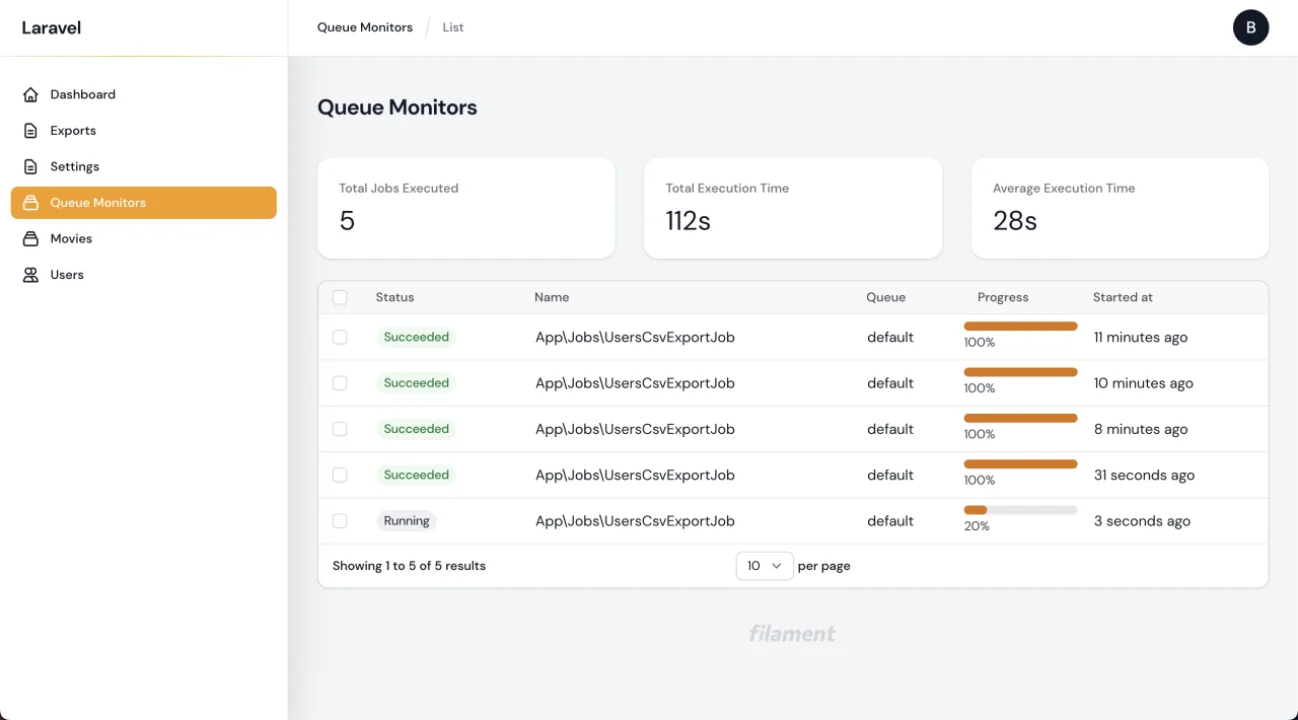
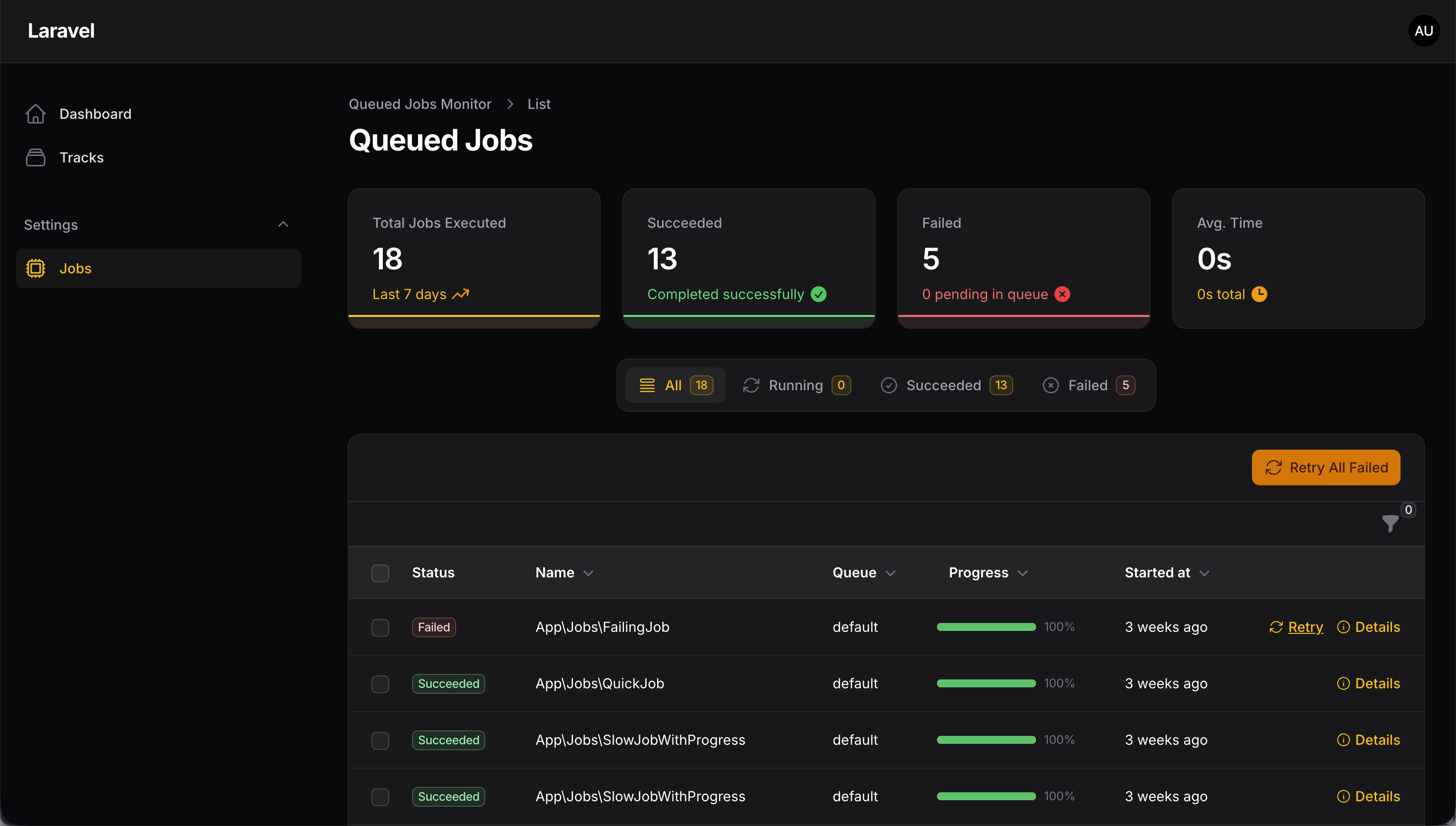
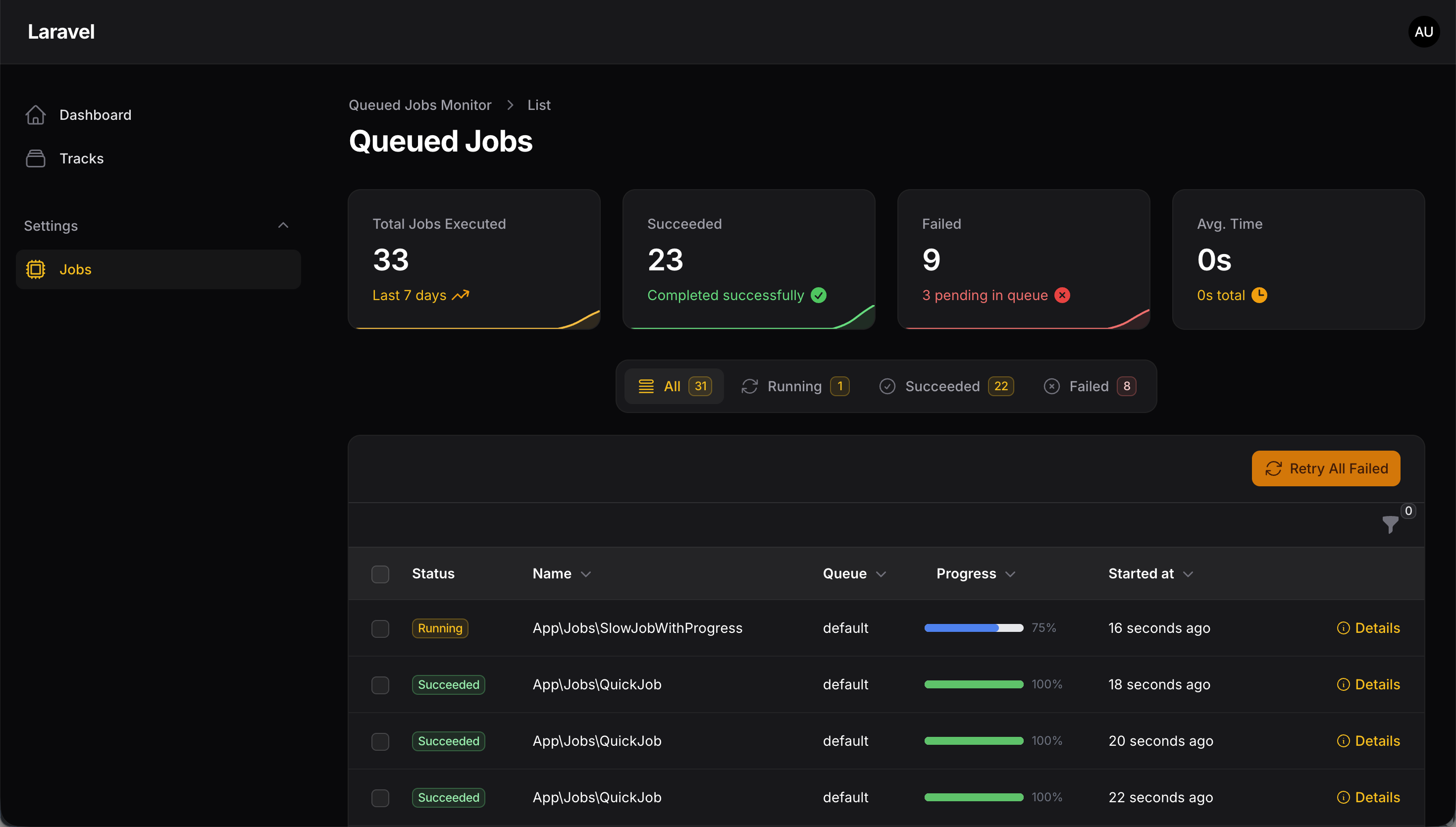
This is a package to monitor background jobs for FilamentPHP. It is inspired by Laravel Horizon and is compatible with all drivers.
#Installation
Check your filamentPHP version before installing:
| Version | FilamentPHP | PHP |
|---|---|---|
| 1.* | 2.* | 8.1 |
| 2.* | 3.* | >= 8.1 |
| 3.* | 4.* | >= 8.1 |
| 4.* | 4., 5. | >= 8.2 |
| 5.* | 5.* | >= 8.3 |
5.* requires Filament 5 and supports Laravel 12 and 13. 4.* still supports Filament 4 and Laravel 11.28+, and is maintained on the 4.x branch.
Install the package via composer:
composer require croustibat/filament-jobs-monitor
Publish and run the migrations using:
php artisan vendor:publish --tag="filament-jobs-monitor-migrations"
php artisan migrate
#Usage
#Configuration
The global plugin config can be published using the command below:
php artisan vendor:publish --tag="filament-jobs-monitor-config"
This is the content of the published config file:
return [
    'resources' => [
        'enabled' => true,
        'label' => 'filament-jobs-monitor::translations.model_label',
        'plural_label' => 'filament-jobs-monitor::translations.plural_model_label',
        'navigation_group' => 'filament-jobs-monitor::translations.navigation_group',
        'navigation_icon' => 'heroicon-o-cpu-chip',
        'navigation_sort' => null,
        'navigation_count_badge' => false,
        'resource' => Croustibat\FilamentJobsMonitor\Resources\QueueMonitorResource::class,
        'cluster' => null,
        'sub_navigation_position' => null, // SubNavigationPosition::Top, ::Start or ::End
        'polling_interval' => null, // e.g. '10s' to auto-refresh the job tables
    ],
    'failures' => [
        'enabled' => true,
        'polling_interval' => '10s',
    ],
    'pruning' => [
        'enabled' => true,
        'retention_days' => 7,
    ],
    'queues' => null, // null discovers them; or list them explicitly

    'queue_discovery' => [
        'cache_ttl' => 60,
    ],
    'tenancy' => [
        'enabled' => false,
        'model' => null, // e.g., App\Models\Tenant::class
        'column' => 'tenant_id',
    ],
];
NOTE: label, plural_label and navigation_group default to translation keys, so they follow the panel locale. Replace any of them with a plain string ('label' => 'Job') to hard-code it: a value carrying neither a :: namespace nor a . group is used verbatim and is never looked up in your application's JSON translation catalogue.
NOTE: queues is null by default, which discovers the queues instead of requiring a list: every queue seen in queue_monitors, in the jobs and failed_jobs tables, the default queue of each configured connection, and Horizon's supervised queues. That is what makes Redis and SQS work here — neither can enumerate its queues, but every queue a job ran on has been recorded. The result is cached for queue_discovery.cache_ttl seconds (60 by default). Setting queues to an explicit array skips discovery entirely.
NOTE: resources.polling_interval makes the Job History and Pending jobs tables refresh on their own, so the progress of a long-running job can be watched without reloading the page. It is disabled by default (null): a refresh of the Job History table also re-runs its four tab count badges, which is one count query per tab, so the interval is left to you. Any value Filament's poll() accepts works — '5s', '10s', '1m'. The Failures page has its own failures.polling_interval, already set to '10s'.
#Failures page
The Failures page groups failed jobs by signature — exception class, job class and normalised message (dynamic values such as ids, uuids and quoted strings are stripped) — so a thousand occurrences of the same error show up as a single row instead of a thousand, Sentry-style.
It includes:
- A stats overview: open groups, failures in the last hour, 24h failure rate and groups resolved in the last 7 days.
- A table of failure groups with occurrence counts, last-seen time and a 7-day sparkline per group, with Open / Resolved / All tabs and filters by exception class and queue.
- A detail slide-over per group with the stack trace of the last occurrence (app frames / all frames / raw toggle), the failed job payload rendered as a collapsible tree, and the most recent occurrences.
- Actions to mark a group resolved (a new occurrence reopens it automatically), reopen it, or retry all failed jobs of the group.
The page can be disabled with 'failures' => ['enabled' => false]. Failure grouping requires the add_failures_to_filament-jobs-monitor_table migration — republish the migrations, migrate and publish the plugin assets when upgrading:
php artisan vendor:publish --tag="filament-jobs-monitor-migrations"
php artisan migrate
php artisan filament:assets
If the migration has not been run, the plugin keeps working as before and simply skips failure grouping.
#Pruning old records
The QueueMonitor model uses Laravel's Prunable trait and will prune records older than pruning.retention_days (default: 7 days) when pruning.enabled is true.
Important: Laravel's built-in
php artisan model:prunecommand only auto-discovers prunable models that live in your application'sapp/Modelsdirectory. BecauseQueueMonitoris shipped inside this package (vendor/...), it is never picked up by a baremodel:prunecall — this is the most common cause of "the model is not pruning".
You have two ways to prune the records:
1. Use the dedicated command shipped with this package (recommended):
php artisan filament-jobs-monitor:prune
This targets the package model directly, so it works regardless of your app structure. Schedule it in routes/console.php (Laravel 11+) or app/Console/Kernel.php:
use Illuminate\Support\Facades\Schedule;

Schedule::command('filament-jobs-monitor:prune')->daily();
2. Or call Laravel's model:prune with an explicit --model flag:
php artisan model:prune --model="Croustibat\FilamentJobsMonitor\Models\QueueMonitor"
Pruning can also be toggled/configured at the plugin level:
FilamentJobsMonitorPlugin::make()
    ->enablePruning() // or ->enablePruning(false) to disable
    ->pruningRetention(14); // keep records for 14 days
#Extending Model
Sometimes it's useful to extend the model to add some custom methods. You can do it by extending the model by creating your own model :
$ php artisan make:model MyQueueMonitor
Then you can extend the model by adding your own methods :
    <?php

    namespace App\Models;

    use \Croustibat\FilamentJobsMonitor\Models\QueueMonitor as CroustibatQueueMonitor;

    class MyQueueMonitor extends CroustibatQueueMonitor {}
#Multi-Tenancy Support
This plugin supports multi-tenancy for applications using Filament's built-in tenant functionality. When enabled, job monitors are automatically filtered by the current tenant.
Features:
- Automatically associates jobs with tenants based on a
tenantIdproperty in your job class - Filters the job monitor list to show only jobs for the current tenant
- Filters pending jobs and failed jobs by tenant (via payload inspection)
- Backwards compatible - disabled by default
Configuration:
Enable multi-tenancy in your published config file:
'tenancy' => [
    'enabled' => true,
    'model' => App\Models\Tenant::class,  // Your tenant model
    'column' => 'tenant_id',              // Column name in queue_monitors table
],
Migration:
If you enable tenancy after initial installation, re-publish and run the migration to add the tenant_id column:
php artisan vendor:publish --tag="filament-jobs-monitor-migrations" --force
php artisan migrate
Job Requirements:
For jobs to be associated with a tenant, they must have a public tenantId property:
class MyTenantJob implements ShouldQueue
{
    use Dispatchable, InteractsWithQueue, Queueable, SerializesModels;

    public function __construct(
        public int|string $tenantId,  // Required for multi-tenancy
        // ... other properties
    ) {}
}
When dispatching the job, pass the current tenant ID:
MyTenantJob::dispatch(
    tenantId: Filament::getTenant()->id,
    // ... other arguments
);
See examples/TenantAwareExportJob.php for a complete example.
#Using Filament Panels
If you are using Filament Panels, you can register the Plugin to your Panel configuration. This will register the plugin's resources as well as allow you to set configuration using optional chainable methods.
For example in your app/Providers/Filament/AdminPanelProvider.php file:
<?php


use \Croustibat\FilamentJobsMonitor\FilamentJobsMonitorPlugin;

...

public function panel(Panel $panel): Panel
{
    return $panel
        ->plugins([
            FilamentJobsMonitorPlugin::make()
        ]);
}
#Usage
Just run a Background Job and go to the route /admin/queue-monitors to see the jobs.
#Example
Go to example folder to see a Job example file.
Then you can call your Job with the following code:
    public static function table(Table $table): Table
    {
        return $table

        // rest of your code
        ...

        ->bulkActions([
            BulkAction::make('export-jobs')
            ->label('Background Export')
            ->icon('heroicon-o-cog')
            ->action(function (Collection $records) {
                UsersCsvExportJob::dispatch($records, 'users.csv');
                Notification::make()
                    ->title('Export is ready')
                    ->body('Your export is ready. You can download it from the exports page.')
                    ->success()
                    ->seconds(5)
                    ->icon('heroicon-o-inbox-in')
                    ->send();
            })
        ])
    }
#Authorization
v5 puts every destructive action, and the job payloads themselves, behind an ability. Payloads routinely carry customer data, and "Clear logs" truncates the monitor table, so a panel with more than one role should not hand them to everyone who can open it.
Nothing changes when upgrading: an ability nobody covered is granted, as in v4. Flip
authorization.fallback to false once the abilities below are granted, and the plugin then
refuses anything the application has not allowed.
| Ability | Gate name | Policy method | Covers |
|---|---|---|---|
| View | viewAnyQueueMonitor |
viewAny |
the resource, the three pages and their routes |
| Retry | retryQueueMonitor |
retry |
retry, bulk retry, retry all failed, retry a failure group |
| Delete | deleteQueueMonitor |
delete |
deleting monitor records |
| Clear logs | clearQueueMonitorLogs |
clearLogs |
the "Clear logs" action, which truncates the table |
| Delete pending job | deletePendingJob |
deletePendingJob |
deleting queued jobs on the Pending page |
| Resolve failure | resolveQueueMonitorFailure |
resolveFailure |
marking a failure group resolved, and reopening it |
Each ability is resolved in this order, first match wins:
- the closure or boolean set on the plugin;
- a policy registered for the
QueueMonitormodel, when it implements the method; - a gate of the same name;
- the
authorization.fallbackconfig key (trueby default).
Denied abilities hide their action instead of failing on click, and a denied View makes the routes return 403 rather than only hiding the navigation entry.
#With the plugin
FilamentJobsMonitorPlugin::make()
    ->authorize(fn () => auth()->user()?->hasRole('admin'))
    ->authorizeRetry(fn () => auth()->user()?->can('retry_jobs'))
    ->authorizeClearLogs(fn () => auth()->user()?->hasRole('super-admin'))
The closure receives the record when the ability targets one. The other methods are
authorizeDelete(), authorizeDeletePendingJob() and authorizeResolveFailure().
#With a policy
// app/Policies/QueueMonitorPolicy.php
public function viewAny(User $user): bool
{
    return $user->hasPermissionTo('view jobs');
}

public function clearLogs(User $user): bool
{
    return $user->hasRole('super-admin');
}
// AppServiceProvider::boot()
Gate::policy(\Croustibat\FilamentJobsMonitor\Models\QueueMonitor::class, QueueMonitorPolicy::class);
Plain gates (Gate::define('clearQueueMonitorLogs', ...)) and spatie/laravel-permission work the
same way, since both end up behind Gate. With Filament Shield, generate a policy for
QueueMonitor and add the abilities above to it.
#Denying anything that is not granted
// config/filament-jobs-monitor.php
'authorization' => [
    'fallback' => false,
],
Recommended once the abilities are granted: an ability nobody covered is then refused instead of
allowed. Grant viewAnyQueueMonitor first, or the resource disappears from the panel.
#Batches page
Opt-in page listing Laravel's batches, next to Jobs / Pending / Failures:
FilamentJobsMonitorPlugin::make()->enableBatchesPage()
// config/filament-jobs-monitor.php
'batches' => [
    'enabled' => true,
    'polling_interval' => '10s',
    'retention_days' => 7,  // age the "Prune finished batches" action prunes past
],
It reads job_batches rather than duplicating its state, so progress, counts and status always
match what Laravel knows, and it only registers when batches are stored in the database — the page
and its route stay absent otherwise, instead of erroring. Rows carry View (the monitored jobs of
the batch), Retry (queue:retry-batch) and Cancel, each behind the matching ability.
On the Jobs table, a Batch column (hidden by default) links to the page, and a Batch filter lists
the batches jobs were actually monitored in. Both appear only once the batches migration has been
run.
With multi-tenancy enabled, a batch belongs to the tenant of the jobs it ran — batches have no
tenant of their own — so the page scopes them through queue_monitors.
#Batches and chains
Jobs dispatched inside Bus::batch() record their batch, so a monitor can be tied back to it:
$monitor->batch();  // ?Illuminate\Bus\Batch, via Bus::findBatch()
$monitor->chain();  // Collection<QueueMonitor>, the steps of the chain in run order
This needs the add_batches_to_filament-jobs-monitor_table migration. Without it the package keeps
working exactly as before: the schema check is memoized, so a long-running worker pays for it once.
Chain tracking is opt-in, because it unserializes the command of every dispatched job:
FilamentJobsMonitorPlugin::make()->enableChainsTracking()
// or 'chains' => ['enabled' => true] in the config
Laravel has no chain identifier — a chain is a linked list, and
Queueable::dispatchNextJobInChain() mutates the next job before dispatching it — so the plugin
writes one into the payload when the chain starts and carries it forward: while a chained job runs,
the worker remembers its id and the class the next step must have, and the continuation inherits it.
The expectation is consumed on the first match, so an unrelated job dispatched from inside a chained
job does not join the chain.
The job Details modal then shows a timeline of the chain: one line per step with its status, the exception inline on the one that broke, and the steps that were never reached — read off the serialized chain the failed job still carries, since those steps left no row of their own. The Jobs table also gains a Chain filter, which the timeline links to for a chain longer than 50 steps.
#Slow job detection
A job that used to take 2s and now takes 90s is invisible until it starts timing out. The plugin
flags a run as slow when it crosses the absolute threshold, or when it takes more than
anomaly_multiplier times the median of its own job class — the latter only once that class has
min_samples finished runs, so a class seen three times cannot flag itself.
Flagged runs get a warning badge on the duration column with the reason in a tooltip, a Slow
option appears on the status filter, and the Top slow jobs widget lists the slowest classes with
their median, p95 and the trend against the previous window.
// config/filament-jobs-monitor.php
'slow' => [
    'enabled' => true,
    'threshold_seconds' => 60,   // null disables the absolute limit
    'anomaly_multiplier' => 2.0,
    'min_samples' => 20,
    'window_days' => 7,
    'cache_ttl' => 300,
],
Medians and percentiles are computed in PHP from a single query over the window — SQLite and MySQL have no portable percentile function — so the cost does not grow with the number of job classes.
Each flagged run dispatches Croustibat\FilamentJobsMonitor\Events\JobMonitorSlow, carrying the
monitor, the reason (threshold or anomaly), the duration, the class median and the ratio:
Event::listen(JobMonitorSlow::class, function (JobMonitorSlow $event) {
    Log::warning("{$event->monitor->name} took {$event->duration}s ({$event->reason})");
});
#Sub-navigation layout
The Job History / Pending / Failures sub-navigation sits on top by default, because the three pages are wide tables and a side column eats their horizontal space. Move it with the plugin:
        // AdminPanelProvider.php
        ->plugins([
            FilamentJobsMonitorPlugin::make()
                ->subNavigationPosition(SubNavigationPosition::Start),
        ])
or with the resources.sub_navigation_position config key, which the plugin method overrides.
SubNavigationPosition::Start, ::End and ::Top are Filament's three positions; the matching
strings ('start', 'end', 'top') are accepted in the config file.
#Enabling navigation
The navigation item is shown by default. When enableNavigation() is not called, it follows the resources.enabled config key; the fluent method always takes precedence over the config.
        // AdminPanelProvider.php
        ->plugins([
            // ...
            FilamentJobsMonitorPlugin::make()
                ->enableNavigation(),
        ])
Or you can use a closure to enable navigation only for specific users:
        // AdminPanelProvider.php
        ->plugins([
            // ...
            FilamentJobsMonitorPlugin::make()
                ->enableNavigation(
                    fn () => auth()->user()->can('view_queue_job') || auth()->user()->can('view_any_queue_job'),
                ),
        ])
#Changelog
Please see CHANGELOG for more information on what has changed recently.
#Contributing
Please see CONTRIBUTING for details.
Translations are especially welcome: copy resources/lang/en/translations.php into your locale directory and translate the values, keeping the keys and the :count / :minutes / :delta placeholders untouched. tests/Feature/TranslationParityTest.php checks that a locale stays in sync with en; if you complete a locale listed in its INCOMPLETE_LOCALES constant, remove it from that list in the same PR.
#Security Vulnerabilities
Please review our security policy on how to report security vulnerabilities.
#Credits
#License
The MIT License (MIT). Please see License File for more information.
The author
Baptiste is a full-stack developer from Nantes, FR. He's CTO @Dernier Cri, a web & mobile development agency.
From the same author

Featured Plugins
A selection of plugins curated by the Filament team

Sharp Theme
A theme that gives panels a precise, technical look with square corners, strong borders, and clear contrast.
 Filament

Soft Theme
A theme that gives panels a warm, approachable look with rounded shapes, gentle colors, and serif headings.
Filament

Spotlight Pro
Browse your Filament Panel with ease. Filament Spotlight Pro adds a Spotlight like Command Palette to your Filament Panel.
 Dennis Koch

