
Audio Field & Column by Baptiste Bouillot
CommunityAudio player components with circular progress for forms, tables, and infolists.
 Author:
Baptiste Bouillot
Author:
Baptiste Bouillot
Package health
Automated checks of this plugin's Composer package
15 checks
- Skipped: GitHub Actions pinned to SHA
- Skipped: GitLab CI includes pinned to SHA
- Passed: Open security advisories
- Passed: Dependabot PR responsiveness — No open Dependabot PRs.
- Skipped: Renovate MR responsiveness
- Skipped: Dependabot or Renovate configured
- Skipped: Dependency update cooldown configured
- Failed: Provides a security policy — View details on Plumb
- Passed: Abandoned or archived — No consulted source marks the package abandoned (packagist, github).
- Warning: Commit and release recency — Low activity: last commit 188 days ago; last release 203 days ago.
-
Passed:
composer.lock not committed by library
—
composer.lockis absent from the released dist archive. - Warning: Dist archive is lean
-
Passed:
Current Laravel version supported
—
Package dependencies resolve together with current Laravel
13.0. -
Passed:
Current PHP version supported
—
Constraint
^8.2supports current PHP8.5. - Skipped: Current Symfony version supported
filament/
namespace. Review the source and install at your own risk. Found
malware or an unresolved security issue the author won't
address?
Report it
.
Documentation
- Features
- Installation
- Usage
- Configuration Options
- Examples
- Styling
- Browser Support
- Requirements
- Contributing
- License
- Credits
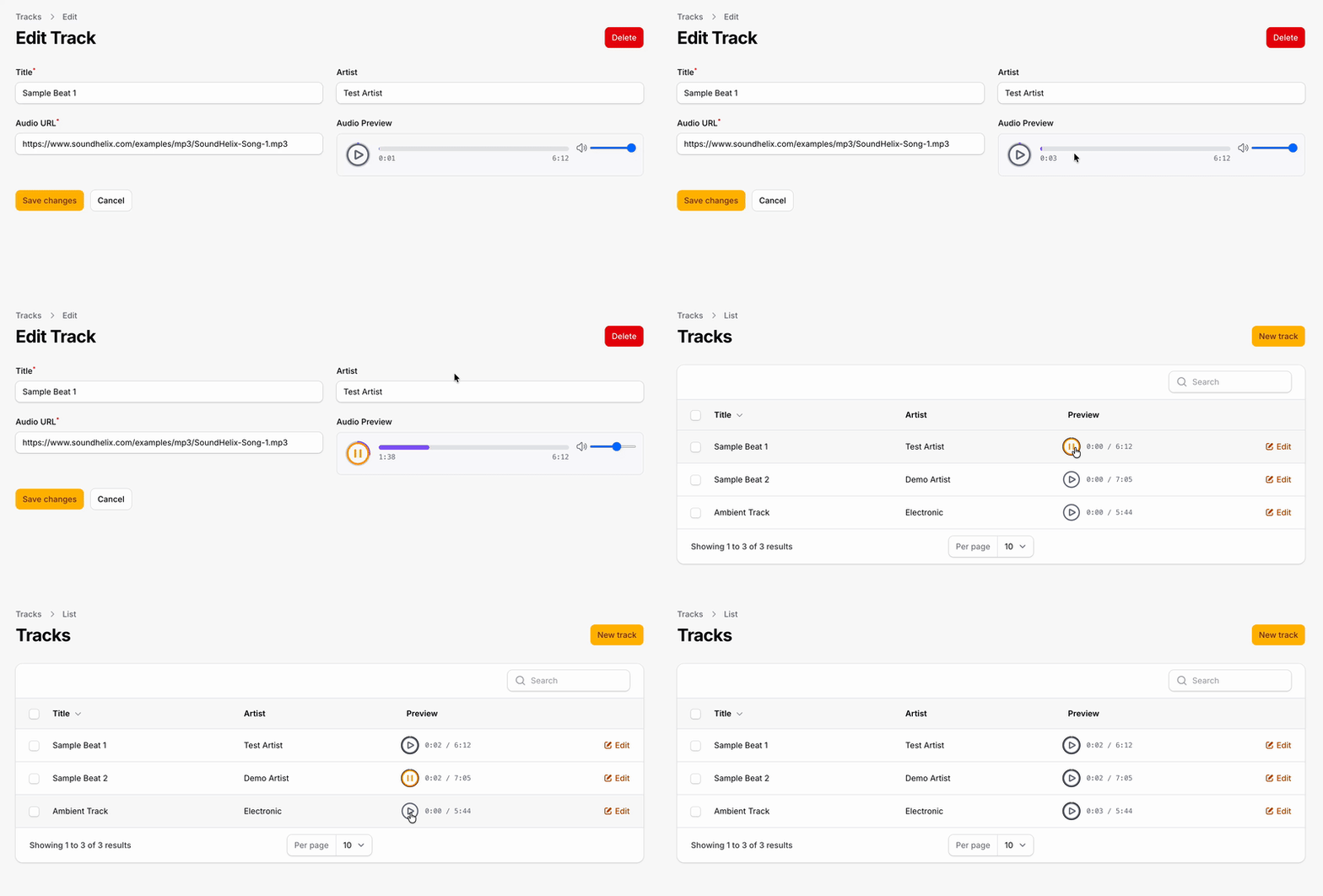
A Filament plugin that provides audio player components with circular progress for forms, tables, and infolists.



#Features
- Play/Pause button with smooth animations
- Circular progress indicator (SVG-based)
- Support for local and remote audio files (MP3, etc.)
- Dark mode support
- Optional volume control
- Optional duration display
- Customizable size and progress color
- Auto-pause when another player starts (only one plays at a time)
- Works in Tables, Infolists, and Forms
#Installation
composer require ultraviolettes/filament-audio-field-column
#Usage
#Table Column
Display an audio player in your table:
use Ultraviolettes\FilamentAudio\Tables\Columns\AudioColumn;

public static function table(Table $table): Table
{
    return $table
        ->columns([
            AudioColumn::make('audio_url')
                ->label('Preview'),

            // Or with a custom URL
            AudioColumn::make('preview')
                ->audioUrl(fn ($record) => $record->getAudioUrl())
                ->size(40)
                ->progressColor('#10b981'),
        ]);
}
#Infolist Entry
Display an audio player in your infolist:
use Ultraviolettes\FilamentAudio\Infolists\Components\AudioEntry;

public static function infolist(Infolist $infolist): Infolist
{
    return $infolist
        ->schema([
            AudioEntry::make('audio_url')
                ->label('Audio Preview')
                ->showDuration()
                ->showVolume(),
        ]);
}
#Form Field
Display an audio preview in your form (read-only player):
use Ultraviolettes\FilamentAudio\Forms\Components\AudioField;

public static function form(Form $form): Form
{
    return $form
        ->schema([
            AudioField::make('audio_url')
                ->label('Audio Preview')
                ->audioUrl(fn ($record) => $record?->audio_url)
                ->showDuration()
                ->showVolume()
                ->size(48),
        ]);
}
#Configuration Options
All components support the following options:
| Method | Description | Default |
|---|---|---|
audioUrl(string|Closure) |
Set the audio URL directly | Uses state value |
size(int) |
Size of the player in pixels | 32 (column/entry), 48 (field) |
progressColor(string) |
Color of the progress circle | #00bfff |
showDuration(bool) |
Show the duration display | false (column/entry), true (field) |
showVolume(bool) |
Show volume control | false |
#Examples
#Basic Table Column
AudioColumn::make('audio_file')
#Customized Column
AudioColumn::make('preview')
    ->label('Audio')
    ->audioUrl(fn ($record) => Storage::url($record->audio_path))
    ->size(36)
    ->progressColor('#f59e0b')
    ->showDuration()
#Full-Featured Form Field
AudioField::make('audio_preview')
    ->label('Current Audio')
    ->audioUrl(fn ($record) => $record?->getFirstMediaUrl('audio'))
    ->size(56)
    ->progressColor('#8b5cf6')
    ->showDuration()
    ->showVolume()
#With Spatie Media Library
AudioColumn::make('audio')
    ->audioUrl(fn ($record) => $record->getFirstMediaUrl('tracks'))
#Remote URLs
AudioColumn::make('sample')
    ->audioUrl('https://example.com/audio/sample.mp3')
#Styling
The component uses Tailwind CSS classes and supports dark mode out of the box. The progress circle color can be customized using the progressColor() method with any valid CSS color value:
->progressColor('#10b981')     // Hex
->progressColor('rgb(16, 185, 129)')  // RGB
->progressColor('deepskyblue') // Named color
#Browser Support
The audio player uses the native HTML5 <audio> element and supports all modern browsers. Supported audio formats depend on the browser:
- MP3: All modern browsers
- WAV: All modern browsers
- OGG: Firefox, Chrome, Opera
- AAC: Safari, Chrome, Edge
#Requirements
- PHP 8.2+
- Laravel 11+
- Filament 4.x or 5.x
#Contributing
Contributions are welcome! Please feel free to submit a Pull Request.
#License
MIT License. See LICENSE.md for more information.
#Credits
- Inspired by the audio preview component from BTY Monorepo
- Built with Filament
- Uses Alpine.js for interactivity
The author
Baptiste is a full-stack developer from Nantes, FR. He's CTO @Dernier Cri, a web & mobile development agency.
From the same author
Featured Plugins
A selection of plugins curated by the Filament team

Blueprint
Filament Blueprint is a premium Laravel Boost extension that helps AI agents produce accurate, detailed implementation plans and security reports for Filament apps.
 Filament

Sharp Theme
A theme that gives panels a precise, technical look with square corners, strong borders, and clear contrast.
Filament

Spotlight Pro
Browse your Filament Panel with ease. Filament Spotlight Pro adds a Spotlight like Command Palette to your Filament Panel.
 Dennis Koch

