
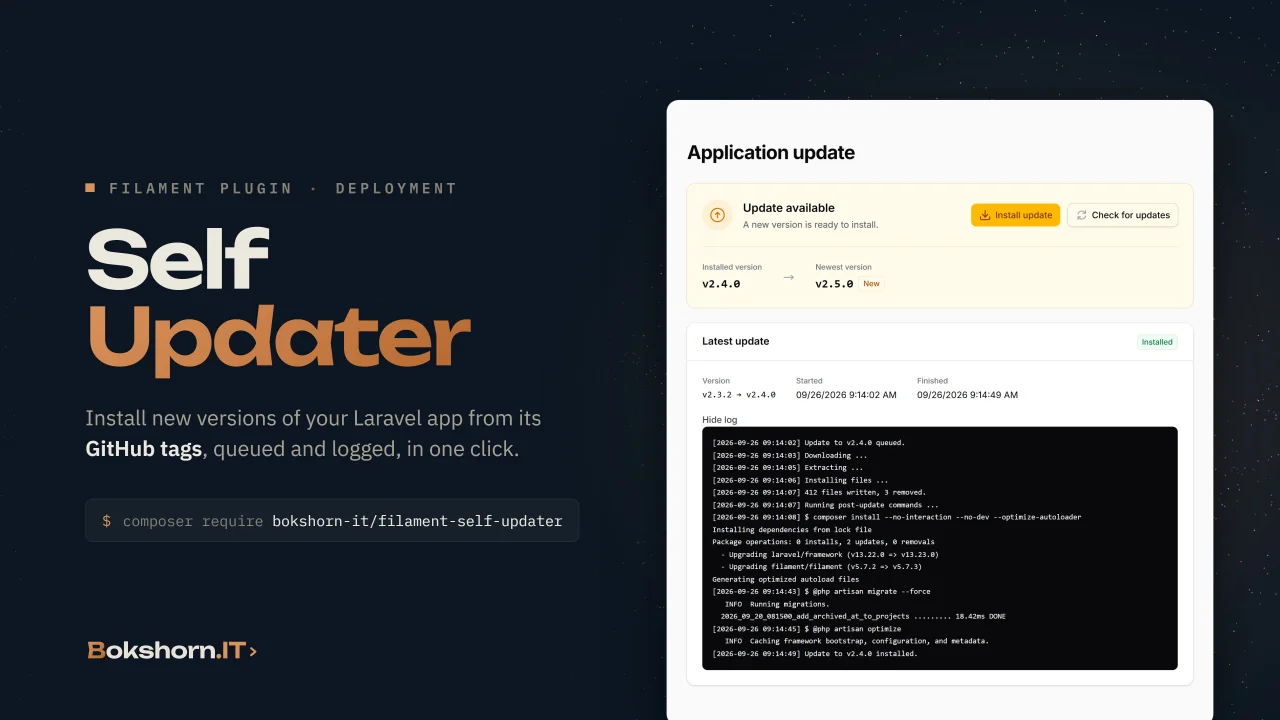
Self Updater
CommunityUpdates a Laravel application from its own GitHub repository: it finds the newest tag or release, installs it through a queued job with a live log, removes the files a release dropped and runs your post-update commands.
 Author:
Bokshorn.IT
Author:
Bokshorn.IT
Package health
BetaAutomated checks of this plugin's Composer package
15 checks
- Passed: GitHub Actions pinned to SHA
- Skipped: GitLab CI includes pinned to SHA
- Passed: Open security advisories
- Passed: Dependabot PR responsiveness — No open Dependabot PRs.
- Skipped: Renovate MR responsiveness
- Passed: Dependabot or Renovate configured
- Passed: Dependency update cooldown configured
- Passed: Provides a security policy
- Passed: Abandoned or archived — No consulted source marks the package abandoned (packagist, github).
- Passed: Commit and release recency — Active: last commit 0 days ago; last release 0 days ago.
-
Passed:
composer.lock not committed by library
—
composer.lockis absent from the released dist archive. - Passed: Dist archive is lean
-
Passed:
Current Laravel version supported
—
Package dependencies resolve together with current Laravel
13.0. -
Passed:
Current PHP version supported
—
Constraint
^8.3supports current PHP8.5. - Skipped: Current Symfony version supported
filament/
namespace. Review the source and install at your own risk. Found
malware or an unresolved security issue the author won't
address?
Report it
.
Documentation
- Features
- Compatibility
- Installation
- Usage
- Configuration
- How an update runs
- Testing
- Changelog
- Contributing
- Security
- Credits
- License



A Filament plugin that updates a Laravel application from its own GitHub repository.
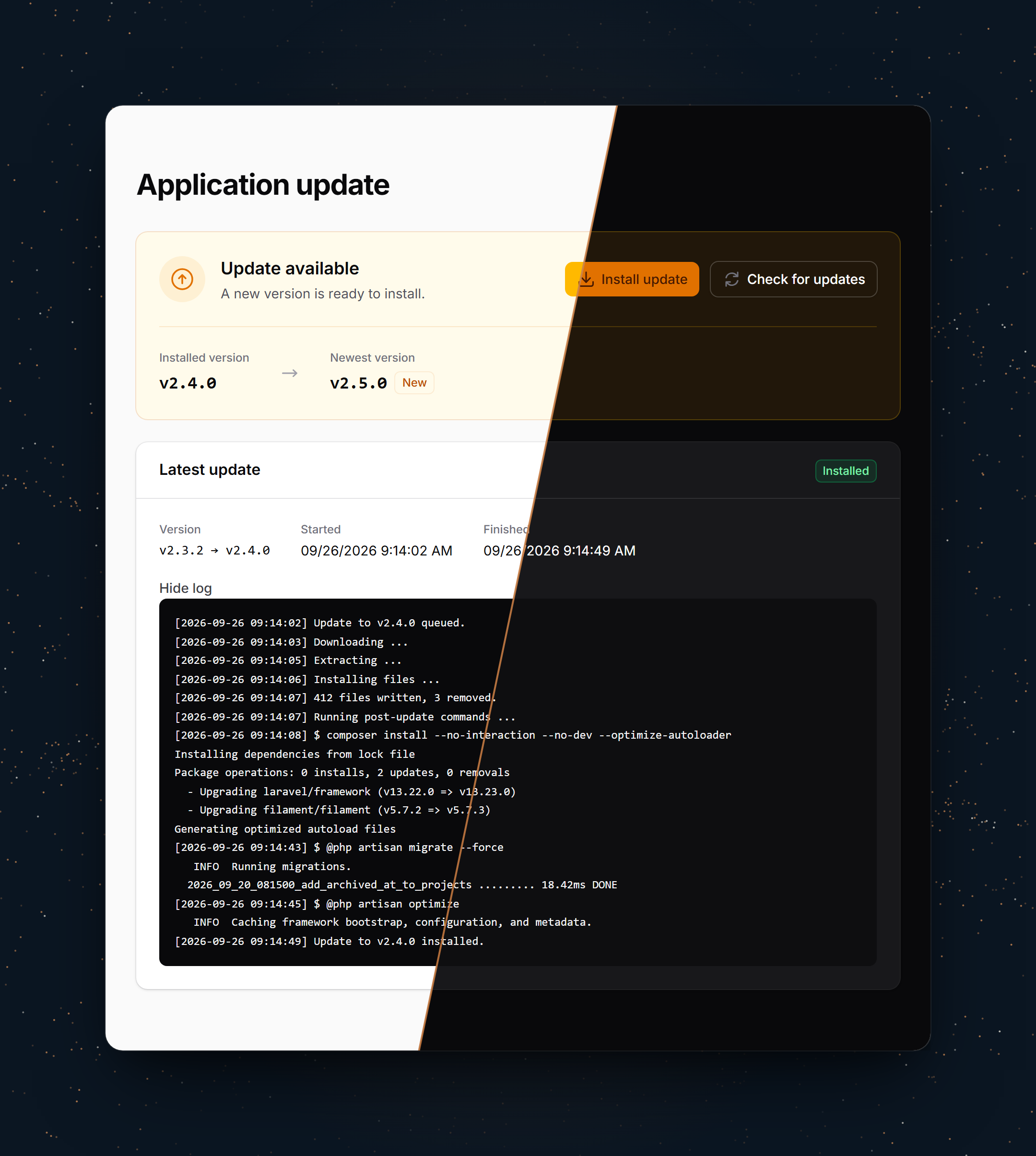
It is built for applications installed on servers you do not deploy to by hand: an operator opens the update page, sees that a newer version is tagged, and installs it with one click. The plugin downloads that version's source archive, lays it over the application, removes the files the release no longer ships and runs the post-update commands you configured. The update itself runs on the queue, so a long composer install never meets a request timeout.
#Features
- Newest version from the repository's tags or its GitHub releases, every page of them, prereleases opt-in
- Private repositories through a token
- Updates run as a queued job, one at a time; the page follows the step and the log as it runs
- Excluded paths (
.env,storage,vendor, ...) are never written or deleted - Files a release dropped are removed on the next update, and only those: files your application created are never touched
- Post-update commands of your choice, their output in the update's log, and a clear difference between "nothing changed" and "files updated, a command failed"
UpdateInstalledandUpdateFailedevents, for a mail or a chat message- Optional dashboard widget
- Ships English and German; every label is translatable
#Compatibility
| Plugin | Filament | Laravel | PHP |
|---|---|---|---|
| 1.x | 5.x | 12.x, 13.x | 8.3+ |
The server needs the zip extension and a running queue worker.
#Installation
Install the package via composer:
composer require bokshorn-it/filament-self-updater
[!IMPORTANT] This package ships Blade views that Tailwind has to scan. If you have not set up a custom theme yet, follow Creating a custom theme in the Filament docs first, otherwise the update page renders unstyled.
Add the package's views to your theme CSS file:
@source '../../../../vendor/bokshorn-it/filament-self-updater/resources/**/*.blade.php';
Then rebuild your assets with npm run build.
Point the plugin at your repository in .env:
UPDATER_REPOSITORY=your-org/your-app
UPDATER_GITHUB_TOKEN=github_pat_...
Updates run as a queued job, so the server needs a queue worker whose timeout covers a whole update. See The queue.
Register the plugin on your panel and say who may use it:
use BokshornIt\FilamentSelfUpdater\SelfUpdaterPlugin;

public function panel(Panel $panel): Panel
{
    return $panel
        ->plugin(
            SelfUpdaterPlugin::make()
                ->authorize(fn (User $user): bool => $user->is_admin)
        );
}
Optionally publish the config file:
php artisan vendor:publish --tag="filament-self-updater-config"
The views and translations are publishable too:
php artisan vendor:publish --tag="filament-self-updater-views"
php artisan vendor:publish --tag="filament-self-updater-translations"
#Usage
#Authorization
The update page is closed to everyone until you call ->authorize(). Installing an update replaces the application's code and runs commands on the server, so this is a decision to make on purpose rather than a default to forget. The closure receives the authenticated user:
SelfUpdaterPlugin::make()
    ->authorize(fn (User $user): bool => $user->can('update-application'))
#Versions
By default the newest version is the highest git tag that looks like a version (v2.4.0 or 2.4.0), compared as versions rather than as text, so v2.10.0 beats v2.9.0. If you publish GitHub releases, read those instead; drafts are never offered:
UPDATER_VERSIONS_FROM=releases
Prereleases (v3.0.0-beta.1, or a release flagged as one) are skipped unless you set UPDATER_PRERELEASES=true.
The installed version is recorded after every update. An application deployed some other way has no record yet, and shows its version as unknown until the first update. To start from a known version, set it once:
UPDATER_INSTALLED_VERSION=v2.4.0
#Post-update commands
Once the files are in place, the plugin runs the commands listed under post_update in the config, from the application root, one after another. Publish the config and list whatever a deployment of your application needs:
'post_update' => [
    'composer install --no-interaction --no-dev --optimize-autoloader',
    '@php artisan migrate --force',
    '@php artisan optimize',
    '@php artisan queue:restart',
],
A string runs through the system shell, so pipes and && work. An array runs as the program and its arguments without a shell, which spares you the quoting:
'post_update' => [
    ['@php', 'artisan', 'migrate', '--force'],
    ['sh', 'deploy/after-update.sh'],
],
@php stands for the PHP binary running the update. Use it for artisan: on shared hosting, the php on the PATH is often a different version from the one serving the application.
Nothing runs until you list something. The output of every command goes into the update's log, which the page shows while it runs. The first command that fails stops the rest; the files are already on the new version by then, and the page says so rather than claiming nothing happened.
#The queue
The update runs as the InstallUpdate job, on the connection and queue you configure:
UPDATER_QUEUE_CONNECTION=database
UPDATER_QUEUE=updates
Make sure a worker listens there, and that the worker's timeout is at least the timeout in the config (30 minutes by default). Only one update runs at a time. An update still marked as running after the timeout counts as abandoned, so a worker that died cannot block the next one.
On the sync connection the update runs inside the request that started it. That works, but long post-update commands then run into the web server's timeouts.
#Excluded paths
.env, .git, bootstrap/cache, node_modules, public/storage, storage and vendor are never written or deleted by an update. Change the exclude list in the config to add your own.
#Events
use BokshornIt\FilamentSelfUpdater\Events\UpdateFailed;
use BokshornIt\FilamentSelfUpdater\Events\UpdateInstalled;

Event::listen(function (UpdateFailed $event): void {
    Mail::to('ops@example.com')->send(new UpdateFailedMail(
        version: $event->status->version,
        filesUpdated: $event->status->filesUpdated(),
        reason: $event->exception->getMessage(),
    ));
});
#Dashboard widget
SelfUpdaterPlugin::make()
    ->authorize(fn (User $user): bool => $user->is_admin)
    ->widget()
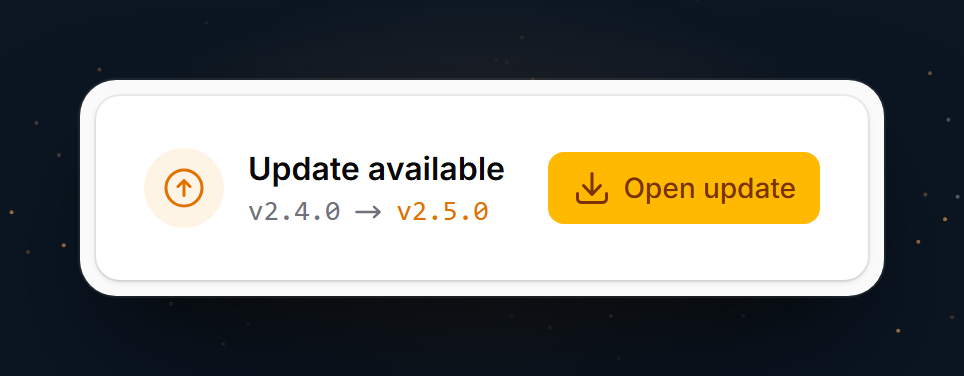
The widget shows the installed version and, when there is one, the newer version with a link to the update page. It only appears for users ->authorize() lets in.
#Navigation
SelfUpdaterPlugin::make()
    ->navigationGroup('System')
    ->navigationIcon('heroicon-o-arrow-path')
    ->navigationSort(90)
->registerNavigation(false) hides the page from the navigation and keeps it reachable at /{panel}/update. To change the page itself, extend Pages\ApplicationUpdate and pass your class to ->page().
#Another source
Versions and archives come from a Contracts\ReleaseSource. Bind your own implementation to fetch them from somewhere other than GitHub:
use BokshornIt\FilamentSelfUpdater\Contracts\ReleaseSource;

$this->app->bind(ReleaseSource::class, fn () => new InternalReleaseServer(
    url: config('services.releases.url'),
));
#Configuration
| Key | Env | Default | |
|---|---|---|---|
repository |
UPDATER_REPOSITORY |
owner/name |
|
token |
UPDATER_GITHUB_TOKEN |
For a private repository | |
versions_from |
UPDATER_VERSIONS_FROM |
tags |
tags or releases |
prereleases |
UPDATER_PRERELEASES |
false |
|
installed_version |
UPDATER_INSTALLED_VERSION |
Used until the first update | |
storage_path |
storage/app/self-updater |
Version, file list, status and logs | |
exclude |
see above | Never written or deleted | |
post_update |
none | Commands run after the files are in place | |
queue.connection |
UPDATER_QUEUE_CONNECTION |
default | |
queue.name |
UPDATER_QUEUE |
default | |
timeout |
1800 |
Seconds, whole update | |
download_timeout |
300 |
Seconds, download only | |
cache_ttl |
1800 |
Seconds the newest version is cached |
#How an update runs
- The archive of the version is downloaded and extracted into the state directory. A failure here leaves the application untouched.
- Every file in it is copied over the application root, except excluded paths.
- Files the previous update installed that this release does not contain are deleted, along with directories that leaves empty. The first update has no previous one to go by, so it deletes nothing; files dropped before it stay until you remove them.
- The new version and the list of installed files are recorded.
- The post-update commands run, one after another, stopping at the first that fails.
Copying is not atomic: the files are replaced one by one while the application keeps serving requests, so for the seconds step 2 takes, a request can meet a mix of old and new files. There is no rollback; to go back, install the previous version.
#Testing
composer test
#Changelog
See CHANGELOG.
#Contributing
See CONTRIBUTING.
#Security
See SECURITY for how to report a vulnerability.
#Credits
#License
The MIT License (MIT). See LICENSE.
The author
Bokshorn.IT builds Laravel and Filament applications for small businesses: ERP and invoicing systems, customer portals, and the internal tooling that keeps them running. The plugins we publish here started out as pieces we needed in our own projects and turned out to be worth sharing.
From the same author
Featured Plugins
A selection of plugins curated by the Filament team

Soft Theme
A theme that gives panels a warm, approachable look with rounded shapes, gentle colors, and serif headings.
 Filament

Spotlight Pro
Browse your Filament Panel with ease. Filament Spotlight Pro adds a Spotlight like Command Palette to your Filament Panel.
 Dennis Koch

Sharp Theme
A theme that gives panels a precise, technical look with square corners, strong borders, and clear contrast.
Filament

