
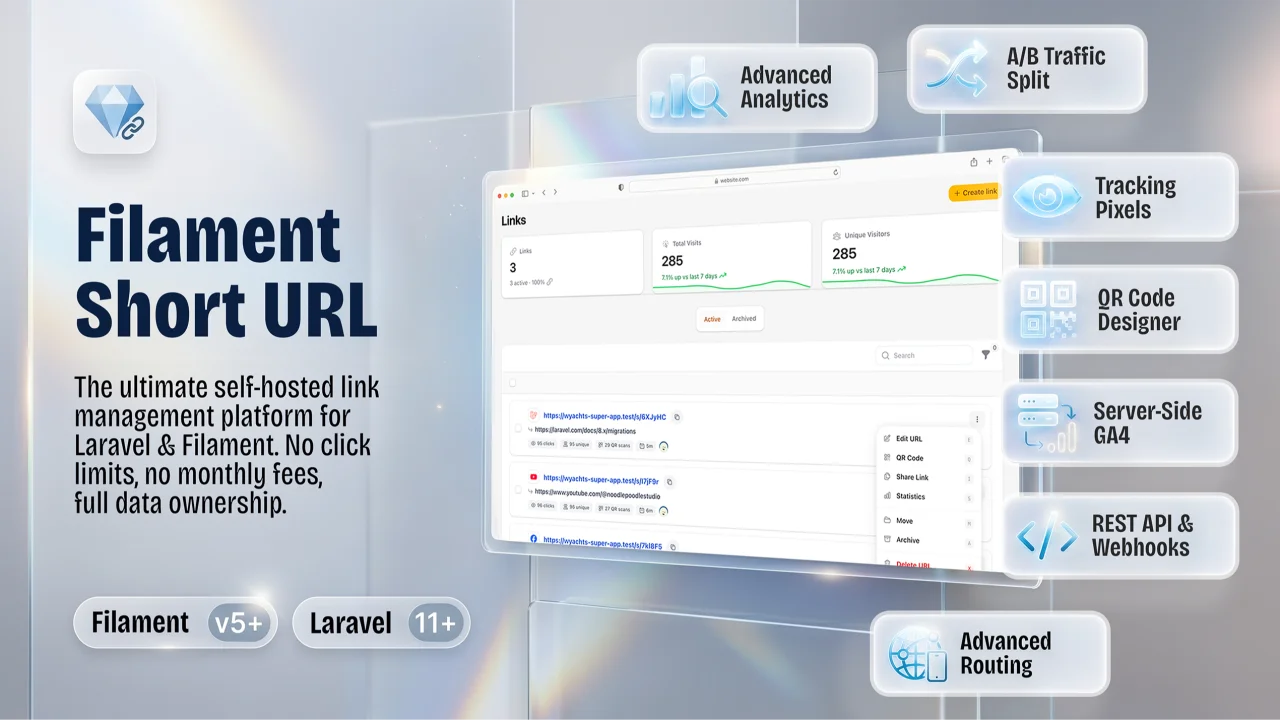
Short URL Manager by Bartłomiej Janczak
CommunityA self-hosted URL shortener, redirect engine, and QR code manager built as a Filament v5 plugin. Drop it into any Laravel 11+ application to replace Bitly, Dub.co, or Rebrandly subscriptions — with full data ownership, no click limits, and no monthly fees.
 Author:
Bartłomiej Janczak
Author:
Bartłomiej Janczak
Package health
Automated checks of this plugin's Composer package
15 checks
- Skipped: GitHub Actions pinned to SHA
- Skipped: GitLab CI includes pinned to SHA
- Passed: Open security advisories
- Passed: Dependabot PR responsiveness — No open Dependabot PRs.
- Skipped: Renovate MR responsiveness
- Failed: Dependabot or Renovate configured — No dependency updater configuration found. View details on Plumb
- Skipped: Dependency update cooldown configured
- Failed: Provides a security policy — View details on Plumb
- Passed: Abandoned or archived — No consulted source marks the package abandoned (packagist, github).
- Passed: Commit and release recency — Active: last commit 21 days ago; last release 46 days ago.
-
Failed:
composer.lock not committed by library
—
composer.lockis present in the released dist archive. View details on Plumb - Warning: Dist archive is lean
-
Passed:
Current Laravel version supported
—
Package dependencies resolve together with current Laravel
13.0. -
Passed:
Current PHP version supported
—
Constraint
^8.3supports current PHP8.5. - Skipped: Current Symfony version supported
filament/
namespace. Review the source and install at your own risk. Found
malware or an unresolved security issue the author won't
address?
Report it
.
Documentation
- Screenshots
- Features
- vs. Bitly, Dub.co & Rebrandly
- Architecture
- Requirements
- Installation
- Upgrading
- Publishing Package Assets
- Setup
- Restricting Settings Access
- Global Settings GUI
- Password-Protected Links
- Redirect Warning Pages
- Security & Anti-Fraud
- Custom Branded Expiry Pages
- Smart Link Targeting
- A/B Split Testing & Weighted Traffic Rotation
- Native App Linking & Deep Linking
- High-Traffic Optimizations
- Social Retargeting Pixels & Central Pixel Registry
- Custom Domain Branding
- Developer REST API
- Enabling the API
- Authentication
- API Key Scopes
- Per-Key Rate Limiting
- Per-Key Link Scoping (Owner User ID)
- Endpoints
- GET /api/short-url/links
- GET /api/short-url/links/{idOrKey}
- POST /api/short-url/links
- PUT/PATCH /api/short-url/links/{idOrKey}
- GET /api/short-url/links/{idOrKey}/stats
- GET /api/short-url/links/{idOrKey}/visits
- POST /api/short-url/links/bulk-delete
- PATCH /api/short-url/links/bulk-update
- PUT /api/short-url/links/upsert
- POST /api/short-url/links/bulk
- GET /api/short-url/links/exists
- GET /api/short-url/links/random
- GET /api/short-url/links/info
- GET /api/short-url/links/{idOrKey}/visits/export
- Tags & Folders REST API
- DELETE /api/short-url/links/{idOrKey}
- Error Responses
- Webhooks
- Configuration Reference (.env)
- Artisan Commands
- Programmatic Usage (Fluent Builder)
- Model Helpers & Service
- Events
- Visitor Filtering (Bot Detection)
- Live Activity Feed (SSE)
- Public Stats (Shareable Analytics)
- SEO, Open Graph & Link Cloaking
- Database Compatibility
- Changelog
- License
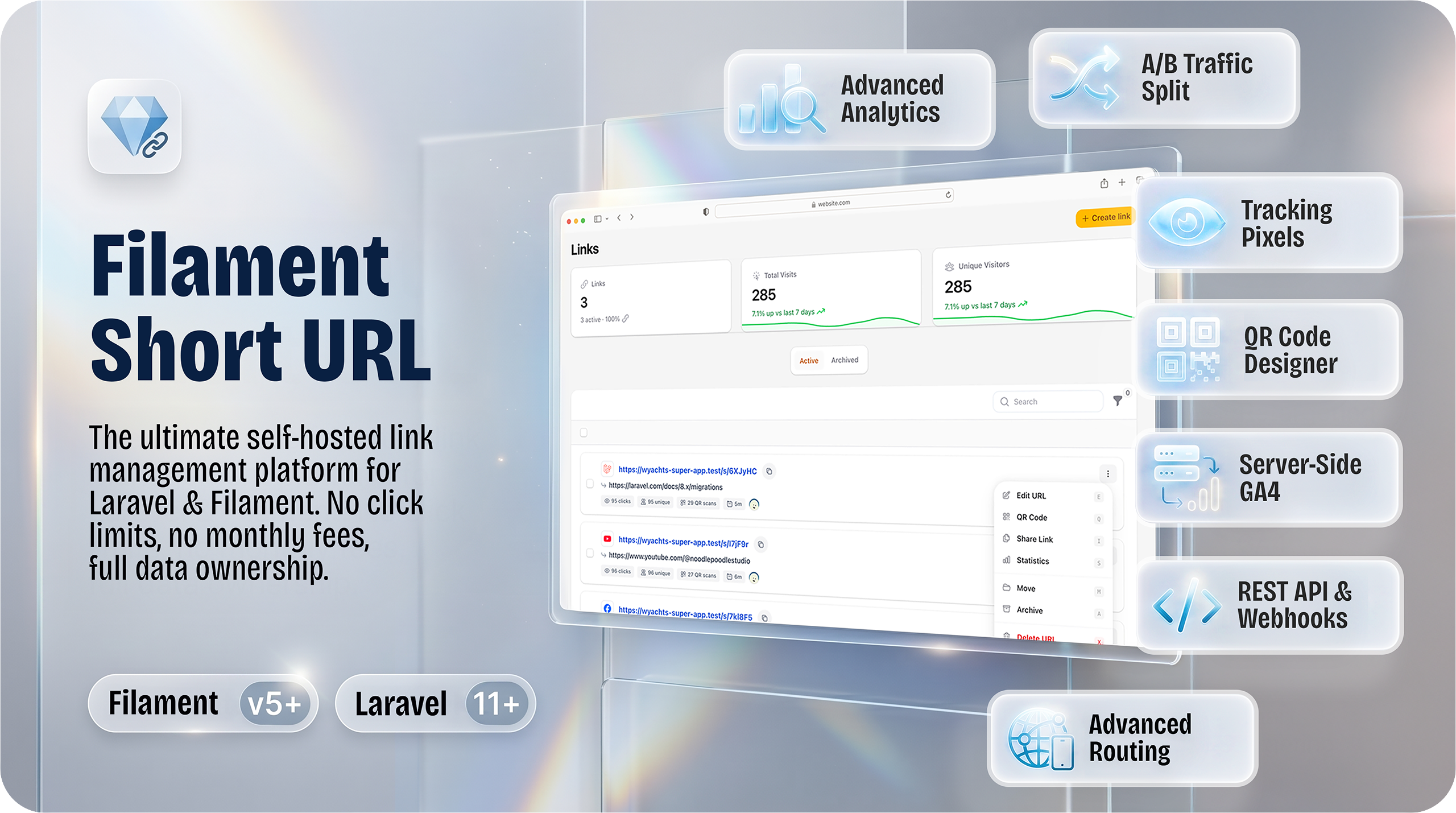
The most complete self-hosted link management plugin for Laravel & Filament.
Short URLs · QR codes · Analytics · SEO & OG Meta · Link Cloaking · Targeting · Deep links · Webhooks · REST API




A self-hosted URL shortener, redirect engine, and QR code manager built as a Filament v5 plugin. Drop it into any Laravel 11+ application to replace Bitly, Dub.co, or Rebrandly subscriptions — with full data ownership, no click limits, and no monthly fees.
On top of basic link shortening it ships: per-link SEO & Open Graph meta, Search Engine Indexing, and Link Cloaking; multi-channel analytics with live activity feed, cross-filtering, and cross-domain retargeting pixels; advanced routing rules (device, country, language, A/B); mobile deep linking into 24+ native apps; a REST API with scoped keys; HMAC-signed webhooks; and offline GDPR-safe Geo-IP — all managed from a polished Filament admin panel.
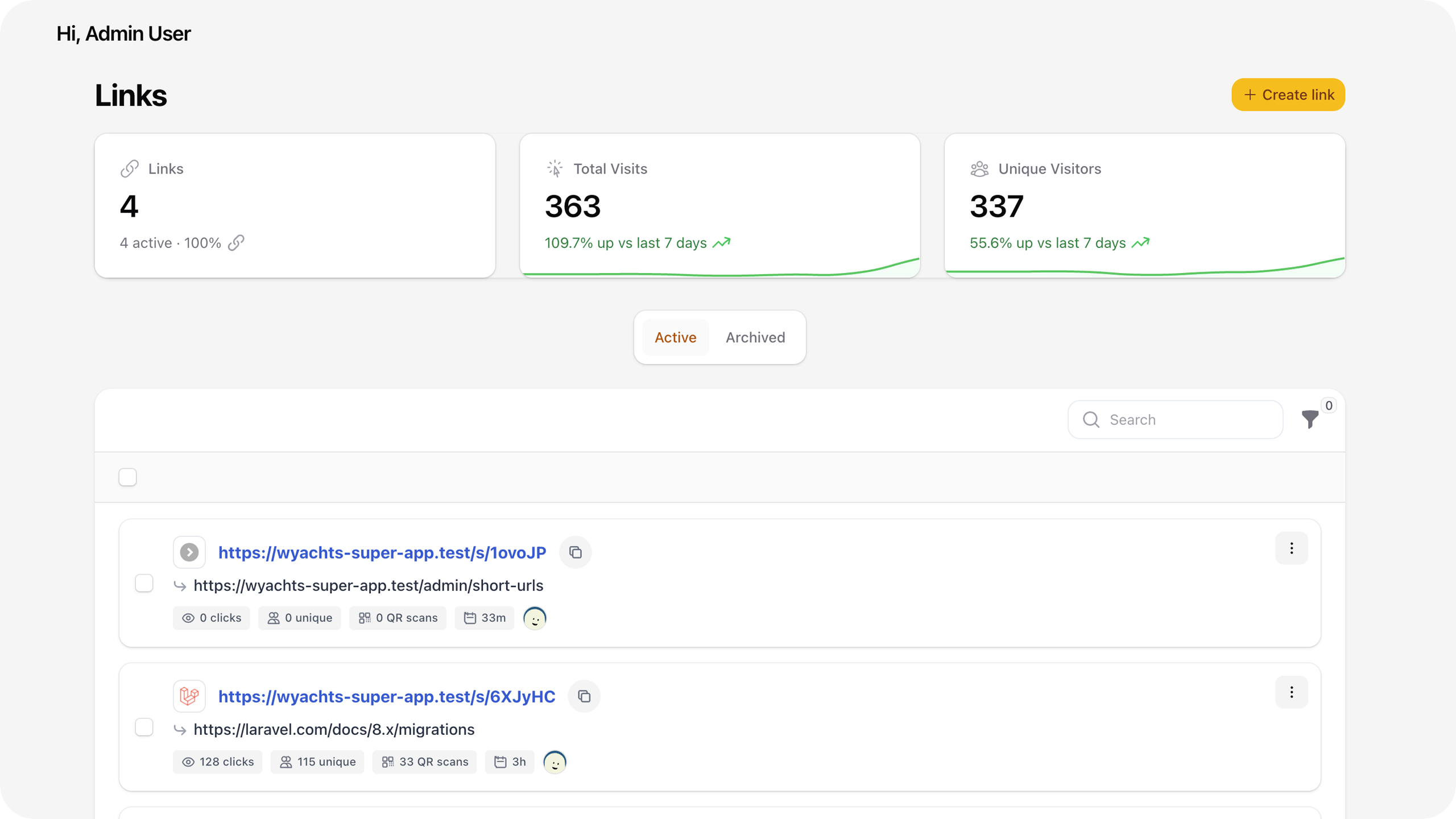
#Screenshots
 |
 |
 |
 |
 |
|
#Features
- 🔗 Short Link Generation — Auto-generate collision-free Base62 keys or set your own custom slugs.
- 🌐 Custom Domain Branding — Register your own domains, verify DNS in real-time (multi A-record + CNAME matching), enforce verification before activation, and serve links directly from the domain root — no
/s/prefix needed. - 🔎 SEO & Open Graph Meta — Per-link
og:title,og:description, andog:imagewith live social preview in Filament. Auto-scrape metadata from the destination URL, import OG images to storage, and serve bot-safe preview pages to Facebook, LinkedIn, X, Slack, and other crawlers. - 🎭 Link Cloaking — Mask the destination URL in the browser address bar by embedding the target in an iframe on your short-link domain. Social bots still receive your custom OG tags; human visitors stay on your branded URL.
- 🚫 Search Engine Indexing Control — Per-link toggle to allow or block search engine indexing. When disabled, every redirect and interstitial response sends
X-Robots-Tag: noindex, nofollowplus matching<meta name="robots">tags. - 🌍 Multiple Geo-IP Drivers — Resolve visitor countries from CDN headers (Cloudflare, CloudFront), offline MaxMind, or ip-api.com. The Headers driver auto-enables CDN trust on save and falls back to MaxMind → ip-api when edge headers are missing (ip-api rate-limited to protect the free tier).
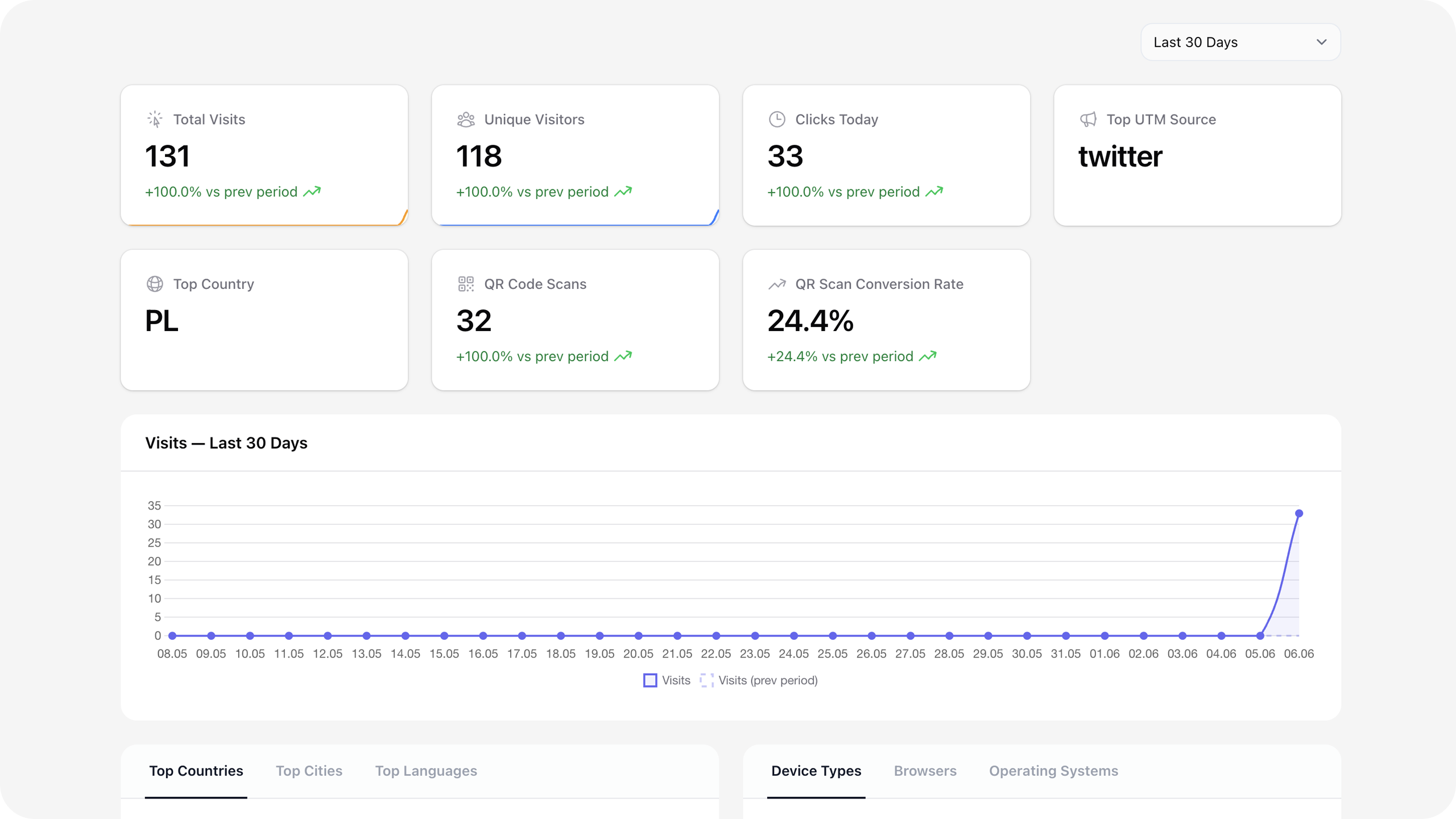
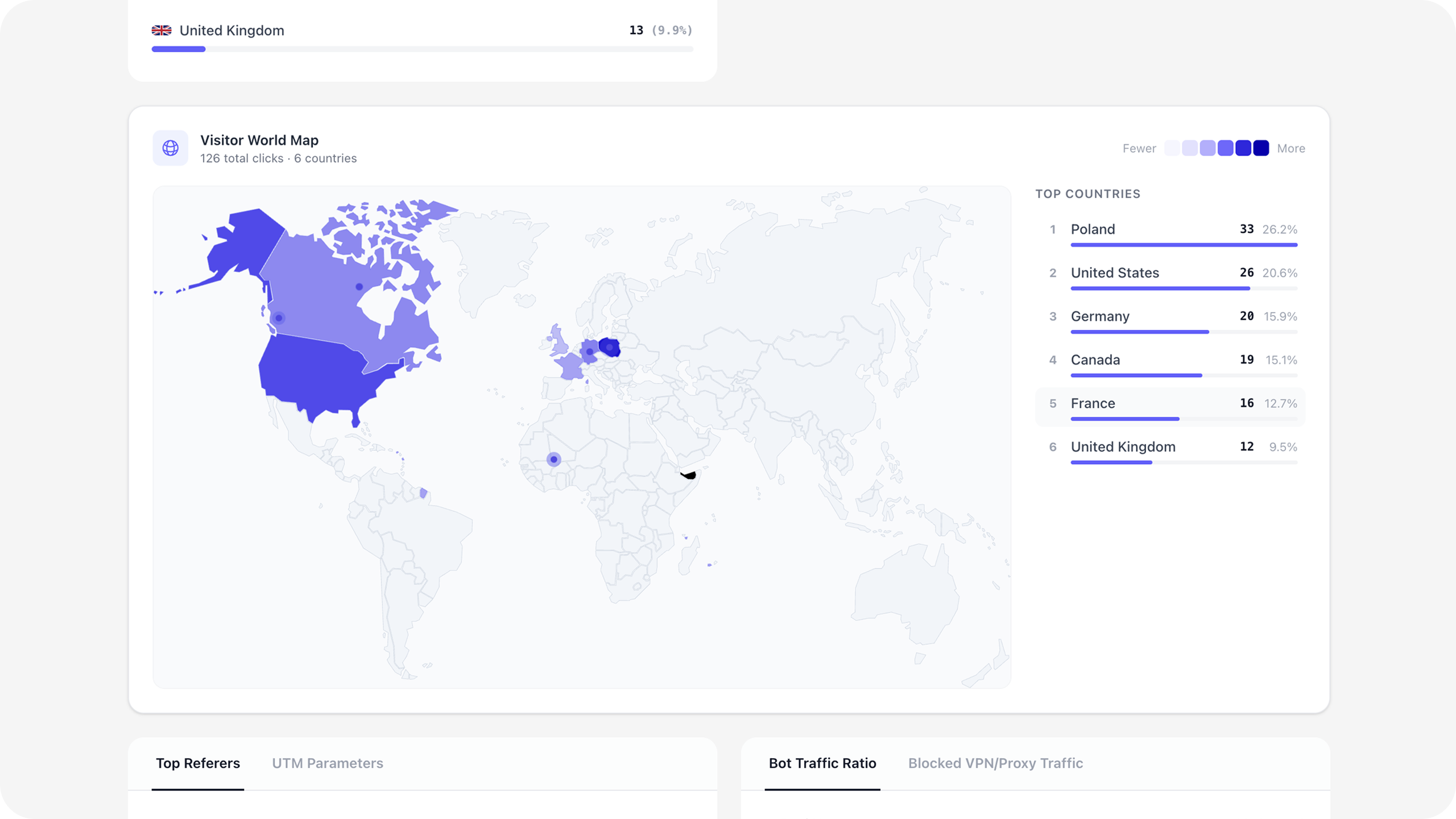
- 🗺️ Visitor World Map — Visualize click distribution on an interactive SVG world map with per-country hover stats.
- 📈 Full Analytics Dashboard — Track total/unique visits, referrers, devices, browsers, OSes, and browser languages. Fully cross-filterable (e.g., "only mobile visits from Poland in May").
- ⚡ Live Activity Feed — Real-time visit stream on each link's stats page (
/{record}/stats/live). Browser uses SSE +EventSource(not Livewirewire:poll). The server auto-detects your cache stack and picks the fastest transport — see Live Activity Feed. - 🚀 Production Redis mode — Set Queue Connection =
redisin Settings for async visit jobs plus dedicated Redis counters, today/hourly stats, and live feed — independent ofCACHE_STORE. Configure Redis host/port/password in the panel; Test Redis and Test queue worker buttons validate before save. - 🗂️ Folders & Tags — Assign each link to a folder and up to 5 tags. Click any folder or tag to navigate to a filtered link list.
- 🗄️ Link Archiving — Soft-archive links instead of deleting them. Archived links are hidden by default and fully restorable.
- 🛡️ VPN, Proxy & Bot Filtering — Optional VPN/proxy/Tor detection (flag or block) when enabled in Settings → Advanced. Known bot and social-preview crawlers are excluded from visit logs entirely (not logged or counted).
- 🔍 Google Safe Browsing — When enabled in Settings → Advanced, target URLs are checked against Google's threat database on create, edit, and redirect (Filament panel, REST API, and cached redirect checks).
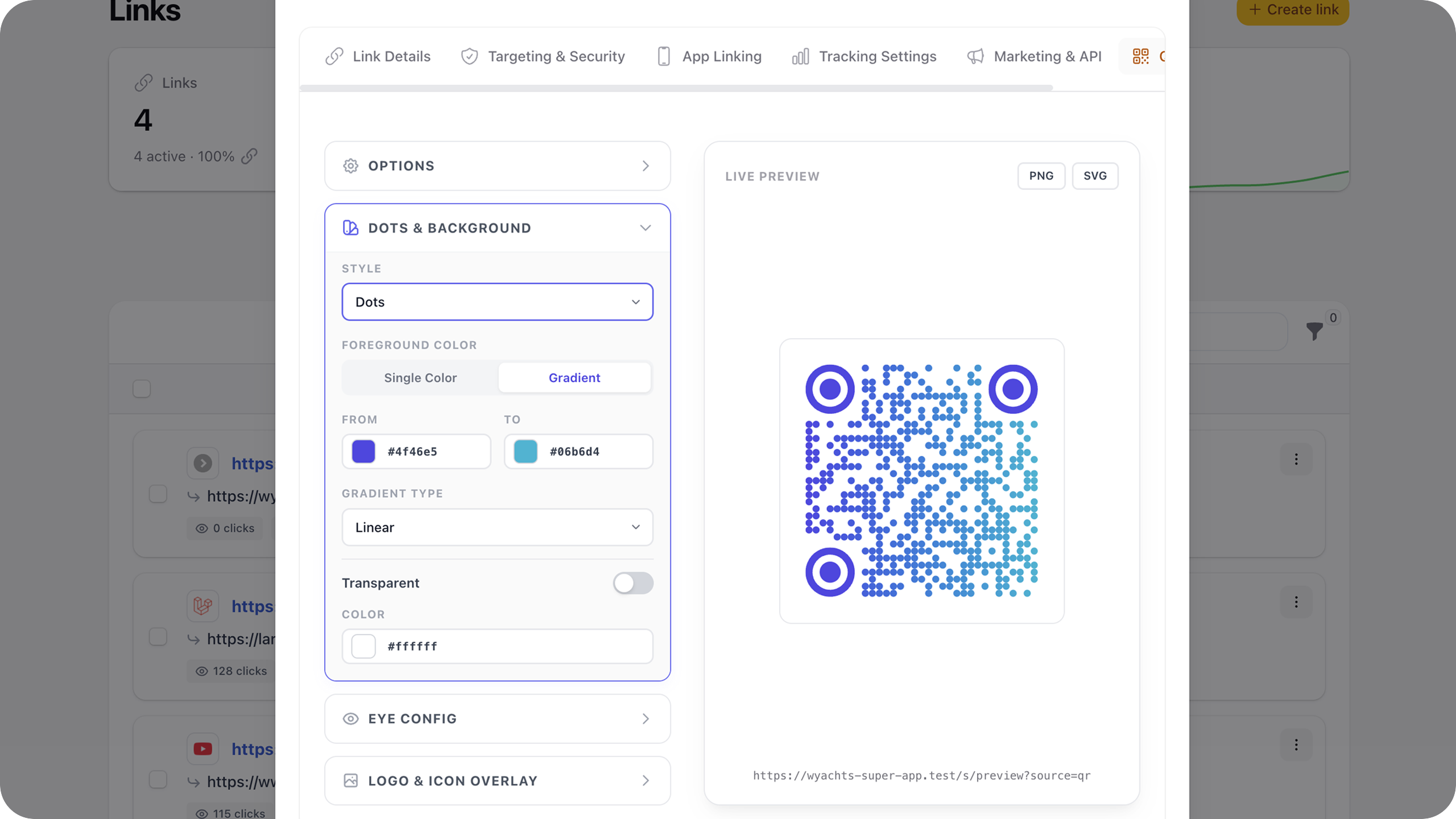
- 🎨 SVG QR Code Designer — Full dot style, gradient, margin, and logo customization. Export as SVG or high-resolution PNG directly from the admin panel (client-side via QRCodeStyling — colors, gradients, and logo are preserved).
- 📊 QR Scan Tracking — QR scans are recorded separately from regular web clicks via
?source=qror?qr=1. Shown as a distinct metric in analytics. - ✈️ Browser Language Targeting — Route visitors to different destinations based on their browser's
Accept-Languageheader. - 🚀 Fast Redirects — The main
/s/{key}route skips Laravel'swebmiddleware (no session/cookies on every click). Password-protected links use a separate stateful/s-auth/{key}route. Simple redirects stay lean; HTML interstitials (warning page, pixels, cloaking) add latency by design. - 🎯 Server-Side GA4 (Enterprise MP) — Full GA4 Measurement Protocol payloads (
page_view,click,short_url_visit) withsession_id,timestamp_micros, and engagement time. Per-link Measurement ID validated before send; Settings Test connection verifies the realG-XXXXXXXXXX+ API secret pair via the debug collector. - ⚙️ UTM Builder — Build and preview campaign URLs with a real-time UTM form that syncs bidirectionally with the destination URL field.
- 🔒 Link Expiration & Caps — Set
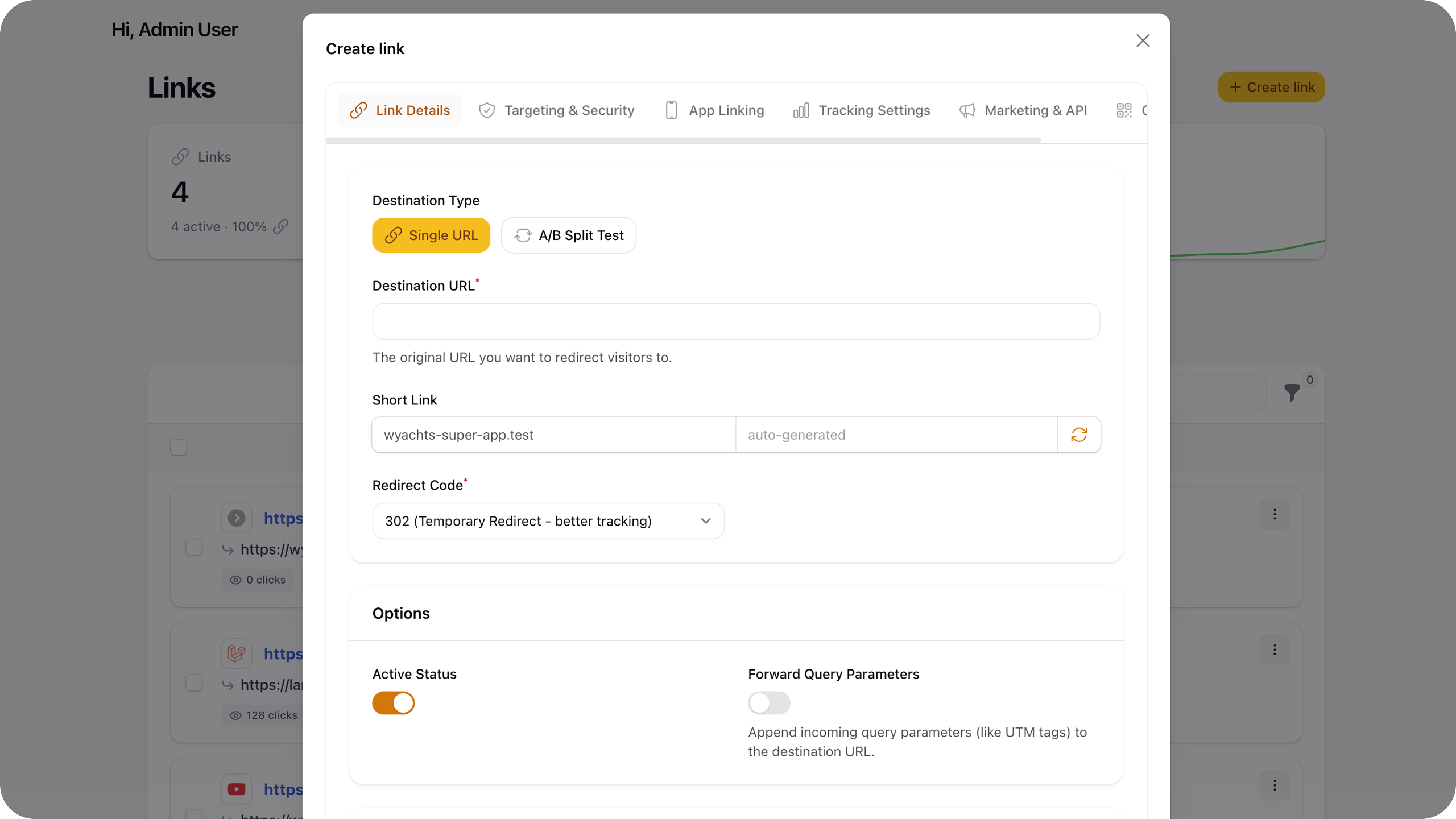
activated_at,expires_at,max_visits, and single-use mode.expiration_redirect_urlapplies only when the link is expired or inactive (time/schedule); visit-cap and single-use limits return 410 Gone (or a branded expiry page), not a fallback redirect. - ➡️ Query Parameter Forwarding — Automatically append incoming query strings (UTM parameters, ad tokens, discount codes) to the destination.
- 🛠️ Settings Panel — All configuration in a dedicated Filament settings page — no
.envediting required for day-to-day changes. - 🔑 Password-Protected Links — Visitors enter a password before being redirected. Passwords are hashed at rest (bcrypt/argon). Session-persisted unlock — visitors only see the prompt once per session.
- 🛑 Redirect Warning Pages — Show a confirmation screen before sending visitors off to external domains.
- 🎲 A/B Split Testing — Distribute traffic across 2–5 weighted variants. Works at the root level or nested inside targeting rules.
- 📊 Public Stats Pages — Per-link shareable analytics: HTML dashboard for visitors, JSON API for embeds, optional password — no API key required.
- 📉 Log Aggregation & Pruning — A nightly command aggregates raw visits into daily summaries and prunes records older than the configured retention window. Keeps the database lean even at millions of visits.
- 🏷️ Retargeting Pixel Registry — Define Meta Pixel, Google Tag, LinkedIn Insight, TikTok, and Pinterest pixels once, then attach them to any link via a simple checkbox list.
- 🔌 REST API with Scoped Keys — Full CRUD API, bulk create/update/delete, upsert by
external_id, visit log + CSV export, tags/folders CRUD, public stats, SHA-256 hashed keys,links:read-only/links:read-writescopes,owner_user_idrequired whenscope_links_to_useris enabled, and per-key rate limits. - 📡 Webhooks — HMAC-SHA256 signed HTTP POST callbacks on
visited,created,expired, andlimit_reachedevents. Outbound URLs are validated against SSRF blocklists before dispatch. - 📱 Mobile Deep Linking — Detect mobile visitors and launch the link directly inside 24+ native apps (Instagram, YouTube, Spotify, TikTok, WhatsApp, etc.).
- 🍎 Universal Links & Android App Links — Serve
apple-app-site-associationandassetlinks.jsondirectly from your domain to enable OS-level native app integration. - 💀 Branded Expiry Pages — When a link expires or hits its limit, visitors see a styled page with your site name instead of a bare 410 error.
- 👤 User Attribution — Each link records its creator. Avatar and name/email hover card visible in the table.
- 🕒 Relative Time Badges — Compact timestamps (
2h,5d,3mo) with exact date on hover. - ⌨️ Keyboard Shortcuts —
Eedit,QQR,Ishare/copy,Sstats,Ppublic stats,Xdelete — available on any row hover. - ⋯ Unified Action Menu — All row actions in one 3-dot dropdown with shortcut badges.
#vs. Bitly, Dub.co & Rebrandly
Self-hosted link management for Laravel/Filament — not a full Dub.co-style attribution SaaS (no workspaces, conversion tracking, or edge analytics pipeline).
| Feature | Filament Short URL | Bitly | Dub.co | Rebrandly |
|---|---|---|---|---|
| Self-hosted | ✅ | ❌ | partial¹ | ❌ |
| Unlimited links & clicks² | ✅ | ❌ | ❌ | ❌ |
| Custom domains | ✅ | 💰 | 💰 | 💰 |
| QR code designer | ✅ | 💰 basic | 💰 basic | 💰 |
| A/B split testing | ✅ | ❌ | ✅ | ❌ |
| Retargeting pixels | ✅ 5 providers | ❌ | ❌ | 💰 |
| Mobile deep linking | ✅ 24+ apps | 💰 Enterprise | 💰 partial | 💰 |
| Server-side GA4 (ad-block bypass) | ✅ | ❌ | ❌ | ❌ |
| Live activity feed | ✅ | ❌ | ✅ | ❌ |
| Cross-filtering analytics (panel) | ✅ | 💰 basic | ✅ | 💰 basic |
| Public shareable stats page | ✅ | 💰 | 💰 | ❌ |
| REST API | ✅ scoped keys | 💰 | ✅ deep | 💰 |
| Webhooks (global event list) | ✅ HMAC-signed | 💰 Enterprise | ✅ per-workspace | 💰 |
| Workspaces / team RBAC | ❌ | ✅ | ✅ | ✅ |
| Lead & sale conversion tracking | ❌ | 💰 | ✅ core | 💰 |
| Offline GDPR Geo-IP (MaxMind) | ✅ | ❌ | ❌ | ❌ |
| VPN & bot filtering³ | ✅ | ❌ | ❌ | ❌ |
| Google Safe Browsing³ | ✅ save + redirect | ❌ | ❌ | ❌ |
| Custom OG meta & social previews | ✅ | 💰 | ✅ | 💰 |
| Link cloaking (iframe masking) | ✅ | ❌ | ✅ | ❌ |
| Per-link search indexing control | ✅ | ❌ | partial | ❌ |
| Filament/Laravel admin panel | ✅ | ❌ | ❌ | ❌ |
| Data stays on your server | ✅ | ❌ | partial¹ | ❌ |
| Monthly cost | $0 | $0–$199+ | $0–$190+ | $0–$49+ |
💰 = paid plans only · ¹ Dub.co is open-source (AGPLv3) but self-hosting expects external managed services (Tinybird, PlanetScale, Upstash) · ² Throughput depends on your PHP/DB/Redis stack — not a CDN edge product · ³ VPN/proxy detection and Safe Browsing are disabled by default; enable in Settings → Advanced. Per-link webhooks use a URL only; subscribed events are configured globally in Settings → Developer.
#Architecture
Filament-native short-link engine inside your Laravel app — not a Dub.co-style attribution SaaS.
| Route | Middleware | Session | Purpose |
|---|---|---|---|
/s/{key} |
throttle:120,1 only |
No | Main redirect (stateless hot path) |
/s-auth/{key} |
web + throttle |
Yes | Password unlock (once per session) |
/s/public-stats/{key} |
web + throttle |
Yes (password unlock) | Public HTML stats page + JSON API |
Custom domain /{key} |
same as /s/{key} |
No | Branded links without prefix |
/api/short-url/* |
API auth + throttle | No | CRUD, bulk, exists, stats |
Multi-tenant (single app): ShortUrlResource scopes by user_id when SHORT_URL_SCOPE_TO_USER=true (default). API keys must include owner_user_id when link scoping is enabled; keys without an owner receive 403 Forbidden. No workspaces, team RBAC, or billing.
Stats retention: raw visits pruned after ~90 days (configurable). Long-range API stats use daily rollups in short_url_daily_stats.
#Requirements
- PHP 8.3+
- Laravel 11+
- Filament 5+
#Installation
Install the package via Composer:
composer require janczakb/filament-short-url
Important
Required: register the plugin's Filament assets immediately after install (and after every composer update). The admin panel relies on bundled custom CSS and JavaScript (QR designer, stats widgets, meta scraper, table actions). Without this step the plugin UI will not work correctly.
php artisan filament:assets
Publish and run the database migrations:
php artisan vendor:publish --tag=filament-short-url-migrations
php artisan migrate
Then register the plugin in your Filament panel — see Setup.
Keep assets in sync: add @php artisan filament:assets to post-autoload-dump in your host app's composer.json so updates re-publish CSS/JS automatically:
"scripts": {
    "post-autoload-dump": [
        "Illuminate\\Foundation\\ComposerScripts::postAutoloadDump",
        "@php artisan package:discover --ansi",
        "@php artisan filament:assets"
    ]
}
#Production checklist
| Task | Why |
|---|---|
php artisan filament:assets |
Required after install/update — publishes plugin CSS/JS to public/ for Filament |
* * * * * php artisan schedule:run |
Domain verification, counter sync, visit aggregation/pruning |
| Queue worker (when async) | Default sync needs no worker. For redis or database, run php artisan queue:work {connection} --queue={name} matching Settings → General (not necessarily QUEUE_CONNECTION in .env). Use Test queue worker in Settings to verify. |
SHORT_URL_SCOPE_TO_USER=true |
Filament users see only their own links (default) |
| Enable Safe Browsing / VPN in Settings | Security features are off by default |
| Global webhook signing secret | Required when global webhook is enabled |
Raw visit logs are pruned after the retention window (default 90 days); long-range API stats rely on daily rollups.
#Load & stress testing
Two complementary baselines — use both before high-traffic launches or after infra changes.
1. In-process (Artisan) — measures Laravel routing + redirect handler without HTTP overhead:
php artisan short-url:stress-redirect your-key --requests=200 --warmup=10
Reports avg / min / p95 / max in milliseconds. Best for quick regressions in CI or after code changes.
2. HTTP load (k6) — concurrent requests against a running app (Herd, staging, production-like stack):
# Install k6: https://grafana.com/docs/k6/latest/set-up/install-k6/
k6 run vendor/janczakb/filament-short-url/scripts/k6/redirect-baseline.js \
  -e BASE_URL=https://your-app.test \
  -e URL_KEY=bench-key \
  -e VUS=20 \
  -e DURATION=1m \
  -e P95_MS=500
| Variable | Default | Purpose |
|---|---|---|
BASE_URL |
(required) | App origin, e.g. https://wyachts.test |
URL_KEY |
(required) | Existing short link key |
ROUTE_PREFIX |
s |
From SHORT_URL_ROUTE_PREFIX |
VUS |
10 |
Concurrent virtual users |
DURATION |
30s |
Test duration |
P95_MS |
500 |
Fail threshold for p95 latency |
SLEEP_MS |
— | Optional pause between iterations |
Tips
- Create a dedicated link with
track_visits=falsefor a pure redirect benchmark (no queue/DB write noise). - Compare SQLite vs MySQL on staging — driver and connection pool matter under load.
- These tests establish your baseline; they are not a license throughput guarantee.
#Upgrading
When updating from v5.1.x or earlier:
composer update janczakb/filament-short-url
php artisan filament:assets
php artisan migrate
#Migration safety (v5.2.0)
Four additive migrations ship with the v5.2.x schema wave. They do not drop, rename, or rewrite existing rows. Your links, visit history, API keys, and settings remain intact.
| Migration | Purpose |
|---|---|
2026_06_08_000001_add_api_and_utm_fields_to_short_urls_table |
API/UTM/public-stats columns + visit index |
2026_06_09_000001_audit_schema_and_performance_fixes |
domain_scope_id, composite unique keys, FK, stats columns |
2026_06_10_000001_add_security_counts_to_daily_stats |
all_visits_count, bot_visits_count, proxy_visits_count on daily rollups |
2026_06_11_000001_add_cross_dimensional_stats_to_daily_stats |
Cross-filter JSON rollups for filtered dashboard widgets |
#2026_06_08_000001
| Database change | Effect on existing installs |
|---|---|
external_id, utm_*, ref columns |
Added as nullable — all existing links stay NULL until you set values |
public_stats_enabled |
Added with default false — public stats stay off until enabled per link |
public_stats_password |
Added as nullable |
Index on short_url_visits (short_url_id, ip_hash) |
Performance only — no data change |
#2026_06_09_000001
| Database change | Effect on existing installs |
|---|---|
domain_scope_id |
Added with default 0 (default app domain). Existing custom-domain links get domain_scope_id = custom_domain_id. |
Unique (url_key, domain_scope_id) |
Replaces global url_key unique — allows the same slug on different domains |
FK custom_domain_id → short_url_custom_domains |
ON DELETE SET NULL when a domain is removed |
Index (user_id, is_archived, id) |
Admin list performance |
Index (short_url_id, id) on visits |
Aggregation/pruning performance |
JSON columns on short_url_daily_stats |
utm_terms, utm_contents, browser_versions, os_versions for richer charts |
#2026_06_10_000001
| Database change | Effect on existing installs |
|---|---|
all_visits_count |
Total daily visits including bots/proxies (security widget rollups) |
bot_visits_count |
Pre-aggregated bot traffic per day |
proxy_visits_count |
Pre-aggregated VPN/proxy traffic per day |
#2026_06_11_000001
| Database change | Effect on existing installs |
|---|---|
cross_dimensional_stats |
JSON rollups for filtered dashboard widgets (cross-filter charts) |
cross_filter_pairs |
Precomputed filter-pair aggregates for faster filtered stats |
filter_qr_counts |
QR scan counts keyed by active dashboard filters |
All four migrations use no ->after() column ordering hints and no database-specific ENUM types, so they run cleanly on SQLite, MySQL, and PostgreSQL.
If you publish migrations to database/migrations/, make sure both new files are present after composer update, then run php artisan migrate. If you never published migrations, the package service provider registers them automatically — migrate is still required once per release that adds schema changes.
Rollback: php artisan migrate:rollback --step=4 removes the four v5.2.x additive migrations (2026_06_08 through 2026_06_11, one step per migration). Existing link data created before v5.2.0 is unaffected.
#Publishing Package Assets
Optional publishes (config, translations, views). filament:assets is not optional — run it on every install and update (see Installation).
# Config file → config/filament-short-url.php
php artisan vendor:publish --tag=filament-short-url-config

# Translations → lang/vendor/filament-short-url/ (EN + PL included)
php artisan vendor:publish --tag=filament-short-url-translations

# Blade views (dashboard, QR designer, interstitials)
php artisan vendor:publish --tag=filament-short-url-views
Register Filament assets (required — custom CSS/JS for QR designer, charts, scraper, etc.):
php artisan filament:assets
The CSS and JS are pre-compiled in the package — you do not need to run npm or Tailwind in the host app for the plugin assets themselves.
If you compile your own Filament theme (Tailwind CSS v4), add an @source directive so Tailwind scans the plugin views:
/* resources/css/filament/admin/theme.css */
@source './vendor/janczakb/filament-short-url/resources/views/**/*.blade.php';
That @source directive is only for your own Filament theme build. It does not replace php artisan filament:assets — the plugin still needs its published CSS/JS bundle under public/.
#Setup
Register the plugin in your Filament Panel Provider (app/Providers/Filament/AdminPanelProvider.php):
use Bjanczak\FilamentShortUrl\FilamentShortUrlPlugin;

public function panel(Panel $panel): Panel
{
    return $panel
        ->plugins([
            FilamentShortUrlPlugin::make()
                ->navigationGroup('Marketing')      // optional — sidebar group name
                ->navigationLabel('Short Links')    // optional — override menu item name
                ->navigationIcon('heroicon-o-link') // optional — override menu icon
                ->navigationSort(50),               // optional — sort order in sidebar
        ]);
}
#Navigation Configuration Options
All fluent methods on the plugin are optional. If not called, the plugin falls back to defaults or translation files:
| Method | Default | Description |
|---|---|---|
navigationGroup(string) |
null |
Groups the resource menu item under a sidebar section. |
navigationLabel(string) |
'Short URLs' |
Overrides the menu item display name. |
navigationIcon(string) |
heroicon-o-link |
Overrides the Heroicon used in the sidebar. |
navigationSort(int) |
50 |
Controls the sort order within the navigation list. |
authorizeSettingsUsing(Closure) |
null |
Restricts access to the Settings page using a custom callback. See Restricting Settings Access. |
#Restricting Settings Access
By default, any user who can view Short URLs can also access the Settings page. You can restrict this to specific roles or permissions using the authorizeSettingsUsing() method:
FilamentShortUrlPlugin::make()
    ->authorizeSettingsUsing(fn () => auth()->user()->hasRole('admin'))
The callback can be any closure that returns a bool. When it returns false, the Settings page returns a 403 and the Settings button in the table header is automatically hidden.
#With spatie/laravel-permission
FilamentShortUrlPlugin::make()
    ->authorizeSettingsUsing(fn () => auth()->user()->hasRole('admin'))
    // or permission-based:
    ->authorizeSettingsUsing(fn () => auth()->user()->can('manage short-url settings'))
#Via a Laravel Policy
Alternatively, define a manageSettings method in a Policy for the ShortUrl model — the plugin detects it automatically without any plugin configuration:
// app/Policies/ShortUrlPolicy.php
public function manageSettings(User $user): bool
{
    return $user->is_admin;
}
Then register the policy in your application (e.g. AppServiceProvider or bootstrap/app.php in Laravel 11+):
use Bjanczak\FilamentShortUrl\Models\ShortUrl;
use App\Policies\ShortUrlPolicy;

protected $policies = [
    ShortUrl::class => ShortUrlPolicy::class,
];
Priority order:
authorizeSettingsUsing()callback →ShortUrlPolicy@manageSettings→ defaultcanViewAny()fallback.
#Global Settings GUI
The package comes with a built-in admin settings dashboard. It is accessible directly from your sidebar menu under the same navigation group as your links.
Settings are stored dynamically in the database (short_url_settings table), cached for 3600 seconds by default, and immediately override config defaults. Legacy settings from filament-short-url-settings.json are automatically imported on first load.
Note
Modular Tab Architecture: The Settings page is split into independent tab classes (GeneralTab, GeoIpTab, Ga4Tab, AdvancedTab, TrackingDefaultsTab, QrDefaultsTab, DeveloperTab, DeepLinkingTab) with clean query-string navigation (e.g. ?tab=qr-defaults). The link create/edit form uses separate tabs: Link Details, Targeting, Password, Expiration, Tracking, Marketing & API, and SEO & Social.
The settings panel allows you to configure:
#1. General Routing & Queueing
- Route Prefix: The slug prepended to short URLs (e.g.
sfor/s/{key}). Can be left empty to serve links directly from the root domain (e.g.domain.com/{key}). - Default Redirect Status: Choose
302 (Found / Temporary)or301 (Moved Permanently).- Note:
302is highly recommended for analytics accuracy because browsers cache301redirects, skipping subsequent logs.
- Note:
- Key Length: Default character count (base62) for auto-generated keys (default:
6). - Queue Connection: Laravel queue driver for async visit tracking. Default is
sync(works without a background worker). Set todatabaseorredisin Settings → General (orSHORT_URL_QUEUE) when you run a matching queue worker. - Queue Name: Target queue for visit tracking and counter sync jobs (default:
default). Shown when connection ≠sync. - Queue mode callout: One contextual info box per async driver with a dynamic worker command, e.g.
php artisan queue:work redis --queue=default. Hidden forsync. - Redis connection (when Queue =
redis): Host, port, password, database index, and optional key prefix — stored in settings and overridedatabase.redis/queue.connections.redisat runtime (no.envedit required for day-to-day ops). - Test Redis connection: PING + counter-style Redis probe using current form values (works before Save).
- Test queue worker: Enqueues a probe job and confirms a worker processes it within 12 seconds; shows the exact worker command if not.
#2. Geo-IP Country Detection
Toggle country tracking and select from three drivers:
- Headers (Edge Resolution, recommended behind CDN): Reads country/city from edge headers (
CF-IPCountry,CloudFront-Viewer-Country, etc.). Saving settings with this driver automatically enables Trust CDN & Proxy Headers. When headers are missing, the plugin falls back to MaxMind, then ip-api.com (rate-limited). - MaxMind (Offline Resolution): Reads from a local GeoIP2 database (such as the free GeoLite2-Country database).
- IP-API (Online): Direct lookup via
ip-api.comwith configurable timeout and built-in rate limiting (40 requests/minute guard).
Tip: Enable Trust CDN & Proxy Headers only when your app sits behind a real CDN or reverse proxy. The Headers driver turns this on for you on save — do not enable it on a server that receives traffic directly from the internet.
#3. Google Analytics 4 (GA4) Integration
Sends server-side hits using the GA4 Measurement Protocol API — bypassing browser ad-blockers entirely. Hits are dispatched asynchronously in TrackShortUrlVisitJob (never blocking redirects).
Each visit sends a standards-compliant MP payload:
page_view—page_location,page_title,page_referrer,languageclick— outbound link metadata (link_url,link_domain)short_url_visit— plugin-specific dimensions (url_key, device, country, QR flag)session_id,timestamp_micros,engagement_time_msec— required for GA4 session reporting
Configuration:
- GA4 API Secret — Create in Google Analytics under
Admin → Data Streams → Measurement Protocol API secrets. - Per-link Measurement ID — Set
ga_tracking_id(G-XXXXXXXXXX) on each link. Invalid IDs are rejected before HTTP. - Firebase App ID (optional) — Use instead of Measurement ID for Firebase streams.
- Test connection — In Settings → GA4, enter your Measurement ID and click Test connection. Uses the GA4 debug collector with your real stream ID + secret (not a placeholder).
Privacy: client_id is a deterministic SHA-256 hash of IP + User Agent — no raw PII sent to Google.
#4. Counter Buffering (Write-back Caching)
For extremely high-traffic applications, direct database writes for click counts can cause row-locking bottlenecks.
- Buffer Click Counts: Toggling this option buffers total and unique visit count increments in the application cache (or dedicated Redis when Queue Connection =
redis— then buffering is automatic and the toggle is disabled). - Cron Synchronization: When enabled, the synchronization command flushes counts to the database. The package automatically registers this in the Laravel Scheduler to run every minute when counter buffering is active, so you only need to ensure the standard Laravel schedule runner (
* * * * * cd /path-to-your-project && php artisan schedule:run >> /dev/null 2>&1) is running on your server.- Command:
php artisan short-url:sync-counters
- Command:
#5. Advanced Tab — Aggregation, Rate Limiting & Security
#High-Traffic Log Management (Aggregation & Pruning)
At scale, the short_url_visits table can grow to tens of gigabytes. The aggregation system solves this:
- Enable Daily Aggregation: When enabled, the stats are summarized. The package automatically registers the aggregation command in the Laravel Scheduler to run daily at 02:00, so you only need to ensure the standard Laravel schedule runner is running on your server.
- Command:
php artisan short-url:aggregate-and-prune
- Command:
- Prune Raw Logs After (days): Raw visit records older than this threshold are permanently deleted after aggregation. Set to
0to disable pruning. Default:90days.
#Rate Limiting / Bot Protection
Prevent redirect abuse and bot traffic flooding:
- Enable Rate Limiting: Activates per-IP rate limiting on all redirect routes.
- Max Redirects Allowed: Maximum number of redirect requests per IP within the decay window. Default:
60. - Decay Window (seconds): The rolling time window for the rate limiter. Default:
60seconds.
When a client exceeds the limit, a 429 Too Many Requests response is returned with a Retry-After header.
#Analytics & Bot Detection (Settings GUI)
These options were previously .env-only; they are now editable under Settings → Performance & Security (?tab=advanced) → Analytics & Bot Detection:
- Click deduplication — Ignore repeat clicks from the same IP within a configurable window (default: off, 1 hour). Mirrors
SHORT_URL_CLICK_DEDUP/SHORT_URL_CLICK_DEDUP_HOURS. - Verify Googlebot IP — Optional reverse-DNS + forward IP check for Googlebot user agents. Mirrors
SHORT_URL_VERIFY_GOOGLEBOT_IP. - Bot debug secret — Allows
?bot=1preview testing in production when the query matchesSHORT_URL_BOT_DEBUG_SECRET.
#Password-Protected Links
You can require visitors to enter a password before being redirected. Enable this in the Password tab of the short URL form:
- Set a password in the Access Password field.
- Visitors will see a styled password prompt page before gaining access.
- The unlock state is stored in the PHP session — visitors only need to enter the password once per session.
- Passwords are hashed at rest using Laravel's
Hashfacade (bcrypt/argon). Legacy plain-text passwords created before v5.2.0 are still verified and automatically re-hashed on the next save.
// Programmatically — set via fillable attributes (hashed automatically on save)
$shortUrl = ShortUrl::destination('https://secret.example.com')
    ->create();

$shortUrl->update(['password' => 'my-secret-pass']);

// Verify programmatically
$shortUrl->verifyPassword('my-secret-pass'); // true
$shortUrl->hasPassword(); // true
Note
Stateful vs stateless routes: The main /s/{key} redirect uses only rate limiting by default (no web middleware). Password unlock uses /s-auth/{key}, which loads sessions. Visit tracking defaults to the sync queue so redirects work without a queue worker; switch to redis/database in Settings → General for async tracking on high-traffic sites.
#Redirect Warning Pages
Enable the Show Redirect Warning Page toggle in the Password tab to display a safety interstitial before redirecting.
The warning page:
- Shows the destination URL clearly so visitors can verify they trust it.
- Provides Continue and Go Back buttons.
- Is confirmed via a
?confirmed=1query parameter — no additional session storage required. - Is styled to match the password prompt page (glassmorphism, dark mode compatible).
This feature is useful for NSFW links, external partner links, or any URL that leaves a trusted domain.
#Security & Anti-Fraud
Protect your application redirection routes and visitor data from malicious activities and automated scrapers.
#1. VPN & Proxy Detection
When enabled in Settings → Advanced, filter anonymous proxy, VPN, or Tor connections to keep analytics clean and prevent abuse. Disabled by default.
- Driver Selection: Choose between the free IP-API service (default) or the premium VPNAPI.io service (requires setting an API key).
- Configurable Action:
- Flag Only: Flags VPN/Proxy visits in database statistics for inspection but allows the redirection to continue.
- Block Traffic: Actively blocks the request, serving a
403 Forbiddenresponse to the client.
- Verify Key: An interactive "Verify connection" action is available in settings to check your API credentials.
#2. Google Safe Browsing URL Verification
When enabled in Settings → Advanced, scan and verify user-provided target URLs against Google's Safe Browsing API on creation, edit, and redirect (cached per destination URL). Disabled by default.
- Protection: Blocks malware, phishing, and social engineering domains.
- Filament UI: Displays a clean status badge and blocks form saving if the target URL is flagged as unsafe.
- Verify Key: Includes a "Test API Connection" action on the settings dashboard to validate your Safe Browsing API credentials.
#Custom Branded Expiry Pages
When a short URL is expired, deactivated, or has reached its maximum visit limit, it needs to handle the redirect gracefully:
- Custom Fallback URL: If configured, visitors are immediately redirected to the
expiration_redirect_urltarget. - Branded Expiry Page (Default): If no fallback URL is specified, the system displays a premium branded, fully localized, dark-mode compatible HTML page (
expired.blade.php) instead of a generic browser410 Goneerror.- Automatically displays your customized Site Name from Settings → General (falls back to
config('app.name')) and the host application logo when thesetting('logo_path')helper is defined. The same branding is used on password prompts, public stats pages, and other visitor-facing screens. - Displays a clean visual alert state with details about the expired link.
- Features a friendly back button pointing to your website's homepage.
- Can be easily customized by publishing package views:
php artisan vendor:publish --tag=filament-short-url-views.
- Automatically displays your customized Site Name from Settings → General (falls back to
#Smart Link Targeting
The Targeting tab exposes a powerful rule engine that lets you route different visitors to different destinations — all from a single short URL.
You can configure multiple rules evaluated sequentially from top to bottom. Each rule contains:
- A Target URL (the redirect destination if rule matches).
- A Match Strategy:
AND(all filters must match) orOR(any filter can match). - A list of Filters:
- Device: Filter by
desktop,mobile,tablet. - Platform: Filter by
windows,mac,linux,ios,android,fire_os. - Country: Filter by country codes (e.g.
PL,US,DE) with flags display. - Language: Filter by preferred browser language codes (e.g.
pl,en,de).
- Device: Filter by
#Multi-Filter JSON Schema
For programmatic or REST API updates, pass an array of rules to targeting_rules:
$shortUrl->update([
    'targeting_rules' => [
        [
            'match' => 'and',
            'url' => 'https://ios-pl.example.com',
            'filters' => [
                [
                    'type' => 'platform',
                    'data' => ['platforms' => ['ios']]
                ],
                [
                    'type' => 'language',
                    'data' => ['languages' => ['pl']]
                ]
            ]
        ],
        [
            'match' => 'or',
            'url' => 'https://fallback-mobile.example.com',
            'filters' => [
                [
                    'type' => 'device',
                    'data' => ['devices' => ['mobile', 'tablet']]
                ]
            ]
        ]
    ]
]);
#Supported Filter Options & Formats
| Filter Type | Data Key | Allowed Values |
|---|---|---|
device |
devices |
desktop, mobile, tablet |
platform |
platforms |
windows, mac, linux, ios, android, fire_os |
country |
countries |
ISO-3166 2-letter country codes (e.g. PL, US, DE), case-insensitive |
language |
languages |
ISO-639-1 language codes (e.g. pl, en, de), case-insensitive |
#Legacy Strategies (v1.2.0 - v2.x)
If your database contains legacy single-strategy rules (e.g. 'type' => 'device' or 'type' => 'geo'), the plugin handles them automatically:
- Redirection Engine: The redirect system detects the legacy structure and processes it on-the-fly using the legacy strategy.
- Filament UI: When loading a link with legacy rules, the Filament Form automatically upgrades and hydrates them to equivalent new multi-filter rules.
#A/B Split Testing & Weighted Traffic Rotation
A single short URL can distribute traffic across 2–5 landing pages using configurable weights. This is useful for comparing conversion rates between different pages without changing the link you've already shared.
#Two ways to set it up
Root-level split test — Set the Destination Type to A/B Split Test directly on the short URL. All visitors hitting that link will be distributed across your variants.
Nested inside a targeting rule — Combine split testing with audience targeting. For example: send mobile visitors from Poland into a 50/50 test, while everyone else goes to a single fallback URL.
#Weights
Each variant gets a percentage weight. Weights must sum to exactly 100% and can be adjusted in 1% increments. The admin form shows an interactive split bar — drag the handles or hit "Balance weights" to divide traffic evenly. When you add or remove a variant, weights are rebalanced automatically.
UTM parameters and other query strings on the original click are forwarded to whichever variant is selected.
#Analytics
Every visit records which variant was resolved (selected_variant column in the visit log). The link's statistics dashboard shows a Variant Clicks Distribution bar chart so you can compare actual click shares against your configured weights.
#REST API
For root-level split tests, pass rotation_variants in the request body:
{
  "destination_type": "split",
  "rotation_variants": [
    { "label": "Variant A", "url": "https://example.com/page-a", "weight": 70 },
    { "label": "Variant B", "url": "https://example.com/page-b", "weight": 30 }
  ]
}
To nest a split test inside a targeting rule, use variants within the rule object:
{
  "destination_type": "single",
  "destination_url": "https://example.com/default",
  "targeting_rules": [
    {
      "match": "or",
      "destination_type": "split",
      "variants": [
        { "label": "Mobile A", "url": "https://example.com/mob-a", "weight": 50 },
        { "label": "Mobile B", "url": "https://example.com/mob-b", "weight": 50 }
      ],
      "filters": [
        { "type": "device", "data": { "devices": ["mobile"] } }
      ]
    }
  ]
}
#Native App Linking & Deep Linking
This package supports two distinct levels of mobile app integration: Per-Link App Linking (client-side redirects using custom schemes) and Global Deep Linking Files (domain association files for OS-level native integration).
#1. Per-Link App Linking (Mobile Auto-Open)
When creating or editing a short URL, the Targeting tab includes an App Linking section where you configure automatic redirects into native mobile applications.
- How it works: If a destination URL matches one of the 24+ pre-configured native applications (such as YouTube, TikTok, Instagram, Facebook, Spotify, WhatsApp, Messenger, etc.), the plugin can bypass standard web views for mobile visitors.
- The Interstitial Experience: If Auto open app on mobile is enabled, mobile visitors are shown a premium glassmorphic redirect interstitial page that triggers the corresponding custom URL scheme (e.g.
whatsapp://,instagram://,youtube://) to launch the native app directly, with fallback options to open in a web browser. - Interactive Panel Preview: Inside the Filament resource edit form, a live preview widget demonstrates if the URL was matched, showing:
- The matched app with its official favicon.
- The calculated deep link scheme.
- An interactive grid showing all supported native applications.
Supported apps include: YouTube, TikTok, Instagram, X (Twitter), Spotify, Facebook, Reddit, Snapchat, WhatsApp, LinkedIn, Pinterest, Twitch, Netflix, Google Docs/Sheets/Slides/Maps, Messenger, Apple Music, Airbnb, TripAdvisor, Amazon, StockX, Booking, AliExpress.
#2. Global Deep Linking Files (Universal Links & App Links)
To support seamless OS-level integrations without browser intermediaries—such as iOS Universal Links and Android App Links—you can serve domain association files directly from your application's root domain.
Important
Disabled by default: This feature is turned off by default. You can enable it and customize the association JSON in your settings panel.
#Enabling and Configuration
- Open the Settings panel from your Filament sidebar.
- Navigate to the Deep Linking tab.
- Toggle Enable Deep Linking Files to ON.
- Fill in your configurations:
- apple-app-site-association (iOS): The JSON configuration representing your iOS application IDs and supported paths (e.g.,
/s/*). This will be served at/.well-known/apple-app-site-associationand/apple-app-site-associationwith theapplication/jsoncontent-type header. - assetlinks.json (Android): The Digital Asset Links JSON array representing your Android application package names and SHA-256 certificate fingerprints. This will be served at
/.well-known/assetlinks.json.
- apple-app-site-association (iOS): The JSON configuration representing your iOS application IDs and supported paths (e.g.,
#Example Configurations
#iOS AASA Example:
{
    "applinks": {
        "apps": [],
        "details": [
            {
                "appID": "YOUR_TEAM_ID.com.yourcompany.app",
                "paths": [
                    "/s/*"
                ]
            }
        ]
    }
}
#Android AssetLinks Example:
[
    {
        "relation": [
            "delegate_permission/common.handle_all_urls"
        ],
        "target": {
            "namespace": "android_app",
            "package_name": "com.yourcompany.app",
            "sha256_cert_fingerprints": [
                "14:6D:E9:57:3E:28:B6:58:91:..."
            ]
        }
    }
]
#High-Traffic Optimizations
#Daily Stats Aggregation
The short_url_daily_stats table stores pre-aggregated daily summaries per short URL. Each row contains:
| Column | Description |
|---|---|
date |
The calendar day |
visits_count |
Human visits (excludes bots/proxies) |
unique_visits_count |
Unique human visitors (by hashed IP) |
all_visits_count |
All visits including bots and proxies |
bot_visits_count |
Bot visits for the day |
proxy_visits_count |
VPN/proxy visits for the day |
device_stats |
JSON — visit counts by device type |
browser_stats |
JSON — visit counts by browser |
os_stats |
JSON — visit counts by operating system |
country_stats |
JSON — visit counts by country |
city_stats |
JSON — visit counts by city |
referer_stats |
JSON — visit counts by referer domain |
utm_source_stats |
JSON — visit counts by UTM source |
utm_medium_stats |
JSON — visit counts by UTM medium |
utm_campaign_stats |
JSON — visit counts by UTM campaign |
qr_visits_count |
Pre-aggregated daily QR code scans |
language_stats |
JSON — visit counts by browser language preferences |
utm_terms, utm_contents |
JSON — UTM term/content breakdowns |
browser_versions, os_versions |
JSON — version-level breakdowns |
variant_stats |
JSON — A/B variant breakdowns |
The getCachedStats() model method automatically merges data from both tables: historical days come from short_url_daily_stats, while today's data is merged live — from Redis today buffer when Settings queue is redis, otherwise from a short-TTL SQL micro-cache on short_url_visits.
Filtered stats (dashboard filters active) use FilteredStatsCollector: pruned history is read from cross-dimensional daily rollups (cross_dimensional_stats, cross_filter_pairs) where possible, the retention window contributes exact unique via one SQL query, and only today (or 3+ simultaneous filters) requires a bounded raw scan. Results are cached via StatsCacheHelper (works on file, database, Redis, Memcached, and array cache drivers). Historical stats cache is not invalidated on every visit when using the Redis scaling profile.
Security breakdown (bots / VPN widget) uses getSecurityBreakdownStats() with the same daily rollups plus a single aggregated query on raw visits.
#Production scaling profile (queue_connection = redis)
When Settings → Queue Connection = redis and Redis is reachable:
| Component | Role |
|---|---|
PluginRedisConnection |
Shared Redis from queue.connections.redis (not CACHE_STORE) |
VisitCounterBuffer |
Buffered link totals/uniques + dirty-set sync |
TodayStatsBuffer |
Live today summary + hourly chart counters |
StatsScalingProfile |
Chooses Redis vs SQL/cache paths per feature |
StatsVisitRecorder |
Stats side effects in the visit job without full cache bust |
Requires a running worker: php artisan queue:work redis --queue=<Queue Name> (use Test queue worker in Settings to verify).
#Queue Worker vs. Synchronous Execution
The plugin is designed to be highly reliable and performant regardless of whether your hosting environment runs a background queue worker.
#1. With a Queue Worker (Recommended for high traffic)
If your application runs a queue worker (e.g. via Supervisor), configure Queue Connection in Settings → General (or SHORT_URL_QUEUE) to database or redis. The package default is sync so redirects work out of the box without a worker.
- Performance: With
databaseorredisqueue, visitor clicks, Geo-IP lookups, GA4 hits, and webhook dispatches run inTrackShortUrlVisitJob/SendWebhookJobafter the redirect response is sent — keeping the hot path lean. Latency still depends on your stack (DB, Redis, enabled security features, HTML interstitials). - Worker command: Must match Settings → General, not necessarily
.envQUEUE_CONNECTION:
Replacephp artisan queue:work redis --queue=defaultrediswith your selected connection anddefaultwith your Queue Name from Settings. - Verify before production: Use Test queue worker in Settings (dispatches a probe job and waits for processing).
#2. Without a Queue Worker (Sync Driver)
If you do not run background queue workers, set the Queue Connection to sync.
- Automatic Fallback: The plugin dynamically executes all jobs synchronously on the request thread. The visitor is redirected as soon as the synchronous processes (log recording, webhook calls, etc.) complete.
- Fault Tolerance (Safety Nets): Webhook failures (timeouts, 500 errors) or database tracking glitches can happen. The plugin wraps all synchronous execution points in strict error boundaries (
try/catch). A failed tracking job or a slow/offline webhook will NEVER crash the visitor's redirect or programmatic REST API responses. They are gracefully logged in the background.
#Queue-Based Counter Fallback
When counter buffering is enabled and Settings queue is not redis, IncrementVisitJob can dispatch to the configured queue connection so counts survive cache evictions. With queue = redis, counters use dedicated Redis keys via VisitCounterBuffer and flush through short-url:sync-counters.
#Social Retargeting Pixels & Central Pixel Registry
Instead of manually copy-pasting tracking pixel IDs (Meta, Google Tag, LinkedIn, TikTok, Pinterest) every time you create a new link, the package features a centralized Retargeting Pixel Registry with a Many-to-Many relationship. You define your marketing pixels once in the new Pixel Registry resource, and then easily select them via checkbox/list options when creating or editing short links.
#The Interstitial Experience
- Premium Design: Built using the exact same modern glassmorphic look as the password protection and warning interstitial pages. Supports dark mode automatically.
- Brand Customization: Automatically renders the application logo (if defined via the
setting('logo_path')helper) and the Site Name Override (configured globally in Settings, falling back toconfig('app.name')) to ensure the transition page looks professional and trust-instilling. - Micro-Animations & Smooth Redirect: Displays a sleek animated loading spinner and a progress bar that smoothly fills from 0% to 100% in ~220-250ms. This short delay ensures browser execution time for the tracking scripts before performing a seamless
window.location.replace()to the destination URL.
This unlocks remarketing to people who clicked your links even when redirecting to external domains (e.g. booking.com, amazon.com) where you cannot install your own tracking code.
#Supported Pixel Providers
| Type | Provider | Script loaded |
|---|---|---|
meta |
Meta / Facebook Ads | fbevents.js via fbq('init', ...) |
google |
Google Ads / GA4 | gtag.js via Google Tag Manager |
linkedin |
LinkedIn Insight Tag | insight.min.js via LinkedIn |
tiktok |
TikTok Pixel | TikTok Analytics pixel script |
pinterest |
Pinterest Tag | Pinterest Tag pixel script |
Note: These pixels fire client-side in the visitor's browser — completely separate from the server-side GA4 Measurement Protocol integration. Both systems work in parallel and do not interfere with each other.
#How to use
- Open Pixel Registry in your panel sidebar and register your pixels.
- Open any short URL for editing.
- Navigate to the Marketing & API tab.
- Select the configured pixels from the list under Retargeting Pixels.
- Save. Done — every click will now trigger the configured tracking scripts.
#Programmatic Association
To associate centrally registered pixels programmatically, use standard Eloquent relationship syncing:
$shortUrl = ShortUrl::find($id);

// Sync with specific pixel registry IDs
$shortUrl->pixels()->sync([$pixelId1, $pixelId2]);
Privacy/GDPR Note: You are responsible for ensuring that firing these pixels complies with applicable privacy regulations and your cookie consent mechanism.
#Custom Domain Branding
Branded links (e.g. go.company.com/abc123 instead of yourdomain.com/s/abc123) significantly increase click-through rates and build trust. This package includes a full-featured custom domain manager out-of-the-box.
#Key Features
- Multi-record DNS verification: Resolves all A records and CNAME targets via
dns_get_record()(withgethostbynamel/digfallbacks). Matches when any resolved IP intersects the app host, or when a CNAME chain points toapp.url. - Activation gate: Domains cannot stay active without passing DNS verification (
custom_domains.enforce_dns_on_activate, defaulttrue). Failed activation attempts are automatically deactivated. - DNS Setup Instructions: Step-by-step instructions for non-technical users to connect their domain in their registrar (GoDaddy, Cloudflare, Namecheap, etc.) directly in the Filament UI.
- Verified-Only Assignment: Only domains that are active and verified can be associated with short URLs (enforced in Filament and API validation).
- Root-Level Redirections: When a visitor hits a custom domain link (e.g.
go.company.com/abc123), the request is matched directly at the root path — omitting the default/s/prefix automatically. - Scheduled re-verification:
short-url:verify-custom-domainsre-checks DNS daily for active domains.
#How to use
- Go to the Custom Domains page in the Filament admin panel (sidebar → Links → Custom Domains).
- Click Create and enter your domain name (e.g.
go.company.com). - Follow the DNS Setup instructions shown in the modal to point your DNS records to the application server.
- Click Setup DNS / Verify inside the table actions. Once DNS resolves correctly, the domain status changes to Active.
- In the Short URL creation form, select your custom domain from the Custom Domain dropdown. The generated short URL will use your branded domain automatically.
#DNS Setup (for users)
You need to add one of the following records at your DNS provider:
| Type | Name | Value |
|---|---|---|
| CNAME | go (subdomain) |
yourdomain.com. (main host) |
| A | go (subdomain) |
123.45.67.89 (server IP) |
The plugin dynamically resolves the host application's IP at verification time — no hardcoded IP configuration is required.
#Web Server Configuration (required)
Custom domains must be configured at the web server level to forward requests to your Laravel application. Below are example configurations:
#nginx
server {
    listen 80;
    listen 443 ssl;
    server_name go.company.com;

    # Proxy to your main Laravel app
    location / {
        proxy_pass http://127.0.0.1:80;  # or your app server socket
        proxy_set_header Host $host;
        proxy_set_header X-Real-IP $remote_addr;
        proxy_set_header X-Forwarded-For $proxy_add_x_forwarded_for;
        proxy_set_header X-Forwarded-Proto $scheme;
    }
}
Or, if the custom domain points directly to the same server running Laravel:
server {
    listen 80;
    listen 443 ssl;
    server_name go.company.com;

    root /var/www/your-app/public;
    index index.php;

    location / {
        try_files $uri $uri/ /index.php?$query_string;
    }

    location ~ \.php$ {
        include snippets/fastcgi-php.conf;
        fastcgi_pass unix:/run/php/php8.3-fpm.sock;
    }
}
#Caddy
go.company.com {
    root * /var/www/your-app/public
    php_fastcgi unix//run/php/php8.3-fpm.sock
    file_server
}
#Apache
<VirtualHost *:80>
    ServerName go.company.com
    DocumentRoot /var/www/your-app/public

    <Directory /var/www/your-app/public>
        AllowOverride All
        Require all granted
    </Directory>
</VirtualHost>
Note: The Laravel application automatically detects the incoming
Hostheader and routes the request to the correct short URL via the fallback route. No additional application configuration is needed beyond registering the domain in the Filament UI.
#Server Requirements
- DNS verification runs natively using PHP's built-in
dns_get_record()function. - If native DNS functions are disabled or fail, the plugin falls back to the
digCLI tool (apt install dnsutilson Debian/Ubuntu,yum install bind-utilson CentOS/RHEL). - Verification compares resolved records against
config('app.url')host IPs — no hardcoded server IP orSERVER_ADDRfallback. - The DNS verification runs synchronously in the admin panel when the Verify button is clicked. For production use with many domains, the scheduled
short-url:verify-custom-domainscommand handles bulk re-checks.
#Database Schema
Custom domains are stored in the short_url_custom_domains table:
| Column | Type | Description |
|---|---|---|
id |
bigint | Primary key |
user_id |
bigint | Owner (nullable, references users.id) |
domain |
string | The domain name (e.g. go.company.com) |
is_verified |
boolean | Whether DNS verification passed |
is_active |
boolean | Whether the domain is enabled for use |
created_at |
timestamp | Creation timestamp |
updated_at |
timestamp | Last update timestamp |
Short URLs reference their custom domain via custom_domain_id (foreign key on short_urls).
#Developer REST API
The plugin exposes a REST API that allows external systems (CRMs, Zapier, Make, custom integrations) to manage short URLs programmatically.
#Enabling the API
The API is disabled by default. Enable it in Settings → API & Webhooks → REST API Access → Enable Developer REST API.
#Authentication
All API endpoints are protected. Include your API key in every request using one of these headers:
X-Api-Key: sh_key_xxxxxxxxxxxxxxxxxxxxxxxxxxxxxxxx
or
Authorization: Bearer sh_key_xxxxxxxxxxxxxxxxxxxxxxxxxxxxxxxx
Managing API Keys: Go to Settings → API & Webhooks → Developer API Keys and add named keys. Each key can be individually activated or deactivated without deleting it.
For security, new API keys are hashed using SHA-256 and stored securely in the database. The plain key is displayed only once during generation via a persistent warning notification in the Filament UI. All keys are authenticated using constant-time string comparisons (hash_equals()) to prevent timing attacks.
If the API is disabled globally, all endpoints return
503 Service Unavailableregardless of the key provided.
#API Key Scopes
Each API key can be assigned a scope that restricts its access level:
| Scope | Allowed Methods | Use Case |
|---|---|---|
links:read-write |
GET, POST, PUT, PATCH, DELETE |
Full control (default) |
links:read-only |
GET only |
Integrations that only need to read link data (e.g., dashboards, reporting tools) |
A links:read-only key attempting a write operation (POST, PUT, PATCH, DELETE) will receive a 403 Forbidden response.
#Per-Key Rate Limiting
Each API key can have its own individual rate limit (requests per minute), independent of the global route throttle. This allows high-trust integrations to use a higher limit while restricting untrusted keys more aggressively.
Configure the rate limit for each key in Settings → API & Webhooks → Developer API Keys. The default is 60 requests per minute.
#Per-Key Link Scoping (Owner User ID)
When scope_links_to_user is enabled (default), every API key must include an owner_user_id. All link queries and mutations through that key are scoped to short URLs where user_id matches — useful for multi-user panels or per-team integrations. Keys without an owner ID are rejected with 403 Forbidden.
When link scoping is disabled (SHORT_URL_SCOPE_TO_USER=false), owner_user_id is optional and keys without an owner retain access to all links (subject to scope and rate limits).
Configure in Settings → API & Webhooks → Developer API Keys → Owner User ID.
#Endpoints
All endpoints are prefix-grouped under /api/short-url/ and are protected by the API Key middleware. The effective rate limit is the lower of the global route throttle and the per-key rate limit.
#GET /api/short-url/links
List all short URLs (paginated, 30 per page).
curl https://yourdomain.com/api/short-url/links \
  -H "X-Api-Key: sh_key_your_key_here"
Response:
{
  "data": [
    {
      "id": 1,
      "destination_url": "https://example.com",
      "url_key": "abc123",
      "short_url": "https://yourdomain.com/s/abc123",
      "is_enabled": true,
      "redirect_status_code": 302,
      "total_visits": 47,
      "unique_visits": 31,
      "max_visits": null,
      "activated_at": null,
      "expires_at": null,
      "webhook_url": null,
      "targeting_rules": null,
      "password_protected": false,
      "show_warning_page": false,
      "auto_open_app_mobile": false,
      "ga_tracking_id": null,
      "track_visits": true,
      "track_ip_address": true,
      "track_browser": true,
      "track_browser_version": true,
      "track_operating_system": true,
      "track_operating_system_version": true,
      "track_device_type": true,
      "track_referer_url": true,
      "track_browser_language": true,
      "pixels": [],
      "notes": null,
      "created_at": "2026-06-01T12:00:00+00:00"
    }
  ],
  "meta": {
    "current_page": 1,
    "last_page": 3,
    "per_page": 30,
    "total": 72
  }
}
#GET /api/short-url/links/{idOrKey}
Retrieve details for a single short URL using either its database id or short url_key.
curl https://yourdomain.com/api/short-url/links/abc123 \
  -H "X-Api-Key: sh_key_your_key_here"
Response: 200 OK
{
  "data": {
    "id": 1,
    "destination_url": "https://example.com",
    "url_key": "abc123",
    "short_url": "https://yourdomain.com/s/abc123",
    "is_enabled": true,
    "redirect_status_code": 302,
    "total_visits": 47,
    "unique_visits": 31,
    "password_protected": false,
    "is_cloaked": false,
    "do_index": false,
    "og_title": null,
    "og_description": null,
    "og_image": null,
    "created_at": "2026-06-01T12:00:00+00:00"
  }
}
#POST /api/short-url/links
Create a new short URL.
curl -X POST https://yourdomain.com/api/short-url/links \
  -H "X-Api-Key: sh_key_your_key_here" \
  -H "Content-Type: application/json" \
  -d '{
    "destination_url": "https://example.com/product",
    "url_key": "promo26",
    "notes": "Summer campaign",
    "single_use": false,
    "max_visits": 1000,
    "pixels": [1, 2],
    "webhook_url": "https://api.mycrm.com/clicks"
  }'
#PUT/PATCH /api/short-url/links/{idOrKey}
Update an existing short URL (resolved dynamically by either database id or short url_key).
curl -X PATCH https://yourdomain.com/api/short-url/links/promo26 \
  -H "X-Api-Key: sh_key_your_key_here" \
  -H "Content-Type: application/json" \
  -d '{
    "destination_url": "https://example.com/new-product-page",
    "notes": "Updated summer campaign description",
    "is_enabled": true
  }'
Accepted Fields (for POST & PUT/PATCH requests):
| Field | Type | Required (POST) | Description |
|---|---|---|---|
destination_url |
string (URL) | ✅ | Target URL (max 2048 chars) |
custom_domain_id |
integer | ❌ | ID of a verified custom domain record |
url_key |
string | ❌ | Custom unique slug/key (max 32 chars, alpha-dash; auto-generated if omitted) |
notes |
string | ❌ | Internal admin notes (max 255 chars) |
is_enabled |
boolean | ❌ | Active status (default: true) |
redirect_status_code |
integer (301/302) | ❌ | HTTP redirect status code |
single_use |
boolean | ❌ | Expire the short link immediately after the first visit |
forward_query_params |
boolean | ❌ | Forward visitor query parameters to target destination |
max_visits |
integer | ❌ | Maximum click threshold limit |
expiration_redirect_url |
string (URL) | ❌ | Fallback URL to redirect to upon link expiration (max 255 chars) |
activated_at |
datetime | ❌ | Activation timestamp (must be after or equal to today) |
expires_at |
datetime | ❌ | Expiration timestamp (must be after or equal to activated_at) |
pixels |
array of integers | ❌ | List of registered retargeting pixel IDs to associate with the link |
webhook_url |
string (URL) | ❌ | Per-link webhook URL for immediate event notifications |
targeting_rules |
array | ❌ | Advanced Multi-Filter Targeting Rules JSON schema (see Smart Link Targeting for schema details) |
is_cloaked |
boolean | ❌ | Embed destination in an iframe on your short-link domain (default: false) |
do_index |
boolean | ❌ | Allow search engine indexing of the short link (default: false) |
og_title |
string | ❌ | Custom Open Graph / Twitter Card title (max 255 chars) |
og_description |
string | ❌ | Custom social preview description (max 500 chars) |
og_image |
string (URL) | ❌ | Public URL to an OG image (Filament upload/import pipeline stores processed images on disk) |
password |
string | ❌ | Password to protect the short URL (hashed automatically on save; never returned in API responses) |
show_warning_page |
boolean | ❌ | Toggle redirect warning interstitial page |
auto_open_app_mobile |
boolean | ❌ | Auto open deep link in native application on mobile devices |
ga_tracking_id |
string | ❌ | Custom Google Analytics 4 Measurement ID for this link (G-XXXXXXXXXX, max 50 chars) |
track_visits |
boolean | ❌ | Toggle tracking/analytics logging for this link (default: true) |
track_ip_address |
boolean | ❌ | Track client IP address (default: true) |
track_browser |
boolean | ❌ | Track client browser name (default: true) |
track_browser_version |
boolean | ❌ | Track client browser version (default: true) |
track_operating_system |
boolean | ❌ | Track client OS (default: true) |
track_operating_system_version |
boolean | ❌ | Track client OS version (default: true) |
track_device_type |
boolean | ❌ | Track client device type (default: true) |
track_referer_url |
boolean | ❌ | Track visitor referrer URL (default: true) |
track_browser_language |
boolean | ❌ | Track visitor preferred browser language (default: true) |
external_id |
string | ❌ | External CRM/integration identifier (unique, max 255 chars) |
folder_id |
integer | ❌ | Assign link to a folder (short_url_folders.id) |
tag_ids |
array of integers | ❌ | Up to 5 tag IDs to attach |
is_archived |
boolean | ❌ | Archive instead of delete (hidden from default list) |
utm_source / utm_medium / utm_campaign / utm_term / utm_content |
string | ❌ | Stored on the link and merged into the destination URL on redirect (existing query params on the destination are preserved; link-level values fill gaps only) |
ref |
string | ❌ | Appended as ?ref= on redirect when not already present |
public_stats_enabled |
boolean | ❌ | Enable the public stats page + JSON endpoint for this link (default: false) |
public_stats_password |
string | ❌ | Optional password for public stats (hashed at rest; session unlock on HTML, Bearer/POST for JSON) |
Response (POST & PUT/PATCH success): 200 OK (or 201 Created for POST) containing:
{
  "message": "Short URL updated successfully.",
  "data": {
    "id": 2,
    "destination_url": "https://example.com/new-product-page",
    "url_key": "promo26",
    "short_url": "https://yourdomain.com/s/promo26",
    "is_enabled": true,
    "redirect_status_code": 302,
    "total_visits": 0,
    "unique_visits": 0,
    "max_visits": 1000,
    "activated_at": null,
    "expires_at": null,
    "webhook_url": "https://api.mycrm.com/clicks",
    "targeting_rules": null,
    "password_protected": false,
    "show_warning_page": false,
    "auto_open_app_mobile": false,
    "is_cloaked": false,
    "do_index": false,
    "og_title": null,
    "og_description": null,
    "og_image": null,
    "ga_tracking_id": null,
    "track_visits": true,
    "track_ip_address": true,
    "track_browser": true,
    "track_browser_version": true,
    "track_operating_system": true,
    "track_operating_system_version": true,
    "track_device_type": true,
    "track_referer_url": true,
    "track_browser_language": true,
    "pixels": [],
    "notes": "Updated summer campaign description",
    "created_at": "2026-06-04T12:00:00+00:00"
  }
}
#GET /api/short-url/links/{idOrKey}/stats
Retrieve visit analytics statistics for a single short URL.
curl https://yourdomain.com/api/short-url/links/promo26/stats \
  -H "X-Api-Key: sh_key_your_key_here"
Optional Query Parameters:
date_from(string): Filter stats starting from date (e.g.YYYY-MM-DD).date_to(string): Filter stats up to date (e.g.YYYY-MM-DD).
Response: 200 OK
{
  "data": {
    "totalVisits": 156,
    "uniqueVisits": 98,
    "visitsToday": 14,
    "visitsThisWeek": 114,
    "visitsThisMonth": 156,
    "visitsByDay": {
      "2026-06-01": 42,
      "2026-06-02": 50
    },
    "visitsByCountry": {
      "Poland": 100,
      "United States": 50
    },
    "visitsByCity": {
      "Warsaw (PL)": 80,
      "Krakow (PL)": 20
    },
    "visitsByDevice": {
      "desktop": 90,
      "mobile": 66
    },
    "visitsByBrowser": {
      "Chrome": 110,
      "Safari": 46
    },
    "visitsByOs": {
      "Windows": 70,
      "macOS": 60
    },
    "visitsByReferer": {
      "linkedin.com": 80,
      "twitter.com": 40
    },
    "utmSources": {
      "linkedin": 80,
      "twitter": 40
    },
    "utmMediums": {
      "social": 120
    },
    "utmCampaigns": {
      "spring_sale": 120
    },
    "qrScans": 12,
    "visitsByLanguage": {
      "pl": 100,
      "en": 56
    }
  }
}
#GET /api/short-url/links/{idOrKey}/visits
List raw visit logs for a single short URL (paginated, 30 per page by default).
curl "https://yourdomain.com/api/short-url/links/promo26/visits?per_page=50" \
  -H "X-Api-Key: sh_key_your_key_here"
Response: 200 OK with paginated visit records (id, visited_at, browser, country_code, referer_host, is_qr_scan, UTM fields, etc.). The raw password hash is never included.
#POST /api/short-url/links/bulk-delete
Delete multiple short URLs in a single request (max 100).
curl -X POST https://yourdomain.com/api/short-url/links/bulk-delete \
  -H "X-Api-Key: sh_key_your_key_here" \
  -H "Content-Type: application/json" \
  -d '{"ids": [1, 2, 3]}'
Alternatively, pass "keys": ["promo26", "summer24"] instead of "ids".
Response: 200 OK
{
  "message": "Short URLs deleted successfully.",
  "deleted": 3
}
#PATCH /api/short-url/links/bulk-update
Update multiple short URLs at once (max 100). Supported fields in the data object: is_enabled, notes, expires_at, max_visits.
curl -X PATCH https://yourdomain.com/api/short-url/links/bulk-update \
  -H "X-Api-Key: sh_key_your_key_here" \
  -H "Content-Type: application/json" \
  -d '{
    "keys": ["promo26", "summer24"],
    "data": { "is_enabled": false }
  }'
Response: 200 OK
{
  "message": "Short URLs updated successfully.",
  "updated": 2
}
#PUT /api/short-url/links/upsert
Create or update a link by external_id, or by matching url_key + destination_url. Accepts the same fields as POST /links. When a match exists, unique validation ignores the existing record.
curl -X PUT https://yourdomain.com/api/short-url/links/upsert \
  -H "X-Api-Key: sh_key_your_key_here" \
  -H "Content-Type: application/json" \
  -d '{
    "external_id": "crm-deal-42",
    "destination_url": "https://example.com/offer",
    "url_key": "offer42",
    "notes": "Synced from CRM"
  }'
Response: 200 OK (updated) or 201 Created (new link).
#POST /api/short-url/links/bulk
Bulk-create up to 100 links in one request.
curl -X POST https://yourdomain.com/api/short-url/links/bulk \
  -H "X-Api-Key: sh_key_your_key_here" \
  -H "Content-Type: application/json" \
  -d '{
    "links": [
      {"destination_url": "https://a.com", "url_key": "bulk-a"},
      {"destination_url": "https://b.com", "url_key": "bulk-b"}
    ]
  }'
Response: 201 Created with data array of created links.
#GET /api/short-url/links/exists
Check whether a URL key is already taken within a domain scope (default app domain = scope 0, custom domain = its ID).
# Default domain scope
curl "https://yourdomain.com/api/short-url/links/exists?url_key=promo26" \
  -H "X-Api-Key: sh_key_your_key_here"

# Custom domain scope (same slug can exist on another domain)
curl "https://yourdomain.com/api/short-url/links/exists?url_key=promo26&custom_domain_id=3" \
  -H "X-Api-Key: sh_key_your_key_here"
Response: 200 OK — {"exists": true, "url_key": "promo26", "domain_scope_id": 0}
#GET /api/short-url/links/random
Return one random link from the scoped collection (respects owner_user_id on the API key).
#GET /api/short-url/links/info
Lightweight lookup by url_key or external_id query parameter.
curl "https://yourdomain.com/api/short-url/links/info?external_id=crm-deal-42" \
  -H "X-Api-Key: sh_key_your_key_here"
#GET /api/short-url/links/{idOrKey}/visits/export
Download raw visit logs as CSV (same filters as the paginated visits endpoint).
curl "https://yourdomain.com/api/short-url/links/promo26/visits/export" \
  -H "X-Api-Key: sh_key_your_key_here" \
  -o visits.csv
#Tags & Folders REST API
Manage organization metadata programmatically:
| Method | Endpoint | Description |
|---|---|---|
GET |
/api/short-url/tags |
List tags |
POST |
/api/short-url/tags |
Create tag (name, optional color) |
PUT/PATCH |
/api/short-url/tags/{id} |
Update tag |
DELETE |
/api/short-url/tags/{id} |
Delete tag |
GET |
/api/short-url/folders |
List folders |
POST |
/api/short-url/folders |
Create folder (name) |
PUT/PATCH |
/api/short-url/folders/{id} |
Update folder |
DELETE |
/api/short-url/folders/{id} |
Delete folder |
Attach tags and folders to links via tag_ids and folder_id on create/update/upsert requests.
#DELETE /api/short-url/links/{idOrKey}
Permanently delete a short URL by its database id or short url_key.
curl -X DELETE https://yourdomain.com/api/short-url/links/promo26 \
  -H "X-Api-Key: sh_key_your_key_here"
Response: 200 OK
{
  "message": "Short URL deleted successfully."
}
#Error Responses
| HTTP Code | Reason |
|---|---|
401 Unauthorized |
Missing or invalid API key |
403 Forbidden |
Read-only API key attempted a write, or public stats password missing/invalid |
404 Not Found |
Short URL not found |
422 Unprocessable Entity |
Validation error (see errors field in response) |
503 Service Unavailable |
REST API is disabled in Settings |
#Webhooks
Webhooks allow external systems to receive real-time HTTP POST notifications when events occur on your short URLs. Payloads are dispatched asynchronously via the Laravel Queue — redirects are never blocked.
#Configuration
Webhooks can be configured at two levels:
1. Per-link Webhook (Dedicated Webhook URL):
- Where to configure: Set the
Dedicated Webhook URLin the Marketing & API tab of a specific short URL (or pass it via thewebhook_urlparameter in the REST API). - How it works: When a visitor clicks the short URL, or when the link is programmatically created via the REST API, a webhook notification is sent directly to this URL.
- Bypassing Global Filters: Dedicated webhooks always fire for these events and are completely independent of the global Monitored Webhook Events settings. This is useful for third-party landing pages or integrations that need to track a specific link's traffic without routing all package events.
2. Global Webhook:
- Where to configure: Set a Global Webhook URL in Settings → API & Webhooks → Global Webhook Configuration.
- How it works: Fires for all links that do not have their own Dedicated Webhook URL configured. It will only fire for the specific event types selected in the Monitored Webhook Events setting.
#Monitored Events
| Event key | When fired |
|---|---|
visited |
A visitor clicks the short URL |
created |
A new short URL is created via the REST API |
expired |
A link reaches its expiration date |
limit_reached |
A link reaches its max_visits click limit |
Select which events to monitor in Settings → API & Webhooks → Monitored Webhook Events.
#Webhook Signature Verification
Outgoing webhooks can be cryptographically signed using an HMAC-SHA256 signature to verify that the request originated from your system:
- Configure a Webhook Signing Secret in your Settings panel under API & Webhooks.
- When configured, outgoing HTTP POST payloads will include the signature in the
X-ShortUrl-Signatureheader, which is calculated ashash_hmac('sha256', $payloadJson, $secret). - The receiver can verify the signature by re-calculating the HMAC of the raw request payload using the shared secret and comparing it using
hash_equals().
#Payload Format
All webhook requests are HTTP POST with Content-Type: application/json and the following payload structure:
{
  "event": "visited",
  "timestamp": "2026-06-02T10:00:00+00:00",
  "short_url": {
    "id": 1,
    "destination_url": "https://example.com",
    "url_key": "abc123",
    "short_url": "https://yourdomain.com/s/abc123",
    "total_visits": 48,
    "unique_visits": 32
  },
  "visit": {
    "id": 101,
    "visited_at": "2026-06-02T10:00:00+00:00",
    "device_type": "desktop",
    "browser": "Chrome",
    "browser_version": "124.0",
    "operating_system": "Windows",
    "operating_system_version": "10",
    "country": "Poland",
    "country_code": "PL",
    "city": "Warsaw",
    "referer_url": "https://linkedin.com",
    "referer_host": "linkedin.com",
    "utm_source": "linkedin",
    "utm_medium": "social",
    "utm_campaign": "spring_sale",
    "utm_term": null,
    "utm_content": null
  }
}
#Retry Policy
If the webhook endpoint returns a non-2xx response or is unreachable, the SendWebhookJob will automatically retry up to 3 times with a 10-second backoff between attempts. Failed jobs land in your queue's failed jobs table after exhausting retries.
#Outbound URL Validation
Before a webhook job is queued or executed, the target URL is validated against an SSRF blocklist. Requests to localhost, link-local/private IP ranges, cloud metadata endpoints, and .local/.internal hostnames are rejected. Hostnames are DNS-resolved — URLs that resolve to private IPs are blocked even when the hostname looks public. This applies to per-link webhooks, global webhooks, OG image imports, and the iframeable pre-check redirect chain.
#Webhook Priority (per-link vs global)
The global webhook URL fires only when Enable Global Webhook is turned on in Settings (or global_webhook_enabled is true in config). Resolution order:
- If the short URL has its own
webhook_url→ use it (always fires, regardless of global event selection). - If no per-link URL is set, global webhook is enabled, a Global Webhook URL is configured, and the event type is in the selected Monitored Events list → use the global URL.
- Otherwise no webhook is fired.
#Configuration Reference (.env)
You can also pre-configure all parameters via your .env file:
| Environment Variable | Config Path | Default | Description |
|---|---|---|---|
SHORT_URL_PREFIX |
route_prefix |
's' |
URL prefix for short URL redirects. |
SHORT_URL_SITE_NAME |
site_name |
null |
Brand/Site name override for warning/interstitial pages. |
#User Integration Configuration
The user configuration block connects the package to your application's User model so that creator avatars and details are displayed in the admin table:
// config/filament-short-url.php
'user' => [
    'model'         => \App\Models\User::class,
    'name_column'   => 'name',
    'email_column'  => 'email',
    'avatar_column' => 'avatar_url', // attribute name, method name, or null to auto-detect
],
Avatar resolution order:
- Call
$user->{avatar_column}()if it is a method on the model. - Read
$user->{avatar_column}as a direct attribute. - Call
$user->getFilamentAvatarUrl()if the model implementsFilament\Models\Contracts\HasAvatar. - Fall back to a Gravatar URL derived from the user's email.
Set avatar_column to null to skip steps 1–2 and start from the HasAvatar interface check.
The package automatically attaches the currently authenticated user's ID to every newly created short URL via a model creating event on ShortUrl.
#Full .env Reference
| Environment Variable | Config Path | Default | Description |
|---|---|---|---|
SHORT_URL_GEO_IP |
geo_ip.enabled |
true |
Globally enable/disable Geo-IP tracking. |
SHORT_URL_GEO_IP_DRIVER |
geo_ip.driver |
'headers' |
Geo-IP resolver driver (headers, maxmind, ip-api). |
SHORT_URL_MAXMIND_DB |
geo_ip.maxmind.database_path |
storage_path('geoip/GeoLite2-Country.mmdb') |
Path to local MaxMind db. |
SHORT_URL_STATS_CACHE_TTL |
geo_ip.stats_cache_ttl |
300 |
Caching TTL in seconds for dashboard charts. |
SHORT_URL_QUEUE |
queue_connection |
'sync' |
Queue connection for recording visits. |
SHORT_URL_QUEUE_NAME |
queue_name |
'default' |
Queue name to which visit tracking jobs are dispatched. |
REDIS_HOST |
redis.host |
'127.0.0.1' |
Default Redis host (overridden by Settings when queue = redis). |
REDIS_PORT |
redis.port |
6379 |
Default Redis port. |
REDIS_PASSWORD |
redis.password |
null |
Default Redis password. |
REDIS_DB |
redis.database |
0 |
Default Redis database index. |
REDIS_PREFIX |
redis.prefix |
'' |
Optional Redis key prefix for plugin keys. |
SHORT_URL_CACHE_TTL |
cache_ttl |
3600 |
Redirection model caching TTL (set to 0 to disable). |
GA4_API_SECRET |
ga4.api_secret |
null |
Google Analytics 4 Measurement Protocol API Secret. |
FIREBASE_APP_ID |
ga4.firebase_app_id |
null |
Google Analytics 4 Firebase App ID (or uses Measurement ID). |
SHORT_URL_COUNTER_BUFFERING |
counter_buffering.enabled |
false |
Buffer click counts in cache (flushed via console command). |
SHORT_URL_LIVE_FEED_SSE_INTERVAL |
live_feed.sse_interval_seconds |
3 |
Live feed SSE heartbeat / poll interval (seconds). |
SHORT_URL_LIVE_FEED_SSE_MAX_DURATION |
live_feed.sse_max_duration_seconds |
120 |
Max SSE stream duration before client reconnects. |
SHORT_URL_LIVE_FEED_REDIS_PUSH |
live_feed.use_redis_push |
true |
Use Redis pub/sub push when cache is Redis + PhpRedis; false forces SSE poll. |
SHORT_URL_TRUST_CDN_HEADERS |
trust_cdn_headers |
false¹ |
Trust proxy/CDN headers to extract real client IP and country. |
SHORT_URL_CUSTOM_DOMAIN_ENFORCE_DNS |
custom_domains.enforce_dns_on_activate |
true |
Require passing DNS verification before a custom domain can stay active. |
SHORT_URL_PRUNING_ENABLED |
pruning.enabled |
true |
Enable daily aggregation and log pruning. |
SHORT_URL_PRUNING_DAYS |
pruning.retention_days |
90 |
Number of days to retain raw visit logs. |
SHORT_URL_RATE_LIMITING |
rate_limiting.enabled |
false |
Enable per-IP redirect rate limiting. |
SHORT_URL_RATE_LIMIT_MAX |
rate_limiting.max_attempts |
60 |
Max redirect requests within the decay window. |
SHORT_URL_RATE_LIMIT_DECAY |
rate_limiting.decay_seconds |
60 |
Rate limiter rolling window in seconds. |
SHORT_URL_DEEP_LINKING_ENABLED |
deep_linking.enabled |
false |
Enable serving domain association files for deep linking. |
SHORT_URL_ENABLE_FALLBACK |
enable_fallback_route |
true |
Toggle registration of the global fallback redirection route. |
SHORT_URL_API_ENABLED |
api_enabled |
false |
Enable the Developer REST API (/api/short-url/*). |
SHORT_URL_SCOPE_TO_USER |
scope_links_to_user |
true |
Scope Filament links and API keys to owner_user_id / authenticated user. |
SHORT_URL_VPN_DETECTION |
vpn_detection.enabled |
false |
Enable VPN/proxy detection on incoming visits. |
SHORT_URL_VPN_DRIVER |
vpn_detection.driver |
'ip-api' |
VPN detection driver (ip-api or vpnapi). |
SHORT_URL_VPNAPI_KEY |
vpn_detection.vpnapi_key |
null |
VPNAPI.io API key (when driver is vpnapi). |
SHORT_URL_VPN_BLOCK_ACTION |
vpn_detection.block_action |
'flag_only' |
Action on VPN/proxy detection (flag_only or block_with_403). |
SHORT_URL_SAFE_BROWSING |
safe_browsing.enabled |
false |
Enable Google Safe Browsing URL checks. |
SHORT_URL_SAFE_BROWSING_KEY |
safe_browsing.api_key |
null |
Google Safe Browsing API key. |
SHORT_URL_CLICK_DEDUP |
click_deduplication.enabled |
false |
Ignore repeat clicks from the same IP within the dedup window. |
SHORT_URL_CLICK_DEDUP_HOURS |
click_deduplication.hours |
1 |
Deduplication window in hours. |
SHORT_URL_VERIFY_GOOGLEBOT_IP |
bot_detection.verify_google_bot_ip |
false |
Verify Googlebot user agents via reverse DNS + forward IP check. |
SHORT_URL_BOT_DEBUG_SECRET |
bot_detection.debug_secret |
null |
Secret value for ?bot= debug param outside local/testing environments. |
¹ When
geo_ip.driverisheaders, Trust CDN & Proxy Headers is automatically enabled on settings save and at runtime. The effective default for CDN deployments is thereforetrue.
Tip
Database Configuration Preferred: Avoid configuring large, multi-line JSON blocks (such as apple-app-site-association and assetlinks.json) via .env file environment variables as it is error-prone and can cause parsing issues. The recommended approach is to configure them dynamically via the Filament Settings Panel, which stores them securely in the database with real-time JSON validation.
#Artisan Commands
| Command | Description |
|---|---|
short-url:stress-redirect {key} |
In-process redirect benchmark (avg / min / p95 / max). Options: --requests=, --warmup=. |
short-url:sync-counters |
Flushes buffered visit counts from cache to the database. Schedule every minute when counter buffering is enabled. |
short-url:aggregate-and-prune |
Aggregates previous days' raw visits into short_url_daily_stats and prunes raw records older than the configured retention period. Schedule daily (e.g. at 02:00). |
short-url:verify-custom-domains |
Re-verifies DNS for all active custom domains. Schedule daily in production. |
#Automatic Scheduler Registration
As of version 1.3.0, you no longer need to manually copy scheduled commands into your host application code! The plugin automatically registers the required tasks inside its ServiceProvider booted phase, dynamically respecting your Settings GUI toggles:
short-url:aggregate-and-pruneis scheduled daily at 02:00 (runs automatically only if Enable Daily Aggregation is ON).short-url:sync-countersis scheduled every minute (runs automatically only if Buffer Visit Counts in Cache is ON).short-url:verify-custom-domainsis scheduled daily (always registered; re-checks DNS for active custom domains).
Important
Cron Setup Required: For the scheduler to fire these tasks automatically, your server must run the standard Laravel Scheduler cron job. Add this single cron entry to your server:
* * * * * cd /path-to-your-project && php artisan schedule:run >> /dev/null 2>&1
Note: These commands execute synchronously within the scheduling process. You do not need a queue worker (php artisan queue:work) to run them.
If you prefer to configure the schedule manually, you can still define them in routes/console.php (ensure the corresponding toggles are turned OFF in your Settings panel to avoid redundant executions):
// routes/console.php

use Illuminate\Support\Facades\Schedule;

// Flush buffered click counts every minute (only if counter buffering is enabled)
Schedule::command('short-url:sync-counters')->everyMinute();

// Aggregate stats and prune old raw visits nightly
Schedule::command('short-url:aggregate-and-prune')->dailyAt('02:00');
#Programmatic Usage (Fluent Builder)
You can programmatically generate, customize, and trace short URLs anywhere in your code using the static destination builder on the ShortUrl model:
use Bjanczak\FilamentShortUrl\Models\ShortUrl;

$shortUrl = ShortUrl::destination('https://example.com/products/promo')
    ->urlKey('promo2026')   // Optional, auto-generated base62 key if omitted
    ->notes('Spring social promo')
    ->singleUse()           // Deactivates the link automatically after the first visit
    ->forwardQueryParams()  // Appends incoming URL query strings to destination
    ->expiresAt(now()->addDays(7)) // Automatic link expiration
    ->trackVisits(true)     // Enable or disable click logs
    ->withTracing([         // Dynamically filter and append UTM parameters
        'utm_source'   => 'linkedin',
        'utm_medium'   => 'social',
        'utm_campaign' => 'spring_sale',
        'utm_content'  => null, // skipped automatically
    ])
    ->create();

// Get the full URL string
echo $shortUrl->getShortUrl(); // https://yourdomain.com/s/promo2026
#Fluent Builder API Reference
| Method | Argument Type | Description |
|---|---|---|
urlKey() |
string |
Sets a custom redirection key (slug). |
notes() |
string |
Appends internal notes for administrators. |
singleUse() |
bool (default true) |
Makes the short URL expire immediately after the first successful click. |
forwardQueryParams() |
bool (default true) |
Forwards client-side incoming parameters (e.g. ?gclid=xxx) to the final target. |
expiresAt() |
DateTimeInterface|Carbon|null |
Automatically sets an expiration timestamp after which the URL is inactive. |
activatedAt() |
DateTimeInterface|Carbon|null |
Sets the timestamp from which the URL is active. |
deactivatedAt() |
DateTimeInterface|Carbon|null |
Sets the timestamp after which the URL is inactive. |
maxVisits() |
int|null |
Sets a custom limit of total visits allowed. |
expirationRedirectUrl() |
string|null |
Sets a custom URL to redirect to when expired/inactive. |
trackVisits() |
bool (default true) |
Toggles statistical logging for this link. |
withTracing() |
array |
Appends non-empty tracking parameters (like UTM codes) directly to the target URL. |
create() |
ShortUrl |
Persists the model to the database and returns the ShortUrl instance. |
#Model Helpers & Service
#ShortUrl Model Methods
hasPassword(): bool— Whether the link requires a password.verifyPassword(string $plain): bool— Verify a plain-text password against the stored hash (supports legacy plain-text values).isActive(): bool— Checks if the short URL is enabled and within its activation/expiration timestamps.isExpired(): bool— Checks if the URL has passed its expiration date.getShortUrl(): string— Resolves the complete redirect URL string.getPublicStatsUrl(): string— Resolves the public stats page URL (/s/public-stats/{key}or custom-domain equivalent).incrementVisits(bool $isUnique = false): void— Atomically increments visit counts (with Redis buffering or queue fallback).getCachedStats(): array— Returns cached key metrics for dashboard charts. Automatically merges daily aggregated stats with today's raw visits.resolveDestinationUrl(Request $request): string— Evaluates active targeting rules (device, geo, rotation) and returns the correct destination URL for the current visitor.
#Injecting the Service
For standard creations, you can inject ShortUrlService:
use Bjanczak\FilamentShortUrl\Services\ShortUrlService;

$service = app(ShortUrlService::class);

$shortUrl = $service->create([
    'destination_url' => 'https://example.com',
    'track_visits'    => true,
]);
#Events
The package fires the ShortUrlVisited event inside the queue job. You can listen to it to trigger custom logic, Slack notifications, or syncing external CRMs:
use Bjanczak\FilamentShortUrl\Events\ShortUrlVisited;
use Illuminate\Support\Facades\Event;

Event::listen(ShortUrlVisited::class, function (ShortUrlVisited $event) {
    $event->shortUrl; // The ShortUrl model instance
    $event->visit;    // The ShortUrlVisit model (contains resolved IP, country, device, browser, OS, referrer)
});
#Visitor Filtering (Bot Detection)
Visits from scrapers, search bots, and web crawlers are not recorded in the visit log at all — they never increment counters or appear in analytics. The redirect engine still serves appropriate responses (OG preview HTML for bots when custom meta tags are configured, or a standard redirect otherwise).
Bot detection matches user agents and referers against a configurable list (Googlebot, Bingbot, Applebot, Facebook, Twitter, Slack, WhatsApp, and generic curl/http clients). Optional Googlebot reverse-DNS IP verification is available via SHORT_URL_VERIFY_GOOGLEBOT_IP.
The ?bot=1 query parameter (for testing link previews) is restricted to local/testing environments or requires a matching SHORT_URL_BOT_DEBUG_SECRET (configurable in Settings → Advanced).
#Live Activity Feed (SSE)
The Live Feed tab (/{record}/stats/live) streams visit updates to the Filament panel over Server-Sent Events (SSE). The browser opens an authenticated EventSource to GET /short-url/live-feed/{id}/stream and calls Livewire onStreamUpdate() only when a new visit id arrives — no full-page or wire:poll refresh.
#How the cursor works (all environments)
On every recorded visit, TrackShortUrlVisitJob calls LiveFeedBroadcaster::publish() which stores the latest visit id (TTL 24 h) and, when Redis is available, **PUBLISH**es it on a per-link channel.
Redis source priority (first match wins — Settings override .env cache):
- Short URL Settings → General → Queue Connection =
redis— uses Laravel'squeue.connections.redisRedis connection (same infra as async visit jobs). CACHE_STORE=redis— uses the default Laravel cache Redis store.- Otherwise — cursor lives in the active cache driver (
database,file, …) with SSE poll + optional DB fallback.
The SSE stream tracks a cursor (last seen visit id). The widget badge shows which transport is active:
| Badge | Meaning |
|---|---|
| Live · Redis push | Redis (from Settings queue or cache) + PhpRedis — instant updates via SUBSCRIBE |
| Live · SSE poll | All other setups — interval check of the cursor |
#Auto-adaptive SSE transport
The plugin resolves Redis at runtime (LiveFeedBroadcaster::resolveRedisSource()):
| Redis source | Redis client | SSE transport | DB MAX(id) in loop? |
|---|---|---|---|
| Settings Queue = redis | PhpRedis | Redis pub/sub push | ❌ |
| Settings Queue = redis | Predis | SSE poll on Redis cursor | ❌ |
CACHE_STORE=redis (queue ≠ redis) |
PhpRedis | Redis pub/sub push | ❌ |
CACHE_STORE=redis |
Predis | SSE poll on Redis cursor | ❌ |
| No Redis (sync/database queue + database cache) | — | SSE poll on cache; DB fallback when cursor cold | Only on cold cursor |
Typical production setup: set Queue Connection = redis in Settings → General (no need to change CACHE_STORE if it stays database). Ensure REDIS_CLIENT=phpredis and a running queue:work for async visit jobs.
Predis note: cursor + PUBLISH still work, but SSE uses polling because Predis cannot reliably time out SUBSCRIBE for heartbeats.
Queue timing: with sync queue, the cursor updates on the redirect thread. With redis queue, it updates when the worker runs TrackShortUrlVisitJob (typically sub-second).
#Configuration
| Setting / env | Default | Purpose |
|---|---|---|
| Settings → Queue Connection | sync |
redis enables live-feed Redis (wins over CACHE_STORE) |
CACHE_STORE |
database |
Fallback Redis source when queue ≠ redis |
REDIS_CLIENT |
phpredis |
Required for pub/sub push; Predis → SSE poll |
SHORT_URL_LIVE_FEED_SSE_INTERVAL |
3 |
Heartbeat / poll interval (seconds) |
SHORT_URL_LIVE_FEED_SSE_MAX_DURATION |
120 |
Max SSE connection length before client auto-reconnects |
SHORT_URL_LIVE_FEED_REDIS_PUSH |
true |
Set false to force SSE poll even with PhpRedis + Redis |
Filament badge and Alpine client reconnect automatically after the stream closes (every ~120 s), passing the updated cursor so no visits are skipped.
#Public Stats (Shareable Analytics)
Each link can expose a read-only public stats page and matching JSON API without API key authentication — useful for sharing campaign dashboards or embedding click counts on landing pages.
Upgrade note: requires migration
2026_06_08_000001(public_stats_enabled,public_stats_password). Runphp artisan migrateafter updating the package.
#Enable in Filament
Open the link row ⋮ menu → Public stats (P):
| State | What you see |
|---|---|
| Off | Toggle + hint; save to generate the shareable URL |
| On | Status badge, copyable link, Open button, optional password field |
| Password | Leave blank to keep the current hash; disable public stats to clear it |
The public URL is built from the link’s url_key (and custom domain when configured), e.g. https://yourdomain.com/s/public-stats/promo26.
#Public HTML page (browser)
A normal GET in the browser renders a branded stats dashboard:
- Summary cards: total / unique visits, today, this week, this month, QR scans
- Visits-by-day table with optional date_from / date_to filters
- Site name from Settings → General → Site Name Override (same as password/expiry pages); logo from host
setting('logo_path')when available - Optional password form (session unlock, same pattern as
/s-auth/{key})
Legacy alias: GET /short-url/public-stats/{url_key} behaves the same.
#JSON API (embeds & curl)
Request JSON explicitly when integrating programmatically:
# Accept header
curl -H "Accept: application/json" "https://yourdomain.com/s/public-stats/promo26"

# or query flag
curl "https://yourdomain.com/s/public-stats/promo26?format=json&date_from=2026-06-01&date_to=2026-06-30"
If a password is set, send it in the POST body or Authorization: Bearer … header (not in the query string):
curl -X POST -H "Content-Type: application/json" \
  -d '{"password":"secret"}' \
  "https://yourdomain.com/s/public-stats/promo26"

curl -H "Authorization: Bearer secret" \
  -H "Accept: application/json" \
  "https://yourdomain.com/s/public-stats/promo26"
You can also enable or configure public stats via the REST API (public_stats_enabled, public_stats_password on create/update).
Response: 200 OK with a public-safe stats subset (totalVisits, uniqueVisits, visitsToday, visitsThisWeek, visitsThisMonth, qrScans, visitsByDay — no raw visit rows or sensitive metadata). Returns 404 for unknown keys and disabled public stats (prevents slug enumeration). Returns 403 when password is missing, wrong, or supplied in the query string. Rate limited to 10 requests/minute per IP per link.
#SEO, Open Graph & Link Cloaking
Control how each short link appears on social networks, in search engines, and in the browser address bar — all from the SEO & Social tab:
| Toggle / field | Config key | What it does |
|---|---|---|
| Search Engine Indexing | do_index |
When off (default), every redirect and interstitial sends X-Robots-Tag: noindex, nofollow and <meta name="robots" content="noindex, nofollow">. When on, a canonical URL is emitted and bots may index the short link. |
| Link Cloaking | is_cloaked |
When on, human visitors see the destination embedded in an iframe on your short-link domain — the address bar keeps your branded URL. Social crawlers receive a standalone OG HTML page instead of the iframe. |
| OG Title | og_title |
Custom Open Graph / Twitter Card title (falls back to link title or URL key). |
| OG Description | og_description |
Custom social preview description. |
| OG Image | og_image |
Upload or auto-import a preview image (WebP, stored on disk). Rendered with og:image:width / og:image:height for large-card previews. |
#How it works on redirect
- Social bots & crawlers (Facebook, LinkedIn, X, Slack, WhatsApp, Googlebot, …) hit your short URL and receive a dedicated HTML page with full OG/Twitter meta tags — without
meta refreshor JavaScript redirects, so preview scrapers can read the tags reliably. - Human visitors on a cloaked link see the destination inside an iframe; on a normal link they are redirected instantly.
- Search indexing off applies
noindexheaders on every response type: direct redirects, password prompts, warning pages, expiry pages, pixel loaders, and OG preview pages.
#Auto-scrape & live preview
- Click Scrape from destination in the Filament form to pull
og:title,og:description, andog:imagefrom the target URL (SSRF-safe, streaming fetch). - Imported OG images are processed to WebP and promoted to permanent storage on save.
- A live Social Preview sidebar shows exactly how the link card will look before you publish.
#Iframeable pre-check (cloaking)
Before enabling Link Cloaking, verify the destination allows iframe embedding:
curl -X POST https://yourdomain.com/short-url/check-iframeable \
  -H "Cookie: ..." \
  -H "Content-Type: application/json" \
  -d '{"url": "https://destination.example.com/page"}'
Response:
{
  "url": "https://destination.example.com/page",
  "iframeable": true
}
Sites that send X-Frame-Options: DENY/SAMEORIGIN or restrictive Content-Security-Policy: frame-ancestors headers will return "iframeable": false.
OG metadata can also be fetched manually via the authenticated scrape endpoint: GET /short-url/scrape-meta?url=...
#Database Compatibility
All migrations are compatible with SQLite, MySQL, and PostgreSQL:
- No MySQL-specific
ENUMtypes —device_typeusesVARCHAR(20)validated at PHP level. - No
->after()column ordering hints — fully cross-database. - JSON columns work natively on MySQL 5.7.8+ and are stored as TEXT on SQLite.
- Upgrade-safe schema changes — New columns are nullable or have safe defaults; indexes are additive. See Upgrading for the v5.2.0 migration details.
#Changelog
Recent releases are summarized below. For the full version history (v1.2.0–v4.0.0), see CHANGELOG.md.
#v5.2.3
Production Redis mode, stats scaling, and Settings diagnostics.
#Settings → Redis & queue
- Redis in Settings GUI — Host, port, password, DB index, key prefix when Queue Connection =
redis; overridesdatabase.redisandqueue.connections.redisat runtime. - Test Redis connection — Health check with PING + INCR/SADD probe (preview unsaved form values).
- Test queue worker — Probe job + 12 s wait; reports exact
php artisan queue:work {connection} --queue={name}if no worker. - Unified queue callout — One box per async driver with dynamic worker command; hidden for
sync.
#Stats scaling (high traffic)
StatsScalingProfile,PluginRedisConnection,VisitCounterBuffer,TodayStatsBuffer,StatsVisitRecorder— Dedicated Redis counters/stats when Settings queue isredis; historical stats cache no longer busted on every visit.- Auto counter buffering — Forced on when queue =
redis. - Live feed — Shares queue Redis infra with counters/stats when configured.
#Public stats UI
- Filament row action — ⋮ → Public stats (
P): toggle, optional password, copy/open shareable URL. - Public HTML dashboard — Browser
GET /s/public-stats/{key}with branded layout (Settings site name + optional host logo). - Dual format — Same route serves HTML by default; JSON via
Accept: application/json,?format=json, or authenticated POST. - Password flows — HTML uses session unlock after form POST; JSON uses POST body or
Authorization: Bearer. Query-string passwords rejected (403).
#Tests
StatsScalingTest,RedisSettingsTest,PluginRedisConnectionTesterTest,PublicStatsUiTest.
#v5.2.2
Enterprise hardening, airtight counters, and maintainability.
#Security (P0 / P1)
- Stored XSS fixes — Pixel interstitial and Alpine stats widgets use
@json()instead ofaddslashes()for JavaScript context output. - Atomic
max_visits—VisitSlotReservationreserves slots at redirect time with fast-pathUPDATE … WHERE total_visits < max_visitsand pessimistic locking near the cap; parallel bursts cannot exceed the limit. - Single-use + bots — Social preview bots no longer consume single-use links.
- Counter buffer integrity — Cache increments are reverted before DB fallback so
SyncBufferedCountersCommandcannot double-count. - API tenancy — Keys without
owner_user_idare rejected whenscope_links_to_useris enabled; folder/tag/pixel ownership validated on API writes (IDOR fix). - Redirect order —
single_useandmax_visitsrun beforeauto_open_app_mobileinterstitial and visit tracking. max_visitswithout tracking — Visit caps enforced even whentrack_visits=false(counters still increment).
#Performance (P1)
max_visits_pessimistic_remaining— Configurable threshold (default 5) for when pessimistic locking kicks in.- Live feed adaptive SSE — Redis cache + PhpRedis → pub/sub push (instant); Predis or non-Redis cache → SSE poll on cache cursor; auto-reconnect with cursor; see Live Activity Feed.
- Stats cache lock —
Cache::lockon cold misses prevents thundering herd across widgets. - List table batching —
preloadBufferedCountersForIds()loads buffered counters in one round-trip.
#Quality (P2)
- Public stats — Uniform
404for unknown/disabled keys; response limited to a public-safe subset. - Octane-safe A/B variant —
resolved_ab_variantstored onrequest()->attributes, notapp()->instance(). - Filtered uniques — Daily rollup
unique_visits_countmerged inFilteredStatsCollector. findByKey()— Queries bydomain_scope_idfor better index use.
#Code quality
HasStatssplit — Facade trait composingHasVisitCounters,HasStatsCache,HasStatsQueries, andHasSecurityStats; atomic reservation centralized inVisitSlotReservation.- i18n audit — Filament panel, visitor interstitials, and API/redirect error messages use
__('filament-short-url::default.*')translation keys (EN + PL).
#v5.2.1
Policy, API stats, SSE live feed, and load baselines.
#Authorization & API
ShortUrlPolicy— Per-link authorization for view, update, delete, and settings access. Aligns withscope_links_to_useranduser_id. Override in your app by registering your own policy.- API stats filters —
GET /api/short-url/links/{idOrKey}/statssupports the same cross-filters as the Filament dashboard (country, device, date range, UTM, and more). Query aliases:country,device. Response includesmeta.filters.
#Live feed
- SSE stream — Authenticated endpoint pushes visit updates to the admin panel without Livewire polling.
- Configurable timing —
live_feed.sse_interval_secondsandlive_feed.sse_max_duration_seconds. - Adaptive transport (v5.2.2+) — Auto-detects Redis cache + PhpRedis for pub/sub push; falls back to cache-cursor polling (Predis, file, database drivers). See Live Activity Feed.
#Load testing
php artisan short-url:stress-redirect {key}— Quick in-process redirect timing (avg / min / p95 / max).scripts/k6/redirect-baseline.js— Concurrent HTTP load test for staging or production-like environments (requires k6).
#v5.2.0
Main release theme: SEO & Social — First-class per-link Open Graph metadata, Search Engine Indexing control, and Link Cloaking. None of these existed in v5.1.x or earlier.
#SEO, Open Graph & Link Cloaking (headline)
- New SEO & Social tab — Dedicated Filament form tab for
og_title,og_description,og_image, Search Engine Indexing (do_index), and Link Cloaking (is_cloaked). Live social preview sidebar in the admin panel. - Custom Open Graph meta — Per-link OG/Twitter tags (
og:site_name, image dimensions, canonical URL, HTTPS-normalized images) served to Facebook, LinkedIn, X, Slack, WhatsApp, and other preview bots. - Search Engine Indexing (
do_index) — Per-link toggle (default: off). When disabled, all response types emitX-Robots-Tag: noindex, nofollowand matching<meta name="robots">tags — redirects, password prompts, warning pages, expiry pages, pixel loaders, and OG HTML. - Link Cloaking (
is_cloaked) — Embeds the destination in an iframe on your short-link domain so the browser address bar shows your branded URL. Human visitors see the iframe; crawlers receive a standalone OG page without iframe/JS redirect. - Bot-safe OG pages — Social crawlers get full meta tags without
meta refreshor JavaScript redirects, so link previews scrape reliably. - OG meta scraper — SSRF-safe streaming fetch from the destination URL; auto-populates title, description, and image in the Filament form (
GET /short-url/scrape-meta). - OG image pipeline — Download, WebP conversion (Imagick → GD → original fallback), temp-bucket storage with automatic promotion to
short-urls/og/on save. - Iframeable pre-check — Authenticated
POST /short-url/check-iframeableendpoint validatesX-Frame-Options/ CSPframe-ancestorsbefore enabling cloaking. OgMetaPresenter&redirect-htmlview — Centralized OG rendering for cloaked links and bot previews.
#Security
- Password hashing — Link passwords are hashed at rest (bcrypt/argon). Legacy plain-text passwords remain verifiable and are re-hashed automatically on save. New model helpers:
hasPassword()andverifyPassword(). - API password privacy — REST responses expose
password_protected: boolinstead of the raw password/hash. - Webhook SSRF guard — Outbound webhook URLs are validated against private IP, localhost, and cloud metadata blocklists before queueing and execution.
- Bot query hardening — The
?bot=1debug parameter is limited tolocal/testingenvironments or a configuredSHORT_URL_BOT_DEBUG_SECRET. - Optional Googlebot IP verification — Reverse-DNS + forward IP check for Googlebot user agents (
SHORT_URL_VERIFY_GOOGLEBOT_IP).
#Analytics & Bot Detection
- Bot visit exclusion — Crawlers and preview bots no longer create visit records or increment counters.
- Click deduplication (opt-in) — Configurable per-IP dedup window (
SHORT_URL_CLICK_DEDUP, default off) to suppress repeat-click inflation. StatsSqlHelper— Cross-database date/month SQL expressions; stats logic split into focused traits (HasVisitCounters,HasStatsCache,HasStatsQueries,HasSecurityStats) withVisitSlotReservationfor atomic caps.
#REST API
- Expanded serializer — Responses now include
password_protected,is_cloaked,do_index,og_*,qr_scans,single_use,forward_query_params,external_id, UTM fields,folder_id,tags, andpublic_stats_enabled. GET /links/{idOrKey}/visits— Paginated raw visit log export.GET /links/{idOrKey}/visits/export— CSV export of visit logs.POST /links/bulk-delete— Bulk delete by database IDs or URL keys (max 100).PATCH /links/bulk-update— Bulk updateis_enabled,notes,expires_at,max_visits.POST /links/bulk— Bulk create up to 100 links.PUT /links/upsert— Create or update byexternal_id(orurl_key+destination_urlmatch).GET /links/exists,GET /links/random,GET /links/info— Slug availability, random link, and lightweight lookup helpers.- Tags & Folders API — Full CRUD at
/api/short-url/tagsand/api/short-url/folders. - Per-key owner scoping —
owner_user_idon API keys limits access to links created by that user (required whenscope_links_to_useris enabled — see v5.2.2). - Link-level UTM params —
utm_*andrefstored on the link and merged into the destination on redirect.
#Public Stats
- Shareable stats endpoint —
GETorPOST /short-url/public-stats/{url_key}(and prefixed/s/public-stats/{url_key}) returns aggregated analytics whenpublic_stats_enabledis on. v5.2.3+ adds a public HTML dashboard and Filament ⋮ → Public stats modal. - Password auth — If
public_stats_passwordis set, send the password in the POST body orAuthorization: Bearer …header for JSON; HTML uses a password form with session unlock. Passwords in the query string are rejected (403). - Host scope — Stats are scoped to the request host (default app domain vs verified custom domain).
#Security & Reliability Hardening
- DNS-aware SSRF protection — Outbound URLs (webhooks, OG scraper, iframe checker redirects) resolve hostnames and block targets that resolve to private/metadata IPs.
OutboundUrlvalidation rule — Reusable SSRF guard for form requests and services.- Iframeable redirect re-validation — Redirect chains during cloaking pre-check are followed manually without
allow_redirects, re-validating each hop. - Safe Browsing fail-closed — When Safe Browsing is enabled but the API is unreachable, URLs are rejected instead of silently allowed.
- VPN detection fail-closed — When
block_with_403is enabled, API timeout/error treats the client as proxy (403). - Custom domain legacy URLs —
/s/{key}on a verified custom domain returns 301 to/{key}. - Global webhook toggle respected —
global_webhook_enabledin Settings/config must be on before the global webhook URL fires. log-errorendpoint hardened — Authenticated, throttled, and validated; no longer accepts anonymous error dumps.- Single-use link fix — Expired single-use links return
410without recording a visit or incrementing counters. - Redis counter fix — Buffered counter sync no longer fails when Redis is the cache driver.
#Settings GUI
- Analytics & Bot Detection section — Click deduplication, Googlebot IP verification, and bot debug secret are editable in Settings → Advanced (previously
.env-only).
#Database
- Additive migrations —
2026_06_08_000001,2026_06_09_000001,2026_06_10_000001, and2026_06_11_000001— safe upgrade from v5.1.x with no data loss. Cross-database: SQLite, MySQL, PostgreSQL.
#Performance & reliability
domain_scope_id— Composite unique(url_key, domain_scope_id)so the same slug can exist on the default domain and on custom domains independently.- Custom domain URLs — Links on verified custom domains resolve at
https://domain.com/{key}(no/s/prefix); password auth at/auth/{key}; legacy/s/{key}→ 301 →/{key}. - Real-time visit limits —
getRealTimeTotalVisits()merges DB totals with counter-buffer cache;max_visitsenforced correctly even when redirect model is cached. - Counter buffering fixes — Redis dirty-set prefix, scoped buffer loads,
SyncBufferedCountersCommandbatch flush, incremental aggregation withlast_aggregation_date. - Stats accuracy & performance — Unique visits via
COUNT(DISTINCT ip_hash); bot/proxy filtering in human aggregation; daily rollups for all chart dimensions;FilteredStatsCollector(single raw scan with filters); world map and security widget routed through cached stats layers. - API hardening — DB transactions on bulk/upsert, per-link cache invalidation, scoped
exists, hashed-only API keys, public stats rate limit + password not in query string. - Custom domain cron —
short-url:verify-custom-domainsre-checks DNS for active domains. - Central cache invalidation —
ShortUrlCacheInvalidator,HostNormalizer, reserved path segments on custom domains. - Settings — VPN timeout/TTL in GUI; settings cache TTL 3600s; route cache cleared on prefix change;
set()surfaces errors to the admin UI. - Default queue:
sync— No background worker required by default; opt in todatabase/rediswhen you run a worker.
#Enterprise hardening
Ga4MeasurementProtocolService— Centralized GA4 MP withpage_view,click,short_url_visit,session_id,timestamp_micros,engagement_time_msec; Measurement ID format validation; debug-collector credential test with real stream ID.- Geo-IP foolproofing — Headers driver auto-enables CDN trust on save; offline fallback chain (MaxMind → ip-api); ip-api rate limit guard (40/min).
- Custom domain DNS gate — Multi A-record + CNAME verification; activation blocked until DNS passes (
enforce_dns_on_activate); removedSERVER_ADDRfallback. - API upsert lock —
lock_url_keynow blocksurl_keyandcustom_domain_idchanges via upsert (parity with panel/API update). - Stats reliability fixes — Cross-filter aggregation, public stats rate limiting, webhook SSRF protection, and Octane-safe memory flushing.
- Stateless redirect default —
/s/{key}withoutwebmiddleware; password unlock on/s-auth/{key}. - Filament link scoping —
LinkUserScope+scope_links_to_user. - API domain scope —
existsrespects custom domains; store/update validate domain ownership. - Locked URL keys — Server-side enforcement when
lock_url_keyis enabled. - Safe Browsing on redirect — Cached re-check when enabled.
- Webhook signing — Signing secret required for global webhooks by default.
#Refactoring & Validation
ShortUrlRedirectHandler— Redirect logic extracted from the controller;RobotsTagApplicatorapplied consistently.RedirectUrlResolver— Shared redirect Location resolution for meta scraper and OG image importer.SafeUrlrule — Google Safe Browsing validation reused in Form Requests.- Config defaults — Explicit
api_enabled,vpn_detection,safe_browsing, andclick_deduplicationsections in published config.
#v5.1.0
#Request Lifecycle & Middleware Optimization
- Stateless redirect middleware — Standard redirect paths (
/s/{key}) use rate limiting only (nowebsession middleware by default). Password auth uses/s-auth/{key}with sessions. HTML interstitials and sync visit tracking add latency. - Dynamic Stateful Route Transition — Password-protected redirects are dynamically routed to a stateful
/s-auth/{key}route wrapped under thewebgroup. Handles session verification, password prompts, brute force rate-limiting, and warning interstitials. - Robust Integration Testing — Refactored the entire package test suite and main application feature tests to accommodate the dual stateful/stateless redirect routing architectures without coverage loss.
#v5.0.0
#Analytics — Live Activity Feed
- Dedicated
/stats/livepage — Live Feed is now a full standalone page at/{record}/stats/live, on par with Visit Logs at/{record}/stats/logs. Tab navigation is consistent across all three stat sub-pages (Statistics / Live Feed / Visit Logs). - Intelligent no-change skip — Each poll tick now calls
checkForUpdates(), which performs a single O(1)MAX(id)query against the composite index. If the highest visit ID hasn't changed since the last render,skipRender()is called and Livewire returns a ~100-byte "nothing changed" response — zero PHP rendering, zero DOM operations. - Correct cursor initialization —
$latestVisitIdis initialized to-1(sentinel). After the firstgetViewData()call it is set to the actualMAX(id), so the very first poll does not trigger an unnecessary re-render. - Cache key versioned by
latestVisitId— Fixed a bug where two concurrent users detecting the same new visit could share a thundering-herd cache entry that didn't include the visit that triggered their render, causing them to permanently miss that visit until the next new visit arrived. - 3-second thundering-herd cache — Collapses N concurrent admin users watching the same URL into one DB query per 3-second window. Cache key includes URL id, date range, active filters, and
latestVisitIdversion. - Country flags via
flagcdn.com— Flag images are rendered as<img src="https://flagcdn.com/h20/{cc}.webp">instead of emoji. The URL is precomputed once in PHP (getViewData()), not per-row in Blade. Alpine.jsx-on:errorhandles broken images without CSP-unsafe inlineonerrorhandlers. - Blade performance —
time_agois precomputed once in PHP using$visit->visited_at->diffForHumans()(noCarbon::parse()double-instantiation). All per-row presentation values are plain PHP arrays, not Eloquent model calls in Blade. - Optimized DB query — Selects only 12 needed columns (
id,visited_at,country,country_code,city,browser,operating_system,device_type,referer_host,referer_url,ip_address,is_qr_scan,selected_variant) instead ofSELECT *. Limit reduced to 25 rows. - Live updates (v5.2.1+) — SSE stream +
EventSourcereplacedwire:pollfor multi-admin live feed (see v5.2.1).
#Link Organization
- Folders — Each short URL can be assigned to one folder. Clicking a folder in the sidebar navigates to a filtered link list showing only that folder's links. Link count displayed per folder.
- Tags — Each short URL can have up to 5 tags. Clicking a tag shows a filtered link list. Link counts displayed per tag.
- Archiving — Short URLs can be archived instead of permanently deleted. Archived links are hidden from the default list view and can be restored at any time via the Filament panel.
#REST API
- Per-key API scopes — Each API key now supports either
links:read-only(GET only) orlinks:read-write(full CRUD) scope. Read-only keys return403 Forbiddenon any write attempt. - Per-key rate limiting — Each API key can have its own individual rate limit (requests per minute), independent of the global route throttle. Configure in Settings → API & Webhooks → Developer API Keys.
Older releases (v1.2.0–v4.0.0) are documented in CHANGELOG.md.
#License
Source-Available & Dual-Commercial License — version 1.3. See the LICENSE file for the full text.
Permitted free use covers internal/personal use and single-client freelance deployment within defined limits. Commercial distribution, bundling, high-volume use (>1M qualified events/month), software transfer to third parties, and competing products require a separate written Commercial License from the Copyright Holder.
Section 9 of the license excludes liability of the Copyright Holder toward licensees (B2B) and does not limit enforcement against license violators.
The author
PHP developer with 10+ years of turning coffee into code. Specializing in Laravel and Filament — building tools that make developers' lives a little less painful. Based in Poland, shipping open source.
From the same author
Flex Fields
FLEX Fields is the ultimate UI toolkit for Filament 5, delivering 79+ advanced form components and configurable JSON custom fields under one unified design system. Build polished Laravel admin panels faster with dynamic inputs, performance-optimized asset loading, and Media OS—a complete workflow for uploads, image processing, and multilingual file metadata. Seamlessly integrates with your existing models and Spatie packages out of the box.
Author:
Bartłomiej Janczak
Flex Forms
Build beautiful multi-page forms with drag-and-drop, conditional logic, calculated fields, embeds, and real-time insights — all inside Filament. Connects to Mailchimp, HubSpot, Zapier, Google Sheets, Slack and more.
Author:
Bartłomiej Janczak
Featured Plugins
A selection of plugins curated by the Filament team

Compact Theme
A theme that makes data-heavy panels easier to scan by fitting more useful information on each screen.
 Filament

Custom Fields
Eliminate custom field migrations forever. Let your users create and manage form fields directly in Filament admin panels with 20+ built-in field types, validation, and zero database changes.
 Relaticle

Advanced Tables (formerly Filter Sets)
Supercharge your tables with powerful features like user-customizable views, quick filters, multi-column sorting, advanced table searching, convenient view management, and more. Compatible with Resource Panel Tables, Relation Managers, Table Widgets, and Table Builder!
 Kenneth Sese
