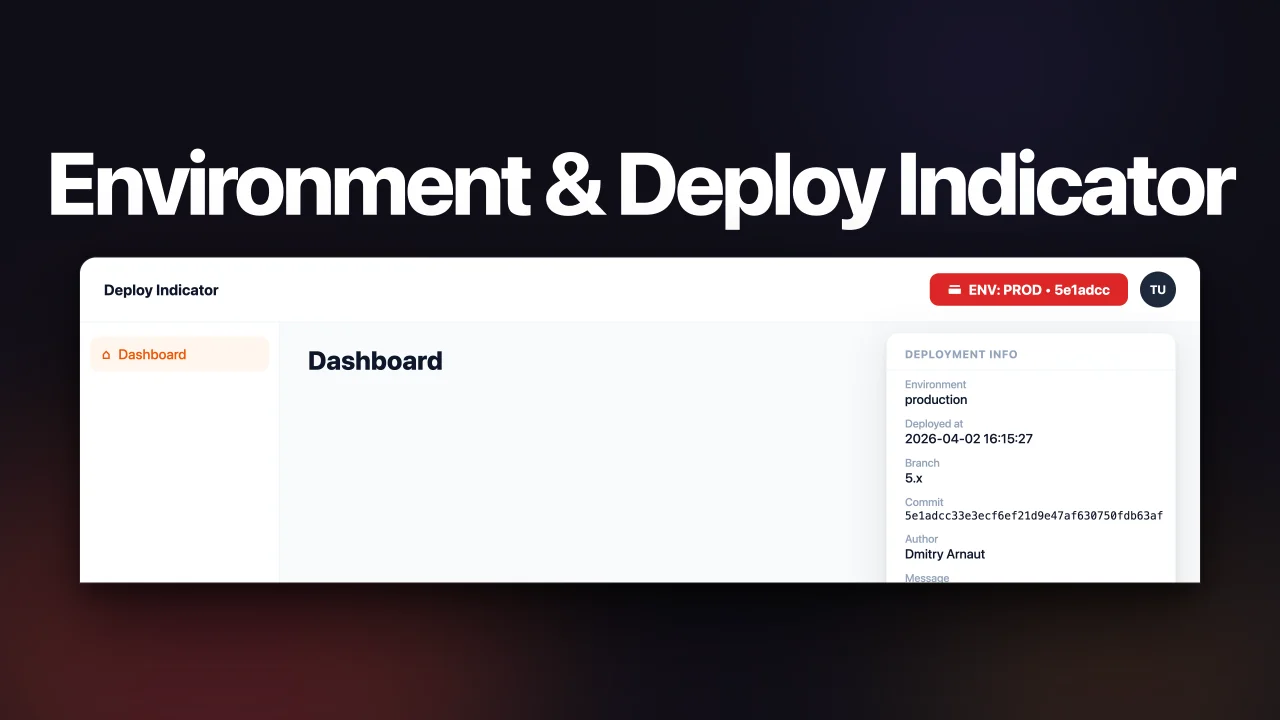
Environment & Deploy Indicator
CommunityKnow exactly what's deployed at a glance. Deploy Indicator shows your current environment and deployment details (commit, branch, author, tag) right in the top bar, with one-click copy and full CI/CD integration.
 Author:
Dmitry Arnaut
Author:
Dmitry Arnaut
Package health
BetaAutomated checks of this plugin's Composer package
15 checks
- Failed: GitHub Actions pinned to SHA — View details on Plumb
- Skipped: GitLab CI includes pinned to SHA
- Passed: Open security advisories
- Passed: Dependabot PR responsiveness — No open Dependabot PRs.
- Skipped: Renovate MR responsiveness
- Warning: Dependabot or Renovate configured — Updater does not cover the JavaScript ecosystem, which has a committed lockfile.
-
Failed:
Dependency update cooldown configured
—
No cooldown configured in
.github/dependabot.yml. View details on Plumb - Passed: Provides a security policy
- Passed: Abandoned or archived — No consulted source marks the package abandoned (packagist, github).
- Passed: Commit and release recency — Active: last commit 22 days ago; last release 22 days ago.
-
Passed:
composer.lock not committed by library
—
composer.lockis absent from the released dist archive. - Passed: Dist archive is lean
-
Passed:
Current Laravel version supported
—
Package dependencies resolve together with current Laravel
13.0. -
Passed:
Current PHP version supported
—
Constraint
^8.2supports current PHP8.5. - Skipped: Current Symfony version supported
filament/
namespace. Review the source and install at your own risk. Found
malware or an unresolved security issue the author won't
address?
Report it
.
Documentation
- Features
- Requirements
- Installation
- Register the plugin
- Conditional visibility
- Configuration
- Dev Tools navigation group
- Generating deployment info
- Deploy history
- CI/CD integration examples
- Verify your setup
- Deployment JSON format
- Testing
- Changelog
- Contributing
- Security Vulnerabilities
- Credits
- License
Show the current application environment (ENV) and optional latest deployment info in your Filament topbar.




#Features
- Shows current
APP_ENV(mapped to a short label likePROD,STAGE,LOCAL) with a color-coded badge. - Optional hint next to the label: commit hash, deploy time, git tag, or branch name.
- Click the badge to see full deployment info: commit, branch, author, message, tag, deploy time.
- Copy commit hash to clipboard with one click.
- Reads deployment metadata from a JSON file (default:
storage/app/private/deploy-info.json). - Can auto-generate the JSON from git on first request, or generate it during deployment via Artisan command.
- Records every deploy to an append-only history log and shows the last few in the dropdown.
- Optional Dev Tools navigation group: surface links to Horizon, Telescope, Mailpit, and your own tools in the sidebar, each gated by permission and environment.
#Requirements
- PHP ^8.2
- Filament ^4.0 or ^5.0
#Installation
composer require arnautdev/filament-deploy-indicator
#Register the plugin
Add the plugin to your panel provider:
use Arnautdev\FilamentDeployIndicator\FilamentDeployIndicatorPlugin;

public function panel(Panel $panel): Panel
{
    return $panel
        ->plugins([
            FilamentDeployIndicatorPlugin::make(),
        ]);
}
#Conditional visibility
Show the indicator only to specific users:
FilamentDeployIndicatorPlugin::make()
    ->visible(fn (): bool => auth()->user()?->is_admin === true),
#Configuration
Everything is configurable two ways: publish the config file, or chain fluent methods on the plugin (Filament style). Fluent methods override the published config at runtime.
#Fluent configuration
FilamentDeployIndicatorPlugin::make()
    ->setPosition('panels::topbar.start')        // render hook position
    ->setCacheTtl(300)                            // cache seconds
    ->setFilePath(storage_path('app/deploy.json'))// read path
    ->setWritePath(storage_path('app/deploy.json'))// write path (auto-gen / command)
    ->setGitRoot(base_path())                     // git repo root
    ->setAutoGenerateWhenMissing(true)            // generate from git if missing

    // ENV badge
    ->setDefaultLabel('ENV')                      // fallback label
    ->setDefaultColor('gray')                     // fallback color
    ->setEnvMap([                                 // replace whole map
        'production' => ['label' => 'PROD', 'color' => 'danger'],
    ])
    ->mapEnv('qa', 'QA', 'warning')               // add/override one env

    // Topbar hint
    ->setTopbarHint('commit')                     // null|commit|deployed_at|tag|branch
    ->setCommitLength(7)                           // commit hash chars
    ->setDateFormat('d.m H:i')                     // deployed_at format

    // Deploy history
    ->setHistoryEnabled(true)
    ->setHistoryPath(storage_path('app/private/deploy-history.jsonl'))
    ->setHistoryMaxEntries(100)
    ->setHistoryShowInDropdown(5)

    // Dev Tools navigation group
    ->devTools()                                   // enable the group
    ->devToolsGroupLabel('Dev Tools')              // group label (string or Closure)
    ->devToolsGroupCollapsed(true)                 // start collapsed
    ->devToolsPermission('access-dev-tools')       // group gate (string or Closure)
    ->addTool('grafana', [                         // add/override one tool
        'label' => 'Grafana',
        'icon' => 'heroicon-o-chart-bar',
        'url' => env('GRAFANA_URL'),
        'permission' => null,                      // null | ability string
        'environments' => null,                    // null = everywhere; ['local'] to restrict
        'open_in_new_tab' => true,
    ])
    ->toolPermission('grafana', fn (): bool => auth()->user()?->isAdmin() === true)

    // Conditional visibility
    ->visible(fn (): bool => auth()->user()?->is_admin === true),
| Method | Config key |
|---|---|
setPosition() |
position |
setCacheTtl() |
cache_ttl |
setFilePath() |
file_path |
setWritePath() |
write_path |
setGitRoot() |
git_root |
setAutoGenerateWhenMissing() |
auto_generate_when_missing |
setDefaultLabel() |
default.label |
setDefaultColor() |
default.color |
setEnvMap() |
env_map |
mapEnv() |
env_map.{env} |
setTopbarHint() |
topbar.show |
setCommitLength() |
topbar.commit_length |
setDateFormat() |
topbar.date_format |
setHistoryEnabled() |
history.enabled |
setHistoryPath() |
history.path |
setHistoryMaxEntries() |
history.max_entries |
setHistoryShowInDropdown() |
history.show_in_dropdown |
devTools() |
dev_tools.enabled |
devToolsGroupLabel() |
dev_tools.group_label |
devToolsGroupCollapsed() |
dev_tools.collapsed |
devToolsPermission() |
dev_tools.permission (string) / runtime (Closure) |
setTools() |
dev_tools.tools |
addTool() |
dev_tools.tools.{key} |
toolPermission() |
dev_tools.tools.{key}.permission (string) / runtime (Closure) |
visible() |
(runtime only) |
#Published config file
php artisan vendor:publish --tag="filament-deploy-indicator-config"
#Main options
| Option | Default | Description |
|---|---|---|
position |
GLOBAL_SEARCH_BEFORE |
Filament render hook position |
cache_ttl |
30 |
Cache time in seconds |
file_path |
storage/app/private/deploy-info.json |
Path to read deployment JSON from |
write_path |
null (falls back to file_path) |
Path to write generated JSON to |
auto_generate_when_missing |
true |
Generate JSON using git if file is missing |
git_root |
base_path() |
Root of the git repository (env: DEPLOY_INDICATOR_GIT_ROOT) |
env_map |
See config | Mapping of environment → label + Filament color |
topbar.show |
'commit' |
null, 'commit', 'deployed_at', 'tag', 'branch' |
topbar.commit_length |
7 |
Number of commit hash characters to show |
topbar.date_format |
'd.m H:i' |
PHP date format for deployed_at hint |
history.enabled |
true |
Record deploys to an append-only history log |
history.path |
storage/app/private/deploy-history.jsonl |
Path of the JSONL history file |
history.max_entries |
100 |
How many entries to keep (older ones are trimmed) |
history.show_in_dropdown |
5 |
How many recent deploys to show in the dropdown |
dev_tools.enabled |
true |
Master switch for the Dev Tools navigation group |
dev_tools.group_label |
translation key | Sidebar group label (string or translation key) |
dev_tools.collapsed |
true |
Whether the group starts collapsed |
dev_tools.permission |
null |
Group-level Gate ability (null = everyone) |
dev_tools.tools |
See config | Map of tool key → link definition |
#Dev Tools navigation group
Surface links to developer tooling (Horizon, Telescope, Mailpit, OpenObserve, Swagger, or anything you add) as a collapsible Dev Tools group in the Filament sidebar. It is disabled unless you turn it on — either keep dev_tools.enabled in the published config or call ->devTools() on the plugin.
Each tool is:
- Hidden when its URL is empty — set the URL via env so each environment points at its own host.
- Gated by permission — a group-level gate plus an optional per-tool gate. A permission can be a Gate ability string (the user must
->can()it) or a Closure for custom logic. - Restricted by environment —
environments: nullshows it everywhere (production included); an array like['local', 'development']keeps it out of production.
#Configure via env
The shipped preset reads these env vars (empty URL = hidden):
DEPLOY_INDICATOR_HORIZON_URL=/horizon
DEPLOY_INDICATOR_TELESCOPE_URL=/telescope
DEPLOY_INDICATOR_MAILPIT_URL=http://localhost:8025
DEPLOY_INDICATOR_OPENOBSERVE_URL=
DEPLOY_INDICATOR_SWAGGER_URL=/swagger
#Permissions
Restrict the whole group, or a single tool:
FilamentDeployIndicatorPlugin::make()
    ->devTools()
    ->devToolsPermission('access-dev-tools')      // everyone in the group must pass this
    ->toolPermission('horizon', 'access-horizon'); // and this to see Horizon specifically
A tool is visible only when both the group gate and its own gate pass. Use null (the default) to leave a gate open.
Config caching: string abilities live in the published config and survive
php artisan config:cache. Closures cannot be cached — pass them through->devToolsPermission(fn () => ...)/->toolPermission('key', fn () => ...)instead, which keeps them on the plugin instance.
#Add your own tools
FilamentDeployIndicatorPlugin::make()
    ->devTools()
    ->addTool('grafana', [
        'label' => 'Grafana',
        'icon' => 'heroicon-o-chart-bar',
        'url' => env('GRAFANA_URL'),
        'permission' => 'access-grafana', // optional
        'environments' => null,           // optional
        'open_in_new_tab' => true,
    ]);
Use ->setTools([...]) to replace the whole preset, or edit the dev_tools.tools array in the published config.
#Generating deployment info
The plugin reads deployment metadata from a JSON file. There are two ways to generate it.
#Option 1: During deployment (recommended)
Run the command as part of your deployment pipeline. Git data (commit, branch, author, message) is read automatically. This also gives accurate deployment timestamps.
php artisan deploy-indicator:write --env=production
Any option you pass overrides the git value. For example, to set a custom author:
php artisan deploy-indicator:write \
  --env=production \
  --author="CI Bot" \
  --deployed-at="$(date '+%Y-%m-%d %H:%M:%S')"
#Option 2: Auto-generate on first request
Set auto_generate_when_missing = true in config (default). The JSON will be generated from git automatically on the first request if the file is missing. Useful for local development.
#Deploy history
Every time deploy info is written (via deploy-indicator:write or auto-generate), the package appends a snapshot to an append-only JSONL log at storage/app/private/deploy-history.jsonl.
- Deduped by commit hash — running the command twice for the same commit does not create duplicate entries.
- Retention — capped at
history.max_entries(default100). Older entries are trimmed automatically. - Shown in the dropdown — under the current deploy info, a "Recent deploys" section lists the last
history.show_in_dropdownentries (default5) incommit · author · deployed_atformat. - Disable — set
history.enabledtofalsein config.
Each line in the JSONL file is a self-contained JSON object, e.g.:
{"environment":"production","deployed_at":"2026-04-27 10:00:00","commit":"abc123","branch":"main","author":"Dmitry","commit_message":"...","recorded_at":"2026-04-27 10:00:01"}
#CI/CD integration examples
#GitHub Actions
Git data is read automatically. Pass --commit-url to make the commit hash clickable in the dropdown.
- name: Write deploy info
  run: |
    php artisan deploy-indicator:write \
      --env=production \
      --commit-url="${{ github.server_url }}/${{ github.repository }}/commit/${{ github.sha }}"
#GitLab CI
deploy:
  script:
    - |
      php artisan deploy-indicator:write \
        --env=production \
        --commit-url="$CI_PROJECT_URL/-/commit/$CI_COMMIT_SHA"
#Shell / custom script
php artisan deploy-indicator:write --env=production
#Verify your setup
Run the check command to see the current state of the plugin configuration:
php artisan deploy-indicator:check
Example output:
Filament Deploy Indicator — Setup Check

  ✓ Config file published
  ✓ Git repository detected at: /var/www/html
  ✓ Git info readable (commit: abc1234, branch: main)
  ✓ deploy-info.json found at: storage/app/private/deploy-info.json
  ✓ deploy-info.json is valid JSON
  ✓ Write path is writable: storage/app/private

Current deployment info:
 +--------------+-----------------------+
 | Key          | Value                 |
 +--------------+-----------------------+
 | environment  | production            |
 | deployed_at  | 2026-03-05 10:00:00   |
 | commit       | abc1234...            |
 | branch       | main                  |
 | author       | Dmitry                |
 +--------------+-----------------------+
#Deployment JSON format
The plugin reads a JSON file with this structure:
{
  "environment": "production",
  "deployed_at": "2026-03-04 16:30:00",
  "commit": "33de817f4b2c3a1e9d0f8c7b5e2a4d6f8b1c3e5a",
  "branch": "main",
  "author": "Dmitry",
  "commit_message": "initial release",
  "commit_url": "https://github.com/your/repo/commit/33de817",
  "tag": "v1.0.0"
}
All fields are optional. Default location: storage/app/private/deploy-info.json.
#Testing
composer test
#Changelog
Please see CHANGELOG for more information on what has changed recently.
#Contributing
Please see CONTRIBUTING for details.
#Security Vulnerabilities
Please review our security policy on how to report security vulnerabilities.
#Credits
#License
The MIT License (MIT). Please see License File for more information.
The author
Full-stack Laravel developer and Filament plugin author with over 12 years of experience building scalable SaaS platforms, admin panels, and custom tools. Creator of high-quality, production-ready Filament plugins focused on performance, developer experience, and clean architecture.
From the same author
Featured Plugins
A selection of plugins curated by the Filament team

Blueprint
Filament Blueprint is a premium Laravel Boost extension that helps AI agents produce accurate, detailed implementation plans and security reports for Filament apps.
 Filament

Advanced Tables (formerly Filter Sets)
Supercharge your tables with powerful features like user-customizable views, quick filters, multi-column sorting, advanced table searching, convenient view management, and more. Compatible with Resource Panel Tables, Relation Managers, Table Widgets, and Table Builder!
 Kenneth Sese

Custom Dashboards
Let your users build and share their own dashboards with a drag-and-drop interface. Define your data sources in PHP and let them do the rest.
Filament

