
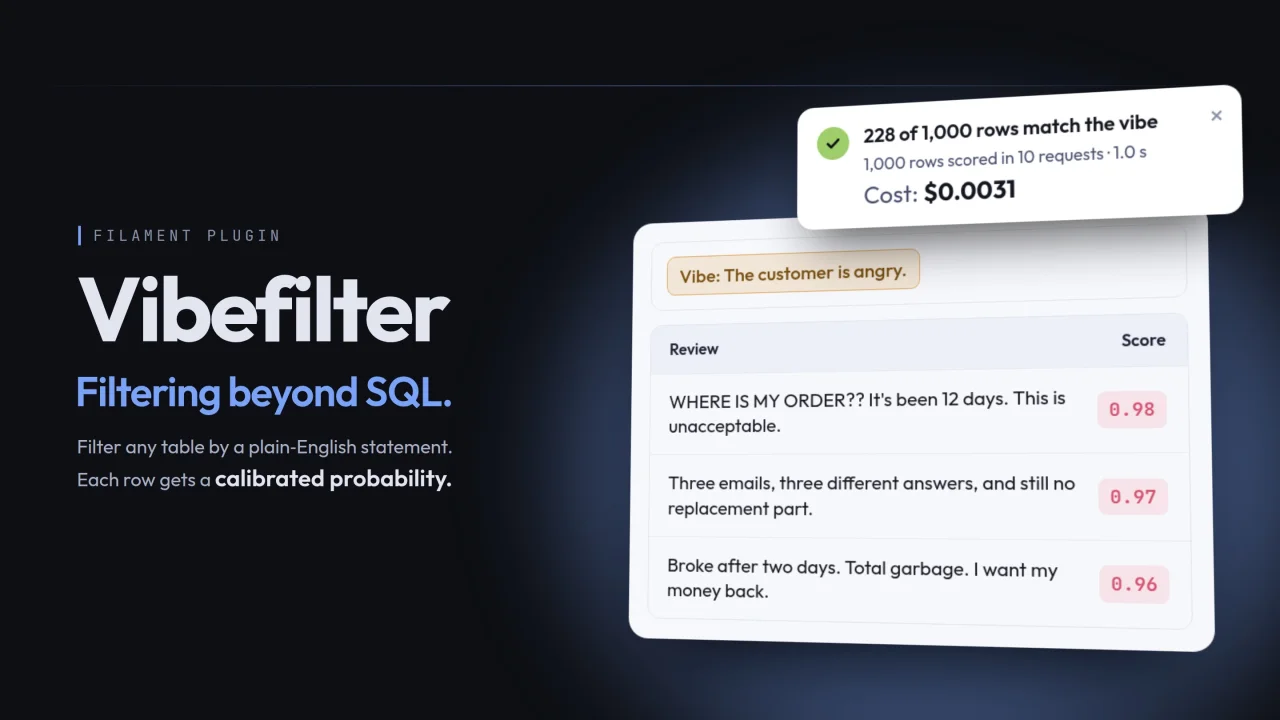
Vibefilter
CommunityFilter your tables by a plain-English statement like "The customer is angry." and keep only the rows it's true for, each scored by an AI model with a calibrated probability.
 Author:
András Horváth
Author:
András Horváth
Package health
BetaAutomated checks of this plugin's Composer package
15 checks
- Passed: GitHub Actions pinned to SHA
- Skipped: GitLab CI includes pinned to SHA
- Passed: Open security advisories
- Passed: Dependabot PR responsiveness — No open Dependabot PRs.
- Skipped: Renovate MR responsiveness
- Passed: Dependabot or Renovate configured
- Passed: Dependency update cooldown configured
- Passed: Provides a security policy
- Passed: Abandoned or archived — No consulted source marks the package abandoned (packagist, github).
- Passed: Commit and release recency — Active: last commit 1 days ago; last release 1 days ago.
-
Passed:
composer.lock not committed by library
—
composer.lockis absent from the released dist archive. - Passed: Dist archive is lean
-
Passed:
Current Laravel version supported
—
Package dependencies resolve together with current Laravel
13.0. -
Passed:
Current PHP version supported
—
Constraint
^8.2supports current PHP8.5. - Skipped: Current Symfony version supported
filament/
namespace. Review the source and install at your own risk. Found
malware or an unresolved security issue the author won't
address?
Report it
.
Documentation
- How it works
- Requirements
- Installation
- Usage
- Configuration
- Drivers
- Caching
- About the demo data
- Results
- Cost
- Privacy
- Translations
- Testing your app
- Testing the package
- Changelog
- Contributing
- Security
- Credits
- License
Filtering beyond SQL. Filter your Filament tables by vibe.



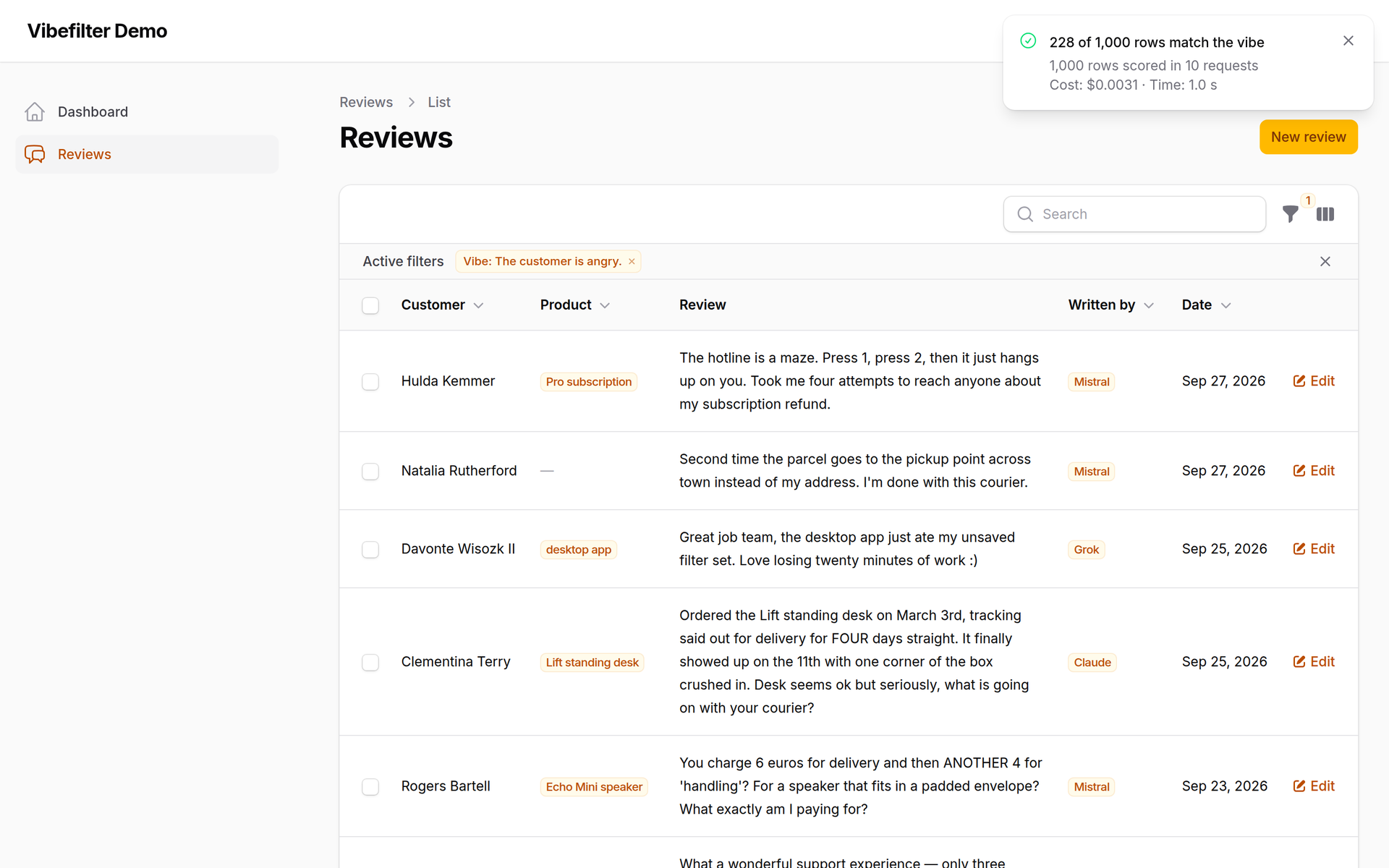
Vibefilter turns any sentence into a zero-shot classifier for your Filament table: each row gets a calibrated probability that the statement is true, and the table keeps the rows above your threshold.
Type "The customer is angry.", "The ticket is about billing." or "The candidate has worked with Kubernetes.". No training data, no labels, no keyword lists. The scoring is done by TypeSafe Jev, a model built for exactly this kind of yes/no decision.
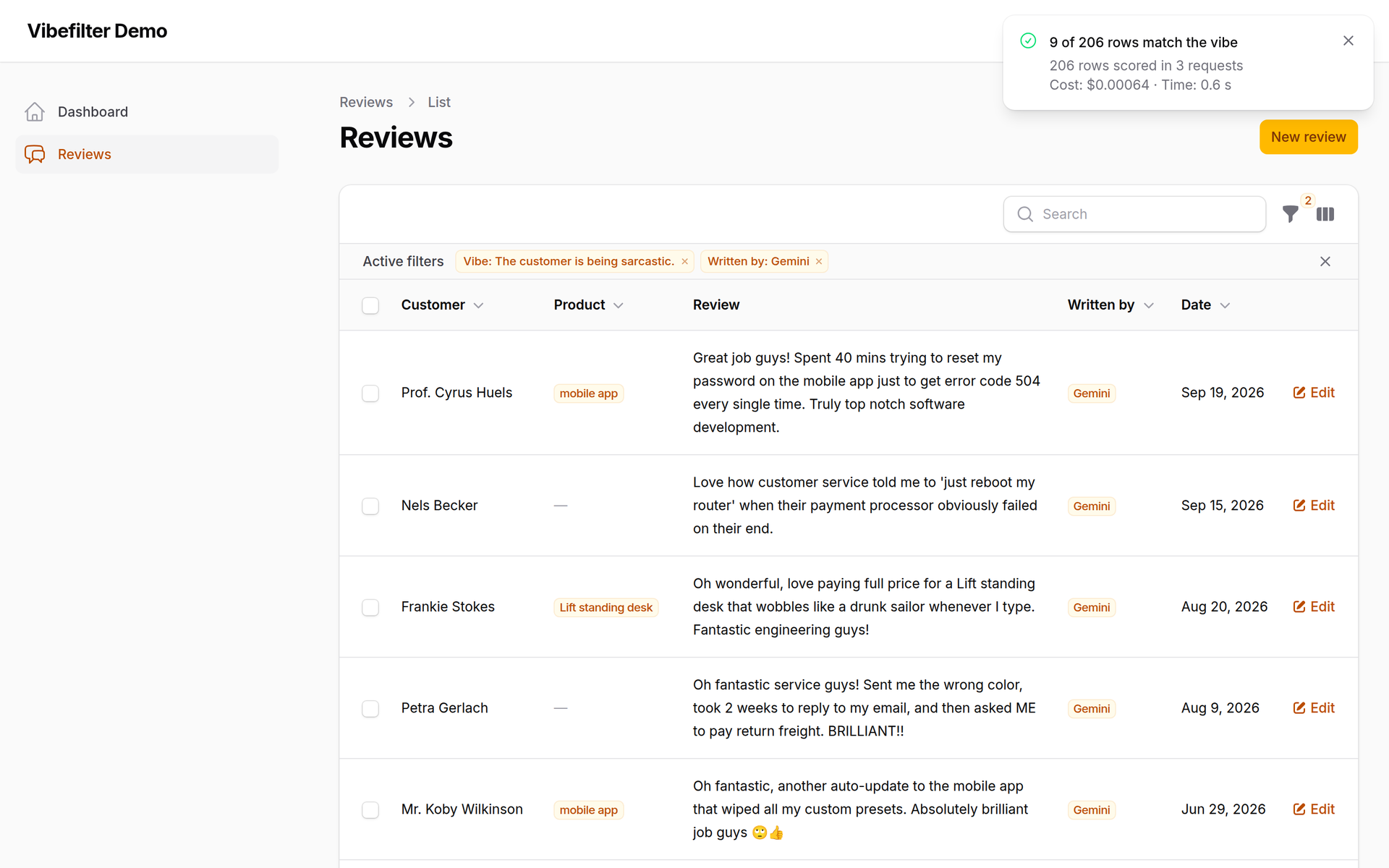
It reads between the lines, too. "Great job guys!" and "Fantastic engineering" look like praise to a keyword search; here they're the sarcastic reviews, picked out from those written by one model (see About the demo data):
#How it works
- You add a
VibeFilterto a table and tell it which columns hold the text. - A user types a statement and applies the filter.
- Vibefilter takes the rows that the table's other filters and search leave, sends their text to Jev in batches of 100 (10 requests in parallel), and gets back a probability for each row.
- The table shows the rows scoring at or above the threshold (0.8 by default).
Scores are cached by the text's content, so the same statement on the same rows is instant and free the second time, even after a page reload or on another table.
#Requirements
- PHP 8.2+
- Laravel 12.36+ or 13
- Filament 5.9+
- An API key from TypeSafe or OpenRouter
Earlier Filament 5 releases will probably work too, but the test suite can't run against them (a Filament testing issue fixed in 5.9), so they aren't supported. If you're on an older 5.x, composer update filament/filament gets you there: it's a minor update.
#Installation
composer require vibefilter/filament
Publish and run the migration (it creates two tables for the score cache):
php artisan vendor:publish --tag="vibefilter-migrations"
php artisan migrate
Add your API key to .env:
TYPESAFE_API_KEY=your-key
Or, to use Jev through OpenRouter:
VIBEFILTER_DRIVER=openrouter
OPENROUTER_API_KEY=your-key
Optionally, publish the config file:
php artisan vendor:publish --tag="vibefilter-config"
No custom Filament theme is needed: the plugin's only view uses inline styles, not Tailwind classes. Light and dark mode both work.
#Usage
Add the filter to any table and name the columns whose text should be judged:
use Vibefilter\Filament\Tables\Filters\VibeFilter;

public static function configure(Table $table): Table
{
    return $table
        ->columns([
            // ...
        ])
        ->filters([
            VibeFilter::make()
                ->textColumns(['body']),
        ]);
}
With several columns, each row is sent as labelled lines (subject: …, body: …), so the model knows which part is which:
VibeFilter::make()
    ->textColumns(['subject', 'body'])
    ->threshold(0.7)            // default: 0.8
    ->maxUnscoredRows(5000),    // default: 1000
The filter works together with the rest of the table. If the table is already narrowed down, say by another filter to last month's orders or by a search for "refund", only those rows are scored.
#Choosing a threshold
The threshold is the probability a row needs to pass. Higher means fewer rows, and fewer borderline ones. 0.8 is a good start: on the 1000 demo reviews, Jev's answers at 0.8 matched the reviews' own mood labels most often (see Results). Lower it if you'd rather see a few extra rows than miss one.
#Large tables: the "Run anyway" limit
Scoring costs money and time, so the filter doesn't send thousands of new rows on its own. When more rows than maxUnscoredRows have no cached score yet, the table stays unfiltered and the user sees how many rows are waiting, with two ways forward: narrow the table down with other filters or a search, or click Run anyway.
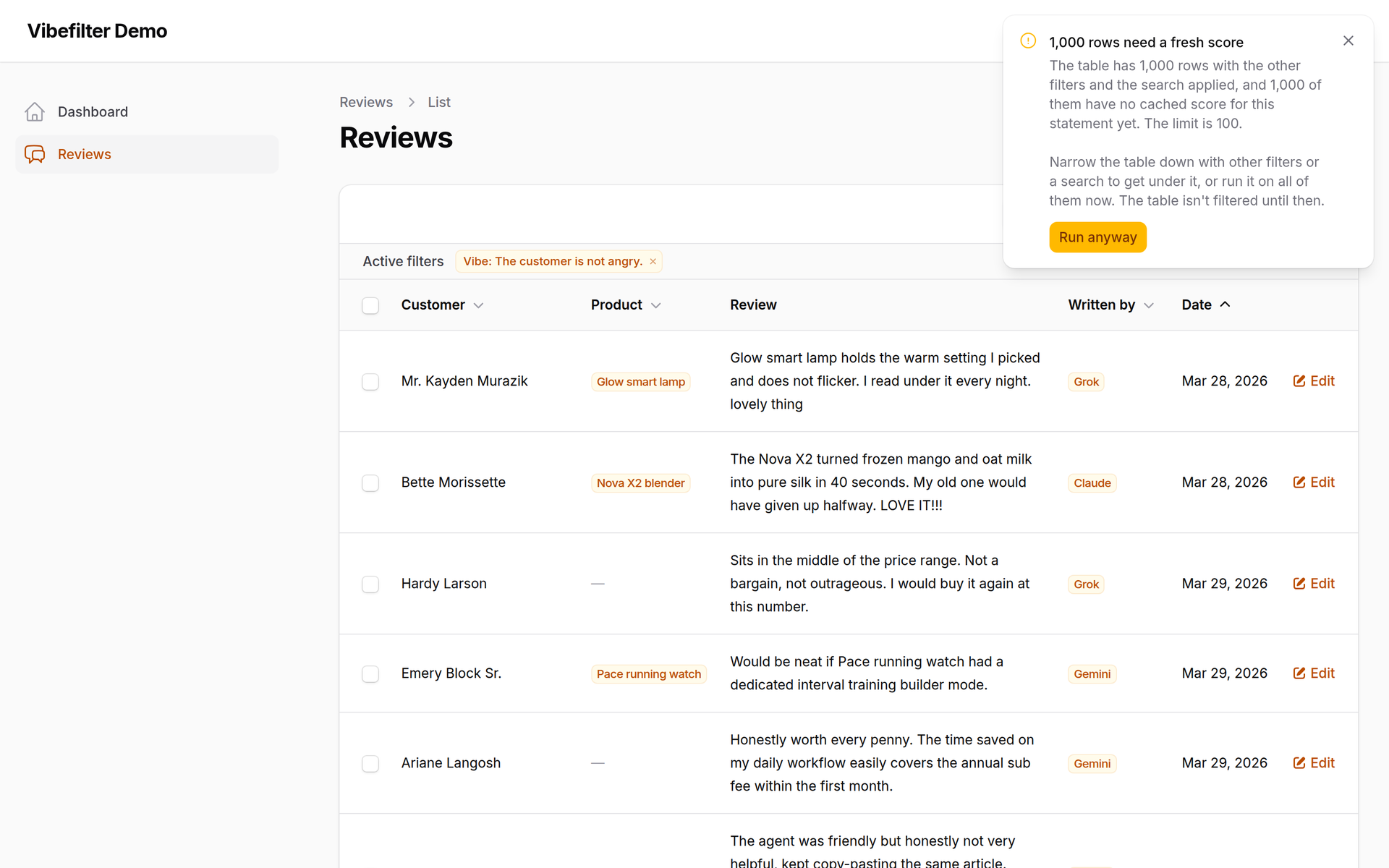
Only rows without a cached score count toward the limit. A statement that has already been run on the whole table never asks again.
#Live progress
While a run is going, a progress bar under the table toolbar shows the requests as they come back, and any retries. When it's done, a notification sums up the run: how many rows matched, how many were scored and in how many requests, how many came from the cache, and how long it took. With the OpenRouter driver, the bar and the summary also show what the run cost, as OpenRouter reports it for each request.
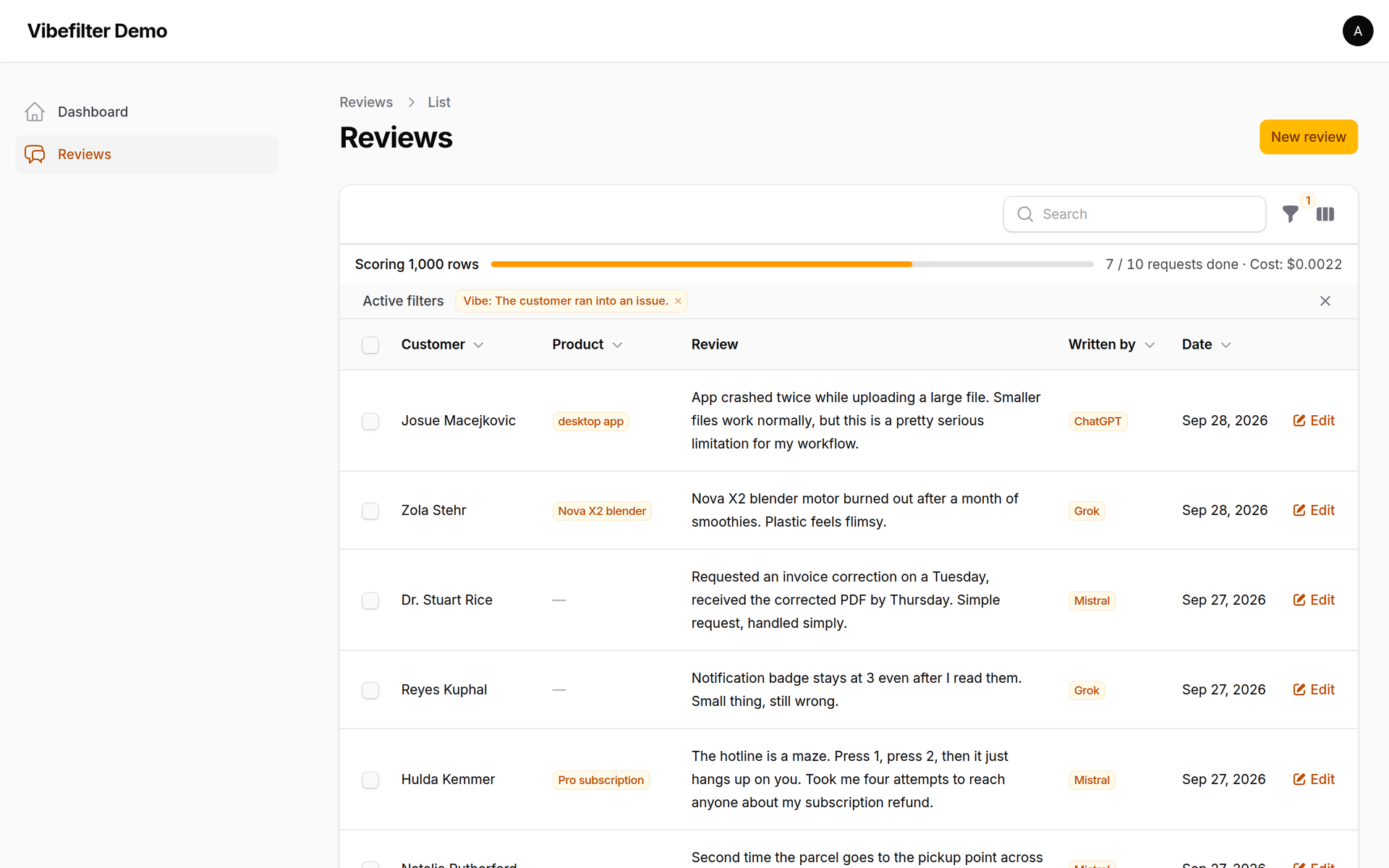
During the run the table still shows the unfiltered rows; the matches replace them when the last request is back.
The bar is streamed with Livewire's streaming responses. If your app sits behind Nginx, Livewire already sends the X-Accel-Buffering: no header that turns buffering off for these responses. If another proxy buffers them, the filter still works, but the bar only shows up at the end.
#When the API has a bad moment
Requests that hit a rate limit, a server error or a dropped connection are retried after 0.5, 2 and 5 seconds (a Retry-After header of up to 30 seconds is honoured). A batch that still fails is split in half and tried once more. Every batch that came back is saved right away, so if a few fail anyway, the table is filtered on the rows that were scored and a warning offers to try the rest again.
#Configuration
The published config/vibefilter.php:
| Key | Default | Env | What it does |
|---|---|---|---|
driver |
typesafe |
VIBEFILTER_DRIVER |
typesafe or openrouter |
drivers.typesafe.model |
jev-1.13.0 |
TYPESAFE_MODEL |
Jev version on TypeSafe |
drivers.openrouter.model |
typesafe/jev-1.13 |
OPENROUTER_MODEL |
Jev version on OpenRouter |
drivers.*.timeout |
60 |
Seconds per request | |
drivers.*.retry_delays |
[500, 2000, 5000] |
Pauses (ms) before each retry | |
threshold |
0.8 |
Default probability a row needs to pass | |
max_unscored_rows |
1000 |
VIBEFILTER_MAX_UNSCORED_ROWS |
Rows without a cached score before the filter asks first |
batch_size |
100 |
Rows per request | |
concurrency |
10 |
Requests in parallel |
#Drivers
| Driver | Service | Model |
|---|---|---|
typesafe |
TypeSafe's own API | jev-1.13.0 |
openrouter |
OpenRouter's Decisions API | typesafe/jev-1.13 |
Both run the same model with the same requests; OpenRouter forwards to TypeSafe. Use OpenRouter if you already have an account there. The models are pinned to a fixed version rather than an alias like jev-latest, because a silent model update would mix scores from two versions in the cache.
#Caching
Each score is stored against three things: a hash of the row's text, the statement, and the driver (service and model, e.g. openrouter:typesafe/jev-1.13). That means:
- Rows are matched by content, not by ID. Edit a row and it gets a fresh score; two rows with the same text are scored once.
- Statements are compared after light normalisation (case, extra spaces), so "The customer is angry." and "the customer is angry." share a cache.
- Switching the model or the service starts a new cache instead of mixing results.
#About the demo data
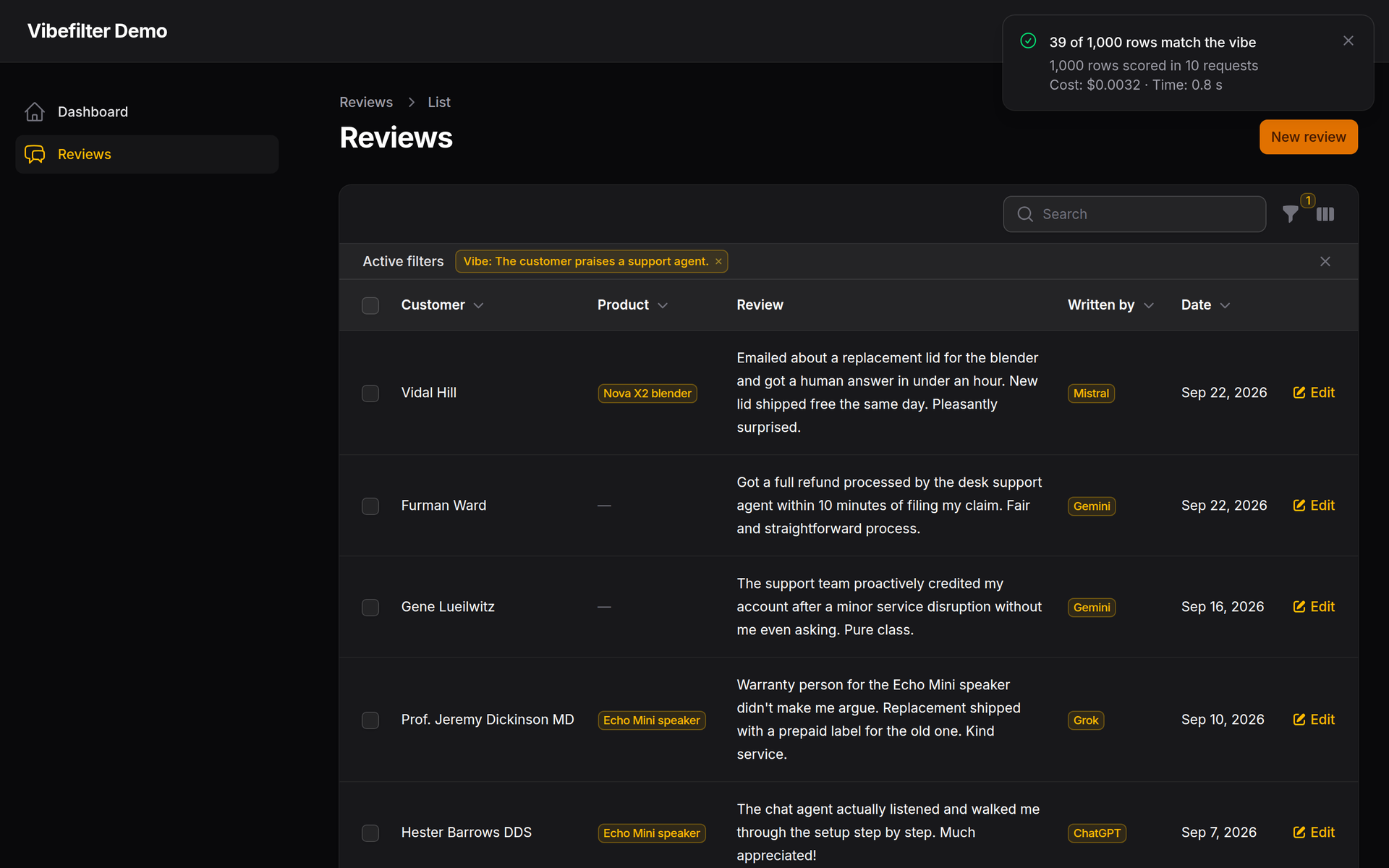
The screenshots and the results below come from a demo app with 1000 made-up customer reviews for a fictional shop. The reviews were written by five language models: Claude, ChatGPT, Gemini, Grok and Mistral. Each model also labelled its own reviews by topic and mood. The "Written by" column in the screenshots shows which model wrote which review. The customer names and dates are invented as well.
#Results
We compared the mood labels (angry, neutral or satisfied) that each model gave its own reviews with what Jev said about "The customer is angry." and "The customer is satisfied.":
| Threshold | Agreement with the labels |
|---|---|
| 0.6 | 833 / 1000 |
| 0.7 | 847 / 1000 |
| 0.8 | 861 / 1000 |
Angry and satisfied were never swapped. Nearly all the disagreements are on the line between neutral and mildly satisfied ("Does the job.", "No complaints really."), where two people would argue too. The labels aren't ground truth, so these numbers are agreement between two raters, not accuracy.
#Cost
Jev is billed per token. Scoring a new statement on 1000 short reviews costs about $0.003 and takes about a second. Cached scores cost nothing. With the OpenRouter driver you don't have to guess: every run shows its exact cost. Check your provider's current pricing, and set a spending limit on your API key.
#Privacy
The text in the columns you pass to textColumns() is sent to TypeSafe (and through OpenRouter, if you use that driver) to be scored. Pick those columns with care, and check that sending them fits your privacy policy and your agreements with your users.
Record IDs and other columns are never sent. Each row goes out under a random tag, and the rows in a request are shuffled.
#Translations
Vibefilter ships in English and Hungarian. Missing your language? Copy resources/lang/en/vibefilter.php to resources/lang/{your-locale}/vibefilter.php, translate it, and open a pull request. A test checks that no key is missing.
To change the wording in your own app, publish the language files:
php artisan vendor:publish --tag="vibefilter-translations"
#Testing your app
Don't call a real API in your tests. Swap in the fake driver: it never makes a request, and you decide each row's score with a callback, so your tests are fast, free and give the same result every time:
use Vibefilter\Filament\Contracts\DecisionDriver;
use Vibefilter\Filament\Drivers\FakeDriver;

$this->app->instance(DecisionDriver::class, new FakeDriver(
    fn (string $statement, string $text): float => str_contains($text, 'furious') ? 0.95 : 0.05,
));
$driver->calls records every statement and batch of texts it received.
#Testing the package
composer test      # tests
composer lint      # code style (Laravel Pint)
composer analyse   # static analysis (PHPStan)
#Changelog
See CHANGELOG for what has changed recently.
#Contributing
See CONTRIBUTING.
#Security
Please report security issues privately. See our security policy.
#Credits
Scoring by TypeSafe Jev.
#License
The MIT License (MIT). See License File for more information.
The author
I'm a developer from Hungary.
After many years of building web applications, I'm now working on applied AI, putting focused, reliable AI models to work inside the business software people already use.
My first Filament plugin, Vibefilter, filters any table by a plain-English statement, so you can find the angry customers, the sarcastic reviews or the tickets about billing without writing a single query.
Featured Plugins
A selection of plugins curated by the Filament team

Soft Theme
A theme that gives panels a warm, approachable look with rounded shapes, gentle colors, and serif headings.
 Filament

Spotlight Pro
Browse your Filament Panel with ease. Filament Spotlight Pro adds a Spotlight like Command Palette to your Filament Panel.
 Dennis Koch

Advanced Tables (formerly Filter Sets)
Supercharge your tables with powerful features like user-customizable views, quick filters, multi-column sorting, advanced table searching, convenient view management, and more. Compatible with Resource Panel Tables, Relation Managers, Table Widgets, and Table Builder!
 Kenneth Sese
