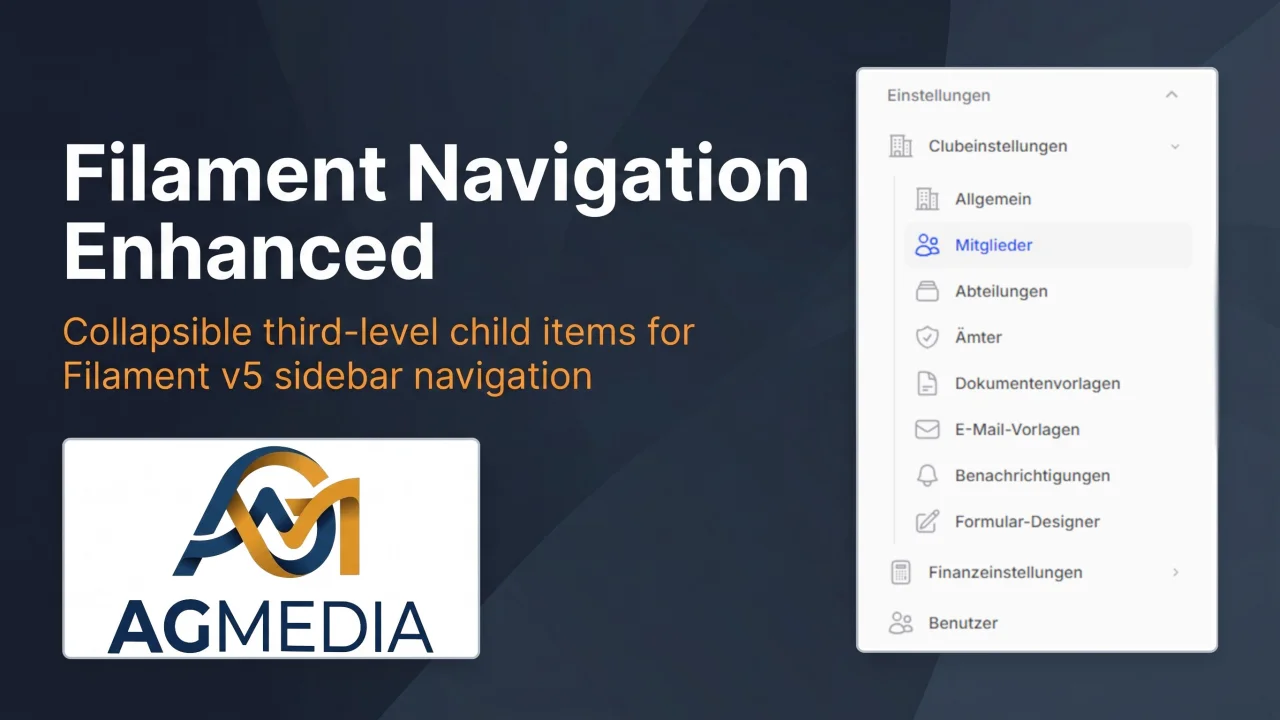
Navigation Enhanced
CommunityAdds collapsible child-item support to the Filament sidebar navigation.
filament/
namespace. Review the source and install at your own risk. Found
malware or an unresolved security issue the author won't
address?
Report it
.
 Author:
AGMedia
Author:
AGMedia
Documentation
Adds collapsible child-item support to the Filament v5 sidebar navigation. A parent item becomes an expand/collapse toggle; its children are revealed in an animated sub-list. The group auto-expands whenever a child is active.
#Requirements
| Dependency | Version |
|---|---|
| PHP | ^8.2 |
| filament/filament | ^5.0 |
#Installation
#Via Composer (Packagist)
composer require agroezinger/filament-navigation-enhanced
#Publish the view override
The package ships a replacement for Filament's sidebar/item component. Publish it once so Filament picks it up:
php artisan vendor:publish --tag=navigation-enhanced-views
This copies the view to resources/views/vendor/filament-panels/components/sidebar/item.blade.php.
#Usage
#1. Register the plugin
Add NavigationEnhancedPlugin to every panel that should use the feature:
use Agroezinger\FilamentNavigationEnhanced\NavigationEnhancedPlugin;

public function panel(Panel $panel): Panel
{
    return $panel
        // ...
        ->plugins([
            NavigationEnhancedPlugin::make(),
        ]);
}
The plugin itself has no configuration options — registering it documents intent and allows future configuration hooks.
#2. Add the trait to a parent Page or Resource
use Agroezinger\FilamentNavigationEnhanced\Concerns\HasNavigationChildren;
use Filament\Navigation\NavigationItem;

class SettingsPage extends Page
{
    use HasNavigationChildren;

    protected static string|\BackedEnum|null $navigationIcon = 'heroicon-o-cog-6-tooth';
    protected static string|\UnitEnum|null $navigationGroup = 'Einstellungen';
    protected static ?string $navigationLabel = 'Einstellungen';

    public static function getNavigationChildItems(): array
    {
        return [
            NavigationItem::make('Allgemein')
                ->url(static::getUrl())
                ->icon('heroicon-o-cog-6-tooth')
                ->isActiveWhen(fn() => request()->routeIs('filament.club.pages.settings.general')),

            NavigationItem::make('Abteilungen')
                ->url(DepartmentResource::getUrl('index'))
                ->icon('heroicon-o-rectangle-stack')
                ->isActiveWhen(fn() => request()->routeIs('filament.club.resources.departments.*')),

            NavigationItem::make('Benutzer')
                ->url(UserResource::getUrl('index'))
                ->icon('heroicon-o-users')
                ->isActiveWhen(fn() => request()->routeIs('filament.club.resources.users.*')),
        ];
    }
}
#3. Suppress child items from the top-level navigation
Resources and Pages that appear as children should not register themselves as standalone sidebar items. Override shouldRegisterNavigation() on the Resource:
class DepartmentResource extends Resource
{
    public static function shouldRegisterNavigation(): bool
    {
        return false;
    }
}
For a child Page, set:
protected static bool $shouldRegisterNavigation = false;
#4. Active-state detection
Use request()->routeIs() with a wildcard to match all pages of a resource (index, create, edit):
NavigationItem::make('Abteilungen')
    ->isActiveWhen(fn() => request()->routeIs('filament.{panel}.resources.{resource-slug}.*')),
For a single Page, match the exact route name:
NavigationItem::make('Allgemein')
    ->isActiveWhen(fn() => request()->routeIs('filament.{panel}.pages.{page-slug}')),
To find the exact route names for your panel, run:
php artisan route:list --name="filament.{panel}" --json \
  | php -r "foreach(json_decode(file_get_contents('php://stdin'),true) as \$r) echo \$r['name'].PHP_EOL;"
#How it works
The package publishes a custom sidebar/item Blade component that extends Filament's default one. When a NavigationItem carries child items (set via $item->childItems([...])), the component renders a <button> toggle instead of an <a> link, and wraps the children in an Alpine.js-powered <ul> with enter/leave transitions.
HasNavigationChildren::getNavigationItems() wraps the parent's items and calls childItems() on each with the return value of getNavigationChildItems(). The parent item auto-expands on load when $active || $activeChildItems is true.
Items without children fall through to Filament's original rendering path unchanged.
#License
MIT
The author
From the same author
Featured Plugins
A selection of plugins curated by the Filament team

Custom Dashboards
Let your users build and share their own dashboards with a drag-and-drop interface. Define your data sources in PHP and let them do the rest.
 Filament

Spotlight Pro
Browse your Filament Panel with ease. Filament Spotlight Pro adds a Spotlight/Raycast like Command Palette to your Filament Panel.
 Dennis Koch

Advanced Tables (formerly Filter Sets)
Supercharge your tables with powerful features like user-customizable views, quick filters, multi-column sorting, advanced table searching, convenient view management, and more. Compatible with Resource Panel Tables, Relation Managers, Table Widgets, and Table Builder!
 Kenneth Sese

