
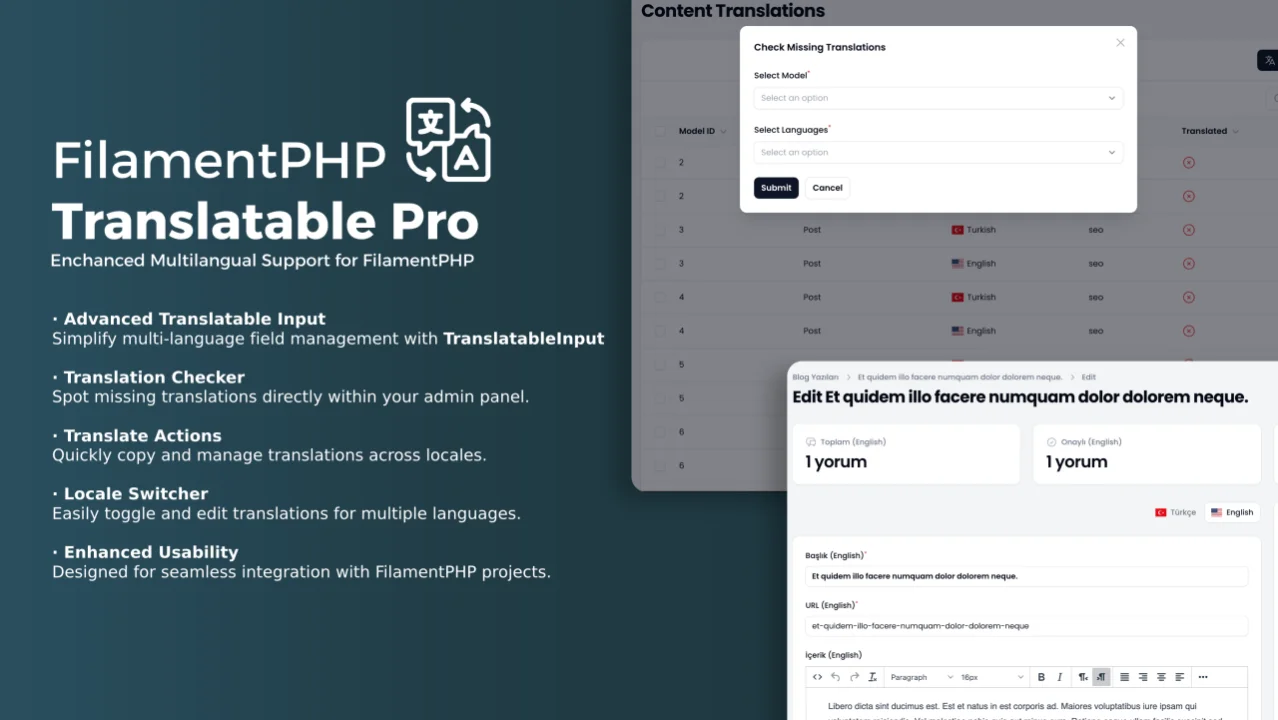
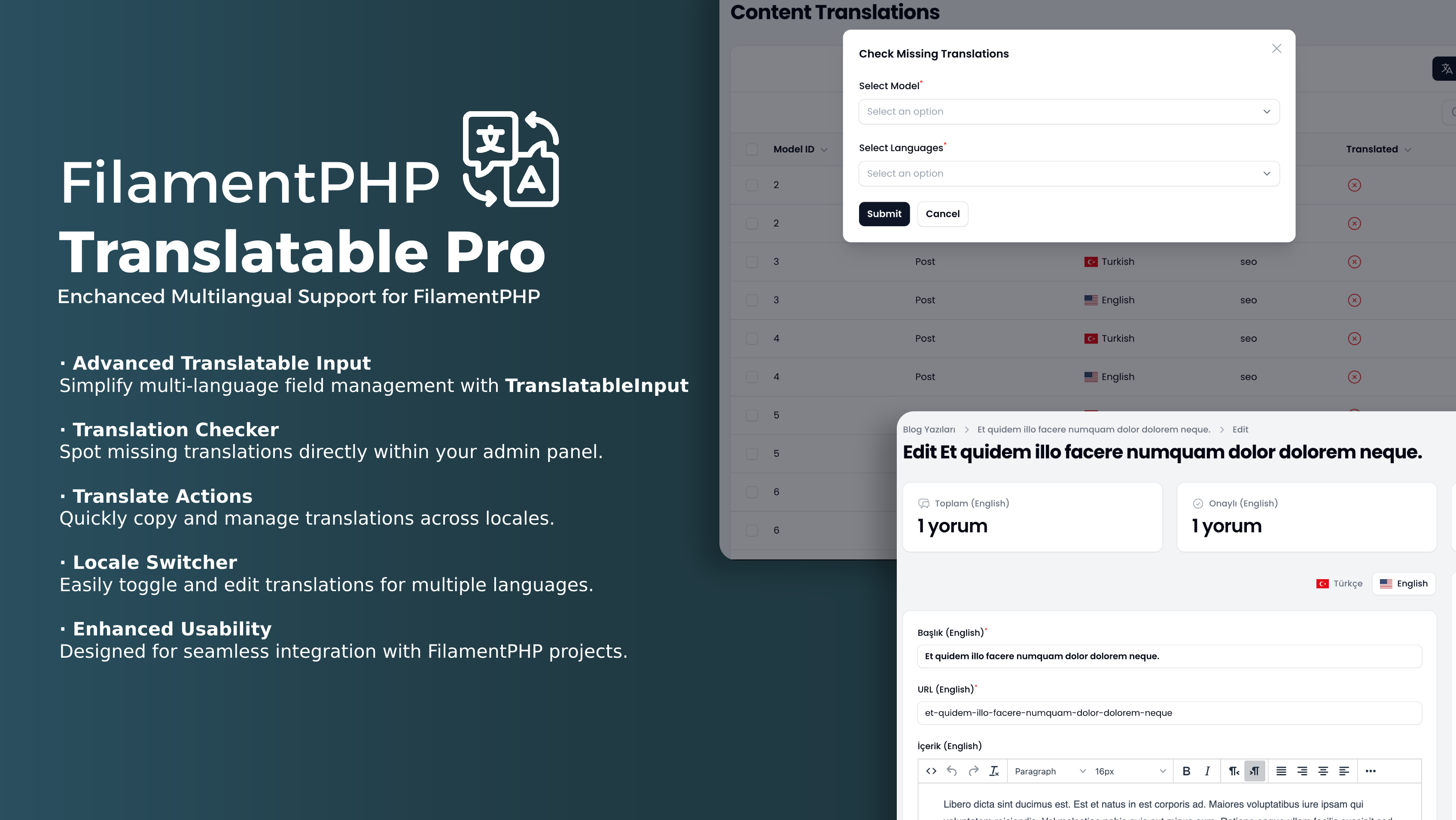
Translatable Pro
CommunityStreamlines multi-language management in FilamentPHP projects, enabling developers to build immersive, multilingual applications with ease.
filament/
namespace. Review the source and install at your own risk. Found
malware or an unresolved security issue the author won't
address?
Report it
.
 Author:
Azad Furkan ŞAKAR
Author:
Azad Furkan ŞAKAR
Documentation
- Table of Contents
- Introduction
- Features
- Breaking Changes from V1
- Migration Guide
- Installation
- Usage
- Actions
- Columns
- Translation Status
- Quality / Testing
- Support
- License
- Credits
- Security
#Table of Contents
- Introduction
- Features
- Breaking Changes from V1
- Migration Guide
- Installation
- Usage
- Actions
- Columns
- Translation Status
- Support
#Introduction
Filament Translatable Pro V2 is a powerful FilamentPHP v4 plugin that enhances the Spatie Translatable package with advanced, user-friendly features. This major version introduces significant improvements, including enhanced translation management, better performance, and a more intuitive API design.
#Features
- Enhanced TranslatableInput: Improved multi-language management with better UX and performance
- Advanced Translation Actions: New
TranslateRecordActionandTranslateContentActionfor comprehensive translation workflows - Translation Status Tracking: Advanced tracking and monitoring of translation completeness
- Smart Column Components:
TranslatedColumnandTranslationProgressColumnfor better data display - Improved Locale Switcher: Enhanced global locale switching with multiple display modes
- Background Translation Jobs: Asynchronous translation processing for better performance
- Email Notifications: Get notified about missing translations and translation completion
- Auto-detection: Automatically detect translatable attributes from models
- Flag Support: Visual flags for better locale identification
#Breaking Changes from V1
#⚠️ Important: V2 introduces several breaking changes. Please read this section carefully before upgrading.
#1. Namespace Changes
Actions Namespace:
// V1
use Afsakar\FilamentTranslatablePro\Actions\TranslateAndCopyAction;
use Afsakar\FilamentTranslatablePro\Actions\TranslateFieldAction;

// V2
use Afsakar\FilamentTranslatablePro\Filament\Actions\TranslateRecordAction;
use Afsakar\FilamentTranslatablePro\Filament\Actions\TranslateContentAction;
Components Namespace:
// V1
use Afsakar\FilamentTranslatablePro\Forms\Components\TranslatableInput;

// V2
use Afsakar\FilamentTranslatablePro\Filament\Components\TranslatableInput;
Columns Namespace:
// V1
use Afsakar\FilamentTranslatablePro\Columns\TranslationProgressColumn;

// V2
use Afsakar\FilamentTranslatablePro\Filament\Columns\TranslationProgressColumn;
use Afsakar\FilamentTranslatablePro\Filament\Columns\TranslatedColumn; // New
#2. Plugin Configuration Changes
Removed Methods:
->renderHook()- Global switcher location is now fixed->suffixLocale()and->prefixLocale()- Now handled at component level->navigationTitle(),->navigationGroup(), etc. - Now configured via config file
New Methods:
->localeSwitcherType()- Choose between 'dropdown' and 'toggle'
#3. Action Name Changes
// V1
TranslateAndCopyAction::make() // Renamed
TranslateFieldAction::make()   // Renamed

// V2
TranslateRecordAction::make()  // New name
TranslateContentAction::make() // New name
#4. Method Name Changes
// V1
TranslatableInput::make()
    ->prefixLocale()    // Removed
    ->suffixLocale()    // Removed
    ->exclude()         // Renamed

// V2
TranslatableInput::make()
    ->prefixLocaleLabel()   // New
    ->suffixLocaleLabel()   // New
    ->excludeFields()       // New name
#5. Facade Changes
// V1
use Afsakar\FilamentTranslatablePro\Facades\FilamentTranslatablePro;

// V2
use Afsakar\FilamentTranslatablePro\Facades\TranslatableProFacade;
#Migration Guide
#Step 1: Update Namespaces
Replace all old namespaces with new ones:
# Find and replace in your codebase:
# Actions
find . -name "*.php" -exec sed -i '' 's/use Afsakar\\FilamentTranslatablePro\\Actions\\/use Afsakar\\FilamentTranslatablePro\\Filament\\Actions\\/g' {} \;

# Components
find . -name "*.php" -exec sed -i '' 's/use Afsakar\\FilamentTranslatablePro\\Forms\\Components\\/use Afsakar\\FilamentTranslatablePro\\Filament\\Components\\/g' {} \;

# Columns
find . -name "*.php" -exec sed -i '' 's/use Afsakar\\FilamentTranslatablePro\\Columns\\/use Afsakar\\FilamentTranslatablePro\\Filament\\Columns\\/g' {} \;

# Facades
find . -name "*.php" -exec sed -i '' 's/use Afsakar\\FilamentTranslatablePro\\Facades\\FilamentTranslatablePro/use Afsakar\\FilamentTranslatablePro\\Facades\\TranslatableProFacade/g' {} \;
#Step 2: Update Action Names
// Replace these action calls:
TranslateAndCopyAction::make() // Change to TranslateRecordAction::make()
TranslateFieldAction::make()   // Change to TranslateContentAction::make()
#Step 3: Update Plugin Configuration
// V1 Configuration (Remove these)
FilamentTranslatableProPlugin::make()
    ->renderHook(PanelsRenderHook::TOPBAR_START)          // Remove
    ->suffixLocale(true)                                   // Remove
    ->prefixLocale(true)                                   // Remove
    ->navigationTitle('Content Translations')             // Remove
    ->navigationGroup('Content')                           // Remove
    ->navigationSort(1)                                    // Remove
    ->navigationIcon('heroicon-o-globe')                   // Remove
    ->navigationSlug('content-translations');             // Remove

// V2 Configuration (Use this)
FilamentTranslatableProPlugin::make()
    ->locales([
        'tr' => 'Türkçe',
        'en' => 'English'
    ])
    ->globalSwitcher(true)
    ->localeSwitcherType('dropdown'); // New: 'dropdown' or 'toggle'
#Step 4: Update Component Methods
// V1
TranslatableInput::make()
    ->prefixLocale() // Deprecated
    ->suffixLocale() // Deprecated
    ->exclude(['description']);

// V2
TranslatableInput::make()
    ->excludeFields(['description']);
#Step 5: Update Configuration File
Publish and update the config file:
php artisan vendor:publish --tag="filament-translatable-pro-config" --force
Update your config file:
// config/filament-translatable-pro.php
return [
    'locales' => ['en', 'tr'],

    // New configuration section
    'translation_status' => [
        'navigation_group' => 'Content',
        'navigation_icon' => 'heroicon-o-language',
        'model_label' => 'Translation Status',
        'navigation_label' => 'Translation Status',
        'slug' => 'translation-statuses',
        'sort' => 99,
    ],
];
#Step 6: Run Migrations
V2 includes new database tables:
php artisan migrate
#Installation
Filament Translatable Pro uses AnyStack to handle payment, licensing, and distribution.
You can get your license here: FilamentPHP Translatable PRO
To install you'll need to add the repository to your composer.json file:
{
    "repositories": [
        {
            "type": "composer",
            "url": "https://satis.afsakar.com"
        }
    ]
}
Once the repository has been added to the composer.json file, you can install Filament Translatable Pro like any other composer package using the composer require command:
composer require afsakar/filament-translatable-pro
You will be prompted to provide your username and password. The username will be the email address and the password will be equal to your license key.
Loading composer repositories with package information
Authentication required (satis.afsakar.com):
Username: [license-email]
Password: [license-key]
Next, add the plugin's views to your custom theme in your theme.css file:
Important
If you haven't set up a custom theme and are using a Panel, follow the instructions in the Filament Docs first. This setup applies to both the Panels and standalone Forms packages.
@import '../your/vendor/path/translatable-pro/resources/css/index.css';


@source '../your/vendor/path/afsakar/filament-translatable-pro/resources/views/**/*';
Afterward, run npm run build or yarn build to compile assets.
Publish the configuration file if needed:
php artisan vendor:publish --tag="filament-translatable-pro-config"
In the published config file, you can define the available locales and translation status settings:
return [
    'locales' => ['tr', 'en'],

    'translation_status' => [
        'navigation_group' => 'Content',
        'navigation_icon' => 'heroicon-o-language',
        'model_label' => 'Translation Status',
        'navigation_label' => 'Translation Status',
        'slug' => 'translation-statuses',
        'sort' => 99,
    ],
];
Optionally, publish translations using:
php artisan vendor:publish --tag="filament-translatable-pro-translations"
Run the migrations:
php artisan migrate
#Register the Plugin
Register the plugin in your Filament service provider:
class AdminPanelProvider extends PanelProvider
{
    public function panel(Panel $panel): Panel
    {
        return $panel
            ->plugins([
                \Afsakar\FilamentTranslatablePro\FilamentTranslatableProPlugin::make()
                    ->locales([
                        'tr' => 'Türkçe',
                        'en' => 'English'
                    ])
                    ->globalSwitcher(true) // Enable/disable the global switcher
                    ->localeSwitcherType('dropdown') // 'dropdown' or 'toggle'
            ]);
    }
}
#Usage
#Preparing Resources
To prepare your resources for translatable fields, add the Translatable trait in your Filament Resources:
<?php

namespace App\Filament\Resources;
use Afsakar\FilamentTranslatablePro\Resources\Concerns\Translatable;
use Filament\Resources\Resource;

class PostResource extends Resource
{
    use Translatable;
    // resource code
}
Add the Translatable trait to your List Page as well:
<?php

namespace App\Filament\Resources\PostResource\Pages;

use Afsakar\FilamentTranslatablePro\Resources\Pages\ListRecords\Concerns\Translatable;
use App\Filament\Resources\PostResource;
use Filament\Resources\Pages\ListRecords;

class ListPosts extends ListRecords
{
    use Translatable;

    protected static string $resource = PostResource::class;
}
Edit Page:
<?php

namespace App\Filament\Resources\PostResource\Pages;

use Afsakar\FilamentTranslatablePro\Filament\Actions\TranslateRecordAction;
use Afsakar\FilamentTranslatablePro\Resources\Pages\EditRecords\Concerns\Translatable;
use App\Filament\Resources\PostResource;
use Filament\Actions;
use Filament\Resources\Pages\EditRecord;

class EditPost extends EditRecord
{
    use Translatable;

    protected static string $resource = PostResource::class;

    protected function getHeaderActions(): array
    {
        return [
            TranslateRecordAction::make(),
            Actions\DeleteAction::make(),
        ];
    }

    // You can use Translatable in widgets as well
    protected function getHeaderWidgets(): array
    {
        return [
            PostResource\Widgets\PostCommentsWidget::make([
                'activeLocale' => $this->activeLocale, // You need to pass the active locale to the widget
            ]),
        ];
    }
}
View Page:
<?php

namespace App\Filament\Resources\PostResource\Pages;

use Afsakar\FilamentTranslatablePro\Resources\Pages\ViewRecord\Concerns\Translatable;
use App\Filament\Resources\PostResource;
use Filament\Resources\Pages\ViewRecord;

class ViewPost extends ViewRecord
{
    use Translatable;

    protected static string $resource = PostResource::class;
}
Create Page:
<?php

namespace App\Filament\Resources\PostResource\Pages;

use Afsakar\FilamentTranslatablePro\Resources\Pages\CreateRecord\Concerns\Translatable;
use App\Filament\Resources\PostResource;
use Filament\Resources\Pages\CreateRecord;

class CreatePost extends CreateRecord
{
    use Translatable;

    protected static string $resource = PostResource::class;
}
PostCommentsWidget class:
<?php

namespace App\Filament\Resources\PostResource\Widgets;

use Afsakar\FilamentTranslatablePro\Facades\TranslatableProFacade;
use Afsakar\FilamentTranslatablePro\Resources\Widgets\Concerns\Translatable;
use Filament\Widgets\StatsOverviewWidget as BaseWidget;

class PostCommentsWidget extends BaseWidget
{
    use Translatable;

    public ?Model $record = null;

    protected function getStats(): array
    {
        return [
            BaseWidget\Stat::make('Total ('.TranslatableProFacade::getLocaleLabel($this->activeLocale).')', $this->record->comments->where('locale', $this->activeLocale)->count())
                ->icon('heroicon-o-chat-bubble-left-right'),
            BaseWidget\Stat::make('Published ('.TranslatableProFacade::getLocaleLabel($this->activeLocale).')', $this->record->comments->where('locale', $this->activeLocale)->whereNotNull('published_at')->count())
                ->icon('heroicon-o-check-circle'),
            BaseWidget\Stat::make('Unpublish ('.TranslatableProFacade::getLocaleLabel($this->activeLocale).')', $this->record->comments->where('locale', $this->activeLocale)->whereNull('published_at')->count())
                ->icon('heroicon-o-clock'),
        ];
    }
}
For resources with relationships, include the Translatable trait in the related Resource Form Page:
<?php

namespace App\Filament\Resources\PostResource\RelationManagers;

use Afsakar\FilamentTranslatablePro\Resources\RelationManagers\Concerns\Translatable;
use Filament\Resources\RelationManagers\RelationManager;

class CategoriesRelationManager extends RelationManager
{
    use Translatable;

    protected static string $relationship = 'categories';
}

#Using TranslatableInput
The TranslatableInput component supports multi-language input fields in Filament forms:
use Afsakar\FilamentTranslatablePro\Filament\Components\TranslatableInput;
use Filament\Forms;
use Filament\Actions\Action;

TranslatableInput::make()
    ->locales(['tr', 'en'])
    ->onlyMainLocaleRequired(condition: true, force: false)
    ->showFlags(true)
    ->excludeFields(['description'])
    ->vertical()
    ->schema([
        Forms\Components\TextInput::make('name')->required(fn ($component) => $component->getMeta('locale') === 'tr'),
        Forms\Components\Textarea::make('description')->required(fn ($component) => $component->getMeta('locale') === 'tr'),
    ]);
Available Methods:
excludeFields(): An array of fields to be excluded from the componentonlyMainLocaleRequired(): Make only main locale required if component has required attribute. If force is true, make all components required for main locale. (defaults: condition: true, force: false)showFlags(): Show flags in the tabslocales(): An array of locale codes to be used in the componentvertical(): Display the locale tabs vertically
use Afsakar\FilamentTranslatablePro\Filament\Components\TranslatableInput;
use Filament\Forms;

TranslatableInput::make()
    ->schema([
        Forms\Components\Section::make([
            Forms\Components\TextInput::make('title'),
            Forms\Components\Textarea::make('description'),
        ]),
    ]);


#Specialized Use Cases
Get the current locale of a component with getMeta('locale'):
use Afsakar\FilamentTranslatablePro\Facades\TranslatableProFacade;
use Afsakar\FilamentTranslatablePro\Filament\Actions\TranslateContentAction;
use Afsakar\FilamentTranslatablePro\Filament\Components\TranslatableInput;
use Filament\Forms;

public static function form(Form $form): Form
{
    return $form
        ->schema([
            TranslatableInput::make()
                ->schema([
                    Forms\Components\Section::make('Title Section')
                        ->columnSpanFull()
                        ->columns()
                        ->schema([
                            Forms\Components\TextInput::make('title')
                                ->live(true)
                                ->hintAction(TranslateContentAction::make())
                                ->afterStateUpdated(function ($state, $set, $context, $component) {
                                    if ($context === 'edit') {
                                        return;
                                    }

                                    $language = $component->getMeta('locale');

                                    $set('slug.' . $language, str($state)->slug());
                                })
                                ->required(),
                            Forms\Components\TextInput::make('slug')
                                ->dehydrateStateUsing(function ($state) {
                                    return str($state)->slug();
                                })->unique(ignoreRecord: true),
                        ]),
                    Forms\Components\Section::make()
                        ->schema([
                            Forms\Components\FileUpload::make('image')->lazy(),
                            Forms\Components\RichEditor::make('content')->hintAction(TranslateContentAction::make()),
                            Forms\Components\Repeater::make('optional')
                                ->label('Optional')
                                ->addActionLabel(fn($component) => 'Add Optional (' . TranslatableProFacade::getLocaleLabel($component->getMeta('locale')) . ')')
                                ->schema([
                                    Forms\Components\TextInput::make('key'),
                                    Forms\Components\TextInput::make('value'),
                                ]),
                        ]),
                ]),
        ]);
}
#Actions
#TranslateRecordAction
The TranslateRecordAction allows you to translate an entire record from one locale to another using automated translation services.
<?php

namespace App\Filament\Resources\PostResource\Pages;

use Afsakar\FilamentTranslatablePro\Filament\Actions\TranslateRecordAction;
use App\Filament\Resources\PostResource;
use Filament\Actions;
use Filament\Resources\Pages\EditRecord;

class EditPost extends EditRecord
{
    protected static string $resource = PostResource::class;

    protected function getHeaderActions(): array
    {
        return [
            TranslateRecordAction::make()
                ->excepts(['slug']), // Exclude specific fields from translation
            Actions\DeleteAction::make(),
        ];
    }
}
#TranslateContentAction
The TranslateContentAction allows you to translate individual field content to other locales. This action can be used as a hint action on form fields.
use Afsakar\FilamentTranslatablePro\Filament\Actions\TranslateContentAction;
use Afsakar\FilamentTranslatablePro\Filament\Components\TranslatableInput;
use Filament\Forms;

TranslatableInput::make()
    ->schema([
        Forms\Components\RichEditor::make('content')
            ->hintAction(TranslateContentAction::make()),
        Forms\Components\TextInput::make('title')
            ->hintAction(TranslateContentAction::make()),
    ]);
Note: The TranslateContentAction action doesn't work with the Repeater component.
#CheckTranslationsAction
The CheckTranslationsAction allows you to check and update translation status for specific models. This is useful for monitoring translation completeness across your application.
use Afsakar\FilamentTranslatablePro\Filament\Actions\CheckTranslationsAction;

// Use in table header actions
protected function getHeaderActions(): array
{
    return [
        CheckTranslationsAction::make(),
    ];
}
#Columns
#TranslationProgressColumn
The TranslationProgressColumn displays the translation progress of a record. It automatically detects the translatable attributes from the model and calculates the progress for each locale.


use Afsakar\FilamentTranslatablePro\Filament\Columns\TranslationProgressColumn;

public static function table(Table $table): Table
{
    return $table
        ->columns([
            Tables\Columns\TextColumn::make('title'),
            TranslationProgressColumn::make('translation_progress')
                ->label('Translation Progress'),
            // or use circle style
            TranslationProgressColumn::make('translation_progress')
                ->label('Translation Progress')
                ->circle(),
        ]);
}
#TranslatedColumn
The TranslatedColumn automatically displays translated content based on the current active locale. It intelligently handles both translatable and non-translatable fields, including relationships.
use Afsakar\FilamentTranslatablePro\Filament\Columns\TranslatedColumn;

public static function table(Table $table): Table
{
    return $table
        ->columns([
            TranslatedColumn::make('title'), // Will show translated title based on active locale
            TranslatedColumn::make('category.name'), // Works with relationships too
            Tables\Columns\TextColumn::make('created_at'),
        ]);
}
#Translation Status
#Setting Up Translation Status
First, you need to add the HasTranslationStatus trait to your models. You can exclude specific attributes from the translation status calculation by using the exceptedTranslationStatusAttributes method.
use Afsakar\FilamentTranslatablePro\Concerns\InteractsWithTranslationStatus;

class Post extends Model
{
    use InteractsWithTranslationStatus;

    public function exceptedTranslationStatusAttributes(): array
    {
        return ['slug']; // These fields won't be considered in translation status
    }
}

#TranslationStatusResource
The Translation Status Resource provides a comprehensive view of all translation statuses across your application. You can access it through the navigation menu (configurable in the config file).
Features:
- View all models and their translation status
- Filter by model type, language, and translation status
- Bulk actions to update translation statuses
- Export translation status reports
#Translation Status Command
This command calculates the translation status of records. It automatically detects the translatable attributes from the model and calculates the status for each locale. You can run this command from the terminal.
php artisan translations:check --model=Post
Available options:
--model: Specify the model class name to check (e.g.,Post,User)
Examples:
# Check all models
php artisan translations:check

# Check specific model
php artisan translations:check --model=Post

# Check multiple models (run command multiple times)
php artisan translations:check --model=Post
php artisan translations:check --model=Category
The command will:
- Scan all translatable attributes for the specified model(s)
- Check translation completeness for each locale
- Update the translation status database
- Send email notifications if requested
#Missing Translation Keys Command
Scan application paths for literal translation keys and write missing keys to the fallback locale JSON file.
php artisan translatable-pro:scan-missing-keys
By default, the command scans app_path() and resource_path('views'). You can override paths and excludes in the config file, or per command:
php artisan translatable-pro:scan-missing-keys \
    --path=app/Filament \
    --path=resources/views \
    --exclude=resources/views/vendor \
    --locale=en \
    --dry-run
It detects literal keys used with __(), trans(), trans_choice(), @lang(), Lang::get(), and direct translator get() calls. Dynamic keys and package namespace keys such as vendor::file.key are skipped.
#Translation Manager
The plugin registers a Filament page for editing JSON and PHP language files from the panel.
// config/filament-translatable-pro.php
'translation_manager' => [
    'enabled' => true,
    'navigation_group' => null,
    'navigation_icon' => 'heroicon-o-queue-list',
    'navigation_label' => null,
    'slug' => 'translation-manager',
    'sort' => 100,
    'base_path' => lang_path(),
    'custom_path' => base_path('lang-custom'),
    'exclude' => [
        '*/validation.php',
        '*/passwords.php',
    ],
    'per_page_options' => [25, 50, 100],
],
Values saved from the manager are written to lang-custom. At runtime, lang-custom values override the normal lang values, while missing custom values fall back to the original language files. The manager supports:
- JSON files such as
lang/en.json - PHP group files such as
lang/en/messages.php lang-customoverrides for both JSON and PHP files- file type, search, locale, and missing translation filters
- nullable locale filtering, so all locales can be shown together
- missing translation detection across all configured locales
- excluded language files by path pattern, such as
*/validation.php - paginated editing with configurable per-page options
The page UI text is translatable through resources/lang/*/translatable-pro.php under the translation_manager key.
#Quality / Testing
Install dependencies and run the package checks before opening a pull request:
composer install
composer test
composer phpstan
vendor/bin/pint --test
#Support
If you have a question, bug or feature request, please e-mail me at afsakarr@gmail.com or tag @afsakar on #afsakar-translatable-pro on the Filament Discord. Love to hear from you!
#License
This package is licensed under the MIT License. See the LICENSE file for details.
#Credits
#Security
If you discover any security related issues, please email afsakarr@gmail.com instead of using the issue tracker.
The author
I'm a former Civil Engineer turned Backend Developer, specializing in Laravel. I develop and maintain scalable web applications at Penta Yazılım, delivering efficient backend solutions.
From the same author
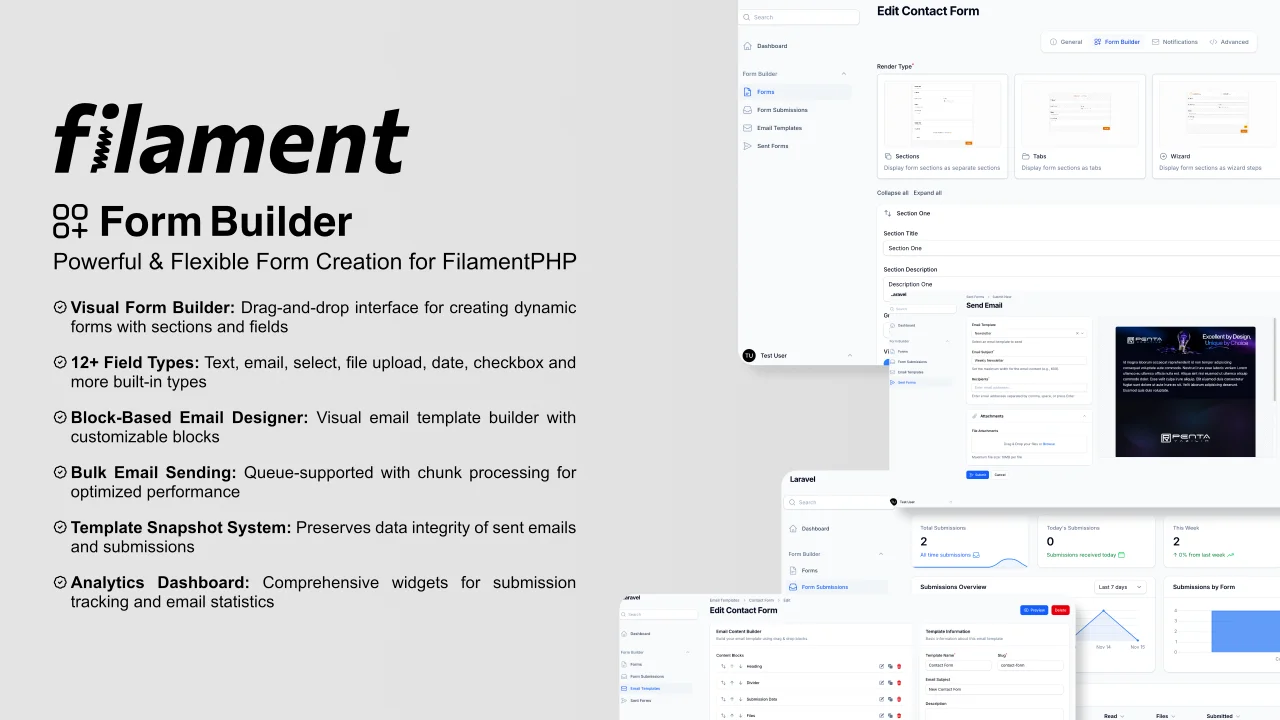
Form Builder
A powerful, flexible form builder package for FilamentPHP that enables you to create, manage, and process dynamic forms with advanced features including custom field types, email templates, bulk sending capabilities, and comprehensive submission tracking.
Author:
Azad Furkan ŞAKAR
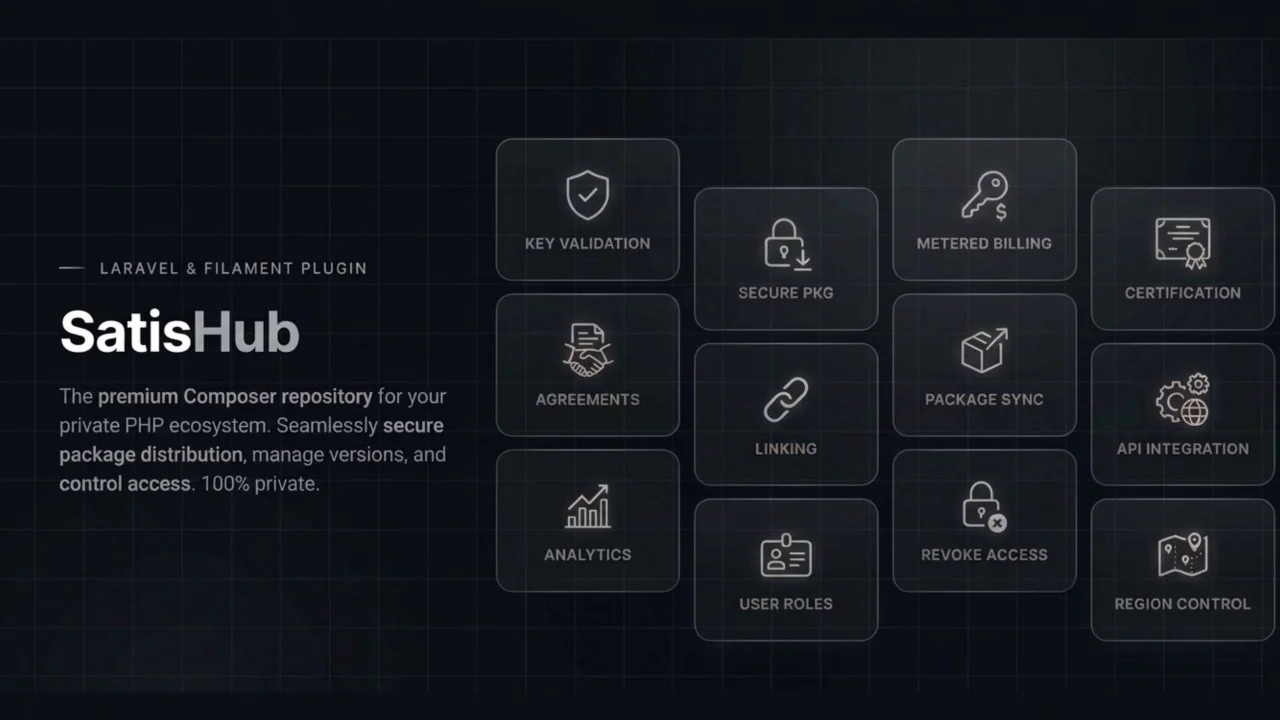
SatisHub
SatisHub is a Laravel package for selling private Composer packages with license-based access control with FilamentPHP.
Author:
Azad Furkan ŞAKAR
OTP Login
OTP Login for FilamentPHP.
Author:
Azad Furkan ŞAKAR
Translate Action
Translate action for FilamentPHP.
Author:
Azad Furkan ŞAKAR
Featured Plugins
A selection of plugins curated by the Filament team

Noir Theme
A theme that gives panels a focused, refined look with near-black surfaces, crisp actions, and restrained color.
 Filament

Custom Dashboards
Let your users build and share their own dashboards with a drag-and-drop interface. Define your data sources in PHP and let them do the rest.
Filament

Advanced Tables (formerly Filter Sets)
Supercharge your tables with powerful features like user-customizable views, quick filters, multi-column sorting, advanced table searching, convenient view management, and more. Compatible with Resource Panel Tables, Relation Managers, Table Widgets, and Table Builder!
 Kenneth Sese

