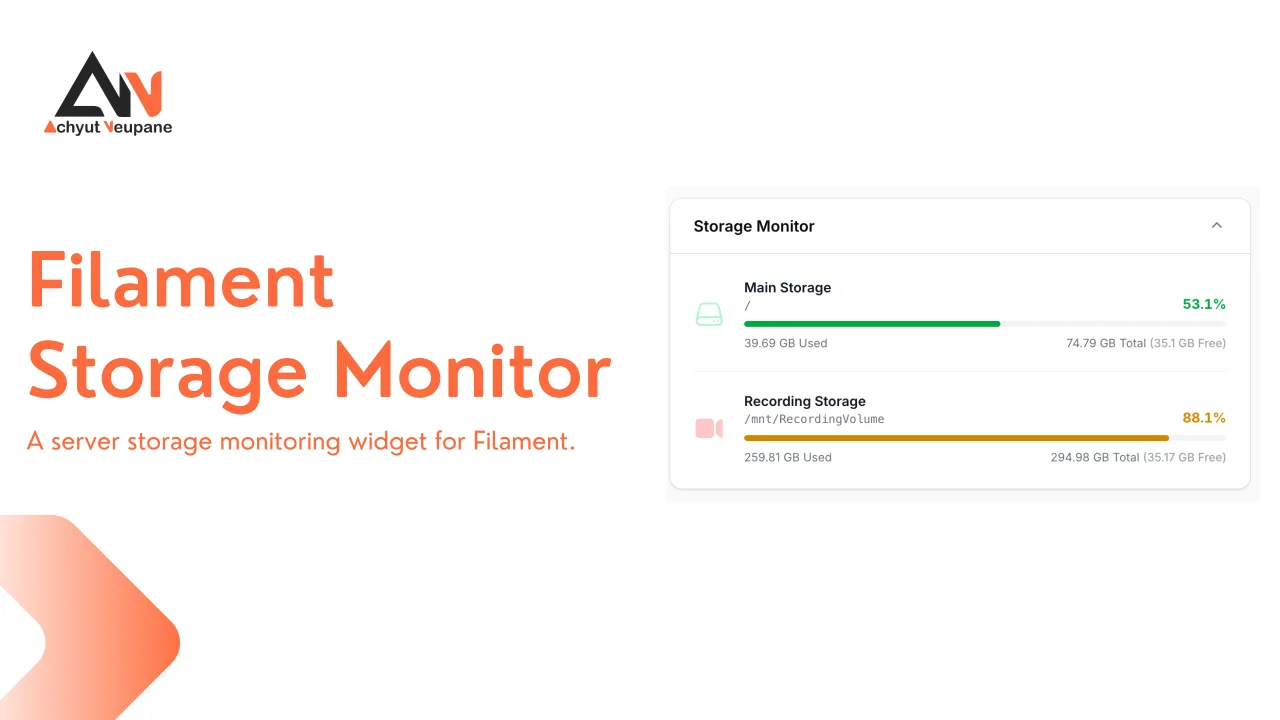
Storage Monitor
CommunityThis package provides a dashboard widget that displays disk usage with support for multiple partitions.
 Author:
Achyut Neupane
Author:
Achyut Neupane
Package health
BetaAutomated checks of this plugin's Composer package
15 checks
- Failed: GitHub Actions pinned to SHA — View details on Plumb
- Skipped: GitLab CI includes pinned to SHA
- Passed: Open security advisories
- Passed: Dependabot PR responsiveness — No open Dependabot PRs.
- Skipped: Renovate MR responsiveness
- Failed: Dependabot or Renovate configured — No dependency updater configuration found. View details on Plumb
- Skipped: Dependency update cooldown configured
- Failed: Provides a security policy — View details on Plumb
- Passed: Abandoned or archived — No consulted source marks the package abandoned (packagist, github).
- Passed: Commit and release recency — Active: last commit 0 days ago; last release 127 days ago.
-
Passed:
composer.lock not committed by library
—
composer.lockis absent from the released dist archive. - Passed: Dist archive is lean
-
Passed:
Current Laravel version supported
—
Package dependencies resolve together with current Laravel
13.0. -
Passed:
Current PHP version supported
—
Constraint
^8.2|^8.3supports current PHP8.5. - Skipped: Current Symfony version supported
filament/
namespace. Review the source and install at your own risk. Found
malware or an unresolved security issue the author won't
address?
Report it
.
Documentation




A strictly typed, highly expressive Filament plugin to monitor server storage. This package provides a clean, native-feeling dashboard widget that displays disk usage with support for multiple partitions, directory-level sizes, custom labeling, and dynamic health-based coloring.
#Requirements
- PHP: 8.2+
- Filament: 4.x or 5.x
#Installation
You can install the package via Composer:
composer require achyutn/filament-storage-monitor
Register the plugin inside your Filament panel:
use AchyutN\FilamentStorageMonitor\FilamentStorageMonitor;

return $panel
    ->plugins([
        FilamentStorageMonitor::make()
            ->addDisk('/mnt/data', label: 'Data Partition')
            ->laravelDisk(name: 'public', label: 'Media Storage'),
    ]);
You can chain several methods to customize the widget's behavior and appearance:
FilamentStorageMonitor::make()
    ->addDisk(path: '/', label: 'Root Storage')
    ->columnSpan('full')
    ->sort(-3)
    ->lazy(false)
    ->visible(fn () => auth()->user()->isAdmin()),
#Usage
The plugin automatically registers a dashboard widget once disks are configured.
#Adding Disks
You can add disks manually by providing a path, or resolve them directly from your Laravel filesystem configuration.
#Manual Registration
You can either use addDisk() for adding a disk through parameters or add() using the Disk DTO:
use AchyutN\FilamentStorageMonitor\DTO\Disk;
use AchyutN\FilamentStorageMonitor\FilamentStorageMonitor;
use Filament\Support\Colors\Color;
use Filament\Support\Icons\Heroicon;

FilamentStorageMonitor::make()
    ->add(
        Disk::make('web-root')
            ->path('/var/www/html')
            ->label('Web Root')
            ->color(Color::Green)
            ->icon(Heroicon::ComputerDesktop),
    )
    ->addDisk(
        path: '/mnt/backup',
        label: 'Backups',
        color: Color::Blue,
        icon: Heroicon::ArchiveBox,
    );
#Laravel Disk Registration
You can also register disks directly from your Laravel filesystem configuration file config/filesystems.php:
FilamentStorageMonitor::make()
    ->laravelDisk(name: 'local', label: 'Local Storage');
#Adding Directories
Disks report partition usage. If you need the actual size of a specific folder — two folders on the same partition report identical total/free space — register it as a Directory. Its used space is calculated by recursively summing the files it contains, while total space still refers to the underlying partition:
use AchyutN\FilamentStorageMonitor\DTO\Directory;

FilamentStorageMonitor::make()
    ->addDirectory(
        Directory::make('uploads')
            ->path('/var/www/storage')
            ->label('Uploads')
            ->color(Color::Amber)
            ->icon(Heroicon::Folder),
    );
Or pass the path and presentation directly, mirroring addDisk():
FilamentStorageMonitor::make()
    ->addDirectory(
        path: '/var/www/storage',
        label: 'Uploads',
        color: Color::Amber,
    );
Both add() and addDirectory() accept a Directory instance; add() also keeps accepting Disk instances.
[!NOTE] When passing a
Directoryinstance toaddDirectory(), the presentation parameters (label,color,icon, ...) are ignored — configure them on the DTO itself.
[!NOTE] A
Directoryrequires apath(). Registering one without a path produces an error row instead of scanning the filesystem.
Directory rows show their own size as used space and omit the partition-level free space, since free space is identical for every folder on the same filesystem.
#Caching Results
Calculating a directory's size is not a single native call — it walks the filesystem and opens every file in the tree to sum its size. On large directories (deep hierarchies, caches, or node_modules-style trees) that scan can take hundreds of milliseconds or more. Without caching, the widget would repeat that work on every dashboard render, adding latency and unnecessary disk I/O to every page load.
To avoid it, results are cached by default for 300 seconds:
FilamentStorageMonitor::make()
    ->cacheResults(); // enabled by default, 300 second ttl

// or
FilamentStorageMonitor::make()
    ->cacheResults(cache: false); // disable caching

// or
FilamentStorageMonitor::make()
    ->cacheResults(ttl: 60); // cache for 60 seconds
Both disk and directory sizes are cached, so a rendered row never triggers a full rescan.
[!NOTE] Call
cacheResults()before registering disks or directories — the caching decision and TTL are captured when each item is added.
The default TTL keeps the widget responsive while still reflecting real usage within a few minutes — enough for a monitoring widget, since filesystem usage rarely changes second-to-second. You can tune it to suit your data:
- Large directories: raise the TTL (e.g.,
cacheResults(ttl: 1800)) to scan even less often. - Frequently changing storage: lower the TTL or disable caching (
cacheResults(cache: false)) to always read live values.
[!NOTE] Cached values may be up to the TTL seconds stale.
#Authorization & Visibility
You can control the visibility of the entire widget or individual disks using boolean values or closures. This is useful for restricting sensitive server information to administrators.
FilamentStorageMonitor::make()
    ->visible(fn () => auth()->user()->is_admin) // Hide entire widget
    ->addDisk(
        path: '/var/www/html',
        label: 'App Files',
        isVisible: fn () => auth()->user()->can('view_server_stats') // Hide specific disk
    );
#Truncating Long Paths
Long disk paths can overflow the widget on narrow viewports (mobile or compact dashboards). Enable responsive truncation to keep the path on a single line: the prefix collapses with an ellipsis when there's not enough room, while the last path segment stays pinned so the disk is always identifiable. When there's space, the full path is shown. The complete path is always available via the element's title tooltip on hover.
FilamentStorageMonitor::make()
    ->truncatePath();
#Compact Mode
If you want a minimal display that only shows the disk label and free space, you can enable compact mode:
FilamentStorageMonitor::make()
    ->compact();
[!NOTE] Compact mode shows only the disk label and usage, so path truncation does not apply.
#Widget Properties
columnSpan(): Set the widget's column span (e.g., 'full', 'half', or a specific number).columnStart(): Define the starting column for the widget.sort(): Define the widget's order on the dashboard (lower numbers appear first).lazy(): Enable or disable lazy loading of the widget (default istrue).visible(): Control the widget's visibility with a boolean or closure.
#Strict Mode
By default, if a disk path cannot be resolved or is misconfigured (e.g., a missing mount), the widget will not crash your Filament panel. Instead, it gracefully catches the error.
If you prefer exceptions to be thrown when a disk is missing or has errors, you can enable throwException() mode:
FilamentStorageMonitor::make()
    ->throwException(true) // boolean

// or

FilamentStorageMonitor::make()
    ->throwException(fn () => app()->isLocal()) // Closure
[!NOTE] Disks monitor partitions using native PHP filesystem functions, so two different paths on the same partition (e.g.,
/var/www/htmland/var/www/html/laravel-project) report the same total/free space — they belong to the same filesystem boundary. UseaddDirectory()when you need the size of a specific directory instead.
#Localization
Filament Storage Monitor includes built-in translations for:
Translations are applied automatically based on your application's current locale.
Missing your language? Feel free to submit a PR to add it!
#License
This package is open-sourced software licensed under the MIT license.
#Contributing
Contributions are welcome! Please create a pull request or open an issue if you find any bugs or have feature requests.
#Support
If you find this package useful, please consider starring the repository on GitHub to show your support.
The author
Achyut is a full-stack web developer from Nepal, passionate about building developer-first tools and clean user interfaces. He has over 6 years of experience in Laravel and over 4 years in React, and actively contributes to the Laravel and Filament ecosystem.
From the same author
Log Viewer
A developer-focused Laravel log viewer with stack trace inspection, built for Filament.
Author:
Achyut Neupane
FLIRT Kit
The starter kit for the Laravel framework with RILT stack and Filament v4 as Admin Panel.
Author:
Achyut Neupane
Featured Plugins
A selection of plugins curated by the Filament team

Custom Dashboards
Let your users build and share their own dashboards with a drag-and-drop interface. Define your data sources in PHP and let them do the rest.
 Filament

Data Lens
Advanced Data Visualization for Laravel Filament - a premium reporting solution enabling custom column creation, sophisticated filtering, and enterprise-grade data insights within admin panels.
 Padmission

Blueprint
Filament Blueprint is a premium Laravel Boost extension that helps AI agents produce accurate, detailed implementation plans and security reports for Filament apps.
Filament

