
Abdulrahamn Bumander Icon Picker
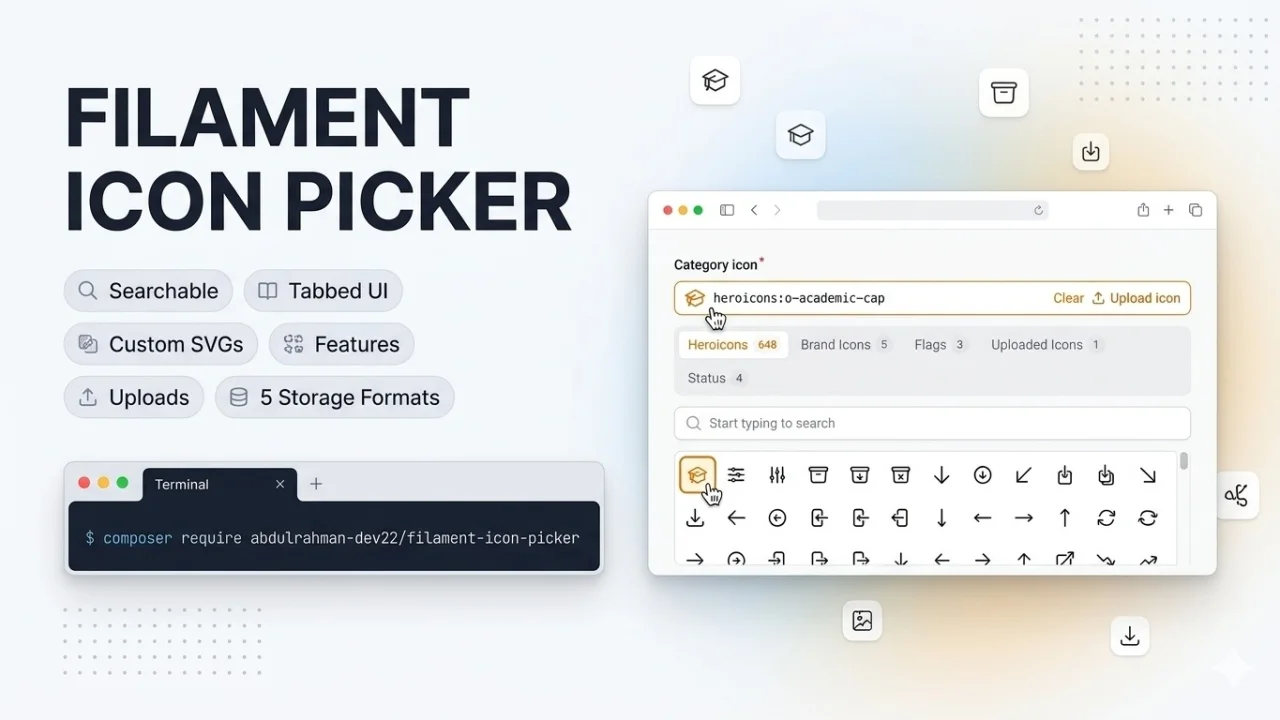
CommunityFilament Icon Picker adds IconPicker::make('icon') — a searchable grid of icons organised into tabs: one for the bundled Heroicons, plus a tab for every custom SVG folder or icon set you register. Zero configuration needed; Heroicons work out of the box, and dropping a .svg into a registered folder makes it available instantly. Choose how the value is written to your model: a compact reference (brand:star), a Blade Icons name (heroicon-o-academic-cap), an array/JSON payload with inline SVG...
 Author:
Abdulrahamn Bumander
Author:
Abdulrahamn Bumander
Package health
BetaAutomated checks of this plugin's Composer package
15 checks
- Failed: GitHub Actions pinned to SHA — View details on Plumb
- Skipped: GitLab CI includes pinned to SHA
- Passed: Open security advisories
- Passed: Dependabot PR responsiveness — No open Dependabot PRs.
- Skipped: Renovate MR responsiveness
- Failed: Dependabot or Renovate configured — No dependency updater configuration found. View details on Plumb
- Skipped: Dependency update cooldown configured
- Failed: Provides a security policy — View details on Plumb
- Passed: Abandoned or archived — No consulted source marks the package abandoned (packagist, github).
- Passed: Commit and release recency — Active: last commit 5 days ago; last release 5 days ago.
-
Passed:
composer.lock not committed by library
—
composer.lockis absent from the released dist archive. - Passed: Dist archive is lean
-
Passed:
Current Laravel version supported
—
Package dependencies resolve together with current Laravel
13.0. -
Passed:
Current PHP version supported
—
Constraint
^8.1supports current PHP8.5. - Skipped: Current Symfony version supported
filament/
namespace. Review the source and install at your own risk. Found
malware or an unresolved security issue the author won't
address?
Report it
.
Documentation
- Requirements
- Installation
- Usage
- Storage formats
- Rendering the value elsewhere
- Letting users upload icons
- Caching
- How multi-version support works
- Testing
- Publishing under another vendor name
- Changelog
- License
A drop-in icon picker form field for Filament v3, v4 and v5.
IconPicker::make('icon') renders a searchable grid of icons organised into tabs: one tab for the
bundled Heroicons, plus a tab for every custom SVG folder or custom icon set you register.
The selected icon is stored as a single string (heroicons:o-academic-cap, brand:logo) that you can
render anywhere in your app.
- Zero configuration: Heroicons work out of the box.
- Custom icons: point at a folder of
.svgfiles. Drop a file in, it shows up. - Extensible: implement one small interface to add any icon source as its own tab.
- Let admins upload new SVG icons from the picker itself; uploads are sanitised and stored on any Laravel disk.
- Choose how the value is stored: compact reference, Blade Icons name, array/JSON with inline SVG and URL, or raw SVG.
- API ready:
FilamentIconPicker::toArray()and an optional{set}/{name}.svgroute for mobile and SPA clients. - Client-side search per tab, configurable grid columns, keyboard focus styles, dark mode, RTL.
- Inherits every standard field behaviour:
required(),disabled(),default(),live(), validation, etc. - Same code path on Filament 3, 4 and 5. No version-specific hacks in your project.
#Requirements
| Package | Supported versions |
|---|---|
| PHP | 8.1+ |
Filament (forms) |
^3.0, ^4.0, ^5.0 (panels or standalone forms) |
| Laravel | 10.45+, 11, 12, 13 (whatever your Filament version needs) |
Heroicons are pulled in through blade-ui-kit/blade-heroicons, which every supported Filament version
already depends on.
#Installation
composer require abdulrahman-dev22/filament-icon-picker
Publish the field's stylesheet with Filament's asset command. Panel projects that have
@php artisan filament:upgrade in their composer.json post-autoload-dump scripts (the default
from filament:install) do this automatically:
php artisan filament:assets
Optionally publish the config file:
php artisan vendor:publish --tag=filament-icon-picker-config
#Notes per Filament version
- Filament 3 – nothing else to do. The stylesheet is plain CSS registered through
FilamentAsset, so you do not need a custom Tailwind theme or to add the package's views totailwind.config.js. - Filament 4 / 5 – nothing else to do. The field extends
Filament\Forms\Components\Fieldand works inside resources, schemas, actions, relation managers and custom pages. - Standalone forms (no panel) – make sure your layout includes
@filamentStylesand@filamentScriptsas described in the Filament docs; the field's stylesheet is injected by@filamentStyles.
#Usage
#Bundled Heroicons only
use AbdulrahmanDev22\FilamentIconPicker\Forms\Components\IconPicker;

IconPicker::make('icon')
    ->required();
Stores e.g. heroicons:o-academic-cap.
By default only the outline style is listed (324 icons). Enable more styles in the config:
// config/filament-icon-picker.php
'heroicons' => [
    'label' => 'Heroicons',
    'styles' => ['o', 's'], // o = outline, s = solid, m = mini, c = micro
],
#Custom icons from a folder
IconPicker::make('icon')
    ->customIconsPath(resource_path('svg/brand'), key: 'brand', label: 'Brand Icons');
Every .svg in that folder becomes an icon. The file name (without extension) is the icon name and
the default label (shopping-bag.svg → Shopping Bag). Nested folders are joined with a dot
(social/twitter.svg → social.twitter). Stored value: brand:shopping-bag.
To make a folder available to every IconPicker in the project, configure it globally instead:
// config/filament-icon-picker.php
'custom_icon_sets' => [
    'brand' => [
        'path' => resource_path('svg/brand'),
        'label' => 'Brand Icons',
    ],
],
Globally registered folders are also registered with Blade Icons under the set key as prefix, so the
stored value doubles as a plain icon name everywhere Filament accepts one:
->icon('brand-shopping-bag'), <x-filament::icon icon="brand-shopping-bag" />,
@svg('brand-shopping-bag'). (Blade Icons prefixes cannot contain dashes; for such keys the picker
falls back to rendering the SVG inline and you should use the Blade component below.)
#Both, and several custom tabs
IconPicker::make('icon')
    ->customIconsPath(resource_path('svg/brand'), 'brand', 'Brand')
    ->customIconsPath(resource_path('svg/flags'), 'flags', 'Flags')
    ->columns(10);
Renders three tabs: Heroicons, Brand, Flags.
#Excluding sets, or ignoring the global registry
IconPicker::make('icon')->withoutIconSet('heroicons');   // or ->withoutHeroicons()
IconPicker::make('icon')->withoutIconSet('heroicons', 'brand');
IconPicker::make('icon')->withoutGlobalIconSets()->customIconsPath(...); // only this field's sets
#Registering a fully custom icon set
Implement AbdulrahmanDev22\FilamentIconPicker\IconSets\IconSet:
namespace App\Support\Icons;

use Illuminate\Contracts\Support\Htmlable;
use AbdulrahmanDev22\FilamentIconPicker\IconSets\IconSet;

class StatusIconSet implements IconSet
{
    public function getKey(): string
    {
        return 'status'; // never contains ":"
    }

    public function getLabel(): string
    {
        return 'Status';
    }

    /** @return array<string, string> icon name => label */
    public function getIcons(): array
    {
        return [
            'open' => 'Open',
            'closed' => 'Closed',
            'archived' => 'Archived',
        ];
    }

    /** A Blade Icons name or an Htmlable containing <svg> markup, or null. */
    public function getIcon(string $name): string | Htmlable | null
    {
        return match ($name) {
            'open' => 'heroicon-o-lock-open',
            'closed' => 'heroicon-o-lock-closed',
            'archived' => 'heroicon-o-archive-box',
            default => null,
        };
    }
}
Register it globally through the config (classes are resolved from the container):
'icon_sets' => [
    \App\Support\Icons\StatusIconSet::class,
],
…or at runtime in a service provider:
use AbdulrahmanDev22\FilamentIconPicker\Facades\FilamentIconPicker;

FilamentIconPicker::register(StatusIconSet::class);
…or for a single field (a set with the same key as a global one replaces it for that field only):
IconPicker::make('icon')->icons([new StatusIconSet()]);
IconPicker::make('icon')->icons([new StatusIconSet()], merge: false); // only this set
The bundled sets are ordinary implementations of the same interface, so you can also pass
new HeroiconsIconSet(styles: ['s'], label: 'Solid') or new CustomIconSet($path, $key, $label).
#Field API
| Method | Description |
|---|---|
customIconsPath(string|Closure $path, string $key = 'custom', string|Closure|null $label = null) |
Add a tab for a folder of SVGs. Repeat with different keys for more tabs. |
icons(array|Closure $sets, bool $merge = true) |
Add IconSet instances or class names. merge: false ignores the global registry. |
withoutIconSet(string ...$keys) / withoutHeroicons() |
Hide globally registered sets from this field. |
withoutGlobalIconSets() |
Use only sets added to this field. |
columns(int|array|Closure $columns) |
Grid columns. 8 applies at every breakpoint; ['default' => 4, 'md' => 6, 'xl' => 10] per breakpoint. Default ['default' => 4, 'sm' => 6, 'lg' => 8]. |
searchable(bool $condition = true) |
Toggle the search box (on by default). Also searchPrompt(), searchDebounce(), noSearchResultsMessage(). |
deselectable(bool $condition = true) |
Clicking the selected icon again clears the value (on by default). |
gridMaxHeight(string $cssLength) |
Height after which the grid scrolls. Default 20rem. |
placeholder(string $text) |
Text shown while nothing is selected. |
storeAs(...) / storeAsReference() / storeAsBladeIcon() / storeAsArray() / storeAsJson() / storeAsSvg() |
How the value is written to the model. See Storage formats. |
uploadable(bool|Closure $condition = true, ?string $set = null) / uploadIconsTo() / uploadMaxSize() / uploadAction() |
Show an "Upload icon" action. See Letting users upload icons. |
Plus everything from Filament's Field: label(), required(), disabled(), default(),
live(), afterStateUpdated(), rules(), hidden(), columnSpan(), etc.
The field validates automatically that a submitted value belongs to one of the field's icon sets.
#Storage formats
Internally the picker always works with a reference: "<set-key>:<icon-name>", e.g.
heroicons:o-academic-cap or brand:star. No file paths are ever stored. What gets written to the
model is up to you, per field or globally (storage_format in the config):
| Method | Stored value | Column | Best for |
|---|---|---|---|
storeAsReference() (default) |
brand:star |
string |
Compact, unambiguous; resolve with the facade. |
storeAsBladeIcon() |
brand-star, heroicon-o-academic-cap |
string |
Drop straight into ->icon(), <x-filament::icon>, @svg(). Sets whose key contains a dash cannot produce one and store null. |
storeAsArray() |
['set', 'name', 'label', 'blade_icon', 'svg', 'url'] |
json + 'icon' => 'array' cast |
API responses without any lookup. |
storeAsJson() |
Same structure, JSON-encoded | text |
Same, without an Eloquent cast. |
storeAsSvg() |
<svg …>…</svg> |
text |
Fully self-contained clients. Heaviest; icon changes do not propagate. |
IconPicker::make('icon')->storeAsArray();          // one field
// config/filament-icon-picker.php
'storage_format' => 'blade_icon',                   // every field
storeAsArray() needs a JSON column and an array cast on the model, otherwise Eloquent cannot
save the array:
// database/migrations/xxxx_add_icon_to_categories_table.php
Schema::table('categories', function (Blueprint $table) {
    $table->json('icon')->nullable();
});
// app/Models/Category.php
class Category extends Model
{
    protected function casts(): array
    {
        return [
            'icon' => 'array',
        ];
    }
}
On Laravel 10 use the $casts property instead: protected $casts = ['icon' => 'array'];.
storeAsJson() does the same job without a cast if you prefer a plain text column.
Whatever the format, loading a record converts the stored value back to a reference so the picker shows the current selection. Existing data keeps working if you switch format later, because the converter accepts every format on the way in (it even matches raw SVG markup back to its icon).
#Rendering the value elsewhere
{{-- Blade component: attributes are placed on the <svg> --}}
<x-filament-icon-picker::icon :icon="$category->icon" class="h-5 w-5 text-primary-600" />
use AbdulrahmanDev22\FilamentIconPicker\Facades\FilamentIconPicker;

// Inline SVG as an Htmlable (null when the value is empty / unknown)
FilamentIconPicker::render($category->icon, ['class' => 'h-5 w-5']);

// The underlying Blade Icons name ("heroicon-o-academic-cap", "brand-star") or Htmlable
FilamentIconPicker::resolveIcon($category->icon);

// Table column
IconColumn::make('icon')
    ->icon(fn (?string $state) => FilamentIconPicker::resolveIcon($state));
All helpers accept any storage format (reference, Blade Icons name, array, JSON string or SVG). The set only needs to be registered globally, not on the field, to resolve outside the form.
#API responses
// app/Http/Resources/CategoryResource.php
public function toArray($request): array
{
    return [
        'name' => $this->name,
        'icon' => FilamentIconPicker::toArray($this->icon),
    ];
}
{
    "icon": {
        "set": "brand",
        "name": "star",
        "label": "Star",
        "blade_icon": "brand-star",
        "svg": "<svg xmlns=\"http://www.w3.org/2000/svg\" …>…</svg>",
        "url": "https://example.com/filament-icon-picker/brand/star.svg"
    }
}
url is null until you enable the icon route. It serves every globally registered icon as an
SVG file with long-lived cache headers, so mobile apps and CDNs can load icons by URL:
// config/filament-icon-picker.php
'route' => [
    'enabled' => true,             // or FILAMENT_ICON_PICKER_ROUTE=true
    'prefix' => 'filament-icon-picker',
    'middleware' => [],            // e.g. ['throttle:60,1']
    'max_age' => 31536000,
],
GET /filament-icon-picker/{set}/{name}.svg → image/svg+xml, 404 for unknown icons.
FilamentIconPicker::url('brand:star') returns the same link.
AbdulrahmanDev22\FilamentIconPicker\Support\IconReference::from($value) splits a reference into ->set
and ->name when you need the parts.
#Letting users upload icons
Icons normally come from the filesystem you deploy. To let admins add icons at runtime, give the picker a set that lives on a Laravel disk and turn on the upload action:
// config/filament-icon-picker.php
'disk_icon_sets' => [
    'uploads' => [
        'disk' => 's3',                 // any disk from config/filesystems.php; null = uploads.disk
        'directory' => 'icon-picker',
        'label' => 'Uploaded Icons',
    ],
],

'uploads' => [
    'set' => 'uploads',                 // default target of ->uploadable(); null = first disk set
    'disk' => env('FILAMENT_ICON_PICKER_DISK'),
    'max_size' => 256,                  // KB
],
IconPicker::make('icon')
    ->uploadable();                                   // everyone who can edit the form
    // ->uploadable(fn () => auth()->user()->can('upload icons'));  // gated
    // ->uploadable(set: 'brand');                    // upload into a specific set
An "Upload icon" link appears next to the selected value. It opens a modal with an SVG file input
and an optional name; on submit the file is sanitised (scripts, event handlers, <foreignObject>,
external and javascript: references and unsafe <style> rules are removed), stored as
{directory}/{name}.svg, the set's cache is refreshed and the new icon is selected.
DiskIconSetreads fromStorage::disk(), so uploads survive deployments and are shared across servers when the disk is S3/GCS. It also registers with Blade Icons, souploads:starworks as the plain icon nameuploads-star.- Folder based sets (
customIconsPath(),custom_icon_sets) can receive uploads too, but only when named explicitly with->uploadable(set: 'key'), so the SVGs you ship with the app are never written to by accident. - Names are slugged and made unique (
star,star-2, …). Customise the modal with->uploadAction(fn (Action $action) => $action->label('…')->modalWidth('lg')). - To use your own sanitiser (for example
enshrined/svg-sanitize), callSvgSanitizer::using(fn (string $svg): string => …)in a service provider. - Programmatic uploads:
app(IconUploader::class)->upload($set, $svgMarkup, name: 'star')returns theIconReferenceof the stored icon. Any set implementingIconSets\Contracts\AcceptsUploadsworks.
#Caching
Icon folders are scanned once per request. To avoid touching the filesystem on every request in production, the resolved list of each set can be cached:
'cache' => [
    'enabled' => env('FILAMENT_ICON_PICKER_CACHE'), // null = only when APP_ENV=production
    'store' => env('FILAMENT_ICON_PICKER_CACHE_STORE'), // null = default cache store
    'ttl' => null, // seconds, null = forever
    'prefix' => 'filament-icon-picker',
],
After adding or removing SVG files with caching enabled, clear the cached lists:
php artisan filament-icon-picker:clear
php artisan cache:clear works too. Sets you implement yourself decide their own caching; use the
AbdulrahmanDev22\FilamentIconPicker\IconSets\Concerns\CachesIconList trait to opt into the same mechanism.
#How multi-version support works
The field extends Filament\Forms\Components\Field and only touches Filament through extension
points that are stable across 3, 4 and 5: the field wrapper view is resolved with
$getFieldWrapperView(), state is bound with $applyStateBindingModifiers() / $entangle, shared
Blade components (x-filament::input.wrapper) are used for the search box, and the stylesheet is
registered through FilamentAsset. Colours use a CSS var() fallback chain so the same file works
with Filament 3's RGB channel variables and Filament 4/5's oklch variables. Nothing in the package
branches on the Filament version.
#Testing
composer test              # against whatever is installed
composer test:filament3    # re-resolves dependencies for Filament ^3 and runs the suite
composer test:filament4
composer test:filament5
The suite covers icon set enumeration, the registry, the field's set resolution, value parsing and rendering, plus Livewire render / round-trip / validation tests for the field.
#Publishing under another vendor name
The package is published as abdulrahman-dev22/filament-icon-picker with the
AbdulrahmanDev22\FilamentIconPicker namespace. To fork it under your own name:
- Replace the namespace
AbdulrahmanDev22\FilamentIconPickerwithAcme\FilamentIconPickerinsrc/,tests/,resources/views/andcomposer.json(autoload,autoload-dev,extra.laravel). - Change
name,homepageandauthorsincomposer.json, andFilamentIconPickerServiceProvider::$composerPackage(used as the asset package id). - Optionally rename the config key / view namespace
filament-icon-picker(FilamentIconPickerServiceProvider::$name,config/, the$viewproperty ofIconPicker, translation keys and<x-filament-icon-picker::icon>). - Update
LICENSE.mdand this README. - Run
composer validate --strictandcomposer test. - Push to GitHub, tag a release (
git tag v1.0.0 && git push --tags) and submit the repository on packagist.org. Enable the GitHub service hook so new tags are picked up automatically.
Follow Semantic Versioning: patch for fixes, minor for backwards compatible
features (new field methods, new sets), major for changes to the IconSet contract or the stored
value format.
#Changelog
See CHANGELOG.md.
#License
MIT. See LICENSE.md.
The author
I'm Abdulrahman, a senior software engineer and UX/UI developer. I work primarily with Laravel on the backend and Vue/Nuxt on the frontend, often connected through Inertia, building in RTL-first, Arabic-language product contexts with attention to data privacy and compliance. My stack also includes Filament for admin panels. I care deeply about clean, maintainable code, and I enjoy building tools that make other developers' workflows smoother — which is what led me to start publishing on Filament.
Featured Plugins
A selection of plugins curated by the Filament team

Sharp Theme
A theme that gives panels a precise, technical look with square corners, strong borders, and clear contrast.
 Filament

Compact Theme
A theme that makes data-heavy panels easier to scan by fitting more useful information on each screen.
Filament

Custom Fields
Eliminate custom field migrations forever. Let your users create and manage form fields directly in Filament admin panels with 20+ built-in field types, validation, and zero database changes.
 Relaticle

