

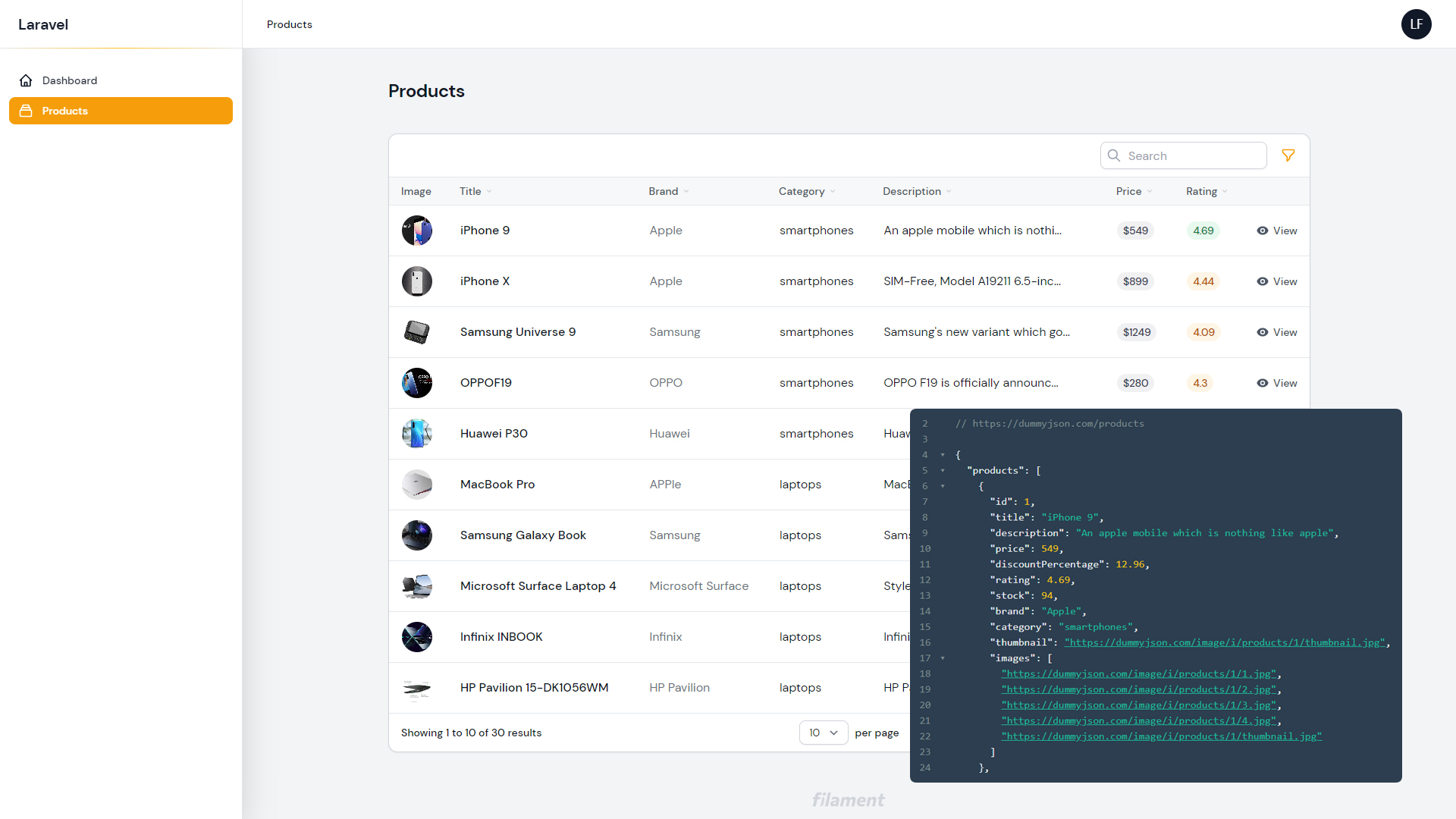
#Introduction
Sometimes you want to use Filament Tables, but without dealing with a database table.
This example will allow you to determine the rows for the model getting data from an external source (JSON API).
#Configuration
Install the calebporzio/sushi package:
composer require calebporzio/sushi
Create a Product Model and a Product Resource:
php artisan make:model Product
php artisan make:filament-resource Product --simple --view
Add the Sushi trait to the Product Model. You may implement the getRows() method to get rows from an external source.
//app\Models\Product.php

namespace App\Models;

use Illuminate\Database\Eloquent\Model;
use Illuminate\Support\Arr;
use Illuminate\Support\Facades\Http;
use Sushi\Sushi;

class Product extends Model
{
    use Sushi;

    /**
     * Model Rows
     *
     * @return void
     */
    public function getRows()
    {
        //API
        $products = Http::get('https://dummyjson.com/products')->json();

        //filtering some attributes
        $products = Arr::map($products['products'], function ($item) {
            return Arr::only($item,
                [
                    'id',
                    'title',
                    'description',
                    'price',
                    'rating',
                    'brand',
                    'category',
                    'thumbnail',
                ]
            );
        });

        return $products;
    }
}
You may create fields and columns in the Product Resource file:
Form fields:
//app\Filament\Resources\ProductResource.php

use Filament\Forms\Components\RichEditor;
use Filament\Forms\Components\TextInput;

public static function form(Form $form): Form
{
    return $form
        ->schema([

            //title
            TextInput::make('title'),

            //brand
            TextInput::make('brand'),

            //category
            TextInput::make('category'),

            //description
            RichEditor::make('description'),

            //price
            TextInput::make('price')
                ->prefix('$'),

            //rating
            TextInput::make('rating')
                ->numeric(),
        ]);
}
Table columns:
//app\Filament\Resources\ProductResource.php

use Filament\Tables\Columns\BadgeColumn;
use Filament\Tables\Columns\ImageColumn;
use Filament\Tables\Columns\TextColumn;

...
->columns([

    //thumbnail
    ImageColumn::make('thumbnail')
        ->label('Image')
        ->rounded(),

    //title
    TextColumn::make('title')
        ->searchable()
        ->sortable()
        ->weight('medium')
        ->alignLeft(),

    //brand
    TextColumn::make('brand')
        ->searchable()
        ->sortable()
        ->color('secondary')
        ->alignLeft(),

    //category
    TextColumn::make('category')
        ->sortable()
        ->searchable(),

    //description
    TextColumn::make('description')
        ->sortable()
        ->searchable()
        ->limit(30),

    //price
    BadgeColumn::make('price')
        ->colors(['secondary'])
        ->prefix('$')
        ->sortable()
        ->searchable(),

    //rating
    BadgeColumn::make('rating')
    ->colors([
        'danger' => static fn ($state): bool => $state <= 3,
        'warning' => static fn ($state): bool => $state > 3 && $state <= 4.5,
        'success' => static fn ($state): bool => $state > 4.5,
    ])
    ->sortable()
    ->searchable(),

])
Table filters:
//app\Filament\Resources\ProductResource.php

use Filament\Tables\Filters\SelectFilter;

...
->filters([

    //brand
    SelectFilter::make('brand')
        ->multiple()
        ->options(Product::select('brand')
            ->distinct()
            ->get()
            ->pluck('brand', 'brand')
        ),

    //category
    SelectFilter::make('category')
        ->multiple()
        ->options(Product::select('category')
            ->distinct()
            ->get()
            ->pluck('category', 'category')
        ),
])
As you can see, the API is readonly. You may hide some actions:
//app\Filament\Resources\ProductResource.php

...
->actions([
    Tables\Actions\ViewAction::make(),
    //Tables\Actions\EditAction::make(),
    //Tables\Actions\DeleteAction::make(),
])
->bulkActions([
    //Tables\Actions\DeleteBulkAction::make(),
])
//app\Filament\Resources\ProductResource\Pages\ManageProducts.php
protected function getActions(): array
{
    return [
        //Actions\CreateAction::make(),
    ];
}
Visit your Product Resource at /admin/products to try it! Hope you enjoy!
You can download this project on GitHub: https://github.com/leandrocfe/filament-tables-json-data-source






