
User Fields by zvizvi
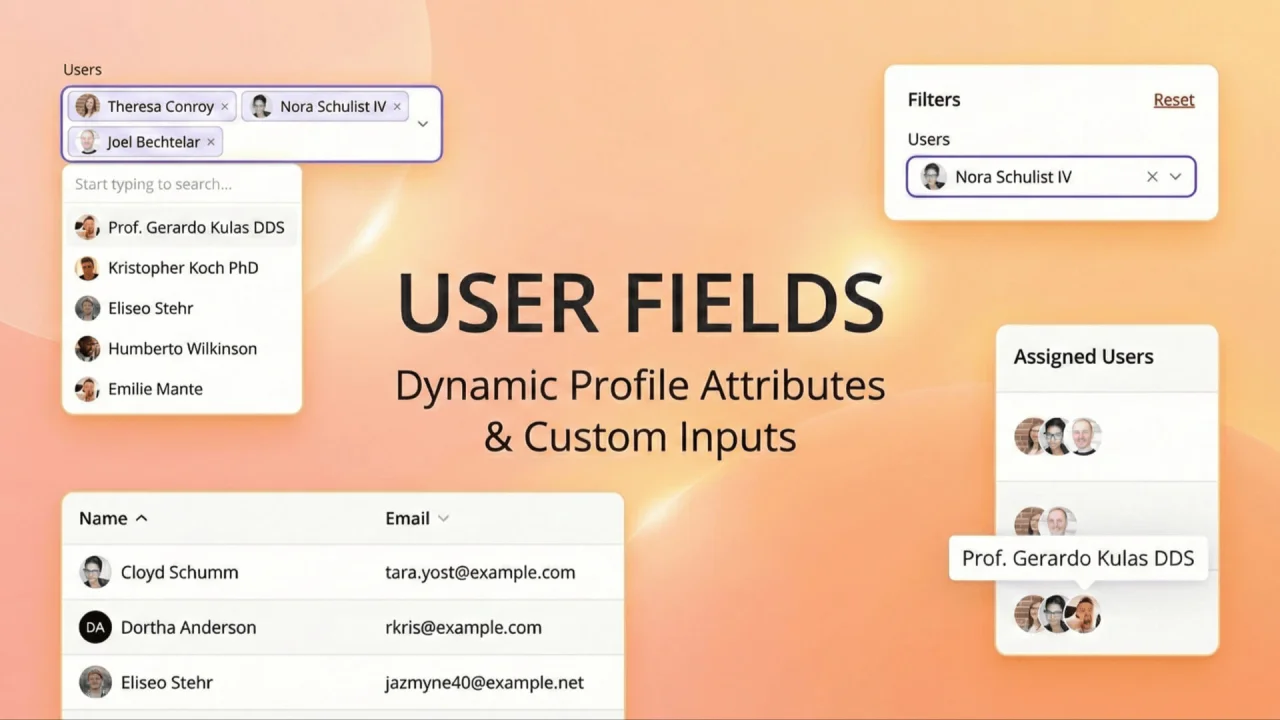
CommunityVisually enhance your user selection fields by adding avatar support. This plugin upgrades standard Select inputs, Table Columns, and Filters to display user profile photos alongside names, making user identification faster and more intuitive.
 Author:
zvizvi
Author:
zvizvi
Package health
Automated checks of this plugin's Composer package
15 checks
- Passed: GitHub Actions pinned to SHA
- Skipped: GitLab CI includes pinned to SHA
- Passed: Open security advisories
- Passed: Dependabot PR responsiveness — No open Dependabot PRs.
- Skipped: Renovate MR responsiveness
- Passed: Dependabot or Renovate configured
- Passed: Dependency update cooldown configured
- Passed: Provides a security policy
- Passed: Abandoned or archived — No consulted source marks the package abandoned (packagist, github).
- Passed: Commit and release recency — Active: last commit 0 days ago; last release 97 days ago.
-
Passed:
composer.lock not committed by library
—
composer.lockis absent from the released dist archive. - Passed: Dist archive is lean
-
Passed:
Current Laravel version supported
—
Package dependencies resolve together with current Laravel
13.0. -
Passed:
Current PHP version supported
—
Constraint
^8.2supports current PHP8.5. - Skipped: Current Symfony version supported
filament/
namespace. Review the source and install at your own risk. Found
malware or an unresolved security issue the author won't
address?
Report it
.
Documentation
- Features
- Installation
- Available Components
- Component Comparison
- Advanced Usage
- Real-World Examples
- Requirements
- Changelog
- Contributing
- Security Vulnerabilities
- Credits
- License
A comprehensive Filament v4/v5 plugin that provides ready-to-use user field components with avatar display for forms, tables, infolists, and filters. This package simplifies the display of user information across your Filament application by providing pre-configured components that automatically render user avatars and names in a consistent, professional manner.
#Features
- Pre-styled Components: Beautiful user display with avatars and names out of the box
- Multiple Display Types: Support for tables, infolists, forms, and filters
- Stacked Avatars: Display multiple users in a compact, stacked format
- Easy Integration: Drop-in replacement for standard Filament components
- Consistent UI: Unified user representation across your entire application
- Zero Configuration: Works immediately with Filament's default user avatar system
#Installation
Install the package via composer:
composer require zvizvi/user-fields
That's it! The package will automatically register itself with Laravel and Filament.
#Available Components
This package provides six main components, each designed for specific use cases within Filament:
#1. UserColumn (Tables)
Purpose: Display user information in table columns with avatar and name.
Use Case: Lists, resource tables, relation managers
Example:
use Zvizvi\UserFields\Components\UserColumn;

public static function table(Table $table): Table
{
    return $table
        ->columns([
            UserColumn::make('author.name') // Dot notation enables native search, sort & eager loading
                ->label('Author')
                ->searchable()
                ->sortable(),

            UserColumn::make('assignee')
                ->label('Assigned To')
                ->wrapped(), // Display in column layout
        ]);
}
On the users table itself, pass the name attribute and the record is used as the user:
// In UserResource
UserColumn::make('name')
    ->searchable()
    ->sortable(),
Features:
- Displays user avatar (circular) with name
- Native
searchable()/sortable()support via dot notation (author.name) - Works on the users table itself (
make('name')) - Optional
wrapped()method for vertical layout - Supports single users or collections
- Automatic line breaks for multiple users
#2. UserEntry (Infolists)
Purpose: Display user information in infolists/view pages.
Use Case: Resource view pages, modal details, info panels
Example:
use Zvizvi\UserFields\Components\UserEntry;

public static function infolist(Infolist $infolist): Infolist
{
    return $infolist
        ->schema([
            UserEntry::make('created_by')
                ->label('Created By'),

            UserEntry::make('reviewers')
                ->label('Reviewers')
                ->wrapped(), // Display in column layout
        ]);
}
Features:
- Read-only display of user information
- Consistent styling with UserColumn
- Supports single or multiple users
- Optional wrapped layout
#3. UserSelect (Forms)
Purpose: Select field for choosing users with rich display.
Use Case: Forms, create/edit pages, modals
Example:
use Zvizvi\UserFields\Components\UserSelect;

public static function form(Form $form): Form
{
    return $form
        ->schema([
            UserSelect::make('user_id')
                ->label('Select User')
                ->relationship('user', 'name')
                ->searchable()
                ->preload(),

            UserSelect::make('team_members')
                ->label('Team Members')
                ->relationship('teamMembers', 'name')
                ->multiple()
                ->searchable(),
        ]);
}
Features:
- Rich dropdown with user avatars
- HTML rendering support for avatars
- Works with relationships
- Searchable and preloadable
- Supports multiple selection
#4. UserSelectFilter (Table Filters)
Purpose: Filter table data by user selection.
Use Case: Table filters and advanced filtering; only works with relationship-based filtering.
Example:
use Zvizvi\UserFields\Components\UserSelectFilter;

public static function table(Table $table): Table
{
    return $table
        ->filters([
            UserSelectFilter::make('author_id')
                ->label('Author')
                ->relationship('author', 'name')
                ->searchable()
                ->preload(),

            UserSelectFilter::make('assigned_to')
                ->label('Assigned To')
                ->relationship('assignedUser', 'name')
                ->multiple(),
        ]);
}
Features:
- Filter results by user
- Rich display with avatars in dropdown
- Supports single or multiple selection
- Searchable options
#5. UserStackedColumn (Tables - Multiple Users)
Purpose: Display multiple users as stacked circular avatars in tables.
Use Case: Team members, collaborators, participants in compact space
Example:
use Zvizvi\UserFields\Components\UserStackedColumn;

public static function table(Table $table): Table
{
    return $table
        ->columns([
            UserStackedColumn::make('team_members')
                ->label('Team')
                ->ring(2) // Ring width around avatars
                ->imageHeight(32), // Avatar size

            UserStackedColumn::make('collaborators')
                ->label('Collaborators')
                ->tooltip(fn ($state) => $state?->name), // Hover tooltip
        ]);
}
Features:
- Compact stacked avatar display
- Circular avatars with ring borders
- Hover tooltips showing user names
- Customizable size and ring width
- Ideal for displaying multiple users in limited space
#6. UserStackedEntry (Infolists - Multiple Users)
Purpose: Display multiple users as stacked avatars in infolists.
Use Case: View pages showing team members, collaborators, participants
Example:
use Zvizvi\UserFields\Components\UserStackedEntry;

public static function infolist(Infolist $infolist): Infolist
{
    return $infolist
        ->schema([
            UserStackedEntry::make('project_members')
                ->label('Project Team')
                ->ring(2)
                ->imageHeight(32),

            UserStackedEntry::make('reviewers')
                ->label('Code Reviewers'),
        ]);
}
Features:
- Same styling as UserStackedColumn
- Read-only display
- Stacked circular avatars
- Tooltips on hover
- Perfect for displaying multiple users in view mode
#Component Comparison
| Component | Context | Display Type | User Count | Interactive |
|---|---|---|---|---|
| UserColumn | Tables | Avatar + Name | Single/Multiple | Read-only |
| UserEntry | Infolists | Avatar + Name | Single/Multiple | Read-only |
| UserSelect | Forms | Dropdown with Avatar | Single/Multiple | Interactive |
| UserSelectFilter | Filters | Dropdown with Avatar | Single/Multiple | Interactive |
| UserStackedColumn | Tables | Stacked Avatars | Multiple | Read-only |
| UserStackedEntry | Infolists | Stacked Avatars | Multiple | Read-only |
#Advanced Usage
#Customizing Avatar Display
All components use Filament's built-in avatar system. To customize avatars globally:
// In your User model
public function getFilamentAvatarUrl(): ?string
{
    return $this->avatar_url
        ? Storage::url($this->avatar_url)
        : "https://ui-avatars.com/api/?name={$this->name}&color=7F9CF5&background=EBF4FF";
}
#Working with Relationships
Columns and entries use dot notation to point at an attribute of the related user. This is the recommended form — Filament recognizes the relationship, eager-loads it automatically, and searchable() / sortable() work out of the box against the users table:
UserColumn::make('author.name')
    ->label('Written By')
    ->searchable()
    ->sortable(),

// Nested relationships work too
UserColumn::make('assignment.user.name')
    ->label('Assigned To')
    ->searchable(),
Passing just the relationship name (UserColumn::make('author')) still works for display, but Filament cannot search or sort it — use dot notation when you need those.
Form fields define the relationship explicitly:
UserSelect::make('reviewer_id')
    ->relationship('reviewer', 'name')
    ->searchable(['name', 'email']) // Search multiple fields
    ->preload(),
#Using on the Users Table
When the record itself is the user (e.g. in your UserResource), point the component at the user's name attribute:
UserColumn::make('name')
    ->label('User')
    ->searchable()
    ->sortable(),

UserEntry::make('name')
    ->label('User'),
#Handling Multiple Users
// In your model
public function teamMembers()
{
    return $this->belongsToMany(User::class, 'team_user');
}

// In your resource
UserColumn::make('teamMembers.name')
    ->label('Team')
    ->searchable()
    ->wrapped(), // Display in vertical layout

// Or use stacked for compact display
UserStackedColumn::make('teamMembers')
    ->label('Team'),
#Custom Styling
UserColumn::make('author')
    ->extraAttributes([
        'class' => 'custom-user-display'
    ]),

UserStackedColumn::make('team')
    ->ring(3) // Thicker ring
    ->imageHeight(40), // Larger avatars
#Real-World Examples
#Blog Post Resource
use Zvizvi\UserFields\Components\{UserColumn, UserSelect, UserSelectFilter};

class PostResource extends Resource
{
    public static function form(Form $form): Form
    {
        return $form->schema([
            TextInput::make('title')->required(),
            UserSelect::make('author_id')
                ->label('Author')
                ->relationship('author', 'name')
                ->default(auth()->id())
                ->required(),
        ]);
    }

    public static function table(Table $table): Table
    {
        return $table
            ->columns([
                TextColumn::make('title'),
                UserColumn::make('author.name')
                    ->label('Author')
                    ->searchable()
                    ->sortable(),
                TextColumn::make('created_at')->dateTime(),
            ])
            ->filters([
                UserSelectFilter::make('author_id')
                    ->label('Filter by Author')
                    ->relationship('author', 'name'),
            ]);
    }
}
#Project Management Resource
use Zvizvi\UserFields\Components\{UserStackedColumn, UserSelect, UserEntry};

class ProjectResource extends Resource
{
    public static function form(Form $form): Form
    {
        return $form->schema([
            TextInput::make('name')->required(),
            UserSelect::make('owner_id')
                ->label('Project Owner')
                ->relationship('owner', 'name')
                ->required(),
            UserSelect::make('team_members')
                ->label('Team Members')
                ->relationship('teamMembers', 'name')
                ->multiple()
                ->searchable(),
        ]);
    }

    public static function table(Table $table): Table
    {
        return $table->columns([
            TextColumn::make('name'),
            UserColumn::make('owner.name')
                ->label('Owner')
                ->searchable()
                ->sortable(),
            UserStackedColumn::make('teamMembers')
                ->label('Team')
                ->ring(2),
        ]);
    }

    public static function infolist(Infolist $infolist): Infolist
    {
        return $infolist->schema([
            TextEntry::make('name'),
            UserEntry::make('owner')->label('Project Owner'),
            UserStackedEntry::make('teamMembers')
                ->label('Team Members'),
        ]);
    }
}
#Requirements
- PHP 8.2 or higher
- Laravel 10.x or 11.x
- Filament 4.x or 5.x
#Changelog
Please see CHANGELOG for more information on what has changed recently.
#Contributing
Please see CONTRIBUTING for details.
#Security Vulnerabilities
Please review our security policy on how to report security vulnerabilities.
#Credits
#License
The MIT License (MIT). Please see License File for more information.
The author
From the same author
Notifications Tabs
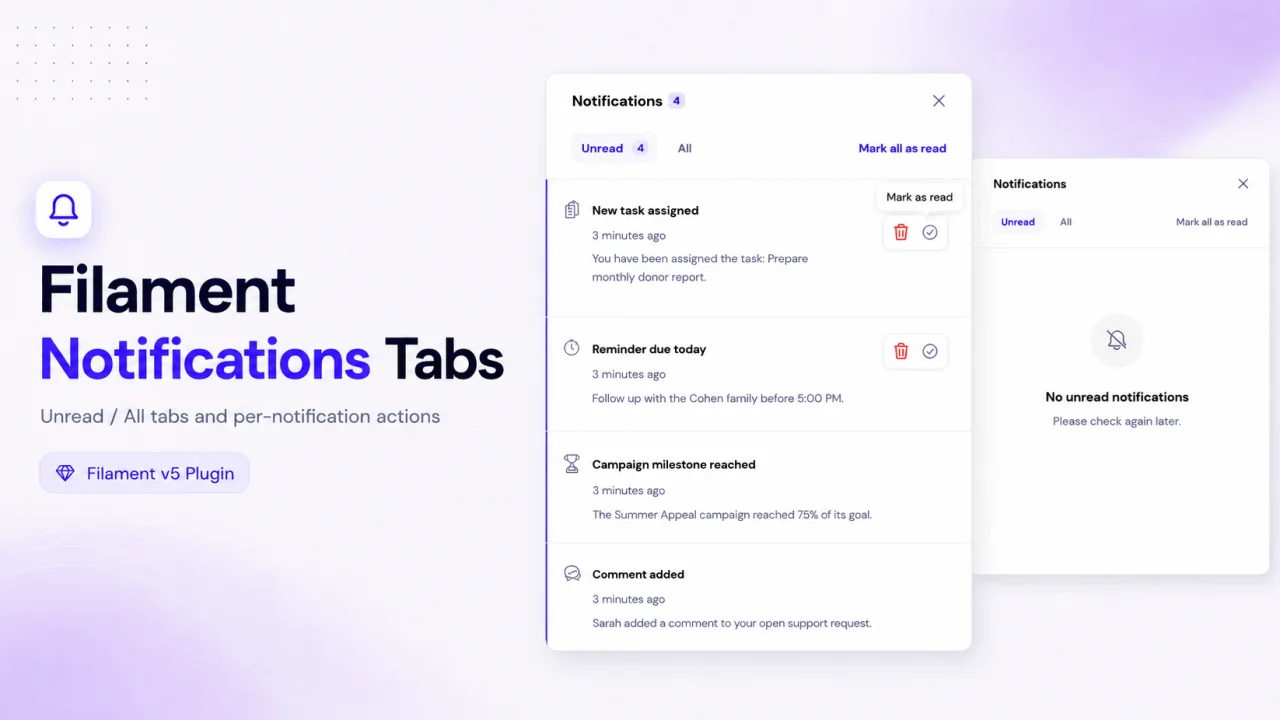
Notifications Tabs adds a cleaner notification workflow to Filament by separating unread and all notifications into dedicated tabs. It also adds per-notification actions, allowing users to quickly mark each notification as read or unread, or delete it directly from the notifications modal.
Author:
zvizvi
Column Filters
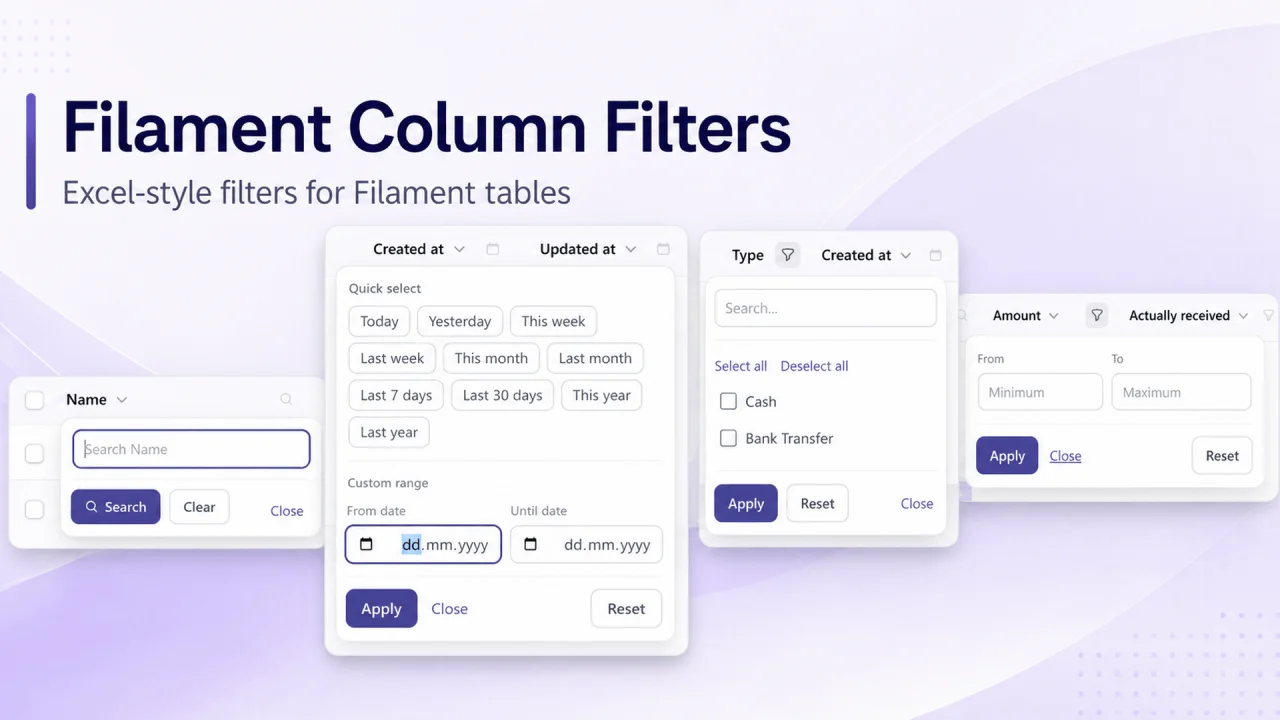
Bring familiar Excel-style filtering to your Filament tables. Add compact filter controls directly to column headers, with support for search, date ranges with quick presets, selectable values, and numeric ranges. Filters integrate with Filament’s native table filter state, indicators, and existing filters.
Author:
zvizvi
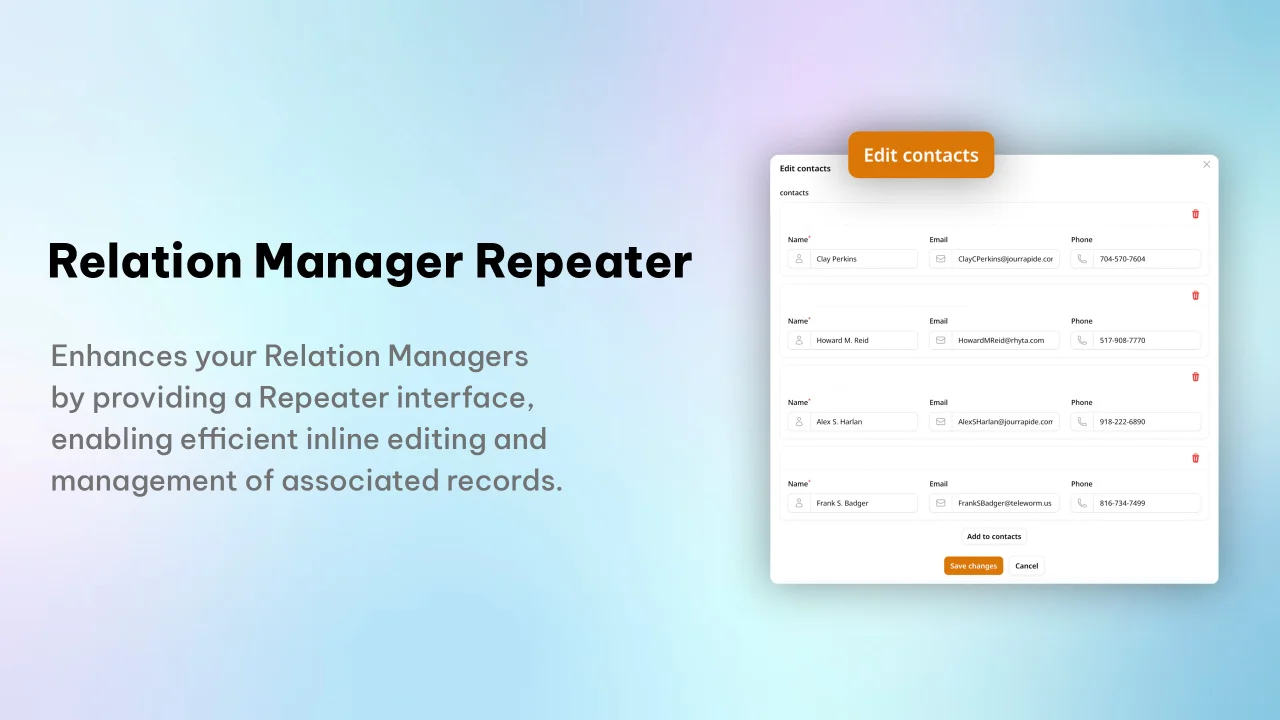
Relation Manager Repeater
A Filament plugin that enhances Relation Managers by providing a Repeater interface, enabling efficient inline editing and management of associated records.
Author:
zvizvi
Featured Plugins
A selection of plugins curated by the Filament team

Noir Theme
A theme that gives panels a focused, refined look with near-black surfaces, crisp actions, and restrained color.
 Filament

Compact Theme
A theme that makes data-heavy panels easier to scan by fitting more useful information on each screen.
Filament

Advanced Tables (formerly Filter Sets)
Supercharge your tables with powerful features like user-customizable views, quick filters, multi-column sorting, advanced table searching, convenient view management, and more. Compatible with Resource Panel Tables, Relation Managers, Table Widgets, and Table Builder!
 Kenneth Sese

