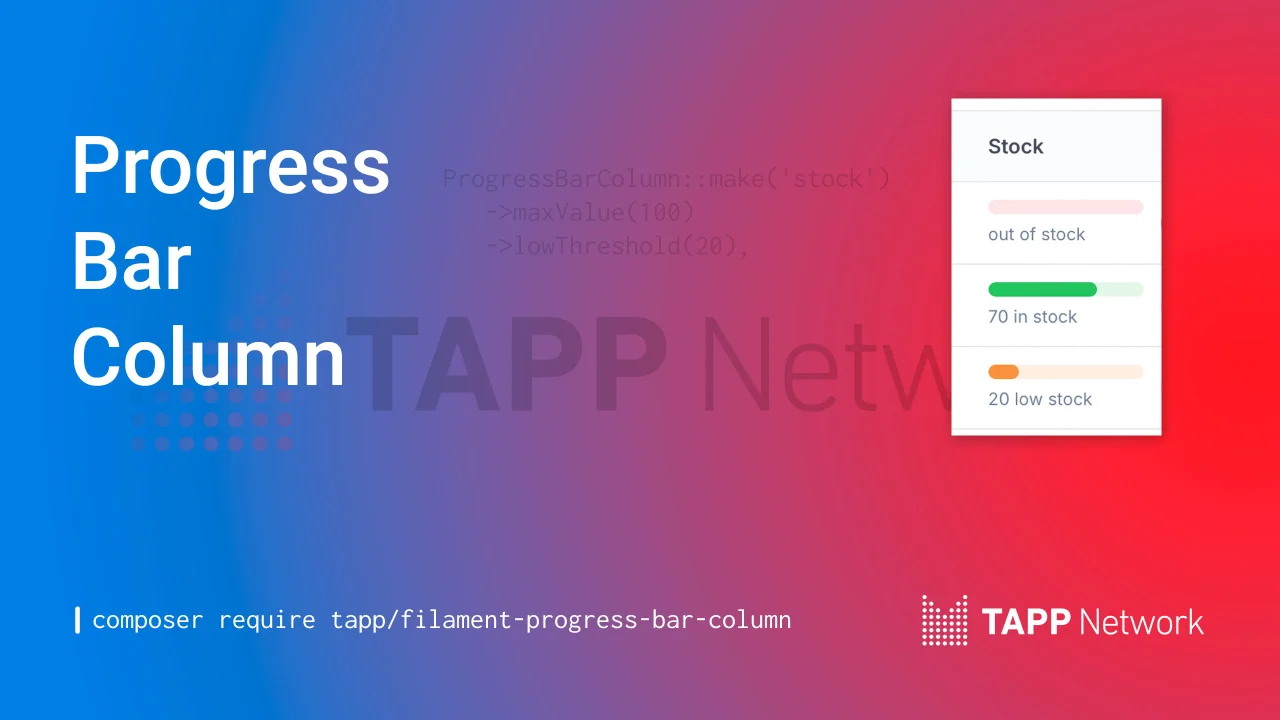
Progress Bar Column
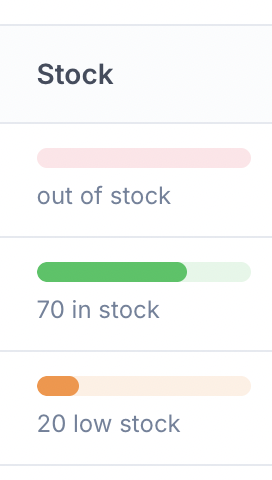
CommunityColor-coded progress bar column for your Filament table. Perfect for inventory tracking, task completion, storage usage, event capacity, and more. With customizable thresholds and automatic status indicators.
 Author:
Tapp Network
Author:
Tapp Network
Package health
BetaAutomated checks of this plugin's Composer package
15 checks
- Skipped: GitHub Actions pinned to SHA
- Skipped: GitLab CI includes pinned to SHA
- Passed: Open security advisories
- Passed: Dependabot PR responsiveness — No open Dependabot PRs.
- Skipped: Renovate MR responsiveness
- Skipped: Dependabot or Renovate configured
- Skipped: Dependency update cooldown configured
- Failed: Provides a security policy — View details on Plumb
- Passed: Abandoned or archived — No consulted source marks the package abandoned (packagist).
- Warning: Commit and release recency — Low activity: no commit date available; last release 186 days ago.
-
Passed:
composer.lock not committed by library
—
composer.lockis absent from the released dist archive. - Passed: Dist archive is lean
-
Passed:
Current Laravel version supported
—
Package dependencies resolve together with current Laravel
13.0. -
Passed:
Current PHP version supported
—
Constraint
^8.3|^8.2supports current PHP8.5. - Skipped: Current Symfony version supported
filament/
namespace. Review the source and install at your own risk. Found
malware or an unresolved security issue the author won't
address?
Report it
.
Documentation
- Features
- Installation
- Integrate plugin's Tailwind classes
- Usage
- Basic Usage
- With Low Threshold
- Custom Colors
- Custom Labels
- Dynamic Values
- Multiple Use Cases
- Complete Example
- Methods
- maxValue(int | Closure $value)
- lowThreshold(int | Closure $value)
- dangerColor(string | array | Closure $color)
- warningColor(string | array | Closure $color)
- successColor(string | array | Closure $color)
- dangerLabel(string | Closure $label)
- warningLabel(string | Closure $label)
- successLabel(string | Closure $label)
- Status Logic
- Progress Bar Calculation
- Testing
- Changelog
- Contributing
- Security Vulnerabilities
- Credits
- License


Visualize progress at a glance with color-coded progress bars for your Filament table. Perfect for inventory tracking, task completion, storage usage, event capacity, budget monitoring, and more with customizable thresholds and automatic status indicators.
#Features
- Visual progress bar representation
- Automatic status detection based on customizable thresholds
- Customizable colors for each status (danger/warning/success)
- Customizable labels for each status
- Works for any use case: inventory, tasks, storage, capacity, budgets, etc.
- Accessible with proper ARIA attributes
#Installation
You can install the package via Composer:
composer require tapp/filament-progress-bar-column
#Integrate plugin's Tailwind classes
#Filament 3
To include the TailwindCSS plugin classes, add the plugin to content in your tailwindcss.config.js file:
export default {
    // ...
    content: [
        // ...
        './vendor/tapp/filament-progress-bar-column/resources/views/**/*.blade.php',
        './vendor/tapp/filament-progress-bar-column/src/**/*.php',
    ],
    // ...
}
#Filament 4 or 5
Filament recommends developers create a custom theme to better support plugin's additional Tailwind classes. After you have created your custom theme, add the Filament Progress Bar vendor path to your theme.css file, usually located in resources/css/filament/admin/theme.css:
@source '../../../../vendor/tapp/filament-progress-bar-column';
#Usage
The column is simple by design. Just two required things:
- The database column name (e.g.,
'stock','quantity','tasks_completed') - The
maxValue()method to calculate percentages
Everything else has sensible defaults but can be customized!
#Basic Usage
Add the ProgressBarColumn column to your Filament table:
use Tapp\FilamentProgressBarColumn\Tables\Columns\ProgressBarColumn;

public static function table(Table $table): Table
{
    return $table
        ->columns([
            // ... other columns

            ProgressBarColumn::make('stock')
                ->maxValue(100),
        ]);
}
#With Low Threshold
Define when the value should be considered "low" (warning state):
ProgressBarColumn::make('stock')
    ->maxValue(100)
    ->lowThreshold(10),
#Custom Colors
Customize the colors for each status:
ProgressBarColumn::make('stock')
    ->maxValue(100)
    ->lowThreshold(10)
    ->dangerColor('rgb(239, 68, 68)')  // Red - when value ≤ 0
    ->warningColor('rgb(245, 158, 11)') // Amber - when value ≤ threshold
    ->successColor('rgb(34, 197, 94)'), // Green - when value > threshold
You can use any valid CSS color format (hex, rgb, rgba, etc.):
ProgressBarColumn::make('stock')
    ->maxValue(100)
    ->dangerColor('#ef4444')
    ->warningColor('#f59e0b')
    ->successColor('#22c55e'),
#Custom Labels
Customize the labels displayed for each status:
ProgressBarColumn::make('stock')
    ->maxValue(100)
    ->lowThreshold(10)
    ->dangerLabel(fn ($state) => 'Out of stock')
    ->warningLabel(fn ($state) => "{$state} low stock")
    ->successLabel(fn ($state) => "{$state} in stock"),
#Dynamic Values
Use closures for dynamic max values and thresholds:
ProgressBarColumn::make('stock')
    ->maxValue(fn ($record) => $record->warehouse_capacity)
    ->lowThreshold(fn ($record) => $record->reorder_point),
#Multiple Use Cases
#Inventory/Stock Tracking
ProgressBarColumn::make('quantity')
    ->label('Stock')
    ->maxValue(100)
    ->lowThreshold(15)
    ->dangerLabel(fn ($state) => 'Out of stock')
    ->warningLabel(fn ($state) => "{$state} low stock")
    ->successLabel(fn ($state) => "{$state} in stock"),
#Task Completion
ProgressBarColumn::make('tasks_completed')
    ->label('Progress')
    ->maxValue(fn ($record) => $record->total_tasks)
    ->lowThreshold(fn ($record) => $record->total_tasks * 0.3)
    ->successLabel(fn ($state, $record) => "{$state}/{$record->total_tasks} tasks"),
#Storage Usage
ProgressBarColumn::make('storage_used_gb')
    ->label('Storage')
    ->maxValue(fn ($record) => $record->storage_quota_gb)
    ->lowThreshold(fn ($record) => $record->storage_quota_gb * 0.8)
    ->successLabel(fn ($state, $record) => "{$state}GB / {$record->storage_quota_gb}GB"),
#Event Capacity
ProgressBarColumn::make('registered_attendees')
    ->label('Capacity')
    ->maxValue(fn ($record) => $record->max_capacity)
    ->lowThreshold(fn ($record) => $record->max_capacity * 0.9)
    ->dangerLabel(fn ($state) => "No registration")
    ->warningLabel(fn ($state) => "{$state} - Almost full!")
    ->successLabel(fn ($state) => "{$state} registered"),
#Complete Example
use Tapp\FilamentProgressBarColumn\Tables\Columns\ProgressBarColumn;

public static function table(Table $table): Table
{
    return $table
        ->columns([
            TextColumn::make('id'),

            TextColumn::make('name'),

            ProgressBarColumn::make('stock')
                ->label('Current Stock')
                ->maxValue(fn ($record) => $record->max_capacity)
                ->lowThreshold(20)
                ->dangerColor('#dc2626')
                ->warningColor('#f97316')
                ->successColor('#16a34a')
                ->dangerLabel(fn ($state) => 'Out of stock')
                ->warningLabel(fn ($state) => "{$state} low stock")
                ->successLabel(fn ($state) => "{$state} in stock"),

            TextColumn::make('price')
                ->money('usd'),
        ]);
}
#Methods
#maxValue(int | Closure $value)
Set the maximum value for the progress bar. This is used to calculate the percentage.
#lowThreshold(int | Closure $value)
Set the threshold below which the status is considered "warning". If not set, only "danger" (≤0) and "success" (>0) states are used.
#dangerColor(string | array | Closure $color)
Set the color for the danger state (when value ≤ 0). Default: rgb(244, 63, 94) (pink/red).
#warningColor(string | array | Closure $color)
Set the color for the warning state (when value ≤ threshold). Default: rgb(251, 146, 60) (orange).
#successColor(string | array | Closure $color)
Set the color for the success state (when value > threshold). Default: rgb(34, 197, 94) (green).
#dangerLabel(string | Closure $label)
Set the label for danger state. The closure receives the current value as $state. Default: fn ($state) => "{$state}".
#warningLabel(string | Closure $label)
Set the label for warning state. The closure receives the current value as $state. Default: fn ($state) => "{$state}".
#successLabel(string | Closure $label)
Set the label for success state. The closure receives the current value as $state. Default: fn ($state) => "{$state}".
#Status Logic
The column automatically determines the status based on the current value:
- Danger: Current value ≤ 0
- Warning: Current value > 0 AND current value ≤ low threshold (if set)
- Success: Current value > low threshold (or > 0 if no threshold is set)
#Progress Bar Calculation
The progress bar width is calculated as:
percentage = (currentValue / maxValue) * 100
The percentage is clamped between 0 and 100.
#Testing
composer test
#Changelog
Please see CHANGELOG for more information on what has changed recently.
#Contributing
Please see CONTRIBUTING for details.
#Security Vulnerabilities
Please review our security policy on how to report security vulnerabilities.
#Credits
#License
The MIT License (MIT). Please see License File for more information.
The author
From the same author
Country Code Field
A country code select field, filter, and table column.
Author:
Tapp Network

Social Share Action
Let your users easily share content via social media platforms, email, or using the native Web Share API all through a fully customizable action.
Author:
Tapp Network
Value Range Filter
A value range filter for Filament table builder.
Author:
Tapp Network
Mail Log
View outgoing mail in a resource.
Author:
Tapp Network
Featured Plugins
A selection of plugins curated by the Filament team

Blueprint
Filament Blueprint is a premium Laravel Boost extension that helps AI agents produce accurate, detailed implementation plans and security reports for Filament apps.
 Filament

Spotlight Pro
Browse your Filament Panel with ease. Filament Spotlight Pro adds a Spotlight/Raycast like Command Palette to your Filament Panel.
 Dennis Koch

Custom Fields
Eliminate custom field migrations forever. Let your users create and manage form fields directly in Filament admin panels with 20+ built-in field types, validation, and zero database changes.
 Relaticle
